Leaderboard




Popular Content
Showing content with the highest reputation on 11/06/25 in all areas
-
Thanks @Luke for the new screen and exit. I'm sure many will find some fault making it unusable (joke), but looks and works great for me3 points
-
OMG @LukeSo another nail in the coffin for the all migthy Android for TV app. This is in deed a sad day. I absolutely HATE the Universal android app usage on a handheld remote control.3 points
-
If you watch a movie and have to download a subtitle, often there is a required subset to make the playback with subtitle proper. The intention is now, that you setup the offset, but it will be kept per movie and downloaded subtitle (please note that new versions of a subtitlecould be downloaded). Expected function: Next time starting the same movie wiht the yame subtitle, the offset from last time is automatically applied.2 points
-
When I worked as technical support and I said that my boss would say to abandon all hope of a useful answer..... Your internet connection may be your only bottleneck. Internet data overhead is hard to calculate. There are numerous monitoring tools for ubuntu though. I would find and try one out to see what data transfer rates are like for your current users.2 points
-
Read the posts fully @Luke- he's already stated that he's already "downloaded the other Emby Android app", but he obviously prefers the ATV app. The ATV app needs to be fixed.2 points
-
All good now in .16 for me as well, thanks for the quick fix!2 points
-
Can confirm that version 3.5.16 fixed the same flac playback issue for me as well -- thanks!2 points
-
If you’re new to the world of media servers, you might be wondering what they are, why people use them, and where Emby fits in. Whether you have a collection of movies, TV shows, music, personal videos, photos, or all of the above, a media server helps you take control of your entertainment. Let’s break it down. So, What Is a Media Server? A media server is simply a system that allows you to store your media in one place and access it from anywhere — your TV, phone, tablet, computer, or even while on the go. Instead of hunting through drives, folders, or different apps, a media server organizes and presents your library in a clean, familiar interface with artwork, descriptions, cast info, and more. Think of it as your personal streaming service that is built around your collection, not someone else’s. An important note and one we can not stress enough, is that Emby does NOT provide any movies, shows, channels or other media. Emby is only for organizing and streaming YOUR own content. Why Choose Emby? There may be several media server solutions out there, but Emby has a philosophy that sets it apart: Your Media. Your Way. With Emby, you are in control! Your library is yours, your privacy is yours, and your server is yours. No forced cloud accounts. No data harvesting. No locked-down ecosystem. Emby is built around choice and customization, allowing you to decide: Where your media is store How your library looks Who can access it What devices you stream to Whether you want to manage media manually or automatically All while keeping your experience intuitive and easy. Beautiful and Powerful Emby automatically fetches artwork, metadata, and episode information to make your library look amazing. The apps are clean, fast, and available across: Smart TVs Streaming boxes like Fire TV, Apple TV, Shield, Android TV Android, iOS, and tablets Game consoles Web browsers And with Emby Premiere, there's even more! You can unlock powerful features like: Offline downloads DVR with Live TV Advanced parental controls Hardware transcoding for smooth streaming Whether you're just starting or you're a longtime media enthusiast, Emby scales with you. This Is Just the Beginning Over the next few days, we’ll walk through: How to install Emby How to add your media Tips for organizing your library And how to stream anywhere So stay tuned — your personal media journey is just getting started. Your Media. Your Way. Welcome to Emby.1 point
-
Hello Emby community, I have been reading the forums and I have seen a few posts about this issue. I am using Emby for Android TV on my TCL QM8 Google TV. I noticed my trailers stopped working. You Tube is giving an error 15 when trying to watch any trailer. I downloaded the other Emby Android app and the trailers are working so I am guessing the issue is with the Emby for Android TV app. I wanted to know if there is a fix for this issue?? Thank you for any help1 point
-
Was able to side load 3.5.16 - all good. Thanks guys.1 point
-
Have you reviewed this setting on the Advanced tab of the Live TV section, specifically the help text underneath?
 1 point
 -
Hi, the Android OS is stripping that, not us. To preserve it, the app will have to request additional permissions from the user and we just haven’t done that yet. It is on our to do list. Thanks.1 point
-
Well click it. What is it you want to show and where?1 point
-
HLS is used to transcode. Emby uses the TS container inside the m3u8. HLS only supports AV1 when the fMP4 container is used. When/If Emby eventually uses fMP4 this would indeed be possible. But today it is not.1 point
-
I have a bunch of movies that have 5.1 AAC audio, which get sent to my receiver as 2.0 PCM. Is there an option or way to make Emby transcode 5.1 AAC to 5.1 AC3 to somewhat preserve multichannel audio? My receiver is connected over ARC.1 point
-
That's a tricky question to answer because it depends. If everyone is direct playing the files then you're only limited by bandwidth - which with 2x 10gb links you're not going to max out even with 20 users streaming 4k remuxes at the same time (say 75 Mbps each, that's only 1.5 Gbps out of your maximum possible 20 Gbps), you'd be limited by your internet connection if dealing with remote users but otherwise locally you'll never cap that. If you have a lot of transcoding occurring then your 1050 Ti is going to be the bottleneck - you can also utilize QuickSync with that CPU but I'm not sure how it handles multiple GPUs in that case. If you have throttling enabled that can help minimize the transcoding impact, but that again also depends on the transcoding load - transcoding large 4k files is much harder to do in real time compared to 1080p or lower resolution content, having throttling enabled just gives it more cycles to process multiple streams since it's not going full tilt all the time and does it in sprints.1 point
-
This is the best lyrics fetcher i have found. A little rough around the edges but very simple to download all lyrics for entire library. https://github.com/tranxuanthang/lrcget i havent used its embedding function, but downloading the synced lyrics as flat files seems to work fine and is compatible with Emby. I think it has an api so someone could develop a plugin for it.1 point
-
Ill join in to say, please add this1 point
-
The Emby for Android TV app looks, runs, and plays better and it should be updated. Even the movie thumbnails look better on Android TV app.. Why? I have no idea but they do.1 point
-
Yes, I also thought about that. Namely if tag is created by one user, if will be "visible" by another user. But I think that for small group of people (e.g. small team or family) that is just fine, as maybe even it is great to share tags between each other. Hence I suggest to add another security role e.g. "Editor", which, if enabled, allows the user to edit media metadata (e.g. add custom tags).1 point
-
Agree, maybe @howllor could also get happy with the grouping feature Emby has implementdn in the Notifications. Thats what i use. I think other solutions would be overcomplicated and tend to break sooner or later with an update. Till now his plugin is quite simple, thats why it simply keeps working.
 1 point
 -
I can understand that, but I think that 'exiting' with the home button isn't really the function of the home button . It's just to take you directly to the home screen and leaves the app in memory, as double pressing it takes you to the app switcher.1 point
-
1 point
-
Additionally, since it drives me nuts when people reply with a "found the problem," but don't share the solution: 1. In your CF dashboard, go to Zero Trust > Access < Policies 2. Select the policy name, likely the default Allow Emails policy, select the three dots menu > Configure 3. Under the Action dropdown, select "Bypass" and the selector under rules to "Everyone" 4. Click save in the bottom right corner. You can now log into your Emby server using non-browser clients or Emby Connect. Please note that you are exposing your Emby login page to the world, so follow best practices. Don't show usernames on the dashboard, hide admin accounts, etc.1 point
-
OK, I have found the problem. It's the OTP default authentication in Cloudflare. Works fine accessing Emby in a browser, but with OTP on, all connections from apps that I tested just show the "Unable to Reach Server" error shared earlier in this thread. Not sure if there is a plan in place for non browser apps to support OTP login to CF tunnels. Would be nice to have that ability for added security, but I'm not sure what all that would entail.1 point
-
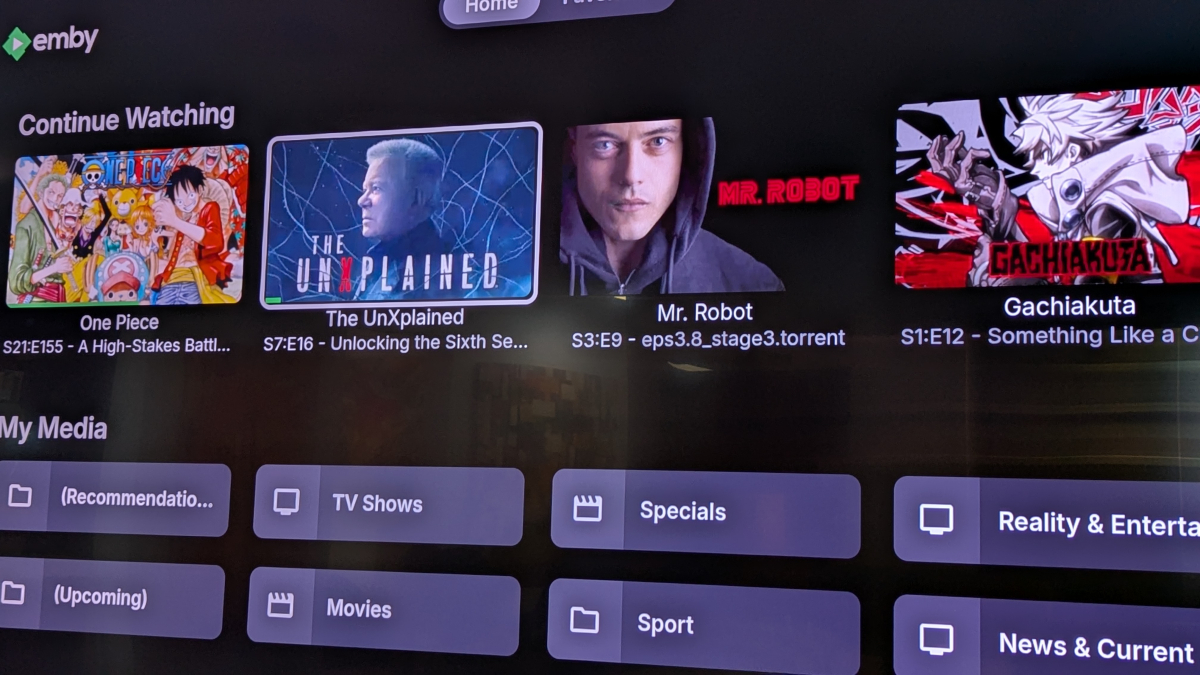
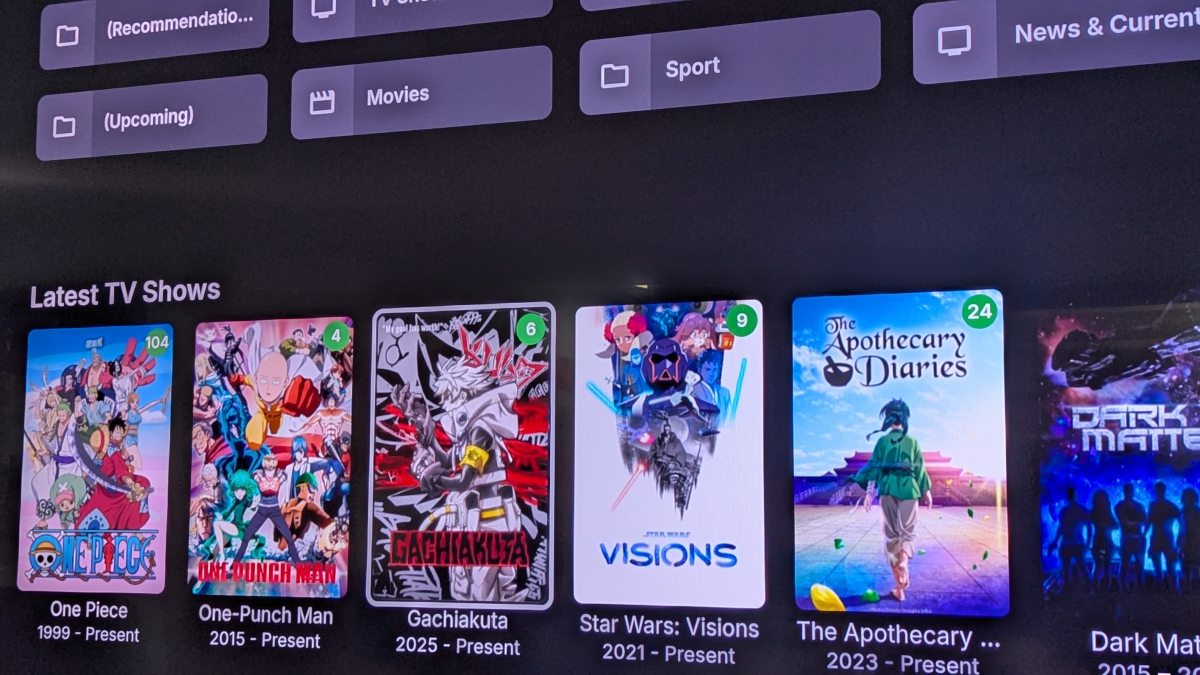
@LukeI've done some moving of the home screen widgets around and it appears that it's specific to the small my media widget only. Spacing between everything else is good, just that widget seems to have extra bottom padding. Pictures for reference.
 1 point
 -
Hey @softworkz, Haha, fair point — I definitely didn’t mean to imply that anyone at Emby didn’t know how to turn that switch on You’re absolutely right — what I did was more of a “let’s see if this still blows up” weekend experiment than a real engineering effort. I develop software for a living, just like you. So I totally understand your point and the reasoning behind the deterministic transcoding pipeline — predictability and consistency across hardware types is key for a company delivering a stable product. But can we talk about the origin of Emby? An open source project that anyone can tailor to their specific needs. (not that everyone should or have the technical knowledge to in the first place, but it was possible. AND… I see that Emby is probably THE most customizable media solution currently out there. I had LOTS of fun setting up my instance at home. And I really don’t say that to a lot of products. I’m someone that is very adamant about my stuff running perfect. Not good - perfect. … I’ve always felt that Emby is still a safe haven for the average tinkerer, even being closed source now. The Deinterlacer is one of the things I couldn’t sleep through with (yes, fr. Watching Live TV through Emby in the bed caused me to get up again and start writing my first post in this forum, specifically requesting that feature. So I’m very sorry for stepping over the line and being so adamant about it in my previous posts). I tried it on all platforms I had at hand and never got a satisfactory result watching soccer/football. Over the next few days I catched myself staring at other people’s TV, seeing how smoothly sports and even news felt. Of course these STBs/Receivers do have hardware deinterlacers built deeply into their SoCs and we will never get that performance on a consumer grade graphics card. Look at YADIF, it’s only a CPU program adapted and ported to run on a GPU (yadif_cuda). It was never originally meant to. Yet Emby uses it today as their main deinterlacer on NVIDIA hardware whereas (in my opinion) better options exist. A lot of things changed over the past years. NVIDIA for example has (as to my knowledge) three different ways to deinterlace (yadif_cuda, bwdif_cuda and CUVID deinterlacing), the latter even becoming the “standard” approach as it already happens in the decoding process, eliminating the need of a filter entirely. Each have their own settings and modes, including either weaving, bobbing or motion compensation of some kind mimicking the bob-mode. Even YADIF does it (but just isn’t very good at it imho). Some people think that interlaced TV was a necessity because of CRT TVs (which is also true). But the main reason (still today) is to save costs. It drastically reduces bandwidth and all STB/Receiver manufacturers already interpolate the missing information almost perfectly. Hence we still send out interlaced signals even though most devices are natively progressive. And even achieve a smoother look on sports because we have more frames to display (interpolated or not). And today (to my knowledge) all major HW accel. providers, including AMD, Intel and of course NVIDIA provide some way of doing that. Software as well. That’s also why I approached it as a quick proof-of-concept rather than something you could safely ship (which probably you wouldn’t approve as plugin because of the dirty pointer substitution. Still, it’s nice to confirm that the known behavior technically can be reintroduced without ffmpeg losing its mind immediately My hope was simply to demonstrate that a developer-facing hook layer (or a few exposed transcoding classes in the SDK) could open the door for experimental features like this — safely and sandboxed, without having to resort to reflection hacks. And of course, officially unsupported by you. If that kind of extension point ever becomes part of the SDK, I’d be happy to help test or even bake this into something clean. So.. the main problem I see is that you have different ambitions for Emby than some power users like me or the TO that really need this kind of feature (that most people don’t even know exists). Either in form of a (cleanly crafted) plugin or a switch with a big red label on it “Flick this on and we’ll not answer your tickets, period.” Don’t get me wrong, this is just the last 2% missing to make Emby THE solution to all my media needs. WebStreams being the latest contribution for that.1 point
-
The ATV app program details window looks ugly as hell!1 point
-
@NinkoYes that's possible, but I have to finish coding the IPTV code first. Vic1 point
-
@Luke1 last thing..... when editing in Metadata Manager, the Save button at the bottom (and the one at the right side top stay the same before and after saving. Any simple way to detect any changes and turn it on, off after Save?? It always looks the same so I do a save, go to get a drink and come back to "Did I save that?". It only takes a second to resave but would be really nice if it is greyed out until some change is made?????1 point
-
3.5.16 fixed the distorted, 500 MPH playback and the mobile data issue with FLAC files. Thanks!1 point
-
What model TV and Soundbar? It most likely doesn't support AAC formats. Samsung in particular doesn't support that many formats.1 point
-
You might be thinking about plugins. The built-in trailer functionality that plays YouTube videos directly from YouTube is great, on Android TV, when it works.1 point
-
The reason I ask is because we are not looking at latest media here. We are looking at recently released movies, and that is tied to the release date and year fields, not date added. But the process of getting to the bottom is the same: What are the values to begin with? What are they later on after some refresh occurs? What exactly happens that causes it to change later?1 point
-
Probably should be in one of the previous Empty Genre topics. But I had the same issue of episode metadata causing this. Since you say you cleared embedded metadata, I would double check "ffprobe -i "pathtofile" and see what is shows as you know what file to test when you click play on the genre folder.1 point
-
Anyway please try Emby for Android 3.5.16+ and let us know how that compares: Thanks.1 point
-
Hi, we are looking into improving this. Thanks guys.1 point
-
OK, I use MKVCleaver to pull out subtitles to get file copies of audio from .mkv files. Then I use AVIdemux to remove audio from media, if needed. It automatically removes all the subtitles if you are converting to mp4. You can use a text editor like edit+ or notepad to edit the .ass files and remove references to fonts. If you want to convert flac, use Audacity. If you want to convert DTS audio, VLC player can file convert to mp3. Then AVIdemux can put the mp3 back in to a remux or reencoded version of the media Of course ffmepg can do a lot of this, but it's command only and pretty picky. The GUI interfaces of the other apps are easier. Probably best to read up on all the controls earlier in the day after coffee... Ha! Hope that helps.1 point
-
Hey, I was able to solve the problem by turning on HDR. Now the tone mapping is done in the projector, but it works fine there. Thank you very much! Kindly regards Michael1 point
-
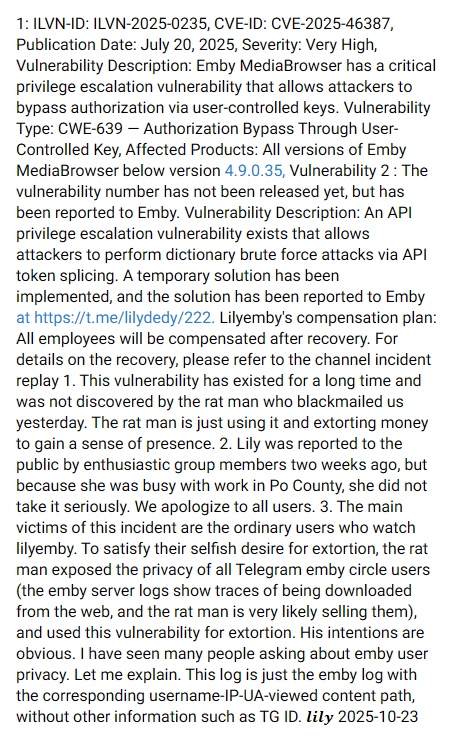
First of all, I see a lot of misinformation. From reading this https://t.me/lily_yaya/788 I get a feeling that somebody might be trying to blow up something as an excuse for one's own mistakes. A lot of information is incorrect here: Especially claims that things would have been reported to us. Then there's a reference to a fake CVE from August with absolutely zero content. Further, it is being said that only versions earlier than 4.9.0.35 are affected. Version 4.9.0.35 is from Dec 31, 2024, so it's almost a year old, and ti was a beta version. The person is talking about vulneravbilities in Python code. Emby is not developed in Python nor does it ship any Python code. This is about some 3rd party "product" "https://pypi.org/project/python-emby-proxy", which has closed down the GitHub repo... It is unrelated to the claims above. Once again a totally different case is what is shown in the video. This is not a security vulnerability. It cannot be exploited, because it only works when you do it from the same browser. This is nothing that needs any action. To be honest: the situation seems like you would be trying to throw any old, outdated, pointless and individually unrelated stuff at us in order to make it look as if there would exist some big issue on our side. I don't know why you are doing this but I don't really care anway. Please stop this nonsense!
 1 point
 -
MediaBrowser.Plugins.BarkNotifications.dll使用 Guid = “aa03f484-dbb1-497d-aaeb-998f028c47b6”1 point
-
Is there any way for me to identify a stream fallback? I have two IPTV accounts to the same provider but each account maxes out at 5 streams. I'm trying to merge them into one M3U file. The goal is to have Emby fill up the first 5 streams on the user1 account and then when the connection to the first URL fails after it starts playing from the user2 account. The end result is that I should have a simultaneous stream limit of 10 but the process is seamless for the user. Below is an example of how my M3U file is currently set up. Unfortunately, if the first link fails Emby never tries the second. #EXTINF:-1 tvg-chno="511" tvg-id="WFTSDT.us" tvg-name="ABC" tvg-logo="" group-title="Live TV",ABC http://m3u.com/user1/pass1/517508.ts http://m3u.com/user2/pass2/517508.ts1 point












.thumb.jpg.6d70556a9a97a65714bfb697659788bb.jpg)