Leaderboard




Popular Content
Showing content with the highest reputation on 11/05/25 in all areas
-
Reading though these posts is like going back 5 years in time, where all of the questions have already been asked As most people here know, I am an ardent ATV app user, but even I have to admit that the Universal Android app has come a long way in those 5 years, but it still isn't as good as the ATV app! The ATV app is buttery smooth, as it has been built for a specific platform, whereas the Universal Android app has been shoe-horned into the same space. There are currenrtly 95+ pages discussing the differences between the app in the link above, with many items still outstanding. I can't see how 2 apps developed for the same device/platform are so different in the way they act, seeing as they were developed by the same team of developers. Anyway, until there is no other choice, I will continue to use the ATV app, and try and report all of the issues with the Universal Android app, when I see substantive changes.5 points
-
I too really tried to like Emby for Android, I ran it for about 6 weeks on my main TV/Shield Pro, purposefully not using Emby for AndroidTV - I held my ground despite all the frustration in navigation, poor lethargic performance and frequent crashes and hangs, especially on Live/Recorded TV and have come to same conclusion as @CBersabove - it's STILL a significant downgrade on AndroidTV. I gave in on Sunday night after it refused again to allow skimming/ffd/rwd a recorded program so the App got deleted. Back to Emby for AndroidTV and as it always has done, eveything simply 'worked' in the swift, graceful and beautiful manner that I'm used to. @ebrIf the only updates are via sideload, then I've no issues with that, as that is the way I updated anyway - but PLEASE do not abandon AndroidTV..it's replacement is far from ready.4 points
-
How would I then watch my local trailer3 points
-
OMG @LukeSo another nail in the coffin for the all migthy Android for TV app. This is in deed a sad day. I absolutely HATE the Universal android app usage on a handheld remote control.3 points
-
I'm somewhat content with the Emby for Android app at this point. It isn't perfect but it's at least usable for me now. Removal of the side bar would probably get me to being fully content. My biggest gripe is how the two different apps exist on the app store and how much confusion it adds to users. The Emby for Android app should have been developed in a beta channel or as a side load only until it was ready to be a complete replacement for the Emby for Android TV app, at which point it should have replaced it under the same Google Play listing. Now there is two versions floating out in the wild, one of which will no longer be supported. Any one who doesn't frequent the forums would have no idea about the two versions and would just install whatever one comes up first when you search "Emby" which happens to be the Emby for Android TV version. To get the Emby for Android version on a streamer you need to search "Emb". That's not intuitive at all. Just last week at had a user message me about trailers not working on their Android box. I had to explain to them that the reason it didn't work is that the Emby app they were using hasn't been updated with a fix for YouTube trailers yet and that they should switch to the "new" Emby app. To do this they needed to search for "Emb" and not "Emby". Want to guess how confused they were? Very.2 points
-
My potato PC is just fine, thank you very much. Eventually (after a few more minutes) the session disappeared from the dashboard but continued running and creating TS segments on the server. When I went back into the Android app the screen was black though navigating brought up the OSD on a paused stream, still blank. Hitting OK button resumed the stream then I exited the stream and the app via menu which stopped all activity and cleaned up the files. Let's just say the UX is not at all like the Emby app for ATV.2 points
-
I've been lazily following the Android/ATV app parity thread and other related threads from members and don't know if this specific case was covered before. It surprises me that simple things like exiting are to this day so far apart between the two apps. This specific issue needs to be addressed as it's very similar to the Roku "improper exit" problem which left streams running and tying up tuners. Back button from ATV opens confirmation dialog to exit the app. Back button from Android stable opens/closes side-bar. Evidently Android beta opens an Exit menu. Home button from ATV stops playback and exits to ATV home. Home button from Android opens PIP on ATV home when allowed or pauses playback and exits to ATV home when PIP is disabled. But this leaves a streaming session behind and in the case of LiveTV ties up a tuner and builds up the playback buffer.2 points
-
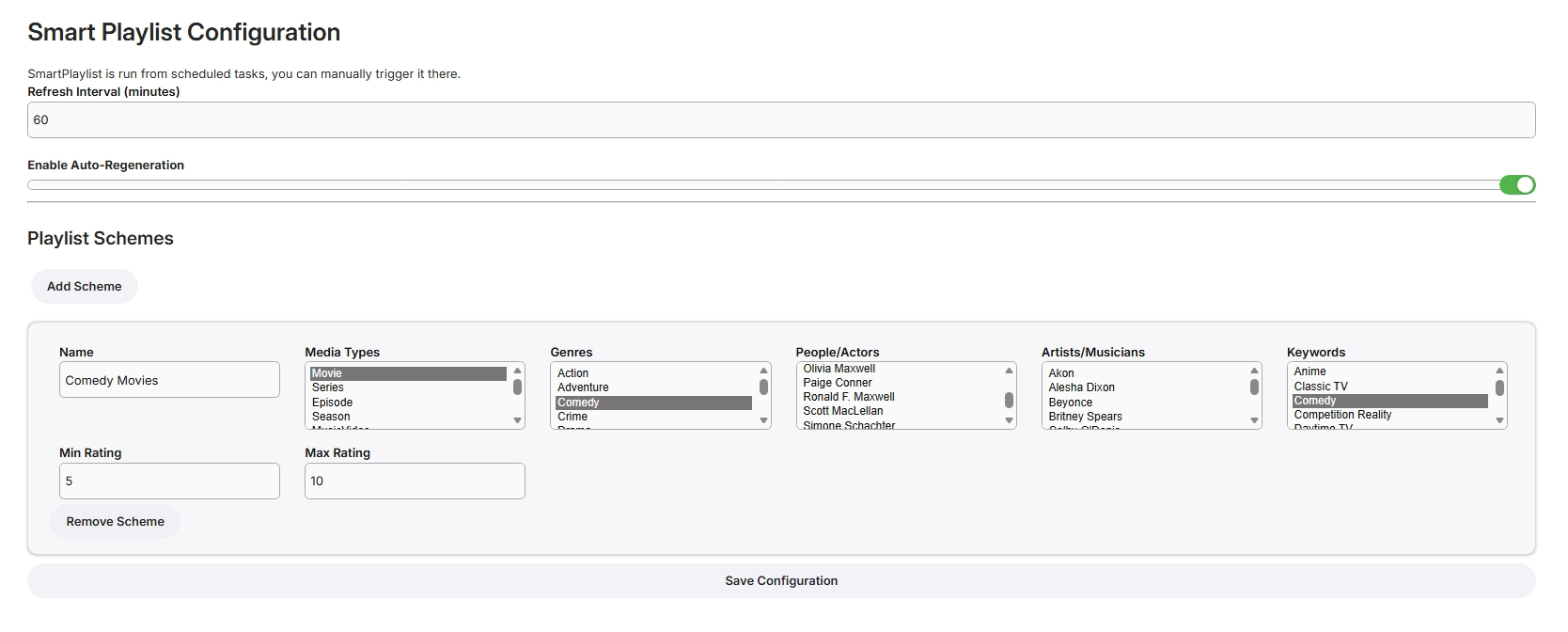
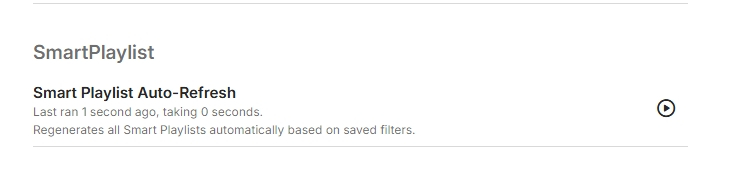
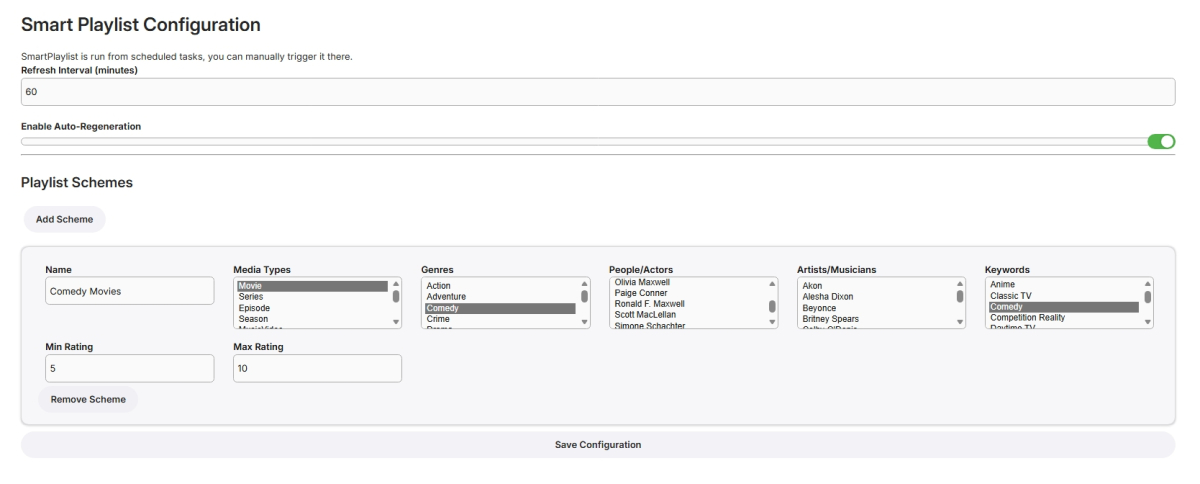
I have never used smart playlists so wasn't exactly sure what to build but here goes... Create Lists Here, add new schemes for more lists From scheduled Tasks Playlists are generated in the playlist library, only minimally tested! SmartPlaylistPlugin.dll
 1 point
 -
On my Apple TV, I love that I can now set the subtitle offset in realtime. However, if i don't finish the video and return later to resume watching, l need to set the offset again. It would be grand if the last offset time was saved.1 point
-
Regarding my latest forum posts. So... I have found a solution. I guess I got a little too impatient waiting for proper server-side bob-deinterlacing. So… I went ahead and built a tiny proof-of-concept plugin that hooks into Emby’s FFmpeg pipeline and forces yadif_cuda (or similar filters) to output at 50 FPS. (currently only NVIDIA though, sorry) Before anyone gets excited — this is absolutely not production-ready. It uses pure .NET reflection and pointer swaps to intercept internal Emby classes at runtime, so it’s more of a hacky POC than a real feature. Still, it proves that the concept works perfectly — so maybe it’s time to expose some of the transcoding components (like ways to mess with the Filter-pipeline) through the public Emby SDK, so developers can implement these features properly and safely. I’ll share the source (with no support whatsoever) anyway for anyone who wants to play around or experiment, but again: use it at your own risk! Also, please keep in mind that Emby will never show the true 50 FPS through "nerd statistics" or in the Diagnostics plugin as the override happens at a later stage. However one can clearly notice the difference. Cheers, Coffee Plugin.cs1 point
-
Hi, the next app update will have this.1 point
-
@softworkz @Luke I have put something together that resembles this function for now in a very bad way. But it proves that it is clearly possible to enable bobbing server-wide with even way less effort than I had to put into it.1 point
-
3.5.16 fixed the distorted, 500 MPH playback and the mobile data issue with FLAC files. Thanks!1 point
-
Hi, stay tuned. We have a revamp of home screen settings coming soon. Thanks.1 point
-
Can confirm: deleting the fanart cache folders corrects this issue. Seems they fixed it yesterday or the day before, but I had movies/TV that were still failing to pull. Once I deleted the cache folders for fanart and rescanned the metadata, it worked flawlessly Didn't need to restart Emby either.1 point
-
Hi we’ll get Roku updated to match. Thanks.1 point
-
Then I believe there is nothing else we can do from the Emby side. I'll keep following it up with Proton to see if there is something that can be done from their side, but I'm not expecting much. Thanks for all the replies!1 point
-
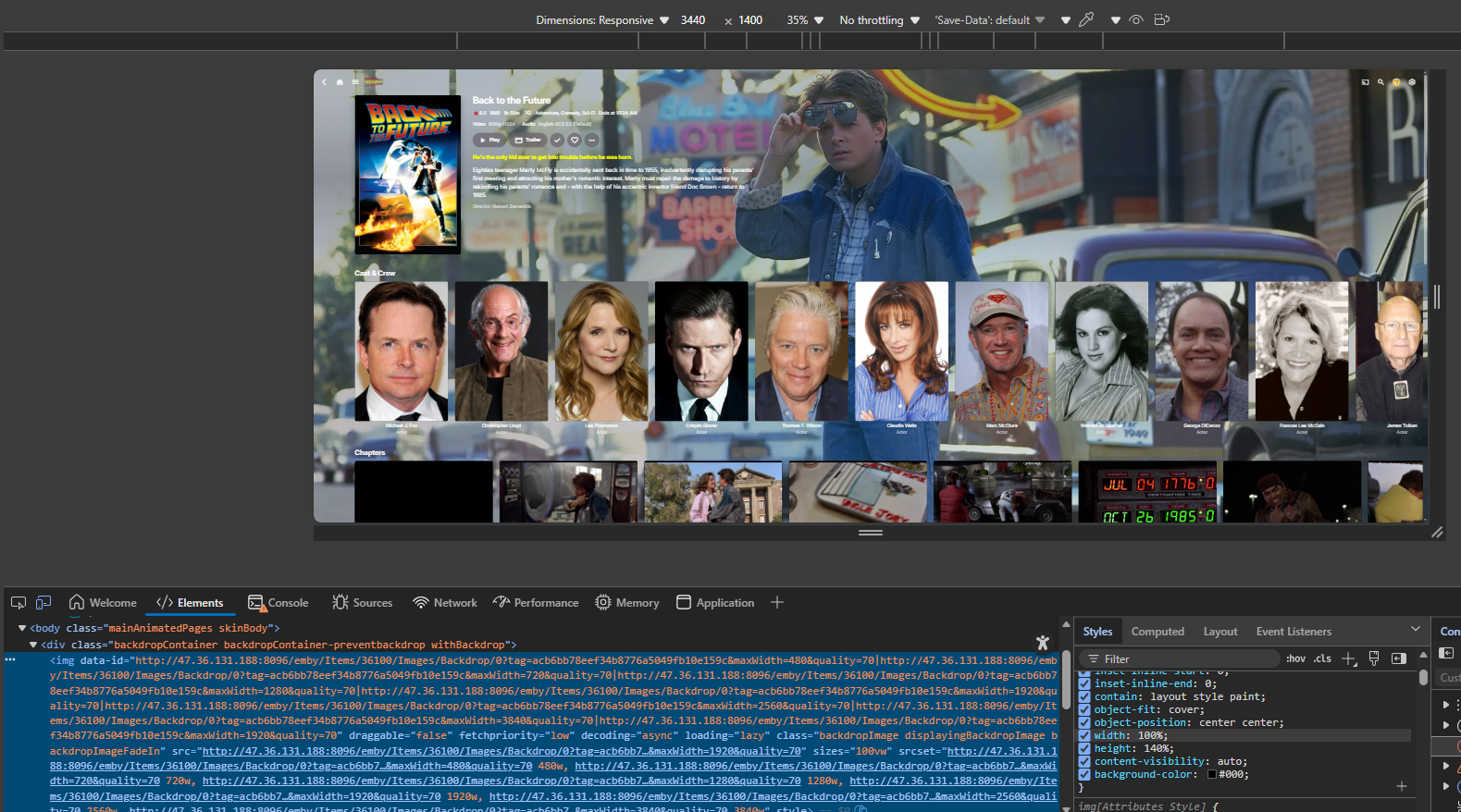
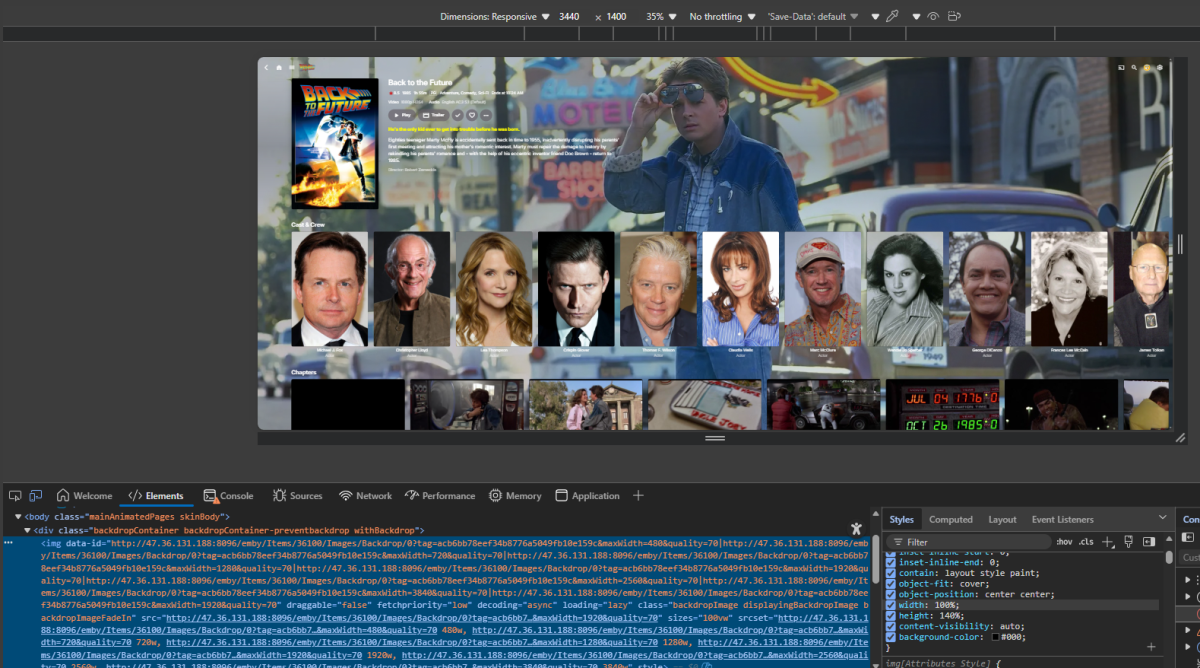
So height code would have to be like 140% to get top edge losing even more bottom. But messing up all other screen displays.
 1 point
 -
@Q-DroidYou need to upgrade you potato pc But thats not1 point
-
Hi Luke If that message was for me, I explained in my previous post that I have tried all methods to connect including external address. I have emby on multiple devices connected on the internal network and my tablet is connected via external address, everything works as expected except this Philips tv with titan os. I have another Philips tv that has google tv os and that works as normal, as I said its just the titan os device with the issue. Let me know if you need any specific device details or further testing carried out.1 point
-
Like what i said above, the same issue happened again for those movies i added after the transfer. If every new movie I need rescan to ensure to get the correct metadata, there must be something wrong imo.1 point
-
You can't restrict access by genre in Emby core. You can either a) use Custom Ratings, b) use Tag-based restrictions or c) reorganize your structure and use Folder-based access. Any of those methods will unfortunately require certain time/effort investment from your side.1 point
-
Can confirm that version 3.5.16 fixed the same flac playback issue for me as well -- thanks!1 point
-
Thank you for your help. That worked for me!1 point
-
It is still there. It is just the browser giving it a different name. I think it is the (China) one.1 point
-
Solved, I think. But with a bypass.... After several new library scans AVIs now are playing again. After deinstalling "EMBY for Android TV version 2.xxx" (Nvidia Shield) and installing "EMBY for Android version 3.5xx" trailers now are playing without any problems. But within this EMBY version the OSD is not the same which is just a small disadvantage. Oliver1 point
-
There wasn't much talk about it on this forum but on other forums people reported it being a problem, me included. Just asking because i'm thinking about getting another card to replace the aging Nvidia card i have now.1 point
-
Thanks @sa20001 point
-
Indeed, now I see all the information for each movie. Thanks to support1 point
-
Nevermind, out of date doco, seems to have been moved to User/Preferences now. Might want to update this. Notifications | Emby Documentation1 point
-
Bump vizio smart TVs are selling more and more. Need to compile the emby get it approved on Vizio and let it grow with Vizio. If Vizio falls in the Future then discontinue. Looks like we have to order more Roku devices. Cheep to get by. Would much rather just pay a fee to emby to get it done. Wink bump.1 point
-
Thanks. So that answers that then.1 point
-
That's why I asked you. That had only changed language tag in TMM db, it doesn't append file header. It doesn't.1 point
-
Hi all, is there any way to choose, which information can be displayed on a movie page? I would like to display writers alongside the directors, to easily search for more movies of the same writer. Thanks in advance!1 point
-
Well Youtube and Vimeo did not work. I will host these on Cloudflare, which is paid, but at least I will get the website up as soon as possible.1 point
-
Did try version 3.5.16, first impression is that looks like it is now working. Also while playing around and trying to find fixes turned of decoding on server side for user, it didn't fixe the crackling for version 3.5.15, but it did fix different issue for me - when playing some songs would randomly crash the app, but now finally no more app crashing for me with decoding off over mobile network.1 point
-
Sorry about that, I’ve reverted to the backup server until I can determine the issue. That’s what happens when you put a new server up too soon before bed1 point
-
Yes, I agree, Emby Global is too basic for TVs, and above all, it's clear from a mile away that it wasn't created for TVs and remote controls.1 point
-
I still think the clue is in the name - Android.....TV.1 point
-
We need to start from a premise: I understand that it's necessary to create an app that runs "everywhere" for obvious reasons, likely to increase the audience, user base, and compatibility across multiple devices. But as things stand now, and based on what I'm seeing, I'm sorry to say, but we're just not there yet. The Android TV version isn't even remotely comparable to this one, and before complaining about these bad things I'm seeing, I tried it for at least two weeks. For example, let's talk about the playback bar, which is a carbon copy of the one on Netflix, etc. Fortunately, it still displays the remaining time and the end time of what you're watching (and I hope this data remains). Just to give you an idea, with a 77-inch TV, the characters for the remaining time and the end time are too small compared to everything else. If we look at the playback bar on the Android TV version, the characters are well-defined and have the right proportions for both the remaining time and the end time, and everything is clear, clean, and well-arranged. While in this "global Android" version, it's bordering on decency, small, and very poorly made... I also wrote this in the other post, but is it possible that to exit the app, the "sidebar of contents in the Emby catalog" always has to appear? But why, I wonder? But if I press back and want to exit, the app should let me exit. Period. You added that option where it asks me if I want to exit or not by activating the button, but it's a system that doesn't work well, it's horrible and not very intuitive. I know for sure that with a smartphone, tablet, or notebook, these problems don't exist because the touchscreen helps, but you have to understand that for some TV users, using this app is really difficult!!! Look at Emby Android TV, do you want to exit your app?? You click yes and it closes, and that's it!!! Guys, don't get offended, I could go on and on. The options that are there are always welcome, but they're so poorly placed that it's often difficult to understand how they actually work. If you want to continue with this global project that works everywhere, including TVs, go ahead, but please simplify and fix it because on TVs, the control system is truly awful and not very intuitive. I'll end here. I hate to say it again, but it's truly sad to see the Android TV version you abandoned a good nine months ago. It's so disappointing to see it go away like this. Good night, everyone. I hope someone gets some inspiration.1 point
-
I'd like to see a feature where on a piece of content there was a button to report a playback error or such. I have a lot of content that I haven't watched that friends have requested - if there was a simple button they could click that pings me a message letting me know there's an issue with the file that'd be great.1 point
-
Not looking for enhancements, just want working trailers. The universal app is unpleasant to use. The Android TV app is snappy and far better imo.1 point
-
Do we know why this happened at all? I have a similar structure of trailers along the media files which I was planning to move to the dedicated trailers subfolder but I am hesitant to do it now seeing this issue.1 point
-
So what you are saying is that we should just get used to an app that: 1) For over a year can't even show photos at the correct size (Android TV app has no such issue) 2) Takes a few thousand back button presses to get out of (very easy to get out of the Android TV app) 3) Confuses people at the end of TV episodes with the displayed choices (Android Tv app is so clear) and so on. I am sure there are many more. Using this logic I am sure you will not want to make an app for the new Firestick OS, so you do not have to duplicate it. Good thing I have no interest in that device. This is getting very frustrating, I used to like Emby very much.1 point
-
My playlist issue got solved in an interesting way. As I said I didn't have many playlists and when I saw that they were empty I deleted them using the web interface. Then when I was checking the Emby server folders I noticed under ...\Roaming\Emby-Server\programdata\data there were "userplaylists" and "playlists" folders. "playlists" folder was empty but "userplaylists" folder had my playlists. I cut them from "userplaylists" folder and pasted them into "playlists" folder and my playlists came back the way they were...1 point
-
EmbyWatch - A brilliant app built by a community user! One of the best things about the Emby community is the creativity that comes from it. Every so often, one of our users takes their love for media servers to the next level and builds something that makes life easier for the rest of us. Today, we’re excited to share EmbyWatch, a brand-new Android app developed by community member @asgard25It is an an incredible example of what happens when passion and innovation meet. A User-Built Tool, Made for Admins What makes this story special is that EmbyWatch wasn’t created by a company or a professional app studio. It was created by one of YOU! — just someone who wanted to make managing a server more intuitive and accessible from anywhere. Want to be even more impressed? This is only the second Android app that asgard25 has developed! EmbyWatch is designed to help server admins and advanced users keep track of what’s happening on their Emby setup in real time. It’s not about playback or browsing media, it’s about giving you the tools to monitor, manage, and control your server, all from your phone. Powerful Features at a Glance EmbyWatch brings a surprising amount of functionality for such a young app. Here’s what it can do: Real-time monitoring: See who’s watching what, where they’re streaming from, and how much bandwidth they’re using — all live. User management: View your users, check activity history, and even send messages directly to connected users. Device overview: Identify every connected client, from smart TVs to mobile apps, with connection times and device info. Library insights: Quickly review all your media libraries with detailed counts and metadata. Task control: Run or schedule maintenance tasks like library scans and metadata updates remotely. Plugin visibility: See your installed plugins and available updates. Logs and server details: Access logs, CPU load, uptime, and more — wherever you are. Notifications and widgets: Stay informed with live alerts and optional Android widgets for quick monitoring. For anyone managing a shared server, EmbyWatch feels like having a live dashboard in your pocket. A True Example of Community Ingenuity We love seeing users like asgard25 take their experience with Emby and turn it into something that benefits everyone. EmbyWatch really is a reflection of how open and flexible the Emby ecosystem can be when people put their ideas into action. This project shows exactly what makes our community special, a shared passion for improving and creating! So whether you’re managing your own home setup or running a multi-user server, EmbyWatch offers a simple, powerful way to stay connected to your system. Huge thanks to asgard25 for sharing EmbyWatch with the community and for showing what’s possible when creativity meets passion. We’re proud to see our users building tools like this that make Emby not just a media server, but a thriving ecosystem shaped by its fans. If you’re an admin or an advanced user, check out EmbyWatch on Google Play and see how it can make managing your server easier than ever. We can’t wait to see what asgard25 — and others in our amazing community — build next. View the full article1 point
-
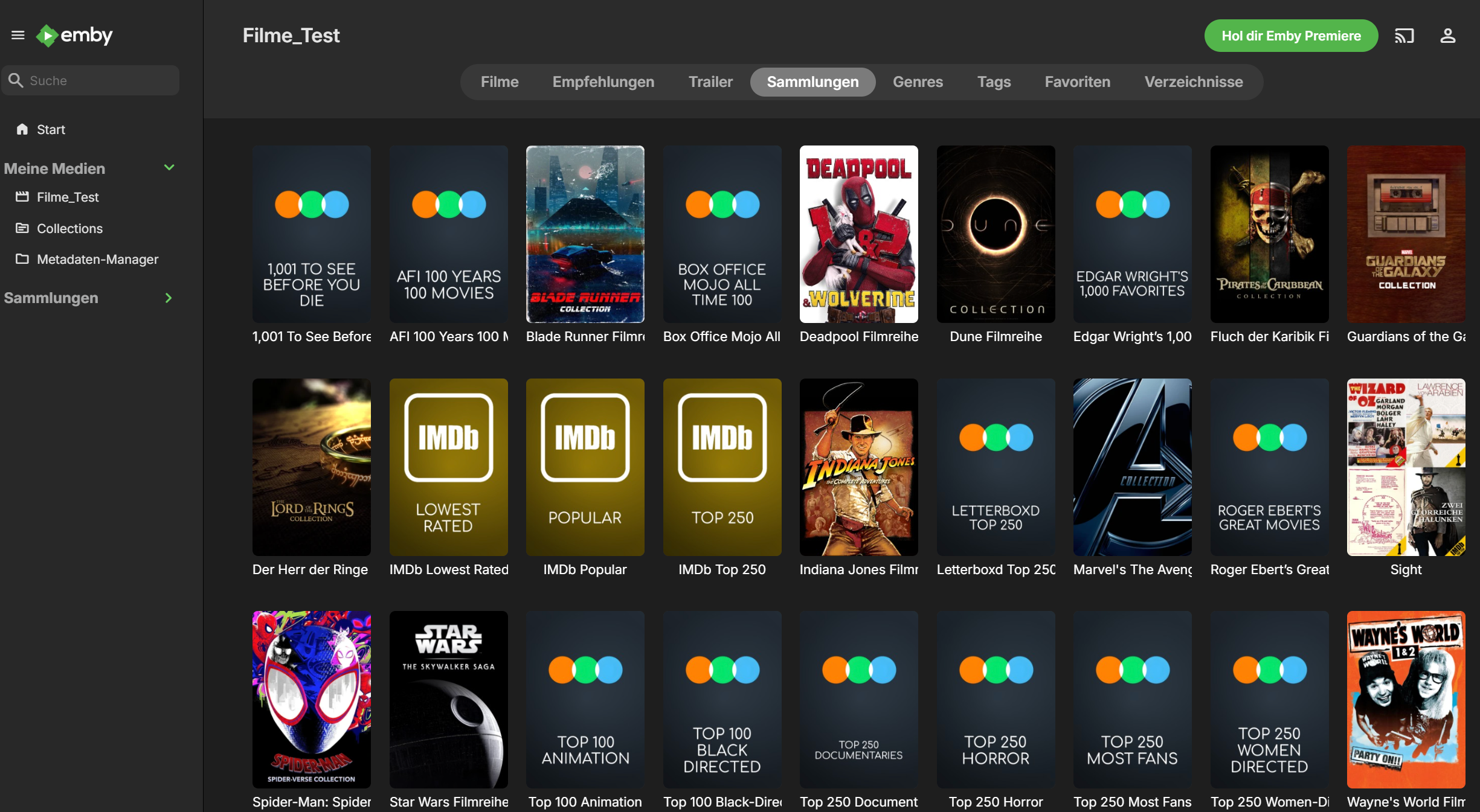
Nice work. I have a really hacked together configuration using a separate Plex instance, kometa, posterizarr, Emby-MDBList-Collection-Creator, and a final chatgpt script I made to initiate everything and push the posters to local media locations only if a poster change was detected.1 point
-
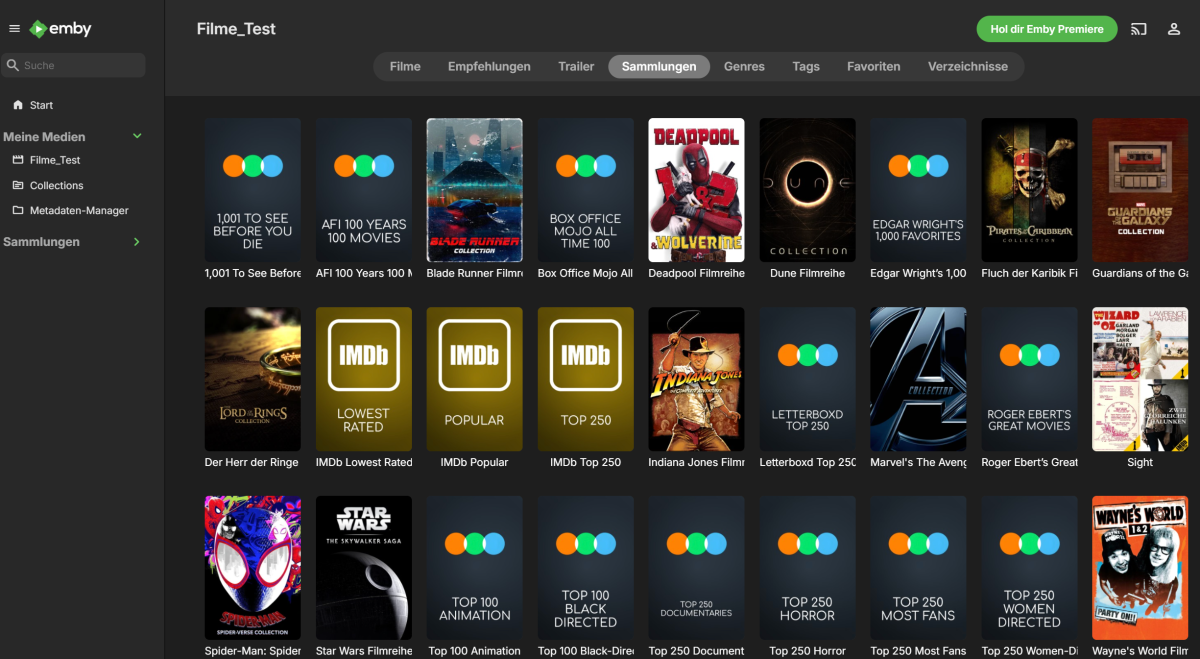
With some time taken, I've managed to butcher the code of Kometa and got it initially working with Emby. I thought of the ways possible to make it work without affecting too much of the rest. I've mostly butchered plex.py with some changes done to other parts which relied to heavily on Plex. I've tried recreating the Plex objects, as it would be otherwise too much work for me. Working (tested): Sync movie libraries Sync Imdb lists Sync letterboxd Poster upload Not Working: Overlays Lists by actors (maybe?) Sort name + summary for boxset Boxset sort order setting Plex labels become a local json file Untested: TV shows Music Multiple libraries etc. Mentions: I used a Plex server for piggyback hacking, thus I guesst the prerequisite is still a Plex library. Config was not updated, enter your Emby credentials in modules/emby.py It's a proof of concept, with no consideration taken towards compatibility to the source project. Removed "docs" folder for sharing Kept my current config as reference No idea how much work I'll put in it, I want the boxset sorting title fixed, summaries and boxsets by actors fixed. I know that we're not there yet, but it's a beginning. Any help welcome! Result with the current version, brand new test server, ca. 400 movies: Kometa.7z
 1 point
 -
For Continue Watching, i strongly disliked episode thumbs, when that was the norm a few years back. Show thumbs are much more distinctive (main reason/my reason) than episode thumbs and avoid spoilers. still cant argue against an option...but I would hate to loose the current design...1 point
-
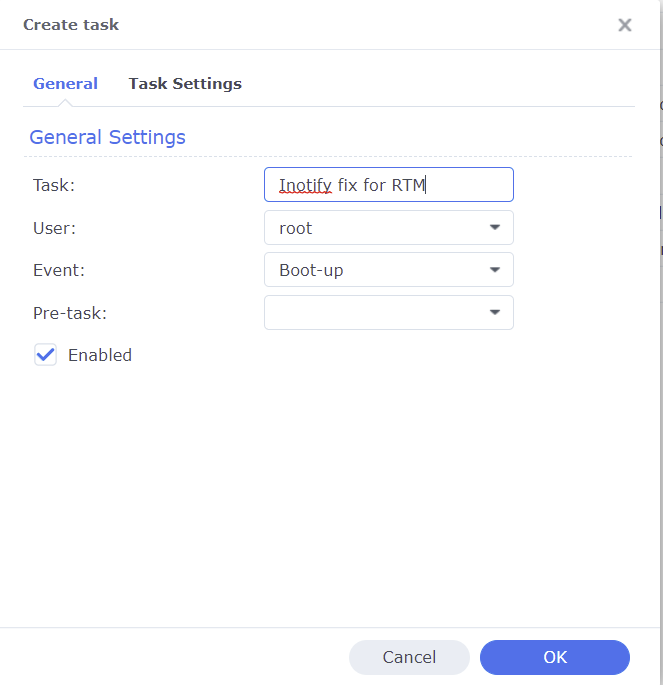
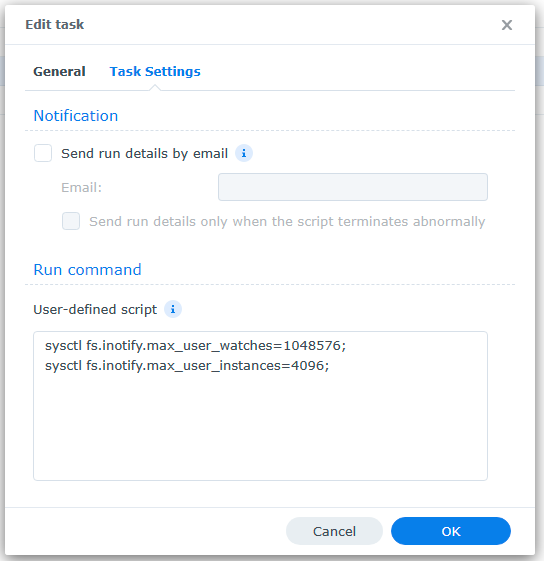
A common reason Emby's Real Time Monitoring (RTM) stops working on Synology NAS is because the Unix set user limit on inotify instances and/or watches has been reached as a result of a large number of changes for instances to process and/or the total amount of folders, files, etc that need to be monitored by watches. When RTM stops working you may start to see errors in your server logs like the following where the default number of user watches (8192) has been reached. A similar error will show up when the default inotify instances (128) is reached. System.IO.IOException: System.IO.IOException: The configured user limit (8192) on the number of inotify watches has been reached, or the operating system failed to allocate a required resource. To increase the number of inotify instances and/or watches create the following task in DSM control panel Task Scheduler logged on with admin privileges. 1. Create a Triggered Task...User-defined script to run at Boot-up 2. Paste the following commands under the Task Settings tab sysctl fs.inotify.max_user_watches=1048576; sysctl fs.inotify.max_user_instances=4096; 3. Click Run to execute the new task (if not logged on as admin then a restart may be necessary) The task will then rerun during every boot to prevent the changes from being reverted back to default from a DSM update. To check that your changes took affect you can optionally run the following commands in Terminal cat /proc/sys/fs/inotify/max_user_instances cat /proc/sys/fs/inotify/max_user_watches If your library gets really big and the limit of user watches is again reached, then just increase the number again. The maximum number of watches allowed in Unix is 524,288 and each used watch takes about 1kb of memory on a 32-bit system (double on 64-bit). However, it will only use what is needed based on the number of items being watched.
 1 point