Leaderboard




Popular Content
Showing content with the highest reputation on 10/28/25 in all areas
-
you're right, once i brought over the "full backup" folder as well, it recognized it and now I was able to import my user data. Seems to work for the tracking data for what is being played, too. All is working now2 points
-
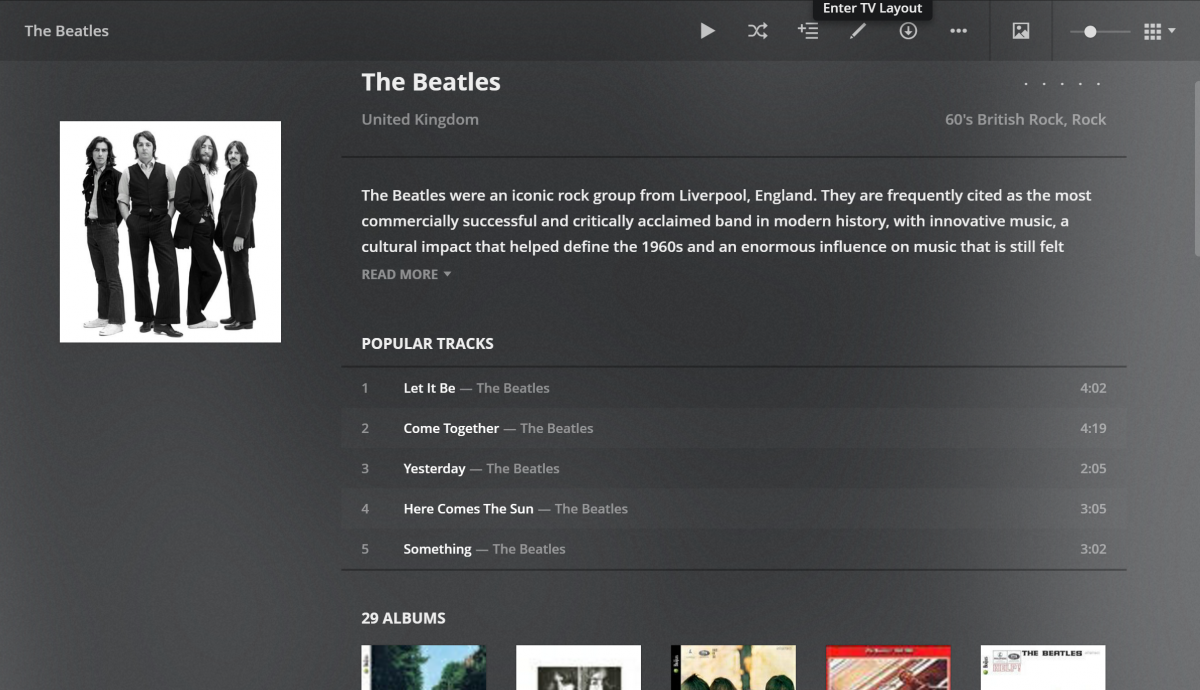
I was just checking out Plex and noticed a feature in Music that I love (see screenshot). In Music when you open an Artist it shows popular songs. This comes in real handy when you don't know all the names of the songs or what albums they are on. Can we please add this to Emby? Thanks
 2 points
 -
Have done - not sure why you ask the question as whether I've used it or not, my immediate thoughts were why would you spend precious development time on an unsupported 3rd party plugin, when the 'Smart Views' core features promised in the last Beta was not delivered ? Logic suggests to me, it would be better to redirect that effort - unless the 'Smart Views' is way off, in which case fixing the Plugin could be justified as an interim fix. But as always, we simply don't know how long we need to wait for the Core feature - could be weeks, could be months and in some cases could be years away ...2 points
-
I've received confermation email after these last post. I've linked. Lets check what happen now. I will update you as soon I can. Thanks for your support2 points
-
Works for me now with 4.9.1.80 ,24h2 and driver 32.0.101.7029 (sept 6,25) Before on 4.8, 23h2 i had to use the driver @Clackdormentioned from early 24 This on a i5-13600k, not n972 points
-
First and foremost: 1. This is heavily vibe-coded with the help of Claude Sonnet 4.5 and just a proof of concept (though it's fully functional on my side)! 2. Tested with stable Server 4.9.1.80 on a 1080p-Screen 3. Pretty sure that the code is not the best and shpuld be reviewed by anyone with good js-Skills. 4. This Banner just works on the Web Client. I hope one of the experienced devs here can make more out of it, e.g. a Plugin. Perhaps something like that can be incorporated as a menu option by Emby itself in the future. What the Spotlight does: On every Homepage load the Spotlight takes 10 items (Movies/TV Shows) from 50 latest Releases in the library and displays them as a slideshow. Banner is clickable to get to the item detail screen. Ratings are also included. Download from: https://github.com/v1rusnl/EmbySpotlight 20251005-1807-48.9352916.mp4.b64639dcb41419847c7795874d16a84b.mp41 point
-
Hey Everyone, My journey from Plex to Emby has been pretty smooth with the exception of setting up SSL encryption. There are lots of great posts on this forum and elsewhere on how to do this, and I consider myself pretty computer literate. But I'll be honest, this was a bit overwhelming for me as I have no experience at all in hosting web servers, DNS, or encryption certificates. After many hours, I've got it all working, so I thought I'd share what I've learned. I'm going to try to write this for the newbie, so don't be offended if it seems like I'm explaining lots of simple stuff. That's really what I needed a week ago, so maybe it'll help someone else in my shoes. Also, this is for Windows, although most of it applies to any OS. There's lots of text, but it's really very easy. Let me also say, I understand that a reverse proxy gives you lots of benefits and flexibility for securing your server. But that was a step too far for me. If you want a reverse proxy this post is not for you, but there are many posts in this forum to help you. If you want to access your Emby server from outside your home network you will want to require secure connection mode for all remote connections (see "Network" tab in Emby server configuration). To do this you need an SSL certificate. To get an SSL certificate you must have your own registered domain name. Here's a step-by-step. Domain Name Registration A domain name is the readable text part of a web address. So emby.media, or google.com, or media.yourdomain.net. Most home users don't have one, but you need one to get an encryption certificate. While (Edit:)There are many options for purchasing a domain (godaddy.com being very popular), I chose to buy my domain from domains.google. It cost me $12/year, and this is the only cost to getting your Emby server working with encryption. Go to https://domains.google, pick a domain, pay your money, and you're ready to go. For the rest of this discussion let's say you registered the domain name yourdomain.net. Now you need to associate your new domain with your home IP address. Most home users get their IP address assigned to them by their internet provider and it is "dynamic," meaning it can change. So you need to be able to tell your domain provider what your address is and update it when it changes. This can be done automatically, and is called dynamic DNS (DDNS). (Edit:) Before obtaining a domain, ensure the provider supports Dynamic DNS. Google domains supports this easily, here is the help page explaining how to set it up. Fortunately, my ASUS router has this capability built in so it was easy, but it's easy even if your router doesn't (follow google's directions). (Edit:) In case you have a static IP (obtained from your ISP), DDNS support is not mandatory. That's it for domain name registration. Now yourdomain.net points to your home network IP address. SSL Certificate Now you need to get an SSL certificate. This has the encryption keys you need, and must be issued by a recognized certificate authority or it gets blocked by your browser. Lets Encrypt will give you a free SSL certificate but it has to be renewed every 90 days. This was the part I was most confused by, but it's actually really easy. The part to understand is that Lets Encrypt must have some way of proving you own your domain name before they can issue you a certificate. There are two options, 1) they give you a little text file to place on your web server in a certain location. I don't have a web server so this is a no-go. 2) They give you a text string to add to your DNS registration in what is called a "TXT Record." You do this with google domains, it's very easy. To get a certificate you need an ACME client program that knows how to talk to the lets encrypt server. They recommend certbot, but it doesn't work in windows. Dig enough and you'll find ZeroSSL, they have a nice downloadable program that does it all and is really easy. Download here. Make a directory on your computer (I used c:\ZeroSSL). Put the le64 (or 32) exe in this directory. A single command will create your certificate. I think the easiest way to do this is create a text file in the same folder as the program, call it "get_cert.bat" and put the following three lines of text in the file. Edit the second line to have your actual domain name (instead of "yourdomain.net"), and to have your actual password for your PFX file (whatever you want it to be, just replace "yourpasswordhere" in the code below. @[member="Echo"] off le64 --key account.key --csr domain.csr --csr-key domain.key --crt certificate.csr --domains "yourdomain.net" --generate-missing --handle-as dns --export-pfx “yourpasswordhere” --live pause Save the text file as get_cert.BAT and then double click it to run. This runs the le64 program, creates the public/private key pair, asks lets encrypt to generate a certificate, saves that certificate, and converts it to a PFX file format that Emby requires. All in one command! When you run this, a command window will appear and you can see what it's doing. After a few seconds it'll pause and ask you to place the TXT record in your domain. It gives you a name and value, the name will be something like _acme-challenge.yourdomain.net, and the value will be a bunch of random letters and numbers. The program pauses here for you to put this into your domain. So now you just log in to your google domain again, go to "DNS" on the left menu, scroll all the way down and enter a "Custom Resource Record." The type is TXT, the name and value are what le64 gave you. Put them in, wait a few minutes for the change to take effect (took just a couple of minutes for me). Then go back to the command window where le64 is running and press enter to continue. It'll then verify your TXT record is there and issue your certificate. You'll find a file certificate.pfx in the le64 directory, that's it! Emby Setup Now log in to your Emby server setup. Go to "Network," in the field "External Domain" you put your domain name, so yourdomain.net or whatever you chose. For "Custom SSL certificate path," browse to the .pfx file that was created by the le64 program. In the "Certificate Password" field put whatever password you used in the .BAT file above when you created your certificate. Then for "Secure Connection Mode" I recommend you choose "Required for all remote connections." You also have to log in to your home router and forward port 8920 to the computer running your Emby server. I'm not going to give directions on how to do this, it depends on your router, but it's super easy. That's it. You need to restart your Emby Server, and then you're done! You can now access your server remotely and securely at https://yourdomain.net:8920. Certificate Renewal Now, I mentioned before that the Lets Encrypt certificates are only good for 90 days. So every 90 days you have to renew the certificate. Take that "get_cert.bat" file you made earlier and make a copy of it called renew_cert.bat. At the end of the second line, just add the text "--renew 20" (without the double quotes). When you are within 20 days of your expiration date run this file, it'll renew your certificate. I believe it'll ask you to place a new TXT record in your domain, so certificate renewal cannot be made fully automatic. You'll have to run it manually and add this TXT record into your google domain just like when you created the certificate in the first place. But it takes just a few minutes and then your certificate is renewed. You'll have to restart your Emby server for it to take. The file locations all stay the same, so you don't have to update anything in the Emby setup, just restart Emby. That's it! Well, I hope this helps someone. Sorry for the long post. I would have benefited from this level of detail a week ago, so maybe it'll be good for someone. If anyone sees something wrong here, feel free to correct me.1 point
-
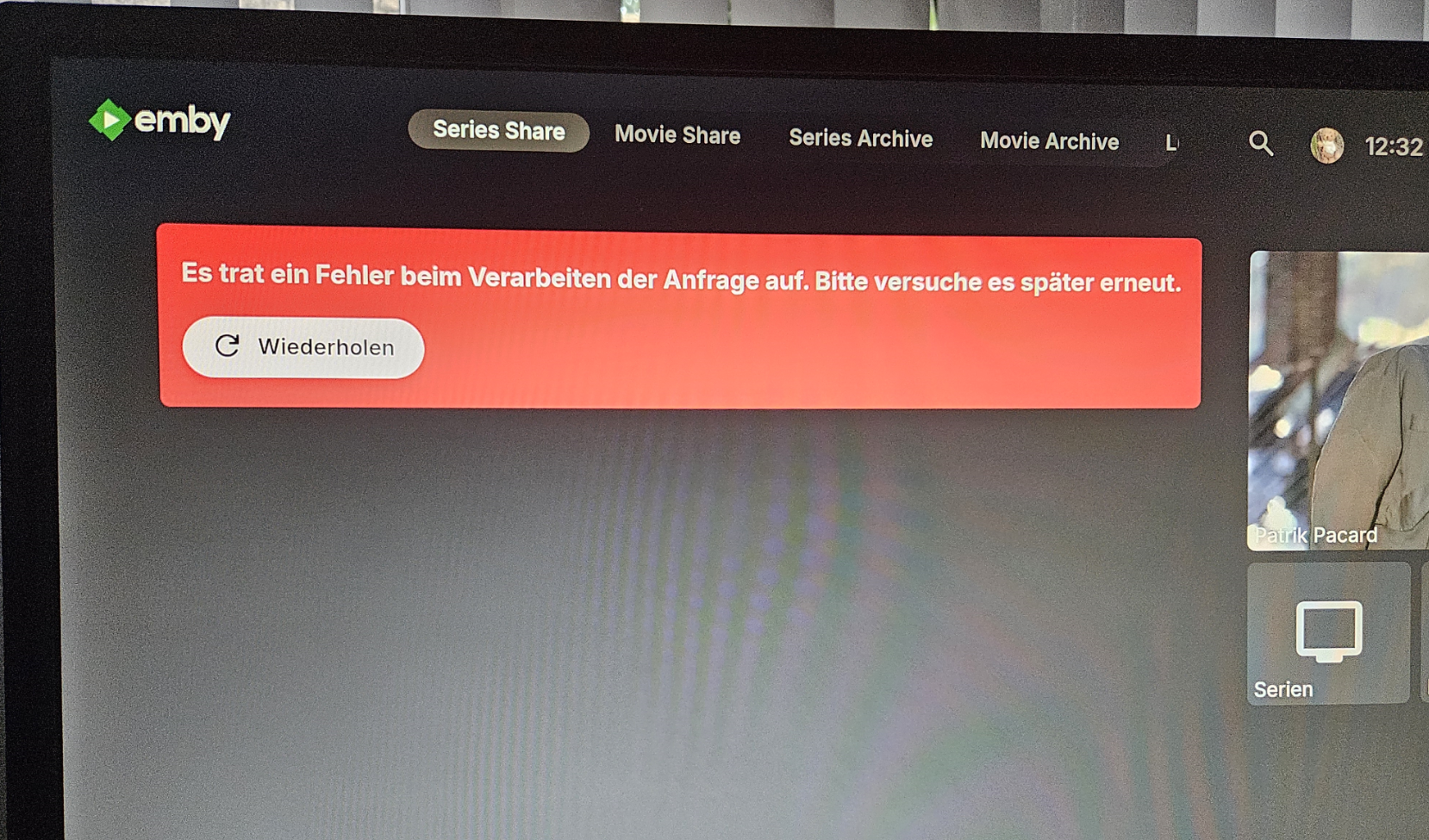
Hi, I also have a problem and getting the message "There was an error processing the request. Please try again later." App Version: 3.5.12 Server Version: 4.9.1.80 The error message appears when navigating through top level navigation with "TV mode home screen = Horizontal" is selected. Screenshot is attached. Btw... same behavior on Shield and FireTV 4K
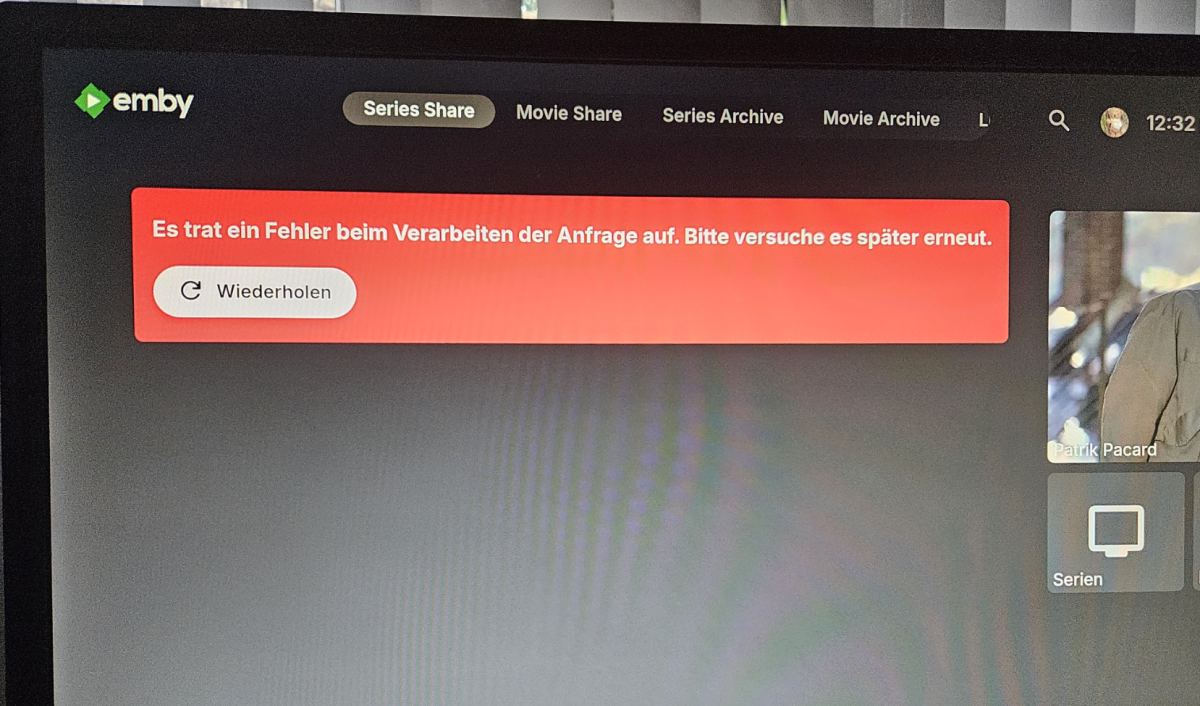 1 point
 -
On recent phones there is a nice ai search tool in gallery: you can search for people, pets, cars, documents etc. Is something like this planned into emby? Like for camera uploads for example. Or do we already having this?1 point
-
1 point
-
I think this thread is enough evidence that no one actually want this, not a single reaction agreed with OP, and all agreed on the other posts saying not to do it and/or there are other products for this. Development efforts are far better spent on actual core features and bug fixes.1 point
-
@Lukeunfortunately, unable to do so for 3-4 weeks. Travelling.1 point
-
I think regardless of how you feel about AI, i think the ability to recognize a dog in a photo and then filter for all photos with a dog but would be neat.1 point
-
I might be able to answer this @Luke! My wife has some sort of aversion to holding her phone in landscape mode when taking pictures or recording video. She also does not have auto-rotation enabled. When she begins playback, the movie is either upside down or 90 degrees off. Its annoying in the extreme and she refuses to hold the phone "correctly", it's up to me to figure it out for her in post-process.1 point
-
1 year later, its possible to change? poster have a better look than actual.1 point
-
HI, we are working on getting this added. Thanks.1 point
-
No, this will go into a maintenance release.1 point
-
I've also noticed if you don't opt into the Contributors network, the plugin kind of ignores that setting and downloads it anyways. And to be honest there's a bunch of new videos that are in other languages, just copies of a trailer, etc.. And some are just totally off.. South Park would be a good example. The contributor's network has become kind of a mess lately, and I can't seem to unselect it. (as it appears at least from my end that it's ignoring the setting)1 point
-
It has some issues, but I found they're minor enough that I can live with them. Hope that helps.1 point
-
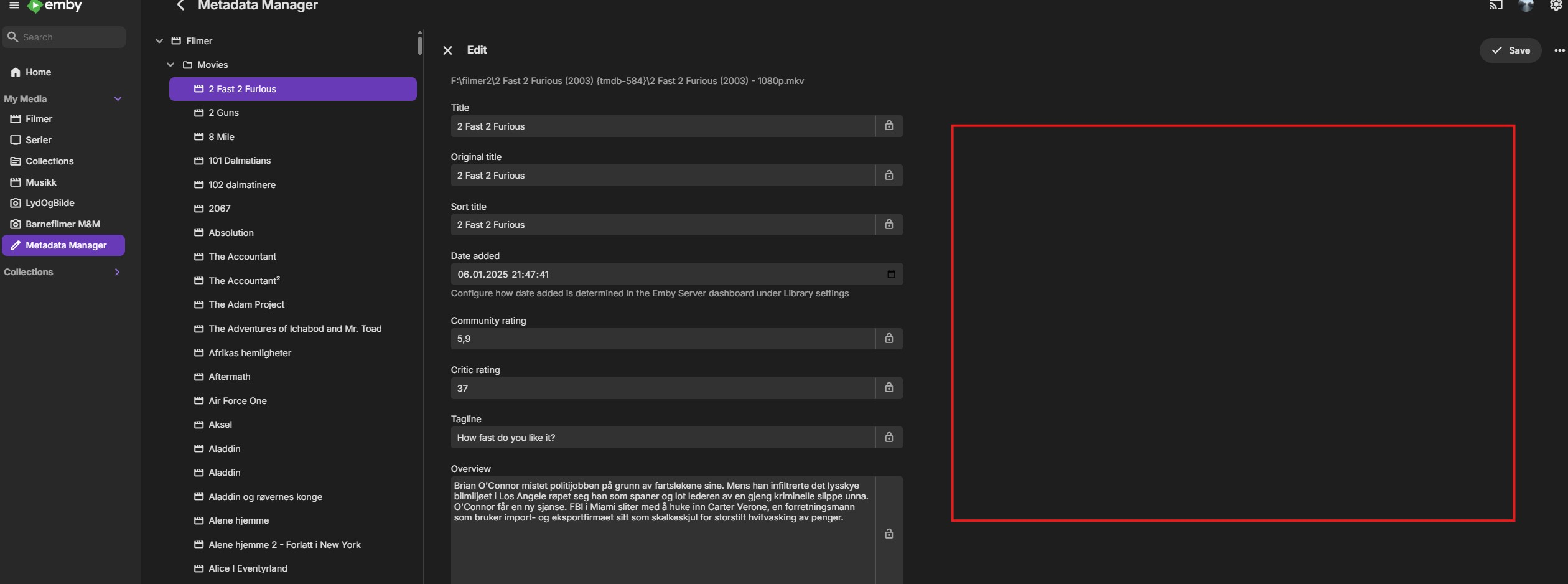
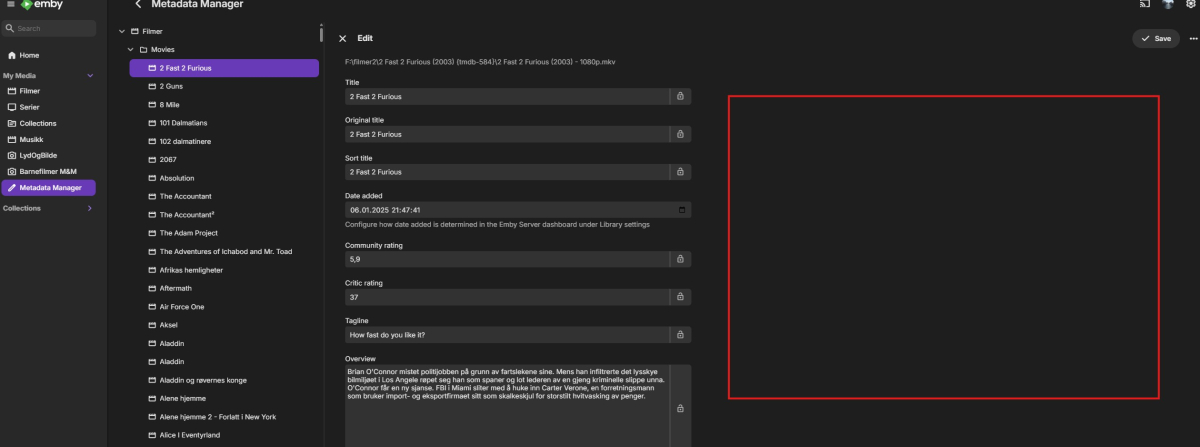
Hi I ended up using tMM to mass add my tag in the .nfo file. So now the tag i searchable. And my better half's collection, she will fix it her self. I don't use tMM to download anything, just create .nfo and rename my files and folders with tmdb id and videoformat (resolution). Just so Emby find it easy and not so much mess in the filenames etc. Haven't tested it much, but the built in Metadata Manager in Emby looks good and works quite nice. But for me it lack the possibility to change filename to the scraped name and the bulk edit. Or is this somewhere I haven't found it? Would also be nice with a search in the Metadata Manger, that don't "jump out" of the manager, alongside with the images on the right side of the metadata (red making) as an easy way of changing them etc. Else, love for Emby
 1 point
 -
Why not making a second profile on your server An use that profile on your tv?1 point
-
Bumping this, I would love to see "Popular Tracks" as well.1 point
-
The problem seems to be solved on my iPhone. I will test on my iPad tomorrow, because it is not with me at the moment.1 point
-
All plugins - Scroller fixed, TV theme songs - down source removed Onto into ytrailers next1 point
-
I too am eagerly awaiting any sort of official word that the devs will agree to fix the single-title-folder display issue (and as discussed above and elsewhere, the issue is more than just the "extra click" toggle in the UI settings, so changing the default for that toggle is not sufficient to address the Folder View concerns). It would also be nice to know that there might be a reasonable timeframe for a patch, because otherwise I'm going to start messing around with binaries in my non-portable Emby installation to forcibly roll the thing back to 4.8, or brick it in the attempt. But just getting the commitment would be nice. Right now we have nothing. For what it's worth, I've only been using Emby for the past couple of years, and don't have the same MediaBrowser pedigree some others have referenced above. I just care about the underlying folder structure because I interface with it beyond Emby. Lots of other people have chimed in on other threads explaining their own organization structure (e.g. folders for directors, genres, etc.), which have all been blown up by this change. I don't use Radarr. I don't want to deal with a large flat list of folders where I can't possibly find anything (in the file system) just to make Emby happy. But I get that there are probably a lot of people who use Radarr and don't want to be bothered sorting out their content and prefer to let Emby manage the entire thing. Either way, Emby supported all types of users very well through 4.8, and it would be especially nice to restore that versatility. And hopefully sooner rather than later!1 point
-
All plugins - Scroller fixed, TV theme songs - down source removed Onto into ytrailers next1 point
-
I received the below message this morning from the titan os team Hi Shaun, we have published the QA report on our partner portal, but have not yet received an updated version for retest from the Emby team. I have sent them a reminder today.1 point
-
OK, I'm not 100% sure yet, but I think I solved it. It had to do with my traefik reverse proxy setup. Took me hours to narrow it down, since I was looking at a 100 other places before. I did not expect traefik to be the issue, since it only affected AndroidTV - so I thought it would be some App settings that are the culprint. But apparently other apps and devices are just a little bit more resilient to the issue that traefik introduced - who knows. I verified that it's traefik by opening the emby http-port on the host, and connecting directly from my Android TV to the emby docker container, therefore bypassing traefik. Afterwards I could not reproduce the issue anymore. (fingers crossed). Then I tried to find out what the exact issue was with traefik, since I don't want to remove it. I use it for many other applications on the server as well, and I don't want to bypass it for Emby. However I never found out the real root cause in traefik. In the end I stumbled on the solution pretty randomly: I tried installing traefik directly on the host, instead of in a docker container. All other settings completely identical, apart from that. This immediately solved the issue, and now I have Emby behind traefik again, and everything works fine. I even noticed some other improvements with laggy UI in the app and so on, but need more time to verify that, since the issues are pretty flaky. TL;DR: Issue came from traefik in docker container. Traefik with same configuration but installed on host solved the issue. Maybe this helps someone else too.1 point
-
Nice way! I think lg app store is having way too strict policies.1 point
-
This would be great! Would make the setup much easier1 point
-
This is a stupid setting. By default, this option isn't even enabled. And even when you turn it on, it still only shows folder names—no other movie details like bitrate, year, file size, etc. Why would I want to see those stupid folder names? It ruins the entire software's aesthetics. This change is a completely fatal, erroneous, and idiotic decision.1 point
-
Awesome stuff! Looks incredibly good! Sadly hard to implement in the docker version. Would love for the devs to implement an easy way to customize the UI.1 point
-
Moved more details over to here as this thread seems more relevant to what i'm experiencing.1 point
-
Just chiming in here. Have error code 15 as well, started a few weeks ago on my Nvidia Shield + Emby Android TV App. Was working fine before then. Tried the Emby for Android App, and it just seems to try to start the youtube trailer, blinks a black screen and goes back to the Emby for Android app. No error or anything. Tried to turn on logging for the Emby for Android app, and it's not writing any log files1 point
-
Emby server LAN IP address is static.1 point
-
Yeah, I realized that was the problem after I posted this.1 point
-
Hi Luke, The TV is/was connected via Ethernet. I have disconnected the Ethernet cable and connect over Wi-Fi. Client is currently configured to use the LAN IP address; I'll monitor the situation. Many thanks Regards Nick1 point
-
Generally dedicated volume buttons on keyboards affect the system volume. Is that the intention here? Or are you saying the web app would intercept the attempt at volume control, so it would happen in the player and not the system as usual? P.S. It should probably be removed from the keyboard shortcuts page if it is in fact no longer a shortcut that works.1 point
-
It does not. The beta channel has an updated intel driver. We are still working on updating the ffmpeg build.1 point
-
Hab das jetzt nochmal ausprobiert, es funktioniert auch ohne die Weiterleitung von Port 443 in der firewall der discstation. Im Router muss er aber offen sein und an die Discstation weitergeleitet sein.1 point
-
Sigh! Shame as the TV picture etc is still good. I guess I'll have to run the emby client on some intermediate device with the TV as display. Thanks.1 point
-
Hmm, interestingly, this seems to have resolved itself and it's playing fine again. I didn't do anything except wait. Thanks for your time though!1 point
-
Another for what it's worth... Today on my Nvidia Shield Pro, I force stopped, cleared cache and cleared data on Emby for Android TV and it didn't help at all. Still error 15 with any trailers. Didn't try with the universal app, honestly can't stand it - it's too flashy blinky zoomy for my liking. Really hope this gets resolved soon on the Android TV app.1 point
-
As somebody who has been following and testing Narjo and Apreggi on iOS (Navidrome and subsonic clients) my advise is get a basic player made, and get it on testflight, start a discord server to build a community of testers and see what features people want etc. The speed and progression on Narjo and Arpeggi have been insane. It took the Narjo dev less than a week to integrate casting to Sonos for me.1 point
-
By the time it’s properly implemented, it will be 2032. Currently, it’s already working on the web using a script. We’re looking for a similar quick solution for the other devices.1 point
-
Gracias, solucionado lo anterior y ya sé qué cosa no se puede por ahora.1 point
-
Working now @Luke I discovered a phantom device on my network that was assigned the same IP address as my Emby server. That was probably messing up the port forwarding. On that note though, I was never able to get remote working using UPnP, only when I went in and specified the forwarding did it work. I’m using a Xfinity gateway with no additional networking equipment. I made sure UPnP was enabled. A note to everyone out there trying to get this set up. It will NOT work unless you forward the port. Period.1 point
-
Thanks for the response! Release Date descending will put the folders at the end. But I'd still like to be able to have a toggle to park them at the end regardless of the sort selection--at least in cases where the metadata for the sort selection is null. But again, this is a low priority sort of request. Most of my folder views I leave sorted by Title, and I appreciate that I have a lot of flexibility to customize things exactly how I want with the Sort Title metadata field. For a handful of folders like this one, it's preferable to sort by Release Date and it would be nice to have some control over the folders (by which I mean multi-title folders. Single-title folders would still be much nicer if they acted like titles in the 4.8 style..).1 point
-
I manually corrected all of the images and re-established the collections then locked them. Hopefully that prevents it in the future.1 point
-
Was having issues when I thought it was a good idea to blindly update emby in my TrueNAS 13.2 jail and saw that everything broke. Could not get to official instruction working from https://emby.media/truenas-server.html. However with a few adjustments to several posts in this thread here is what worked for me (which is very similar to https://emby.media/freebsd-server.html) Create 13.5-RELEASE-p5 jail and name it "emby-server" (This is if you are on the latest TrueNAS-13.0-U6.8 version) Make sure the following are checked: - Auto-start - DHCP Autoconfigure IPv4 - allow_mlock Set up your mount points - Source is where you want your stuff to go to - Destination I would suggest /mnt/xxxxxx/iocage/jails/emby-server/media Start the jail and shell into into it Run these commands in order and type in "y" when prompted: pkg update pkg upgrade pkg install dotnet8 libass fontconfig freetype2 mbedtls3 fribidi gnutls iconv opus sqlite3 libtheora libva ocl-icd libvorbis webp libzvbi libraw ImageMagick6 tesseract intel-media-sdk libunwind libinotify openssl icu krb5 libexif libjxl libheif libimagequant openexr openjpeg orc pango tiff pkg add -f https://github.com/MediaBrowser/Emby.Releases/releases/download/4.9.1.80/emby-server-freebsd13_4.9.1.80_amd64.pkg sysrc emby_server_enable="YES" service emby-server start if you then run the "top" command you should see emby server as one of the processes. Now just go to whatever IP address assigned you jail and type in ":8096" at the end e.g. 192.168.1.142:8096 Hopefully these random instructions will help someone out as I got stuck for a bit. The above commands uses the latest stable 4.9.1.80 emby release. these instructions might not work for future releases.1 point