Leaderboard




Popular Content
Showing content with the highest reputation on 10/21/25 in all areas
-
No issues with the TV. It's at 1080p and no zoom capabilities. It's a Sony that is about 15 years old, flat screen. I did reboot the Roku and it looks like that may have fixed it. Still setting up more libraries so we'll see what happens. Thanks for the suggestions! John2 points
-
Most people able to setup Emby and open the router ports to give access to people outside their home would be able to get a smtp server either by a domain they own or via an free email service, I don't get why smtp reset password isn't yet available that way. Implementing it this way would not prevent future improvement with another way to do it giving Emby administrator even more choice in the future2 points
-
Been monitoring it over the last few days and haven't had any issues. Cheers for all the help.2 points
-
I think logs being anonymized now plays a part in why this hasn't been exploited on a larger scale. Someone made a post in the Jellyfin subreddit and one of their team members actually responded. Jellyfin uses some sort of UUIDs for ItemIds, not an incremental number, so its inherently less vulnerable as the UUID acts as a "password" in a sense, however their images endpoint also requires no auth still. They supposedly have a solution to resolve this within the next major version. If Emby hasnt addressed this by then, then CVE should be reported.2 points
-
First and foremost: 1. This is heavily vibe-coded with the help of Claude Sonnet 4.5 and just a proof of concept (though it's fully functional on my side)! 2. Tested with stable Server 4.9.1.80 on a 1080p-Screen 3. Pretty sure that the code is not the best and shpuld be reviewed by anyone with good js-Skills. 4. This Banner just works on the Web Client. I hope one of the experienced devs here can make more out of it, e.g. a Plugin. Perhaps something like that can be incorporated as a menu option by Emby itself in the future. What the Spotlight does: On every Homepage load the Spotlight takes 10 items (Movies/TV Shows) from 50 latest Releases in the library and displays them as a slideshow. Banner is clickable to get to the item detail screen. Ratings are also included. Download from: https://github.com/v1rusnl/EmbySpotlight 20251005-1807-48.9352916.mp4.b64639dcb41419847c7795874d16a84b.mp41 point
-
This was brought to my attention by a post on Reddit in r/selfhosted just a few hours ago. It seems images are available by the itemid even when unauthenticated. The OP claims to have attempted to contact the emby team regarding this and a few other issues with no response. I'm making this post to raise awareness as not everyone who frequents these forums will have seen the post on Reddit, and as it is posted publicly elsewhere it definitely deserves attention on the main forum. This is very troubling as it means that content that's available on the server can be determined without being logged in. Even more troubling if you're using emby for family pictures and videos as the pictures themselves can be viewed, and the thumbnail for videos can be viewed as well. I have tested this myself and can verify that it is a major problem. I could see cover art for movies, as well as pictures from my family photos library without being logged in. It seems that itemid's are incremental, so it's arbitrary to just guess a value until you get a valid hit. Leaking what movies and shows are on a server is definitely not great, but leaking actual personal content is just unacceptable in my opinion. Until something is done to address this I would not recommend using emby for personal/sensitive content if your server is publicly exposed. Steps to reproduce below. Replace <itemid> with the numerical value of a library item to test it while not logged in. https://<hostname:port>/emby/Items/<itemId>/Images/Primary1 point
-
Unless I'm being a bit blind (highly possible!), I'd love a way to hide a couple of the top green navigation items without hacking it in myself. For example, in Movies I don't want the 'Trailers' item to appear for any profile and for TV I don't need the 'Upcoming' nav link. Obviously not a major issue but thought it would be a nice thing to have, perhaps allowing them to be re-ordered like the home page items but again just a nice extra,1 point
-
Similar to this old post, I'm suggesting a tab that would be titled Watchlist and could be placed in between Suggestions and Favorites. The functionality would pretty much be a copy of Favorites, just with a + symbol added next to the heart and other symbols that let you favorite a movie etc. The previous post had mentioned extra functionality such as automatically removing a movie from Watchlist after it has been watched. This would be nice, but is unnecessary because after watching a movie you can simply click the + symbol a second time to remove it from Watchlist. I would imagine this would be very easy to implement as a rebranded copy of Favorites. Adding other features could come later. Edit: added link to old post1 point
-
My request is to be able to chose to add items to the home screen. Specifically in my case, I am thinking of playlists and collections. Here's some reasons I'd like to see this: The home screen is the first piece of the user interface a person will see when they pull up Emby. I often places movies in bulk into my media library. This sometimes means people never see the new movie I've made available. Happens a lot, actually. While all movies are searchable or can be found by sorting, I believe the interface would benefit from having the customization option. I have created a "Justin Recommends" collection and would LOVE to be able to put that on the home screen. By keeping this optional, no one is forced to use it. If you don't have a use-case, then it's just a feature. If you look at things like Netflix, many movies and shows get "featured" and by doing that, a lot of people end up watching that wouldn't otherwise (imagine if The Tiger King was just another buried documentary you had to hunt for, no one would have heard of it). I appreciate your time. If you've considered this before and decided against for reasons other than difficulty implementing the feature, I'd ask you to reconsider. I believe that being able to customize our servers helps us personalize and tailor them to our audience and our needs, and that helps promote a feeling of ownership. I also truly believe that this small change could lead to some powerful results. In my case, I know that it would be of huge benefit to accomplishing what I would like to do with my Emby server. Thank you.1 point
-
Request No. 1: Implement Metascore rating for movies, from Metacritic.com, in Emby. OMDb api provides this information. Request No. 2: Also, fix an option in settings to enable or disable a ratings source according to the user's choice.1 point
-
Could you allow users to customize the order of movies in collections instead of only having it by alphabetical or by release date? Example: I want to have a collection of Batman movies, both animated and motion pictures but want the motion pictures together followed by all the animated ones. With the current order options, this isn't possible. Thanks!1 point
-
This is a smaller extras request that I haven't seen posted yet. While it's being decided how extras are advanced, can we get a sorting order for the various extras folders? Right now, I can sort them into Interviews, Deleted Scenes, Specials, etc. However, once uploaded to Emby they just mash together alphabetically, leaving you with this: Deleted Scene, Interview, Deleted Scene, Special, Featurette, Interview, Behind the Scenes, Featurette, Featurette, Deleted Scene, Special. It would be great if each Extras folder had a numbered value. That way the line in Emby looked more like: Interview, Interview, Deleted Scene, Deleted Scene, Deleted Scene, Behind the Scenes, Featurette, Featurette, Featurette, Special, Special. This would go a long way in making the Extras look much neater in their current state.1 point
-
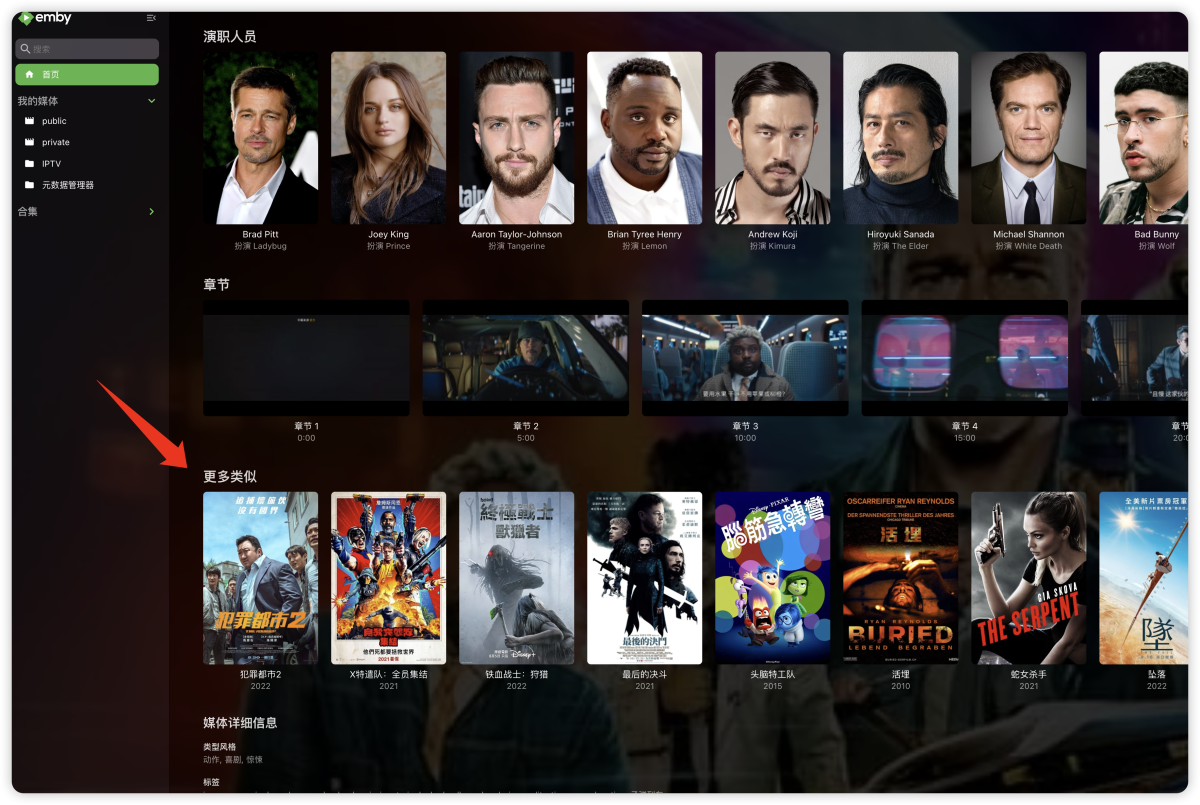
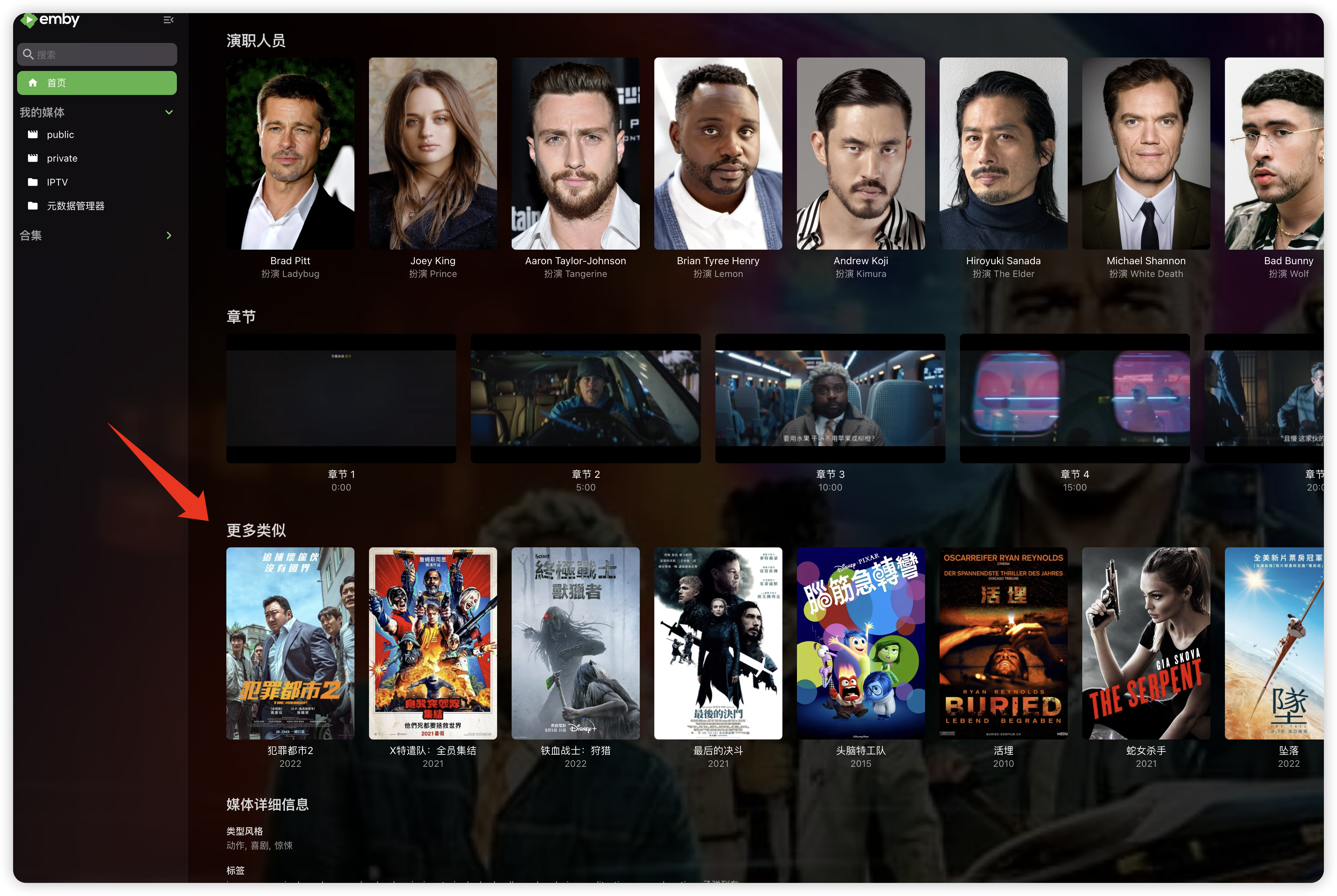
"More like this" will recommendations are made based on multiple media libraries,I don't like this, I prefer him to only recommend similar ones in the current media library, otherwise I would rather turn it off. What should I do?
 1 point
 -
You nailed it. I run Jellyfin in docker and configured it to use a different port BUT the health check URL was not updated. Changed that URL to have the correct port and no more errors in my Emby Logs. THANKS1 point
-
@JamesTX10https://jellyfin.org/docs/general/post-install/networking/advanced/monitoring/ I would suspect it is some plugin doing it and mistakenly polling an endpoint meant for a different server platform.1 point
-
I googled unraid docker service failed to start and followed the steps outline. I ended with Delete and Recreate Docker Image Then added all containers in UNRAID In Emby, I restored embyserver-backup-full plus scheduled a scan media library Emby is now running!1 point
-
Can you post or PM your webstreams.xml in the config folder, then I can take a look..1 point
-
Actually I figured it out. It has to do with my split tunnel. VPC is using a different path to the internet. We can close this.1 point
-
Change "Thumbnail images interval" to '10 seconds' instead of 'Chapter markers', toggle "Save video preview thumbnails into media folders" on or off, as desired.1 point
-
Fixed it myself .. NVENC encoder sux - use H265 via CPU. General Unique ID : 192458859544121370814816829090457371951 (0x90CA3A6286436E9F1625E79BBF22C52F) Complete name : S:\Seriale\Doctor Who (2005)\Season 9\Doctor Who (2005) - S09x01 - The Magician's Apprentice (1).mkv Format : Matroska Format version : Version 4 File size : 583 MiB Duration : 46 min 20 s Overall bit rate : 1 760 kb/s Frame rate : 25.000 FPS Title : Doctor Who Series 9 Disc 1 Encoded date : 2025-10-19 14:52:03 UTC Writing application : HandBrake 1.7.0 2023111500 Writing library : Lavf60.16.100 ErrorDetectionType : Per level 1 Video ID : 1 Format : HEVC Format/Info : High Efficiency Video Coding Format profile : Main@L4@Main Codec ID : V_MPEGH/ISO/HEVC Duration : 46 min 20 s Width : 1 920 pixels Height : 1 080 pixels Display aspect ratio : 16:9 Frame rate mode : Constant Frame rate : 25.000 FPS Color space : YUV Chroma subsampling : 4:2:0 (Type 0) Bit depth : 8 bits Writing library : x265 3.5+1-f0c1022b6:[Windows][GCC 13.2.0][64 bit] 8bit+10bit+12bit Encoding settings : cpuid=1111039 / frame-threads=4 / numa-pools=20 / wpp / no-pmode / no-pme / no-psnr / no-ssim / log-level=2 / input-csp=1 / input-res=1920x1080 / interlace=0 / total-frames=0 / level-idc=0 / high-tier=1 / uhd-bd=0 / ref=3 / no-allow-non-conformance / no-repeat-headers / annexb / no-aud / no-eob / no-eos / no-hrd / info / hash=0 / temporal-layers=0 / open-gop / min-keyint=25 / keyint=250 / gop-lookahead=0 / bframes=4 / b-adapt=0 / b-pyramid / bframe-bias=0 / rc-lookahead=15 / lookahead-slices=6 / scenecut=40 / no-hist-scenecut / radl=0 / no-splice / no-intra-refresh / ctu=64 / min-cu-size=8 / no-rect / no-amp / max-tu-size=32 / tu-inter-depth=1 / tu-intra-depth=1 / limit-tu=0 / rdoq-level=0 / dynamic-rd=0.00 / no-ssim-rd / signhide / no-tskip / nr-intra=0 / nr-inter=0 / no-constrained-intra / strong-intra-smoothing / max-merge=2 / limit-refs=3 / no-limit-modes / me=1 / subme=2 / merange=57 / temporal-mvp / no-frame-dup / no-hme / weightp / no-weightb / no-analyze-src-pics / deblock=0:0 / sao / no-sao-non-deblock / rd=2 / selective-sao=4 / no-early-skip / rskip / fast-intra / no-tskip-fast / no-cu-lossless / no-b-intra / no-splitrd-skip / rdpenalty=0 / psy-rd=2.00 / psy-rdoq=0.00 / no-rd-refine / no-lossless / cbqpoffs=0 / crqpoffs=0 / rc=crf / crf=22.0 / qcomp=0.60 / qpstep=4 / stats-write=0 / stats-read=0 / ipratio=1.40 / pbratio=1.30 / aq-mode=2 / aq-strength=1.00 / cutree / zone-count=0 / no-strict-cbr / qg-size=32 / no-rc-grain / qpmax=69 / qpmin=0 / no-const-vbv / sar=1 / overscan=0 / videoformat=5 / range=0 / colorprim=1 / transfer=1 / colormatrix=1 / chromaloc=1 / chromaloc-top=0 / chromaloc-bottom=0 / display-window=0 / cll=0,0 / min-luma=0 / max-luma=255 / log2-max-poc-lsb=8 / vui-timing-info / vui-hrd-info / slices=1 / no-opt-qp-pps / no-opt-ref-list-length-pps / no-multi-pass-opt-rps / scenecut-bias=0.05 / no-opt-cu-delta-qp / no-aq-motion / no-hdr10 / no-hdr10-opt / no-dhdr10-opt / no-idr-recovery-sei / analysis-reuse-level=0 / analysis-save-reuse-level=0 / analysis-load-reuse-level=0 / scale-factor=0 / refine-intra=0 / refine-inter=0 / refine-mv=1 / refine-ctu-distortion=0 / no-limit-sao / ctu-info=0 / no-lowpass-dct / refine-analysis-type=0 / copy-pic=1 / max-ausize-factor=1.0 / no-dynamic-refine / no-single-sei / no-hevc-aq / no-svt / no-field / qp-adaptation-range=1.00 / scenecut-aware-qp=0conformance-window-offsets / right=0 / bottom=0 / decoder-max-rate=0 / no-vbv-live-multi-pass / no-mcstf / no-sbrc Default : Yes Forced : No Color range : Limited Color primaries : BT.709 Transfer characteristics : BT.709 Matrix coefficients : BT.709 Audio ID : 2 Format : AAC LC Format/Info : Advanced Audio Codec Low Complexity Codec ID : A_AAC-2 Duration : 46 min 20 s Channel(s) : 2 channels Channel layout : L R Sampling rate : 48.0 kHz Frame rate : 46.875 FPS (1024 SPF) Compression mode : Lossy Title : Surround 5.1 Language : English Default : Yes Forced : No1 point
-
Library thumbnails are user-agnostic, i.e. shared across all users and not linked to individual user and/or content access. Your best bet is to assign some custom/neutral image manually, lots of examples in Fan Art & Videos Forum section.1 point
-
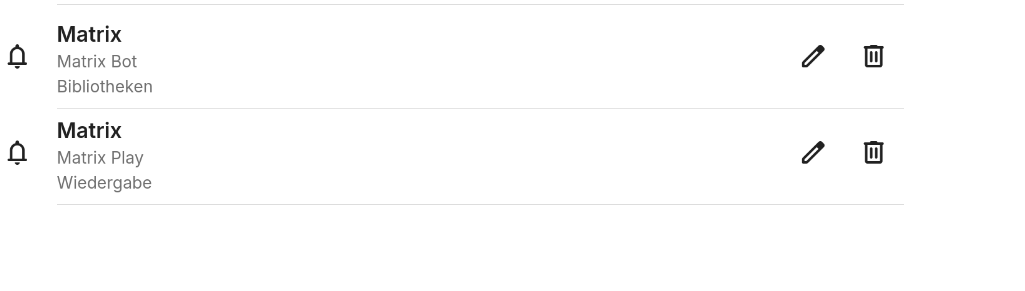
Simply use multiple instances of the Notifications Plugin: The upper one is configure to send posters when new content is added, the lower one sends player events with posters disabled.
 1 point
 -
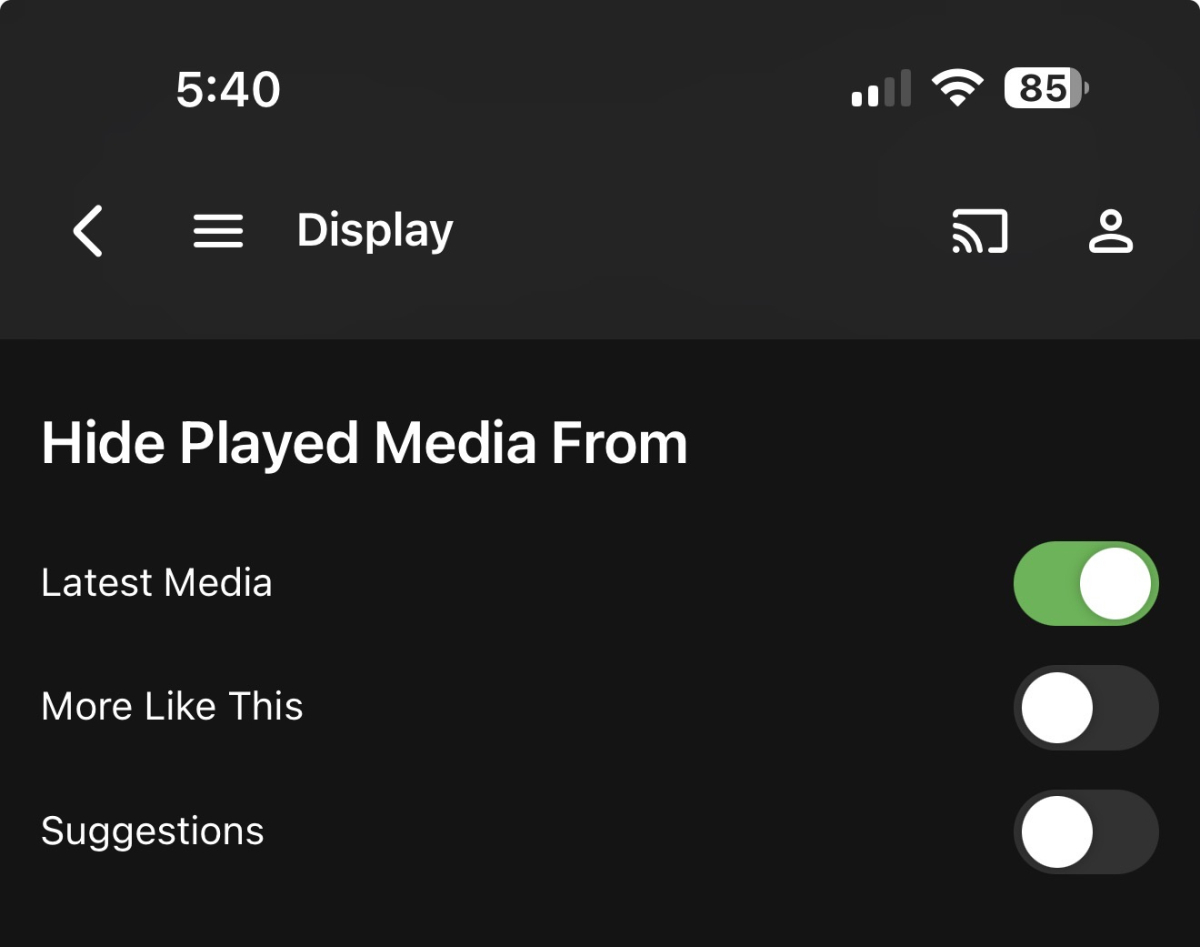
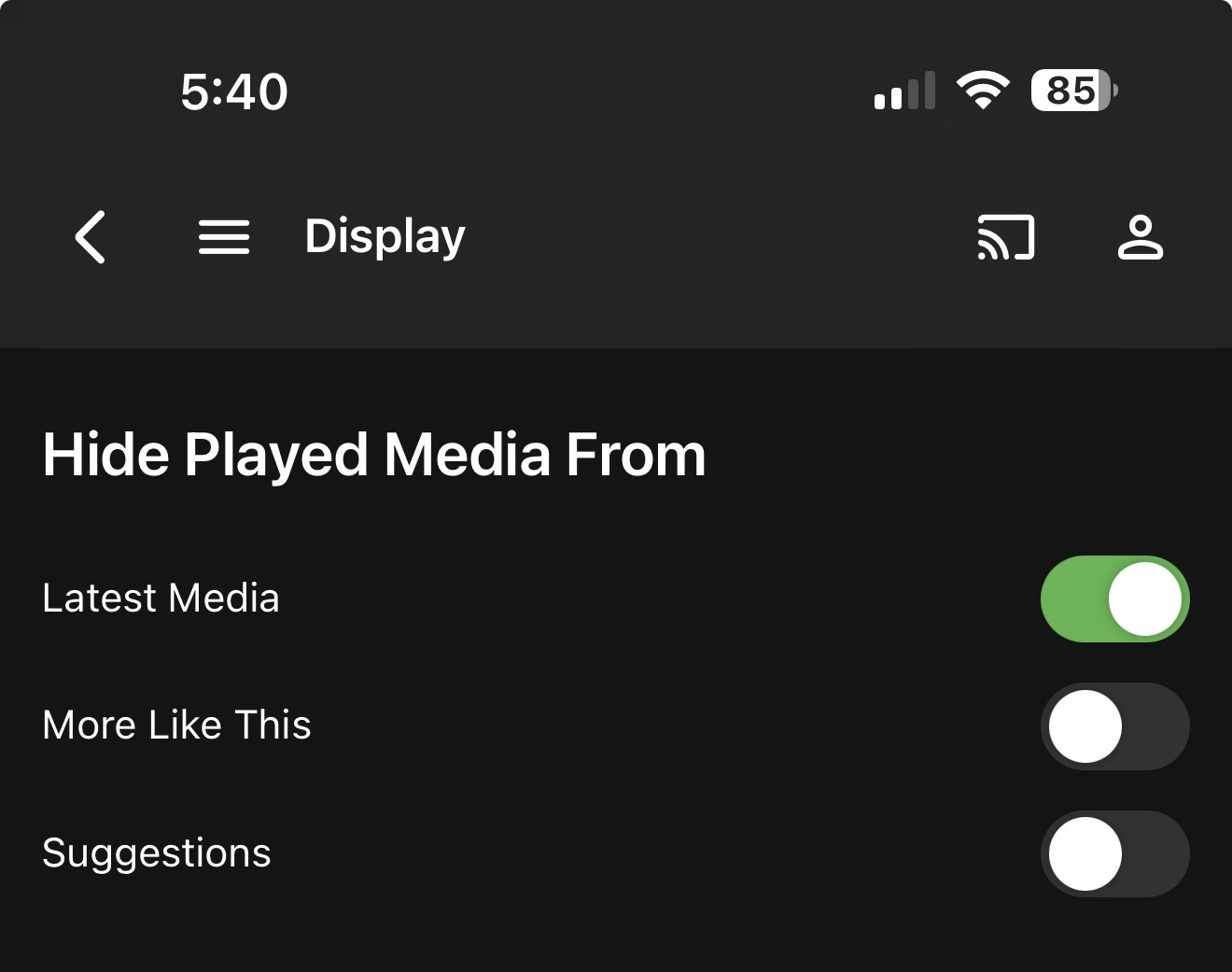
Maybe this could be an option in Settings - Display, something like “Also hide partially watched media”, or a dropdown to select what counts as Played - “fully watched” or “partially watched”.
 1 point
 -
I created a small landingpage for my addons because i am not allowed to edit my startposts anymore: https://bjoerns1983.codeberg.page/ If you want to stay updated you can also use the rss feed you find on the Codeberg release page: https://codeberg.org/bjoerns1983/Emby.Plugin.TelegramNotification1 point
-
@softworkz I've uninstalled and reinstalled and so far that seems to have fixed the problem. All the time I've started it it's worked first time. I'll keep an eye on it and let you know if it reverts to having to do it twice.1 point
-
If you have guide data with multiple aspect ratios (epg123 is one that serves all 3) then you have have the 2x3 poster for the guide/menu and then the 16x9 for the background when going into the play/record screen. I had requested this sometime last year and saw it has been added at some stage and I hadn’t noticed until I got my old guide data up and running again. @Lukeand @ebrthanks for the feature implementation. The Apple TV app is coming along nicely. Love the current player implementation too, automatically uses mpv for live tv (mpegts) and then uses avplayer for movies/tv shows (mp4 w/ mov_text). IMO makes the experience as good or better than on my shield.1 point
-
Each user has the ability to set their preferred audio and subtitle language under their User Preferences (see Playback and Subtitles)1 point
-
Dont know if anybody still uses this plugin, but i have ported some of the changes of my Telegram Plugin to it. Version 1.2.0.0 can finally send poster into a chat. You can find the release in my Codeberg Repo: https://codeberg.org/bjoerns1983/Emby.Plugin.MatrixNotification/releases/tag/v1.2.0.0 Please dont use the DLL from the starting post, it is completely outdated, but i am not allowed to edit the post. Messages with posters will be send in to messages, one for the posters and one for title description. The Matrix Client Server Api is a bit quirky, and i dont know if every client implements it the same way. I have only tried it with Element on Linux and ElementX on iOS. So if you encounter any issues feel free to colaborate on Codeberg by opening in issue or sending a PR. Have fun with the Plugin.1 point
-
For me it still works, on latest stable via VAAPI, one stream has approx 9-13% CPU load. Even h265 encoding works, albeit it has 13% CPU load with ToneMapping and 4K HDR to 1080p SDR transcoding on 1520+1 point
-
Okay I just had a breakthrough. I had the user that required a port. I was reading an old post and it said to use 443 in the port. Worked for them1 point
-
Yes, please give us the option to enable it. I never had a problem with it on my ancient Chromecast Ultra That metadata display was a big help when we're trying to decide what to watch next.1 point
-
Got help from fallenbagel. For some reason the settings.json of jellyseerr wasn't properly being loaded into memory. Backing up and then deleting settings.json and settings.json.old, and then going through the setup process anew, from the remote URL, did the trick.1 point
-
Can't wait! Thanks for the reply.1 point
-
I believe it was me (amongst others) that mentioned the industry mechanism for reporting vulnerabilities is the CVE process. I believe Emby have had more than enough time to address this, so in the interest of public safety, my personal opinion is this should be reported. If this forces Emby to do something about it - then about time, but on the other hand if it spotlights the issue and causes more visability, then that is a bad thing. Maybe Emby can respond with a committed deadline on getting it resolved, afterwhich if still no resolution it will be raised. It's not a zero day or anything like that, but I'm surprised nobody has publicly exploited it yet..1 point
-
Hi there, let's look at an example. Please attach the information requested in how to report a media playback issue. Thanks!1 point
-
the jellystat point is being corrected and is only accessible in beta1 point
-
EmbyWatch - A brilliant app built by a community user! One of the best things about the Emby community is the creativity that comes from it. Every so often, one of our users takes their love for media servers to the next level and builds something that makes life easier for the rest of us. Today, we’re excited to share EmbyWatch, a brand-new Android app developed by community member @asgard25It is an an incredible example of what happens when passion and innovation meet. A User-Built Tool, Made for Admins What makes this story special is that EmbyWatch wasn’t created by a company or a professional app studio. It was created by one of YOU! — just someone who wanted to make managing a server more intuitive and accessible from anywhere. Want to be even more impressed? This is only the second Android app that asgard25 has developed! EmbyWatch is designed to help server admins and advanced users keep track of what’s happening on their Emby setup in real time. It’s not about playback or browsing media, it’s about giving you the tools to monitor, manage, and control your server, all from your phone. Powerful Features at a Glance EmbyWatch brings a surprising amount of functionality for such a young app. Here’s what it can do: Real-time monitoring: See who’s watching what, where they’re streaming from, and how much bandwidth they’re using — all live. User management: View your users, check activity history, and even send messages directly to connected users. Device overview: Identify every connected client, from smart TVs to mobile apps, with connection times and device info. Library insights: Quickly review all your media libraries with detailed counts and metadata. Task control: Run or schedule maintenance tasks like library scans and metadata updates remotely. Plugin visibility: See your installed plugins and available updates. Logs and server details: Access logs, CPU load, uptime, and more — wherever you are. Notifications and widgets: Stay informed with live alerts and optional Android widgets for quick monitoring. For anyone managing a shared server, EmbyWatch feels like having a live dashboard in your pocket. A True Example of Community Ingenuity We love seeing users like asgard25 take their experience with Emby and turn it into something that benefits everyone. EmbyWatch really is a reflection of how open and flexible the Emby ecosystem can be when people put their ideas into action. This project shows exactly what makes our community special, a shared passion for improving and creating! So whether you’re managing your own home setup or running a multi-user server, EmbyWatch offers a simple, powerful way to stay connected to your system. Huge thanks to asgard25 for sharing EmbyWatch with the community and for showing what’s possible when creativity meets passion. We’re proud to see our users building tools like this that make Emby not just a media server, but a thriving ecosystem shaped by its fans. If you’re an admin or an advanced user, check out EmbyWatch on Google Play and see how it can make managing your server easier than ever. We can’t wait to see what asgard25 — and others in our amazing community — build next. View the full article1 point
-
I'm just used to all other Specials I have showing up as a season next to the normal seasons, so having only two outliers is kinda annoying haha1 point
-
Ok what are your detailed suggestions ? Right now it's a lot bla bla with no suggestions1 point
-
But seriously, you're just criticizing without any real suggestions…1 point
-
Don't do drugs! Get a job!1 point
-
Hi Emby team, I paid for Lifetime Emby Premiere because I believed Emby would keep up. After years on Emby and now running a Mac mini (Apple Silicon), I’m honestly frustrated and disappointed — especially after spending just two days testing Jellyfin side-by-side. This isn’t a rage post. It’s a reality check from a paying customer who feels left behind on macOS. 1) Hardware acceleration on macOS isn’t where it should be in 2025 On Emby (4.8.11.0), only H.264 hardware acceleration consistently engages for me. HEVC often falls back to software and hammers the CPU. Meanwhile, Jellyfin on the same machine uses Apple’s VideoToolbox reliably and — this was the gut punch — can hardware-accelerate HDR→SDR tone-mapping and even remap Dolby Vision Profile 5 to correct SDR colors on my library. A free competitor doing this while a paid product struggles is hard to swallow. It’s been years since Apple Silicon launched. We’re still missing dependable HEVC HWA and modern, accurate HDR/Dolby Vision handling in Emby on macOS. 2) “Convert Media” appears stuck on software on macOS Playback transcoding sometimes taps H.264 hardware, but server-side Convert Media does not (even when the target is H.264). My CPU pegs to 100% for long stretches. If there’s a way to offload these conversions with VideoToolbox on macOS, it’s either not implemented or not documented. Either way, that’s not acceptable for a paid, cross-platform server in 2025. 3) The ecosystem gap is widening (SSO, skip features, etc.) SSO/OIDC: This keeps coming up in Emby threads. Jellyfin already has a working plugin. I shouldn’t need workarounds for basic identity in a family server. Intro/credits/recap/ad skipping: Jellyfin’s plugins detect intros, credits, recaps, previews — even mid-roll ad segments — and can auto-skip from the server. In practice it’s more capable and less fiddly than what I get with Emby today. Music lyrics: Emby can display lyrics, yes, but the experience across clients is inconsistent and still feels behind competitors. 4) Why this matters now: the homelab shift from x86 to Apple Silicon I’m one of many who have moved from x86/NAS to Mac mini for home self-hosting: lower idle power, quiet 24/7 operation, and strong integrated media engines. This shift is real — a growing slice of homelabbers are standardizing on macOS for exactly these reasons. Competitors (Jellyfin, Plex) have clearly invested in macOS paths and moved faster to meet this demand. Emby hasn’t kept pace. If macOS isn’t treated as a first-class server platform, paying users like me are going to drift away — not because we want to, but because we can’t wait forever. 5) Communication with Mac users has been poor This is the part that stings: macOS requests sit for ages without a concrete answer. If there’s a roadmap, we don’t see it. If there’s progress, it isn’t communicated. What I expect as a paying customer Give us specifics — dates and deliverables — not “we’ll look into it.” macOS hardware acceleration parity: Reliable HEVC encode/decode, hardware HDR→SDR tone-mapping, and correct Dolby Vision (P5) handling on Apple Silicon. Hardware-accelerated Convert Media on macOS: Not just playback transcoding — library conversions must use VideoToolbox where possible. Official SSO/OIDC: First-party, documented, maintained. Server-side skip segments: An endorsed, end-to-end solution for intro/credits/recap (plus guidance for DVR ad detection), with consistent client behavior. A transparent macOS roadmap: Public, mac-specific media-pipeline/HWA plan with milestones. No more guessing. Treat macOS as first-class: Assign ownership to the mac media pipeline, publish known issues/workarounds, and close the loop with actual releases. I’m happy to provide logs, test builds, and real-world repro steps. But please don’t tell me to switch OS, “use software,” or wait indefinitely. I bought Lifetime because I wanted Emby to be my long-term home. Right now, on macOS, it isn’t. Please meet your macOS users where we are — with a plan, not silence.1 point
-
Hello again Emby community! So long story short, I'm developing on the plugin again as time permits. I essentially started from scratch, which is what I think my mind needed to look at the project in a new way, design-wise that is. This time around, instead of doubling up on Emby's REST API calls or using the SQLite database, I am using the internal .NET API that was already available to me via the plugin itself, and things are already looking much, much cleaner! Since I had a few GitHub stars on the original repo, I am just reusing it for this new effort. The good news is that I have successfully gotten the following three endpoints working successfully: /rest/ping /rest/getLicense /rest/getArtists Not much I know, but I'm hoping things will go quicker as I hit more of Subsonic's API methods. I'll report back when I'm near or at an initial release, but in the meantime, feel free to track progress at the repo.1 point
-
Any reason not to prioritize it? Do you need anything? It's really annoying having to constantly monitor and adjust volume when listening to music, and Emby is lagging behind other media centers on this point. "something we can look at in future updates" might as well mean "2 years" or "never", a little transparency would go a long way so users can find alternatives if you're not planning it anyway. Thanks1 point
-
it'd be really cool to have extras seperated by type. it's hard to scroll through the section when some shows have over one hundred extras. i'd like to choose between featurettes, making of or interviews folders easily. tvdb started seperating the extras this way, maybe it can be implemented?1 point
-
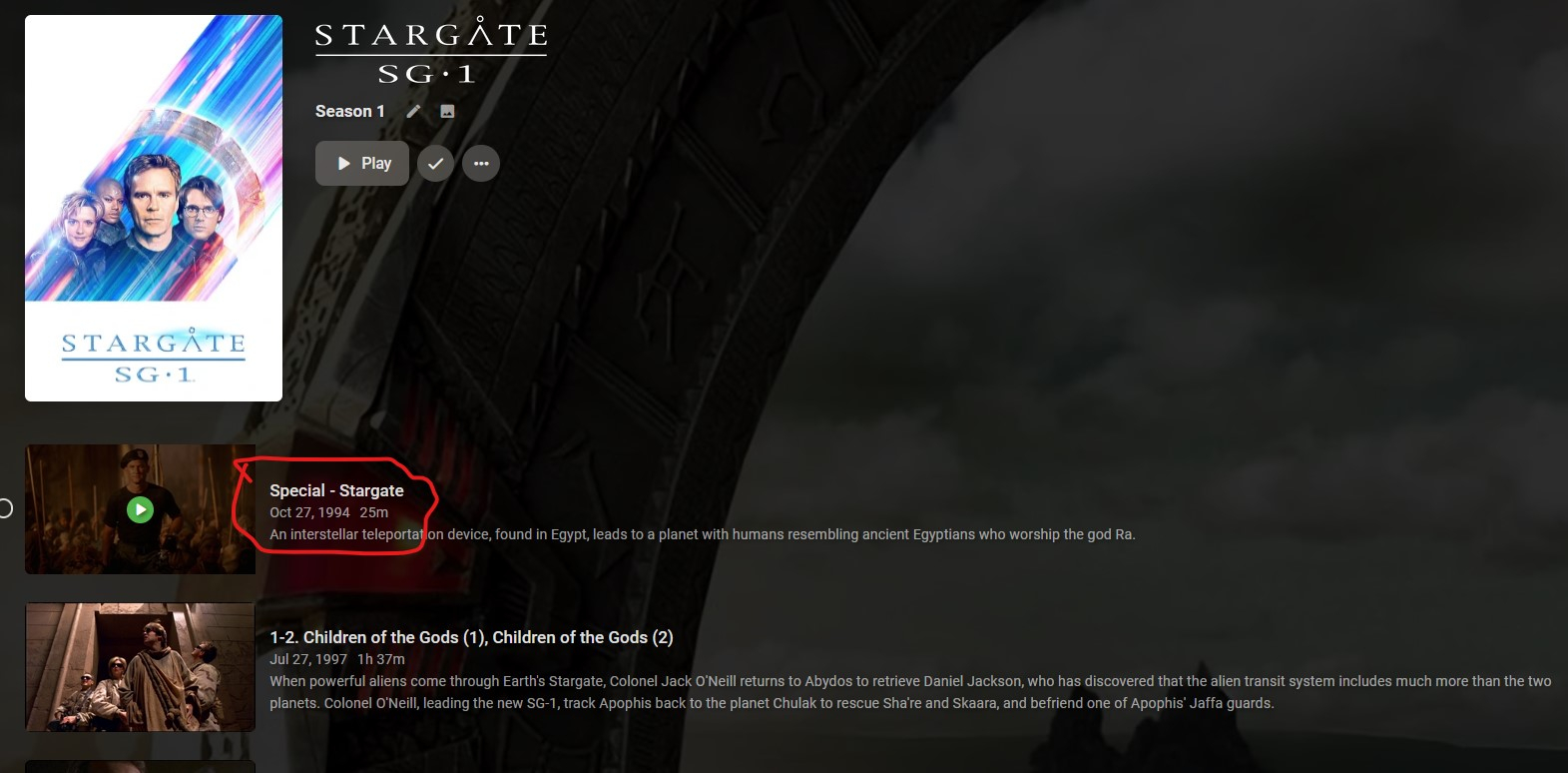
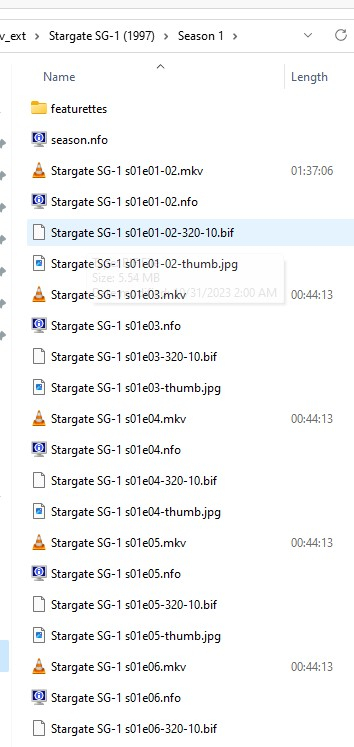
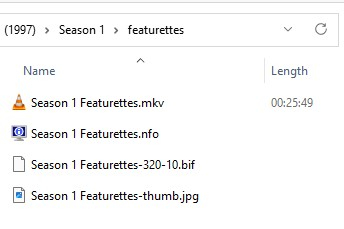
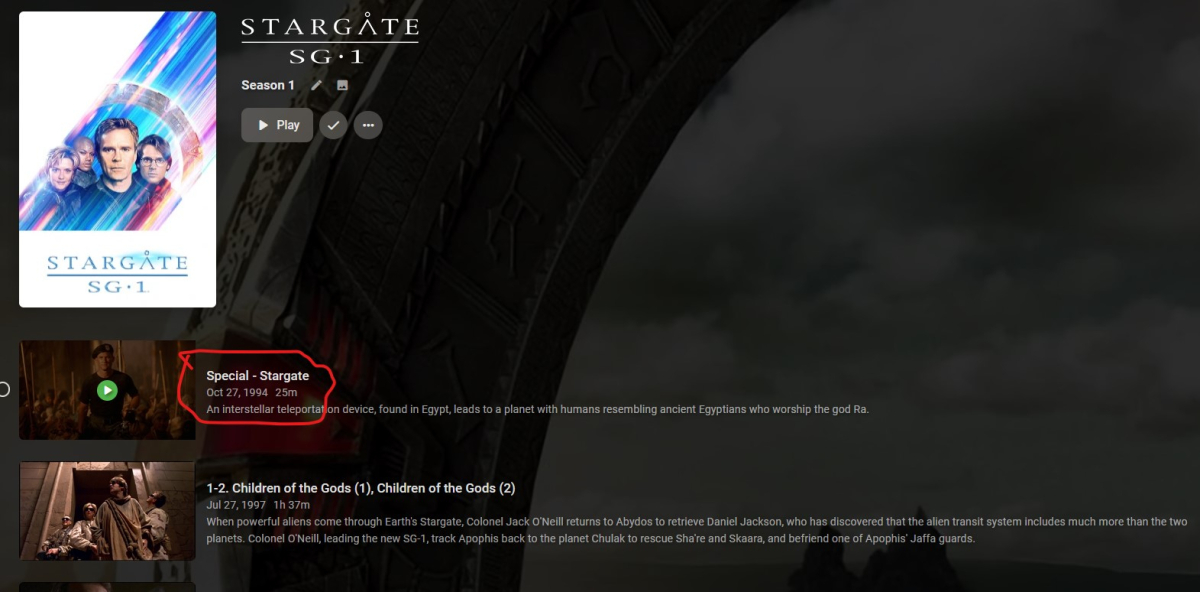
I'm still having trouble wrapping my head around how to use this feature. I'm currently ripping and adding Stargate SG1 to my library and am using that as an opportunity to test out per season extras. I've added a 'featurettes' folder to Season 1: I've added a video file named 'Season 1 Featurettes' to the featurettes folder: The result is that Emby decides this 25 minute video that doesn't have Stargate in the name is the first Season 0 special, which happens to be the ~2 hour feature film Stargate: What I imagined would happen is that because this file has no special S00EXX naming, Emby wouldn't try to identify it with a metadata provider special and instead would just add this extra as a non-numbered, unofficial special using the file name and place it at the end of Season 1. In other words, I wanted to see 'Special - Season 1 Featurettes' as the last 'episode' in the Season 1 listing. And, what I continue to want is for Emby to place this not-a-'special' *extra* in a separate Extras section at the bottom of Season 1 and only for actual, metadata backed Specials with a metadata 'appears before episode' property to appear in-line with the Season listing.
 1 point
 -
My feeling is that none of the devs really use extras in Movies or TV, so they don't experience the pain of the 90% completed feature set.1 point
-
But why? That makes everything worse? Can you explain the benefit of throwing every single form of extra into one folder? Especially one that would have separate files that grab metadata from other sites like tvdb? This seems like a very unorganized way to group it.1 point
-
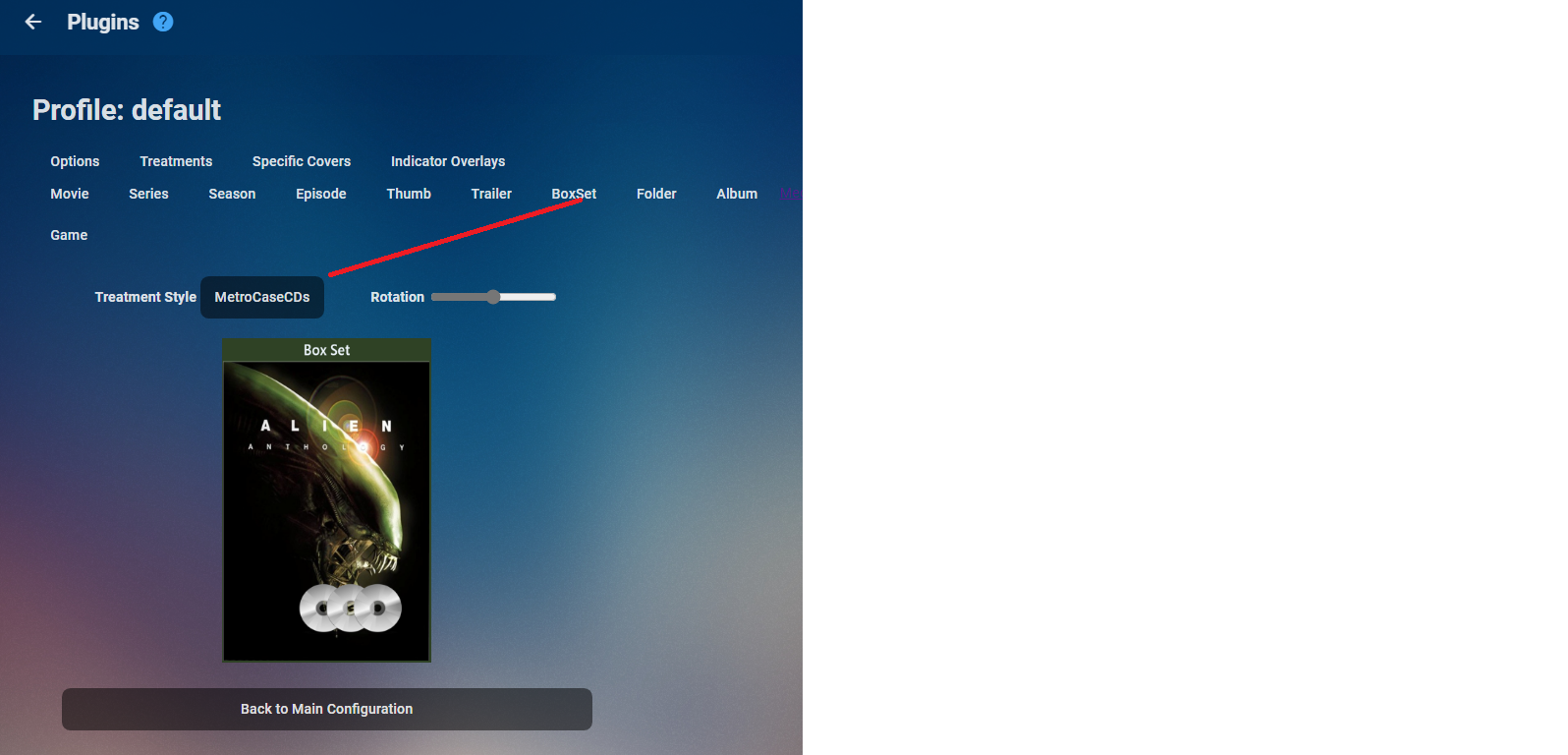
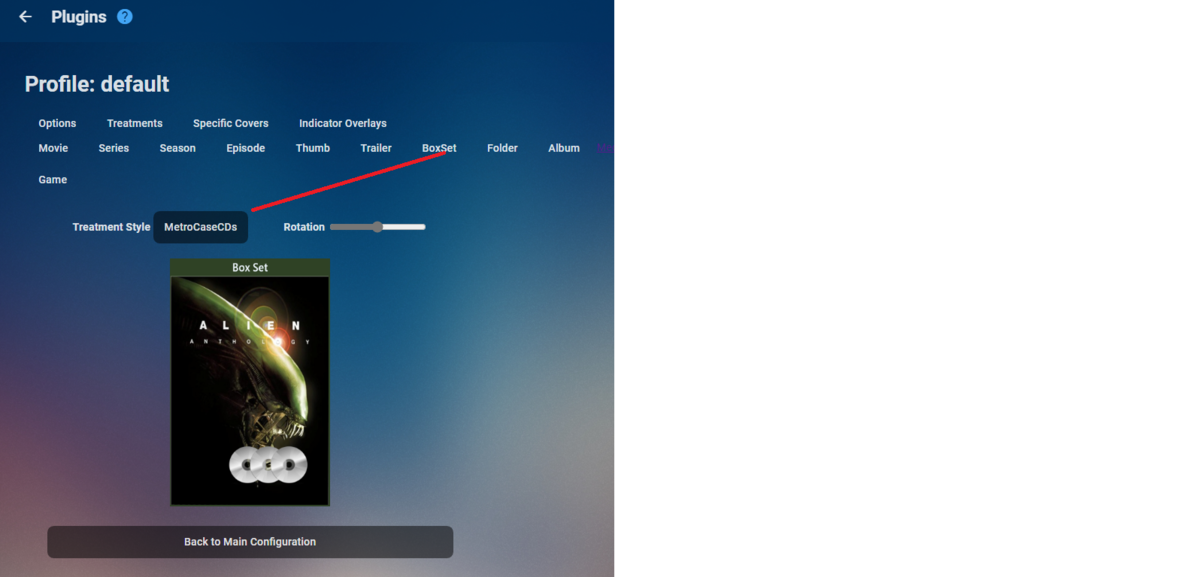
Go to CoverArt plugin and change the treatment for Boxsets.
 1 point



























.thumb.jpg.21d888786f2104b4f688825203ce7598.jpg)