Leaderboard




Popular Content
Showing content with the highest reputation on 10/17/25 in all areas
-
It has been figured out meanwhile. It's planned for the future Also planned.2 points
-
Also, for additional info I have had "Enable Throttling" disabled on transcoding which seems to be related to the tmpfs filling up super quickly. Even with my above fix, 2 streams would max out the new 16GB tmpfs limit. I have now enabled "Enable Throttling" and I can handle at LEAST 6x 4K remuxes so I am a happy camper. TLDR: You have to manually limit tmpfs on proxmox lxc containers, and also ENABLE THROTTLING2 points
-
Anyone are more than welcome to take that android app (or any plugin i made for that matter) and change it in any way they want. It was given to me as a template to make something but i have no experience at all with Android app making.2 points
-
Ok that good just wanted to be sure, you knew2 points
-
Hi - just purchased the premium version, really nice app. I am seeing all watch history for all users under my account rather than under each user's account. My other users' accounts have a blank watch history instead of showing what they actually watched. One other suggestion (and I can add this on discord if needed too) - @yockerhas made a ridiculosly helpful plugin that (among other things) allows server admins to limit the playback time for certain user accounts, which I use for my kids' emby accounts (i.e. they get to watch an hour of emby a day, and then playback is disabled until the next day). Within the plugin, I'm also able to provide them with bonus time, as well as change other limits. Right now, there is a rudimentary Android app that allows me to see watched time for my limited users, as well as extend time and timeout, etc. It would be awesome if you could add this functionality to your app, as I feel like it would fit in perfectly with the 'app for emby admins' vibe you have. See this thread/post for the link to the apk provided by @yocker2 points
-
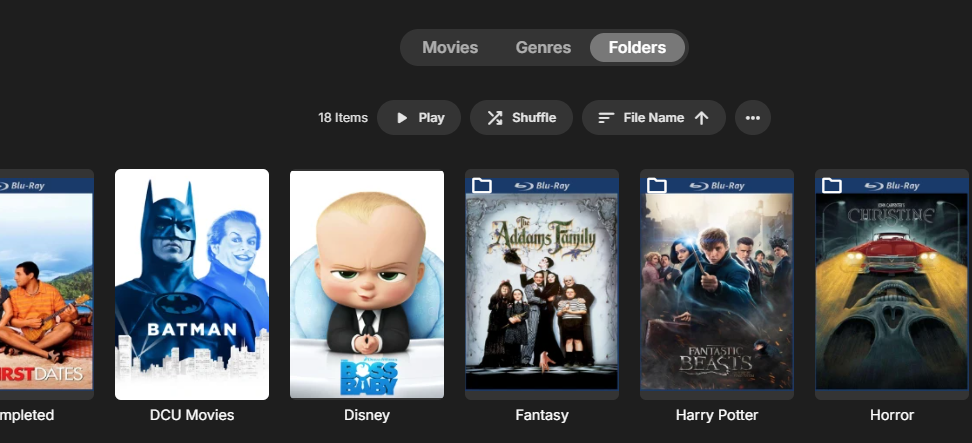
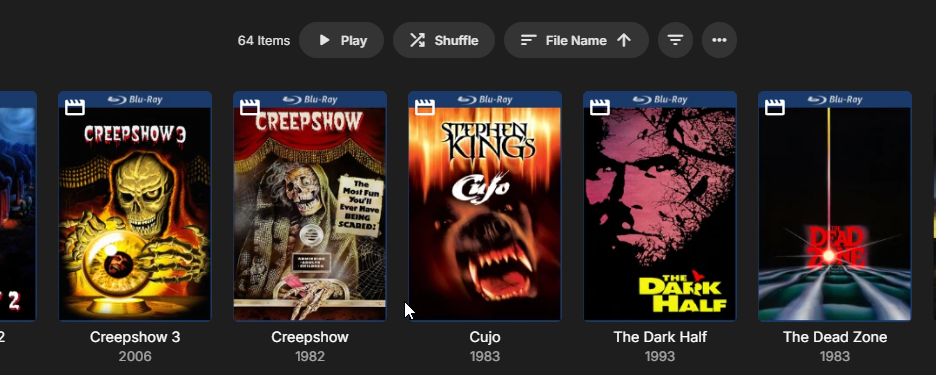
I'm in the same boat. I have 2 movie libraries - Movies and Classic movies. Until this update they both had a very nice visually pleasing Folder view. They both are laid out the same (I use radarr to maintain my movies). Top level Library folder - Category Folders - Movies folders. For the one that did not lose its folder view I see this - with the category looking like My classic movies in folder view looked exactly the same until the update. Now it looks like And with another click needed to got into the secondary folder that holds a single movie (yes I saw the note on how to eliminate that sometimes). It is ugly, inefficient, and just doesn't do what we have had for years on years. I have enough movies that I want folder view as my default so if I feel like watching a Cary Grant movie I can quickly get to all the Cary Grant movies because they are all in my Cary Grant category folder. Again, this layout has worked for as long as I have had Emby, at least 6+ years now. So my question is how do I get the Classic Movies library that changed without me changing a thing on the library setup itself back to the same style as my movies library still is?
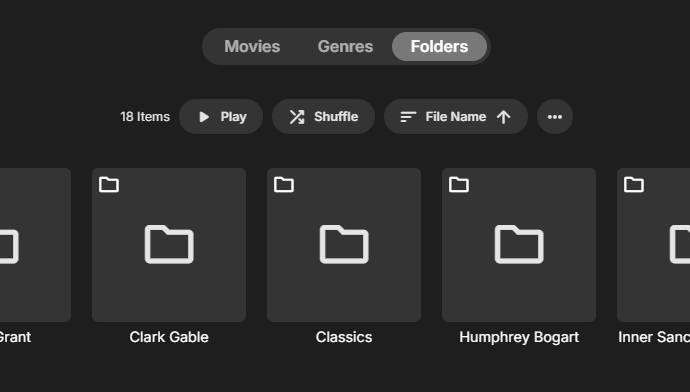
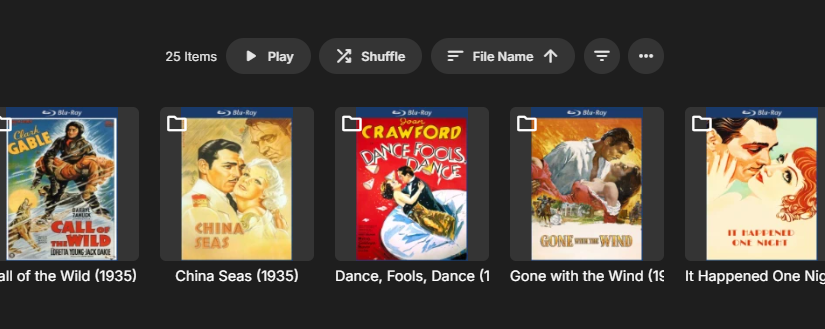 2 points
 -
We need neither colon nor comma. Just put a single space there and go on with life. Less useless punctuation = less visual clutter.2 points
-
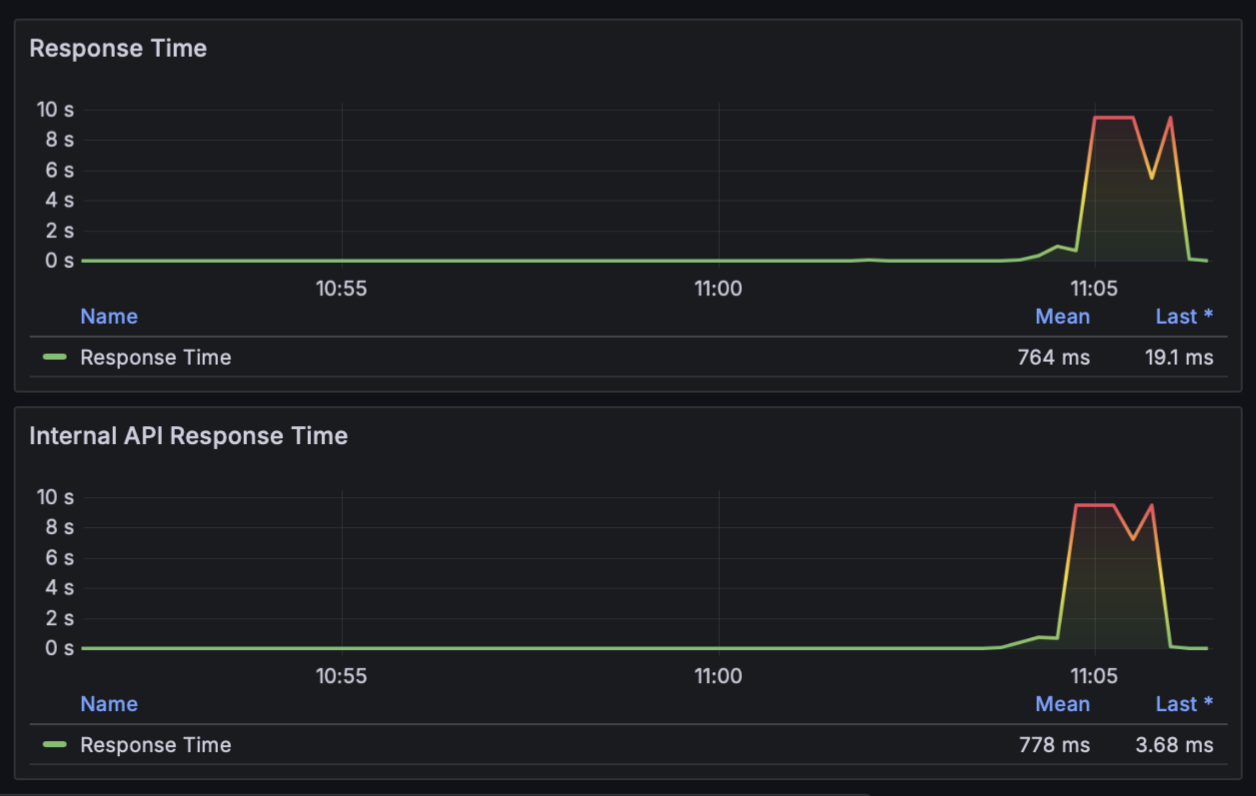
Hi all, I have been chasing emby container hanging/crashing for the past few months and finally think I have narrowed down the specific root cause. Context: Dell R730 Proxmox 9 Host (48 CPU, 128GB RAM) Debian 13 LXC Container w/ Emby 4.9.1.80 (42 CPU cores, 32GB RAM) Periodically my emby container completely stops responding, becomes very sluggish and I am not able to login via SSH or the proxmox pct console tool. I originally thought this was an intel GPU issue as I switched from an NVIDIA GPU earlier this year and I anecdotally thought the issues begun around then. It was very hard to diagnose because I do not have access to the container when it is in this failed state. I finally broke down and setup Prometheus for monitoring and a Grafana dashboard, and this has finally indicated that I am really seeing a OOM RAM issue. For this specific issue repro I am streaming 2 4K movies simultaneously and both are Direct Play / Direct Stream Remuxing due the the file container not being compatible with macOS Safari. As you can see, as soon as the streams are started the container RAM completely fills up, and after a couple of minutes the container becomes completely unresponsive and the streams stop. At this point, I have to force stop the container and restart it to recover. I suspect this is because emby/ffmpeg is remuxing the video files into a container compatible with the streaming client, and as such is loading the entire (large) video files into memory. I have used emby for years, why is this only an issue within the past year? If this is simply a linux memory management issueI I would expect the kernel to handle this properly and dispose of cached memory when it gets too full. Is this an emby/ffmpeg issue? Swap is off on both my proxmox host and the emby lxc container as I have a lot of RAM, I would prefer to keep swap turned off. Here are some images from my grafana dashboard that shows the rapid memory fill up just a few minutes after the streams begin, and then the metrics cut off when the container becomes unresponsive. I will also upload the emby server and ffmpeg stream logs from this session, with enhanced logging turned on. It seems really odd that I can no longer serve 2x 4K streams simultaneously when they aren't even transcoding, just remuxing/direct playing Thanks! ffmpeg-remux-f64d60e1-684c-4e99-83d0-f5aece2eeb5c_1.txt embyserver-63896295956.txt ffmpeg-directstream-101e7ef9-94c8-4e6b-b8ec-0ada5e8a74d4_1.txt
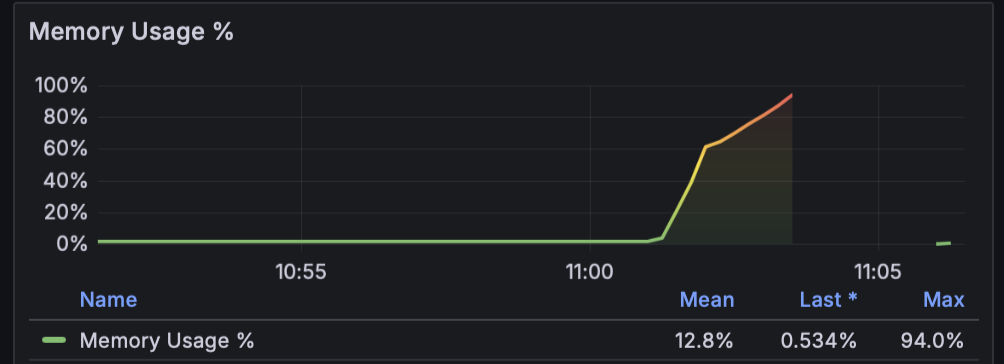
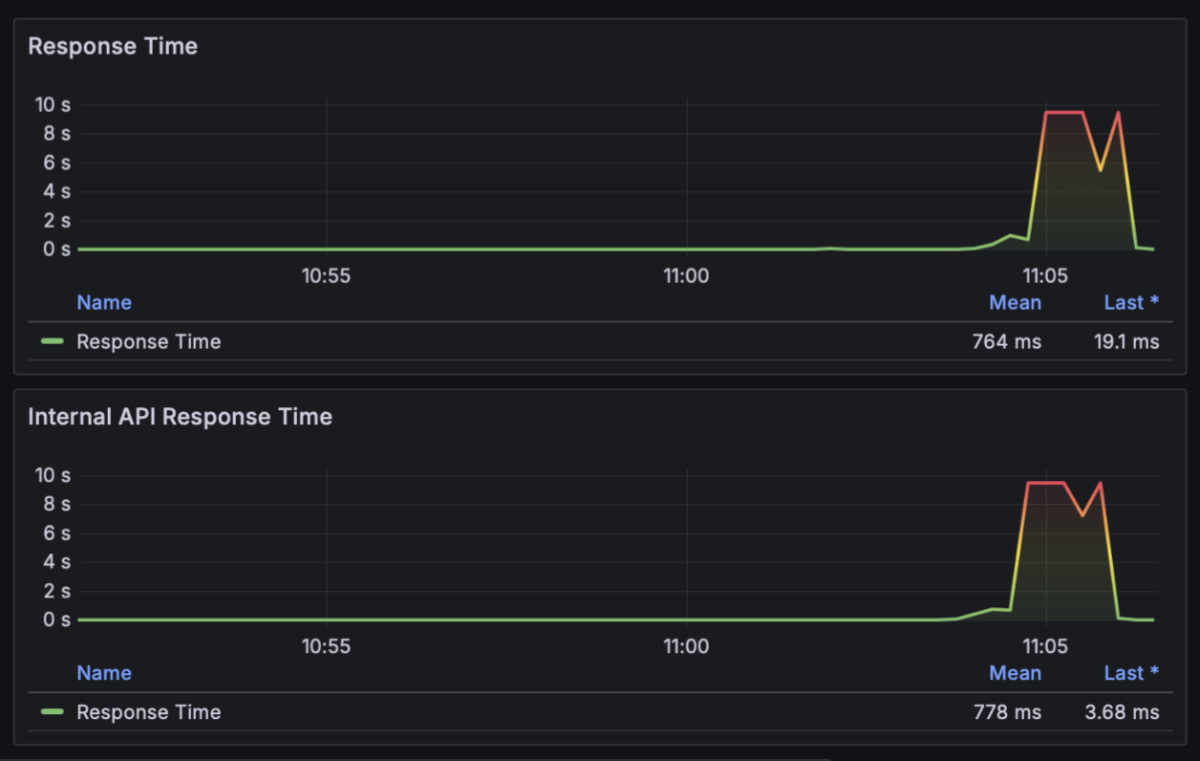 1 point
 -
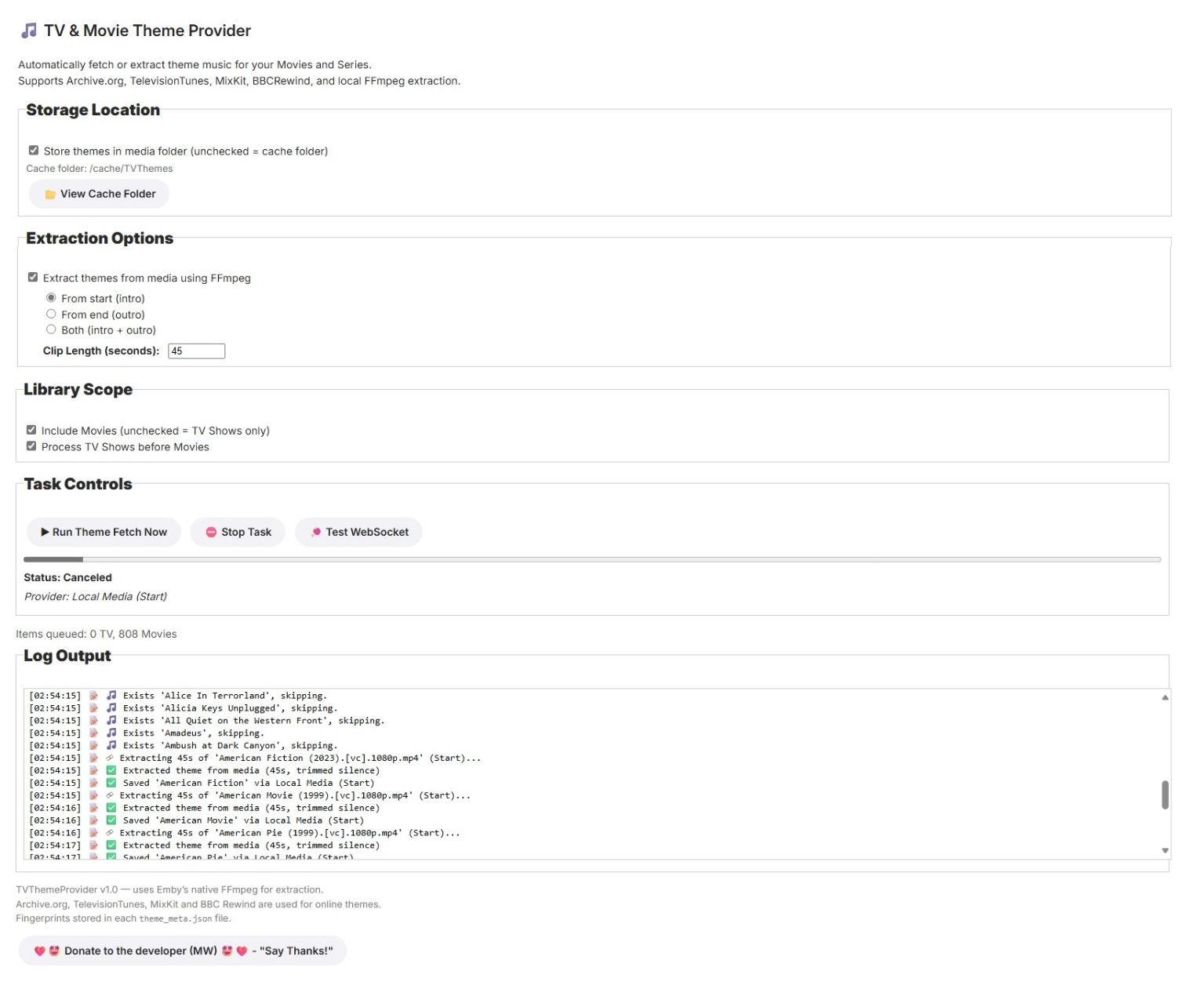
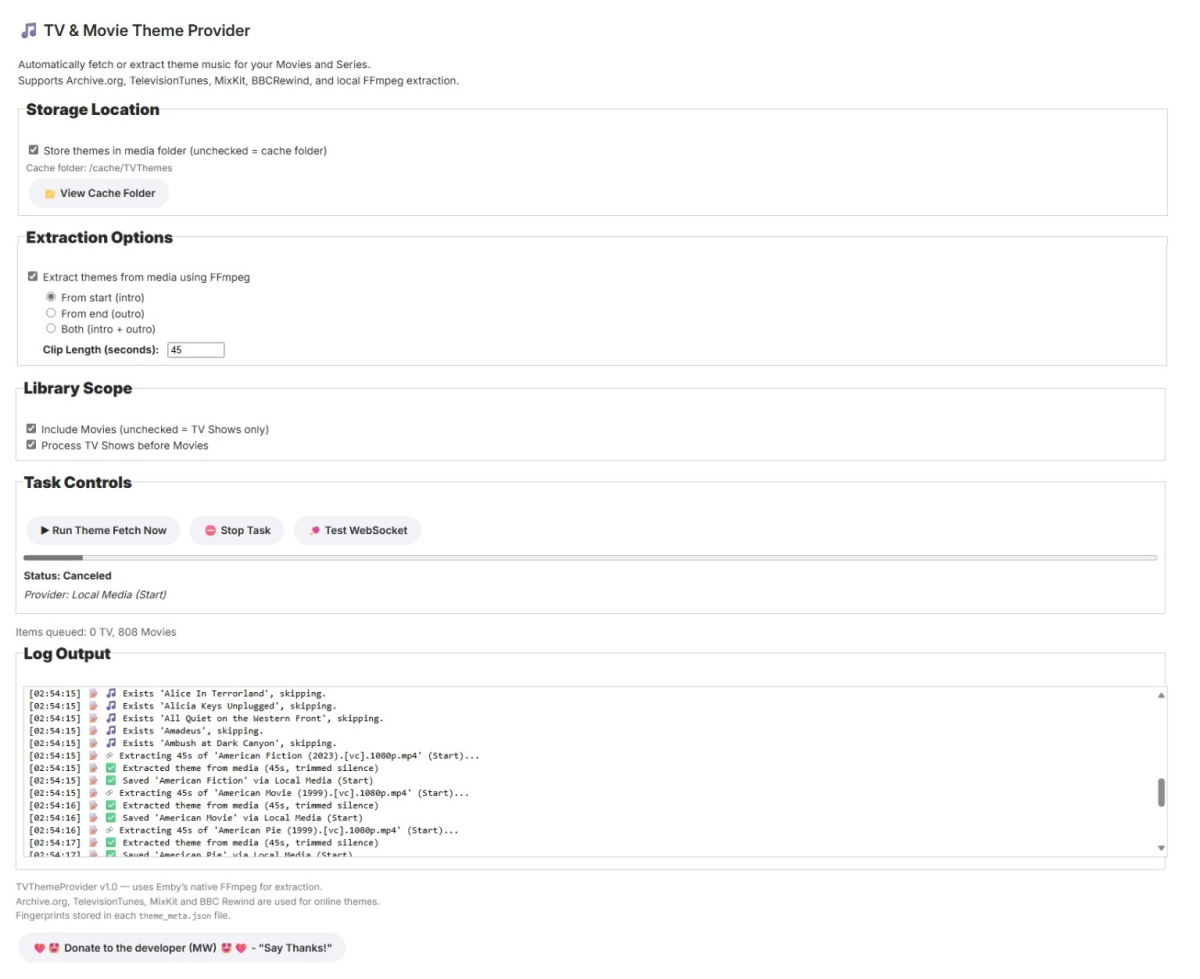
Built for server 4.8.11 + TV&Movie Theme Provider Plugin Overview TV&Movie Theme Provider automatically locates, downloads, or extracts theme music for Movies and TV Series in your Emby library. It integrates multiple free and legal providers — Archive.org, TelevisionTunes, MixKit, and BBC Rewind — with an optional local FFmpeg extractor for generating clean intro/outro MP3 clips directly from your media. The plugin runs as a scheduled Emby task and provides a full Dashboard configuration page featuring live log output, WebSocket updates, and library scan statistics. Step-by-Step Operation Library Scan The scheduled task queries the Emby library through ILibraryManager. TV Series are processed first by default; Movies optionally included. Theme Detection For each item, the plugin searches theme sources in order: Archive.org TelevisionTunes.co.uk MixKit.co BBC Rewind (musicmemories.bbcrewind.co.uk) Download or Extraction If no theme is found online, FFmpeg extracts 45 seconds of audio from the start or end of the video. The extraction uses: bash -t 45 -af silenceremove=start_periods=1:start_threshold=-40dB ensuring silence is trimmed. Storage Themes can be saved in the media’s folder or a cache directory, based on user settings. Fingerprint & Metadata Each successful theme creates a theme_meta.json with SHA-256 fingerprint, provider, licence, and timestamp. Dashboard Feedback A WebSocket channel TVThemeProvider streams progress messages to the dashboard page (tvthemeprovider.html / .js). Users see real-time status, provider name, progress bar, and log output. Process Flow flowchart TD A[Start Task] --> B[Load Plugin Config] B --> C[Query Library (Series / Movies)] C --> D{Existing Theme?} D -->|Yes| E[Skip] D -->|No| F[Try Providers<br>Archive→TelevisionTunes→MixKit→BBC Rewind] F -->|Found| G[Save MP3 + JSON Metadata] F -->|Not Found| H[Extract with FFmpeg<br>Trim Silence 45 s] H --> I[Compute Fingerprint] G --> I I --> J[Broadcast via WebSocket] J --> K[Next Item] K --> L[Complete + Summary] Conclusion The TVThemeProvider Plugin is a complete, legally-safe theme music engine for Emby. It automatically retrieves or extracts high-quality theme MP3s, maintains consistent metadata, and keeps you informed in real time via a responsive dashboard. With BBC Rewind support and WebSocket integration, this plugin enriches your media library MediaBrowser.Plugins.TVThemeProvider.dll MixKit and BBC Rewind have been removed , MixKit is unauthorised and contains samples anyway so is not valid, BBC Rewind have removed the media and discontinued but left their api up, so 404's galore. That one is a shame Fixed tv Series extractions and added code to honour intro markers, although I havent tested it yet. Im away for the week now, so I have posted it anyway, im sure you ll let me know if it aint working MediaBrowser.Plugins.TVThemeProvider.1.0.0.1.zip
 1 point
 -
Throttling is just limiting how hard it has to work into spurts, so instead of going full tilt until it's done it will have a ~2 minute buffer worth. It should still be providing opportunities for cleanup as long as the sizing is being reported correctly. I tried digging through my logs to try to find what it says when it's cleaning up segments but I couldn't find any, my temp path is quite large but I know I've seen the messages before even when it wasn't really necessary to clean up yet so I was hoping to find something to reference. I'd recommend putting your transcoding temp folder on a disk backed path. If you're concerned that it will "wear out" your drive, especially if it's an SSD, don't be - modern consumer grade hardware is quite resilient, unless it's super super cheap or something you'll replace that drive long before it wears out. As a point of reference my scratch array includes a Samsung 850 EVO which used to serve as an OS drive for my hypervisor so it saw A LOT of small writes from VMs - it has almost 8 years of power on time with over 150 TB written and far as I can tell from the SMART data is still quite healthy even though it's warranty only covers 5 years and 150 TBW. EDIT: I have 2 of the same drive with equivalent results, since I ran them as RAID 1 when they were the hypervisor drives, now they're part of a ZFS "raid 0" array.1 point
-
Is there any news on this issue? I am afraid to do the update if all my adjusted metadata will be gone.1 point
-
These seem to be 10:00pm and 10:30pm on the 15th which he was asking about 2025-10-14 00:05:35.592 Info LiveTV: Creating recording timer for 3c523f5a9f6ac3bf29a0032b36ac6e62, Cheers. Timer will fire in 2754.406787133333 minutes 2025-10-14 00:05:35.638 Info LiveTV: Creating recording timer for 960366bd236eb4677e64b28632159a4e, Cheers. Timer will fire in 2784.4060248 minutes1 point
-
HI, this is only a 25 second log file here. I don't see any web app activity. Please try clearing browsing data and see if that helps. If it doesn't help, then please attach the complete emby server log and indicate the time the problem occurred.. Thanks.1 point
-
The other thought I had was that it wasn't cleaning up the temp files, which seems like it would be the case if the reported size is larger than the actual size so it never tries. I don't remember what the log entry says exactly to see if it was trying to do it. Glad that resolved it.1 point
-
@LessajThank you so much. I have been chasing this for months and your reply is exactly what I needed to put the last piece of the puzzle together. Currently streaming 4x 4K movies without issue! Only using 16GB of the containers overall 32GB RAM1 point
-
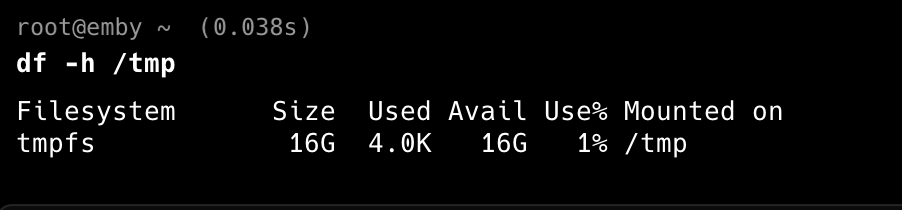
OK! Problem pretty much solved. It looks like there's some issue with proxmox/cgroups/lxc which means that the tmpfs size is created with half of the host's RAM and completely ignores the actual container memory limit set in the proxmox lxc .conf. As a result, it tries to fill tmpfs to 64GB and when it hits the container limit (32GB) it OOMs and crashes. I am going to make a post on the proxmox forum and see if this is expected, or a known issue or something. In the meantime, I am going to override this with `lxc.mount.entry = tmpfs tmp tmpfs nodev,nosuid,size=16G 0 0` in my container config which should limit tmpfs to half of my containers RAM, rather than half of the host ram.

 1 point
 -
Is your /tmp file system RAM backed or disk backed? This is where the temporary files will go when remuxing or transcoding. Do you monitor the space used for this path?1 point
-
To be fair that's a good idea. I had thought about intro skip when I added the JSON output file with it, keeping fingerprints of them, so that if I decide to later can match episodes or related material with them.1 point
-
OK j'ai installé l'appli sur ma smartv samsung je viens de l'acquérir: elle est neuve; je vais réessayer1 point
-
Yup, happens ALL the time. JUST happened now when doing a Metadata Refresh for missing images on shows, movies etc.1 point
-
Small suggestion: you could insert logic between online sources check and FFmpeg 45s extract to check for IntroSkip markers - if found, FFmpeg extract from that time onwards as that part is extremely likely to contain music theme, if not, proceed to regular 45s (or whatever) extract.1 point
-
Just an observation -- Assuming you recently upgraded Emby, it is a new version of Emby and one or more of the plugins may not be working correctly with the changes to Emby.1 point
-
Well, now I feel dumb, lol! Thanks!1 point
-
I'm using this plugin for over a week in my Emby server and it works flawlessly. Thank you!1 point
-
I've been testing the plugin, and it works excellently! Everything runs smoothly with Ktuvit integration—subtitles download quickly and correctly. Nice work!1 point
-
Thank you!!! This is very helpful. I haven’t tried every relevant ArtistsService query permutation yet but adding “UserId=…” is sufficient for me to now get the correct counts for AlbumArtist, Artist and Composer in 4.9, and easy to implement. Perhaps Emby can answer if this is a new permanent requirement for 4.9 ArtistsService? It doesn’t seem to be necessary for 4.9 ItemsService /Items. Thanks!1 point
-
Thanks @GrimReaper, that's right. I changed the image and deleted my browser history. Thanks Exactly @cBers, that's what it looks like, and even though I've had it like this for a long time, I got tired of seeing it like this.1 point
-
Looks like you're running my script from in unraid and not the container. So this will fail. Follow the instructions in the link above for Docker. You need to connect to the Docker Container and run the script from within it1 point
-
Option number 1 - put the synopsis back please. After that...1 point
-
I noticed this discrepancy this evening when calling the Emby API on my server and checking some API responses! Long story short, this endpoint behaves the way it should if you pass in userId=… as a query parameter. * On my server, I have 843 album artists, but 3,255 regular artists. * I wanted to get a list of album artists, and I haven't tried this on older versions of Emby server, just v4.9.1.80. I would expect /Artists/AlbumArtists to just… return album artists, and not all artists. Based on what @user24 is saying, that's the way it used to work in previous Emby server versions, too. The following cURL gets me all 3,255 artists, which is identical to the response returned from calling /Artists. curl "https://EMBY_HOST/Artists/AlbumArtists" \ -H 'Authorization: Emby Client="Client Type", Device="Device Name", DeviceId="DB533F1F-D2A3-44F7-AE9A-2C45E4D4F5A5", Version="0.1.0", Token="TOKEN"' So given @Luke's advice, I looked at what the web UI (which shows the correct list of album artists) is calling, and compared query parameters, and started making the same request and removing individual query parameters one at a time, and the one that changed the response to show all artists was userId — as soon as I removed it from the query the web UI was making, I started getting all artists. Put that query param back in, and I get the list of album artists. So I modified my API call to add just that parameter, and that did the trick. curl "https://EMBY_HOST/Artists/AlbumArtists?userId=USER_ID" \ -H 'Authorization: Emby Client="Client Type", Device="Device Name", DeviceId="DB533F1F-D2A3-44F7-AE9A-2C45E4D4F5A5", Version="0.1.0", Token="TOKEN"' Success! That returns the 843 items I'm looking for.1 point
-
Again that won't impact images.1 point
-
@piecesofme?1 point
-
OK yea it's certainly a possibility.1 point
-
If you have any questions for @asgard25directly, a great place to ask is on the forums at1 point
-
Hi Luke, yes. I noticed that some files still play, while most don't. I hadn't fiddled with the permissions, nor does anyone else have access to the server. Either way, the new emby update seems to have sorted the issue. The files that were previously unplayable are now working on all devices. Thanks!1 point
-
Please send them to me or post a link with https://wetransfer.com/ I have to upload them but YouTube suspends the account and vimeo is very restrictive these days. I will have to find a work around.1 point
-
Appears to be mostly working now with the latest update. Some times freezing on the app when casting or a spinning blue wheel (android app) but generally it's working.1 point
-
EmbyWatch - A brilliant app built by a community user! One of the best things about the Emby community is the creativity that comes from it. Every so often, one of our users takes their love for media servers to the next level and builds something that makes life easier for the rest of us. Today, we’re excited to share EmbyWatch, a brand-new Android app developed by community member @asgard25It is an an incredible example of what happens when passion and innovation meet. A User-Built Tool, Made for Admins What makes this story special is that EmbyWatch wasn’t created by a company or a professional app studio. It was created by one of YOU! — just someone who wanted to make managing a server more intuitive and accessible from anywhere. Want to be even more impressed? This is only the second Android app that asgard25 has developed! EmbyWatch is designed to help server admins and advanced users keep track of what’s happening on their Emby setup in real time. It’s not about playback or browsing media, it’s about giving you the tools to monitor, manage, and control your server, all from your phone. Powerful Features at a Glance EmbyWatch brings a surprising amount of functionality for such a young app. Here’s what it can do: Real-time monitoring: See who’s watching what, where they’re streaming from, and how much bandwidth they’re using — all live. User management: View your users, check activity history, and even send messages directly to connected users. Device overview: Identify every connected client, from smart TVs to mobile apps, with connection times and device info. Library insights: Quickly review all your media libraries with detailed counts and metadata. Task control: Run or schedule maintenance tasks like library scans and metadata updates remotely. Plugin visibility: See your installed plugins and available updates. Logs and server details: Access logs, CPU load, uptime, and more — wherever you are. Notifications and widgets: Stay informed with live alerts and optional Android widgets for quick monitoring. For anyone managing a shared server, EmbyWatch feels like having a live dashboard in your pocket. A True Example of Community Ingenuity We love seeing users like asgard25 take their experience with Emby and turn it into something that benefits everyone. EmbyWatch really is a reflection of how open and flexible the Emby ecosystem can be when people put their ideas into action. This project shows exactly what makes our community special, a shared passion for improving and creating! So whether you’re managing your own home setup or running a multi-user server, EmbyWatch offers a simple, powerful way to stay connected to your system. Huge thanks to asgard25 for sharing EmbyWatch with the community and for showing what’s possible when creativity meets passion. We’re proud to see our users building tools like this that make Emby not just a media server, but a thriving ecosystem shaped by its fans. If you’re an admin or an advanced user, check out EmbyWatch on Google Play and see how it can make managing your server easier than ever. We can’t wait to see what asgard25 — and others in our amazing community — build next. View the full article1 point
-
Hi Luke, Same here — I’ve run into the same issue after updating to 4.9.1.80. Before, in folder view, if a folder contained just one movie, clicking that folder would take me straight to the movie’s detail page. That was perfect, and I’ve used Emby this way for years. Now, even if there’s only one movie inside, Emby adds another subfolder (like A → B → movie), so I have to click through one more level. It makes browsing my library much less convenient. I’ve seen the suggested workaround, but honestly it feels a bit clunky and not what we really want. We just want the original simple folder behavior back — or at least a global option that lets users choose between the new and old style. It would be great if this setting could apply to Movies, TV Shows, Mixed Content libraries, and any other content type that uses folder view — so that the experience is consistent across all libraries. Please consider restoring or adding this option in a future update. The old folder view worked beautifully for many of us longtime users. Thanks a lot for listening and for all your hard work on Emby!1 point
-
It doesn't like if it I try use my domain (via reverse proxy). Auth failed. Internal ip works to connect to server.1 point
-
Serious question: Is it really that hard to bring the old folder view back? The developers say this is the real folder attitude. It may be; but it is not the style we arranged our media and already embedded metadata to them. We can't sort, organize or select titles anymore which makes creating collections or playlists a chore... And I am sorry but no, it is not just one click more, it is more than that and you know it...1 point
-
And could it be possible to have an option that would behave like the previous legacy version in the emby server options? I really miss how it used to work.1 point
-
The setting Luke refers to only addresses the extra click for the final step of actually playing a title. For anyone that uses Folder View for both navigating/watching and doing configuration for their content, the click-through option is not good enough. There are several active threads relating to different aspects of this change, but it's all the same issue, relating from this rather significant change in how single-title-folders are managed by the system.1 point
-
This gets dumber by the day. I just created a new collection, painfully slow...everything is now slow with this new version. But that is not the real problem. Because of my FOLDER STRUCTURE if I add all the movies at once in a folder to a collection when you go to the collection they don't show as movies, but as folders and are separate from the other movies added individually. So it appear I now have to turn off that setting that flattens the folders for LOOKS ONLY it appears, then click each folder to get to an individual movie, then select that movie to add to the collection. And I have to repeat this for 35 movies, instead of how it USED TO WORK where you just multi-selected all in the folder and created a collection. This new so called upgrade is a huge downgrade in productivity which totally negates any new features or fixes etc. This is totally ridiculous. Do the emby developers actually use their own product? What a huge waste of time jumping through hoops for a change that has ABSOLUTELY NO FUNCTIONAL PURPOSE. If it does then please illustrate.1 point
-
So you have taken folders and made them useless? You know, every time I think we may be getting somewhere you all take us backwards. I can no longer organize my content and this is a time waster. You have essentially made this useless but what you are really saying is "we think you should just throw everything in one giant folder because our database handles it all" but that only handles content not file organization. I simply don't know what to do now. The old stable is a pain due to navigation issues and double dates that will never get resolved and now I can no longer organize my content because I am an organized person who uses folders so I can segregate and quickly find everything. So although it is easier to record stuff I can no longer organize it because for some reason you all just don't like folders. FORCING a flat folder structure means having way too many libraries while organizing and that is a pain too. This is not good at all, what a disappointment. So a year an a half wait and it's worse, great.1 point
-
This is stupid. I couldn't use the beta because it had other problems with my setup so I had no clue this [redacted] was done. Problem is the last stable is effed up with all kinds of little [redacted] you won't fix so it's the lesser of two evils. This is a giant waste of productivity and ADDS NOTHING. Whoever thought this [redacted] up really needs good spanking. Folder view has worked perfectly forever. There was no reason to touch it. I have lots of folders and this just makes this release a [redacted]. All the other stuff looks nice but this kills it all in one fell swoop. This will waste my time EVERY DAY.1 point
-
What? Why on earth would you add another layer I have to click through for no reason? What is it's purpose other than to be annoying?1 point
-
Ok, what's this folder view BS and how do I turn it off? That seems to be the problem and I don't understand the purpose of "folder view" to begin with.1 point
-
Correct, but Amazon has a solution for existing Fire OS apps that they select and they have selected ours.1 point
-
I think a user filter could make sense. Also when clicking on a user in user setup, being able to see this same information for that user. So almost like that screen becomes a dashboard for that one user and not just their permissions.1 point