Leaderboard




Popular Content
Showing content with the highest reputation on 10/05/25 in all areas
-
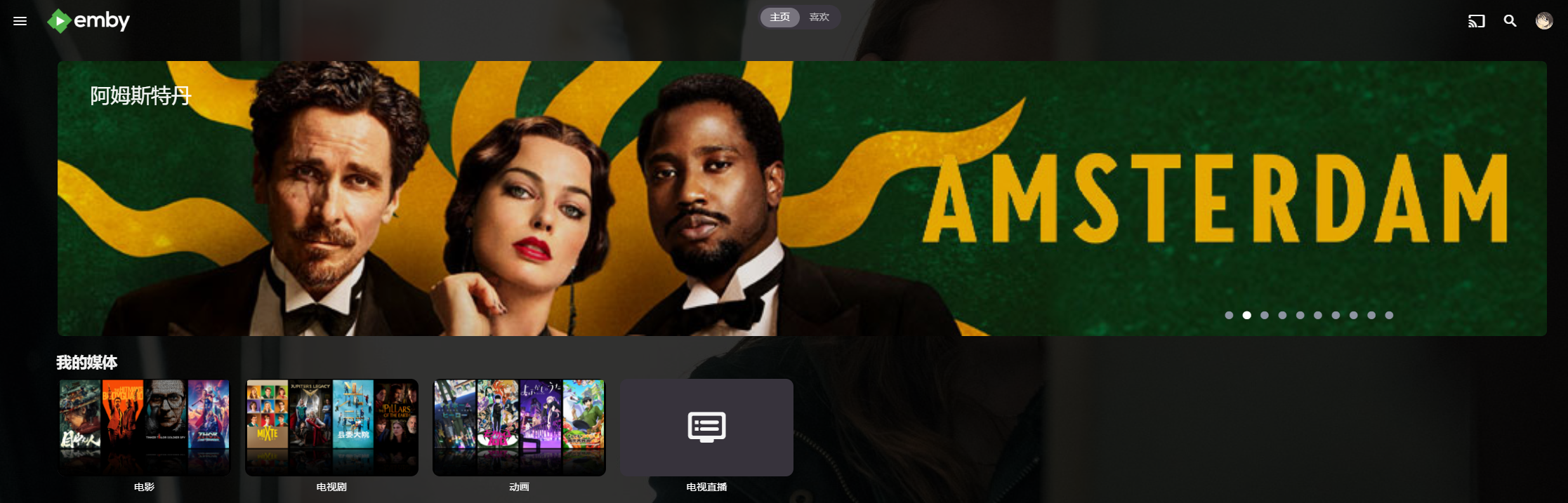
First and foremost: 1. This is heavily vibe-coded with the help of Claude Sonnet 4.5 and just a proof of concept (though it's fully functional on my side)! 2. Tested with stable Server 4.9.1.80 on a 1080p-Screen 3. Pretty sure that the code is not the best and shpuld be reviewed by anyone with good js-Skills. 4. This Banner just works on the Web Client. I hope one of the experienced devs here can make more out of it, e.g. a Plugin. Perhaps something like that can be incorporated as a menu option by Emby itself in the future. What the Spotlight does: On every Homepage load the Spotlight takes 10 items (Movies/TV Shows) from 50 latest Releases in the library and displays them as a slideshow. Banner is clickable to get to the item detail screen. Ratings are also included. Download from: https://github.com/v1rusnl/EmbySpotlight 20251005-1807-48.9352916.mp4.b64639dcb41419847c7795874d16a84b.mp44 points
-
I will respond tomorrow when i'm sober4 points
-
Generally speaking how long is the turn around historically between submitting and app and it getting published to the Roku store?3 points
-
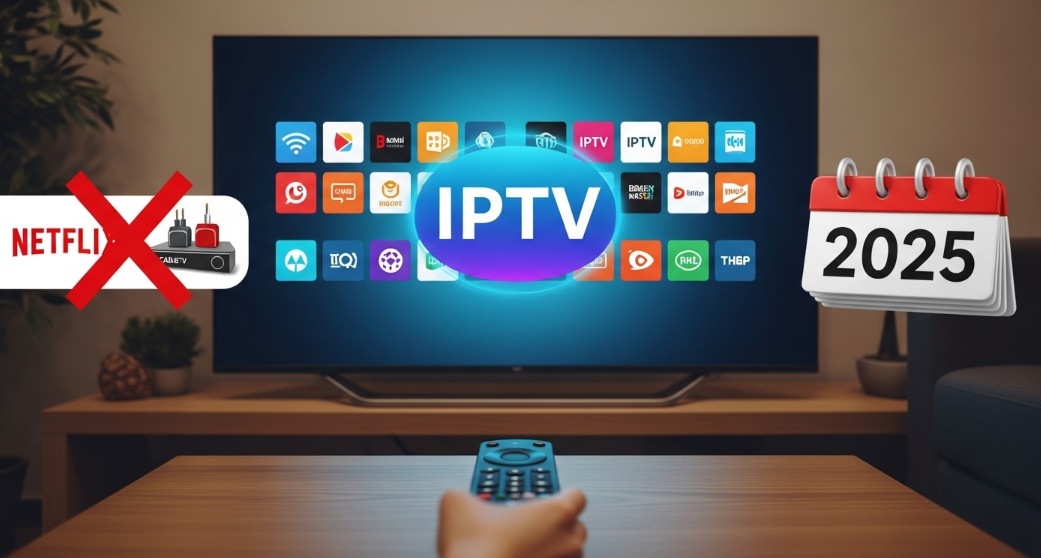
Is there any iptv provider which is best in regard of 4K quality, antifreezing, bufferless and cheap cost? I'm using a IPTV Great, but want to explore some more options. Channels need to be 100K+ and vod also needed 100k+? It should be legal.
 2 points
 -
Hi. This is not true. Emby Connect is completely optional. You can access your server remotely via its address at any time. Connect is just a convenience.2 points
-
The update will go out Monday night. Roku does not work weekends.2 points
-
I can understand being concerned, these are the main points that come to my mind: You don't want to give 3rd-party access to your server: The plugin runs on your server and connects to mine, not the other way around. I do not store your Emby API key on my server, so there’s no way for me to connect to it to access your media for example. There are solutions that work like that, but I deliberately avoided that approach. Technically, any plugin could contain malicious code, but that’s true for all plugins. I don’t obfuscate the code, and since it’s .NET, anyone can open the DLL and inspect it fully. You don't want a 3rd party to know what media you own: Since I want to give you the option to see what items you are missing from a collection I have to store that information. Someone could theoretically infer what items you do have in a collection if that data were leaked. Honestly, I hadn’t thought much about this, popular plugins like Trakt track what you have watched and there are similar examples. In any case, I’ll add an option to disable this data being stored. You want to become a supporter but don’t want some random guy having your financial information: All of that goes through Patreon, and I never see or handle any of it.2 points
-
Disregard, it works fine. Been on PLEX for years but do to their latest interface had to find something else, this emby seems great, what plex used to be..2 points
-
Okay, thx for that info, @SamES For testing i uninstalled the USB Version 2.2.5 and installed the 2.1 from the Samsung AppStore. Same message appears now there too. When my child stops playing Games on the TV in choose a factory reset of the TV. Thats the First factory reset i ever do on this TV. That cant hurt. I report later.2 points
-
Okay, I’ve found the reason why Emby won’t accept my M3U URL. Strong, Dino, and other IPTV providers lock their M3U URLs, preventing any editing. Therefore, when attempting to load a locked M3U, Emby throws an 884 error code. Additionally, when trying to use m3u-editor, it won’t allow editing, resulting in an error code. Regular IPTV apps allow the M3U because it’s solely for playback purposes. To resolve this, go to xtream-editor.com or a similar platform and allow it to create and modify your Extreme playlist using your Extreme credentials. Once done, Extreme generates a new M3U URL and XMLTV URL, which you can then paste back into Emby, and you’ll be back online.2 points
-
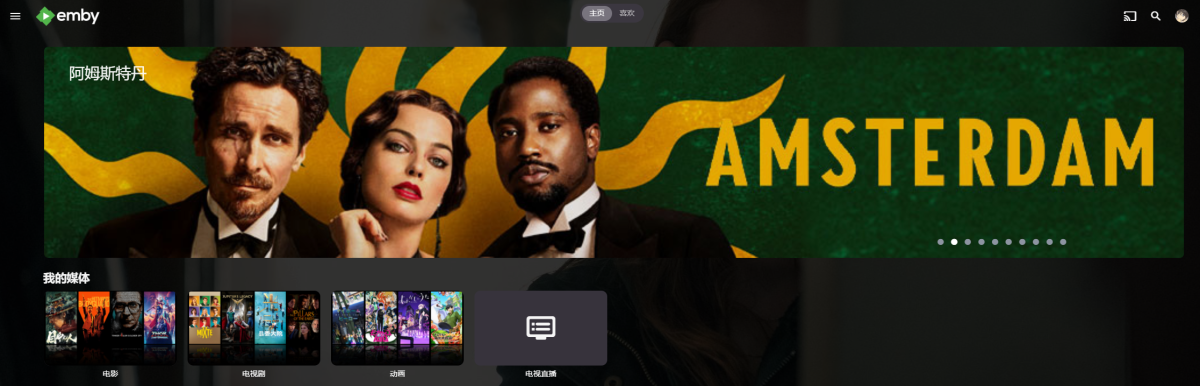
https://github.com/Shurelol/EmbyCustomJS_Css Some fantastic feature can be added to your emby easily Such as photo carousel
 1 point
 -
I would like to see an option within the library options to check which users have access. (And I also wonder why the "pop-up" instead of a "new" window to manage or add a Library)1 point
-
I'm still impressed how gorgeous this looks every time I'm back on Home Screen and Spotlight pops-up, I'm not yet used to it. But I adore it. Awesome work, @sh0rty.1 point
-
Hi, we'll have to add options to control it. It got tightened up a little so that the results would make a little more sense.1 point
-
Alright, in doubt, I have "re-installed" (more correct to say "redeployed") a new instance of Emby on my server. I see too many things going a little wrong here and there. And it can't be right. Now I have set up my new instance as properly as I could, following the documentation. So I'm gonna mark this topic as solved, because, technically my 'old' Emby install, hasn't crashed again since I created a specific user with that specific number (911). But that's a solution that I find inelegant and unsatisfying. So -> clean new install -> I'll post here to say if the problem happens again with that new install.1 point
-
Yes. They just picked a round number. 4.9.1 was released as a "quasi-stable" version for some platform (I don't recall which) that had an update which made it require a change that was only in the beta. Paul1 point
-
If my current questions don't lead to any clues then the next thing will be that I wonder if the video file has a cast list in it's embedded metadata.1 point
-
I do apologise, I didn't notie it! Thanks!1 point
-
Give the latest version a go pal. Had chance to look into this further today and a compatibility update was required. I've just pushed a new release to each of the three. cheers1 point
-
If you google youtube error 153 a lot of apps seem to be impacted. We are keeping an eye on this. Thanks.1 point
-
OK now I got it Changed correctly now.1 point
-
After looking at drive pool it's well worth the $29.95 for the features. I guess I will post an update in a few weeks. This may simplify my life a bit, as right now my 'emby' drive has backups on three separate devices, and was done via a robocopy script... once it seems good, I will report, and show the comparisons for future users!!! cheers to all...1 point
-
You can add custom css in general settings, this disables the check for movies and series: .cardIndicator.cardCountIndicator, .cardIndicator.cardPlayedIndicator { display: none !important; } hope this helps1 point
-
This is looking just beautiful. Btw, testing on 4.8.11.0, no adverse effects observed for now. Well done.1 point
-
Thanks gents, looks like the Amazon Store one is newer than what I have. Since it's a FireTV, I'll give that a shot first. If not, I'll side load.1 point
-
To see which nodes are available, I would not use the list in the skin customization. That's way to tricky if you are not sure what's the one you need. Use Kodi's video addons in Kodi's addon menu. There you have full access to every node available from e4k plugin. I think, what you want is under dynamic nodes -> TVShows -> continue watching, but double check the nodes. Once you know what you need, use the skin customization tools.1 point
-
alors deja je dois trouver comment acceder aux donnees systemes sur le synology pou rprendre le dossir config et metadata ... heu non je vais prendre les deux dossiers directement dans le backup-full1 point
-
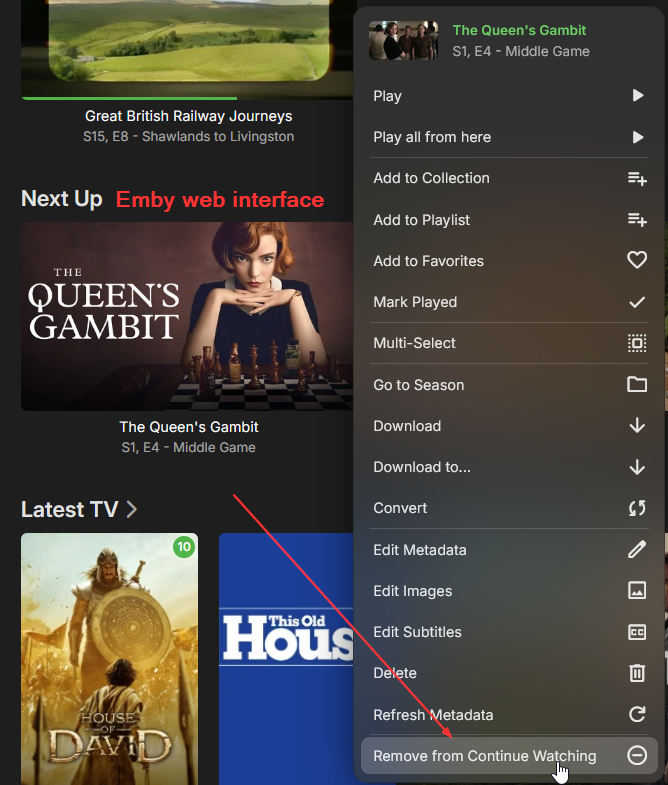
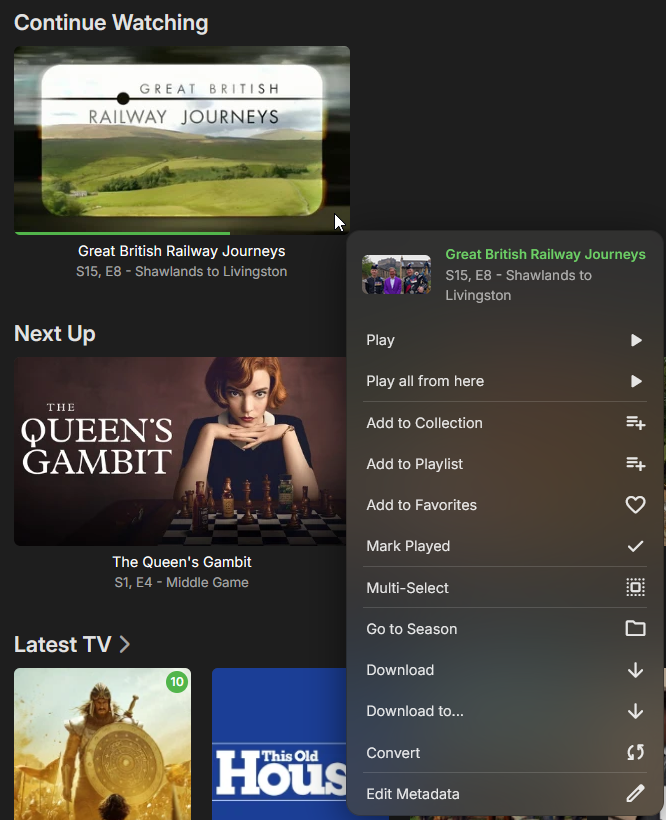
Hey, I've been dealing with this a lot, so of course I know what I'm talking about. I'm shocked you can't read my mind! In the Emby web interface, I clicked on the 3-dot menu for a series that was in the "Next Up" listing, then selected "Remove from Continue Watching", as shown in the screen shot attached. On Kodi, I have a main menu item (using the Aeon Nox Silvo skin) called "Next Up". It activates: Add-ons | Video add-ons | Emby for Kodi Next Gen (Video) | Synced nodes (my emby server name) | Next Episodes (Mixed content) | Create menu item to here This node brings up the "Next Up" list from Emby, but doesn't seem to recognize that I've done the "Remove from Continue Watching" in Emby itself. Now, it is odd, I think, that the context menu in Emby calls it "Remove from Continue Watching". To me, that's to pick up where you left off in a particular episode or movie. However, the behavior in Emby is to remove it from the "Next Up" listing. If I select the 3-dot menu for an episode that I stopped playing part way through, I do not get an option to "Remove from Continue Watching", only to "Mark Played". If you need me to reproduce & provide a log file, just let me know, happy to do so.
 1 point
 -
I think @GuyBeewas mentioning the initial prompt for context. The actual issue was how to stop a PIN request you approved when you first logged in. You just select the 'sign out' option under your username and then sign back in. You'll be asked again if you want the PIN prompt and you can select 'no' this time. You won't be asked again next time you use this device.1 point
-
Here's a video showing exactly that. (please note that there's no audio) Grid_18k.mp41 point
-
No, this didn't resolve the problem. There is still the URL from the hostname field, so the link is still wrong1 point
-
I made a mistake in my previous post, the audio is also fully working in the TV. Seems that there are some failures working here together. the emby app/server is not able to identify that the file can be direct play in the TV, then there is a problem about the transcoding and for finishing looks that the transcoding itself is failling for no reason1 point
-
That is only because they have no other way of presenting it to you. Presenting static VoD content in an EPG is irrational. The content has no relation to time. This plug-in is precisely to solve that problem by separating the live content from the static content. This plug-in will allow you to see and manage the static content just like the static content on your own server with all the features that come with that.1 point
-
page restored. Thank you1 point
-
1 point
-
Bonjour, je vais essayer de faire cela des que je reussi à migrer proprement ma base de donnéee1 point
-
TV shows have two sort methods based on date added, by "Date Added" (TV show itself) and by "Last Episode Date Added" (for an episode of particular TV show). Home Screen "Latest" rows for TV shows content-type libraries are displayed based on latter.1 point
-
Nice so do I1 point
-
I have an OLED B1... and no, DV movie in direct play are still pink/green :(1 point
-
Currently I'm not able to trigger the issue on my setup. I used a mixed content library as well but seems to be fine. I assume my folder structure is a bit different than yours. I continue testing...1 point
-
OK please keep us posted on that. Thanks !1 point
-
Ha, good call! No, I’ve not seen this message before and from what I can find in the Tizen forums, this type of debugging shouldn’t even be possible if the TV does not have developer mode enabled. Just go to the app screen, if developer mode is enabled you should see a banner at the top of the page telling you it’s enabled. Alternatively, I would have also suggested that you check the firmware but it does look like what you have is the latest. Have you had this issue before with the USB version or is this the first time you have tried USB loading? BTW, I wouldn’t be too concerned of the different version number between the store and USB versions. We have to increment the version number every month to update the USB version so it goes up quite quickly but there usually aren’t any significant functional differences between them. The store version gets updated often enough that you shouldn’t really see much of a difference and it’s not worth the hassle of uninstalling/reinstalling every month1 point
-
I hope this update drop for my older version1 point
-
Oh man... After uninstalling 12.2.0 and installing 12.3.4, everything. just. works. At least so far! I was having issues with Next Episode & Continuing lists not working - those both seem to work now! Does E4K sync on a schedule or as needed? I removed several shows from Emby's (via Emby's interface) "Next Up" listing and they haven't removed from E4K. If it syncs on a schedule, then that would make sense - I'm not likely to have done it right before a scheduled sync... The other issues I was having was when a video would end (TV show, Movie, or even just a file - sports events don't tend to fall into organizational categories that Emby/Kodi can deal well with), Kodi would just hang. I'd get a black screen and nothing would happen - I've left it for 12 hours and come back and it was still that way. Don't know if this was something weird with E4K 12.2.0, or if there's something more sinister going on in my underlying Kodi/LibreELEC install. I'll have to keep an eye on that and will report back. --- UPDATE --- Watched a show and when it ended, it went back to the menu like it should have. Very happy about that! It's been very frustrating having to reboot the box after every episode... Only issue I've noted so far is that when the episode ended, it was still in the "Next Up" listing. I selected the context menu, and it showed "Mark Unwatched". I did so, then "Mark Watched". When I manually marked it watched, it disappeared from "Next Up". I was having that issue a while back with the 11.x version, too... Annoying, but in comparison to what I've been dealing with, most livable. Thanks for all your hard work, quickmic!1 point
-
Hi guys. We’ve got this resolved and will be submitting an update to Roku ASAP. Thank you all.1 point
-
Hi, we'll take a look at it. Thanks.1 point
-
Gotify Notifications Plugin Gotify notifications for your Emby server. Current version: 2.0.0.0 Last updated: 2024-02-02 Certified working on Emby Server 4.8.1.0 ## Links Plugin: Download Source: View ## Fresh Installation For Emby Server 4.8.0.0 and above: Download the latest v2 of the DLL file on the release page of this repo Put it in the "plugins" folder of your Emby Server and restart Emby Server The plugin should now show up in your Emby Server management page under Advanced > Plugins Configure the plugin by heading to the new Notification section under User settings Click the "+ Add Notification" button and choose "Gotify" The rest is self-explanatory For Emby Server versions older than 4.8.0.0: Download the v1.0.0.0 of the DLL file on the release page of this repo Put it in the "plugins" folder of your Emby Server and restart Emby Server The plugin should now show up in your Emby Server management page under Advanced > Plugins Select the plugin and it will take you to its configuration page ## Upgrading If you are upgrading Emby Server to 4.8+ from 4.7 or below, after the upgrade: Head to the plugin section in your Emby Server management page Uninstall your current Gotify plugin by right-clicking it and choosing "Uninstall" Stop your Emby Server Go to your Emby server plugin folder and double-check "MediaBrowser.Plugins.GotifyNotifications.dll" is not present, if yes, delete it Inside the plugin folder, go to its "configurations" sub-folder and delete "MediaBrowser.Plugins.GotifyNotifications.xml" Follow instructions under "Fresh Installation" above for Emby Server 4.8.0.0 and above ## Future Updates I'm going to be honest here: I have no idea how to code in C# specifically. So this plugin totally relies on the development of the Pushover plugin (see credits below). In the event of an Emby Server update breaking the plugin, I will do my best to try and fix it and will release an update on the Github repo. ## Credits This is a shameful slight mod of the Pushover plugin for Emby Server written by LukePulverenti [Luke] so all thanks to him and the Emby Server team. I take no credits for this. And of course big thanks to Gotify as well.1 point
-
Yes, an option for that would be very nice.1 point
-
Hey, it sends the IMDB IDs of the missing items in the collection to my server. Where I stores them so that you can see which items you do not have. Other people will not be able to see what those items are. I've thought about making this optional but no one has requested it. If it's a stopper for you I can look into that. The plugin does not access your Emby API key or anything like that and I don't even store the IP of your server.1 point


.thumb.png.f4cb0545e98b51fd9b00e427622ab761.png)