Leaderboard




Popular Content
Showing content with the highest reputation on 09/19/25 in all areas
-
In tweaking my server a bit over the last few days, and in reading and replying to some posts here, a couple of (what seem to me) rather simple security enhancements came to mind. 1. Option to require password. This could be both a global or individual user setting. It doesn't have to change the behavior of anything else. Actually... I couldn't believe this wasn't there somewhere. Am I missing it? Couldn't a user just delete their own password and open a security hole? 2. Global option hide profile pictures/login. Right now, the only way to do this is per user, which is fine for someone like me that only has 5 It doesn't seem like these would be difficult changes unless I'm missing something.5 points
-
As we are seeing an influx of users getting compromised by bad actors. Why should Emby not impose a password policy ? Or at least impose passwords on Emby Connection accounts since they need to be created local first. But dont need a local password. This gives the Admins a FAULSE sense of security, being a Emby Connect account. But in fact if configured wrong !! Leaves the door right open. As seen below, in at least 1 example. I know I have asked this before, but the vote is still no. 1) This on is from this morning. I suspect this is the case, need confirmation. 2) This one is earlier this year. Had not set password, when setting up Emby Connect accounts. TBH we as users " Admins don't get any warning when NOT doing so. " So how would this admin know ? And I guess this is just the tip of the Iceberg. Not all admins would confess to this.3 points
-
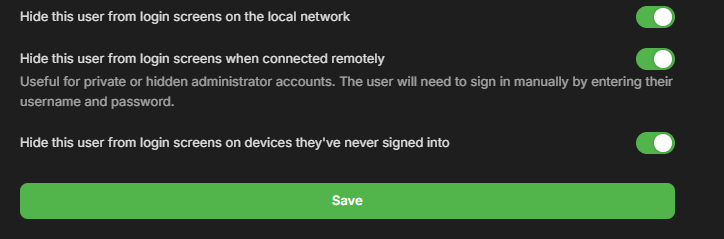
First of all Disable remote access to your network via your router. Also for good measure check your router and disable upnp. If that plugin is enabled in Emby, and uninstall it. Change your admin user to a new admin account without remote access enabled. The new admin account should not indicate that its an admin account. you need to change password on all user accounts connected. And make sure to delete those you did not create. Also enable all the below, since that would be shown to anyone coming across Emby login page. If you use Emby Connect make sure those users also have a secure password. I would also ask you ISP for a new static IP and change DNS name or domain, if you are using that. You would have to ask them here billingsupport@emby.media
 2 points
 -
Looks like i missed this basic setting. I had to scroll down this is exactly what i needed. Thank you.2 points
-
First time to come and reply here to say thank you so much for this keep on!!!2 points
-
I switch to a "dummy account" to test and play around, so I didn't care about play status, continued watching, etc.2 points
-
Being able to specify Collections or even Genres that are allowed/not allowed for specific users would be helpful in the "Parental Control" setting. Only having maximum allowed parental rating isn't as helpful.1 point
-
I'm a plex life time member, but I have been using Emby for over six years continuously, but there is a feature which I have always thought is missing in Emby which I would like and encourage the developer to consider including especially in this dispensation where families can social or commingle due to COVID 19. Today, I received a notification from Plex about it new feature titled Watch together you can read about it here https://support.plex.tv/articles/watch-together/ The feature allows friends and families at distance to watch same movies together instantly, you simply invite all your buddy, once they signed to the system which can be seeing in the server then play and pause as needed, this I think is cool feature should be added to emby. Let's here your though if Emby developer should consider adding this feature to our beloved Emby Media https://www.bing.com/news/search?q=Plex+Watch+Together&qpvt=plex+watch+together&FORM=EWRE1 point
-
With College Football and NFL seasons starting up in the States, a multi-screen option for Live TV would be a nice addition to the Emby feature set. I am thinking of what the WatchESPN app offers thru their Web Browser access. The ability to open a multi-screen window that breaks into four (4) screens that allows you to select streams (Live or Replay) for each and then go full screen. Audio is from whichever of the four screens you have as active. I can accomplish the same right now with the HDHomeRun Quick View TV app. I open multiple instances of the Windows app and then snap them to each corner on my 110" projector screen. Equivalent of four (4) 55" screens. Would be nice if this were a remote friendly option from within Emby Theater and the WebUI clients. I have only seen it in Web Browsers at the moment and not any of the Win10 UWP apps (FS GO, NBCSn, WatchESPN). But, Fox Sports Go just released a multi-screen solution for their Apple TV app. https://techcrunch.com/2016/08/26/fox-sports-go-hits-apple-tv-allows-viewing-of-four-games-at-once/1 point
-
Due to limitations in the number of items allowed in my Trakt collection using the free version, I have removed all items from my Trakt collection except for those that I have not yet watched. When I watch those items, I will remove them from the Trakt collection. Moving forward, any new items I add to my Emby library will be added to my Trakt collection. I will then remove them from the collection once watched and/or deleted from my server. If I tick the "Sync Library" option in the plugin, new content added to my Emby server is automatically tagged as collected in Trakt. That is good. But I'm finding that Emby is also going back through the media on my server and re-tagging other, older items in my library as collected as well. That is bad, as I then have to go back and remove them from my collection in Trakt to stay under the 100item limit. Even after doing that, they eventually get re-tagged as collected on a future sync. Can the Trakt plugin be configured so that it only marks new items added to the Emby library as collected in Trakt during a library sync between Emby and Trakt?1 point
-
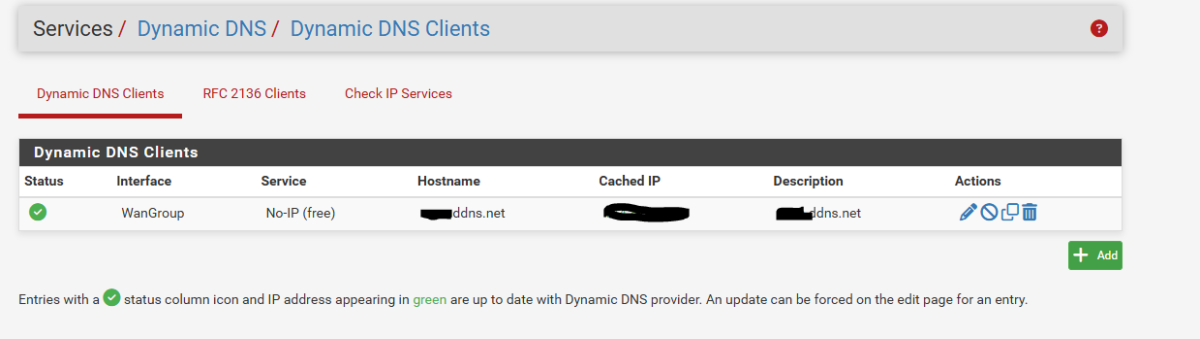
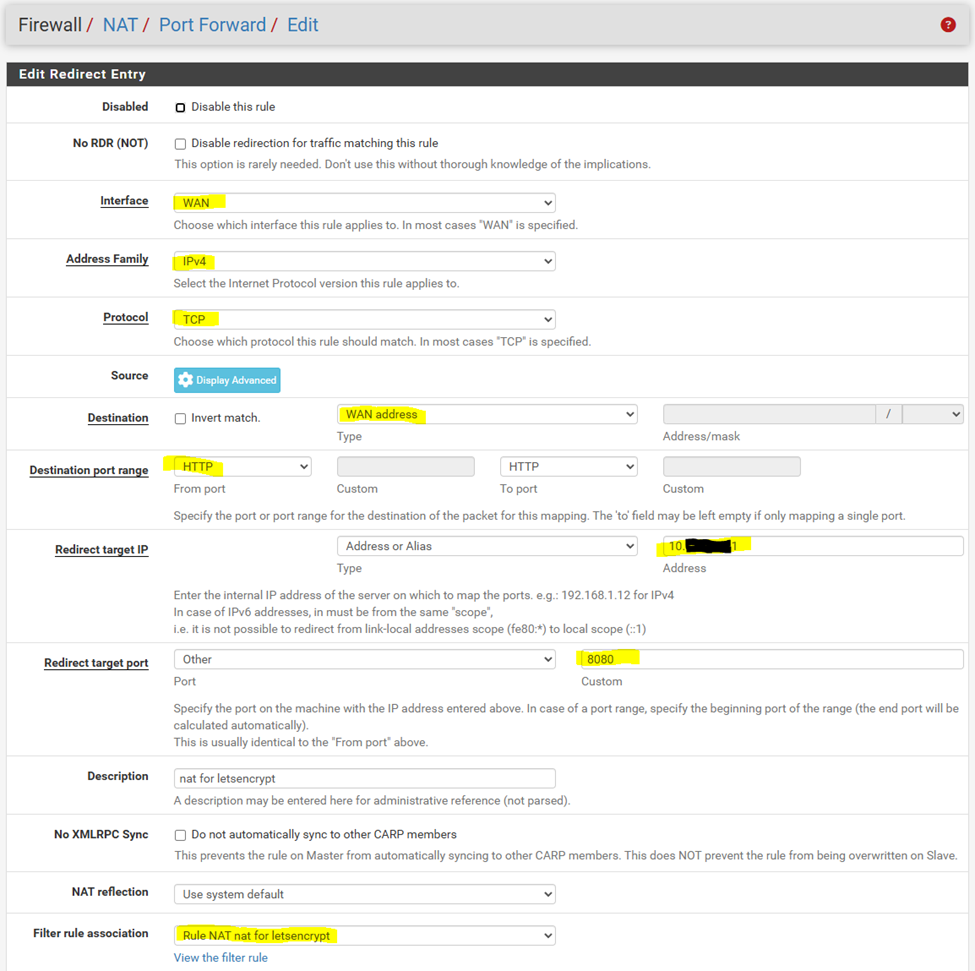
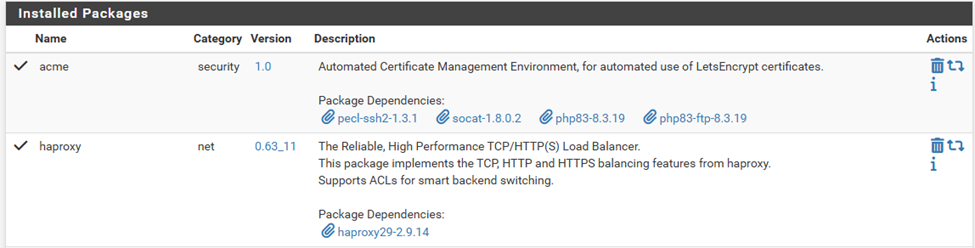
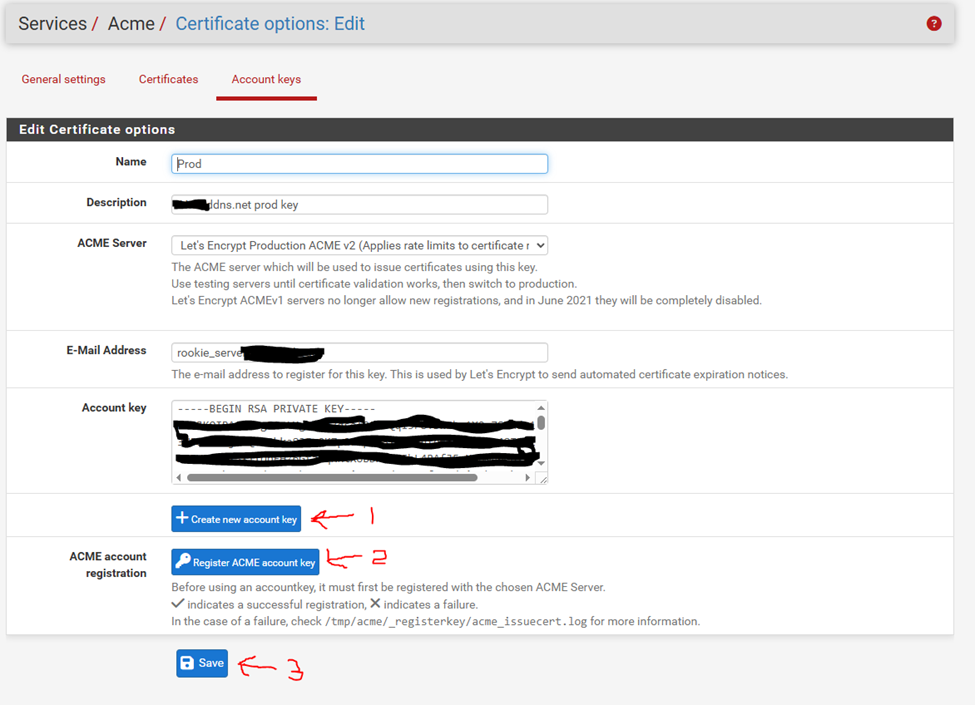
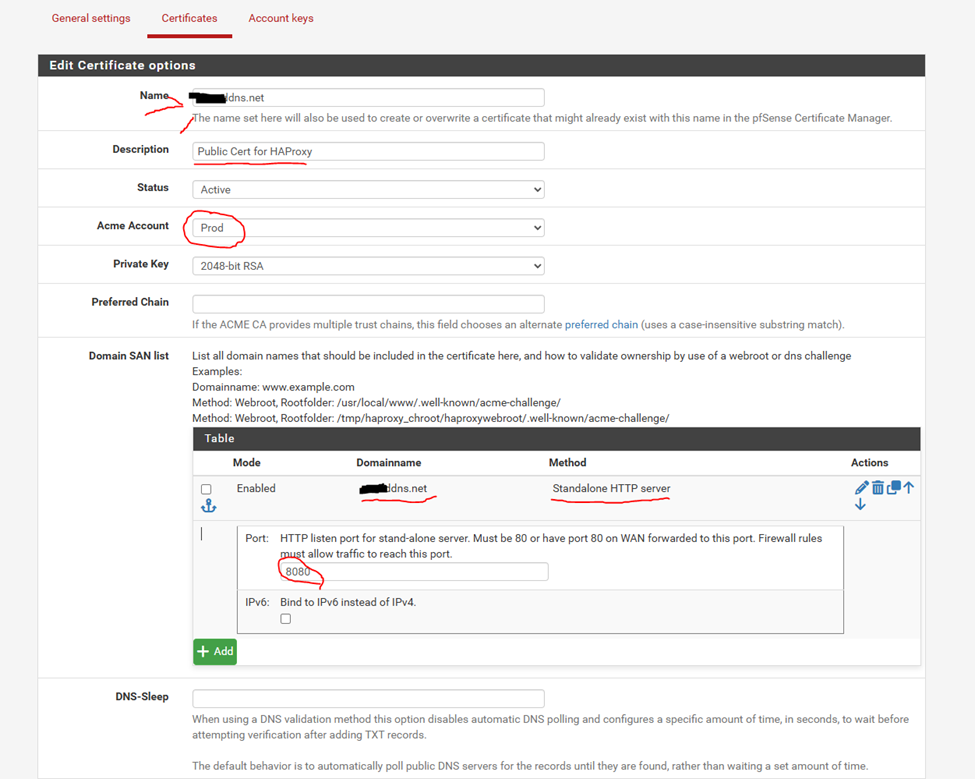
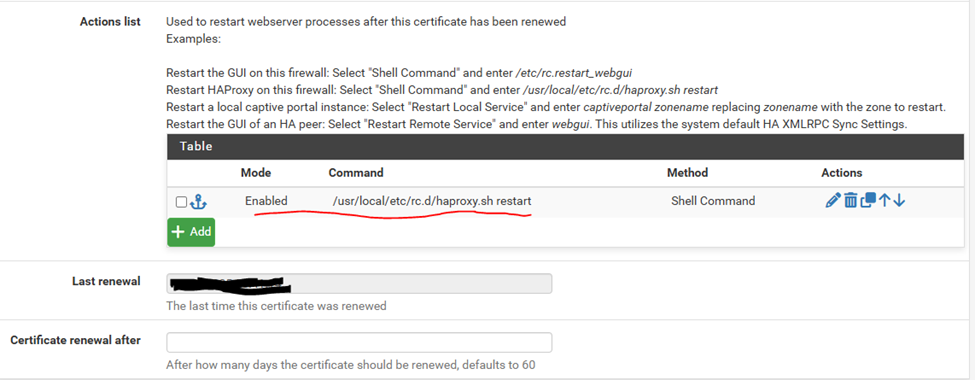
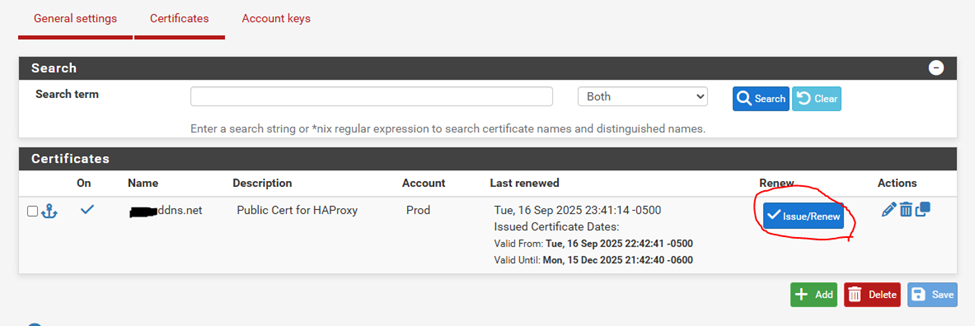
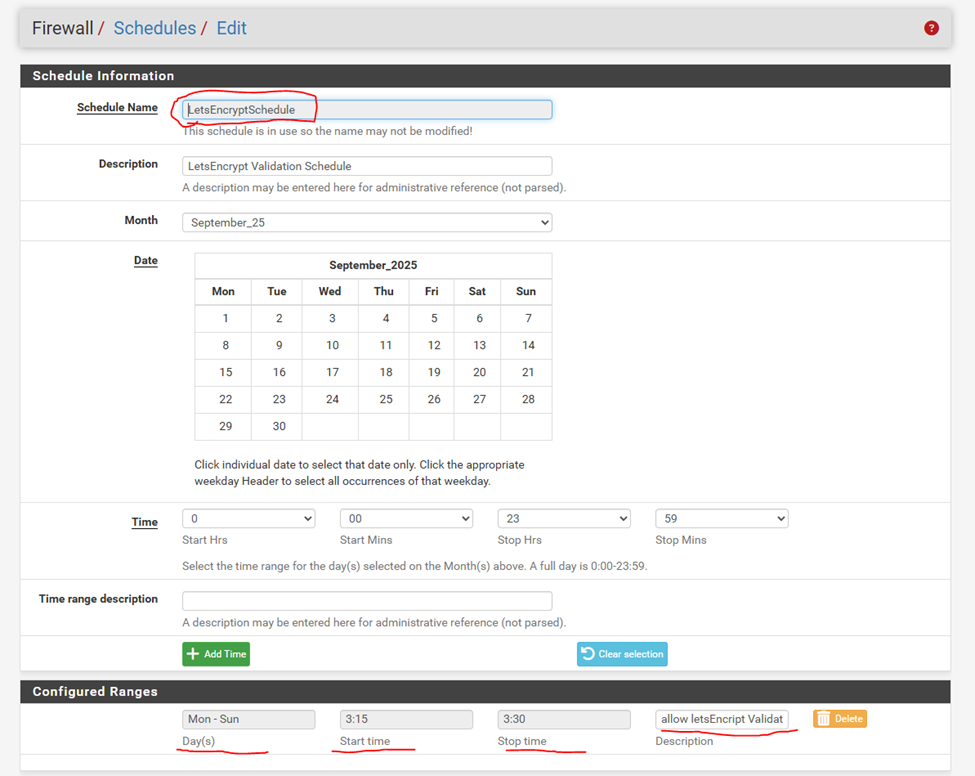
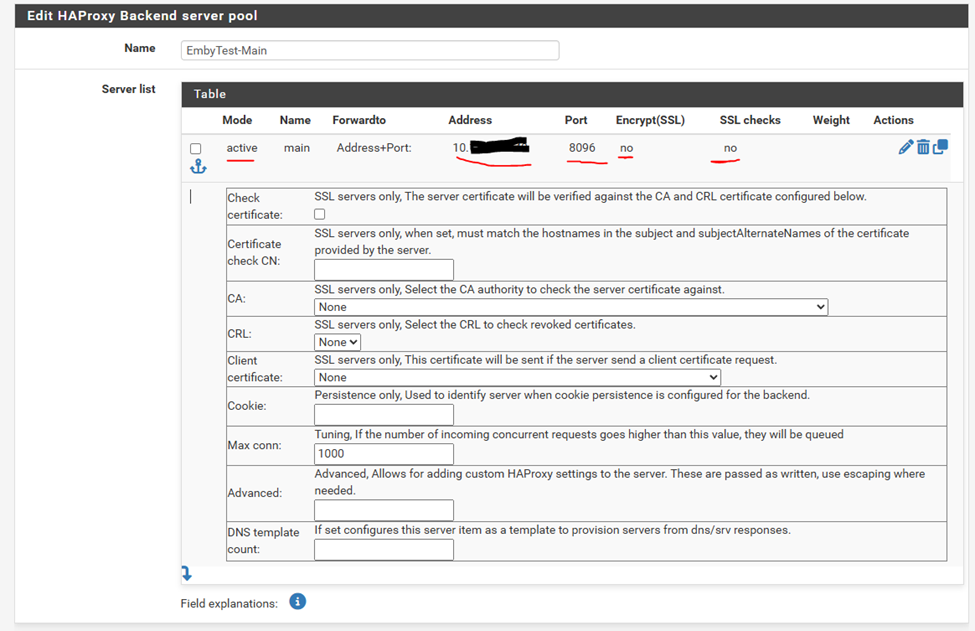
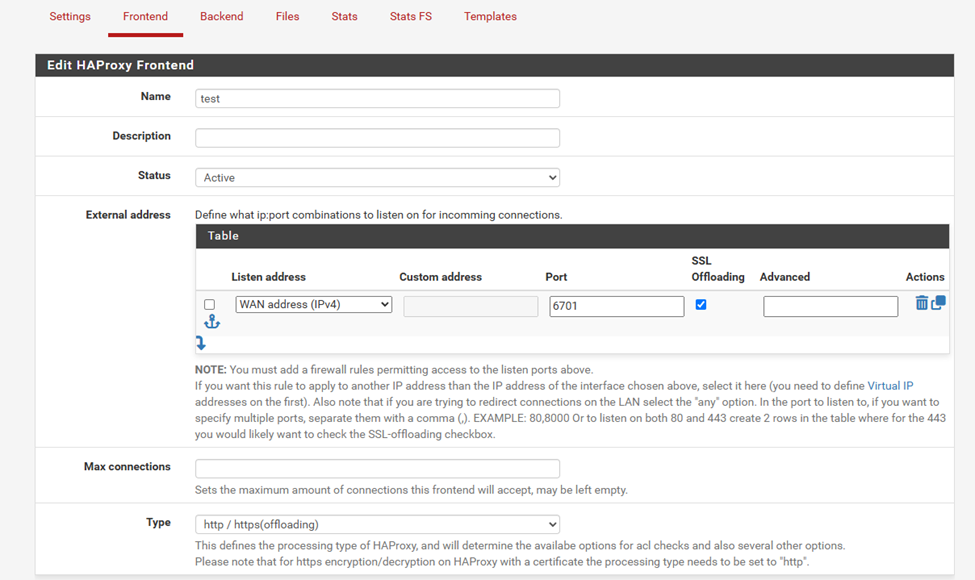
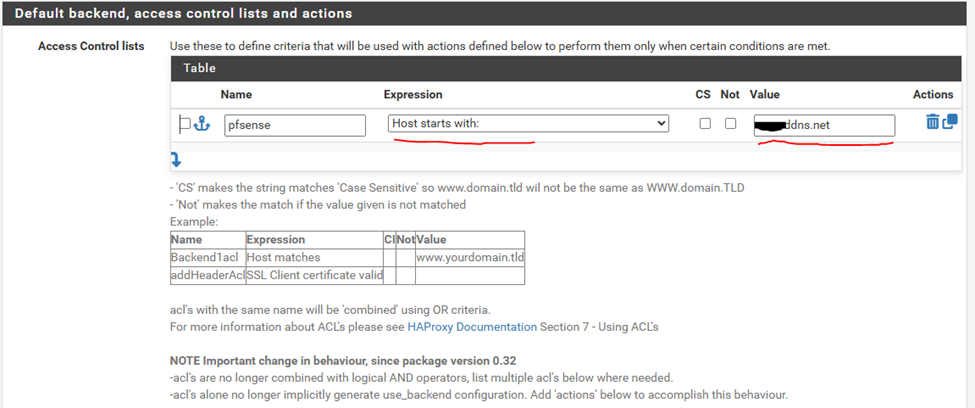
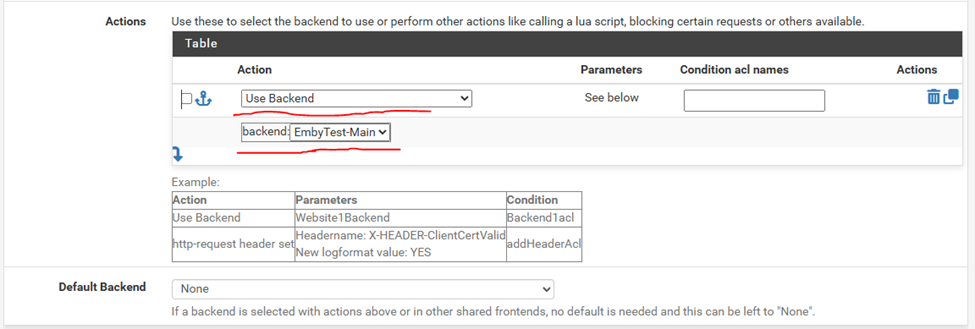
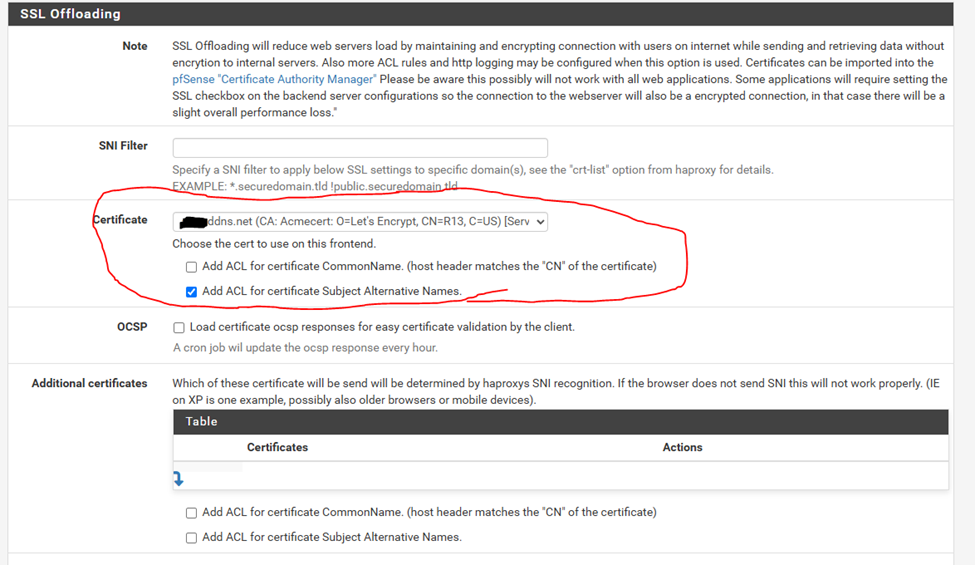
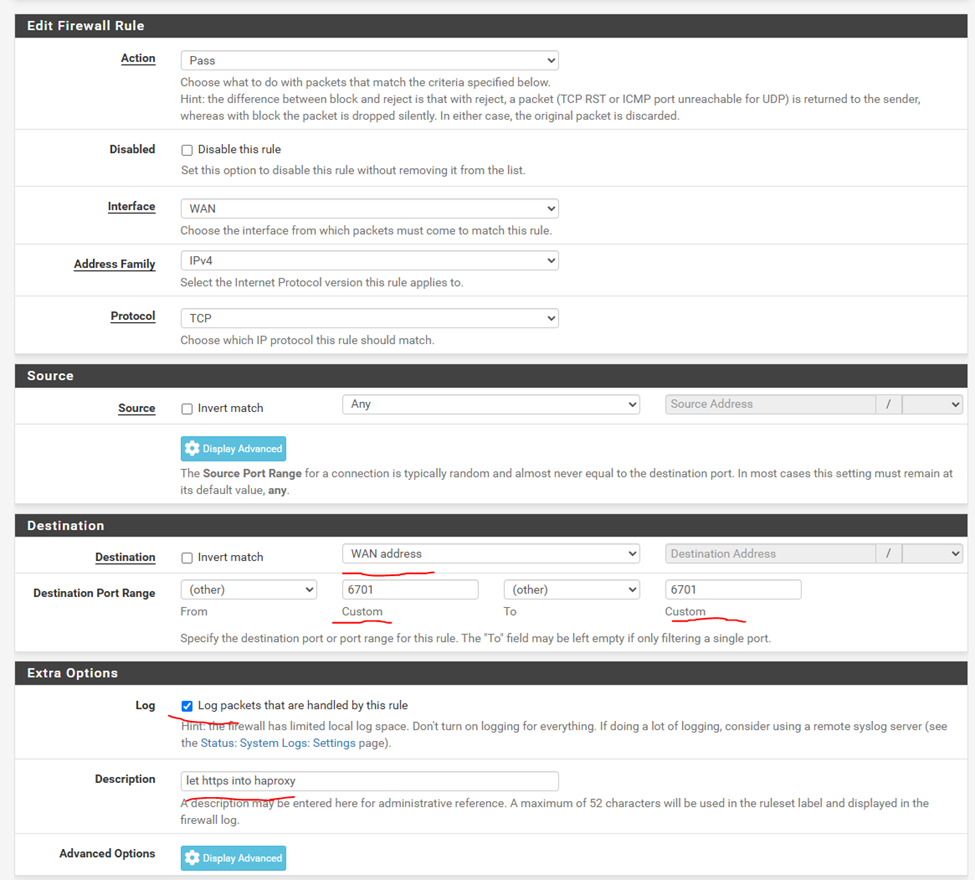
I am currently just starting out with Emby, but this is my initial solution for setting up external SSL at low or no cost and no domain ownership required. The only cost to this solution would be hardware to run PFSense on if you don't already have something. It's 10 "easy" steps, so lets get started. PFSENSE: (highly recommended) PFSense is a Commercial grade firewall with all the features and capabilities you would expect. It is a free network firewall distribution, based on the FreeBSD operating system with a custom kernel and including third party free software packages for additional functionality. PFSense is a Software firewall that can be deployed on a wide range of hardware solutions. You can buy an appliance directly from netgate https://pfsense.org/products/ (I run a NetGate 4200+) or you can build your own firewall utilizing hardware you have laying around or purchase: https://pfsense.org/products/#requirements Please familiarize yourself with the setup of your Firewall and validate that the configuration is secure. Don’t assume, PFSense will allow you to do things that typical residential firewall will not. If you are not familiar with setting up a firewall, I would recommend you get PFSense running and build out a configuration that works for you base needs prior to doing a full switch over. This will give you some time to learn how things work and get comfortable with the interface. PFSense has an awesome community should you need help with this step. Prerequisites: 1) A working PFSense Firewall configuration. note: You should either replace your ISP’s Router with PFSENSE or put the ISP’s Router in bridge mode to pass all traffic directly to PFSense. (this will eliminates double NAT configuration bs) 2) A DDNS account. (this can be any free DDNS service) 3) A DDNS domain name. I use (xyz.DDNS.NET free domain currently) The setup for Emby Hosting: Step 0: setup dyndns go to Services -> Dynamic DNS Step 1: go to Firewall -> NAT -> Port Forwarding and Add a new rule. To forward port 8080 to your internal network firewall Address. Step 2: go to System -> Package Manager and install 2 package “acme” and “haproxy Step 3: go to Services -> Acme Certificates first “Create a new Account Key” then “Register ACME account key” then click save. go to certificates tab For domain name put in your domain name ex xyz.ddns.net For method use “Standalone HTTP Server” the set port to 8080. For action set it to restart haproxy on cert renewal. Then save. Step 4: issue a cert You can verify your cert by going to System -> Certificates. You should see the root cert: And the certificate: Step 5: re-secure port 80 since it points back into your farwall. Go to Firewall -> Schedules and create a schedule for mon-sun 3:15-3:30 Go to Firewall -> Rules -> wan Find the rule created when you made the NAT rule and apply the Schedule to that rule in advanced options. (note: with this schedule applied the cert can only be renewed between 3:15am and 3:30 am when the auto renew job goes off. If you attempt to renew outside that time the firewall blocks the validation requests from letsencrypt) Step 6: go to Services -> haproxy -> settings Enable haproxy Make sure dns is set further down: Step 7: go to Backend and add an entry Set to address and port of your internal Emby server. Save Step 8: go to frontend and add an entry Port should be the external port you want to use for emby access. I used 6701 Set type to http/https offloading Set the host expression to starts with and the value to your dns name xyz.ddns.net For action set it to use backend and pick the backend you created in the previous step Further down in the ssl offloading section pick the certificate you created earlier Step 9 go to Firewall -> Rules -> Wan Add a rule to allow traffic to the haproxy front end I used port 6701 for access. Step 10 open a browser on a device not connected to your network and go to: https://xyz.ddns.net:6700 (replace xyz.ddns.net with your domain name.) You should get the Emby login page via a SSL connection. I am sure there are additional step you can perform to increase security on this. but the goal is a working configuration. done go watch a movie!





 1 point
 -
Install Universal Android app from the store (search for "Emb").1 point
-
Caddy is fully cross-platform - indeed I think there are some (minor) facilities not fully implemented on Windows for the usual technical reasons. But on any platform, Caddy by default does all you need for https connections, other than getting you a domain name! Paul1 point
-
For anyone seeing this please up vote this1 point
-
@ebrI see this as an escalating issue for non the wiser new comers to your software. To put this bluntly, you are NOT helping anyone or Emby by not imposing this FR. All bad rep. will fall back to Emby, if not set in stone. Please demand a password on admin enabled accounts. this last 2 months I have see the 2 above admin's not knowing what's going on. Its both stupid and dangerous not to do so. Issues following this can be. Loss of data. Loss of years of custom artwork procurement. The one that would strike me the worst, is this "Loss of premier license sold to highest bitter. " But You as a company could careless i guess. If its a lifetime license admin has 2 options, ask you to renew license key and confess to bad security. Or just buy a new license. I this OHH so real scenario what would you tell the admin. We will 1) create a new license and cancel the old key ? 2) Buy a new and don't look back ?1 point
-
Jellyfin seems to open the road to another type of database. Their last 10.11 release going this way. https://features.jellyfin.org/posts/315/mysql-server-back-end1 point
-
Hi, there's already an open request for this or something functionally equivalent. Please join in and contribute to the existing discussion at:1 point
-
Didn't see any queries in the log so not sure if enabling OMDB corrected the issue rewriting the config.1 point
-
I clear saved track selection, it looks like that did the trick although I kind of need them, another issue for a different post. Thank you so much.1 point
-
Ok as ebr said the plugin is no longer compatible. But please stay tuned for some new server features that will be coming that might allow you to achieve something similar.1 point
-
Confirmed to work for me too, no more black screen. But! Since I havent used the Fire app for a long time I don't know when this happened but now I see choppy playback on all sorts of content, sdr and hdr. Maybe it is something known , worked on. Or maybe just me, I have to continue testing now when the app is good for use again.1 point
-
anybody still interested in Pre-Rolls? i have about 70 of them before they were deleted. don't know where to provide them1 point
-
LOL - sure, let's do load-balancing where locks need to be synchronized over the network. What a phenomenal plan!1 point
-
Let it run last night ingesting the movie library. Still going through the results, but it appears to have found every single movie and correctly pulled metadata and the base poster and backdrop images. The 4.9 release seems to be a major release, going to play around with this for a while and figure out all the bells and whistles. Thanks again for the info.1 point
-
Hi Vic, thank you for the Update. I Tested your latest version: Continue Watching ok, Radio ok. Random ok. Good work1 point
-
A late update on this There are two factors that affect this 1. As outlined by @quickmicabove - the Music folder structure option for the library needs to be one of the two stuctured settings 2. If there is more than one instance of the album folder in the library or other libraries, then they all need to have the same custom art files.1 point
-
Thanks for the reply and info! I have so far just been playing with full imports anyway. then going through and seeing how it is handling things. so fresh start is not a big deal. only real time sync I see so far is rebuilding all my collections the way I want them. I have DEV skills, perhaps I can write something using api calls to create what I want. haven't got that far yet.1 point
-
Maybe just try this (not forgetting to keep a copy of what you're using at the moment of course) - Emby css 19 Sep 25 text.txt might help. Its the whole thing and needs tidying up and I know there's things that don't work properly (especially the odd border). Maybe you have a zoom or scale setting somewhere greater than 100% - just a thought.1 point
-
Thanks so much1 point
-
1 point
-
Your TV Shows type libraries Latest rows are sorted by Last episode date added. Why they're sixth in the row can be caused by two things: 1) You've added some episodes (of other TV Shows) after those two 2) Your "Date added behavior for new content" in Setyings>Library tab in the sidebar>Advanced tab up top is set to "File creation date" and those files were simply older1 point
-
Check your user Home Screen preferences, each library has "Display in secondary home screen sections such as latest media and continue watching" toggle.1 point
-
OK yea we submitted an update several days ago so we're just waiting for that to go through the process.1 point
-
I just did some preliminary testing to see if the continue watching behavior is normal for TV shows and movies outside of live TV. Everything seems to be working as expected. Thank you very much for your efforts on this!1 point
-
I switched to using Symphonium app. It works on both Android and Android/Google TV. It can be set up to read from either cloud based storage or from Emby Server and doesn't lock up the server when shuffle playing from Genre or Artist1 point
-
I'm also interested in a feature like this. It's annoying that, when searching for a specific movie a whole bunch of similarly named episodes, books of streams pop up. UX would be beneficial here though, starting a search from the library "Movies" should in my opinion also search the library "Movies". The same would go for other libraries of course. When is user is searching by Library there should also be a "can't find what you're looking for, search everything"-type of message which in turn redirects the user back to the regular search.1 point
-
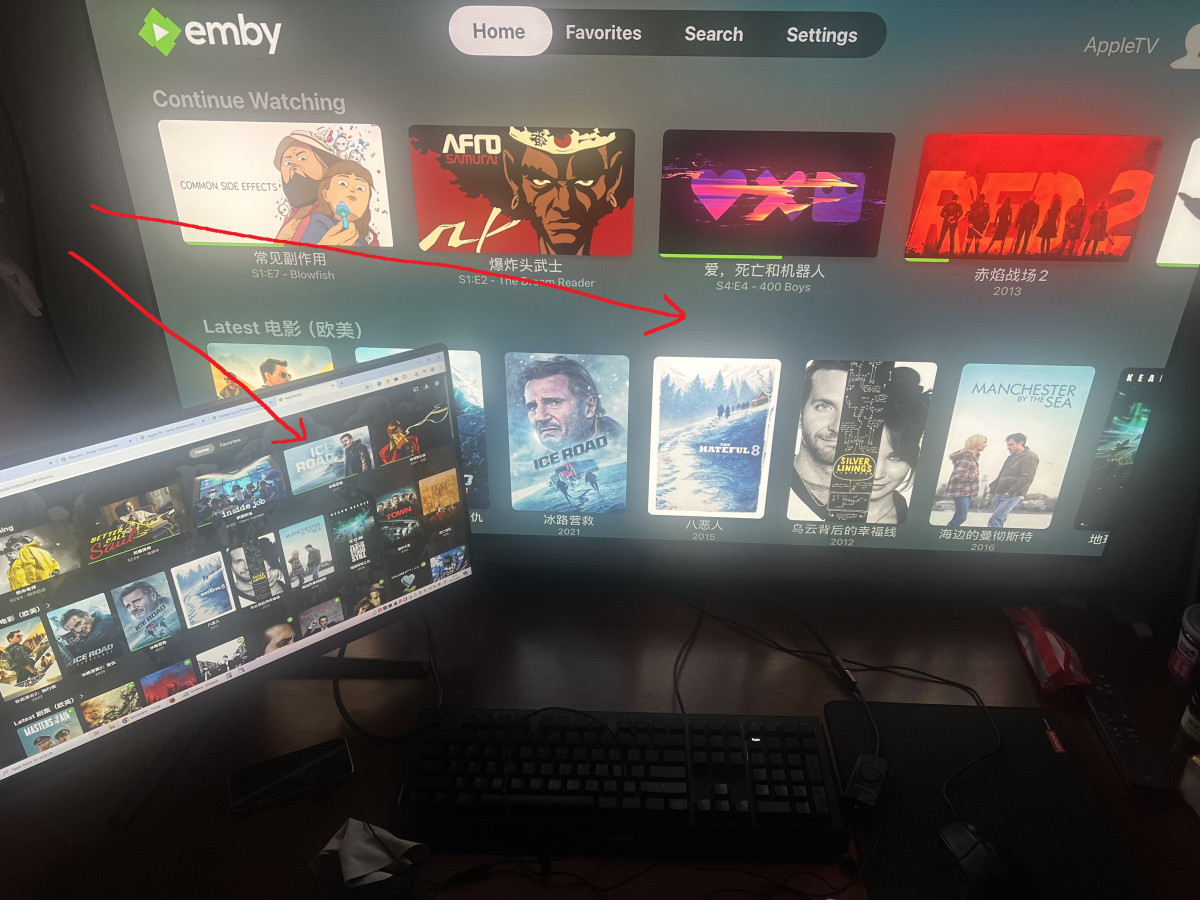
First of all, thank you for the great work on Emby. I’d like to request a feature: please add an option on Apple TV to enable backdrops to be displayed in the background while browsing the homepage and library, similar to the web client.
 1 point
 -
Why would you want to customize your home screen and how to do it! Your Emby home screen is the gateway to your entire media world but for some the default layout isn't the perfect setup. The good news? Emby gives you powerful tools to transform your home screen into a clean, personalized, and intuitive hub that perfectly fits your viewing habits. In this guide, we’ll walk through everything from organizing libraries and smart collections to customizing artwork and user profiles. Whether you’re new to Emby or looking to take your setup to the next level, this article will help you design a home screen that looks and feels like your own streaming service. Organizing Your Libraries and Content Types A clear library structure is the foundation of a great Emby experience. Create dedicated libraries: Separate Movies, TV Shows, Kids, Documentaries, Music, and more. This makes browsing faster and lets you apply different metadata settings for each type. Use descriptive names and icons: Rename generic libraries and assign custom icons or cover images for visual appeal. Fine-tune sorting: Use filters and sort by release date, genre, rating, or watch status to keep your content organized and accessible. Pro Tip: Keep kids’ content in its own library with separate age restrictions and artwork for a cleaner home screen. Customizing Artwork and Posters Visual design has a massive impact on user experience — and Emby gives you full control. Replace default artwork: Swap in your own posters, backdrops, and logos for each title. Use consistent visuals: Download high-quality images from sources like The Movie Database (TMDb) or Fanart.tv for a cohesive look. Customize library icons: Apply themed icons for each library (e.g. a film reel for Movies, a TV icon for Shows). Hiding or Rearranging Home Screen Sections A cluttered home screen can be overwhelming to some. Streamline your layout by: Disabling unused sections: Turn off “Latest Media,” “Trailers,” or “Music” if you don’t use them. Reordering content rows: Move “Continue Watching” or “Favorites” to the top for fast access. Simplifying for guests or kids: Remove advanced sections on non-admin profiles for a more focused view. This keeps your home screen clean and purpose-driven. Themes, Skins, and Display Options Give your Emby interface a personal touch with display tweaks: Enable Dark Mode or Light Mode: Choose a theme that fits your environment. Adjust poster sizes: Larger posters are more visual, smaller ones fit more on screen. Tweak text and layout: Adjust font size, spacing, and aspect ratio for optimal readability on TVs, tablets, or phones. Personalizing User Profiles If you share your server with family or friends, user profiles let each person have their own home screen experience: Individual layouts: Each profile can show different libraries, collections, and sections. Parental controls: Restrict content ratings, block libraries, or set watch schedules for kids. Profile pictures and colors: Add custom avatars and themes for a personal touch. This keeps everyone’s experience separate and clutter-free. A well-designed Emby home screen can make your entire media experience feel faster, cleaner, and more personal. By organizing libraries, building smart collections, customizing artwork, and tailoring profiles, you can create a setup that feels like your own private streaming platform. Spend a little time experimenting — you’ll be amazed at how much more enjoyable Emby becomes when it’s designed just for you. Our next blog article will focus on building dynamic smart playlists which will allow you to take your home screen even further. Keep an eye on on that in the coming days! View the full article1 point
-
Trial and error (so might happen to work but in the wrong way). Maybe - div.detailMainContainerParent {margin-left: -10.4%; scale:80%;} makes just that bit smaller, doesn't seem to affect Cast etc below that. But if you have any shading behind the info or stuff further down it messes that up and don't know how to fix that.1 point
-
Hello, I hope OP is doing well, we miss him and the work he's contributed to Emby and the community. We're still waiting for an update and so sad to learn he may no longer be a dev for Emby. All the best friend!1 point
-
We might be restricting what devices get the smooth scrolling a little too strictly, thus resulting in it only being used on the newest devices. We'll take a look at that. Thanks.1 point
-
This would be an awesome feature to have. A definite must have in my opinion. I hope the EMBY devs put this on priority status. I believe It would hugely benefit users as well as EMBY as a product. Also, and correct me if I am wrong, but a chat server isn't needed really since people watching remotely will be organizing via phone, text, zoom, google meet, facetime, signal, whatsapp, slack, messenger or whatever likely anyway. I know when we do remote movie parties with family and friends we all connect on an app or phone first and often keep a phone call going through the movie to communicate (shouting, talking, etc.). For me, anyway, just a simple way to gather up the people on EMBY and have the host hit play and have all the clients in the party pool play the movie at the same time would be a killer feature. Thank you.1 point
-
1 point
-
Reason why people here thinks it's not a big demand for this is surely because users aren't even aware about this feature. This is a very new way of watching content together. If this was marketed by, for example, Netflix, it would become wildly popular. I do this all the time with friends and family but with other apps, would be both amazing and great for Emby to implement this so, for example, all of my users on my server would do movie nights together, especially split families.1 point
-
I really think the concept of paid third-party-plugins, that are marketed through an official "in-app-store" is not a good thing for emby in the long run. Exactly when such things as above happen, people will in the last consequence always look at emby, not at the specific developer in question. In my opinion every plugin that is "marketed" through the in-app-plugin-store should be a) free and b) open-source with corresponding github-link (or some internal code-repository-system). So that the plugins can still be updated even if the main developer leaves the project and so we can also see what those plugins do in the code, when they come from third-parties. When looking at https://emby.media/community/index.php?/topic/136755-new-plugin-acdbtv-automated-collections/ my worries would be also that it gets tempting to outsource essential features to third-parties, here even with a subscription-based-model, and put aside in the internal-emby-development process, since there exists already a plugin...1 point
-
Request that Emby server store Dolby Vision (including profile), Dolby Atmos, DTS:X, HDR10+ (smpte2094) and HLG for appropriate video in the db and use it for display in the media info and track selection sections of movie/episode details screen. This information once in the db can then also be used in numerous other areas like: Mediainfo Cover Art, Stats for Nerds, Distinguishing different DV profiles for hardware support and tone mapping Example Mediainfo app display of HDR10+ ffmpeg patch for HDR10+ https://patchwork.ffmpeg.org/patch/11491/ Related requested that may require DV profile information in order to prevent unneeded TM1 point
-
Sort of saw the issue here as ebr was thinking the same as me needing a higher value to not create collections if the info exists.1 point
-
Unfortunately, it is hardcoded 1 thru 4. But pretty sure this has come up before. On average 4 would work the majority of the time but dev may need to look a higher value for users that don't want them at all.1 point
-
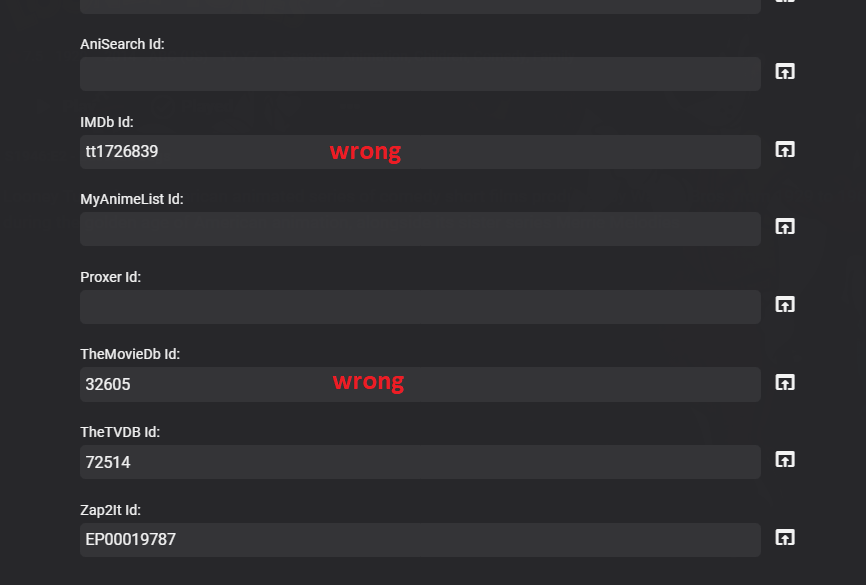
This could be used when there is a miss match of data between providers by locking to a specific providerid and being able to lock to a empty provider. Say Looney Tunes as you have to lock the entire series or you get mismatching id. So technically if primary provider does not have all info then secondary will be completely wrong. An option like this is needed or per show provider options. This this would probably be the easier route.
 1 point
 -
Hi. It was closed because it was a duplicate of this one. We need to keep requests to a single topic or we have no hope of being able to track interest. Thanks.1 point