Leaderboard




Popular Content
Showing content with the highest reputation on 09/14/25 in all areas
-
Thanks2 points
-
Expose the hidden setting in the UI? But for OP Emby is set to a 90 second delay. <LibraryMonitorDelaySeconds>90</LibraryMonitorDelaySeconds>2 points
-
I got a G5 a few months ago now, and the Emby app seems to think that the TV supports DTS, but it doesn't. It just transmits the bitstream and it's silent rather than automatically transcoding like it does on my CX (which also doesn't support DTS). It's been several months and there have been a couple of Emby updates, but it's not fixed... is there a reason? 80% of my film library doesn't play anymore .. I had guessed it would have been resolved in the very next update. I have tried "playback correction" to force transcoding the audio; stats for nerds does show that it's kicked into transcoded audio mode, and it makes sound, but for some reason the stream freezes and the UI stops responding after about 5-10 seconds. All UI just goes unresponsive until I stop playback after enabling first level playback correction. If I very quickly hit payback correction a second time to engage video transcoded too, then it actually works; stats for nerds shows both audio and video are being transcoded, and it doesn't freeze anymore, but the video looks like shit... unwatchable So, can we just get this fixed? It works fine on my LG CX, which Emby seems to know doesn't support DTS and it just does the right thing. LG 5-series client needs to ask the server to transcoded...1 point
-
Be able to create playlist based on a certain criteria, like genre and or year, in order to create a dynamic playlist that it refreshes automatically when new content is added. This way you can for example, create a tv comedy playlist from the 90's, or a new sci-fi Movies playlist. Some other criteria for rules could be the rating, watched/unwantched, score, tags, language, audio codec, etc The possibilities could be endless1 point
-
Hi, I created the subtitle plugin for SubSource (https://subsource.net). Please install it and let me know if there is a problem with it. Source code: https://github.com/nRafinia/Emby.Subtitle.SubSource Binary: https://github.com/nRafinia/Emby.Subtitle.SubSource/releases/latest Emby.Subtitle.SubSource.dll1 point
-
Summary: Emby does not remember where you stopped reading. Reopening an eBook always starts at the beginning. Please persist a per-user last read position and resume from it on all clients. Steps to reproduce: Open any eBook Go to a later page or chapter Close and reopen the book Expected: The book opens at the last read page. Actual: The book opens at page 1. Request: Save and sync last read position per user for all supported formats. Update on page change and on exit. Resume automatically across devices. Optional API endpoint to read and update progress.1 point
-
Add structured eBook metadata fields to Emby so books can be indexed, searched, filtered, sorted, synced, and surfaced with the same quality as video and audio libraries. Problem Current handling of eBooks in Emby is limited. Important fields are missing or unindexed, which makes large libraries hard to organise. Users who migrate from Calibre or other managers lose rich metadata, reading progress, and annotations. Proposed solution Introduce native models, scanners, UI, and API support for the following fields. Core fields Title. Main identifier for the eBook. Used in listing and searching. Author/Editor. One or many. Essential for grouping and sorting. Language. For filtering and display. Series. Series name and number, sortable. File Format. EPUB, MOBI, PDF, AZW3, CBZ, etc. Drives renderer choice. Identifier. Unique ID next to ISBN, such as, DOI, UUID, or an internal GUID. File Path / Location. Absolute path for local and NAS items. Optional fields Publisher. Useful to separate commercial and indie content. Subject / Genre. Fiction, Non-fiction, Sci-Fi, Thriller, etc. Tags / Keywords. Freeform labels for flexible search and smart lists. Reading Progress. Per user last read location, bookmarks. DRM Status. Enum: Unknown, None, Present. Word Count / Page Count. For size filters. Rating. Per user and external ratings. Last Accessed / Last Read. Per user activity to support “Continue reading”. Annotations / Highlights. Per user notes and highlights, exportable. Data model Add a new BookItem entity that extends the existing BaseItem. Scalars: Title (string), Language (ISO 639-1), SeriesNumber (decimal), DateAdded (datetime), DatePublished (date), Format (enum), DrmStatus (enum), WordCount (int), PageCount (int), RatingExternal (float), RatingUser (float), LastAccessedUtc (datetime). Collections: Authors (list of person refs), Editors (list), Identifiers (list of type:value), Tags (list), Subjects (list). Per-user: ReadingProgress (location plus percent), Bookmarks (list), Annotations (list of location plus text and timestamp). Paths: Path (string), LibraryId (guid). Indexing and search Index Title, Authors, Series, Language, Publisher, Tags, Subjects, Identifiers. Sort keys: Title, Author, SeriesName+SeriesNumber, DatePublished, DateAdded, PageCount, WordCount, Rating. Ingestion and metadata Add an eBook library type in Library Setup with supported extensions and a priority order: EPUB, MOBI, AZW3, PDF, CBZ, CBR. Parse embedded EPUB OPF metadata, PDF XMP, and sidecar .opf files produced by Calibre. Optional metadata providers: Google Books, Open Library, ISBNdb, Goodreads export files. Providers should map cleanly to core fields and never overwrite user edits unless requested. Support Calibre migration: read Calibre library structure, .opf sidecars, and metadata.db when available in read-only mode. UI and UX Library views: Grid, list, and series views with badges for format, language, and DRM. Detail page: Title, series breadcrumb, authors, description, identifiers, subjects, tags, publisher, publication date, format, page count. Actions for “Read”, “Download”, “Mark as finished”, “Add bookmark”. Reader integration: For EPUB and PDF, an in-browser reader that persists per-user progress, bookmarks, and annotations. If a built-in reader is out of scope, expose progress endpoints so external readers can update state. Filters: Language, series, publisher, genre, tags, format, size, DRM, rating, date added, date published. Smart playlists and collections using the new fields. API contracts Extend the public API: GET /Items?IncludeItemTypes=Book with new query filters series, language, publisher, format, drmStatus, minPageCount, maxPageCount, subject, tag. GET /Users/{id}/Books/{itemId}/Progress and POST to update progress, bookmarks, and annotations. POST /Items/{itemId} allows updates to book metadata with field-level overwrite controls. WebSocket events for progress updates to sync multi-device reading. Permissions and privacy Store annotations and progress per user. Do not expose one user’s notes to others unless explicitly shared. Allow metadata locking at the item and field level. Migration and compatibility Backfill DateAdded from file system timestamps if no prior value exists. Detect duplicates by Identifier or by fuzzy match on Title, Author, Series, and Page Count. Do not break existing audio-book flows. Keep AudioBook separate from Book. Performance considerations Defer parsing heavy PDFs until requested or during low-priority background tasks. Cache OPF and XMP reads. Respect library scan schedules. Acceptance criteria A user can import a mixed EPUB, MOBI, and PDF library and see correct Title, Author, Language, Series, Format, Identifier, Path, Date Added, and Date Published without manual edits. A user can filter by Language and Series, sort by Date Published, and search by ISBN. Reading progress persists per user across devices for EPUB. Optional fields are editable in the UI and via API and are indexed for search. Export of per-user annotations to JSON is available. Nice to have, phase 2 OPDS server for books using the new metadata. Goodreads or Open Library sync for ratings and shelves. Calibre two-way sync for edits and progress.1 point
-
Morning, everybody. I think it would be very useful to be able to send notification emails by grouping them in a daily digest. Do you think this is feasible? Thank you very much. Claudio Carli1 point
-
When I go into Movies then Trailers it says "No Trailers found. To add Trailers, please install the Trailer plugin from the Emby plugin catalogue" I have already installed the plugin but is showing up in My Media1 point
-
Well something does not add up then as I can't see how they are the same files with different containers, file size, bitrates, audio tracks and subtitles. "mp4","Size":1825265940,"Name":"The Hunting Wives (2025) S01 E07 { "Protocol": "Http", "Id": "82ec4a8c4f9b81578c19a5650ee43a45", "Path": "https://starlite.best/api/stream/username/password/tvshow/tt31038430/1/7", "Type": "Default", "Container": "mp4", "Size": 1825265940, "Name": "The Hunting Wives (2025) S01 E07", "IsRemote": true, "HasMixedProtocols": false, "RunTimeTicks": 28799610000, "SupportsTranscoding": true, "SupportsDirectStream": true, "SupportsDirectPlay": true, "IsInfiniteStream": false, "RequiresOpening": false, "RequiresClosing": false, "RequiresLooping": false, "SupportsProbing": false, "MediaStreams": [{ "Codec": "h264", "CodecTag": "avc1", "Language": "und", "TimeBase": "1/16000", "VideoRange": "SDR", "DisplayTitle": "1080p H264", "NalLengthSize": "4", "IsInterlaced": false, "BitRate": 4872228, "BitDepth": 8, "RefFrames": 1, "IsDefault": true, "IsForced": false, "IsHearingImpaired": false, "Height": 1080, "Width": 1920, "AverageFrameRate": 23.976027, "RealFrameRate": 23.976025, "Profile": "Main", "Type": "Video", "AspectRatio": "16:9", "Index": 0, "IsExternal": false, "IsTextSubtitleStream": false, "SupportsExternalStream": false, "Protocol": "File", "PixelFormat": "yuv420p", "Level": 40, "IsAnamorphic": false, "ExtendedVideoType": "None", "ExtendedVideoSubType": "None", "ExtendedVideoSubTypeDescription": "None", "AttachmentSize": 0 }, { "Codec": "aac", "CodecTag": "mp4a", "Language": "eng", "TimeBase": "1/48000", "DisplayTitle": "English AAC 5.1 (Default)", "DisplayLanguage": "English", "IsInterlaced": false, "ChannelLayout": "5.1", "BitRate": 192002, "Channels": 6, "SampleRate": 48000, "IsDefault": true, "IsForced": false, "IsHearingImpaired": false, "Profile": "LC", "Type": "Audio", "Index": 1, "IsExternal": false, "IsTextSubtitleStream": false, "SupportsExternalStream": false, "Protocol": "File", "ExtendedVideoType": "None", "ExtendedVideoSubType": "None", "ExtendedVideoSubTypeDescription": "None", "AttachmentSize": 0 } ], "Formats": [], "Bitrate": 5070251, "RequiredHttpHeaders": {}, "AddApiKeyToDirectStreamUrl": false, "ReadAtNativeFramerate": false, "ItemId": "12" "mkv","Size":1985179118,"Name":"The Hunting Wives (2025) S01 E07" { "Protocol": "Http", "Id": "32a264e9485908fb2d748470f9811b00", "Path": "https://starlite.best/api/stream/username/password/tvshow/tt31038430/1/7", "Type": "Default", "Container": "mkv", "Size": 1985179118, "Name": "The Hunting Wives (2025) S01 E07", "IsRemote": true, "HasMixedProtocols": false, "RunTimeTicks": 28799610000, "SupportsTranscoding": true, "SupportsDirectStream": true, "SupportsDirectPlay": true, "IsInfiniteStream": false, "RequiresOpening": false, "RequiresClosing": false, "RequiresLooping": false, "SupportsProbing": false, "MediaStreams": [{ "Codec": "h264", "TimeBase": "1/1000", "VideoRange": "SDR", "DisplayTitle": "1080p H264", "NalLengthSize": "4", "IsInterlaced": false, "BitRate": 5514461, "BitDepth": 8, "RefFrames": 1, "IsDefault": true, "IsForced": false, "IsHearingImpaired": false, "Height": 1080, "Width": 1920, "AverageFrameRate": 23.976025, "RealFrameRate": 23.976025, "Profile": "Main", "Type": "Video", "AspectRatio": "16:9", "Index": 0, "IsExternal": false, "IsTextSubtitleStream": false, "SupportsExternalStream": false, "Protocol": "File", "PixelFormat": "yuv420p", "Level": 40, "IsAnamorphic": false, "ExtendedVideoType": "None", "ExtendedVideoSubType": "None", "ExtendedVideoSubTypeDescription": "None", "AttachmentSize": 0 }, { "Codec": "eac3", "Language": "eng", "TimeBase": "1/1000", "DisplayTitle": "English EAC3 5.1 (Default)", "DisplayLanguage": "English", "IsInterlaced": false, "ChannelLayout": "5.1", "BitRate": 640000, "Channels": 6, "SampleRate": 48000, "IsDefault": true, "IsForced": false, "IsHearingImpaired": false, "Type": "Audio", "Index": 1, "IsExternal": false, "IsTextSubtitleStream": false, "SupportsExternalStream": false, "Protocol": "File", "ExtendedVideoType": "None", "ExtendedVideoSubType": "None", "ExtendedVideoSubTypeDescription": "None", "AttachmentSize": 0 }, { "Codec": "subrip", "Language": "eng", "TimeBase": "1/1000", "DisplayTitle": "English (SUBRIP)", "DisplayLanguage": "English", "IsInterlaced": false, "IsDefault": false, "IsForced": false, "IsHearingImpaired": false, "Type": "Subtitle", "Index": 2, "IsExternal": false, "IsTextSubtitleStream": true, "SupportsExternalStream": true, "Protocol": "File", "ExtendedVideoType": "None", "ExtendedVideoSubType": "None", "ExtendedVideoSubTypeDescription": "None", "AttachmentSize": 0, "SubtitleLocationType": "InternalStream" }, { "Codec": "subrip", "Language": "eng", "TimeBase": "1/1000", "Title": "SDH", "DisplayTitle": "English (SDH SUBRIP)", "DisplayLanguage": "English", "IsInterlaced": false, "IsDefault": false, "IsForced": false, "IsHearingImpaired": true, "Type": "Subtitle", "Index": 3, "IsExternal": false, "IsTextSubtitleStream": true, "SupportsExternalStream": true, "Protocol": "File", "ExtendedVideoType": "None", "ExtendedVideoSubType": "None", "ExtendedVideoSubTypeDescription": "None", "AttachmentSize": 0, "SubtitleLocationType": "InternalStream" } ], "Formats": [], "Bitrate": 5514461, "RequiredHttpHeaders": {}, "AddApiKeyToDirectStreamUrl": false, "ReadAtNativeFramerate": false, "ItemId": "10639873" }1 point
-
Huh, that's weird, I agree that it doesn't like up with what they're claiming to achieve. I'm gonna reach out to them and see what they say about something like an emby plugin.1 point
-
I still have to disagree. The original thread starter wants you to move files. With functions of the operating system. This is dangerous from a programs perspective as you have rightly stated in your comment way up. This is very different to emby-server altering the emby-metadata-database and just changing paths. Paths that point to correct physical locations of files. This is the core job of emby-server. But it's okay i just might be to stupid for this all and somehow indeed moving files on OS-level is the same as changing entries in a sql-db...1 point
-
We use Apple TVs as our preferred devices ( have tried Shield and others) and I really prefer the Apple TV. I came to emby from the other platforms and have used Infuse with them in the past. I setup Infuse to work with Emby and I can play Atmos files that have the compressed lossy format. I understand the Apple TV only supports this version of atmos and not TrueHD. Would you please add support for lossy Atmos to the app so that we can play these files without needing to use Infuse? I would rather use the native app. I have seen a number of users request this from the "other platforms" and they have not gotten there. I expect this will bring a lot of new customers to Emby and sell Premiere subscriptions. If there is a licensing fee that Emby has to pay to enable this, I would also be willing to pay a one time enablement fee to add the feature to my server in addition to the premier subscription. Thanks.1 point
-
I've got the latest beta and this doesn't seem solved.1 point
-
Hi, this has been resolved in the upcoming 4.9 server release. Thanks.1 point
-
Randomly this morning it happened again, showing 10pm GMT when it was actually 8am aedt. My tv showed 8am correctly. Again, I had to change the timezone on my tv temporarily before emby recognised the correct time.1 point
-
Everyone, I am improving how movies and TV shows are being played. I am testing it now. I should have new code posted soon. I also fixed a bug in the "Add Channel" code and several other small bugs. Soon I will have the sort order bug fixed that someone posted earlier. Vic1 point
-
Summary: Text in eBooks cannot be selected, which blocks copy, highlight, notes, and dictionary lookups. Steps to reproduce: Open any eBook Try to drag to select a word or sentence Expected: You can select text and get a context menu to copy, highlight, add a note, or search. Actual: No text selection is possible. Request: Add text selection for ebooks on all clients, with standard actions (copy, highlight, note, search). Respect DRM no-copy flags and expose selection-based annotations via API.1 point
-
I still have this same startup problem. It has never stopped. Please don't assume that users disappearing ever means that a bug is resolved. So many issues reported on this forum never get fixed that I imagine people lose interest in reporting. That is certainly how I feel.1 point
-
Perfect! Thank you!Of course, I expect auto transcoding to AC3; this was working fine on my CX for years. I see no reason to transcode my media; 1. No TV exists for a lifetime, I don't want to butcher my archive quality media for one TV 2. Many people share my library, with many different TV's, it's impossible to form media files that suit all devices; Emby must aggressively transcode to suit whatever device is playing 3. I have thousands, maybe 10s of thousands of media... it would take me months to format it all specifically for the G5... it could meanwhile break on my friends and families TV's, and then what when I get a G8 or change teams to Sony or whatever? 4. I'm not a fan of adding a bunch of duplicate tracks to the media; it doesn't play well; 1, usually the compatibility track needs to come first, or the device won't select it by default and you transcode anyway, 2, if the compatibility track DOES come first, then nobody ever selects the best track for their player and just roll with the most inferior transcoded experience anyway! Emby's realtime transcoding is the best thing about the software. Lean-in to that awesome feature! I desperately wish Emby would do MP4 transcoding for LG TV's when playing any DV media in MKV files... I transcode all MKV content to MP4, but it's a lossy conversion (subs -> mov_text) and I feel sad every time, because I'm destroying the source material. Please consider adding DV MKV->MP4 transcoding; `ffmpeg -i [src.mkv] -c copy -c:s mov_text -map 0:v -map 0:a -map 0:s -strict unofficial dst.mp4` is all it takes, unless the source mkv also has pgs subs and/or unsupported audio format; then I have to work out the ID's of all bitmap sub files and selectively strip those streams from the dest, which is something that should be performed so much nicer by emby! (It's a tragedy to destroy my archive media just for LG players! also, I can't share/seed any of my archive after I've butchered it) I'll experiment with the DV playback from memory stick shortly and get back to you...1 point
-
Hello everyone. I completed unoffical web API for csfd. https://czechapi.000.pe/?name=potter azkaban https://czechapi.000.pe/?name=potter azkaban&lang=fr All possibillities are: others => 'sk', 'at', 'gb', 'us', 'de', 'es', 'fi', 'fr', 'hu', 'pl' https://czechapi.000.pe/?id=1354750 by csfd.cz/film/XXXX or by imdb code https://czechapi.000.pe/?id=tt27534307 It will return also nice images, but without resolution in hires array. If you want to get resolution, I can do this, but it is superslow. So now it is disabled for better performance. There is cache for 1 month. If movie is made by year as now, there is 14 days cache. Within two months after the premiere is, there is 7 days cache. API is hosted via free hosting, so please dont blame me for speed. On my VPS it can parse about 10seconds with 50 images with hires resolution.1 point
-
If you change your library path names despite movie folders/files themselves being untouched, the entire library will rebuild. This can take considerable time. e.g /root1/movies1 to /root/movies Would it not be possible that upon scan a quick hash of file is performed. And then upon rescanning in the future it realises it already has this file metadata and therefor no need to nuke it from its metadata and rebuild it i think you get the idea. I know some might suggest putting metadata alongside the media but this is surely less optimal if your media is on slow storage If I’m wrong on anything please correct me. Thanks.1 point
-
Implement a lookup and link to CSFD movie db link to movie/serie detail. CSFD is biggest central EU movie DB similar to IMDB, much more used in central EU Slavic countries.1 point
-
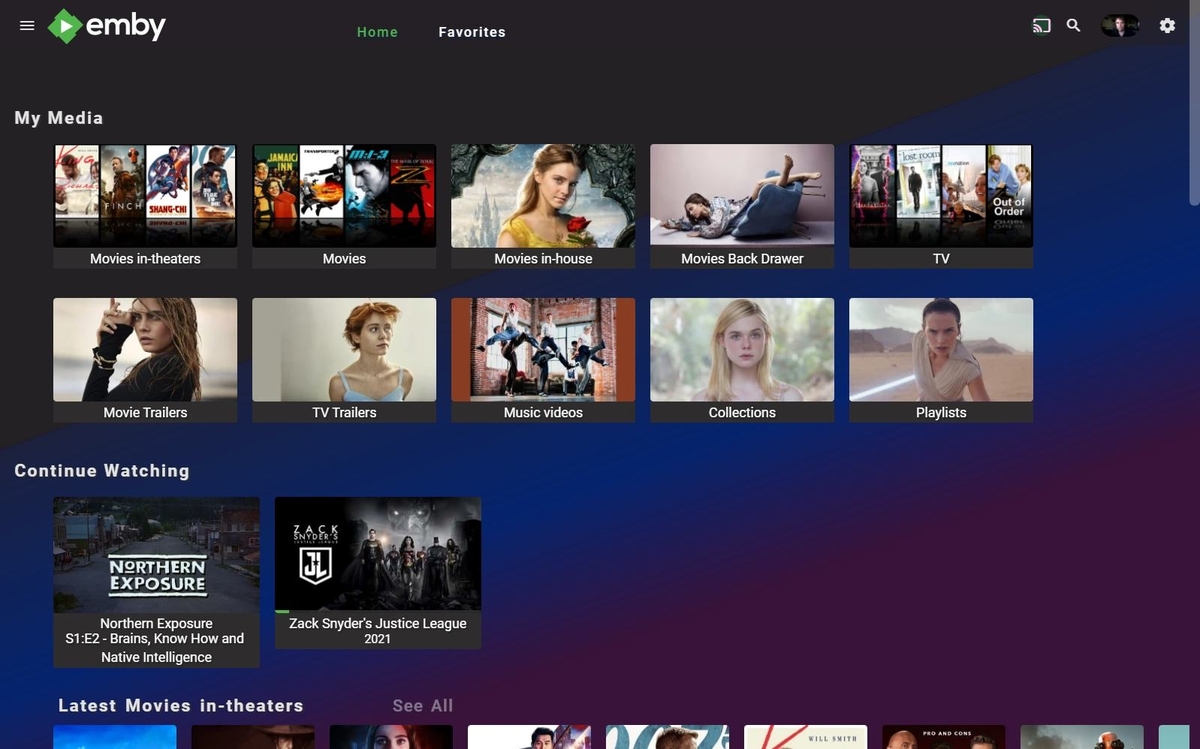
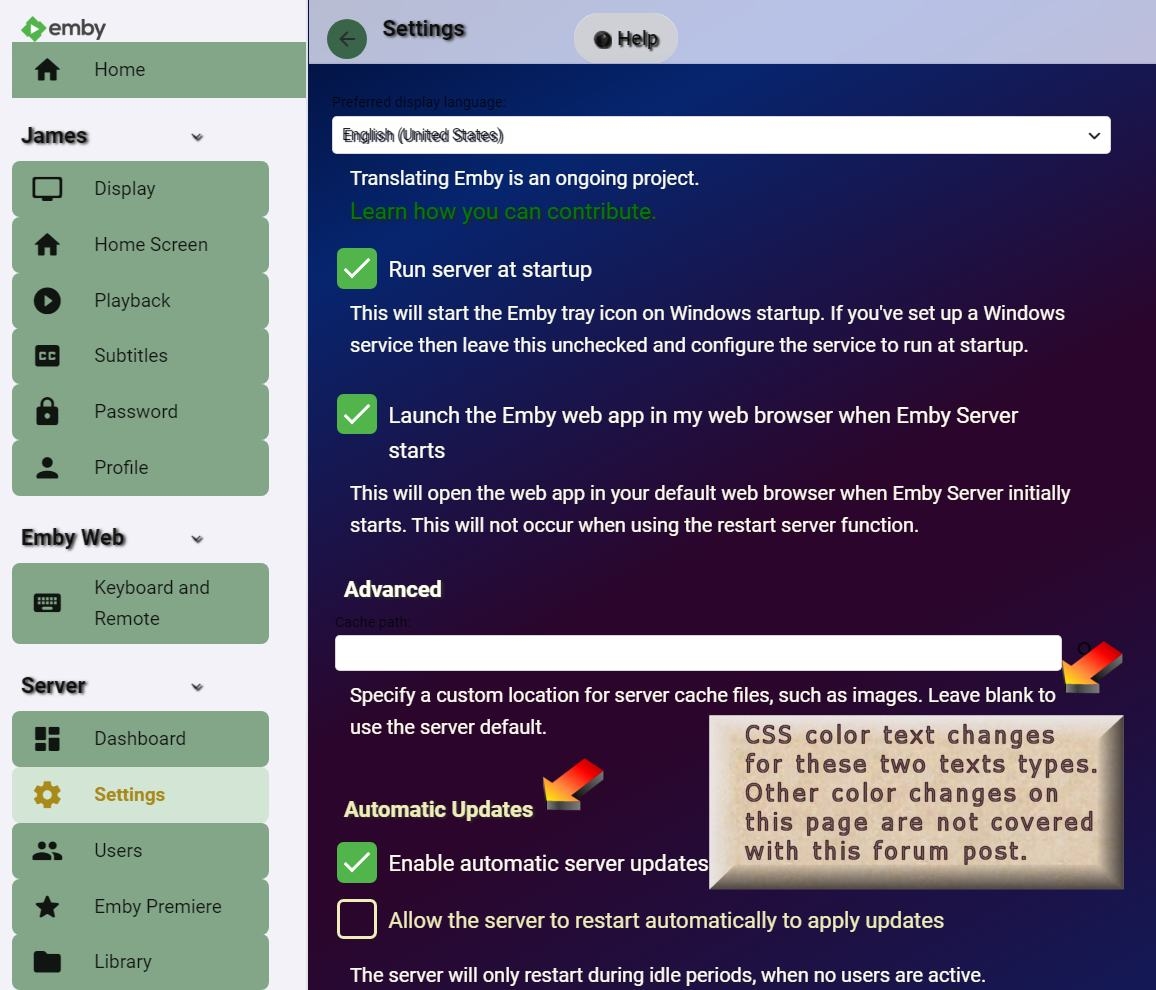
I find Emby very customizable, but you need to really know how to tweak CSS and understand the process of updating styles in a server that is running. CJ, are you thinking that customizing would be going to a theme builiding page, with buttons and color controls to add background and you click and drag to change everything? Sure, that is a customizing interface, but you would always be limited to whatever features are added to that page. Making a page like that is a lot of work and it would have to be regularly updated with every release. Just that page could maybe cost 10% of your workload. Emby allows custom css with very few feature limits, but there are complex rules and issues that you need to have a good understanding of, to add the css code updates correctly. This forum group has a lot of examples. I would argue that this custom css code option makes Emby very customizable, but the learning curve is a little steep. That also makes it rather fun to work on. I have probably over a 100 csutomized style changes in my server. Here is the code to add to the custom .css inside Settings page. But here is a warning: This solution does not adjust the original background color. So it's incomplete. In order to cover the background color better, I adjusted the width, height and margins. You could adust the blend gradients instead. Also any changes you try, may need to have the cache cleared to see the change. It's sort of like the purple and blue curtains in my old home town movie theater. I think I might keep this. I added in some width, height, repeat and rotate styling so you can play with those. I think it looks good without the extra transparency blending. Some of the changes need to have the cache deleted to show up. Each browser has a different way to do this. Have fun. .backgroundContainer { background: linear-gradient(to right, #000420 0%, #06256f 18%, #2b052b 38%, #2b052b 45%, #06256f 78%, #000420 100%) !important; -webkit-backdrop-filter: none !important; background-blend-mode: color !important; width: 132% !important; height: 178% !important; margin: -205px; background-repeat-y: repeat !important; transform: rotate(63deg) !important; } Another slight variation: .backgroundContainer { background: linear-gradient(to right, #000420 0%, #06256f 18%, #2b052b 27%, #2b052b 28%, #06256f 62%, #000420 100%) !important; -webkit-backdrop-filter: none !important; background-blend-mode: color !important; width: 186% !important; height: 220% !important; margin: -164px; background-repeat-y: repeat !important; transform: rotate(63deg) !important; } I just noticed that this background also affects the admin dashboard, so you can no longer read the text on some pages. Hmmm, here are some color style adjustments to allow the text to be readable. This is the problem with tweaking CSS with custom styles. You start to break the theme that has been balanced to work on all pages. This text color update only fixes a few pages in the admin area. Several other pages also need fixing. It's annoying. Ha! This is the very reason why most all App UI locks out users from easily making changes in theme colors. You quickly get into a cascade of errors. It's a real profession as a graphic artist specializing in web design to get a site's colors and themes to look good. Everyone thinks it should be easy, but it is not. This color style custom changes only fixes 2 or 3 admin pages. There are still more to do. Be careful if you start to customize with this background, it's just not that simple. I don't think my color choices are that great in the admin area, but I am the only person that sees this area. /* Dashboard right column */ .fieldDescription, .verticalSection.verticalSection-extrabottompadding > h2, .listItemBodyText-secondary, #windowsStartupDescription { color: #FFFFF0 !important; } #windowsStartupDescription, #fldEnableAutomaticRestart > label > span, .verticalSection.autoUpdatesContainer > h2 { color: #efeeb9; margin-bottom: 12px; }
 1 point
 -
Honestly, I just don't see this as a core function of our system and it carries with it a lot of risk (massively altering the actual media file system locations). Moving items to different physical locations and/or between libraries is really as easy as moving the files, adjusting the Emby library configuration and running a library scan. If you store the metadata with the media this will be a pretty fast operation and will preserve any customization you have made.1 point
-
Doesn't the new tvOS 26 have AVAudioContentSource.passthrough that can be implemented into Emby? https://developer.apple.com/documentation/avfaudio/avaudiocontentsource/passthrough0 points