Leaderboard




Popular Content
Showing content with the highest reputation on 09/11/25 in all areas
-
You two go get a room, and leave us rest bitching about 5+ years of waiting for functional IP TV in emby. I think there has been enough bitching for the moment. Feel free to resume later, but for now I think, the message has been received. Let me share some gossip instead... You have no idea what an important role the WebStreams plugin is playing in the context of TVnext. Initially, it was meant to be integrated in TVnext, but hardly anybody was able to follow or visualize and imagine what I was talking about exactly, so for me, this had become... The Hardest Sell We've all learnt that there's nothing worse you can do than (actually or seemingly) taking away an existing feature in a new/updated version of a software application. And yet there was exactly one such kind of removal that was inevitable in the making of TVnext, which is - simply said - about dropped support for VOD streams as (fake) TV channels. The below conversation is fictional but roughly resembles the average of the kind of conversations that I had with many people at that time - not just internally, but also with external people and with some of our beta participants as well: Feature Removal? softworkz: "Please be prepared that VOD streams are not supported and not handled by TVnext. TVnext is about live TV streams and also supports non-TV live streams but not playback of static files that are just disguised as live streams" other: "What? You cannot do that! Users expect that to work, all other apps are doing it like that, you must not take this feature away!" softworkz: "Yes, I'm fully aware about how people are reacting when they feel that a feature is taken away from them. That's why I have the following great plan:" other: (already stopped listening) softworkz: "The plan is to replace the lacking VOD playback feature with something that is so much better and nicer and unique and even unprecedented, that nobody will ever be missing it." other: "No - people expect this to work like everywhere else." softworkz: "What do you mean - what exactly are people expecting? That the first episode of series XYZ, season 1 is on channel 1456153 and the second on 1456154 while the first episode of the next season is on channel 1623214?" other: "Yea, that's how it works everywhere." softworkz: "But we are Emby - our mission is to present media content in the best possible way, enriched with all kinds of metadata - who would want to access series content via non-memorable, 6- to 10-digit channel ids without any other metadata than a short description and a single image - if at all? We can present this in a much better way!" other: "Nah, people will freak out when they cannot do like that anymore, this won't be accepted" softworkz: "But how can that be? This is so clearly inferior to everything else. This doesn't even allow having saved playback positions, neither any kind of 'watched' indications etc. There are no series and season entries for grouping - in sum: you get almost none of the features that Emby provides normally." other: "All others are doing it the same way; people are used to it and expecting it to work like that." softworkz: "Why should people prefer Emby then, when it doesn't do better than any of the other apps? And I still can't imagine how anybody would be seriously using it that way: How do you navigate a TV guide when it has 10k, 20k, or even more channel rows? And all of those rows (unless actual live tv) having a single 'program' that is repeating 24/7? When you want to play an episode or film, you search for a TV channel of that name? And when you have 50k TV channels due to that, how can you find an actual TV channel when you get so many search hits? And how is channel management supposed to work? When you want to bring a certain channel from the end to the middle, or from the middle to the start or end? You hold down your finger on the mouse button for several minutes when drag-drop sorting? For every single channel that you want to move?" other: "Sure it's not ideal, but that's how it has always worked, and people want that!" softworkz: "Yes, but..." other: "No, this must continue working!" softworkz: "But the WebStreams concept is so cool - nobody else has that! I'm sure, people will love it. Anyway, TVnext cannot handle VOD - it's impossible unless we drop so many essential features that it's not even worth proceeding." other: "Hmm, well, err, but no...etc etc." softworkz: (sigh) WebStreams Plugin After all those discussions, I had realized that I couldn't get that idea sold as such. The sole promise of providing something better in the end wasn't sufficiently convincing. Yet, there wasn't an alternative to dropping VOD from live tv either. At the same time, this had grown and become a really hot topic, putting the project on the edge, even though it had been explicitly documented and discussed early that this split between live and vod streams will need to happen. The only way out that I had seen at this time was to turn the sole promise of "providing something so much better that nobody would ever complain about lacking VOD channels" into a reality - outside of TVnext, independent of TVnext and delivered even before TVnext. That's how the WebStreams plugin came to life. Some got convinced quickly, for others it still took a while, but as of now, I don't think that there's any remaining doubt that the WebStreams plugin is the way to go for handling VOD content in Emby - even though it's been a long way...4 points
-
Hi, I'm reviving this post. All the Xbox One S consoles in my home are still facing this issue. Most of the time I open the Emby app and I have to press the centre X button to go out of the screen and then back in to be able to select anything. Sometimes it works perfectly. Any word on a timeline for a fix for this?2 points
-
TVs don't support passing through formats like TrueHD. You will need a player like a Nvidia Shield to be able to support formats like TrueHD. Rule of thumb is that TVs usually just support DD+ and 5.1.2 points
-
@DarkStar1977 If I'm being honest I'm not a fan of the boxes having so much empty space. They don't currently know about each other so I would have to rewrite the CSS to get the largest box. Furthermore, They are as compact as possible to be responsive, that way you get more data on smaller screens.1 point
-
I tried uninstalling it, then reinstalling it. I get the exact same issue. BUT I tried with my gamepad rather than my remote control, and that got me past the "Ready to launch" dialog. No idea why it doesn't respond to my remote (which works with Emby otherwise). P.1 point
-
That would appreciated. Regards, Bill1 point
-
@Luke I have an ad blocker, but interestingly it was not the culprit, the destination was not filtered. For some reason the DNS server itself did not resolve "data.tmsapi.com". I have changed the DNS to quad9 and it worked. Thank you.1 point
-
Sent you a DM1 point
-
Nevermind, this is your issue: MediaBrowser.Model.Net.HttpException: MediaBrowser.Model.Net.HttpException: Name or service not known (data.tmsapi.com:443) You must have something preventing that outgoing connection. Typical causes are firewall, security software or VPN. Can you look into those and let us know what you find? Thanks.1 point
-
This repo (link) is completely outdated, I'll try to fix it/or remove it. Actually it's a link to a 3rd party repo. https://repo.kodinerds.net/ Not sure if this should be integrated in Emby's Kodi repository as it's not part of Emby's Kodi plugins.1 point
-
Hi, we’ll take another look at it. Thanks.1 point
-
it seems to work now; it took a while to reload all libraries, but let's see how it goes from now on1 point
-
I'm not accusing you of anything Luke, you have been really great about this so I am not complaining but relaying information to you is all. I am not making this up. I am going to start up my old idle server that is complete with a fresh install of Windows 11 and the beta emby server already installed. I will update it and then add the new streaming TV guide data and make a second parallel recording of TCM to see what happens.1 point
-
Unfortunately I have no TrueHD capable sound system connected to the Dune.1 point
-
Use apliclient.getImageUrl1 point
-
Hi, thanks for responding. It's fixed now. Downloaded the from app. In the store you can find two apps. Emby and emby for Android tv. The second one no Atmos and the first one works perfect. The second one seems like an old version.1 point
-
Great share Softworkz!1 point
-
So far it tells in the specs: Volle Unterstützung für HD-Audio Der Mediaplayer kann alle Formate von HD-Audio (bis zu Dolby TrueHD und DTS:X) über HDMI im Bitstream-Passthrough-Modus ausgeben. Zusätzlich kann der Mediaplayer alle HD-Audioformate in mehrkanaliges PCM (bis zu 7.1 Kanäle) dekodieren.1 point
-
I check tonight1 point
-
I'm going to be honest. I have no idea how to debug this. I don't have access to the Windows App codebase nor any of it's debug data. Unless @Lukecould point me in the right direction or connect me with the apps developer, I think it's just an issue you'll have to deal with. The hyperlinks still work, so that's something.1 point
-
Hi @Luke Yeah, I fully understand the reason. Thanks.1 point
-
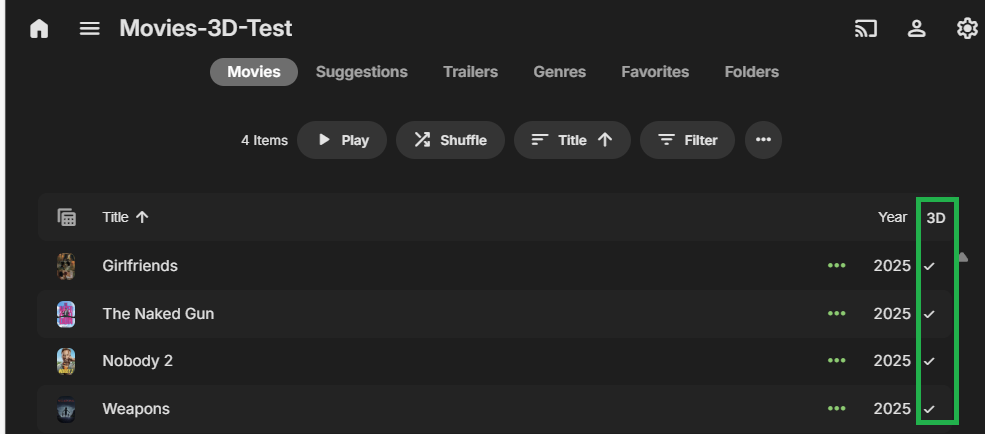
I did some tests using dummy files with variations of 3D and 3d and SBS and sbs and all movies were flagged as being 3D. File names used were: Nobody 2 (2025)-3D.MVC.mp4 The Girfrield (2025)-3d.mvc.mp4 The Naked Gun (2025)-3D.mvc.mp4 Weapons (2025)-3d.MVC.mp4 and this is a table view of the library showing the 3D indicator You mentioned a 3D icon - I am not familiar with how that appears and which client apps show it. Could you give me an example / screenshot / photo
 1 point
 -
I was able to go to the playstore and download emby and it is working fine beside that, Dune is on android 111 point
-
Operating System Version Desktop Environment Window Manager Compositor Graphics Mint 22.2 Cinnamon Muffin (Mutter) Muffin Nvidia GP107M / Intel UHD 6301 point
-
You two go get a room, and leave us rest bitching about 5+ years of waiting for functional IP TV in emby.1 point
-
Thanks a lot for the season posters @yocker! I really appreciate the work you've done. They make the whole experience feel more complete (to me).1 point
-
New PUBLIC TESTING version available 12.3.2: Delta changelog 12.3.1 -> 12.3.2 fix cast fix timeouts on content selections Comment: Repair sync for TV shows is required to apply the patch1 point
-
Been a while since i worked on this. i replaced the mb/cpu with a newer b760/i5-12600K back in Dec 2024. A750 still not recognized. i just used the iGPU since it was fast. Fast Forward to now. i installed the A750 again, downloaded newest drivers and presto, it recognizes the a750 for encoding/decoding along with the iGPU 770. i don't know if it was arc drivers as i was using the latest at the time(went thru several revisions) or some win 10 update. Yes this card work great for Emby and fast at encoding.1 point
-
Hi, this is on our to do list for the near future, to start saving the play queue. That said, yes the installed apps will do better this than the browser given that you won't have to worry about accidentally closing a browser tab.1 point
-
Thanks again Luke!! It is fixed now as of last night's new beta release.1 point
-
added a vhs sound effect Emby Curtain.mp41 point
-
Okay, messed around with the files some more. It appears that having two movies Grouped together causes problems. I had Spider-Man: Into the Spider-Verse grouped as one, Split them apart into Theatrical and Enhanced, and the Source icons for Enhanced (source.extended.png) showed up. The Theatrical icon, however, has not (not for Mappings of "theatrical", "theatrical cut", nor "theatrical edition"). Neither Reloading the plugin nor flushing the icon cache brought the Theatrical icon up. Grouping them together again makes the Enhanced icon disappear. I think this may be because Grouping them lists the Theatrical version before Enhanced (thus going by file age). Separating them the Enhanced version regains the proper icon, while Theatrical sill does not show.1 point
-
I know there are no default icons for this, so I threw together some .png icons to try this version out, but unfortunately nothing is showing up. I've added about 20 entries to Mapping, things like "international", "director's cut", "upscale", etc. All icons seem to be named correctly (source.text-word.png, with dashes for multiple words/white spaces). Some debugging thoughts: Could having multiple versions in the same directory cause a conflict? Say, both the default movie and another copy appended with "(Upscale)". Could the parentheses themselves be causing problems (should Mapping have "(Upscale)" as the trigger text instead of just the word "Upscale")? Could having multiple Mapping triggers for the same icon cause a problem? Would having "Extended", "Expanded", and "Enhanced" all mapped to use the same icon cause conflicts? Similarly, would having Source icon names that are partially duplicated cause a conflict? Like "source.alternate.png" and "source.alt.png"? In this case would the text "Alt" trigger both icons? I don't see any of my icons showing up on the Sample icon location pic. Does the pic not try to display Source icons (because there are no defaults to fall back to)? I'm presuming Source icons only show up on videos recognized as Movies, and not Series (or any video at all). Looking forward to this expansion, it has some great possibilities!1 point
-
From some time in the past:1 point
-
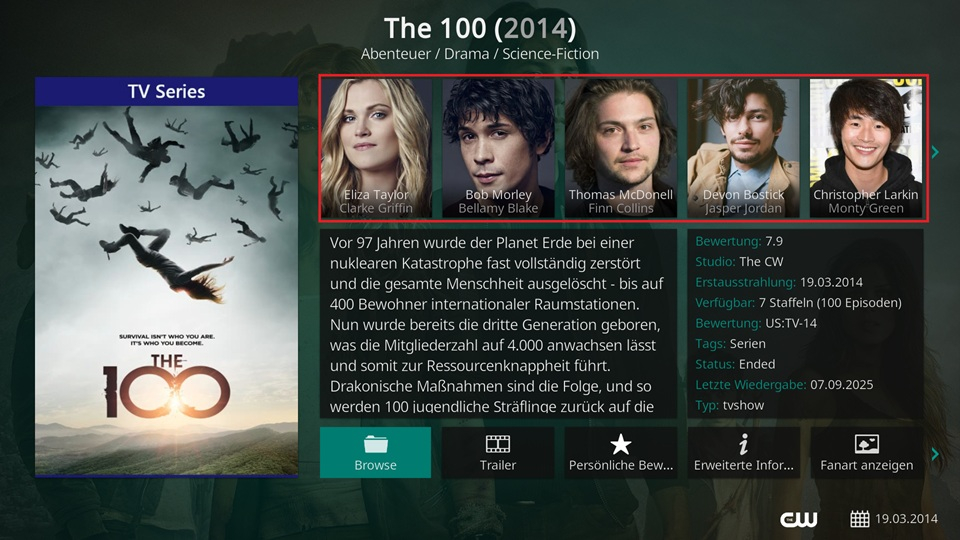
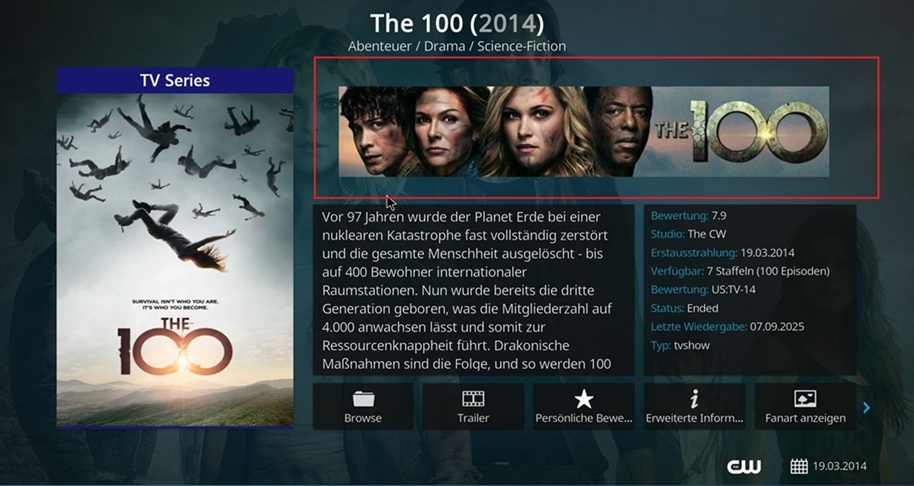
Hi quickmic, i made some tests with a clean Kodi Installation on Windows: Scenario: Clean Kodi by wiping / renaming the ...\appdata\roaming\kodi folder. Kodi 21.2 64bit Version, running on (a allmost clean) Windows 11 Pro. No other addons in Kodi other than stock ones, no additional settings other than language and setting level sometimes to expert. E4k was used in Addon-Mode only, also with stock settings, no helper addons, and i added only my movie and tv-show libraries... Result, against Emby Server Beta 4.9.1.27 + 4.9.1.29 E4k 12.1.0 + 12.1.2 - ok, Actors / Cast shown in TV-Shows information window E4k 12.2.1 + 12.3.1 - nok, only a banner is shown instead of cast. Same result against some older beta server, i have tested 4.9.2.17, 22, 23.... This tells me, something in e4k 12.2.1 and above was changed and cause the artist / cast "bug". But then, i have ONE client, Coreelec 21.2 on odroid n2+, with lastest e4k addon, and all are fine there. On a 2. Coreelec / odroid n2+ some of the tv-shows shown ok, most not... I can provide some logs if you need, and could do some mor testings....
 1 point
 -
HI, the upcoming 4.9 server release has updated to dotnet 8.1 point
-
Both of those are ancient, and horrible. If you are going to use hardware encoding, seriously upgrade to newer equipment. If this is just going to be an encode server with the movies and content stored on a NAS, you can easily buy a refurbished i3-12100 for under $200 USD. If your motherboard supports resizable bar, get an Arc A310 or A380 instead of the ancient 1050Ti. Your system will have problems with 4k content, specially with tone mapping as it won't have enough umpf.1 point
-
That's the whole thing though - as a PAYING Emby customer, I'd expect them to have an application the Apple TV that works properly! Infuse can do it, Channels DVR can do it, Plex can do it (etc.) So yes, still a cop-out. You can tell that the devs at Emby just don't seem to care about other platforms.1 point
-
From my understanding you set the library order on the server itself. Whatever is set will be displayed correctly on the Apple TV.1 point
-
The hold up is the Apple TV is a piece of crap that is not friendly to programmers who attempt to use it for playing stuff outside of the Apple ecosystem. There is a reason Android devices are so much easier to use.0 points