Leaderboard




Popular Content
Showing content with the highest reputation on 09/08/25 in all areas
-
Yes, it is - not technically but logically! TVnext handles live TV streams from many different origins - but always live streams. And ONLY live streams! The current live TV implementation and many M3U based stream sources are sometimes mixing up VOD streams and live streams, even though these are fundamentally different. Delivering TVnext without support for static (non-live) streams would have been a degradation of the live TV feature (albeit not being live streams), so a solution was required to handle those kinds of streams, in order to make TVnext acceptable for everybody. So we had developed the WebStreams plugin pretty early to close this gap. All participants of the TVnext beta have seen it already. The WebStreams plugin is not just a stop-gap solution for a "missing" feature in TVnext - it is much more: It is the result of completely rethinking the way how VOD content ought to be represented in Emby - which means: Movies, tv show episodes, videos, and other streams do not show up in Emby as a kind of "fake TV channel" with fake guide entries pretending that it would be a continuous broadcast of the same program being repeated 24/7 - not anymore! Instead, with the WebStreams plugin, that kind of content is shown in separate libraries just like your local content and enriched with metadata in the same way! The WebStreams plugin is an essential step towards TVnext and an important prerequisite which had always been planned to be published before proceeding with TVnext.3 points
-
Hi, I am using the Android app version 3.4.24 and like that you can click on on the director's portrait and see a list of all their movies in my library. What I don't like is that the director is listed last in the cast and crew so you have to scroll all the way to the right past however many people are in the cast before you see them. I would like the director to be listed first in the cast and crew section.2 points
-
@darkside40can you add image support? There is good sample code here: https://github.com/MediaBrowser/Emby.Plugins.Slack/blob/master/Emby.Notification.Slack/Notifier.cs#L76C17-L89C18 Just update the project to use the 4.8.11 nuget package or higher.2 points
-
Dev will have to comment on the errors, but appear driver related. 11:31:29.799 Stream mapping: 11:31:29.799 Stream #0:0 (hevc) -> scale_cuda:default (graph 0) 11:31:29.799 setparams:default (graph 0) -> Stream #0:0 (h264_nvenc) 11:31:29.799 Stream #0:1 -> #0:1 (eac3 (native) -> ac3 (native)) 11:31:29.799 Stream #0:2 -> #1:0 (subrip (srt) -> webvtt (native)) 11:31:29.799 Stream #0:0 -> #1:1 (copy) 11:31:29.799 Stream #0:3 -> #2:0 (subrip (srt) -> webvtt (native)) 11:31:29.799 Stream #0:0 -> #2:1 (copy) 11:31:29.799 Press [q] to stop, [?] for help 11:31:29.884 [tonemap_cuda@f4 @ 0x55a8253f56c0] cu->cuLinkAddData(link_state, CU_JIT_INPUT_PTX, ff_tonemap_ptx_data, ff_tonemap_ptx_len, "tonemap.ptx", 0, ((void *)0), ((void *)0)) failed -> CUDA_ERROR_INVALID_PTX: a PTX JIT compilation failed 11:31:29.884 [tonemap_cuda@f4 @ 0x55a8253f56c0] CUDA linker output: ptxas application ptx input, line 1037; error : Feature '.branchtargets directive' requires PTX ISA .version 6.0 or later ptxas application ptx input, line 1044; error : Feature 'brx.idx' requires PTX ISA .version 6.0 or later ptxas application ptx input, line 1157; error : Feature '.branchtargets directive' requires PTX ISA .version 6.0 or later ptxas application ptx input, line 1164; error : Feature 'brx.idx' requires PTX ISA .version 6.0 or later ptxas application ptx input, line 1277; error : Feature '.branchtargets directive' requires PTX ISA .version 6.0 or later ptxas application ptx input, line 1284; error : Feature 'brx.idx' requires PTX ISA .version 6.0 or later ptxas application ptx input, line 1400; error : Feature '.branchtargets directive' requires PTX ISA .version 6.0 or later ptxas application ptx input, line 1407; error : Feature 'brx.idx' requires PTX ISA .version 6.0 or later ptxas application ptx input, line 1893; error : Feature '.branchtargets directive' requires PTX ISA .version 6.0 or later ptxas application ptx input, line 1900; error : Feature 'brx.idx' requires PTX ISA .version 6.0 or later ptxas fatal : Ptx assembly aborted due to errors 11:31:29.885 Error while filtering: Generic error in an external library 11:31:29.885 Failed to inject frame into filter network: Generic error in an external library 11:31:29.885 Error while processing the decoded data for stream #0:0 11:31:30.062 Conversion failed! But have you tried changing your decoder order to see if it makes a difference? >>>>>> Hardware Decoders for hevc [X] NVDEC NVIDIA GeForce RTX 4060 - H.265 (HEVC) [ ] CUVID NVIDIA GeForce RTX 4060 - H.265 (HEVC)2 points
-
I mean saving markers to media folders, so new emby install or migration is much easier.2 points
-
tbh, really not sure why Emby simply don't add it to the NFO metadata - that was an option in this Plugin as I asked Cheese (the author) to add it as it seemed the logical place to store the data and make it portable. Emby already reads/writes the NFO at a system level - so it really wouldn't take much to add the chapter hidden markers as NFO lines ... @LukeIf nobody is supporting this Plugin (I'm pretty certain Cheese is not, and I don't have the source..) then it should be removed from the Plugin catalogue, especially as it is a paid for Plugin).2 points
-
Yes, it looks like the app might need to have the aspect ratio calculation adjusted now that the server side is fixed. I'll take a look at it.2 points
-
@LukeI made it work with 4.7.14.0. Here for your information other versions I tried: Version Outcome 4.7.14.0 Works. This is the last working version. After this, it stops working. 4.8.0.80 Fails with "No compatible streams are currently available" 4.8.11.0 Fails with "No compatible streams are currently available" 4.9.1.27 Fails with "No compatible streams are currently available" I have always used the emby-server-synology7-mono_x.x.x.xx_armv7_legacy versions. I hope this can help understanding how to possibly regain compatibility with older devices.2 points
-
Hi, This has been talked about a lot on the Apple TV forums, but there is no formal request for it. So I do it here, please add support for MKV HEVC HDR playback using Apple TV (without tone mapping). I don't care what technique you use. Either adding HLS fPM4 support to the server or improving the MPV player. I anticipate that I am not satisfied with you saying that Apple TV does not support that, since most players on the market support it. Thanks1 point
-
A new plugin is in the Emby plugin catalog for Emby Premiere users, largely developed by @softworkz. This plugin requires Emby Server version 4.9.1.27+, so unless you're running that, you will not see it. WebStreams This is designed to be a better version of the IPTV plugin. You can now import both single streams as well as M3U lists into Emby Server. Eventually we may also add RSS support and merge the podcasts plugin into this. Beyond RSS, there is also the potential to support other formats if there's enough demand for them. Features Import both single streams and M3U lists into Emby Server TV episodes within M3U are displayed with Series and Season hierarchies, just like regular libraries (make sure to select the appropriate content type when adding a source) Rich metadata support using MovieDb and TVDB (make sure to select the appropriate content type when adding a source) Ability to filter what gets imported Known Issues We need to add more visibility into the server's background refresh queue. You can see the progress of it on the webstreams config page. Currently if you restart the server in the middle of this, then you will need to run the refresh channels scheduled task.1 point
-
I have an issue where Emby stutters and will finally hang during live broadcasts. This both through OTA and IPTV. I wanted to give you two examples, so I captured a side-by-side comparison between Emby (left) an alternative app called Channels (right). Clip01.mp4: This clip shows Emby using the Auto option for display settings in the web browser and it is at 1080p @ 60MB/s. Channels automatically transcodes at 1080p @ 10MB/s. You'll notice Channels hangs for a quarter of a second at 9 secs, 30 secs, and 53 sec. Emby plays fine until about 1:30 and doesn't recover whereas Channels doesn't stop at all. Clip02.mp4: I set Emby's display to 1080p @ 10MB/s so it matches Channels. You'll see Emby hangs at 14 sec whereas Channels has no issues. I'm also attaching the transcode logs for both clips. I've done this test in a web browser, Apple TV, Chromecast, and Roku. Roku struggles the most but it does impact the other two as well. I suspect there's a signal drop briefly and Emby chokes whereas Channels is able to recover, but that's just a guess. Any ideas how to resolve this? Clip01a.mp4 Clip02a.mp4 Clip01 log.txt Clip02 log.txt embyserver.txt1 point
-
Thanks! Although I'm not seeing it yet because I'm not on that version, like you said...though my dashboard says I'm up to date for MacOS Server (Version 4.8.11.0), so that's probably why it's not coming up for me in the plugin catalog.1 point
-
Ugreen Ugos alias Debian 121 point
-
Oh woops, wrong post - thought (hoped) this was the one about episodes not completing properly. Not an issue anymore. I was able to fix it by setting my timezone on my tv to a random one, then back to the correct one. But it did revert to GMT in emby again a few days/a week later and I did the same thing again and it fixed it. No issues since.1 point
-
4.9 looks to be a massive update. looking forward to seeing all the hard work put into it1 point
-
Reposting this as I finally got around to updating TW and forgot GPU.. Also I forgot about my LeGo1 point
-
I think I figured out the issue after comparing the fresh install vs original install. Then when the problem appeared again after copying the config files from the official install to the fresh install I started modifying different settings. It appears Emby doesn't like it when I have the transcode temporary path set to a separate SSD that I have set up for transcoding and DVR. This only appears to impact Live TV/IPTV and not general media. I've now been watching a channel for 10 min. and not a single pause. So probably not Emby but a drive issue or something else.1 point
-
I think @Neminem covered it, no?1 point
-
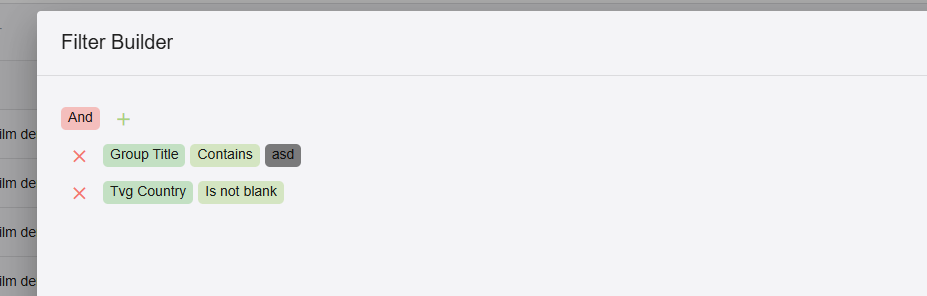
The plugin doesn't store anything. It integrates streams that are available on the web into Emby - that's why it's called "WebStreams" Go to the entry in the plugin config, click the 3-dot menu and choose "Edit Filer" There, click the filter button: Then you'll see a grid that is showing all entries, and the grid provides lots of ways for filtering. You can enter values in the filter row, click on the magnifier icon to change the match type You can click on the funnel icons in the headers (Excel-like filters) You can click on "Create Filter" at the bottom left to build custom filters just as you like: The primary rule is: The filtered result is what you see in the grid. Finally, click on "Save" to persist the filter. No, this isn't possible. But there is an option to show a WebStreams collection as a top-level library (making it look the same as normal library)

 1 point
 -
I used your commands, no luck. Only when i use chmod 777 on the video folder it works, until i change permission via ugreen ugos, then these changes are gone1 point
-
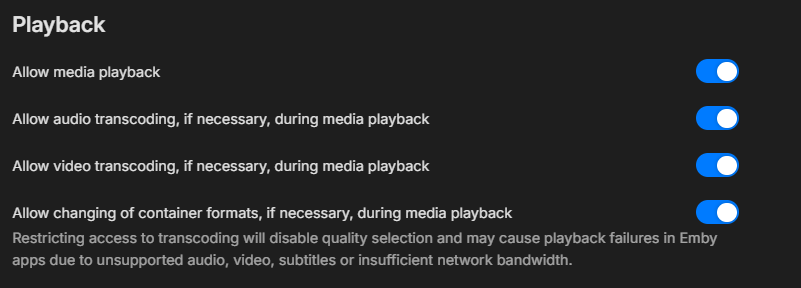
For specific content no. You can disable transcoding for all content, but media will fail if conversion is required. It is a per user setting. We would need to see the transcode logs to know why your media is transcoding as it will tell you and Stats for Nerds will also during playback.
 1 point
 -
Yes - like for all channel plugins, the refresh is executed during the "Refresh Internet Channels" task. But that's just for creating the actual items in Emby Server. This usually doesn't take longer than a few minutes. The much larger part is when metadata retrieval is enabled. The actual refresh task creates the Emby items and adds them to the queue for metadata refresh. For the latter, there's no scheduled task. It's a queue that is always working until it's empty. Even when "Refresh Internet Channels" is finished, you may still see the queue growing. That's because one thing leads to another, e.g. metadata is retrieved for a media item, and the metadata includes people (actors, crew) or is part of a series and has a season, those new items are getting added to the queue as well. Short answer Yes - configure the "Refresh Internet Channels"task to run at a specific time instead of the default "every 12hI".1 point
-
Correct - there are several causes for running out of buffer (causing hangs). But these are very different depending on the type of stream: For live streams, an increased buffer can help, because it sets you back a little more behind the "live edge". So any processing that is happening - like for creating segments - can make you run out-of-buffer. For example, when a live stream is served in segments of 10s length, and you have a buffer delay of just 5s, you might play one segment as soon as it's ready and downloaded, and when those 10s are played, the next 10s might not be ready and downloaded in time. With a 30s buffer, this won't happen, because you'll always have the next one or two segments downloaded already when the previous 10s have been finished playing. (just for illustration, typically, segments are 2 or 3s) For VOD streams on the other hand, there is no "live edge" that is limiting download of future content. In that case an increased buffer doesn't help at all. When you are experiencing hangs (out-of-buffer), then it means one of two things: Either the provider cannot serve the content quickly enough (maybe it does some ad-hoc conversion, but usually it's only urls to mp4 files where Emby server is requesting specific byte ranges), otherwise, the network connection is too slow to transfer the data as fast as needed. In both cases, increasing the buffer will only vary between more frequent short time hangs or less frequent hangs but of longer duration until playback resumes. TL/DR If you are seeing hangs with live streams => Don't use WebStreams for Live TV streams - it's not made for that! It's not only inferior to TVnext's live tv stream handling, but even inferior to the current live TV M3U tuner If you're seeing hangs with VOD content => Check your network conditions or try another provider1 point
-
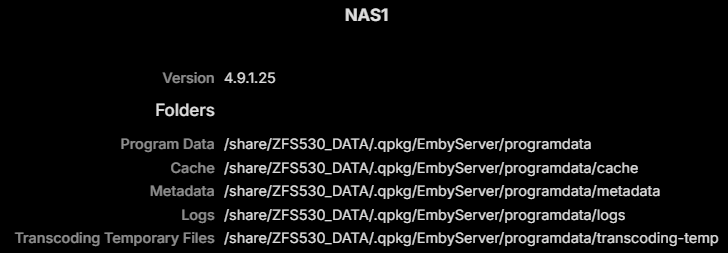
Sorry about that, I was still in Qnap mode Here is the dashboard info from my Emby server. No surprises here, it is in fact all in the ZFS530_DATA folder:
 1 point
 -
the reason why i am on 22 is live Tv on LE flickers when changing channel on LE 20 and 21 the issue has now been resolved in 23 I loaded 12.2.1 every thing is fine Thanks1 point
-
Thanks, you're welcome. If you want me to name something, then it would be: Please create new topics for new questions, if possible.1 point
-
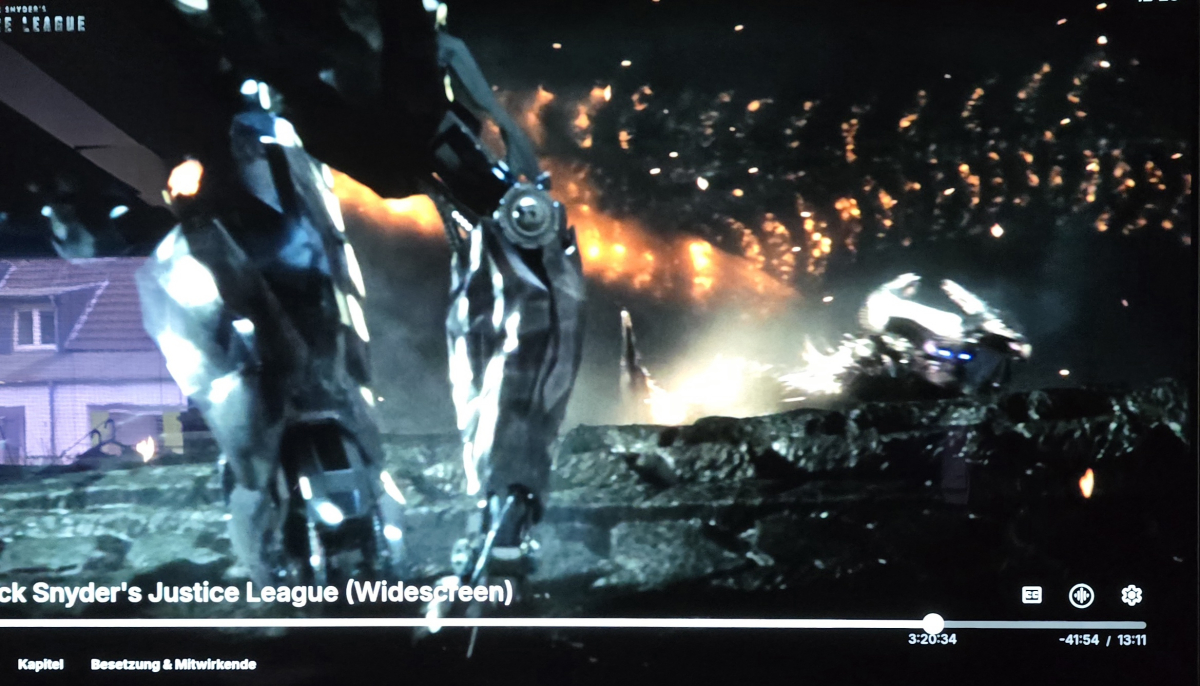
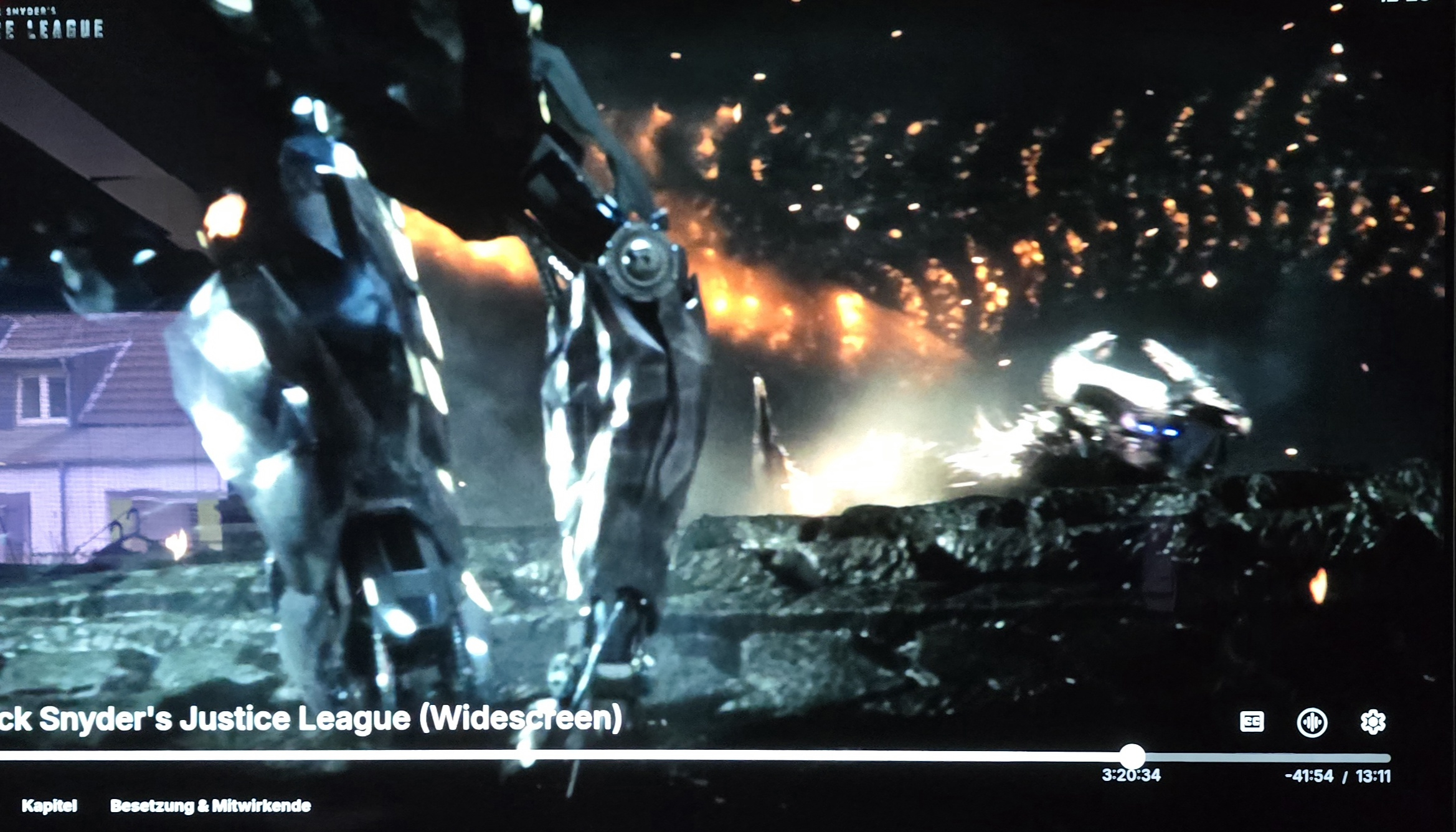
Hi, I first noticed this bug the first time several versions ago. In the lower right hand corner, you get the remaining time of the video and the estimated ending time. This no longer works after a certain percentage of a video has been played. Especially in long videos I find it irritating not to be able to find out, when it will be over. Please look at the example. At three hours and twenty minutes into the movie, everything is fine. Four minutes later the information has disappeared. This behavior can be reproduced with any video of any length. Please have a look into this, I hope it is not on purpose.
 1 point
 -
It’s great to see the Android version is getting some attention. Thanks1 point
-
Thanks @teicang - I will follow this up with the development team1 point
-
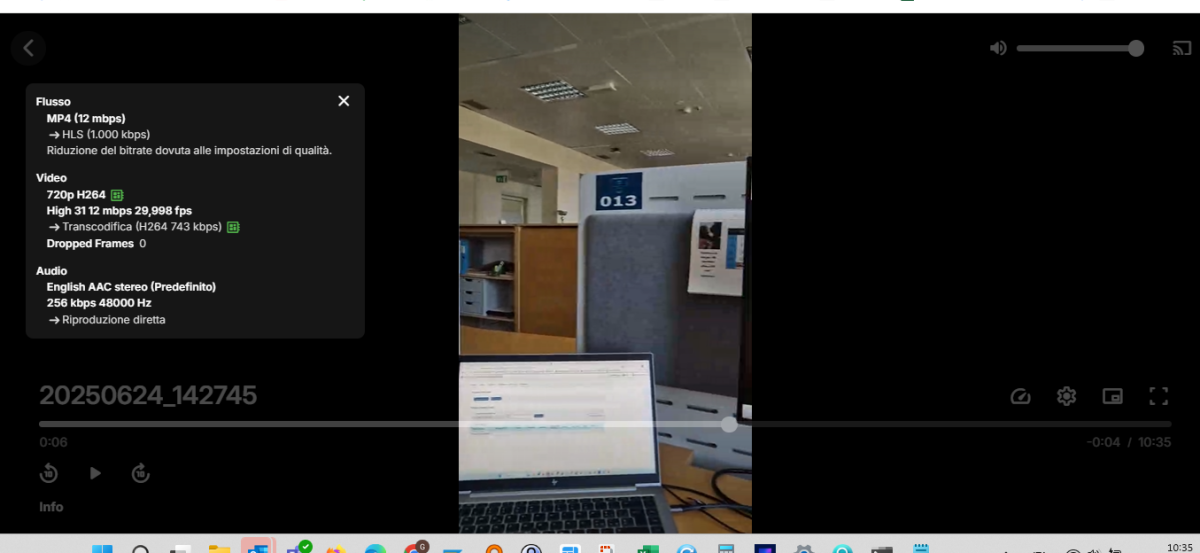
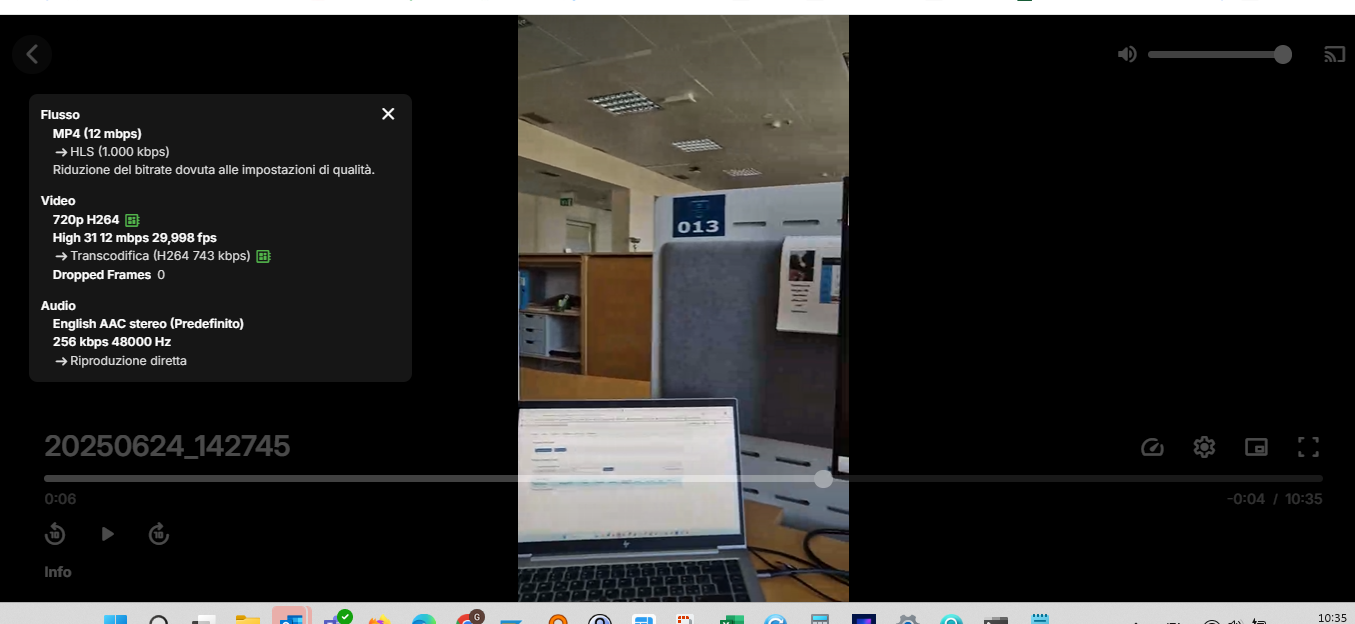
SAMSUNG QE65Q80 Unfortunately all videos shot with my S24 phone are always transcoded, so I didn't have a chance to check if it worked in direct playback thxx1 point
-
ADD: same video played from PC with google CHrome work fine both in direct playng than transcode. \Gi
 1 point
 -
As per release notes1 point
-
Thank you both. You're rockstars Pleease let me know if I can return the favor!1 point
-
The latest beta, 4.9.1.27, is a great improvement. It now includes the episode titles, which look great. When will this feature be added to the Android version? A big thank you to the Emby team.1 point
-
That is soooo cool. Imagine that I have been using Emby for all these years and never thought that that was what that line was for. Going to give it a try as there are still some NFL games left to verify. Thanks again.1 point
-
Not all server plugins are visible when viewing server configuration from within client apps. There's a whitelist of plugins known to work within the context of client apps and the WebStreams plugin isn't on that list yet (well - it's just been published).1 point
-
The initial sync is stopping before finishing. 2025-09-07 15:29:04.301 T:1656 error <general>: Traceback (most recent call last): 2025-09-07 15:29:04.301 T:1656 error <general>: File "/storage/.kodi/addons/plugin.service.emby-next-gen/database/library.py", line 785, in worker_library_add 2025-09-07 15:29:04.302 T:1656 error <general>: 2025-09-07 15:29:04.302 T:1656 error <general>: if not self.update_Item(AddedLibraryProgress, ItemIndex, Item, SQLs, AddedLibrary[3], ProgressBar, False, ClassObject): 2025-09-07 15:29:04.302 T:1656 error <general>: 2025-09-07 15:29:04.302 T:1656 error <general>: File "/storage/.kodi/addons/plugin.service.emby-next-gen/database/library.py", line 861, in update_Item 2025-09-07 15:29:04.302 T:1656 error <general>: 2025-09-07 15:29:04.302 T:1656 error <general>: Ret = ClassObject.change(Item, IncrementalSync) 2025-09-07 15:29:04.302 T:1656 error <general>: 2025-09-07 15:29:04.302 T:1656 error <general>: File "/storage/.kodi/addons/plugin.service.emby-next-gen/core/series.py", line 41, in change 2025-09-07 15:29:04.302 T:1656 error <general>: 2025-09-07 15:29:04.302 T:1656 error <general>: common.set_MetaItems(Item, self.SQLs, self.GenreObject, self.EmbyServer, "Genre", "GenreItems", "", IncrementalSync, Item["LibraryId"]) 2025-09-07 15:29:04.302 T:1656 error <general>: 2025-09-07 15:29:04.302 T:1656 error <general>: File "/storage/.kodi/addons/plugin.service.emby-next-gen/core/common.py", line 1259, in set_MetaItems 2025-09-07 15:29:04.302 T:1656 error <general>: 2025-09-07 15:29:04.302 T:1656 error <general>: WorkerObject.change(SubItem, IncrementalSync) 2025-09-07 15:29:04.302 T:1656 error <general>: 2025-09-07 15:29:04.302 T:1656 error <general>: File "/storage/.kodi/addons/plugin.service.emby-next-gen/core/genre.py", line 14, in change 2025-09-07 15:29:04.303 T:1656 error <general>: 2025-09-07 15:29:04.303 T:1656 error <general>: if not common.load_ExistingItem(Item, self.EmbyServer, self.SQLs["emby"], "Genre"): 2025-09-07 15:29:04.303 T:1656 error <general>: 2025-09-07 15:29:04.303 T:1656 error <general>: File "/storage/.kodi/addons/plugin.service.emby-next-gen/core/common.py", line 42, in load_ExistingItem 2025-09-07 15:29:04.303 T:1656 error <general>: 2025-09-07 15:29:04.303 T:1656 error <general>: ExistingItem = EmbyDB.get_item_by_id(Item['Id'], EmbyType) 2025-09-07 15:29:04.303 T:1656 error <general>: 2025-09-07 15:29:04.303 T:1656 error <general>: KeyError 2025-09-07 15:29:04.303 T:1656 error <general>: : 2025-09-07 15:29:04.303 T:1656 error <general>: 'Id' 2025-09-07 15:29:04.303 T:1656 error <general>:1 point
-
Hi, as soon as 4.9 releases. Any day now.1 point
-
Thank you for creating this plug-in; I was able to clean up an inappropriate classification for a kids profile. Emby by default groups G/PG and APPROVED; as such I needed a way to identify all ratings under APPROVED and upgrade them to R. These are the settings I used.
 1 point
 -
Hello again Emby community! So long story short, I'm developing on the plugin again as time permits. I essentially started from scratch, which is what I think my mind needed to look at the project in a new way, design-wise that is. This time around, instead of doubling up on Emby's REST API calls or using the SQLite database, I am using the internal .NET API that was already available to me via the plugin itself, and things are already looking much, much cleaner! Since I had a few GitHub stars on the original repo, I am just reusing it for this new effort. The good news is that I have successfully gotten the following three endpoints working successfully: /rest/ping /rest/getLicense /rest/getArtists Not much I know, but I'm hoping things will go quicker as I hit more of Subsonic's API methods. I'll report back when I'm near or at an initial release, but in the meantime, feel free to track progress at the repo.1 point
-
I've got Emby currently running on an Orange Pi 5 8GB sporting Rockchip RK3588 and I've got an Orange Pi 5 Plus, Radxa Rock 5B just sitting here waiting for something to do. Would be the bees knees to get the hardware acceleration for the Mali-G610 GPU going with Emby when it needs to transcode. Patiently waiting for this as well.1 point
-
I got premiere mainly to try the podcast plugin and I was pretty disappointed. 1. Let me add an OPML file. Adding feeds one by one when you're a power user is... not acceptable. 2. There are no views/sections under the podcast library? All I get is a screen with my podcasts, and then I need to navigate into each one of them. That is *one* of the views that I think a podcast library should have, but here should also be at least one with all new episodes with the newest at the top. 3. The feeds I as an admin enter are what's fed to the entire user base. No options to choose which podcasts to follow. 4. No information about each podcast, no episode notes, no links to a website, nothing? I also tried the route of getting audiobookshelf on my server and then pointing Emby at the folders and setting the media type to audiobooks, and it was also unsatisfactory as a podcast solution. Its actually better than the podcast plugin, but there's no way to control the sorting of episodes, and of course no feed with all new episodes combined (because this wouldn't make sense for audiobook chapters) I really want podcasts on Emby to work well, because there's basically no podcast app out there that lets me cast to my Sonos speakers without having to go through the Sonos app (apart from like.. sp*tify) - but Emby can do this!1 point
-
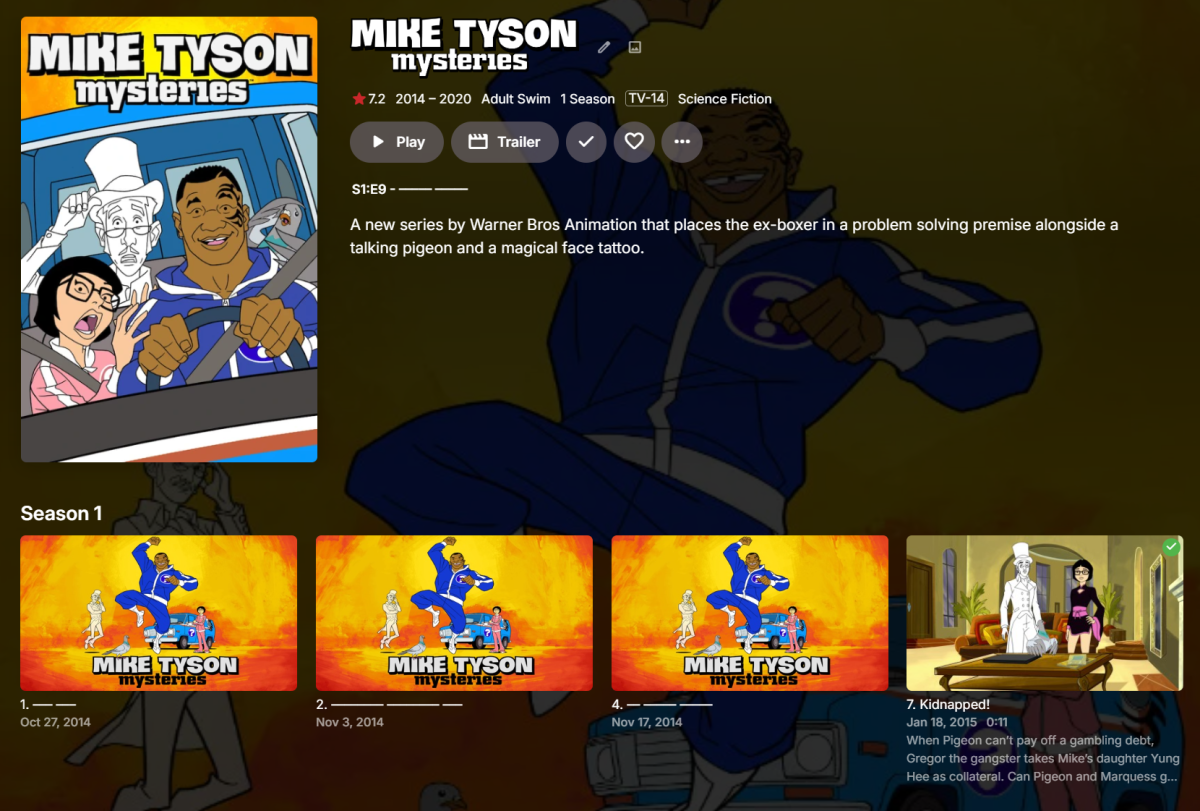
Hi, this will be in the 4.9 server release for the web app, and will be in the next update to many of our apps. It will come in the form of a user setting: And then you will screens like this: Of course it is not guaranteed to be applied everywhere, particularly when it comes to screens that are more intended for media management purposes than viewing. Enjoy.

 1 point
 -
Cable is not the only way to get TV, OTA is still around.1 point
-
That's correct. TrueHD pass-through is not supported by LG1 point
-
Hi, LG does not support TrueHD passthrough to my knowledge. @SamES1 point
-
Would this be able to work with intel-media-va-driver-non-free? Another app I'm running needs it. I did try but it doesn't currently work.1 point
-
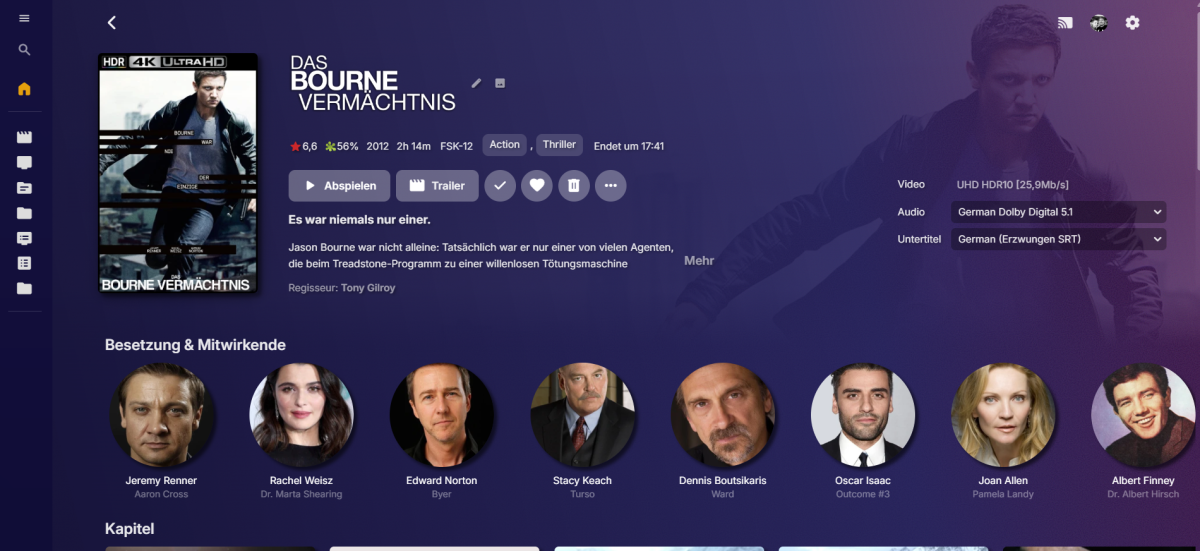
I also checked out to have a gradient mask effect, so that the actor section etc isn't disturbed by the background image, a little bit like Plex. Backgrounds with a lot action in the top right are best for this. Emby-Stable-style-3.5_colorful_v3_gradient_blur.txt
 1 point
 -
Hi Guys, I recently moved from Kodi with MySQL for lack of proper multi user management and server side support, I have to say I'm impressed with Emby. Together with the Kodi Plugin it really takes the solution to a whole new level, count me in among the supporters! One feature I would like to see is the ability to recommend movies or shows to other users: I share my Library with close friends and family but it is a big library so they are always calling me to recommend them a movie to watch. It would be really cool if after watching a movie I can click a Recommend button and choose the users I think would like the movie, then it is displayed on their suggested movies at the top with the name of the user who recommended it... Sorry if there is something like this is already there, I am new to the interface and don't fully know it but could not find such feature... Thanks!1 point


















.thumb.jpg.21d888786f2104b4f688825203ce7598.jpg)