Leaderboard




Popular Content
Showing content with the highest reputation on 09/03/25 in all areas
-
I was researching during the reply time and downloaded and tried MKVToolNix. worked perfectly and allowed me to removed the audio and subtitles not needed. I truly appreciate your help in this Grim.2 points
-
Do you have maybe have "Play default audio track regardless of language" option enabled?2 points
-
Hi. That is intentional and there is currently not an option for it. We could possibly tie it to the option to show media details...2 points
-
Is there plans on the roadmap for OpenID. I have searched but not found any indication this is in development. With many admins taking up SSO through Authelia or Authentik to enhance security it would be great for Emby to support it. One of the easier open standards is OpenID which the aforementioned support. Users could continue to use LDAP if they wish while others can use the arguably better SSO experience.1 point
-
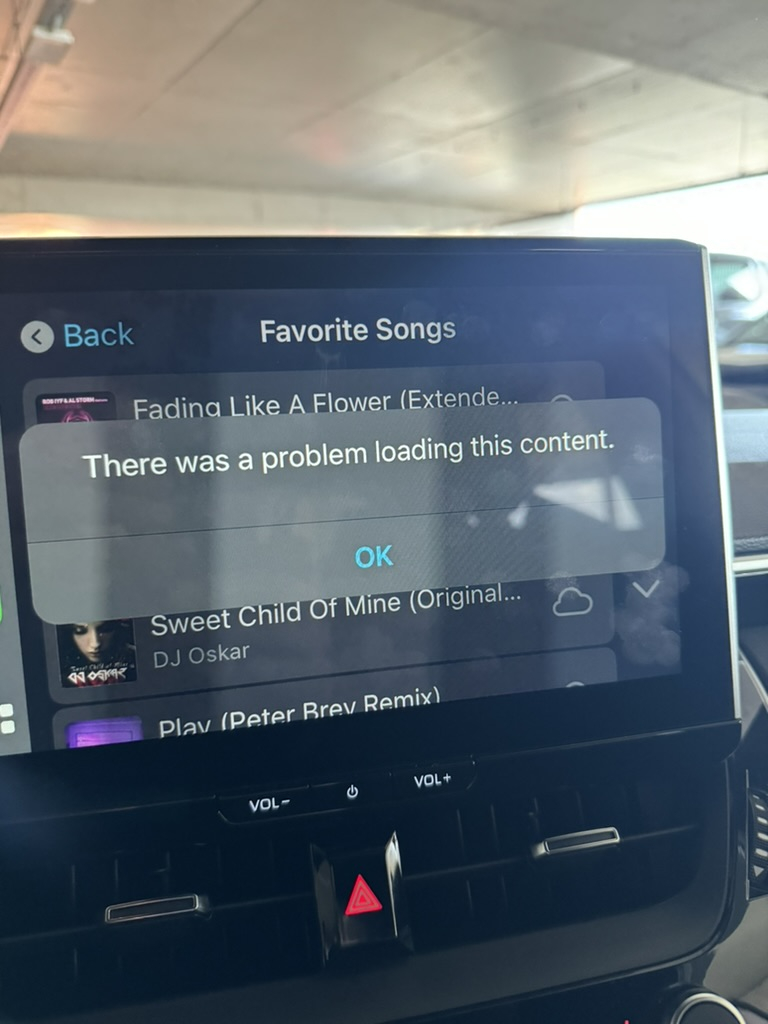
For some reason, initiating playback via CarPlay always fails, while initiating it via IOS App, while connected to CarPlay always works. Maybe someone from Emby team can take a look, it is a bit frustrating, since technically (from end user perspective) Emby CarPlay "does not work". From logs, bunch of errors happen, around the time I attempted it, (search for string "Halo" which is track name) or Timestamp starting from 15:48 Client is latest from AppStore, connection is over Wireguard to the server (Emby unfortunately does not support CarPlay on downloaded files, yet) embyserver.txt
 1 point
 -
I was updating meta data for some of my soundtracks today in Emby and thought it might be interesting if provided a link between the soundtrack and the movie where if you were looking at one you could quickly click to go to the other. I don't know if the current structure would facilitate this seeing as even the metadata for people is separated when it comes to music and movies/series: Its not really a priority item or anything just thought it would be something that could be neat for people that typically keep both the album and the movie (and it might raise the awareness for users of the system that the content is available, say if they just watched interstellar and said "Wow I liked that music quite a bit", oh look the movie soundtrack is already in here).1 point
-
Just take your app to the veterinarian and have it "fixed." That way there will be no problems and less fighting.1 point
-
I honestly don't think it was anything in your setup - likely my DLL Given the sustained interest over the past several months though, I think I'm going to try to work on it a little bit at a time (because it still is fun for me) but I'll work in a private repo so as to give myself the leeway to start fresh, but someone can still fork the archived repo if they want while not expecting much from me lol. With that said it really seems this idea won't die so I'd like to give it one more go!1 point
-
This seems like a common problem going back years. I'm having the same problem. When I searched the phrase "emby download ready to transfer", I see so many threads complaining about this yet it doesn't seem fixed. When will this be resolved? Will it ever?1 point
-
Dass Du mal emby.nemwar.de und dann nemwar.emby.de schreibst, ist richtig?1 point
-
I have reproduced the problem. I will refer it to development Thanks for reporting it1 point
-
You can bind mount the whole dashboard-ui folder, then you should be able access all files inside and modify them. But keep an eye on the file permissions. volumes: - /path/to/dashboard-ui/outside/of/docker/:/app/emby/system/dashboard-ui/1 point
-
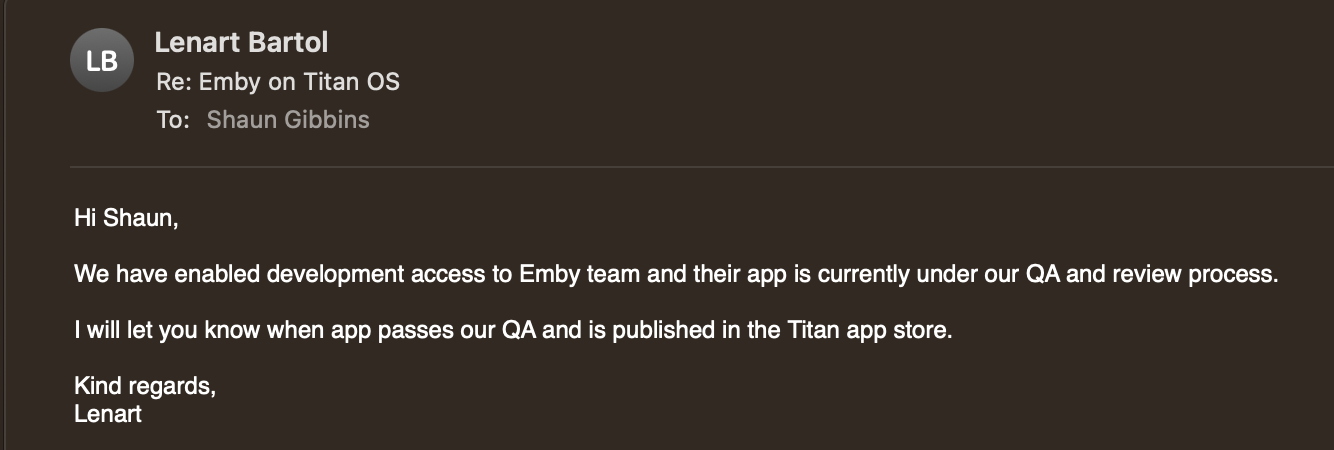
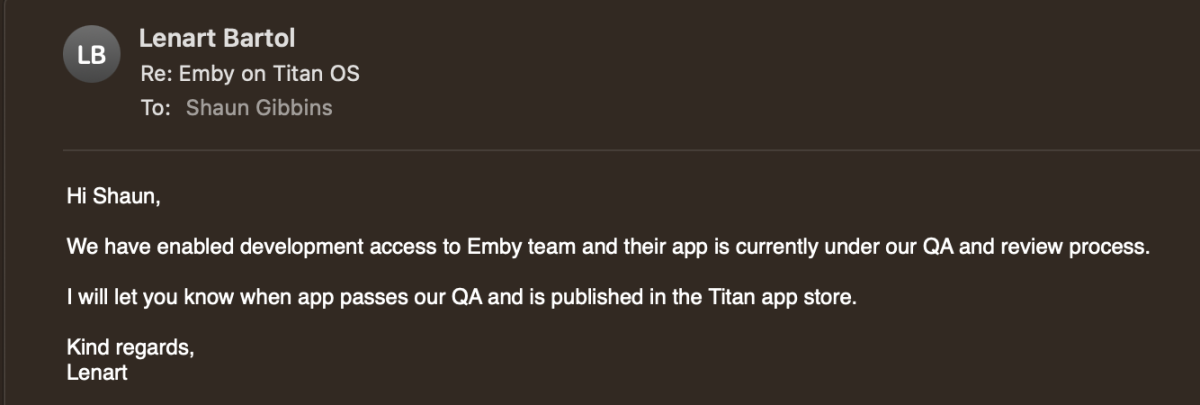
@Luke I got this reply today so hopefully things will progress promptly their end.
 1 point
 -
In that case you should try disabling it, as Japanese tracks in your files are likely flagged as default. You can also clear saved tracks if you wanna rewatch any episode1 point
-
Sorry, das war echt unhöflich von mir, so lange nicht zu reagieren, aber ich habe es einfach nicht hinbekommen. Habe jetzt wieder ein neues NAS - alles neu aufgesetzt mit DSM7.2 - und jetzt läuft es so, wie es soll1 point
-
Use the recordings library on the home screen, not the recordings tab under live tv.1 point
-
Thank you. And if either of you would like any additional logs, let me know!1 point
-
I'll look into it but for looking for what needs upgrades and such, can i suggest Radarr (movies), Sonarr (TV shows) and Bazarr (subtitles)? They are genius pieces of software i don't know how i could live without. They can automatically keep an eye on your collections, update them and download new stuff when available and they can be configured in any way you want them. There are also tools in the settings page that can be used to see what is missing for TV shows and such.1 point
-
Hi, please try 2.2.0 and see how that compares. Thanks.1 point
-
@softworkzI greatly appreciate your answer and I understand the great value of the PluginUi. As you know, I mostly like pushing the boundaries of what Emby plugins and the Emby API can do. MyTv is one example. I program only for the joy of doing so and try my best to give the credit and all of the source code to anyone. My goto tools are always html, JS and C#, rather than the PluginUi. Perhaps a hybrid of the two would be a winner? MyTv is intended for server administrators, not everyday users. It's very visual and interactive and probably suffers all of the problems that you mentioned html/JS plugins have. This is why I have not added it to the catalog. Remember that I am just having fun, and I rely on you to let me know if I have gone into the weeds. Vic1 point
-
Hi guys, I normally scrape my tv series files with the source of the tvdb.com. But for one specific series I would like to have the episode screenshots and the sort order for tv series from themoviedb.com instead. How can I manage that only this one series gets scraped differently? Is there any solution? Please advise. Greetings Dan1 point
-
Okay, OK. Here's the file. I'll tell you what the error is. I've had my movies saved in folders for a long time. In that folder, I put the video, the subtitle, and an image called backdrop.jpg that I created so that the background of the movie listing looks correct. I updated to version 2.1.9 from version 1.9.2 that I was using (if you don't ask me how, but I've been using that version since it came out; I installed it via USB). The thing is, I saw that you changed things in the interface in 2.1.9 and I updated, and now the backgrounds look correct without having to use that backdrop.jpg image. When I select another image because it's now very dark and change the order so that the first one is visible... it gives that error (but only because I have the movies on an external hard drive, which wasn't connected at the time). When I connect it, it doesn't give that error logically because it finds the image. Regards embyserver.txt1 point
-
Just wanted to mention that the problem is still there. I‘m on beta 8 on my iPad 4th Gen. Two weeks till release of ios 26.1 point
-
Thank you for the kind words! Unless i made a mistake somewhere a session is meant to be a "play session", watching a video is a play session. The reason for the number of notifications is that the message system can be a little lacking in some areas, like not being able to control how long the message should be shown, so a compromise would be to show it multiple times instead.1 point
-
Hi. Don't you think that would be terribly distracting?1 point
-
When the view is an album artist I agree having the album artist repeated over and over as the 2nd line serves no purpose. Having the year there would be a much better idea. I can make sure we get this into the app too. On the main music screen it might also be cool to add a 3rd line. Album Name Artist Name Year We can probably do that too. There are some media types that need 3 lines to show everything as row items without cramming. I agree.1 point
-
The entire idea is that the Roku matches exactly how the web app works. If it isn't doing that then we have a problem. The Alphapicker should show up when sorted by "Title". Does the web app let you sort by "Year" and still have the alphapicker? We can fix the issue with year showing inconsistently and incorrect for some items. I know what is causing that issue. Whatever shows on the web app should match what is shown on the Roku. If you can show more screenshots of where you find issues we can fix all these types of things.1 point
-
Ok. In this case probably some things overlaped and i got confused. When i tried to connect locally, the media server got added with my local emby server IP. Remote it did not work. When i tried Add Server with my domain/port it worked but at the end of my domain the Port 443 was visible. At this point i recognized the Emby Connect from my User on the Server was removed (Probably because i once removed the server in the application). When i completly removed the Server from the emby application, again connected the user on the server and then again logged in on the app, the server was available. But this time without the port, which means emby connect on the server did its job.1 point
-
Was just working on the logs from 2 devices a pof it statted working atleast for the pre rendered1 point
-
Alas just like FIXING the search so one can set it to only search the particular library they're in, or when in setting ONLY finding items in settings and not searching ones media Fuzzy Search most likely won't happen. The devs seen to be beyond fuzzy (clueless) on the importance of proper search functions in an app.1 point
-
The Emby music server works very well on my Synology DS220+ NAS (DSM7). However, I have my M3U playlists created for network access by uPnP players. The tracks are in the playlist as \\SNAS\Music\CDQ\trackx.mp3, where SNAS is the 'friendly' name for the NAS. This format will not work with Emby. My Emby music library is /Volume1/Music. So the only way that I avoid "playlist empty" error message is to reformat the track list in my playlists to /Volume1/Music/CDQ/trackx.mp3. Emby will not accept 'SNAS' or 'IP address' in place of 'Volume1', and will only accept forward slash. By 'accept' I mean for the playlist to work in Emby. So, is there a known solution or work-around for this issue so that I can have common playlist files between Emby and network players? Or is this a feature request? Thank you.1 point
-
Hi, not for 4.8.11. We are looking into it. Thanks.1 point
-
Just here to say that I’m in the same situation… unable to start playing anything through CarPlay because op lib size.1 point
-
To clarity to this. What PtpSteve has indicated is correct and works, however it's a combination of problem/feature request/workaround?. When using a Synology NAS with Emby, music Playlists work a bit 'uniquely'. In my case I installed the Emby 'Synology version', and care needs to be taken to ensure that the shared folder has the correct permissions in Synology. This needs to be done in the 'Control Panel', within 'Shared Folders' and then permissions. Note that within 'Permissions' that you need to look for Emby in the 'System Internal User' group and enable the read permissions. This is different if you are using a containerized install of Emby. In Emby you then need to set the Music Library folder to the shared music folder: Folder: /volume1/music (This is the Synology default) (Optional) Shared network folder: \\Snas\music\ (Where Snas is the name of the server) - I have no idea if this is necessary or even required ? At this point, music plays correctly from: Synology AudioStation Synology MediaServer Windows - Any music player Linkplay - Network DLNA music streamers from the Synology MediaServer Emby - Any client device So here's where things start going a bit awry with 'Playlists' Test 1: Absolute reference - Windows file structure If I create a M3U playlist (\\Snas\music\playlist\test.m3u) in a 'playlist' folder in the shared music folder using the following pathing: \\Snas\music\ArtistA\Album01\Track01.mp3 \\Snas\music\ArtistA\Album01\Track02.mp3 \\Snas\music\ArtistB\Album01\Track01.mp3 The playlist is recognised as a playlist and works with: Synology AudioStation Synology MediaServer Windows - Foobar2000 / Windows Media Player Legacy Linkplay - Network UPNP/DLNA music streamers from the Synology MediaServer It does not work with Emby, and although the playlist is shown on the client device, it's 'empty'. Test 2: Relative reference - Windows file structure Taking the same example above and using 'relative pathing' in the same M3U file has the following results: ..\ArtistA\Album01\Track01.mp3 ..\ArtistA\Album01\Track02.mp3 ..\ArtistB\Album01\Track01.mp3 The playlist is recognised as a playlist and works with: Synology AudioStation Synology MediaServer Windows - Foobar2000 / Windows Media Player Legacy Linkplay - Network UPNP/DLNA music streamers from the Synology MediaServer It does not work with Emby, and although the playlist is shown on the client device, it's 'empty'. Test 3: Relative reference - Unix file structure Taking the same example above and using 'relative pathing' AND Unix pathing (ie. substitute '/' for '\') in the same M3U file has the following results: ../ArtistA/Album01/Track01.mp3 ../ArtistA/Album01/Track02.mp3 ../ArtistB/Album01/Track01.mp3 The playlist is recognised as a playlist and works with: Synology AudioStation Synology MediaServer Windows - Foobar2000 / Windows Media Player Legacy Linkplay - Network UPNP/DLNA music streamers from the Synology MediaServer Does work with Emby Clients It seems that the Synology, Windows and Linkplay clients can substitute '/' for '\' during their reading of the M3U files and seem to quite capable of recognizing the server file system and it's requirements and then parsing the M3U file accordingly. It seems however that Emby is not able to provide this for it's clients, and hence is causing a fair bit of confusion. This is not really a 'fault' of Emby as it's technically correct, but rather that the norm has moved and it seems most other systems quite happily parse the M3U file. This lack of M3U Windows/Unix file parsing merely makes playlists on Emby a pain to use, as the following steps are needed: 1. Create playlist on your favorite Windows editor (This creates a \\Snas\music\ArtistA\Album01\Track01.mp3 format) in the \\Snas\music\playlist\ folder. 2. Use a text editor to substitute all '\\Snas\music' for a '..' 3. Use a text editor to substitute all '\' for a '/' It would be great if Emby could also recognize the formats in the Test 1 and Test 2 examples above, as it would make maintaining Playlists a HUGE amount easier from different client devices on different systems.1 point
-
Carplay is not functional in the current iteration of Emby for IoS 2.2.36 . Can you please address when it will be functional? Thank you.1 point
-
HOW TO CONVERT "IMPORTED" PLAYLISTS INTO "NATIVE" EMBY PLAYLISTS, THAT SHOW UP IN "ADD TO PLAYLIST" LISTING: When you try to add new items to the "imported" playlists, they do not show up in the "native" Emby playlists listing as options to add to. Apparently, only playlists actually created within Emby will allow you to add new material to them. "imported" playlists CAN be converted into "native" playlists by adding an "imported" playlist to a newly created playlist. Emby will add all the items from the "imported" playlist to the newly created "native" playlist, then the old "imported" playlist file can be deleted. The specific steps are outlined below: I navigated to HOME>MUSIC>PLAYLISTS, where all the "imported" & "native" playlists appear together (Master Listing). I selected one of the "imported" playlists, then clicked the ellipsis (...) to get to the "Add To Playlist" option. From the "Add to Playlist" screen, I created a new playlist. I had to repeat the navigation from home>music>playlists to get the new playlist to show up, but there it was! it had the same number of items & in the same order. The new PlayList also now shows up in the "Add To Playlist" listing! However, there are now 2 versions of the same playlist showing up in the Master Listing. I had added a custom description to the Metadata of the "imported" playlist. It was a simple matter to edit the "imported" playlist metadata, copy the description, edit the new "native" PlayList Metadata & paste the description, then Save. Since I couldn't delete the "imported" playlist from within Emby (separate question in another post), I went to File Station on my NAS & moved the PlayList.m3u file to a non-Emby-Indexed folder (effectively deleting it from Emby, while keeping a copy). I had to Re-Scan the music library to get Emby to recognize that it had been removed. When I went back to the Master Listing I saw that the "imported" version of the playlist was gone & the new "native" playlist remained, with the same content. I was concerned that deleting the original playlist would also remove the items from the new playlist, since the "source" was removed. However, apparently Emby imported the individual items from the original to the new playlist, so the new playlist remained intact when the original was deleted. Voila!1 point
-
Will the 25-device lifetime be increased to 30? And the 45-device lifetime to 50? (Its not avaliable to buy anymore) Also with the "hopefully increase the value" you mean also the price for bigger plans? Example of the 75 device at 19,99$ to 80 device at 23,99$ Price per device before: $0.27 Price per device after: $0.30 The 30 device still have the same price as before 4,99$ And now the price per device Is: 0,17$ Shouldn't it be the other way around? Usually the more you buy, the less you pay. The 30 device now Is way more convenient This is not to say that I disagree and will not pay anymore. Of course you can do what you want and as long as the software is worth the price I will continue to use it. PS: It would be great to know which users are using how many devices. I know it's done on purpose so that it can't be known. Sorry for the long post. Happy New Year1 point
-
Hey Embians! Just an early update: Made a lot of initial headway in the past couple of days on the Subsonic API plugin. Worked through a couple of thorny issues. I've barely started implementing the API (I'd only trust ping right now), although getLicense and getAlbumList appear to be working against my own Emby server at least. Authentication probably was the biggest problem because the documentation and the Emby.ApiClient package are unfortunately quite dated. I'd love to contribute to one or both after I have an MVP for the Subsonic API plugin. I know it hasn't been long since I last posted, but since others coding against the API sometimes seem to have issues with authentication, I wanted to at least let ya'lls know that I got it working, although my plugin code is in a very early state and shouldn't even be considered a solid example of Emby plugin best practices, let alone programming best practices. My focus is to get it working in the short term. That being said, authentication works and if you are having API authentication problems feel free to go check out my plugin code. As always, feel free to bring up any requests over at the repo, or questions here. Cheers! Talk soon.1 point





.thumb.jpg.21d888786f2104b4f688825203ce7598.jpg)