Leaderboard




Popular Content
Showing content with the highest reputation on 08/27/25 in all areas
-
Even if I wanted to switch to Plex, all the custom editing & re-identifying of mis- & un-identified content might take years (I have A LOT of content). I don't imagine that Plex offers a direct import from Emby, where I have already invested a lot of time making things look "perfect". Switching is not really an option for me at this point. I (we) can only pray that our persistent and polite requests for some form of volume control will result in more implementation than just "that's a good idea" replies. It would be an extremely valuable feature, and if it HAS been implemented in Emby somewhere, It should not be a herculean lift to implement in music playback as well. PROGRAMMERS: PLEASE look into this & give us some form of volume normalization for shuffled playlists, etc!!2 points
-
Here is the latest list of versions for Emby software across the server and clients. Emby Server Stable: v4.9.5.0 (2026/05/18) Release Notes Beta: v4.10.0.14 (2026/06/04) Release Notes For other platforms, please refer to the download page. Emby for Android TV Google Devices Stable: v2.1.23 (2025/12/27) Beta: v2.1.46 (2026/04/15) Amazon Devices Stable: v2.1.23 (2025/12/27) Beta: v2.1.46 (2026/04/15) Stable Release Notes Beta Release Notes Universal Android app Stable: v3.5.16 (2026/01/26) Beta: v3.5.36 (2026/05/10) Release Notes Download the latest Beta here. Emby for Kodi See here for the latest information. Emby for Roku Stable: v4.1.63 (2026/05/04) Release Notes Beta: v4.1.64 (2026/05/13) Release Notes Emby for Windows (Windows Store for PC & Xbox One) Stable Release Notes Beta release notes Emby for Linux Beta Release Notes Emby for Samsung Smart TV (Orsay) E-series to H-series TVs only Release Notes Emby Theatre for Samsung Smart TV (Tizen) Release Notes Emby Theatre for LG Smart TV Stable: 1.0.50 (2026/01/19) Emby for iOS Stable: v2.2.53 (2026/05/16) Stable Release Notes Beta: v2.2.52 (2025/04/11) Beta Release Notes Emby for Apple TV Stable: v2.0.3 (2025/12/26) Announcement Beta: v2.0.6 (2026/04/11) Release Notes Emby for tvOS (Apple TV) Stable: 2.1.6 (2022/12/23) Release Notes - TBA Beta: 1.5.1 (10) (2021/03/02) Beta Release Notes Emby For MacOS Stable: 2.1.6 (2022/05/09) Details here. I will keep this post up-to-date as much as possible, but please send me a PM about anything I haven't updated, or is missing. Special thanks to @Borskfor supplying a lot of the updated information. Thanks.1 point
-
Is it possible to link items in your Emby library to other items in the overview section of albums, artists, playlists and collections?1 point
-
I hit "play all" on a collection and it doesn't show the next film in "Next Up" after I quit out of it. This is apparently intended behaviour, and the same applies to playlists. This is absurd. Why even have the "play all" option? Who's sitting down to watch a full collection's worth of films, or a full playlist? I have playlists for The Prisoner for its various episode orders, and there's no way I'm getting through them in one sitting. I was going to make that my next show to watch but if I'm going to have to keep track manually of my progress through the playlist it makes the playlist fairly pointless TBH. There's no reason playlists or collections shouldn't show up in Next Up.1 point
-
Not sure if this has been requested yet or not, I did a little searching before posting so forgive me if this has been requested already. A nice feature to have would be something along the lines of a Kids Mode, some changes that i would forsee in this mode are: Simplified Playback (Instead of selecting the item then having to hit the play button just have it so when an item is selected it just plays.) Simplified Menus (Instead of separating Movies and TV (yes i know if i change my libraries i could accomplish this) have it more along the lines of maybe Character selections (i.e. Mickey Mouse) without having to search Move the Series and Movies selection to a main screen (i.e. Currently to browse for a movie you have to select the movie library then select the movies tab.) The option could be, if you wanted movies you can just hit movies, then all of your kids movies are displayed. Infinite scroll (Self explanatory, but the ability to keep scrolling instead of having to hit pages would be helpful for this mode) If anyone else has ideas for this mode feel free to add on. Thanks!1 point
-
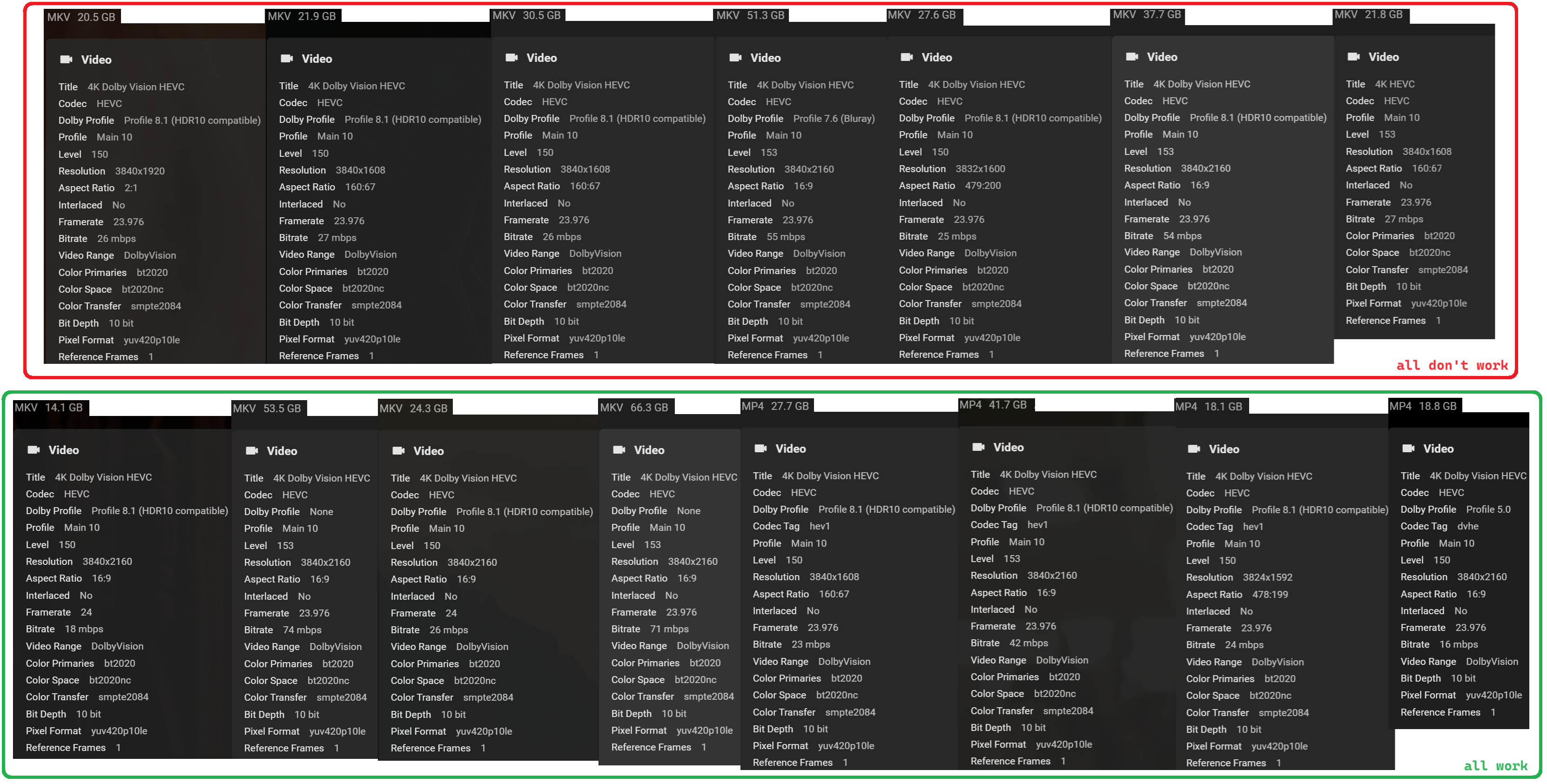
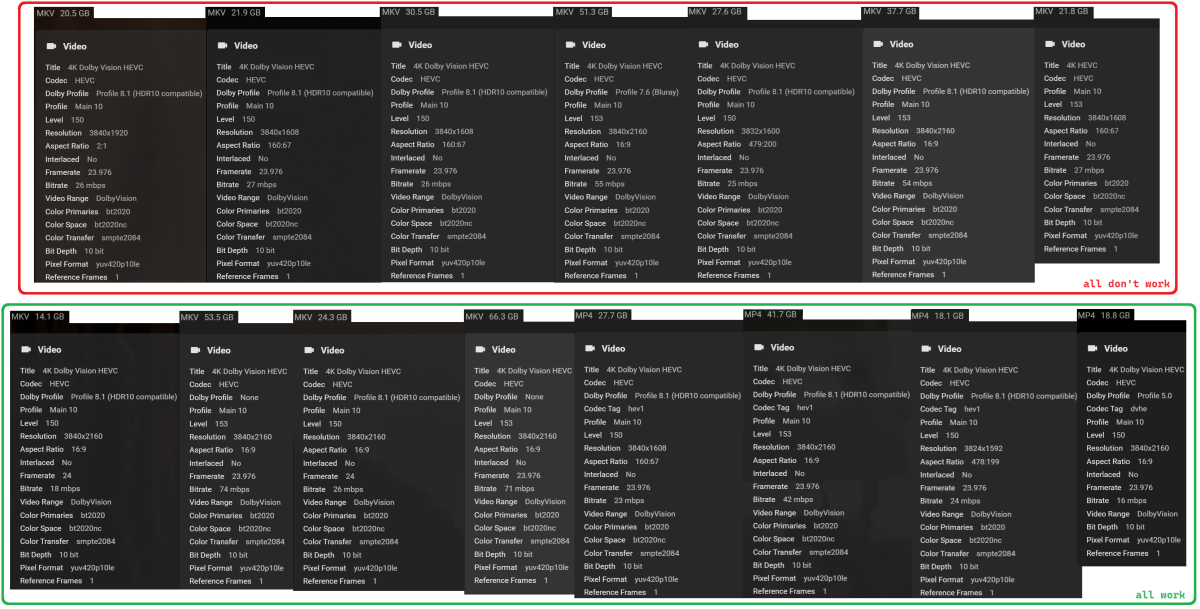
Hello everyone. I bought a FirveTV stick to finally solve my WiFi and LG media player problems. Almost worked. Now I have a new problem. Some videos only run with a black screen on the FireTV using Emby. During playback I can hear sound and do everything but all I see is the black screen without interface. I have tested all videos. And I have summarized it here with several examples (see image below). The playback of the videos marked in red only does not work in combination with FireTV and Emby. Other app on FireTV can do this. Another device like LG TV (emby for WebOS) and my PC with Emby app also play it correctly. Maybe it's due to some settings? Here is an excerpt from the server log. First I played a video with FireTV and then the same video with WebOS. MKV 51.3 GB.txt
 1 point
 -
Hi Luke, I think I struck a nerve there. Don't get upset. That was said tongue in check. I realize you guys do. I might have better said that Emby devs rarely implement silly suggestions such as mine. As I do not consider my suggestion high priority or of high enough importance to be considered. I just wanted to post it, just in case... you never know.1 point
-
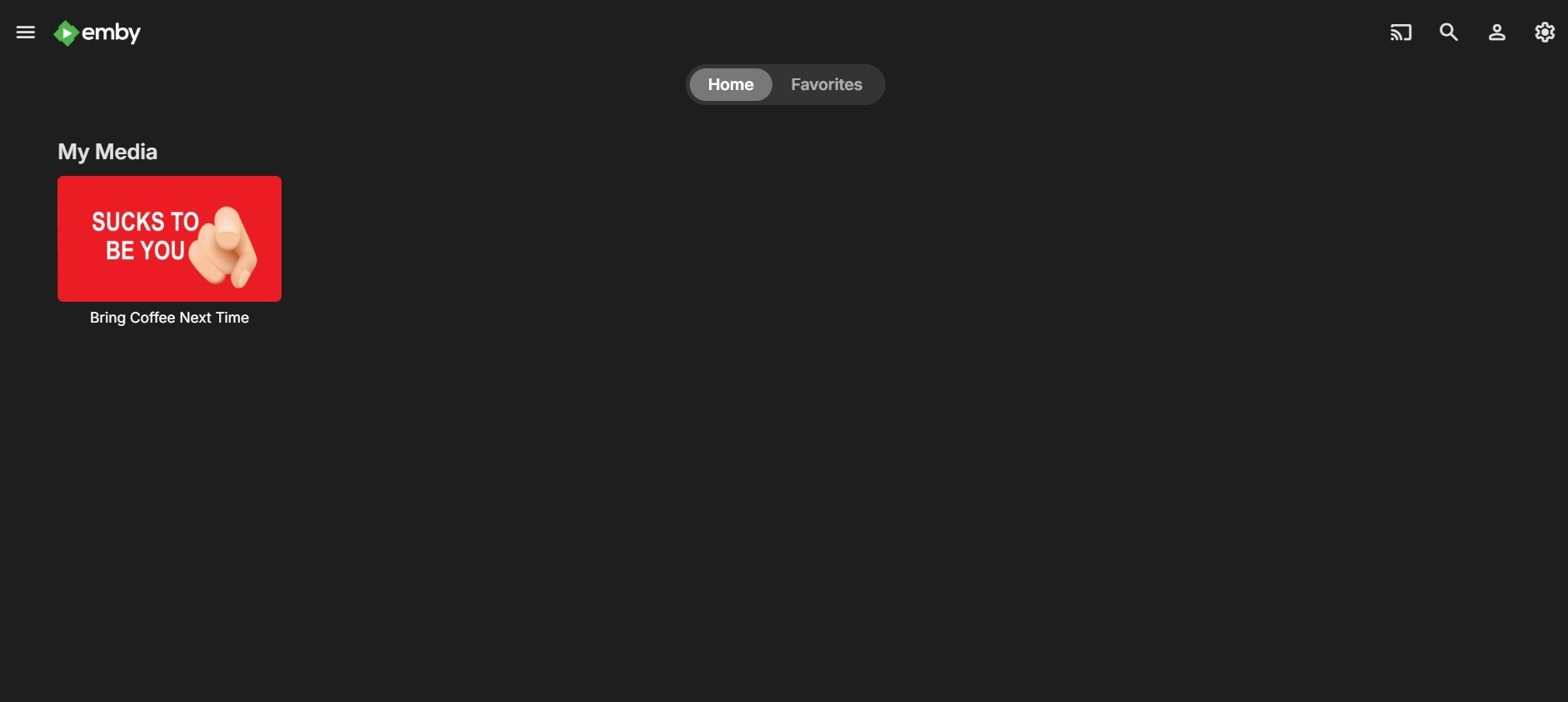
How to get even with family when they visit drinking coffee and never brought you one After they get home and try to watch some tv
 1 point
 -
My remedy for visiting "relatives" is to be as rude as possible and lower/raise the temperature (depending on season) and produce malfunctions in all my electronics. I do NOT like visitors that I did not pre-invite. Visitors come pre-spoiled and I just treat them as I would spoiled meat. People are a***holes in groups but are OK in very small groups but even the best go bad after a very short time. That is they come pre-spoiled.1 point
-
Hi, Thank you for your response and offer to help. Turns out it was the guide data needed to be refreshed. Thanks again! Don1 point
-
Yes I know - it's an open issue. We do not make assumptions. For everything that is tracked internally, we try to get user confirmation before marking it as done. And yes, users who have reported already and are remaining silent is not a suitable measure. But what _is_ a suitable mesasure is when the user counts are increasing but reports on the issue are not. I know very well how annoying these things can be, but neither impact (users affected) nor severity (nit > annoyance > showstopping > security-issue) would justify working on it out-of-the-line. Even more, since we cannot reproduce. This means we need an interactive approach witth the affected users going over several versions in order to identify a suitable solution. We have a dozen of other issues of this type and it's not possible to do such experimental work with stable releases - it requires a beta phase. I understand that and I think we shouldn't create the impression that we would be always working on everything. We simply cannot do that. The problem with creating that impression is that people are eagerly waiting, expecting it to - possibly - happen any other day. So, to kind-of break out of this pattern, the direct and truthful answer is this: There won't be any work on this until the next beta, so there's no fix to be expected meanwhile When the next beta starts - you (and all other affected users) are very welcome to join, test and provide feedback, and we'll work on this until it is resolved for everybody. I'm looking forward to it, and while I can't give any ETA, be assured that it will be worked on, then. Thanks for your understanding1 point
-
1 point
-
Thank you for that information.1 point
-
Just NO, Why should Emby control you filesystem. Its a big NO NO that a program should control that. It might be an option, but just no. If Emby is setup incorrectly, and your admin user is exposed to the internet, and a bad actor gets access. We could lose not only our media, but everything. Bad actor : Great got access. Bad actor : lets delete everything , not only media1 point
-
The lesson here is if you don't know the person who's server your using if you don't know their real name and where they live etc then maybe it's not the best idea to be sending your money to a complete stranger who can delete your login at any time1 point
-
Reading this makes me scratch my head1 point
-
Hi. Albums are not derived from the file structure. They are derived from metadata within your songs so there is not necessarily a single folder to be deleted. However, it would make sense for the album deletion to physically delete all the songs that are tagged to be in that album - regardless of location. Right now, it is behaving more like a collection which is truly virtual.1 point
-
Hi, I couldn't reply earlier because I was on vacation for a few days and didn't have access to my PC. I've now managed to access my Emby account in the browser. I'm not sure if it was a problem with the NAS or Emby. Either way, everything is fine now. Thanks for your support.1 point
-
If it’s your server you can reset access locally. This involves using your username and not your Emby connect email… if you don’t have local access then it’s probably not your server… https://emby.media/support/articles/Admin-Password-Reset.html1 point
-
I installed version 3.4.74. on my Hisense TV. I will see how that works and provide an update in a few days.1 point
-
@RonB26 Exactly, Kodi's database design allows only single movie assignments. I would call this a flaw. No, that's also a Kodi flaw and I run into the same issue. I performed countless tests also with disabled next-gen plugin to rule that out. Actually it depends on the images/devices. Here are workarounds. I use "MALLOC_ARENA_MAX=8", but you could also try "MALLOC_ARENA_MAX=1". Since the modification, it runs stable for weeks. Here is another example what could also cause the memory issue even without emby plugin enabled. https://github.com/b-jesch/skin.estuary.modv2/issues/141#issuecomment-1867398840 ...not saying the skin has a flaw, but it's easy to reproduce. As I use estuarymodv2, here are some recommendations in case you use it too. The memory leak heavenly depends on the library size. Smaller libraries has no issues as they generally not using lot of ram. It would take very very long to run into that issue, but larger libraries easy hit the problem. Also this problem was reported by other (not emby plugin users). Google MALLOC_ARENA_MAX kodi1 point
-
HI, we're still trying to chase this down. We'll have an updated ffmpeg build on the server beta channel in the near future that may help with this. Thanks.1 point
-
Hi, yes this is something we'd like to add. Thanks.1 point
-
Hi, have you tried video backdrops? Theme Songs & Videos1 point
-
Hi, I believe it will still function just fine as our LDAP support is not Microsoft-specific, but please let us know if you run into anything. Thanks.1 point
-
The browser reports what it supports and emby server makes decisions based on that.1 point
-
Mom just complained about this again. I was rather hoping it had been done already. +1 (and another from mom!)1 point
-
Almost 10 years since first post, and there hasnt been any advances here? Im pretty sure I saw somewhere that it was working on both plex and jellyfin. Its a shame, would have been a great little feature to use.1 point
-
And +1 Support for ReplayGain. The only reason, I am still using emby is because the organization of music by album, album artist, track artist ... is working nearly perfectly in my opinion. Plex is really awful, i don't know why everyone is praising Plex to the skies. And Jellyfin also has some flaws (but not that awful as Plex). But both, Plex and Jellyfin do support ReplayGain for a long time now. I expect there are a lot users, who are eager to get RePlayGain support, but have resigned because nothing happend in the last 8 years since the first feature request.1 point
-
Welcome to the club, just sit and dehydrate with us while getting thanked to the infinite and waiting for an early 2000s basic feature1 point
-
As part of my slow migration process toward Emby, I was missing Tautilli's fantastic 'newsletter' functionality. So Grok and I worked on a very basic Python proof-of-concept which I though I'd share with the community. The below script will create an html file containing all media added in the last week. If you call it without an argument, it will ask you which libraries should be included. Otherwise you can call it with the '--libraries x,y,z' argument and it'll immediately process. It's not pretty, but the basic functionality is there. I hope it helps anyone else needing this capability. import requests import json from datetime import datetime, timedelta import getpass import random import argparse # Configuration EMBY_SERVER = "http://your-emby-server:8096" # Replace with your Emby server URL API_KEY = "your-api-key" # Replace with your Emby API key USER_ID = "your-user-id" # Replace with your Emby user ID # Headers for API requests headers = { "X-Emby-Authorization": f'MediaBrowser Client="Python Script", Device="Script", DeviceId="001", Version="1.0.0"', "X-Mediabrowser-Token": API_KEY } def get_libraries(): """Fetch available libraries from Emby.""" url = f"{EMBY_SERVER}/emby/Library/VirtualFolders?api_key={API_KEY}" try: response = requests.get(url, headers=headers) response.raise_for_status() libraries = response.json() return [(lib["Name"], lib["ItemId"]) for lib in libraries] # Note: Use ItemId instead of Id if applicable except requests.RequestException as e: print(f"Error fetching libraries: {e}") return [] def get_user_selection(libraries): """Prompt user to select libraries.""" selection = input("\nEnter the numbers of the libraries to process (e.g., '1,3,4'), or 'all' for all libraries:\n> ").strip().lower() if selection == "all": return [lib_id for _, lib_id in libraries] try: selected_indices = [int(i.strip()) - 1 for i in selection.split(",")] return [libraries[i][1] for i in selected_indices if 0 <= i < len(libraries)] except (ValueError, IndexError): print("Invalid selection. Processing all libraries.") return [lib_id for _, lib_id in libraries] def get_recent_media(library_id, start_date): """Fetch media added in the last week for a given library.""" url = f"{EMBY_SERVER}/emby/Users/{USER_ID}/Items" params = { "ParentId": library_id, "IncludeItemTypes": "Series,Movie,Episode", "Recursive": True, "Fields": "DateCreated,Overview,SeriesName,ParentIndexNumber,IndexNumber,ImageTags", "SortBy": "DateCreated", "SortOrder": "Descending", "Limit": 1000, # Set a high limit to fetch many items "api_key": API_KEY } try: response = requests.get(url, headers=headers, params=params) response.raise_for_status() items = response.json().get("Items", []) # Filter items where DateCreated >= start_date recent_items = [item for item in items if item.get("DateCreated") and datetime.fromisoformat(item["DateCreated"].rstrip('Z')) >= start_date] return recent_items except requests.RequestException as e: print(f"Error fetching media for library {library_id}: {e}") return [] def generate_html(media_by_library, selected_library_ids, library_dict): """Generate HTML file with media grouped by library, then by series for episodes.""" # Collect all unique series and movie IDs for random background selection all_item_ids = set() for lib_id in selected_library_ids: media_items = media_by_library.get(lib_id, []) series_dict = {} movies = [] for item in media_items: if item["Type"] == "Episode" and "SeriesName" in item: series_name = item["SeriesName"] if series_name not in series_dict: series_dict[series_name] = { "SeriesId": item.get("SeriesId", ""), "Episodes": [] } series_dict[series_name]["Episodes"].append(item) elif item["Type"] == "Movie": movies.append(item) all_item_ids.update([data["SeriesId"] for data in series_dict.values()]) all_item_ids.update([movie["Id"] for movie in movies]) # Select random backdrop if available background_url = '' if all_item_ids: random_id = random.choice(list(all_item_ids)) background_url = f"{EMBY_SERVER}/emby/Items/{random_id}/Images/Backdrop?api_key={API_KEY}" # HTML content with improved professional dark theme, no italics, and background image html_content = f""" <!DOCTYPE html> <html lang="en"> <head> <meta charset="UTF-8"> <meta name="viewport" content="width=device-width, initial-scale=1.0"> <title>Recently Added Media</title> <link href="https://fonts.googleapis.com/css2?family=Roboto:wght@400;500;700&display=swap" rel="stylesheet"> <style> :root {{ --bg-color: #121212; --text-color: #e0e0e0; --header-color: #ffffff; --card-bg: #1e1e1e; --accent-color: #b0b0b0; --shadow-color: rgba(0, 0, 0, 0.3); }} body {{ background-color: var(--bg-color); color: var(--text-color); font-family: 'Roboto', sans-serif; margin: 20px; line-height: 1.6; background-image: url('{background_url}'); background-size: cover; background-position: center; background-attachment: fixed; }} .overlay {{ position: fixed; top: 0; left: 0; width: 100%; height: 100%; background-color: rgba(18, 18, 18, 0.7); z-index: -1; }} h1 {{ text-align: center; color: var(--header-color); font-weight: 700; margin-bottom: 40px; }} h2.library-header {{ grid-column: 1 / -1; color: var(--header-color); font-weight: 500; font-size: 1.8em; margin-bottom: 10px; padding-bottom: 10px; border-bottom: 1px solid var(--accent-color); }} h3 {{ color: var(--header-color); font-weight: 500; margin-bottom: 10px; }} .container {{ display: grid; grid-template-columns: repeat(auto-fit, minmax(300px, 1fr)); gap: 20px; max-width: 1200px; margin: 0 auto; position: relative; z-index: 1; }} .card {{ background-color: var(--card-bg); padding: 20px; border-radius: 8px; box-shadow: 0 4px 8px var(--shadow-color); transition: transform 0.2s, box-shadow 0.2s; }} .card:hover {{ transform: translateY(-5px); box-shadow: 0 6px 12px var(--shadow-color); }} .card-content {{ display: flex; align-items: flex-start; }} img {{ max-width: 120px; height: auto; margin-right: 20px; border-radius: 4px; box-shadow: 0 2px 4px var(--shadow-color); }} ul {{ list-style-type: disc; padding-left: 20px; margin: 0; }} li {{ margin-bottom: 8px; }} .synopsis {{ font-size: 0.9em; color: var(--accent-color); }} </style> </head> <body> <div class="overlay"></div> <h1>Media Added in the Last Week</h1> <div class="container"> """ for lib_id in selected_library_ids: lib_name = library_dict[lib_id] media_items = media_by_library.get(lib_id, []) if not media_items: continue # Group episodes by series series_dict = {} movies = [] for item in media_items: if item["Type"] == "Episode" and "SeriesName" in item: series_name = item["SeriesName"] if series_name not in series_dict: series_dict[series_name] = { "SeriesId": item.get("SeriesId", ""), "Episodes": [] } series_dict[series_name]["Episodes"].append(item) elif item["Type"] == "Movie": movies.append(item) # Sort episodes within each series by season and episode number for data in series_dict.values(): data["Episodes"].sort(key=lambda e: (e.get("ParentIndexNumber", 0), e.get("IndexNumber", 0))) # Add library header if there is content has_content = bool(series_dict or movies) if has_content: html_content += f'<h2 class="library-header">{lib_name}</h2>' # Add series cards for series_name, data in series_dict.items(): series_id = data["SeriesId"] html_content += f""" <div class="card"> <div class="card-content"> <img src="{EMBY_SERVER}/emby/Items/{series_id}/Images/Primary?api_key={API_KEY}" alt="{series_name} poster"> <div> <h3>{series_name}</h3> <ul> """ for episode in data["Episodes"]: season = episode.get("ParentIndexNumber", "N/A") episode_num = episode.get("IndexNumber", "N/A") synopsis = episode.get("Overview", "No synopsis available.") html_content += f""" <li>S{season:02d}E{episode_num:02d} - {episode['Name']}: <span class="synopsis">{synopsis}</span></li> """ html_content += """ </ul> </div> </div> </div> """ # Add movie cards for movie in movies: movie_id = movie["Id"] synopsis = movie.get("Overview", "No synopsis available.") html_content += f""" <div class="card"> <div class="card-content"> <img src="{EMBY_SERVER}/emby/Items/{movie_id}/Images/Primary?api_key={API_KEY}" alt="{movie['Name']} poster"> <div> <h3>{movie['Name']}</h3> <p class="synopsis">{synopsis}</p> </div> </div> </div> """ html_content += """ </div> </body> </html> """ # Write to file with open("recent_media.html", "w", encoding="utf-8") as f: f.write(html_content) print("HTML file 'recent_media.html' generated successfully.") def main(args): # Calculate date for one week ago start_date = datetime.now() - timedelta(days=7) # Get libraries libraries = get_libraries() if not libraries: print("No libraries found or error occurred.") return library_dict = {lib_id: name for name, lib_id in libraries} # Print available libraries print("\nAvailable Libraries:") for i, (name, _) in enumerate(libraries, 1): print(f"{i}. {name}") # Get user selection if args.libraries is not None: selection = args.libraries.strip().lower() if selection == "all": selected_library_ids = [lib_id for _, lib_id in libraries] else: try: selected_indices = [int(i.strip()) - 1 for i in selection.split(",")] selected_library_ids = [libraries[i][1] for i in selected_indices if 0 <= i < len(libraries)] except (ValueError, IndexError): print("Invalid command line selection. Falling back to interactive prompt.") selected_library_ids = get_user_selection(libraries) else: selected_library_ids = get_user_selection(libraries) if not selected_library_ids: print("No libraries selected.") return # Fetch recent media for selected libraries media_by_library = {} has_media = False for lib_id in selected_library_ids: media_items = get_recent_media(lib_id, start_date) media_by_library[lib_id] = media_items if media_items: has_media = True if not has_media: print("No media found added in the last week.") return # Generate HTML generate_html(media_by_library, selected_library_ids, library_dict) if __name__ == "__main__": parser = argparse.ArgumentParser(description="Generate report of recently added media in Emby libraries.") parser.add_argument('--libraries', type=str, help="Libraries to process, e.g., '1,3,4' or 'all'") args = parser.parse_args() # Prompt for configuration if not set if EMBY_SERVER == "http://your-emby-server:8096": EMBY_SERVER = input("Enter your Emby server URL (e.g., http://localhost:8096): ").strip() if API_KEY == "your-api-key": API_KEY = getpass.getpass("Enter your Emby API key: ").strip() if USER_ID == "your-user-id": USER_ID = input("Enter your Emby user ID: ").strip() main(args)1 point
-
@lfernandomm2@gmail.com Contact the one whom gave you access. If you installed the server on your own hardware see below.1 point
-
Hi. You will need to contact whomever gave you access to that server.1 point
-
Erik, from an expectation management perspective, the most important thing you can do right now is to restore trust through radical transparency. The situation, as it stands, doesn’t inspire confidence and hasn't for years, but there are some practical steps you can take immediately to start turning that around: Clarify the Beta Timeline People are asking because they care. Avoiding the topic fuels speculation and often negativity no matter how many bugs you squash and how hard the team has worked. If the current beta cycle has a projected end date, share it, even if it's subject to change. What I've learned over the years about SDLC is that it's all about adapting (Agile), but to keep your community and users happy, it also requires to have to have some visibility. Communicate clearly: “The current beta cycle is expected to run until [date], with reviews at each sprint to validate readiness for release.” The Emby team took the first step towards this years ago with the open beta programme, maybe it's time for the next step. Share the Roadmap Does TV-Next have a delivery roadmap? If not, maybe it's time to draft one. It doesn't need to be a rigid Gantt chart, just a high-level view of milestones, sprint goals, and feature releases. If you do have one, make it public (or at least customer-facing). Transparency breeds confidence, and Agile lives, no, thrives on that openness. People understand delays, but they crave honesty and progress tracking, especially for a much anticipated add-on like this. If you're facing blockers or scope creep, say so. Turn the community into your allies by showing them the plan and how you’re adjusting as needed. This can be a limited audience, you do not have to announce this to the whole world. Also, this isn’t about promising perfection. It’s about continuous delivery, fast meaningful feedback, course correction, and keeping your community, which is already very dedicated as a lot have been around here for a decade or more, happy. TL;DR: Set a target end date for the beta phase Publish a delivery roadmap with major milestones Communicate often, adjust openly, and be transparent about what’s next That’s how you manage expectations and keep people engaged.1 point
-
i heard that we will see TVNext really soon, exactly after 14 more SMB fixes.1 point
-
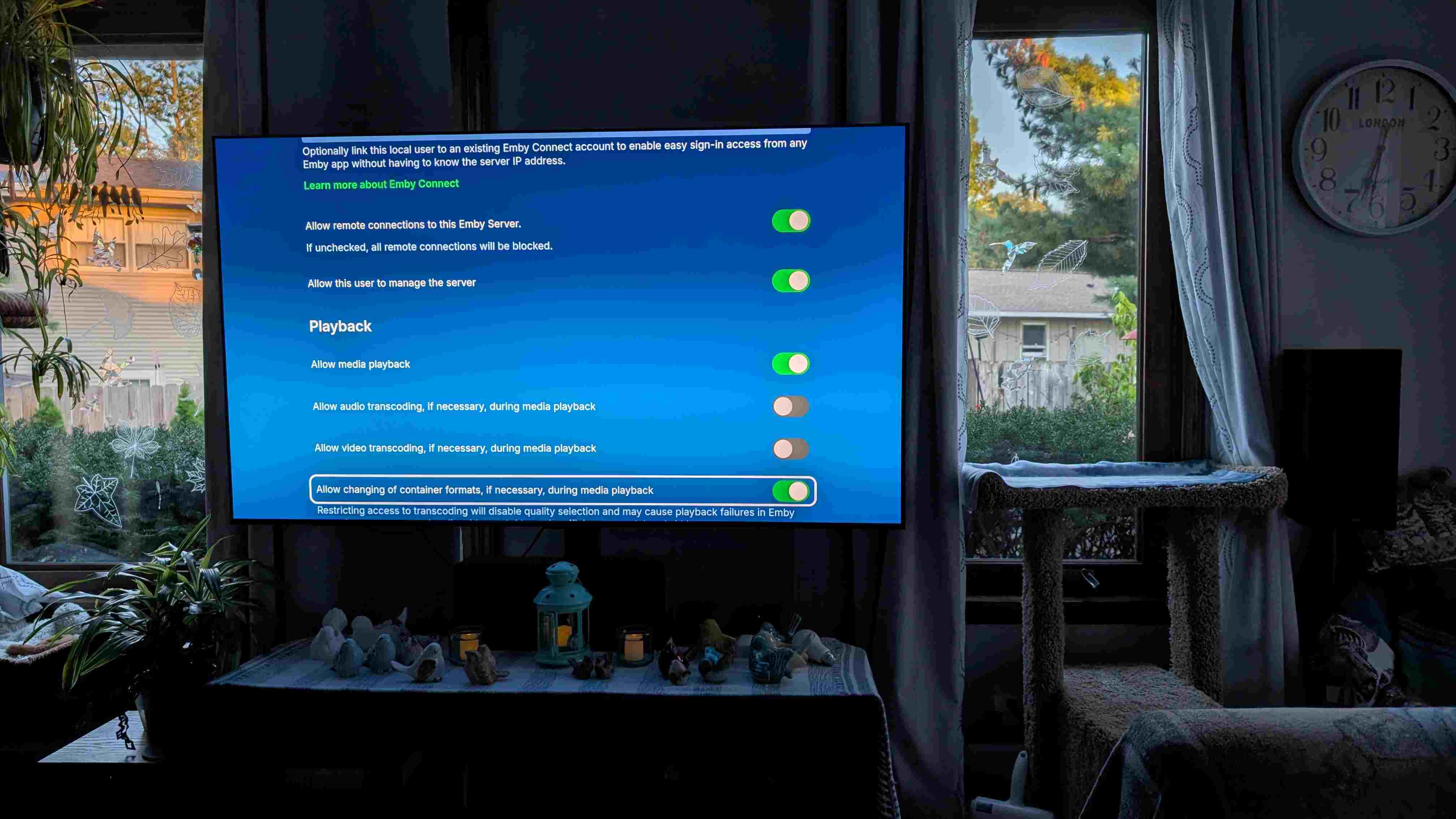
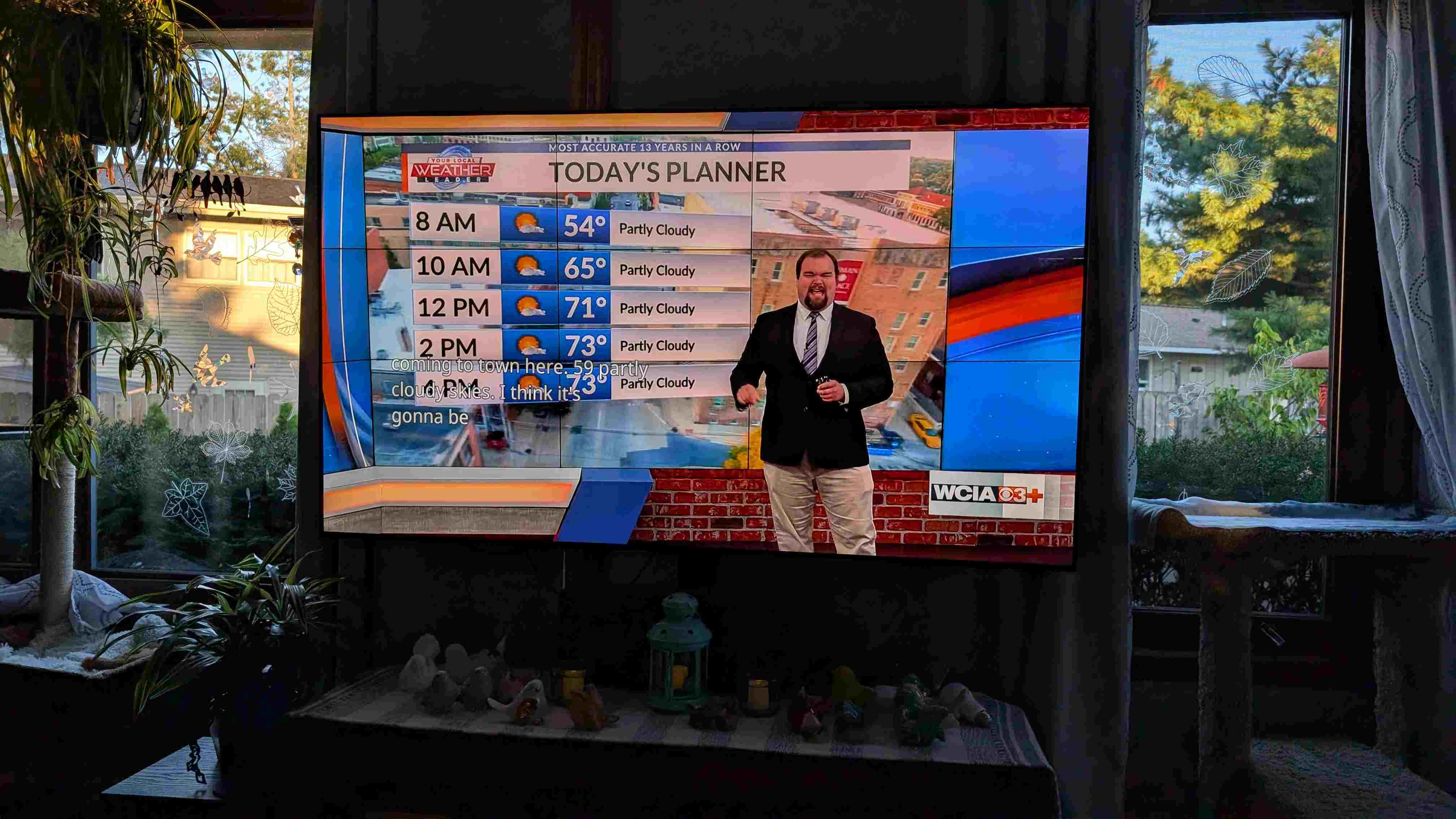
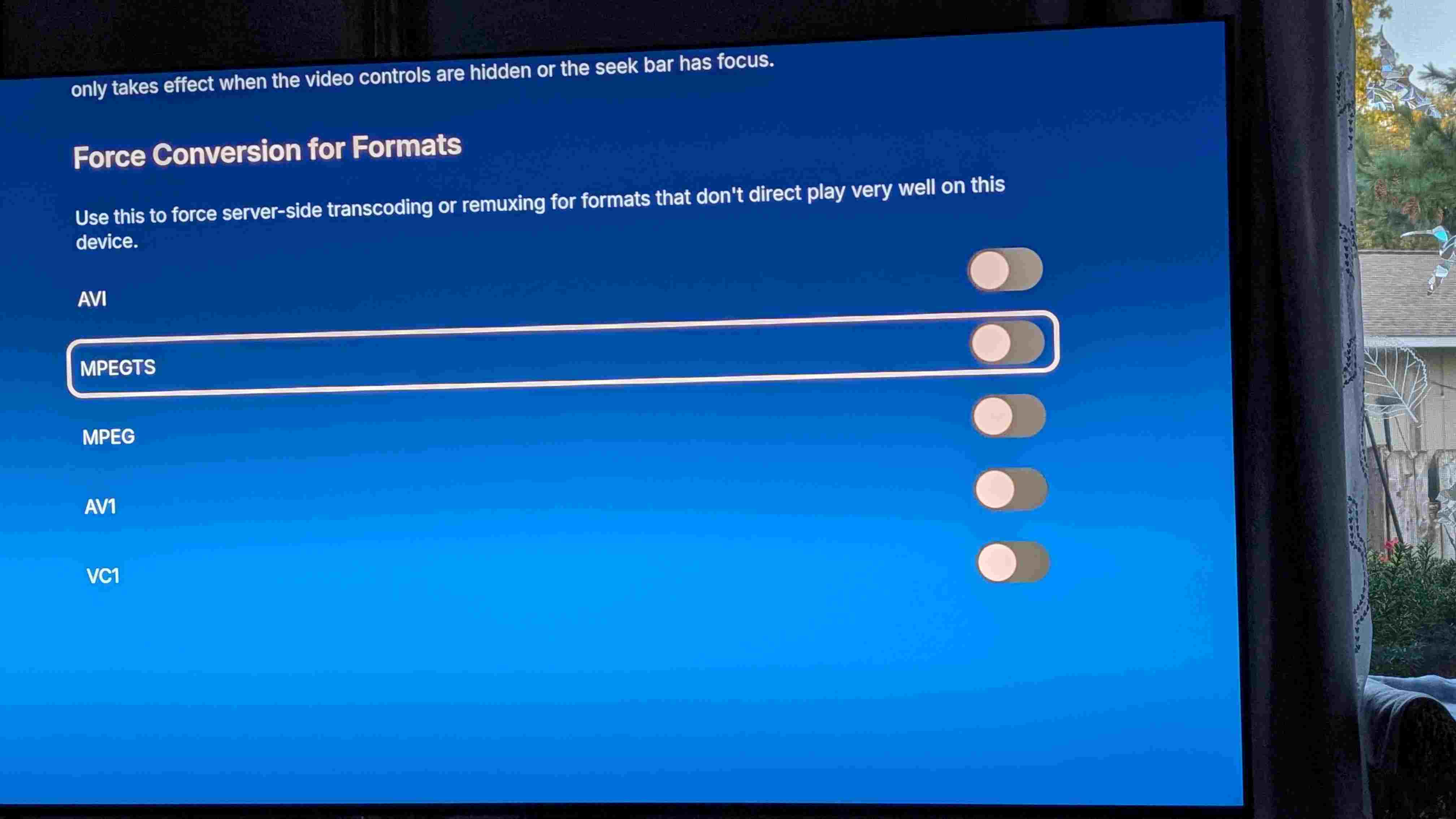
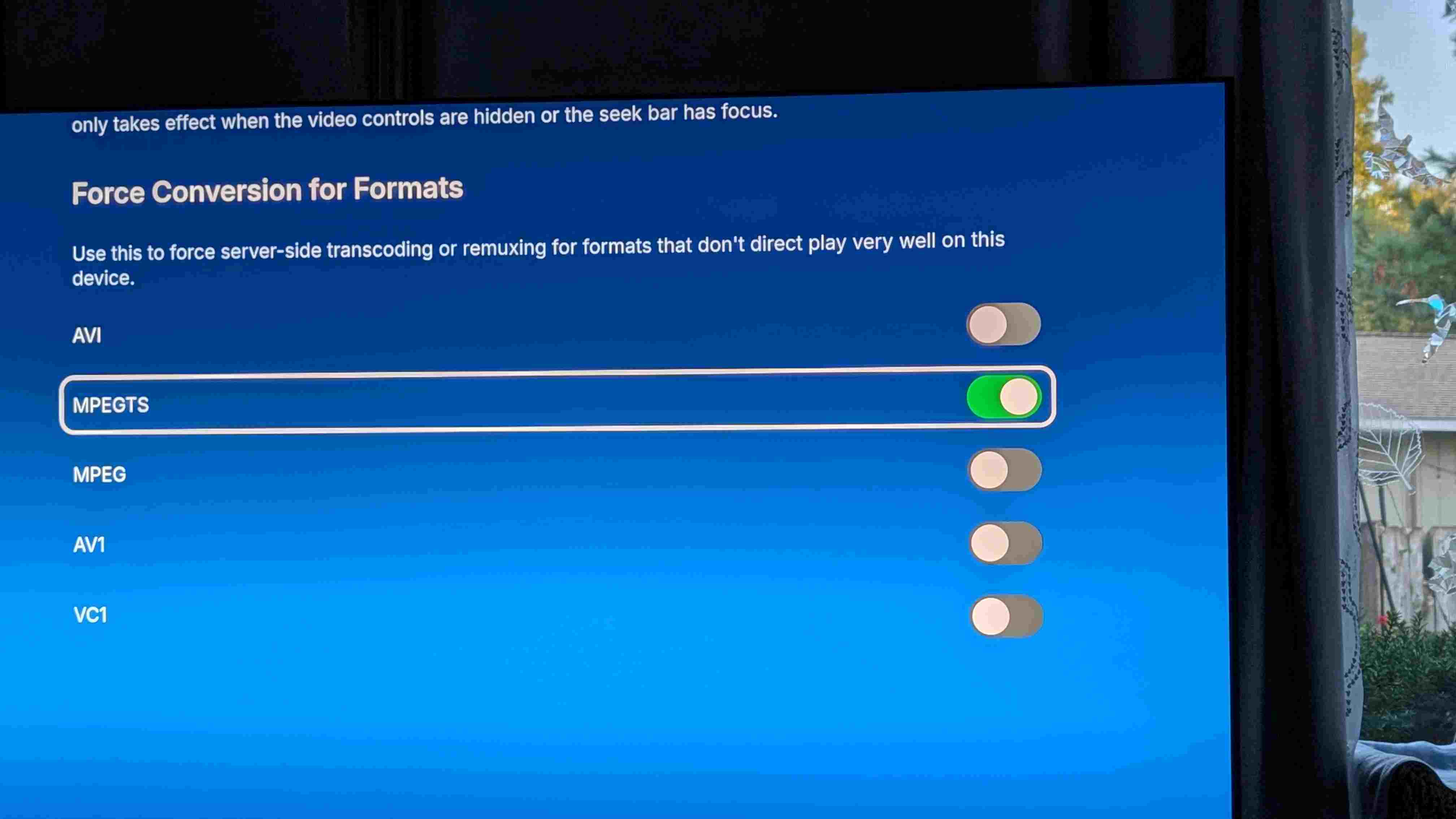
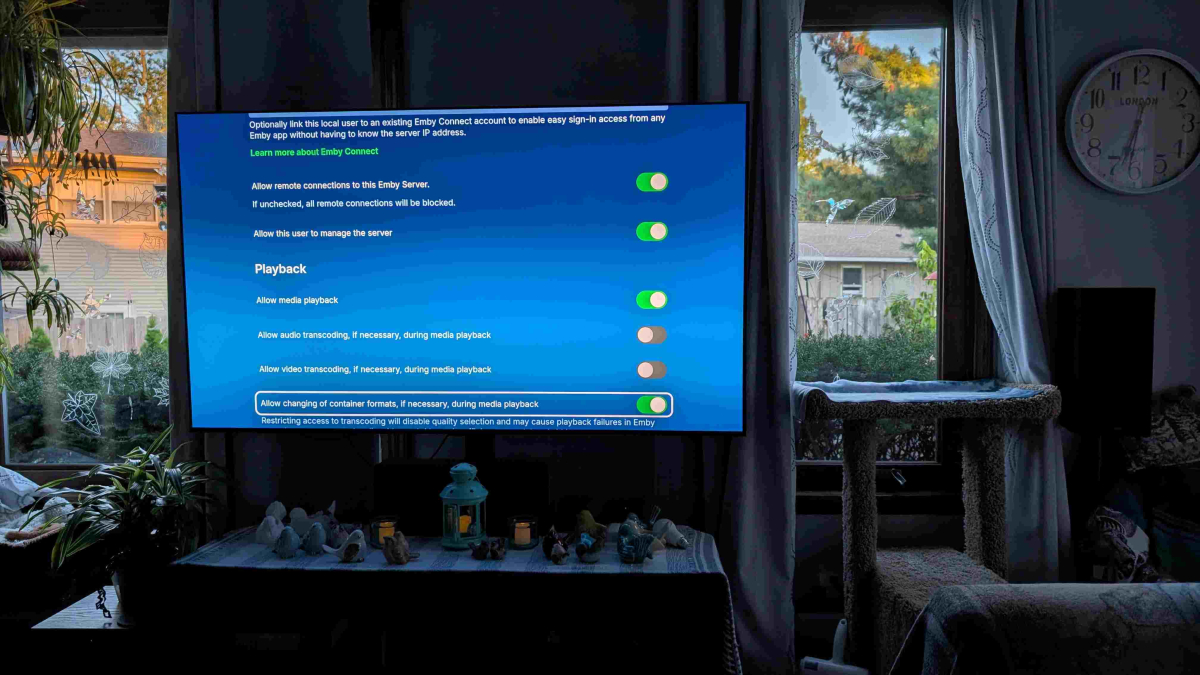
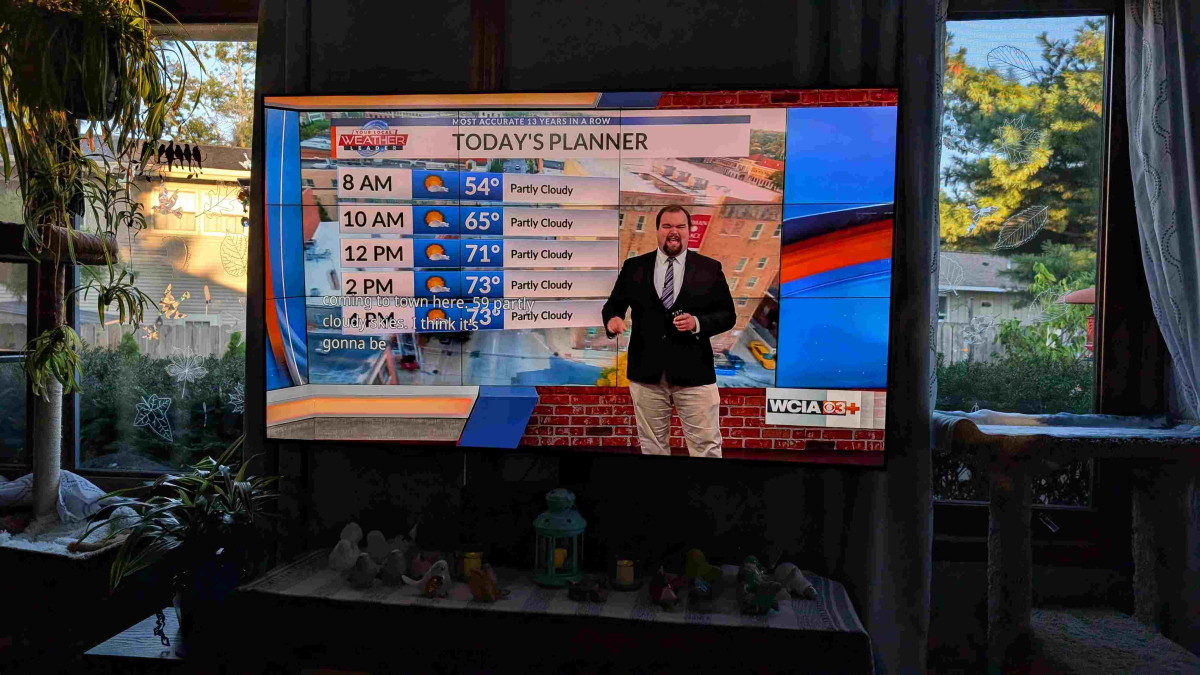
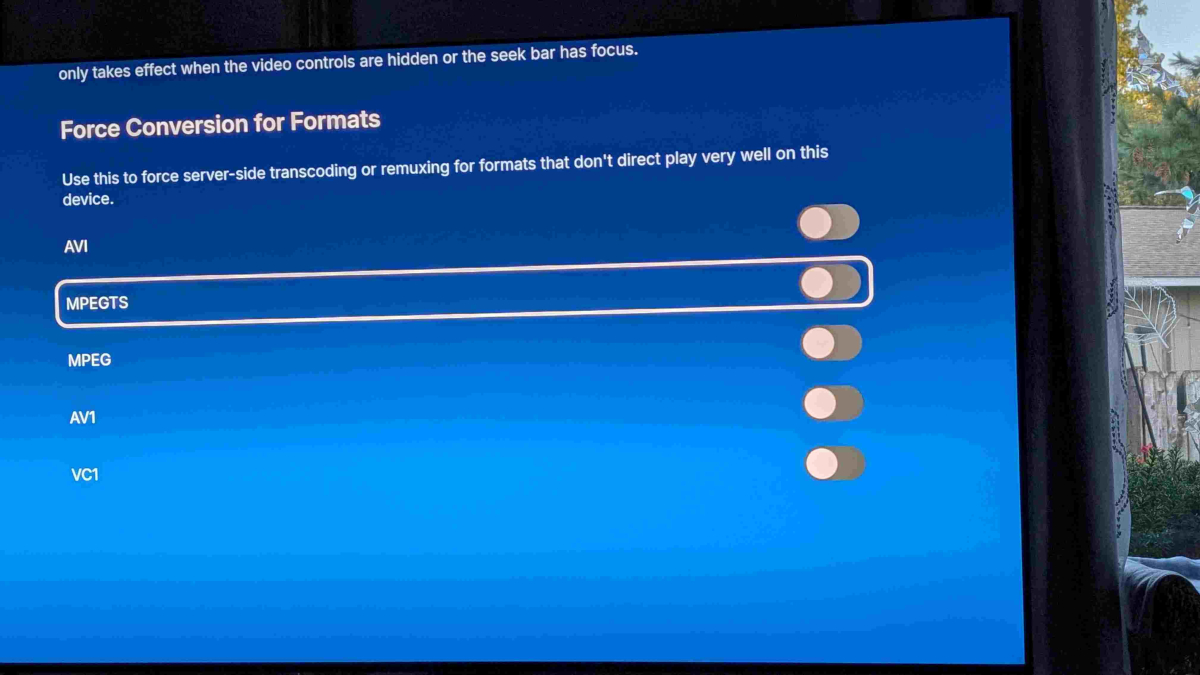
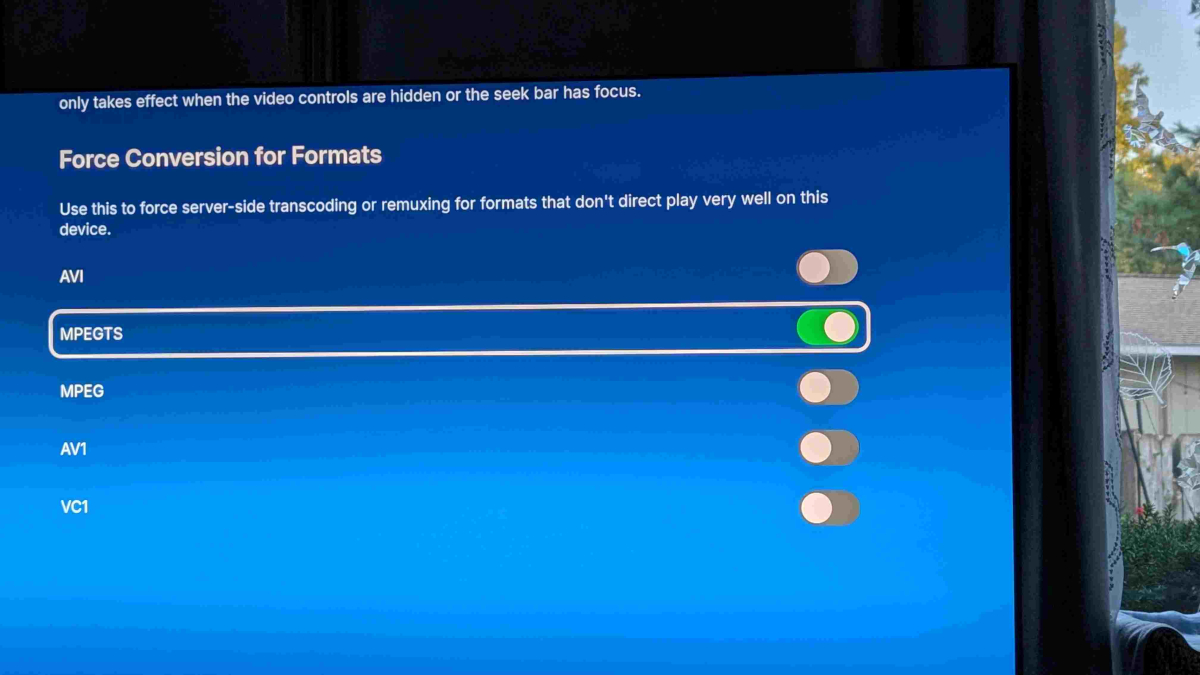
Sorry if there is already a closed captions topic (there are many) but these are the intermittent problems I have. I'm posting this on the Android/fire TV client section, but maybe it should be elsewhere,. again apologies if I'm incorrect. I also apologize if I've loaded up too many logs or if there are not enough. I can try one step at a time if you prefer. We recently just purchased an LG C5 OLED (awesome picture, but that's another topic) and we are trying the make the OTA picture as good as possible. We often watch live tv with closed captions on. We have a fire tv cube gen 3 as the streaming device, though we've also tried to use the LG WebOS built in client. When using the LG WebOS client and turning on CCs, the buffer gets cleared and we are unable to FF and RW and captions still do not work. But that's another post since I think the Android client provides a better picture (or maybe I'm just seeing things) Using the Universal Android client. I have problems getting the closed captions (subtitles) to display on Live TV. I have an HDHomerun tuner. when using the universal client, I have to turn on force Conversion for formats mpegts to be able to fast forward and rewind the live stream so emby does not transcode the stream, I also have to turn off the allow audio and video transcoding options. If I don't do this, the video is transcoded and the quality is subpar since the video getds transcoded for some reason. The dashboard and info for nerds says the video is being transcoded. When watching a show and turn the CC on, the CCs don't display. If I turn off the convert MPEGTS conversion, CCs display, but I am unable to rewind or fast forward. RW and FF are more important the CCs, though we would like both. On the old emby client 2.1.26a, CCs work as expected, though they appear more in the middle of the screen than at the bottom, but this may be because of images/crawls at the bottom. Also on the old and new clients, when using Channels DVR as a tuner for Hulu (TVE) I can't get subtitles to work on either client. I get subtitles unable to load. I can confirm there are subtitles when using Channels DVR client. I would like to use Emby exclusively since I think the picture quality is better. I would also like to use the Newer Universal client since it looks more polished and I believe that is where the development is. I've included screen shots and logs as well as an approximate timeline of what I did. In addition, when watching a previously recorded live tv show, when the mpegts option is turned on, there are no closed captions, when it is turned on, there are closed captions. FF and RW work on the completed recording regardless of this setting, unlike watching a live recording. Here is the approximate timeline: 6:24 morning show 6:26 turn on cc nothing happened eia-608 6:27 turn off cc 6:28 end morning show Turn off mpegts seek 6:29 start morning show 6:31 turn on cc - it works, but unable to ff and rewind 6:32 tried to rewind, failed Old client 6:40 started old client 6:41 turned on cc - it works Kind of high on the screen Able ff and rewind 6:46 Turned off cc 6:48 done 6:49 old client tve HGTV no demo reno, unable to load subtitles 6:51 turn off subtitles 6:55 confirmed channels dvr tve HGTV that cc eorks Emby client on lg, quality not as good 6:56 morning show 6:57 turn on cc , nothing happened Sever says converting subtitles directly into video 7:00 turned off , lost buffer to rewind 7:23 ish Fire client millionaire completed recording When mpegts is turned on no closed captions, able to ff and rewind When mpegts turned off, closed captions and able to seek. No way to position the cc ffmpeg-directstream-ca5f7fbf-047a-4e2f-b77f-2325fb3bfb76_1.txt ffmpeg-directstream-da8989b4-91db-4424-899b-d0abe9820afc_1.txt ffmpeg-directstream-a91fc382-b492-448f-b3c9-d489ee69a517_1.txt ffmpeg-directstream-2c51fcba-c3f2-4b57-8a56-a0b617a13bf3_1.txt ffmpeg-directstream-b408dcab-a81c-43d8-ab29-45ab6b8c33ba_1.txt ffmpeg-directstream-2278642a-784c-43c1-8353-9e5018052d6c_1.txt ffmpeg-directstream-0c4a9f35-7702-4e89-8384-d7afdc972644_1.txt ffmpeg-directstream-930c1180-3d34-4992-a7a0-7361b15f1b8d_1.txt ffmpeg-directstream-76cdd03b-1447-41ca-86e5-f11124f1f147_1.txt ffmpeg-directstream-97556198-4b10-4a69-b974-84494ed37a2b_1.txt embyserver.txt ffmpeg-directstream-c4c77518-5c22-48d7-ab0b-d050bb7c3202_1.txt ffmpeg-directstream-9155bca4-fe20-4400-b345-9bae173d38d2_1.txt ffmpeg-directstream-98053725-d377-4adc-826f-9c8f40d2871b_1.txt ffmpeg-directstream-e55170fe-8108-4869-b242-10732d99d51c_1.txt ffmpeg-directstream-8c693f40-0488-431d-b844-c60337ea51f6_1.txt ffmpeg-directstream-01fa290c-c2e7-4a73-9e02-edf8510208eb_1.txt ffmpeg-directstream-d9bb60f8-7d47-4510-86ed-0d78e688a502_1.txt
 0 points
 -
Sadly but yes0 points