Leaderboard




Popular Content
Showing content with the highest reputation on 08/21/25 in Posts
-
Video Profile - Level - Bitrate - Framerate.2 points
-
Here: https://emby.media/terms.html2 points
-
Hi everyone, long time premiere user here, first time posting on these forums. I apologize in advance if this is the wrong section to post this. I have searched and haven't really found a detailed solution like this posted. I'm running on Linux mint 22.1 with Emby server 4.8.11.0 I have a solution to a problem that had been haunting me for a while now and maybe some users can benefit from this information. My main issue I was experiencing was very choppy/ stuttery play back on some HEVC encoded movies. Specifically the movies encoded by RARBG in 1080p x265 with the .mp4 file extension. I didn't experience this issue in the older server versions before version 4.8.11.0 because I clearly remember playing these movies on earlier server versions without issues. This issue was present when using the 1st and 2nd generation of the Amazon Fire Stick 4k Max on multiple tv's using Emby for Android 3.4.74. I don't know if it's something about these specific movies from RARBG that's not playing well with the newest version of the app or what, because they all play fine in VLC on my desktop. All movies were playing in Direct Play mode when I experienced the choppy playback, and transcoding fixed the issue temporarily, but was not a permanent fix good enough for me. Oddly enough, these movies played back fine on my Android phone using the same app version 3.4.74, but did not playback well on my fire sticks, I can't explain why. I did try out Plex, but still had the same playback issue. Here's the permanent solution that worked for me: I discovered that by remuxing the affected .mp4 files in a program called MKVToolNix solved all my playback issues. This program re-packages the raw video and audio into an MKV container. It also creates a fresh, clean indexing information (important for playback). You can also include any external subtitles all packaged into the new .mkv file. After solving the playback of 1 movie, my next issue was repeating the same process for the rest of my big library of encoded RARBG movies. I used AI to help me write a simple script that uses the command line version of MKVToolNix that searches for any .mp4 file in a folder and subfolders, and remuxes every .mp4 file it finds (and includes external subtitles). After the successful remux and creation of the new mkv movie file , the script deletes the input .mp4 to save space (never do this without a backup just in case). This whole process took my desktop over 90 hours to complete a library of over 1400 affected files, but it was successful and I can now watch every single movie without playback issues. If you have internal hard drives or ssd's I'm sure this process will be much quicker. I hope this helps someone that is experiencing playback issues. If you have any questions about my solution let me know. I want to say thank you to the Emby team for all the hard work you do, this is a fantastic app that I use daily!1 point
-
Currently, when I play a piece of music, Emby then continues playing music that was recently played, playing continuously. I'd love to see some kind of algorithm for this, like YouTube does with continuous play. For example, if a song in your own language is played, does the algorithm combine them in a fun way at least if continuous playback is not based only on previously played items1 point
-
True, true. Still requires me to think though when Emby could just do it for me.1 point
-
Or just divide it by 30.1 point
-
I agree. I use DrivePool and I rarely lose anything even though I have, several times, lost or replaced drives over the years. I do not like having to be aware at all times of where files are stored and I do not like having to use backups as I find the backup systems slow and unreliable. DrivePool uses redundancy and that is not as good as a backup, as if a file is actually deleted it is gone, but it does mean that if a drive is lost no files in the duplicate sections are ever truly lost in the event of a total drive failure. But I am not sure if a small number of drives is handled well in DrivePool (I have 13 drives in my pool) however i see no reason that 2 or three drives would not work well. I started using DrivePool when my library grew to needing 4 drives and as my library grew I just added drives. I started with 4tb drives but now, when I replace a drive, I us at least 8tb and usually 10tb and I am considering adding storage by removing a 4tb drive and replacing it with one of the newer 10+tb drives. I have even seen drives at a reasonable price that are 20+tb in size. DrivePool handles everything so it looks to Emby like I have a single 82+tb drive. All my drives, save one, are external USB drives so swapping them is about as simple as it gets. DrivePool also has the advantage of all files and the duplicates are stored in native format so, in the unlikely event of DrivePool failing completely the files are all still accessible. Because of the way DrivePool handles drives you can have drives of any size in the pool and they can be of different sizes. Also you can add existing drives to the pool without reformatting or erasing the drives and it is a simple process to get the old data on a drive into the pool. This got longer than I intended so I will stop here but, as you can probably tell, I really like DrivePool and I think it is the best pooling software for PCs there is.1 point
-
It is a multiple levels Nav bar Metadata Manager-Views-Missing Episodes (this is a global view of all) Enter any TV library and right click/three dot menu on any Show/Series Enter any Show click three dot menu Same image as above Enter any Season level pretty much same image The virtual Missing Episodes no longer exist.
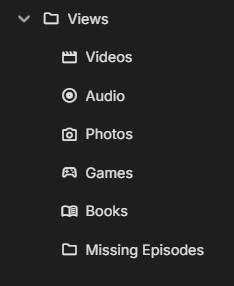
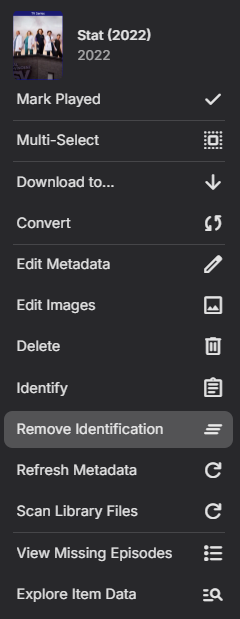
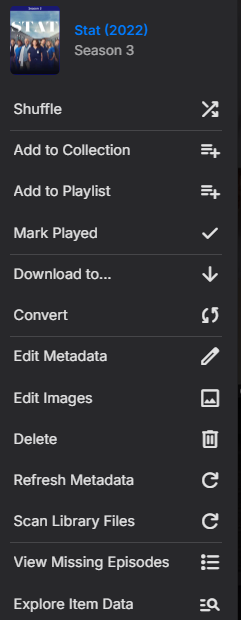 1 point
 -
It has actually already completed all that was left. I was hoping once it finished it would go back and get the ones it had skipped. I just dont know how many were skipped in the days before I realised that is was skipping them. I guess I should be able to write a script of some sort outside emby to run over every video file and check if a bif files exists for it to get a list of missing ones.1 point
-
FB, Check your TV settings. Sometimes there are aspect ratio options that are named Wide, Extra wide, Full, Fill frame and Original (Normal). You may have one of these options picked on the TV that could be cutting off the text on the Emby page.1 point
-
Shut down the server while doing the swap to be absolutely safe. I also highly recommend looking into disk pooling software which will make this a non-issue.1 point
-
Perfect, works well. I've waited so long, finally I can forget about Plex and DDVT_REMOVER. I tested it on an LG C3 with Fire TV. Thank you so much.1 point
-
Coments like these are misleading, (at least) Plex doesn't support remote transcoding out-of-the-box. There's a bunch of plugins adding that functionality, yes, but they don't support it natively either and I consider them not suporting it as well. I can't find any evidence of Jellyfin even support this, but most searches lead to "just use rffmpeg in stead of ffmpeg", which is also a valid way of dealing with this. You could just replace the ffmpeg exe file so that rffmpeg is called with the same arguments. Still, they both don't support it natively either. I do find the concept of remote transcodering fascinating, but I would be more interested in just having seperate versions of the same file so any device can always use direct play, in stead of just having to rely on the availability of processing power.1 point
-
This would be an interesting feature when the uses plays a single media entry ór reached the end of a playlist. The algorithm could determine the next x-amount of songs, based on the previous y-amount of songs.. I like this, this is interesting, especially because YouTube Music does this excellently and I'm a big fan of how they approach this.1 point
-
v.2.1.7 is better, and I've looked around all the settings and other areas and didn't see anything that might have broken as a cause of any changes.1 point
-
Fine; but what are you doing that makes Emby go down at all? In several years usage mine has never crashed in normal* operation. Paul * Twice in that time a new beta has failed to run at all on my system - but that doesn't count as "normal operation"!1 point
-
Glad to report that on a Fire TV 4K Max - HDR10/HDR10+/DV8 Hybrid is now working ok with 3.4.88 and is playing back as DV now with no Black Screen. Thanks for the update ! To add - the following continue to work ok :- HDR10+ > Plays as HDR10+ HDR10 > Plays as HDR10 DV7 > Plays as HDR10 (as expected) DV8 > Plays as DV8 DV5 > Plays as DV5 HLG > Plays as HLG (To note, the Panasonic TV Supports HDR10, HDR10+, HLG and DV 5/8)1 point
-
Hello, do you think you can add the release date with the physical or digital release date? because the cinema release date is too far away, sorting by release date is not great. Thank you so much
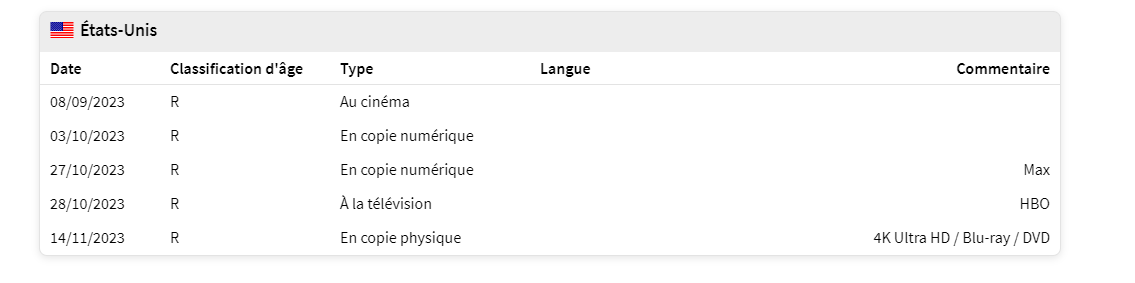 1 point
 -
Ah didn't do that? Whoopsiedoodle, thanks!1 point
-
Then this sounds more like an issue in infrastructure than anything else. You're trying to use multiple Emby instances at different locations at the same time which isn't really what Emby is trying to achieve or support to begin with. You're right, it doesn't state that anywhere, but it doesn't state it's an Enterprise-level application either. Emby also states on this page https://emby.media/support/articles/Premiere-Limits.html, that it's designed to handle up to 30 devices from a single-household. What a "single-household" is obviously kept vague, so let's just pretend the page is talking about a single server that handles 30 devices (connections). Finally, please don't patronize people on this forum. We're all here to achieve the same goal of improving Emby as a product. That isn't a way to achieve that. There're for more programmers and system engineers on here than you'd think.1 point
-
I found a bug and fix it in next version1 point
-
Right OK it's on the wrong tab.1 point
-
Please please don't forget.1 point
-
So Where exactly in the docs and licenses for emby does it say what it is intended for? Does it say in said licenses "though shall not make emby safe for server failures?" I travel every single week. I have a certain amount of flexibility but if a server goes down then I have people in the house asking me whats up. I never said that emby cannot HANDLE the connections with a single server. Please point me to where i said that if you feel i have. I am sure that you are interpreting what i say, in view of YOUR own expectations of how things SHOULD work. Meanwhile i am looking at Failsafe measures so that if a server goes down it is barely noticable. (of course it will be noticed since if it goes down mid stream your stream WILL stop. but you can then reconnect and hit a different server and everything is back to normal) so please explain to me where what i am doing is contrary to what ANY software that is used in a multi user environment should be capable of.... after all i might be wrong on so many points... i only did IT programming, system design and enterprise architecture for 30 years or so....1 point
-
Everything you describe is far outside the scope of what Emby is intended for. You said you don't want to create a Netflix, yet you keep coming back to the whole lie about load balancing. No user who is using Emby for what is intended for needs this. I run Emby on a laptop and I've had no issues with having upwards of 16 concurrent users. It's a personal media server, not a VOD service. You should be looking elsewhere.1 point
-
Should be fixed in this one. WatchingEye.dll1 point
-
Looks like you fixed it. No more issues. Thanks @Luke1 point
-
Thats what I thought, thanks Luke. Please include the missing text size option in the next update, I have small icons selected and giant fonts currently1 point
-
Hi, please try 3.4.88+ and let us know how things compare: We've added automatic fallbacks directly into the player. No server transcoding or operations required. Please try it out and report your experience. Thanks !1 point
-
Understood, thanks!1 point
-
@brothomPlease like on first post1 point
-
Hi, we are working on it. Thanks.1 point
-
This is what I experienced too. Scrolling through chapters or actors doesnt register as interacting so it closes the menu after a timeout. But regardless if it did register it as interacting, the info menu shouldn't disappear until the user chooses to back out of it once they're done reading1 point
-
The support team was very helpful. They contacted Sectigo and used the old CN for my verification process. Now it works again, at least for another year But still, out of curiosity I have now looked into Nginx and have already set everything up. Now I'm wondering, is it normal that video streams always use http1.1 and not http2? This also applies to remote connections. Also, how does the Let's Encrypt certificate work? Is it automatically renewed every 3 months (at the moment I am using the Sectigo SSL, but also tried that from Lets Encrypt)? And it bothers me that the port is now 443 instead of 8920. I dont want that every user must change it.1 point
-
Hi, if you set it to scheduled task only, then the two scheduled tasks can run concurrently.1 point
-
Thank you Luke, I am looking patiently forward to it1 point
-
Hi all, I have created a Model Context Protocol (MCP) server that connects Emby to an AI client such as Claude Desktop. Think of it as a DIY version of Amazon Alexa (tm) that works with any MCP compliant LLM and operates on your own private media collection. This was a learning project to explore MCP and code for the first time in Python (I've been a long-time coder in other languages). It is built using the Emby client SDK and the MCP Server SDK. It runs locally to the AI client on your PC/Mac (not as an Emby server plugin). Current features: Log on to & log out of an Emby media server; Retrieve a list of media libraries; Select a specified library; Retrieve a list of genres used in that library; Search for items in that library by genre, title, album, release year, and lyrics/description - returns rich metadata per item; Retrieve playlists, create new playlists, add items to playlists & re-order them, and share playlists with other Emby users; Retrieve a list of accessible media players known to Emby; Retrieve the current play queue of a specified media player; Control the playing, pausing, seeking, etc of a specified media player, including transferring the queue to another player. I've released it under GPL at https://github.com/angeltek/Emby.MCP if anyone is interested in playing with it. Detailed instructions are provided. I'll post a (long) demo transcript as a reply so as to keep this post tidy.1 point
-
Metadata is the backbone of any Emby server. Accurate metadata not only helps you organize your media but also enhances the browsing experience by providing details such as posters, cast information, and plot summaries. In our next how to guide, we’ll explore how to get the best metadata for your media library in Emby and customize metadata to suit your preferences. Why Metadata Matters Metadata turns a bland file list into an engaging media library. Instead of scrolling through filenames, you can browse visually stunning posters, read synopses, and see ratings or actors at a glance. This makes it easier to find what you want to watch and enjoy your media library to its fullest. Step 1: Setting Up Metadata Agents Metadata agents in Emby are responsible for fetching the information about your media. To configure them: Navigate to Metadata Settings: Go to your Emby Server dashboard. Click on Library, then select the library you want to configure. Choose Metadata Providers: Select metadata providers like TheMovieDB (for movies), TheTVDB (for TV shows), or MusicBrainz (for music). Drag and drop the providers to prioritize which one Emby should use first. Enable Automatic Updates: Make sure "Download metadata from the internet" is checked. This ensures Emby fetches metadata when new content is added. Language Preferences: Specify the language for metadata and artwork to match your preference. Step 2: Organizing Media for Better Metadata Matching Metadata accuracy heavily depends on how well your media files are named and organized. Follow these tips: Use Proper File Naming Conventions: Movies: MovieName (Year).ext (e.g., Inception (2010).mkv) TV Shows: ShowName/Season XX/ShowName - SXXEYY.ext (e.g., Breaking Bad/Season 01/Breaking Bad - S01E01.mkv) Organize Media into Folders: Separate movies, TV shows, and music into different folders. Group collections (e.g., trilogies) into subfolders for easier management. Avoid Extra Characters: Remove unnecessary text like resolution (e.g., [1080p]) or release group names. Step 3: Fixing Mismatched or Missing Metadata Even with proper organization, mismatches can happen. Here’s how to resolve them: Manually Edit Metadata: Open the Emby web app and locate the mismatched media. Click the three-dot menu next to the item, then select Edit Metadata. Correct the title or year and let Emby re-fetch the metadata. Use the Identify Tool: On the Edit Metadata page, use the Identify option to manually search for the correct entry in the provider’s database. Replace Incorrect Posters or Images: From the Edit Metadata page, go to the Images tab. Browse and select new images from the metadata providers or upload your own. Step 4: Customizing Metadata If you’re a power user, customizing metadata allows you to make your library uniquely yours. Enable NFO File Saving: In the Metadata settings, enable saving metadata as NFO files. These are XML files stored alongside your media, allowing you to edit them directly. Create Custom Metadata: Open the NFO file with a text editor. Add or modify tags such as <title>, <plot>, or <cast> to change how the media appears in Emby. Bulk Metadata Management: Use tools like Media Companion or TinyMediaManager to batch edit metadata and export it to NFO files for use with Emby. Step 5: Optimizing Metadata for Large Libraries If you’ve got a large collection, metadata fetching can strain your server. Optimize the process with these tips: Schedule Metadata Updates: In the Library settings, schedule metadata scans during off-peak hours to reduce server load. Use Local Metadata: Preload metadata by saving it as NFO files or by downloading artwork to local folders. Getting the best metadata in Emby doesn’t have to be complicated. By setting up metadata agents, organizing your media files properly, and learning to fix common issues, you can transform your library into a stunning, easy-to-navigate collection. For power users, customizing metadata opens up even more possibilities, making your Emby experience truly unique. Start fine-tuning your metadata today and enjoy a richer, more immersive Emby server experience today! View the full article1 point
-
I press the "pause" button then turn of the TV or switch to some TV show1 point