Leaderboard




Popular Content
Showing content with the highest reputation on 08/05/25 in all areas
-
Yes I am in Wisconsin in the US. What I meant by that was I was making sure my account, profile, everything linked actually showed me as in the US. I then setup the TV and followed that video on forcing the region to show as US. So I am not sure if this is a region issue or if this is extremely specific to just this model of TV. Thank you for all the fast replies as well! I appreciate everyone's help so far.2 points
-
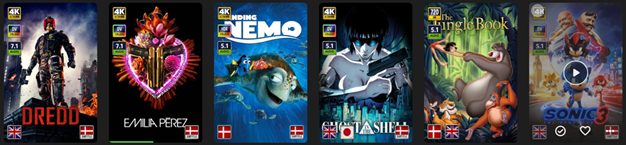
EmbyIcons, in catalog under general. Source code at: yocksers/EmbyIcons: Displays icons on posters in Emby depending on audio and subtitle languages. EmbyIcons enhances your Emby Server by overlaying informational icons directly onto media posters. Display language, codecs, resolution, ratings, and more at a glance with fully customizable profiles for different libraries. Features Extensive Icon Support: Audio/subtitle languages, original language, audio channels, codecs (audio & video), HDR/Dolby Vision, resolution, frame rate, aspect ratio, parental ratings, community ratings (IMDb, Rotten Tomatoes, MDBList audience scores), custom tags, and favorite counts Multi-Profile System: Create distinct profiles and assign them to different libraries for complete customization Flexible Layout Control: Position icons in any corner with custom priority ordering and horizontal/vertical stacking Series & Collection Aggregation: Smart detection shows icons only when all episodes/items share the same property (with Lite Mode option for faster scans) Profile Import/Export: Backup and share your profile configurations Icon Manager: Identify used, unused, and missing icons in your collection Series Troubleshooter: Find episodes with inconsistent properties causing missing icons MDBList Integration: Display Rotten Tomatoes audience scores with a free API key Live Preview: See layout changes in real-time before saving Advanced Settings: Fine-tune cache sizes, performance, and memory usage Icon Naming Convention Place your icon images in a folder on your server. Recommended: ~100x100px PNG with transparency. Supported formats: .png, .jpg, .webp, .gif, .bmp. Icons use the format: prefix.name.png (case-insensitive) Prefix Type Example lang Audio Language lang.english.png sub Subtitle Language sub.german.png og Original Language og.japanese.png ch Audio Channels ch.7.1.png, ch.stereo.png ac Audio Codec ac.dts.png, ac.eac3.png vc Video Codec vc.hevc.png, vc.av1.png hdr Video Format hdr.dv.png, hdr.hdr.png res Resolution res.4k.png, res.1080p.png fps Frame Rate fps.24.png, fps.60.png ar Aspect Ratio ar.16x9.png, ar.2.39x1.png pr Parental Rating pr.pg-13.png, pr.tv-ma.png tag Custom Tag tag.3d.png, tag.directors-cut.png rating Community Rating rating.imdb.png (none) Rotten Tomatoes t.tomato.png, t.splat.png (none) Popcorn-O-Meter t.popcorn.png, t.spilledpopcorn.png, t.fresh.png (none) Favorite Count heart.png Note: Rotten Tomatoes Popcorn-O-Meter requires a free MDBList API key configured in Advanced Settings. Configuration Overview Settings Tab Global Settings: Set icon folder path, loading mode (Hybrid recommended), output format, quality, and logging Profile Management: Create, rename, delete, export, and import profiles Per-Profile Settings: Assign profiles to libraries Enable/disable icon types with custom alignment (corner), priority, and layout (horizontal/vertical) Configure TV show/collection aggregation (Lite Mode, exclude Specials season, etc.) Customize rating score background (shape, color, opacity) Adjust icon size Icon Manager Tab Scan your library to identify missing, found, and unused icons. Perfect for organizing your icon collection. Troubleshooter Tab Series Troubleshooter: Find episodes with inconsistent properties (resolution, codec, etc.) that prevent series-level icons Aspect Ratio Calculator: Get the exact icon filename for custom aspect ratios Advanced Tab Fine-tune cache sizes, expiration times, concurrency, and MDBList API key. Default values work for most users.
 1 point
 -
Watching Eye is a plugin designed to give you granular control over your server's streaming environment. It's the perfect tool for managing user watch time, monitoring server performance, and ensuring a smooth viewing experience for everyone. Key Features: Watch Time Limiter: Set daily, weekly, monthly, and even yearly watch time limits for specific users. Create global watch time rules that apply to all users, with the option to exclude certain individuals. Establish specific time windows during which users are allowed to watch content, perfect for parental controls. Transcode Notifications and Blocking: Receive instant notifications when a user's stream starts transcoding, helping you identify potential playback issues. Proactively block transcodes based on video resolution or container format to conserve server resources. Customize notification messages to inform users why their video is transcoding and suggest solutions. Playback Control and Monitoring: Automatically stop streams that have been paused for an extended period,. Keep a detailed log of transcoding events and when users reach their watch time limits. Download on Githuib - WatchingEye.1 point
-
I mentioned it in another thread, but thought I'd put it here since this looks like a new section--just for posterity. Would like to have a bulk meta data editor function. For example, if I have 750 videos whose producing studio is the same, I want to select those videos and apply the name of the studio to those videos. Similarly, if there is a custom tag I want to apply to a subset of those movies, I want to be able to select them in bulk and apply the tag to those videos (instead of selecting them one by one).1 point
-
Be able to create playlist based on a certain criteria, like genre and or year, in order to create a dynamic playlist that it refreshes automatically when new content is added. This way you can for example, create a tv comedy playlist from the 90's, or a new sci-fi Movies playlist. Some other criteria for rules could be the rating, watched/unwantched, score, tags, language, audio codec, etc The possibilities could be endless1 point
-
Since we can now detect end credits, or manually add them in other cases, it would be nice to see this, rather than an automatic percentage/time remaining, trigger the "next episode" popup and decide whether an episode is resumable or not. Even better if it could expand to movies for the latter point.1 point
-
Season posters don't get icons added. Check the main poster for the series.1 point
-
Masonry layouts would be great!! Really hope that becomes an option soon!1 point
-
I'm able to copy and paste just fine the metadata editor for an album, can you provide an example where it's not working?1 point
-
Thank you,I will look into squatting any bugs you might find though I should have caught them this time.1 point
-
Thanks for this again. Just installed the newest version from your github, and it looks like it basically answers/solves all of the questions I had. My kids will be testing this thoroughly over the next week, so I'll report any bugs.1 point
-
Thanks! I started out with a blue background, but the word Emby and even just the Emby logo seemed to mess up the placement of objects in panel. Then I realized that if I got something close to Emby green, that would maybe give a sense of continuity. UPDATE According to Paintshop Pro 2023, the actual Emby green is Hex Code #52b54b1 point
-
Thank you very much, Neminem I just tried Classification Mapper, and it's just what I wanted.1 point
-
Try with this plugin1 point
-
Hello friend, Lots of really good questions that deserve very good answers. I’m by no means an expert on the subject but can confirm that my Synology NAS hosts my Emby libraries for media and it can be configured to be completely accessible from your PC. The primary feature of any NAS is that it is a visible, shared volume on the same network as one’s PC. The NAS, after being properly fitted with your desired drive(s) and configured with volumes within which are your shared folders, you will discover that the NAS appears as a networked device with its unique device name and IP address that can be accessed through a browser on your local network. If you configure your NAS to be accessible via the internet via a browser app, it’ll have an external IP address and an appropriate port so your Emby library is available wherever you want. Personally, I have an enormous family living in different states with whom I share home videos and photos. Our favorite outlet for videos is internet connected TVs and the Emby apps for smart TVs are remarkably easy to use. Your concerns about losing files is important. There are so many options to backup your files, from cloud based solutions to external hard drives via usb cables. A central feature of running a NAS is the control you have over the content, so the responsibility to safeguard it against loss will be yours. That being said, NAS’s all seem to offer lots of ways and methods to keep your files backed up. As for the UI to manage your NAS, all of the most popular products have a UI tool that you will install on your computer, depending upon the type of computer you have. Since you mentioned Windows 11, you will download the NAS software that is written for Windows. As you will read in reference materials and product reviews and software forums, any computer that has the ability to network via Ethernet cable or wirelessly can host your Emby libraries. The most significant advantage of storing, backing up, sharing, hosting your media on a NAS is the growth capacity of storage size to fit any budget. Personally, I like the silent operation of SSDs that I can regularly swap out for safekeeping and duplication and offsite storage to ensure my digital assets are under my control and protected from loss. Good luck to you on your path. Cheers!1 point
-
Looks fun. Thanks for sharing.1 point
-
Yes @Lukefrom Artist level you get random results when clicking play on any song. Occasionally it will play the song selected but most of the time it will be a random song. OT: But one also has to remember this process is not just selecting one track it is still building an entire playlist.1 point
-
Please upload the log file . Thanks1 point
-
I don't believe I ever catered for that format of HRA (7.1) - but I can easily add when I next update. Thanks !1 point
-
New version up. Various bug fixes. Fix for people being able to circumvent time limit with Chromecast. WatchingEye.dll1 point
-
New version (1.0.0.9) up. Added logs to see what users hit the time limit and/or what users started transcodes. Added time window option for the timelimit so that users can be set to only be able to watch at specific times of the day. Added an "allowance" system to the timelimit, the makes it so users can only watch for a certain amount of time that does not reset, admins will have to add extra time for the user to be able to watch more. Download here or on Githuib - WatchingEye. WatchingEye.dll1 point
-
Direkte Überwachung müsste man wohl selber etwas kreieren. Aber es gibt unter "Plugins → Catalog → Berichte" einige Möglichkeiten, wie Reporting... schau dir das mal an. Vielleicht kann man da was als Grundlage verwenden. Außerdem gibt es ne API, wenn man etwas dazu hängen möchte. Aber wie gesagt, das musst halt wahrscheinlich wohl selber bauen oder bauen lassen.1 point
-
Ich betreib das auch schon lange so wie von dir beschrieben. Mein letzter Stand ist das Echtzeitüberwachung auschließlich mit loklen Dateisystemen funktioniert. Sprich kein NFS/Samba... Aus dem Grund hab ich auch ein eigenes lokales Laufwerk in der VM erstellt, wo die Echtzeitüberwachung auch funktioniert. Das ist aber nur eine temporäre Bibliothek wo sich das Youtubezeugs reinslädt das ich ansehen möchte. Für die Hauptbibliothek läuft einmal im Tag ein Cron. Aber, falls sich das in der Zwischenzeit geändert haben sollte, und die Echtzeitüberwachung nun auch mit shared storages funktioniert, bin ich sowas von offen für Vorschläge.1 point
-
Do you use https? I found an instability issue for https and will be fixed in next 12.X version. However, not sure it's related to the issue you reported.1 point
-
In no way do I want the director listed first before the actors, but I agree the forced horizontal scrolling in TV Mode is awful. I've complained forever about it. Devs claim to many clicks up and down make people upset, but 100 clicks to right and left 100% perfectly fine. Make zero sense.1 point
-
I never removed the original file btw https://dazik.com/files/Puffy_Emby-Icons.zip Been there years now1 point
-
@Q-Droid& @Lukeand everyone else who helped me out with this. I want you guys to know that it looks like everything is working again! I really appreciate you guys taking the time to help me. To summarize: I had a completely working Emby Server running on a Debian virtual machine on a Proxmox server. After updating Synology DSM from 6.x to 7.x I noticed that I could no longer view any videos or listen to any music via Emby in a browser or on the Emby app on our AppleTV. The Synology NAS is where all our media files are stored and were attached to the Emby Server via NFS shares. There were two significant steps that helped me for my situation: 1. Fixing the permissions on /var/lib/emby/data/library.db and /var/lib/emby/data/library.db.backup with these commands: chown emby:emby /var/lib/emby/data/library.db chown emby:emby /var/lib/emby/data/library.db.backup After running these commands I was able to access some of our shares. 2. Fixing the Squash settings on the Synology NAS. The original Squash settings on the Synology NFS shares was set to "Map root to admin" and changing this setting to "Map all users to admin" fixed the shares. After doing these two things I was able to watch videos and listen to music again in the Emby AppleTV app and in all the browsers. Obviously the permissions for the library.db and library.db.backup files could not have been changed from a Synology DSM update so I probably messed them up with my attempts to fix the original access issues. Perhaps all I would have needed to do was change the Squash settings on the Synology but I'll never know now. I have a couple questions remaining, one may be off topic and one could be related: 1. Music Playlists. Before this all started, I had created some extensive music playlists. The library shows the playlists are located at /var/lib/emby/data/playlists so are stored locally on the Emby Server. Now all the playlists are empty. Here is an example of one of my playlist.xml files: <?xml version="1.0" encoding="utf-8" standalone="yes"?> <Item> <Added>3/5/2023 11:47:11 AM</Added> <LockData>false</LockData> <LocalTitle>Pop</LocalTitle> <SortTitle>Pop</SortTitle> <RunningTime>0</RunningTime> </Item> I would have expected to see some of the songs listed in here. Isn't that a correct assumption? Why would this playlist.xml be empty now? 2. Media Images. In the library settings there is a checkbox "Save artwork into media folders". OK, that makes sense. But if this is NOT selected where are the images saved? The reason I ask is because all the images I previously had are now gone. I was able to "Refresh meta data" and that seemed to get most back, but some were manually set and are now gone. Again, thank you to everyone here for their help.1 point
-
Isn't this type of audio processing is better left to the audio processing equipment? Many TVs and receivers do have these types of functions. Movie soundtracks - especially when using true formats like DTS and DD - are inherently designed with high dynamic range and people's listening environments are not well-equipped for that. When bitstreaming one of these audio formats, the volume is not adjustable anyway so the only solution would be to mix down the content to a different format and try to adjust in that process. If that's what is desired then most of the apps should allow you to just set the mode to "Stereo" and that should solve most of this problem.1 point
-
I disagree that it is much worse to have the director before the actors. As it is now even the smallest role is more important to show before the director! The director is only one entry so you will see the lead actors just beside it. As said by others, every other movie app or site have the director easily visible so it can be selected showing other movies directed by the same person. And Emby is not consistent among the platforms as on the Windows server and on the mobile app the director is a separate selectable entity. It would be good if this can be picked up again.0 points
-
As much as I would like this feature I do believe that it belongs at the audio processing level. On my Rokus and on my Shield there is a feature called something like "Night listening mode" that I use and it works pretty well but, on my Shield it has the disadvantage of only producing simple stereo sound and I keep getting warnings/suggestions that I turn it off to have full audio abilities. But that is not a huge problem for me as my ears are old and I hear little difference between standard stereo and all the advanced fluff that is being incorporated now days. It is, for me, much like video quality where I do not see much improvement at any resolution above 1080p. I do not really want Emby to spend much time or energy on this feature but I also would probably use it if/when it comes to fruition.0 points