Leaderboard




Popular Content
Showing content with the highest reputation on 08/03/25 in all areas
-
Watching Eye is a plugin designed to give you granular control over your server's streaming environment. It's the perfect tool for managing user watch time, monitoring server performance, and ensuring a smooth viewing experience for everyone. Key Features: Watch Time Limiter: Set daily, weekly, monthly, and even yearly watch time limits for specific users. Create global watch time rules that apply to all users, with the option to exclude certain individuals. Establish specific time windows during which users are allowed to watch content, perfect for parental controls. Transcode Notifications and Blocking: Receive instant notifications when a user's stream starts transcoding, helping you identify potential playback issues. Proactively block transcodes based on video resolution or container format to conserve server resources. Customize notification messages to inform users why their video is transcoding and suggest solutions. Playback Control and Monitoring: Automatically stop streams that have been paused for an extended period,. Keep a detailed log of transcoding events and when users reach their watch time limits. Download on Githuib - WatchingEye.2 points
-
Hello everyone, I propose integrating a Tailscale-like functionality directly into Emby clients and servers to facilitate remote connections without the necessity of a non CGNAT connection or opening up home firewalls and the security concerns that entails. While starting a Tailscale client is relatively straightforward for most tech-savvy individuals, it becomes less intuitive on devices like TVs (where it can't be autorun), often causing confusion among users. To circumvent this, I typically set up a NanoPI as a proxy for remote users, directing their Emby client to it. However, if the open sourced Tailscale client were integrated into Emby, clients could transparently connect from any location with an internet connection. I understand that this integration would require significant effort, but I believe it would be a highly utilized and defining Premiere feature, attracting users from other Emby alternatives. Running the Emby server itself with the linuxserver.io docker mod is already straightforward, and the server can be easily referred to by a simple name rather than by an IP address or a lengthy FQDN. https://tailscale.dev/blog/docker-mod-tailscale Anyway, food for thought. Keep up the good work.1 point
-
Hi, I created the subtitle plugin for SubSource (https://subsource.net). Please install it and let me know if there is a problem with it. Source code: https://github.com/nRafinia/Emby.Subtitle.SubSource Binary: https://github.com/nRafinia/Emby.Subtitle.SubSource/releases/latest Emby.Subtitle.SubSource.dll1 point
-
EmbyMissingEpisodes - Utility to show what TV episodes are missing on your Emby server Running this application will show, and generate a text file, with all the TV episodes that are missing on your Emby server. Source here Executables for Windows and other operating systems here.1 point
-
@feerlessleadr @Arthessia @Pankookis I added a time limit to playback for specified users to a Plugin i made (was easier and faster than making a new one). You can try it if you want. Besides the normal settings the plugin had it has, what users should have a limit, what that limit should be in minutes and when it should reset. A reset of the server currently resets the limit, will look into make it persist after a reset if the feature has any interest. TranscodeNotifier.dll1 point
-
@nRafiniaThank you for keeping the subtitles options alive for emby, open subtitles is not a good option for my language but sub source is perfect.1 point
-
Hi, we are still working on this so stay tuned. Thanks.1 point
-
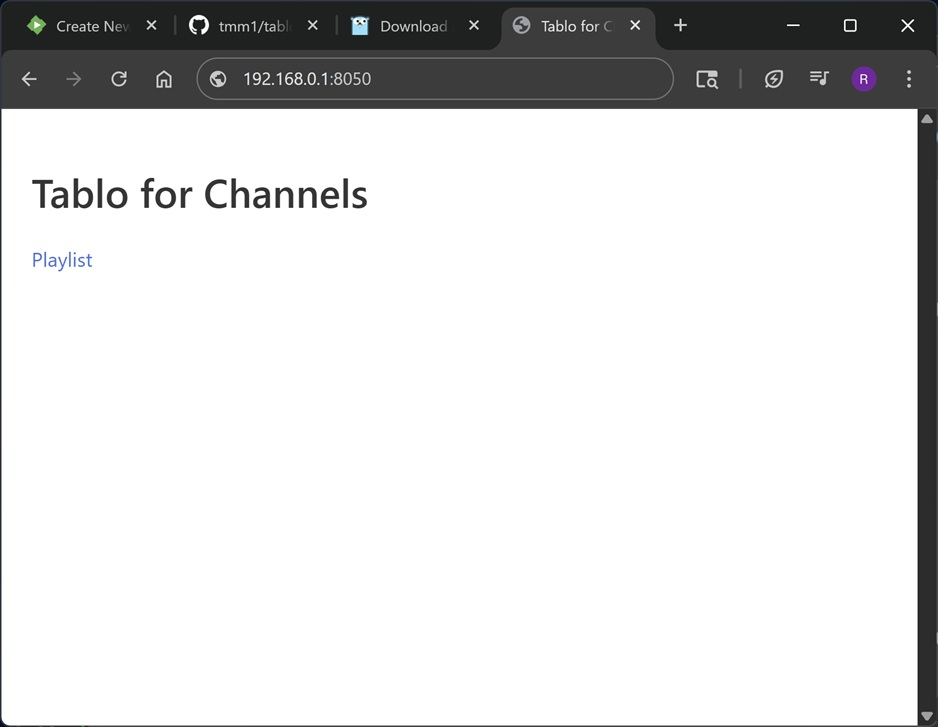
I have one of these Tablo Dual Lite OTA tuners that has great TV reception but is not supported by Emby. Recently I did some searching on the web and found this utility https://github.com/tmm1/tablo-for-channels which exposes a simple m3u playlist for the tuners on a Tablo device. My setup is Emby running on Debian Linux (Openmediavault v7.7.13) with "tablo-for-channels" runing in a docker container. FYI, this utility is only for a gen 3 or older devices. It will NOT work for the new round white Tablo gen 4 OTA devices. Steps to set up tablo-for-channels for Linux. Requires git and Go " https://go.dev/doc/install " 1. Install tablo-for-channels... $ git clone https://github.com/tmm1/tablo-for-channels $ cd tablo-for-channels $ go build 2. Setup docker container (substitue x.x.x.x with the IP address of your Tablo device in the command)... docker run -d --restart unless-stopped --name tablo-for-channels -e TABLO_IP=x.x.x.x -p 8050:80 tmm1/tablo-for-channels 3. Get the m3u playlist from the Tablo device. Either from terminal or web browser. a) From a terminal (use the IP address of your docker server) $ curl 192.168.0.1:8080/playlist.m3u #EXTINF:-1 channel-id="KEYT-HD" tvg-chno="3.1",KEYT-HD http://192.168.0.1:8080/watch/12 #EXTINF:-1 channel-id="CBS" tvg-chno="3.2",CBS http://192.168.0.1:8080/watch/13 #EXTINF:-1 channel-id="NOW" tvg-chno="3.3",NOW http://192.168.0.1:8080/watch/14 b) From a browser (use the IP address of your docker server). http://192.168.0.1:8050 you shoud see a web page like this. Then click on the Playlist link. After retrieving the playlist, import the playlist.m3u file into Emby as a new M3U TV source. These steps are also found on the website https://github.com/tmm1/tablo-for-channels Hope this is helpful.
 1 point
 -
1 point
-
Thanks for the news but @nospotifyis right, this doesn't address the feature request unfortunately1 point
-
I have my answer : I am a free trakt user so it is limited to 100 collected items. https://us1.discourse-cdn.com/flex002/uploads/trakt/original/3X/7/4/74a30030c5b2716c167d400f07554f200ae669f1.png1 point
-
Looks a lot better Thanks1 point
-
Thanks, I can see the issue in the log. Will be fixed in next version.1 point
-
Added a way to edit the amount of time a user has been given. Enjoy! WatchingEye.dll1 point
-
It will be excluded from both.1 point
-
Ah ha, this is not in the app but in the web client, you can select individually and refresh metadata from the top menu. Sorry I primarily use the app, I can't get surround sound via the web client. Thanks for your help through this.1 point
-
Thanks, but according to your reply in the linked thread, this new feature doesn't address the request being made in this thread.1 point
-
Here are your three options for the best home theater experience: Ugoos AMB6+ with CoreELEC and CPM A14 using Emby for Kodi (Next Gen) This is hands down the best setup—period. No debate. It supports full Dolby Vision FEL and full audio passthrough, making it the ultimate choice for high-quality playback of 4K Blu-ray remuxes. NVIDIA Shield This setup will get you about 90% of the way there. However, it does not support Dolby Vision FEL. Any 4K remux with Dolby Vision Profile 7.6 will fall back to Profile 8.1, which is essentially the same as the streaming-quality Dolby Vision you see on services like Netflix. Apple TV 4K with Infuse Similar to the NVIDIA Shield, it has the same limitation regarding Dolby Vision (no FEL support) and also does not support full audio passthrough. Why this matters: The main issue is that many people don’t fully understand why home enthusiasts use Emby, Plex, or Jellyfin. They’re trying to replicate a Netflix-like experience using built-in TV apps, Amazon Fire devices, or Roku. These devices work fine for streaming services but struggle with large 4K MKV files (e.g., 100 Mbps Blu-ray remuxes). For true home theater quality—full Dolby Vision FEL and lossless audio—the Ugoos AMB6+ with CoreELEC and Emby for Kodi is unmatched. I would recommend a Google or ChatGPT search for FEL VS MEL.1 point
-
I was searching to see if this was implemented and this comment encapsulated my idea fairly well. I enjoy being able to control during which hours viewing can occur each day. I would now like to take that to the next level by defining how much time can be spent. Ideally, it should track the time videos are playing (difference between when they start/stop) and not simply the length of the video(s). I wonder if this type of control has been considered.1 point
-
@brothom1 point
-
Hi Radeon Installed the latest version and everything working perfectly, downloaded movie theme songs.1 point
-
Is there any update on playback speed being remembered? I would be very keen top have this option in the app for audiobooks1 point
-
Sory for the confusion but these build steps are not needed. All that is needed is the docker command or the compose file. All the files needed for tablo-for-channels will be pulled from the git repo automatically.1 point
-
Absolutely! The sending / reporting of episodes is great! I wish the default Metadata Manager that that integrated as well, but then again I'd like a general messaging system for all web/app platforms as well to notify users of new episodes but also to notify system administrators of missing content or when users receive system errors.1 point
-
Emby for LG 1.0.47 has been released. Here are the highlights: Improve ASS/SSA subtitle rendering Add text size setting Improve the startup behavior option related to remembering login info Add option to auto-open single items in folders View the full article1 point
-
Thanks Luke. Let us know if you need any help reproducing / debugging (if it only happens on some hardware / configs maybe)1 point
-
This feature would be great - it's very frustrating having to change the speed back to whatever you want it on every time a new video in a playlist you're watching starts.1 point
-
Hi, not yet. On the todo list.1 point
-
My very first computer was a TRS-80 model 1 it had "storage" that was a cassette player. I upgraded it to a single sided floppy disk drive (128 k) and there I thought was all the storage i will ever need. I then a bit later upgraded to 2 double sided double density floppy drives (512 K each) and again that was all the storage i will ever need. I then upgraded to an IBM PC with a 100 mb hard drive and, again, that was all the storage I would ever need. I then went through about 5 different computers each one with more storage than the one before until I had about 4 tb total storage. I then discovered Plex and started adding storage and started to see the warts that Plex has in its Eco structure and looked for different/better media manager and found Emby. From there I had added drives but quickly discovered that management of a number of different drives was complex at best and i discovered Drivepool and pooled my existing media storage and had about 20 tb total storage, and that was all i would ever need. I am now up to 86 tb and I may have to, pretty soon, add another 10 tb. as my 86 tb was not all I would need. I think my next upgrade will finally really be all I need as I am getting quite old and my warranty is running out so my body will have to be retired as the "Steve Austin" upgrades are not materializing and I do not have $6,000,000.00 anyway. There is an axiom in computer systems that says: "Data grows to fill available space" and I think I have proved that, at least to my satisfaction. Fortunately/unfortunately the next growth event for my data will probably be its last as my body is nearing its "EOL" and I think EOL trumps data growth. ( obtuse pun intended ) Have fun with your additional storage.1 point
-
Long Promised — Long Awaited — Finally Here! We are excited to announce the first release of our all-new range of Emby apps, starting today with Windows and Xbox. With a fully redeveloped native foundation, this update delivers improvements across the board: from remote control and gamepad support to background downloading (Windows), as well as refresh and HDR mode switching, and most importantly, enhanced video playback. The new app also comes with a name change from Emby Theater to simply Emby. The name is the only simplification though: On Windows it supersedes and replaces both current apps, "Emby Theater Desktop" and "Emby Theater" from the Windows store, combining the best of both in a single app. It provides enhanced video playback driven by MPV player under the hood, like and even better than "Emby Theater Desktop", and the Download features which were previously available in the Windows store app only. A primary design goal has been to ensure that users of either previous app encounter no drawbacks when moving to the new version. Video Playback (Windows) Video options in the previous ET Desktop app were not always straightforward. The new Emby app adopts a fundamentally different approach to video playback configuration, which accommodates to a range from least to most knowledgeable users by boiling quality options down to three simple and easy understandable presets alongside a custom mode which allows to control all the underlying options in detail. The main presets are: High Quality A no-compromise choice for the best possible quality, regardless of resource usage. Recommended for powerful PCs with high-end GPUs. Video decoding and filtering occur in software for optimal quality, and output scaling uses custom GPU shaders. Balanced The default and recommended choice for most users. Similar to ET Desktop and a standalone MPV player with default settings. Efficiency Mode MPV player is generally focused on quality rather than power saving, and even with the Balanced preset, you can get short of energy rather quickly when running on batteries. This mode is not built-in or available in the regular MPV player. All video operations are fully performed in hardware while scaling at the video output (no shaders/gpu kernels) gets disabled. Too simplistic for you? Enter the Customize mode where you can control all options in detail to find your perfect setup. Video Playback (Xbox) In the new Xbox app, we have a new playback implementation which is based on ffmpeg and takes place of the HTML video playbaback which which had limited codec and format support. By combining ffmpeg decoding with elements from Windows Media capabilities, it combines the best of both worlds: The rich format and codec support from ffmpeg and the built-in hardware acceleration of the Xbox for playing 4k and HDR videos in the best possible way Automatic Refresh and HDR Mode Switching (Windows & Xbox) Refresh rate switching is now as simple as enabling or disabling a single option. The new app can track its window position across multiple monitors and adapt the refresh rate accordingly. On both Windows and Xbox, it can also automatically toggle HDR mode based on the video content and the capabilities of your monitor and graphics hardware. Download Feature (Windows) With the download feature, you can transfer media from your Emby Server to your client device in a suitable format and size, so you can enjoy your media when you're on the road or without an online connection and even automatically synchronize items based on the watched status. The new Windows app implements this with a completely different approach. Instead of periodically polling and running in the background, it uses Windows Push Notifications for server-side activation and the Windows BITS (Background Intelligent Transfer) service for downloads. As a result, the app runs only briefly whenever the server notifies it about newly available items or when BITS reports a completed download. If you don't use this feature, nothing runs in the background at all. Enhanced Support for Remote Control and Gamepad Input (Windows & Xbox) Remote Control support has been extended to cover almost all functions defined in the Windows Media Center remote button schema. For game controllers, mapping has also been expanded to assign functions to all available controls. New options pages provide a reference for button assignments and allow you to test inputs to ensure everything works as intended. Windows Theme (Windows) As a visual highlight, the Windows app features a new and exclusive Windows theme with Mica material background (Win 11) and seamless integration with your Windows desktop appearance, matching theme colors and dark/light switching accordingly. High Contrast Themes (Windows) As part of the Windows theme, the new Emby app also supports the Windows High Contrast settings. Fonts adjust in size and weight for better visibility, and fewer — but thicker—lines are drawn to enhance readability for those who need it.1 point
-
Hi, there's already an open request for this or something functionally equivalent. Please join in and contribute to the existing discussion at:0 points