
Leaderboard




Popular Content
Showing content with the highest reputation on 07/30/25 in all areas
-
New version up (5.25.2) Fixed: Parental rating not showing on TV shows. Icon Manager not looking for icons for parental ratings for TV shows. Download here or on Github - EmbyIcons --- Same as i just uploaded before, just wanted to make it official. EmbyIcons.dll3 points
-
New version is up (Emby Icons 5.2.1) Added: 1. Suppport for parental ratings 2. Support for collections, these work the same way as series. All or nothing, if all movies have for example English audio then an icon for English will be shown. Please note: The collections library it self can not be enabled or disabled as the icons are draw in the normal libraries and then Emby uses that drawn image in the collections library. Changed: 1. Small correction to the text in the settings. It said it would overlay icons on season posters while that is not supported. 2. It is no longer possible to save the settings without having first made a profile. 3. Icons will now overflow and form another line if they don't fit the poster instead of stacking on top of each other. Download here or at Gitbub - EmbyIcons EmbyIcons.dll3 points
-
Really considering giving JellyFin a go given all the advantages Emby supposedly had over Plex when I first set my server up have disappeared. It's no longer open source. There's no longer thriving third party development, and indeed they're basically running plugin devs out of town now...still waiting for the intro skip features to reach parity with the plugin that got booted years ago. Devs are no longer responsive—when ebr was doing the ATV app features and fixes went in within days. There are issues that have been outstanding with the standard app for years. I've also encountered a server-breaking bug that the devs have been completely ignoring for two months now. Playback failed for me last night and still no response to that thread in over 12 hours. That would never have happened a few years ago. It's also increasingly obvious that this is Luke's pet project and the only thing that matters is his preference, which is why the Android app is being redesigned to look and feel like an Apple app. I long ago stopped recommending Emby to others and I'm now actively looking to replace it. I really want the missing half of my library back.2 points
-
Hi there, I know ISO support has come up many, many, many, many, many, many times in the past, but most of the requests seem to focus on ISO playback. However, I would like to ask if it would be possible to get support for ISOs as "folders"? Is there any possibility of adding support for playing back video files from within an ISO? This would be similar to the current DVD and BluRay folder plugins, but instead of having the contents of the disc in a folder, it's all in an ISO. Just as an example, something like DiscUtils is a C# library which allows for reading files from within an ISO without having to extract it first. I'm assuming doing a live remux of the file(s) from within the ISO (by feeding them into ffmpeg) would then allow the video to be played on any client just as any other video would? This would allow for videos to be played back that are stored in an ISO, and not lose any of the benefits of Emby and it's client ecosystem - Emby could still transcode if required, and all clients would be able to play the videos. I know Emby focuses on making things user friendly for all users, but something like this could happily be an "advanced user only" feature - no automatic scanning of files or detection by Emby, but if a STRM file is found (with accompanying NFO file), and the STRM file points to the ISO as a folder, then it would be understood and opened accordingly. E.g., \\EMBYSERVER\Movies\Topgun.iso\VIDEO_TS\VTS_01_0.IFO Is there any chance of something like this being added to the current DVD and BluRay folder plugins? (Also, I know that the default reply is usually "convert to MKV", but there are a lot of discs where it is nice to have access to the whole disc. In those scenarios, I can use Kodi if I ever want the full "disc experience", but for 99.9% of viewing still use Emby without having to store both the ISO and duplicate MKVs. )1 point
-
You need to uncheck the exclude folders boxes. Having them checked will stop the plugin from scrobbling when you're watching. You're other settings look fine. There won't be any type of auto sychronizing exept while you're watching.1 point
-
@LukeI would be very grateful if something like this could be realized at short notice.1 point
-
HI, yes this is on our to do list. Thanks.1 point
-
Hi, we are looking into this. Thanks for reporting.1 point
-
Thanks, works much better as with the plugin.1 point
-
I have connect my emby connect account on my user account, but I can't login my emby server at my phone with emby connect account.1 point
-
I think it's now working the user authentication was the problem. I can now save/clear/restore my timers. I want two working emby servers, one on windows one on mac, and i want them to have the same media, watch status and all the rest I described. Anyway it's fine now.1 point
-
I know this post is old, but I'm currently looking into this myself. Depending on your configuration, there's many thing you can do. Let's say you have a server running emby as a docker. You can have that server run tailscale with exit-node. With the exit-node feature, your traffic will go out from the server itself. By enabling allow-local-lan in the config, you will be able to access emby docker. Another way would be to use the subnet routing, but this can lead to problem on other network using the same subnet. One way I'm currently trying, using unraid docker, is to enable tailscale in the container. Unraid normally do everything and all I have to do is click the link in the beginning of the log file to enable the container in my device list. But with the official emby docker, it seems unraid is unable to install tailscale on it because I never see the option to authorize the container nor even the installation itself. This would be the easiest way and normally, nothing is required, it's installed by unraid. Unsure why it's not working here1 point
-
Found it, done a netstat -an and found a webserver that probably was using it. Uninstalled every webserver that I wasn' t using, rebooted and it installed. That was probably also why jellyfin didnt work. installed it now, going through the setup. Thanks1 point
-
It does sound like your file is having some issues. TV's aren't that great at fixing media-data on the fly, at least not as good as your browser or VLC players are. It might be interested to change the quality of your file via the player (if you have transcoding enable). If you select a different quality, the media stream is handled via ffmpeg and this might also "solve" your issue or maybe even worsen is. Either way, if this is a ripped file you could rip it again and if not, you might want to just try a different source for this file or maybe even re-encoding/muxing it using ffmpeg.1 point
-
100% this. I am the admin, but have to walk people through connecting. The fewer clicks and modifications, the better1 point
-
Hi. That doesn't rule out a file issue - which I believe it probably is. Have you tried re-ripping those files?1 point
-
+1 for 2FA for the admin account1 point
-
I have to admit, my Samsung Smart TV is also acting different from my other devices (Chromecast / Browser and app) taking much longer to load initially (taking about 5 seconds to load from timestamp 0) whilst the browser and app are almost instant. The Samsung Smart TV app also seems more prone to buffering than the other platforms. Maybe the buffer size is much smaller? Regardless, buffering takes much longer on the tv app than other devices even when the network is barely busy. What I did notice is that when there's a lot of drive activity this issue seems more apparent . The logs don't offer any insight either because it's like nothing happens from the Emby side of things. Emby reports: 2025-07-29 20:23:38.701 Info Server: http/1.1 Response 204 to 192.168.2.4. Time: 2ms. POST http://192.168.2.200/emby/Sessions/Playing/Progress [TV start buffering] So I start checking out the server, but I can't find anything wrong after about 5 minutes. Go back to the TV and press play which shows up in the logs: 2025-07-29 20:28:04.645 Info Server: http/1.1 POST http://192.168.2.200/emby/Sessions/Playing/Progress So the logs just seem to jump the gap. I'll check the other logs as well. It's not like any other process seems to be stalling or choking the system either. I did find this tho: 2025-07-29 20:11:44.229 Info SubtitleEncoder: ProcessRun 'ffmpeg-subtitle_convert' Execute: XXXX\AppData\Roaming\Emby-Server\system\ffmpeg.exe -loglevel +timing -y -sub_charenc:s:0 utf-8 -i "XXXX.srt" -map 0:0 -vn -an -c:s:0 webvtt "XXXX\AppData\Roaming\Emby-Server\programdata\cache\temp\1cfad60074db4a5c9beabbabc1fdef01.vtt" 2025-07-29 20:11:45.238 Info SubtitleEncoder: ProcessRun 'ffmpeg-subtitle_convert' Process exited with code 0 - Succeeded Eventhough taking a hot second, waiting for this to load together with requesting the conversion, waiting for that and the tv to process the vtt when loaded might explain the slightly long wait when initially loading media. It kind of suprises me that my TV doesn't seem to support .srt files and a conversion to vtt is required. This conversion can also just take place on the client side because srt and vtt are both text formats and I've also a written a converter for myself some time ago if any devs are interested.1 point
-
Thanks for the info Yeah I saw that the episodes have 0 info about PR - but that's not so important - I was just asking me if that would be easy to implement or not but as it's not important and some work we can forget this At least the TV-Show now has the info displayed Sometimes it's difficult - you can check the code 3563728 times and don't see an error and than suddenly I have that sometimes when I do something under PHP for my website - but it's just a hobby and so I'm not used to do it and so this happens often LOL1 point
-
Hot of the presses. Should fix the problem plus the icon manager in the settings should now also correctly look for parental rating in series. EmbyIcons.dll1 point
-
It's because i've been an idiot, i just got it working for movies and then added it as normal to TV shows. Problem is TV shows looks through episodes and only shows icons if all have it. Working on finalizing a fix.1 point
-
this is true, but i find for me the quality is poor and sometimes the audio is behind the video. We still need a proper fix, Its been weeks.1 point
-
no I'm not. Vonets Wifi bridge is powered-off, disconnected and trashed. there is no any network device connected to TV model UE50AU7002UXRU.1 point
-
I can confirm this - was just checking this And I saw that Emby just put the Parental Rating on the TV-Show itself - not on the season and not on the different episodes - maybe relevant too1 point
-
So far the update seems to have fixed the issue, no crashes on deletions since upgrading to build 48.1 point
-
The command that generated that error was: sudo -u emby /usr/local/AppCentral/emby-server/bin/emby-server And now I'm off to bed. Emby is running (as root) and that's ok with me for now. I'm building a Proxmox server separately to house my Emby/Media library and will be glad to use the NAS purely as a backup device. This was the kick in the pants I needed to get it done. The NAS is now on life support from Asustor anyways, so time to move on I guess. Regards Michael1 point
-
Yes! I am now seeing ALAC Direct Play when using DNLA. Many thanks.1 point
-
So Gumball thought I would delete again but this time DL 720p vice 1080p and this time picked up by Emby and playing on all forms (TV, PC, Tablet) However Ep 2, 3, 4, 6, 7, 14, 16 & 17 are all showing <video unknown> and file is as saved as /volume1/data/media/tv/The Wonderfully Weird World of Gumball/Season 1/The.Wonderfully.Weird.World.of.Gumball.S01E02.The.Assistant.720p.DSNP.WEB-DL.DDP5.1.H.264-NTb.mkv1 point
-
But why not naming it Theatrical Edition then? I can name the files like I prefer, so that's not really an issue from my point of view. Sort order sadly does not influence the version order, otherwise I wouldn't have a problem. My problem is that the default version is based on video metadata and is practically not always the same version, quite the contrary in fact. Even in a season, sometimes the first version and sometimes the second version is the default. That is my core problem and there is still no way for me to fix it.1 point
-
Hello - Thank you for your help @sa2000! The identifier is USA-OTA85260. The timezone you list is almost correct, most of Arizona is on MST and does not follow daylight saving time (there is a small portion of Arizona that does in the Navajo nation and it is currently on MDT). For 7.5, I show that Becker episode airing at 15:30 local time according to https://cw7az.com/schedule/ and it shows in the guide as airing at 16:30. For 10.4, I see that episode airing at 19:30 according to https://www.ontvtonight.com/guide/listings/PhoenixNight.html and it shows in the guide as airing at 16:30.1 point
-
I believe he meant `sudo chown -R emby:emby /home/emby`1 point
-
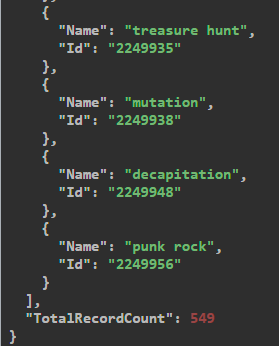
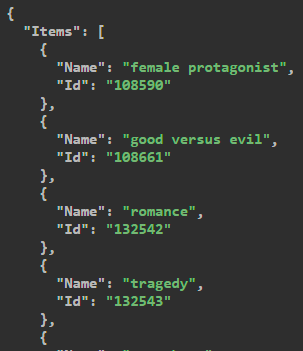
I have some Python code that can process and export all tags from Emby. Still interested? /EDIT: I forgot to mention that you can also fetch the tags as JSON using the API. You can use http://YOUR_SERVER:8096/emby/Tags?api_key=YOUR_API_KEY to get all tags from all libraries, even unused ones or http://YOUR_SERVER:8096/emby/Tags?Recursive=true&ParentId=YOUR_LIBRARY_ID&api_key=YOUR_API_KEY for actually used ones of a specific library. ...
 1 point
 -
The hardware I’ve set up for Emby isn’t particularly remarkable. It’s my old daily driver: an Intel i7-7700 paired with 48GB of RAM and an ageing GTX 1660 GPU handling the transcoding duties. For the operating system, I opted for Windows Server 2025, as I happened to have an unused licence key available. It’s installed on its own dedicated 64GB NVMe drive with the paging file disabled. Emby itself is installed on the system drive, while the cache and image storage are handled by a second NVMe drive (500GB), installed using a PCIe x16 to NVMe adapter. My media library is quite extensive. It includes music, audiobooks, ebooks, films, home videos, television series, photo uploads and YouTube downloads. This main library, not including the comic book collection (which spans 50TB and resides on a separate instance), holds roughly 3.3 million entries. These are spread across 50TB of local RAID volumes for frequently accessed content, and four Synology NAS systems for archived material, totalling approximately 400TB of raw capacity. Films are organised by decade, distributed across multiple volumes and disk groups. TV series are divided into two separate libraries: one for Running series and another for Archived or no longer running stuff. Music, ebooks and audiobooks are housed on a separate local volume. For conversion and transcoding tasks, I use older SATA SSDs configured in RAID 0. As this is a non-critical function, I’m not concerned about potential drive failures in this setup. As clients I have a Nvidia Shield TV 2019, a Nokia Box 8000, an Apple TV 4, 2 x 1080p Android beamers, 3 Smart TVs (LG and Samsung), various iPads, iPhones and Android phones/tablets on various OS versions that connect regularly from various counties mainly within Europe.1 point
-
I disagree... I don't like the Microsoft Store. I don't understand why you're forcing us to use it. Is this like a hostage? Where is the freedom??? We want to use the regular setup.exe file. I see that the old version 3.0.20 from 2023 is available. Can't you update to a newer version??? emby-theater-windows 3.0.20 I know that in the future the old version of Emby will stop working... That will be a big problem. Please respect users who want to use either the Microsoft Store or the classic installer (setup.exe). You can't force us to use only the Microsoft Store.1 point
-
Yep. A basic TOTP authentication would be fine. Plenty of open source libraries if they don't want to develop from scratch.1 point
-
+1 please get this added ASAP. It's crazy it's been 7 years since this was initially requested.1 point
-
Hi Luke, Thank you so much for your time on this! The source can be found here: ISO Container Playback Anything else that I need to do on it, just let me know and I’ll have a crack at it!1 point
-
OK where is the source for this? I can help take it a little further. Thanks.1 point
-
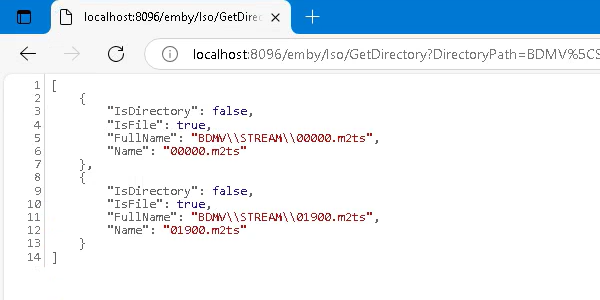
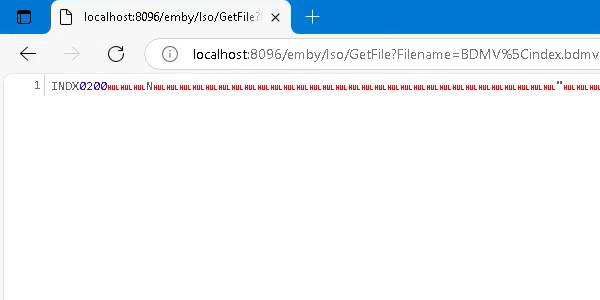
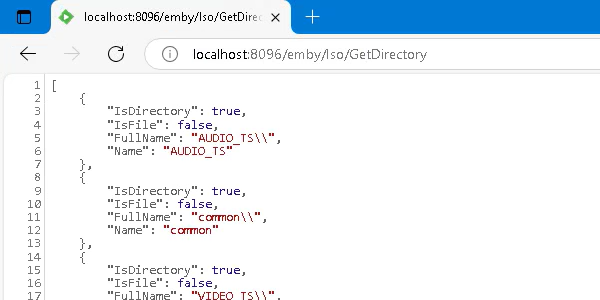
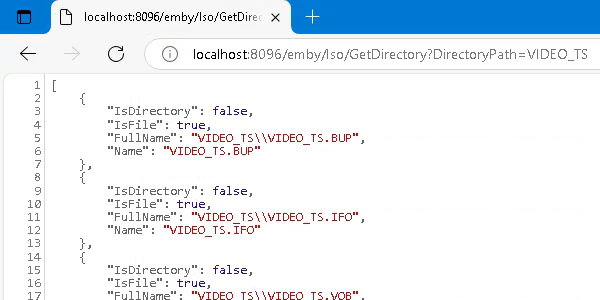
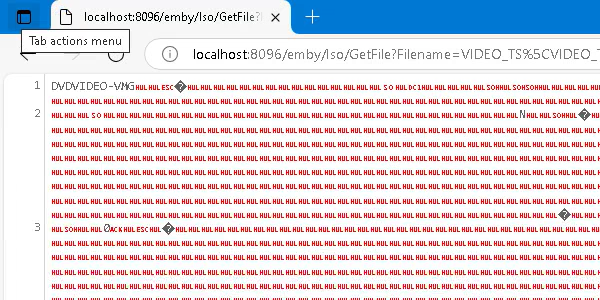
Yep, no problem! BluRay / /BDMV /BDMV/STREAM /BDMV/index.bdmv DVD / /VIDEO_TS /VIDEO_TS/VIDEO_TS.IFO
 1 point
 -
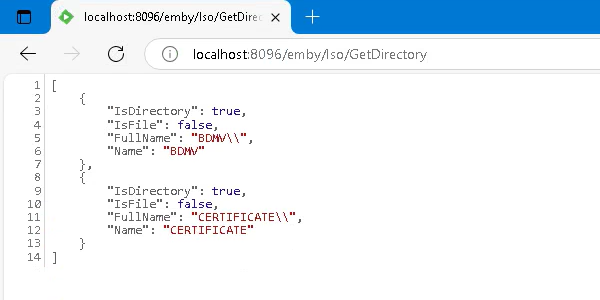
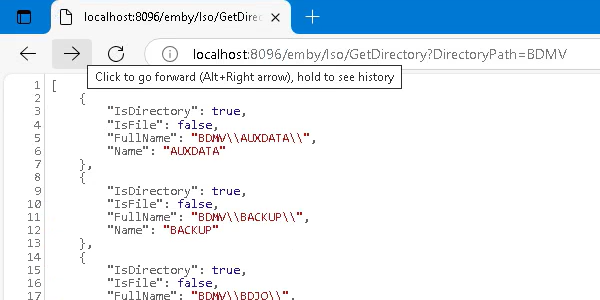
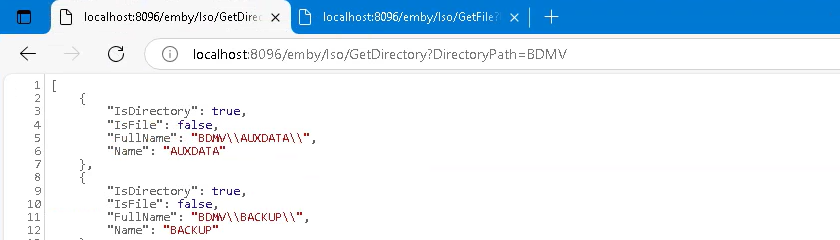
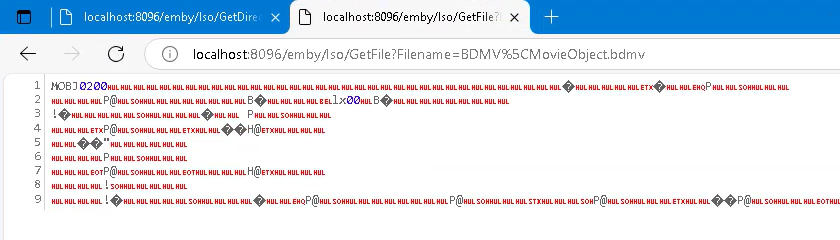
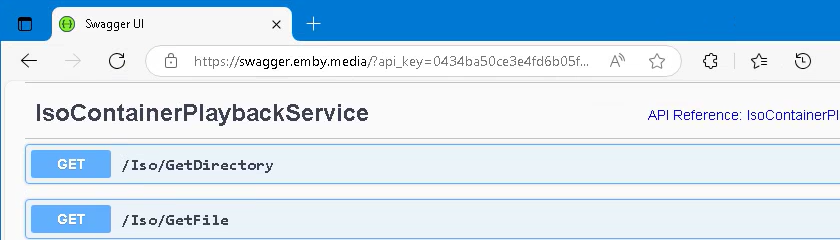
Hi Luke, My apologies, I'd made a small mistake and placed the [Unauthenticated] attribute in the wrong place, but I've fixed this now, and also tweaked a couple of other bits (including merging the services into a single service). With an ISO in the expected hard-coded location, the API is accessible from within a browser, as shown in the screenshots below. At the moment, the GetFile method on the service just returns the Stream object directly, which (I believe) results in it being written to the response stream. Is this sufficient, or is there anything else required when returning a Stream object? I'm not making use of ResultFactory at the moment as I wasn't sure whether that would be needed? Cheers!
 1 point
 -
OK that was quick and you’ve verified that these both work by testing in the browser?1 point
-
Hi @Luke Apologies for getting the wrong end of the stick with my original implementation - I'd interpreted your comment as though you'd just need a stream wrapper around all of the files representing a video on an ISO, to then feed into ffmpeg. I realise now what you asked for was effectively a "virtual file system"-type wrapper to allow access into an ISO, which I guess you can then effectively just use the BluRay and DVD folder plugins/code on top of? I've redone the plugin based on your feedback, and pushed it all to the repo. The plugin now exposes 2 API endpoints - one to get a list of the contents from a folder within an ISO, and another to get a stream to any file within an ISO based on it's full path (within the ISO). The stream is a wrapped stream that, when disposed, will also dispose of the underlying streams, so hopefully there should be no leaks. As per your suggestion, I've added the [Unauthenticated] attribute, and also hardcoded the ISO path for now - it's defined as a constant on the "IsoContainerPlaybackPlugin" class. Hopefully this is more along the lines of what you needed, but again, let me know what else I can do and I'll do my best to get it done!1 point
-
Hi, this is what you will need. Essentially you need to make the .iso appear as if it were an expanded bluray or dvd folder. once you have that, then we can get it to play identically to how a folder rip would play. My suggestion would be to register an api to extract a file from an iso. It should accept as a param the relative path of what file to extract. Just hardcode the iso path into the method for now. We'll make that more dynamic later. In addition to this, you'll probably also need an api to get a list of files based on a relative path inside the iso. Add the [Unauthenticated] attribute to your routes for now so that you can test it easily in the browser. So that's really the hard part. Once you have that, then the Emby side of it will be much easier and I can help fill that in.1 point
-
Hi @Luke, my apologies for taking so long to reply to your previous post! Firstly, I'd just like to say that your response is the reason why Emby rocks, and is the best of the media platforms out there - this is a fairly niche feature, to cater to a handful (at best) of users, yet you are still willing to potentially work on the feature with the community and see if it is viable! You guys are the best! With that said, based on your previous comment I thought I'd have a go at "putting my money where my mouth is" and have a stab at being the community member who attempts to implement the required plugin. My initial work on this plugin can be found in the following repo: IsoContainerPlayback I don't know if I've gone down the right lines with this (trying to present a video as a single stream), or if it will need refactoring to make each individual file from the ISO available separately upon request, but I thought it might be a decent starting point? Below is a summary of the project, taken from the readme: IsoContainerPlayback This is the Emby plugin itself. It consists of the plugin code (to interface with Emby server), and a class called IsoStream (and the derived classes BluRayIsoStream, DvdIsoStream, and VideoCdIsoStream), which provide the core functionality of streaming a video from the contents of an ISO. IsoStream (and it's derivatives) handle the task of opening the files from within the specified ISO and presenting them as a single .Net Stream. The goal is for this stream to be used to allow for the playback of video from within an ISO. Note: Whilst IsoStream is complete and working, the actual Emby plugin code is still work-in-progress. The plugin will correctly register itself with Emby server, and there are initial attempts at exposing API endpoints, but these still need more work to make them useful. This project also includes the source to any required 3rd-party libraries, as plugins can only access framework libraries and the Emby SDK. IsoPlayback.TestClient This is a WinForms project that uses an embedded VLC player to try and prove and test the IsoStream implementations within the IsoContainerPlayback project. The app will load a specified ISO using IsoStream, and then pass the stream to the embedded VLC player to play using the following code: IsoStream isoStream; // Load an iso into isoStream videoView.MediaPlayer.Play(new Media(_libVlc, new StreamMediaInput(isoStream))); I hope I'm along the right lines with this and would be happy to work on this and make whatever changes are needed if it's still possible to consider implementing? If so, please let me know what else I need to work on (I know the API endpoints will need more work and, as mentioned above, the stream implementation may need altering) and I'd be happy to get it done.1 point
-
Looking at DiscUtils that you linked to - in theory the entire source code for this could be embedded into a plugin. However, this can only examine iso files and cannot mount to a local path. Ultimately you need a real path that can be fed into ffmpeg. So what the plugin could do is register an api endpoint with the server. This api could return the contents of files within the .iso file, and then this api url could be the resulting url that ffmpeg streams from. There's a lot of moving parts, but if there is a community member who has the capability of doing the work then I will help them with the emby side of things.1 point
-
No problem, and I appreciate the feedback! As I say, I'm not after full ISO menu support, just the ability to play files from within an ISO, but I appreciate there probably isn't as much demand for this as there is other features. If you guys ever reach a point where you've implemented everything else however, please give this feature another look! Edit: On a side note, is this something that could potentially be achieved through a plugin? Or would it require access into Emby beyond what a plugin is capable of? I saw in your SDK there was an interface called IItemResolver, and I wondered if this would be the avenue into creating something like ISO support as a plugin?1 point
-
My apologies, I missed this reply the first time! I would assume it is possible - I know Emby has support for folders and, whilst I've never tried it on Kodi, I'm going to guess that they support folders too. However, that isn't what I'd like to do - having folders on my NAS, with other files intermingled is not what I'm after. (And please correct me if I'm wrong, but last time I tried, the NFO files, etc. got placed within the folders, and I'm not after Emby/Kodi auto-detecting the folders for me). My goal is just to have a single ISO for each disc that I rip, that I can then craft NFO files (and STRM files if required) for, to allow for videos to be played back from "within" the ISO, via Emby. Then, if I ever want full disc playback, I can hop to Kodi and play the ISO. And I also have a perfect (unencrypted) backup of each of my discs. I appreciate everyone's comments about alternatives, but ultimately none of those are the solution I'm looking for and, whilst I appreciate it's a long shot, my hope is there is a chance this feature request could get picked up, even if just as an "advanced user" feature, or plugin, etc.1 point
-
As I mentioned above, I've got the episodes already ripped to MKV, but I've also got the ISO for when I want that full menu "experience" and I can just switch across to Kodi to play them. However, it would be nice if I didn't need 2 copies of the same episodes, and could just play the episodes directly from within the ISO (again, as a "folder", not full ISO/menu playback). That way, I can watch any episode through Emby with all of it's benefits, but if I do want the full DVD experience, I can hop onto Kodi, all from the same ISO, and saving a lot of disk space in the process.1 point
-
I mean, it's not really going backwards is it? More sideways.... As I said above, Emby already supports DVD and BluRay folders, all this feature request is for is to effectively extend that support to folders inside an ISO. No need to mount it, no menu support, etc., just playing the video files but straight from within the ISO instead of copying the files into a folder. I know Plex has no ISO or folder support, but Jellyfin has been doing work lately to try and extend ISO support (although they seem to be going even further and doing full disc playback too, which isn't what I'm asking for), and they also have a feature request similar to mine to allow for playback of files from within an ISO - they even discuss using DiscUtils, and then taking the Stream returned from DiscUtils and writing it to stdin for ffmpeg. And so, whilst I appreciate this will probably never be the most popular feature request, there are definitely other users out there who I think would also like to see this as a feature. And as I say, it could be an advanced users only feature, so Emby doesn't automatically scan/index ISO files, but if we manually craft a STRM and NFO file correctly, the ISO will be supported (again, as a "folder"/container, not full playback). (Also, I mention Jellyfin above purely for discussion, and to illustrate that there is some desire for this feature request - I love Emby, and have no desire to switch to any other platform, so please don't misconstrue any references to competing platforms! )1 point
-
Hi there! The distinction is because I wasn’t asking for menu support, etc., just the ability to play vob/m2ts files, but instead of being stored inside a folder, they are stored inside an ISO. I know ISOs aren’t “folders” in the literal sense, but they are just file containers and, as illustrated in the linked DiscUtils project, it is possible to access the files within an ISO without having to mount it, or play it as an ISO, or “extract” the contents of the entire ISO. You can access any file within the ISO, and receive a Stream object which can then be treated like any other Stream object. My understanding is that Emby already has the ability to play vob/m2ts files, and the DVD and BluRay folder plugins allow Emby to “understand” the file structure of a disc if copied into folder, and play the video files contained within (again, only as video files, not full disc/menu support). My request was whether it would be possible to extend these plugins to also be able to treat an ISO as just a folder (not by mounting it or playing it in the traditional sense, but by looking inside the container and accessing the data/files directly), and enable vob/m2ts files to be played directly from within the ISO. This would be equivalent to just playing a video file directly, meaning it should work in all Emby clients, as Emby server would stream the data to the client as it already does, and the server could still remux or transcode the data if needed by a client, as it does with any other video. Effectively, it gives the “best of both worlds”, as rips can be stored as ISOs, but played back as normal video files. As for converting, as I say, I like to keep the ISOs and occasionally play them via Kodi, but if Emby could play a vob/m2ts file directly from within an ISO then I wouldn’t need to also keep MKV files alongside the ISOs, reducing the need to effectively store 2 copies of every video.1 point














(Custom)(2).thumb.png.ca72ab46609f41417fcb155e46fe8a5c.png)






