Leaderboard




Popular Content
Showing content with the highest reputation on 07/17/25 in all areas
-
This is a great feature to have. Most of my users are really confused as to why they have to select "4k 200mbps" sometimes. In most cases this causes 1080p / 4k videos to play at their original settings. When the quality is left at automatic, sometimes a different resolution or bitrates is selected causes the server to transcode it. It would also be really nice to set "original quality" as a default quality selection for each user because changing the quality only seems applicable when the device literally doesn't understand the codec ór when the device is too slow (older laptop playing 4k, etc).3 points
-
I’m using an iPhone 13 Pro with the latest version app and the latest version of the QNAP server. Play Movie 1 (4K 200Mbps): I tried selecting 1080p quality to test the transcoding performance, but the playback was very choppy. I wanted to switch back, but I found there was no "Direct" option. Whether I selected the highest quality 4K 200Mbps or "Auto" (which showed as Auto-4K200M), the playback was still choppy. Restarting the video also didn’t play it in Auto-Direct mode. Play Movie 2 (4K 200Mbps): The quality showed as Auto-Direct, and the playback was smooth. Play Movie 1 and Video 2 (Both 4K 200Mbps) via SMB using nPlayer app: Both Movie played very smoothly. I suspect that when playing the first Movie, neither 4K 200Mbps nor Auto is using Direct mode. Please add a Direct option.
 2 points
 -
Yep. A basic TOTP authentication would be fine. Plenty of open source libraries if they don't want to develop from scratch.2 points
-
+1 please get this added ASAP. It's crazy it's been 7 years since this was initially requested.2 points
-
Is there plans on the roadmap for OpenID. I have searched but not found any indication this is in development. With many admins taking up SSO through Authelia or Authentik to enhance security it would be great for Emby to support it. One of the easier open standards is OpenID which the aforementioned support. Users could continue to use LDAP if they wish while others can use the arguably better SSO experience.1 point
-
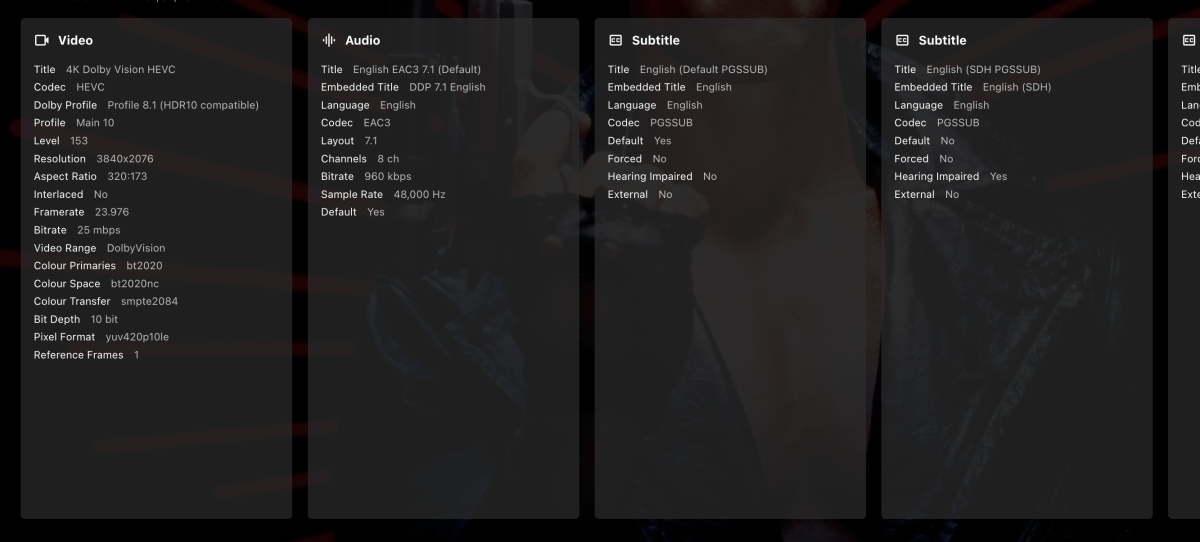
It's not a DTS issue, that model TV still supports DTS. @Darkel_91, thanks for the media info. Can you please also copy the media info block that is at the bottom of the details page for those movies on the server. I'd like to confirm how the server is actually detecting this as well. I mean in the format below, just be sure to scroll across if required to get all the streams. You may need to do multiple screenshots to get it all. Just to clarify, you have 2 servers and 1 TV you are using for testing. Server 2 has no issues with any files, but server 1 has issues with some files that work fine on server 2. Is that correct?
 1 point
 -
Yes exactly.1 point
-
Ah, yes ... "PlaylistIndex": 1, "IndexNumber": 2, "ParentIndexNumber": 2, ... so I am guessing that the ParentIndexNumber is the Season and the IndexNumber is the Episode?1 point
-
@ebrOkay, valid argument and totally fine. But the feature request is over 7 years old. Your wording suggests this edition feature is just an idea and not in implementation currently, or am I wrong?1 point
-
A @Lukementioned, sport events should probably be based by dates and probably cups. I've also checked a bunch of European matches, considering this seems to be a US initiative and those are also suprisingly accurate. Looking at thesportsdb.com structure it seems they figured out the most sensible formatting by themselves. An example: Soccer For home matches (https://www.thesportsdb.com/event/2192339-orlando-city-vs-new-york-city-fc) X:/Sports/Soccer/American Major League Soccer/2025/American Major League Soccer - y2025m07d17t001600 - Orlando City - New York City FC For out matches (https://www.thesportsdb.com/event/2192308-charlotte-fc-vs-orlando-city) X:/Sports/Soccer/American Major League Soccess/2025/American Major League Soccer - y2025m07d05t231500 - Charlotte FC - Orlando City Ice Hockey The above also seems to apply to other sport: https://www.thesportsdb.com/event/2250315-eisbären-berlin-vs-kolner X:/Sports/Ice Hockey/German DEL/2024-2025/German DEL - y2025m04d25t173000 Eisbaren Berlin - Kolner Lacrosse https://www.thesportsdb.com/event/2257685-buffalo-bandits-vs-saskatchewan-rush X:/Sports/Lacrosse/National Lacrosse League/2024-2025/National Lacrosse League - y2025m05d16t232300 - Buffalo Bandits - Saskatchewan Rush These are of course fully qualified to prevent any same-day matches and could be abbreviated to: X:/Sports/WhichSport/WhichLeague/WhichSeason/WhichLeague - y{year}m{month}d{date}t{time?} - Home vs Out Or maybe even just: X:/Sports/Lacrosse/National Lacrosse League - y2025m05d16 The filename itself provides enough information for the item to be found via the API (with date or even exact time matches, there's only 1 match that day). I couldn't find out if abbreviations works correctly via the API but if they do formatting could be cut down even further, but won't make the contents any more clear and only encourage users to "go wild": X:/Sports/NLL/NLL - y2025m051 point
-
yes Luke. sorry thought that was closed long time ago. I'm not using the z9x pro anymore therefore I'm not using jellyfin anymore therefore all good I don't care which port emby uses and blocks fact was that in the installation process the port was not changeable and therefore I couldn't enter the settings menu to change the port... both emyb and jellyfin are suing the same initial port in installation process but now, all good!! best d1 point
-
The new version is up. Added: Support for videos in "Home Videos and Photos" type libraries. Clear icon cache button for when icons have changed in the icons folder - It should now work correctly, last time it didn't work when changing to a different image format, for example from jpg to png. Changed: Made the settings page preview dynamic and random, giving a better representation of the icons. Download here or at Github - EmbyIcons Edit: Forgot to say, the whole code is available on the Github. Do with it what you want, even make it your own, just please keep it open source! EmbyIcons.zip1 point
-
With a movie or series, Try /items/id/similar From there the usual params that you're used to.1 point
-
I have reached out for help. I'm not an advanced user of Docker, it’s very complicated.1 point
-
OK that's one way to do it. Another would be to use date based naming without episode numbers.1 point
-
Ah ok , I'm using it more for actual different versions/cuts of a movie. Like the Theatrical vs Directors cut. I'd like to be able to choose which version is in the dropdown by default.1 point
-
Hi, yes it's not a bad idea. Thanks.1 point
-
When it comes to managing and streaming your personal media collection, Emby stands out as a favorite among home media enthusiasts. Whether you're a cord-cutter, a collector, or just someone who wants full control over your content, Emby delivers. But don’t just take our word for it — recently we took a look around the Emby Community Forums, Reddit, and other media server discussions to find out what users love most. Here are the features Emby users say they can’t live without: 1. Active Development and Plugin Ecosystem The Emby dev team has built a strong reputation for listening to users and delivering consistent improvements. Feature requests are often acknowledged in forums, and updates come regularly. The Emby Plugin Catalog includes tools for metadata management, intro skipping, trakt.tv syncing, theme music, and more — making it easy to expand your setup. 2. Emphasis on Privacy and Local Control Unlike some competitors, Emby doesn’t force users into cloud integration or tracking services. Features like Trakt and others are optional, and you’re never required to give up control of your data. This focus on local-first architecture makes Emby a great option for privacy-conscious users who want full control over their media experience. 3. Customization and Theming From custom libraries to visual themes, Emby offers a highly customizable user interface. Users can choose how metadata is displayed, organize content into rich collections, or apply unique visual themes and CSS tweaks. For families or multi-user households, Emby also supports user profiles with individual settings and parental controls. 4. Direct Play and Efficient Transcoding Emby is built to take full advantage of Direct Play, reducing the need for CPU-intensive transcoding. For devices that require conversion, transcoding is efficient and can be customized for quality and bitrate. If you’re running a hardware-accelerated setup with Intel Quick Sync, NVIDIA NVENC, or AMD VCE, Emby can offload transcoding for better performance. 5. Live TV & DVR Integration One of Emby's most appreciated features is its native support for Live TV and DVR. Whether you're using a TV tuner or loading an M3U playlist from an IPTV provider, Emby makes it easy to stream live television directly from your server. With season pass recording, time-based scheduling, and automatic commercial skipping (with optional plugins), Emby turns your home server into a powerful personal PVR. Bonus: Multi-Platform Support From Android TV, Apple TV, and Firestick, to iOS, macOS, Windows, and even Linux, Emby has apps for nearly every device. And with Emby Theater, you get a lean-back experience optimized for the big screen. Final Thoughts What makes Emby stand out isn't just its feature list — it's the freedom and flexibility it offers to its users. Whether you’re building a streaming server for your family, archiving physical media, or curating a collection for your home theater, Emby puts you in charge. Ready to try it yourself? Download Emby Server and see why so many users are making the switch.1 point