
Leaderboard




Popular Content
Showing content with the highest reputation on 07/15/25 in all areas
-
Could you allow users to customize the order of movies in collections instead of only having it by alphabetical or by release date? Example: I want to have a collection of Batman movies, both animated and motion pictures but want the motion pictures together followed by all the animated ones. With the current order options, this isn't possible. Thanks!3 points
-
It's back baby! Well.. Not really, as i still need to add the code for it but.. The setting is back!!3 points
-
I'd really like to have 2 Factor Authentication added to the login screen. It's just this (optional) extra layer of security to help secure the server (which, especially if people use camera uploads) contains pretty private data. There are for every type of programming language quite a few libraries available, so implementation on a server shouldn't be too hard to realise2 points
-
Emby for Apple TV 2.0.0 has been released. Here are the highlights: Support animated images on music album and playlist detail screens Improve Live TV progress display Photo slideshow bug fixes Improve remote/seeking behavior Support subtitle offset Improve live tv guide scrolling Restore scan library files context menu option View the full article2 points
-
I know this is an old topic, but it would still be great to get this feature. Just something like a checkbox next to a user to require a password change at next login.2 points
-
I used Plex for many years, but over time it became frustratingly slow, so I started looking for alternatives even tried Serviio, but that didn’t work out either. About a year ago, I discovered Emby, and I’ve been using it exclusively ever since. It’s fast, stable, and the configuration options are very well thought out. I liked it so much that I bought the lifetime license. I can honestly recommend it works perfectly with my Samsung QE65Q67DAUXXH 65" TV.2 points
-
+1 please get this added ASAP. It's crazy it's been 7 years since this was initially requested.2 points
-
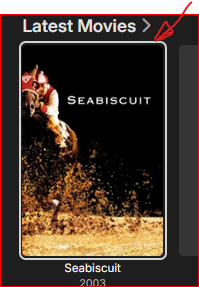
I agree, being able to set the highlight color in the Emby Android app would be helpful. The Emby Android TV app not only highlights in a more visible color, it also slightly zooms in on the highlighted item image, making it easier to tell what's currently highlighted. The Emby Android app doesn't zoom in on the image and the white border is harder to see. This is one reason that's keeping me from using the unified Emby Android app on my TV.2 points
-
Hi. We would like to make this easier but also do not want to compromise our mission of keeping your server your server. Keeping this control in your hands instead of ours does come with some additional responsibilities, unfortunately.2 points
-
Is there plans on the roadmap for OpenID. I have searched but not found any indication this is in development. With many admins taking up SSO through Authelia or Authentik to enhance security it would be great for Emby to support it. One of the easier open standards is OpenID which the aforementioned support. Users could continue to use LDAP if they wish while others can use the arguably better SSO experience.1 point
-
Here you go. In both files I've marked the changes between "START ADDITION" and "END ADDITION" tags. I have these modified files running on my local server and seem to create consistent "random" results making my homescreen feel much more alive and also bring random items to my attention: Performance also seems pretty good, no discernible lag. I also took the liberty to modify the title to also contain the links to the associated item via the router I'm pretty sure this actually should only work in-browser due to other platforms rendering titles differently. homescreen.html homesections.js
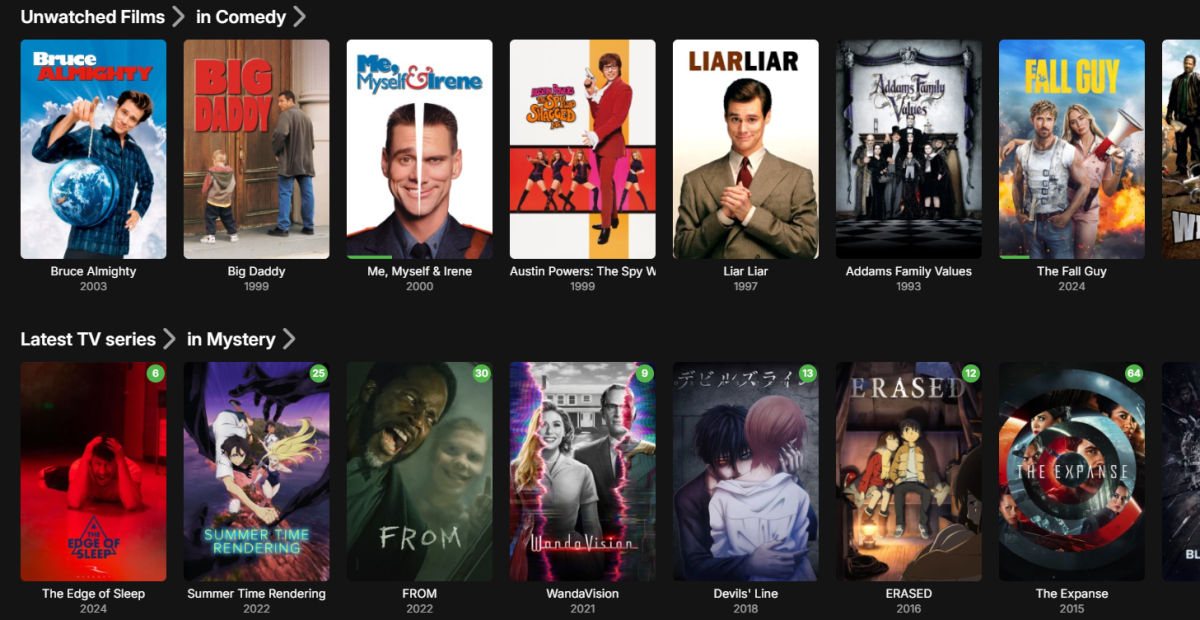 1 point
 -
Hi. I have uninstalled Truenas Scale V24 and moved back to V22 Bluefin as I read several posts for other apps forums that said quite a few users having trouble installing apps on v24 because of the way it changed how it used Docker - especially as I had imported my data pool and data sets from Truenas Core. It says you can do the upgrade this way no problem but I suspect there was something in the ACL permissions that carried over that it didn't like. Didn't understand most of it, but a lot of suggestions saying Bluefin was more stable. I also started from ground zero and wiped previous pool and data sets and recreated everything from within Truenas Scale. I then managed to install Emby on v22 no problem. Thanks anyway.1 point
-
According to your meaning.1 point
-
Hi, Luke. In "Users," I went to "Profile" and "Access." I enabled everything, and now it's working. Thank you so much.1 point
-
Good Eveneing, Yes, this I mean...too bad...thanks for reply..:(1 point
-
Hi, did you check the permissions for the emby user that you're signed in with to see what libraries they are granted access to?1 point
-
Hi, yes we are working on improving this. Thanks for the feedback.1 point
-
Yep. A basic TOTP authentication would be fine. Plenty of open source libraries if they don't want to develop from scratch.1 point
-
That would mess with my OCD1 point
-
Please do not forget Please do not forget that the plugin also creates smart collections, not only playlists. I use the collections, not the playlists. Will the core feature offer collections?1 point
-
HI Luke have to leave for a couple of hours and when I return will report requested info Thanks Rew1 point
-
Well done, does this only work through a browser, or is it compatible with smart TVs etc? Thank you.1 point
-
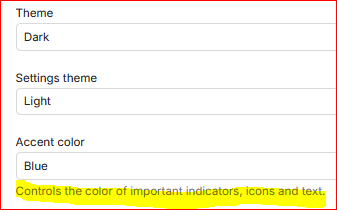
In the Emby Android TV app, the item highlight border is green. That's good. In the web app or Emby Android standard app the border is white. That's bad. The Emby theme in all the apps is "Dark". Evidently, contrary to intuition, the Accent color does not affect this border color. So, how to fix in the non-ATV apps?
 1 point
 -
Nothing has changed in the plugin as far as I'm aware so if it is behaving differently with the same images, it must be a change in the UI.1 point
-
Same discussion over here as it is about "coveredImage-contain" as server code changed here.1 point
-
Hi, I would like to pitch a couple of ideas for a future update. 1. Ability to lock images like metadata (I had an issue where a song had a picture embedded, and even if I deleted/replaced the picture in Emby, it would get reset after a library scan). 2. Ability to edit metadata for multiple items at the same time (for example, I have 20 songs and I want to set the artist and album once, instead of going file by file). 3. Ability to edit the "Collection" library like the Movies, Shows, Music, etc (Refresh metadata, Scan library files, remove and rename). 4. Smooth library scroll on TVs (I'm using Samsung Smart TV running Tizen OS). 5. Expand the "Copy settings from user" feature by adding the ability to set default Display, Home screen, Playback, Subtitles, profile (like what if I want a default picture for every user), and notifications. This way, I don't have to guide every user in turning on Backdrop images and other stuff. 6. Ability to translate the Movie, shows, Music, and other library metadata like the title, overview, cast names, etc, when the language of the UI is changed. Perhaps an additional field could be created where selected translations would reside, allowing users to modify them as needed by editing the metadata. Most people would have 1-3 languages in their household, but it's weird when only the UI gets translated. 7. Ability to set global images for media that lack any images. Currently, if the media is missing images, there is no backdrop or primary image. It would be cool if we could set default images to kick in if no other images are present. In my case, most of my music is in Russian, and the metadata suck. Album images never get pulled, so I have to do it manually. In the meantime, the default images would help the library avoid looking blank. 8. Ability to customize the Suggestions, Trailers, Favorites, Collections, Genres, Folders sections from the Movies navigation bar, the Upcoming, Networks, Episodes, and folders from the TV shows navigation bar, etc (should be included in feature request 5). 9. On the Android app for mobile, the navigation bar at the bottom is missing the TV shows, Music, Audio Book, etc, libraries; only Collections and Movies are displayed along Downloads, Search, and Home. Maybe make it scrollable to the right? 10. Ability to set the default audio and subtitle tracks to the desired language. For example, if my media is in two languages (English and Russian), and the media metadata specifies the track language, automatically select English as the default. 11. Ability to customize whether the media will split into pages when it exceeds a certain amount, like 100 movies per page (should be included in feature request 5) 12. The ability for the Collection, Music, Audio Books (Movies and TV shows Backdrop rotation works perfectly) libraries to automatically select and rotate a Backdrop from media within it if a user did not upload one already. Thank you!1 point
-
I just found a solution that works for me. I tried older versions of Emby, but it did not help. However, playig with settings in Emby, if I go to to playback and select stereo audio output instead of auto, the AC3 sound is back. I do not understand what happened, I did not make any changes and it for whatever reason stopped working in auto audio output setting.1 point
-
Thanks everyone! I truly appriciate the time people put in to making Emby run.1 point
-
huh, what a service . Yesterday I actually looked if there was a new version. Now it works. Thank you very much. I appreciate your support1 point
-
Hi, can you please try the new Emby for iOS 2.2.41 update? Thanks.1 point
-
Hi all. I add my opinion to this thread, cause it could be a good option. I suggest to add a tag in the name to select the order of appearence in the version sélection - and priority. It could (or not) be managed by device types. Another feature could be th denial of some versions outside the LAN : for instance 4k versions of movies are a way too high in bitrate to be supported by my internet connection. Inside the LAN, all is fine. in example I got this movie : The Martian (Seul sur Mars - in French) I got these versions : Seul sur Mars - (2015) - [tmdbid=286217] - extended 4k HDR 8M vp9.mkv / (9.3GB) Seul sur Mars - (2015) - [tmdbid=286217] - extended 4k hevc.mkv / (40 GB) Seul sur Mars - (2015) - [tmdbid=286217] - extended 4k vp9.mkv / (30GB) Seul sur Mars - (2015) - [tmdbid=286217] - extended 30M.mkv / (32 GB) Seul sur Mars - (2015) - [tmdbid=286217] - extended vp9 web.mkv / (2.6GB) Seul sur Mars - (2015) - [tmdbid=286217] - h264 light.mkv / (3.3GB) Inside the LAN, the version priority (if the device support 4k) could be the "extended 4k hevc". Outside the LAN, i could be "extended vp9 web". It could be a marker in the file name such "[NW-LAN-10]" to have this version restricted inside the LAN, and priority 10 (lower the number, higher the priority) another marker could be [NW-10] to just add priority 10 to this version. another one : [NW-WAN-20] : this version have priority 20 in the WAN but no priority in the LAN Or something like that Any thoughts ?1 point
-
Hi, we are looking into this. Thanks.1 point
-
Yep it looks like the Emby mirror site is down. 2025-07-14 10:17:55.057 Error ProviderManager: Error searching *** Error Report *** Version: 4.9.1.6 Command line: C:\Users\Media\AppData\Roaming\Emby-Server\system\EmbyServer.dll -noautorunwebapp Operating system: Microsoft Windows 10.0.26200 OS/Process: x64/x64 Framework: .NET 8.0.17 Runtime: C:/Users/Media/AppData/Roaming/Emby-Server/system/System.Private.CoreLib.dll Processor count: 8 Data path: C:\Users\Media\AppData\Roaming\Emby-Server\programdata Application path: C:\Users\Media\AppData\Roaming\Emby-Server\system MediaBrowser.Model.Net.HttpException: MediaBrowser.Model.Net.HttpException: BadGateway at Emby.Server.Implementations.HttpClientManager.CoreHttpClientManager.SendAsyncInternal(HttpRequestOptions options, String httpMethod) at Emby.Server.Implementations.HttpClientManager.CoreHttpClientManager.SendAsync(HttpRequestOptions options, String httpMethod) at MusicBrainz.MusicBrainzAlbumProvider.GetMusicBrainzResponse(String url, Boolean forceMusicBrainzProper, CancellationToken cancellationToken) at MusicBrainz.MusicBrainzAlbumProvider.GetSearchResultsByName(AlbumInfo searchInfo, CancellationToken cancellationToken) at MusicBrainz.MusicBrainzAlbumProvider.GetSearchResults(AlbumInfo searchInfo, CancellationToken cancellationToken) at Emby.Providers.Manager.ProviderManager.GetSearchResults[TLookupType](IRemoteSearchProvider`1 provider, TLookupType searchInfo, CancellationToken cancellationToken) at Emby.Providers.Manager.ProviderManager.GetRemoteSearchResults[TItemType,TLookupType](RemoteSearchQuery`1 searchInfo, BaseItem referenceItem, CancellationToken cancellationToken) Source: Emby.Server.Implementations TargetSite: Void MoveNext()
 1 point
 -
BW, Try making a background image in some area that few people see, like in a movie library / Folders / 3 dots / Add image Once you have a new image, then go to that poster thumbnail: 3 Dots / Right click / Open in New Window Then use the URL link for this image from emby/... and leave off the &quality=70 Set you css code to look like this: background-image: url(../emby/Items/4076/Images/Backdrop/3?tag=91b36f14d99cfbd46ecccc19d31f329a); This way, the background will stick and you won't have to update it when the Emby version update happens.1 point
-
@Tank_Killer@mausfield that the issue. Not every setup is equal / similar, it would be impossible to make a guide to fit all. Some users don't know what network is or care, they have never logged into there router, and are still using the "factory default password" How would you ever make a guide that fits them ? Not even speaking of the different router interface, where some might change with each firmware iteration ? Then there are the different network setup behind the router, OS, Firewall, security software and reverse proxy setups. etc...... But you could start by making a guide to rule them all1 point
-
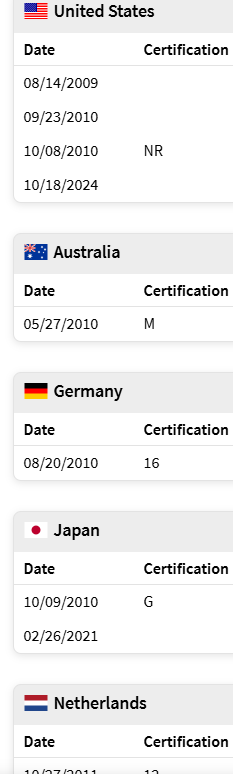
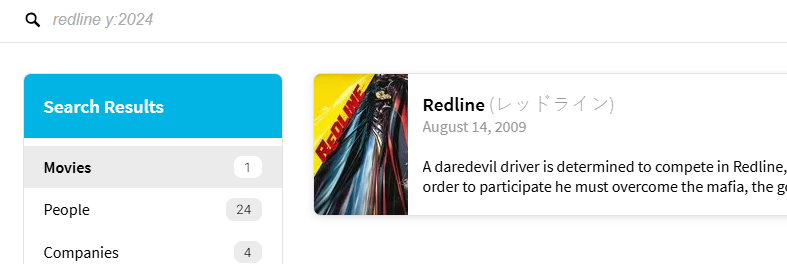
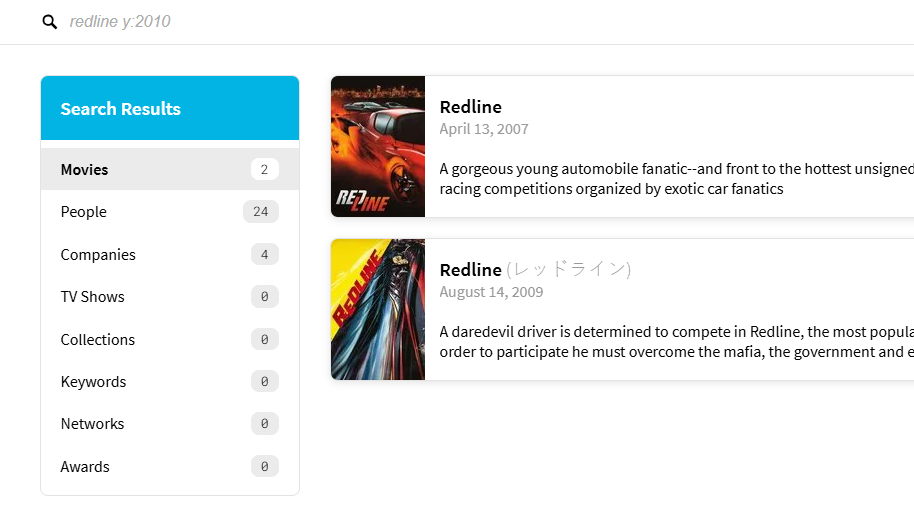
Well there is a caveat to this from the api perspective as release year can be different in many countries. So technically it can be 2009/2010/2011/2021/2024 Redline (2009) - Release Dates — The Movie Database (TMDB) per search 2024 redline — The Movie Database (TMDB) So specific structure and naming along with server log is needed to see what query was sent to provider. But in this case Redline (2010) provides two movies so Emby will always get it wrong here. redline 2010— The Movie Database (TMDB) This issue has come up before and is sort of a defect on TMDB api.
 1 point
 -
Ideally you just create a script to create a custom subfolder within /system/dashboard-ui/Custom-images/ and copy images into that folder with every update. Or copy into existing theme folders. Like here where I copy/replace logo with a script and/or tool to replace existing default image with my colored image.1 point
-
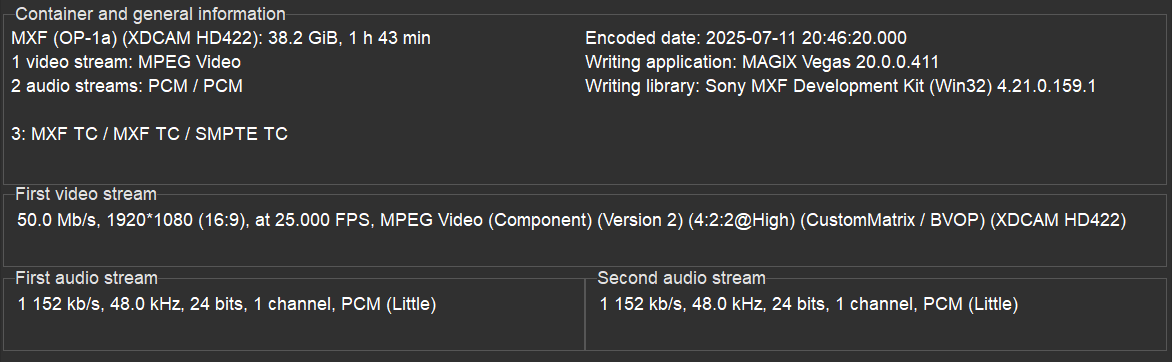
The video below (MXF, 1080p50 MPEG2 @ 50Mbps, 2 discreet PCM channels) plays fine on my TV (bought in 2023) with Android OS using direct play. The same is also true for my Android Phone (Samsung a54/ Android 15). There is no change in container necessary, the app plays MXF out of the box, no transcoding. On the browser there's a change of container and transcoding of both audio and video. On the Windows app it shows HLS for the container, plays the video stream without transcoding but transcodes the PCM audio.
 1 point
 -
Brilliant, thank you. I've stopped using the Fire TV versions for now and moved to using the Emby app on my TV for now, as that doesn't display any of the issues.1 point
-
It was 'in planning' 7 months ago - have Emby made any progress on it ? https://emby.media/community/index.php?/topic/134058-why-does-emby-make-it-so-difficult-to-discover-media/page/3/#findComment-14054841 point
-
+1 for 2FA for the admin account1 point
-
ADM Plugin does not scrape anything, it accesses a flatfile database which is huge. I still have all the data, all I have done at the moment is turned the server off. Currently I have very little time on my hands to do much of anything computer related. However I am open to ideas, so it could possibly be re-instated in the not so distant future. All I have to do is comply legally by making absolutely sure no minors can access the data. For me that's a bit of a challenge, the current server would need some changes as well as the plugin.1 point
-
We’re working on something special for the Emby Blog — a new series that showcases real users and their media server setups. From silent Raspberry Pi builds to powerhouse servers running multiple 4K streams, Emby users around the world are crafting some incredible configurations. In our upcoming feature, “Meet the Emby Community: Users Share Their Setups,” we’ll take a look at how different people are using Emby — and why they love it. Want to be featured? We’re inviting Emby users to share their setups over on the Emby Forums. Tell us about your hardware, streaming devices, and what makes your setup unique. You might just see your system featured in the next blog post — with full credit (if you want it). Visit the forum thread now and tell us your story. We can’t wait to highlight the amazing things the Emby community is building.1 point
-
The lack of transparency on this subject made me jump to another provider for music. Emby is great for media other than music. This post was created November 1, 2017. And the answer we get from Emby in 2025 is... It is comical at this stage. Just say its not coming or give the community a valid reason why not, I get it you are maybe working hard on other features / fixes, but, you are not dealing drugs here and a little honesty and clarity would have been much appreciated.1 point
-
To clarity to this. What PtpSteve has indicated is correct and works, however it's a combination of problem/feature request/workaround?. When using a Synology NAS with Emby, music Playlists work a bit 'uniquely'. In my case I installed the Emby 'Synology version', and care needs to be taken to ensure that the shared folder has the correct permissions in Synology. This needs to be done in the 'Control Panel', within 'Shared Folders' and then permissions. Note that within 'Permissions' that you need to look for Emby in the 'System Internal User' group and enable the read permissions. This is different if you are using a containerized install of Emby. In Emby you then need to set the Music Library folder to the shared music folder: Folder: /volume1/music (This is the Synology default) (Optional) Shared network folder: \\Snas\music\ (Where Snas is the name of the server) - I have no idea if this is necessary or even required ? At this point, music plays correctly from: Synology AudioStation Synology MediaServer Windows - Any music player Linkplay - Network DLNA music streamers from the Synology MediaServer Emby - Any client device So here's where things start going a bit awry with 'Playlists' Test 1: Absolute reference - Windows file structure If I create a M3U playlist (\\Snas\music\playlist\test.m3u) in a 'playlist' folder in the shared music folder using the following pathing: \\Snas\music\ArtistA\Album01\Track01.mp3 \\Snas\music\ArtistA\Album01\Track02.mp3 \\Snas\music\ArtistB\Album01\Track01.mp3 The playlist is recognised as a playlist and works with: Synology AudioStation Synology MediaServer Windows - Foobar2000 / Windows Media Player Legacy Linkplay - Network UPNP/DLNA music streamers from the Synology MediaServer It does not work with Emby, and although the playlist is shown on the client device, it's 'empty'. Test 2: Relative reference - Windows file structure Taking the same example above and using 'relative pathing' in the same M3U file has the following results: ..\ArtistA\Album01\Track01.mp3 ..\ArtistA\Album01\Track02.mp3 ..\ArtistB\Album01\Track01.mp3 The playlist is recognised as a playlist and works with: Synology AudioStation Synology MediaServer Windows - Foobar2000 / Windows Media Player Legacy Linkplay - Network UPNP/DLNA music streamers from the Synology MediaServer It does not work with Emby, and although the playlist is shown on the client device, it's 'empty'. Test 3: Relative reference - Unix file structure Taking the same example above and using 'relative pathing' AND Unix pathing (ie. substitute '/' for '\') in the same M3U file has the following results: ../ArtistA/Album01/Track01.mp3 ../ArtistA/Album01/Track02.mp3 ../ArtistB/Album01/Track01.mp3 The playlist is recognised as a playlist and works with: Synology AudioStation Synology MediaServer Windows - Foobar2000 / Windows Media Player Legacy Linkplay - Network UPNP/DLNA music streamers from the Synology MediaServer Does work with Emby Clients It seems that the Synology, Windows and Linkplay clients can substitute '/' for '\' during their reading of the M3U files and seem to quite capable of recognizing the server file system and it's requirements and then parsing the M3U file accordingly. It seems however that Emby is not able to provide this for it's clients, and hence is causing a fair bit of confusion. This is not really a 'fault' of Emby as it's technically correct, but rather that the norm has moved and it seems most other systems quite happily parse the M3U file. This lack of M3U Windows/Unix file parsing merely makes playlists on Emby a pain to use, as the following steps are needed: 1. Create playlist on your favorite Windows editor (This creates a \\Snas\music\ArtistA\Album01\Track01.mp3 format) in the \\Snas\music\playlist\ folder. 2. Use a text editor to substitute all '\\Snas\music' for a '..' 3. Use a text editor to substitute all '\' for a '/' It would be great if Emby could also recognize the formats in the Test 1 and Test 2 examples above, as it would make maintaining Playlists a HUGE amount easier from different client devices on different systems.1 point
-
It was a nice to have in 20181 point
-
Here you go. img.coveredImage-contain { object-fit: fill; }1 point
-
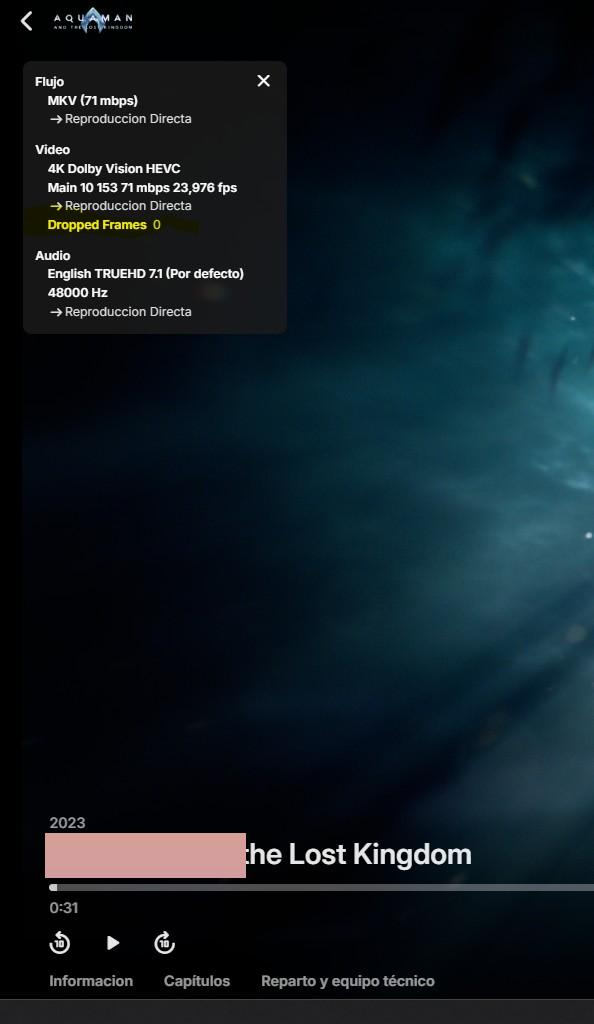
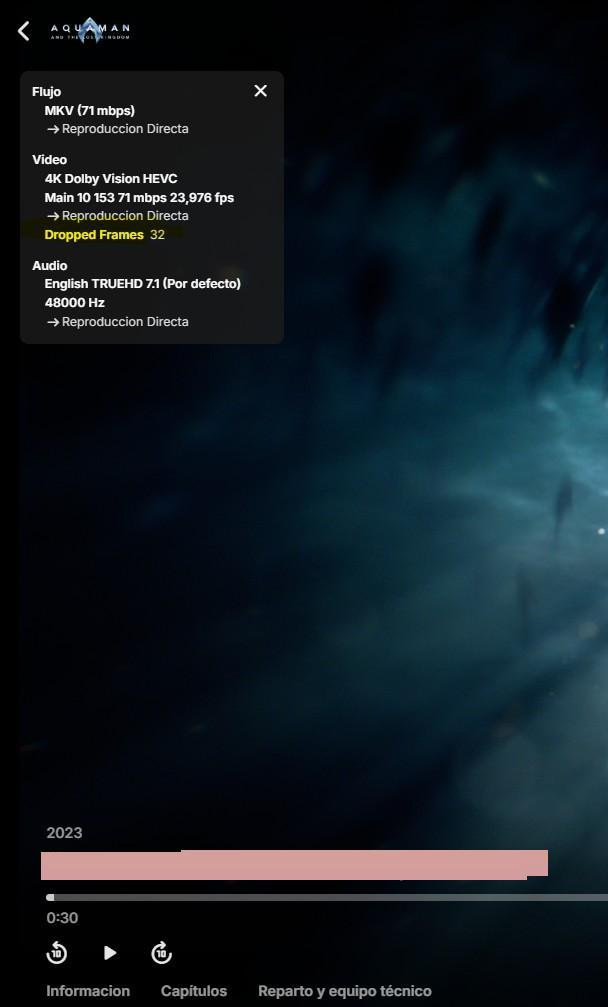
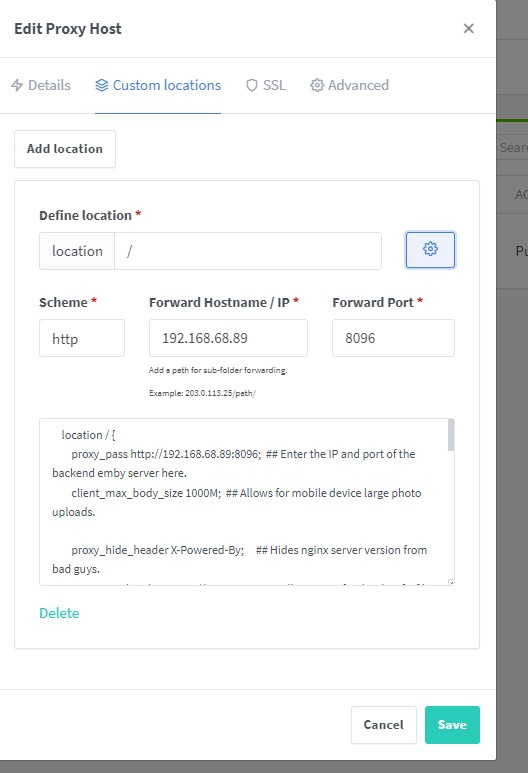
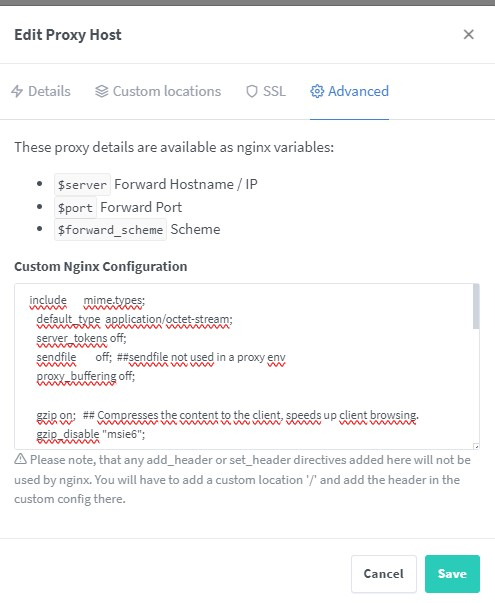
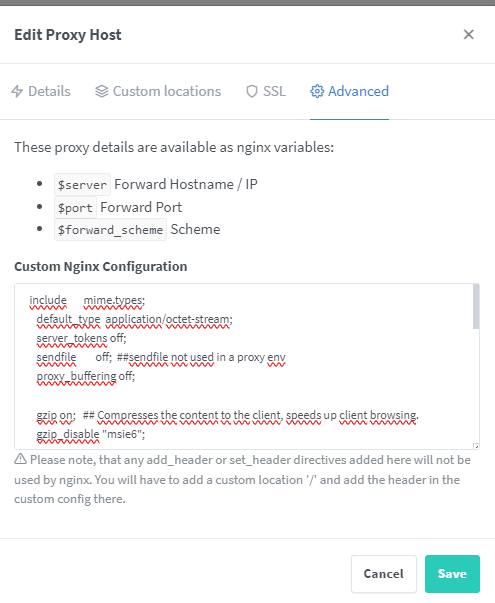
Hello everyone. I'm currently setting up an Emby server on my Mini PC. I currently have it with Proxmox. In Proxmox, I have nginx (lxc) and Emby (Debian virtual machine) The content is hosted using rclone (cache) I've been doing some tests and I can't get a movie to play externally without constant buffering. I'm attaching screenshots of the difference between internal server (192.168.xx.xx) and external (emby.xxxxxx.com) Internal External The difference is too much. Right now I have nginx with the configuration mentioned in this post. I'm attaching screenshots in case I'm setting something incorrectly. Custom Locations ##code## location / { proxy_pass http://192.168.68.89:8096; ## Enter the IP and port of the backend emby server here. client_max_body_size 1000M; ## Allows for mobile device large photo uploads. proxy_hide_header X-Powered-By; ## Hides nginx server version from bad guys. proxy_set_header Range $http_range; ## Allows specific chunks of a file to be requested. proxy_set_header If-Range $http_if_range; ## Allows specific chunks of a file to be requested. #proxy_set_header X-Real-IP $remote_addr; ## Passes the real client IP to the backend server. proxy_set_header X-Real-IP $http_CF_Connecting_IP; ## if you use cloudflare un-comment this line and comment out above line. proxy_set_header Host $host; ## Passes the requested domain name to the backend server. proxy_set_header X-Forwarded-For $proxy_add_x_forwarded_for; ## Adds forwarded IP to the list of IPs that were forwarded to the backend server. ## ADDITIONAL SECURITY SETTINGS ## ## Optional settings to improve security ## ## add these after you have completed your testing and ssl setup ## ## NOTICE: For the Strict-Transport-Security setting below, I would recommend ramping up to this value ## ## See https://hstspreload.org/ read through the "Deployment Recommendations" section first! ## add_header 'Referrer-Policy' 'origin-when-cross-origin'; add_header Strict-Transport-Security "max-age=15552000; preload" always; add_header X-Frame-Options "SAMEORIGIN" always; add_header X-Content-Type-Options "nosniff" always; add_header X-XSS-Protection "1; mode=block" always; ## WEBSOCKET SETTINGS ## Used to pass two way real time info to and from emby and the client. proxy_http_version 1.1; proxy_set_header Upgrade $http_upgrade; proxy_set_header Connection $http_connection; } ## Advanced ##code## include mime.types; default_type application/octet-stream; server_tokens off; sendfile off; ##sendfile not used in a proxy env proxy_buffering off; gzip on; ## Compresses the content to the client, speeds up client browsing. gzip_disable "msie6"; gzip_comp_level 6; gzip_min_length 1100; gzip_buffers 16 8k; gzip_proxied any; gzip_types text/plain text/css text/js text/xml text/javascript application/javascript application/x-javascript application/json application/xml application/rss+xml image/svg+xml; proxy_connect_timeout 1h; proxy_send_timeout 1h; proxy_read_timeout 1h; tcp_nodelay on; ## Sends data as fast as it can not buffering large chunks ## I also have the rules set in my Cloudflare domain (I'm attaching screenshots as well) I've added rule 2 because I noticed this. I don't know if it has anything to do with it.. I don't know what could be causing such a big difference in dropped frames. Can someone help me? Sorry for my English level. Best regards!
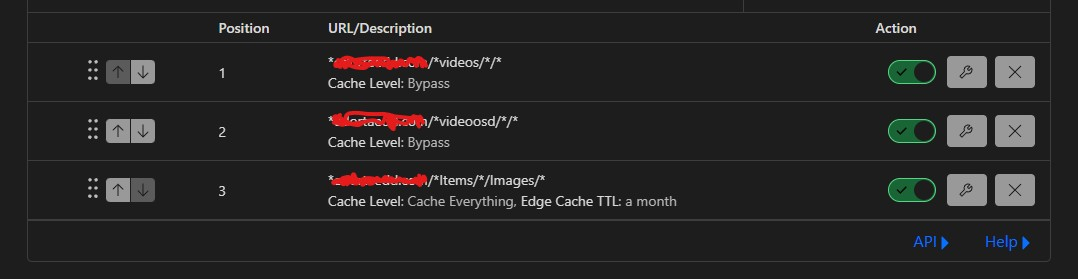
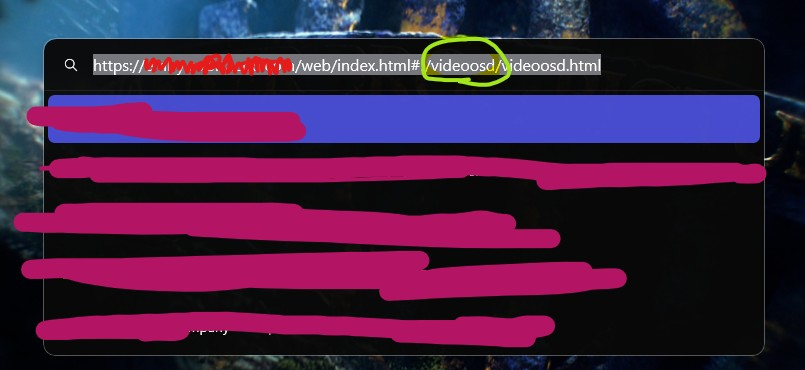
 1 point
 -
I'm running the Emby server on Windows 10 and I connect to it from an LG TV via the app. Since yesterday without changing any settings or any hardware component the sound volume became very low. We can barely hear the sound even with my soundbar's volume turned to maximum. When watching Netflix or Youtube there is no issue at all only when playing movies via Emby. Did anyone else encounter this issue and/or know what could be the issue and how to fix it? Thanks in advance to anyone who can help!1 point
-
A manual sort order for collections is a good idea for the future. Thanks !1 point




























(1)(1)(1).thumb.jpg.9cda33dd2ffce5f5b2d0b0d69e0bf118.jpg)

