Leaderboard




Popular Content
Showing content with the highest reputation on 07/14/25 in all areas
-
Can confirm that this issue is caused by either having additional nesting and / or having empty folders on a season/show level. Having this structure with a TV-show will make also make Emby think there's an extra Season (even if the folder is empty). /Media/TV-Shows/Pokemon (1997)/Movies/... /Media/TV-Shows/Pokemon (1997)/Season 01/... In the above example, Movies will appear as a separate season within Pokemon. But this isn't an Emby problem - but an organisational one. Solution Other platforms also have issues distinguishing which is which or which belongs to what That is what we have naming conventions for: https://emby.media/support/articles/Movie-Naming.html https://emby.media/support/articles/TV-Naming.html Try to ALWAYS use the suggested logic above. It also makes ordering your own files insanely simple. Separate library content If you want to separate Kids and Adult content, it would be best to do it as such: /Media/TV-Shows/.. /Media/Movies/.. /Media/Kids/TV-Shows/.. /Media/Kids/Movies/.. That way you can tell emby the /Media/Kids/TV-Shows(or Movies) belongs to the Kids library without interfering with the other content.2 points
-
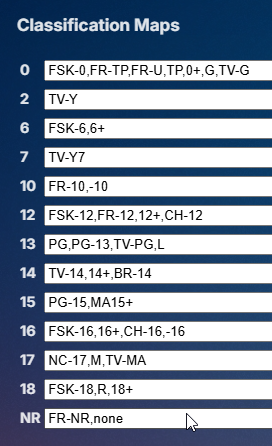
I see parental ratings is really crazy When I see what I already have to enter just for my small library
 2 points
 -
Dispatchaar is the most stable and flexible setup I’ve found so far, plus it’s being actively developed with a new release every few weeks. That may be good or bad depending on how you see it. The downside is channel startup time, it is slower than the others but I prefer that over the freezing of channels and mess other setups create. The other issue I have is there’s no scalable solution for vod content yet, it’s in their roadmap. Setting it all up depends on how you want to use it. The more effort you put into organising everything at the start the more time and headache you’ll save later. For me it’s where in import my playlist into. I select which groups I want imported, everything else gets ignored. Groups you select get put into a stream ‘staging’ area. So from this stream list you have to create channels, these are what are ultimately exposed to emby. The channel name corresponds to the stream name and you can edit the channel name directly. The main standout feature of Dispatchaar is you can add multiple streams to a single channel. The benefit is you make it easier for users who only see one channel and Dispatchaar should switch streams automatically however you can manually do this through the GUI too. You can duplicate channels with different stream orders and put them in different profiles for different emby accounts if you wished… Pooling of accounts works great, so if you have multiple accounts with the same provider you can set Dispatchaar to use then in sequence, the GUI will show which account is being used for which stream. EPG integration is great, but not needed. I import my EPG and auto matching or channels is pretty good but you can always override it. This way when you import into emby channel numbers and epg are how you set them. There’s a lot more it can do with regard to transcoding profiles, streaming profiles, you can even set individual channels to direct play, with different user agents. Downsides of Dispatchaar. VOD is a big one for me, I would prefer an easier way to proxy them, for now you have to import each item as a channel, I tried to import a few thousand items and it killed my instance. HLS Proxy is better in this regard as it automatically creates a proxied M3U of your entire playlist which you can manipulate and import into emby using other tools. GUI - once you log out and log back in the GUI will take a minute or two to repopulate with your configuration. Not sure why this is the case. It just makes wanting a Quick Look at the stats a bit annoying as you have to wait. Plus sometimes the load caused by the playlist import can cause connection issues, but this is likely my weak server I have it running on. Channel Management - changing channel positions and numbering is a bit clunky. You need to plan ahead and know which channels you want where. Plus you can’t have a gap in the numbering, any new channel you create gets added to the next free channel number. There is a profile feature where channels can be put into different M3U’s but I find it frustrating. Granular Controls - there’s not many streaming parameters you can configure when compared to HLS Proxy, but so far I’ve not had to amend anything. My channels play for hours on end without interruption.2 points
-
Moving the issue from this thread, here is a formal request to add to all Emby apps the ability to adjust / sync the audio playback / delay, in the same way it apparently is currently possible to do in Emby Theater.1 point
-
Could you allow users to customize the order of movies in collections instead of only having it by alphabetical or by release date? Example: I want to have a collection of Batman movies, both animated and motion pictures but want the motion pictures together followed by all the animated ones. With the current order options, this isn't possible. Thanks!1 point
-
The final outcome that has worked so far is renaming the folder ' Kids Movies ' to ' Kid's Movies ' (with the apostrophe) and that seemed to convince emby that I didn't have a giant 'Future Kid Takara' folder. My folder structures are reasonably simple, and have been working pretty well since I moved over from Win 7 Media Center and Mediabrowser a couple of weeks ago. I have ~96TB of media that was working great with Mediabrowser, so was VERY happy to not have to change the formatting - other than that curious apostrophe! Thanks for all the advice in this thread!1 point
-
Apologies everyone, for the false positive and for my delayed response. We were on the road again so I wasn't able to check this again until today. The issue is resolved after updating the correct Emby server. I'm running two, so when the problem popped up my first thought was to check for updates. I updated my internal one and then continued to check my external one to see if the problem was fixed After updating my external one today to 4.8.11 everything is working as expected. Thank you, for everyones prompt replies and assistance, and for a great product!1 point
-
Emby for LG 1.0.47 has been released. Here are the highlights: Improve ASS/SSA subtitle rendering Add text size setting Improve the startup behavior option related to remembering login info Add option to auto-open single items in folders View the full article1 point
-
Hi, we are looking into it. Thanks.1 point
-
1 point
-
Yep it looks like the Emby mirror site is down. 2025-07-14 10:17:55.057 Error ProviderManager: Error searching *** Error Report *** Version: 4.9.1.6 Command line: C:\Users\Media\AppData\Roaming\Emby-Server\system\EmbyServer.dll -noautorunwebapp Operating system: Microsoft Windows 10.0.26200 OS/Process: x64/x64 Framework: .NET 8.0.17 Runtime: C:/Users/Media/AppData/Roaming/Emby-Server/system/System.Private.CoreLib.dll Processor count: 8 Data path: C:\Users\Media\AppData\Roaming\Emby-Server\programdata Application path: C:\Users\Media\AppData\Roaming\Emby-Server\system MediaBrowser.Model.Net.HttpException: MediaBrowser.Model.Net.HttpException: BadGateway at Emby.Server.Implementations.HttpClientManager.CoreHttpClientManager.SendAsyncInternal(HttpRequestOptions options, String httpMethod) at Emby.Server.Implementations.HttpClientManager.CoreHttpClientManager.SendAsync(HttpRequestOptions options, String httpMethod) at MusicBrainz.MusicBrainzAlbumProvider.GetMusicBrainzResponse(String url, Boolean forceMusicBrainzProper, CancellationToken cancellationToken) at MusicBrainz.MusicBrainzAlbumProvider.GetSearchResultsByName(AlbumInfo searchInfo, CancellationToken cancellationToken) at MusicBrainz.MusicBrainzAlbumProvider.GetSearchResults(AlbumInfo searchInfo, CancellationToken cancellationToken) at Emby.Providers.Manager.ProviderManager.GetSearchResults[TLookupType](IRemoteSearchProvider`1 provider, TLookupType searchInfo, CancellationToken cancellationToken) at Emby.Providers.Manager.ProviderManager.GetRemoteSearchResults[TItemType,TLookupType](RemoteSearchQuery`1 searchInfo, BaseItem referenceItem, CancellationToken cancellationToken) Source: Emby.Server.Implementations TargetSite: Void MoveNext()
 1 point
 -
This is still an issue... Running 4.9.1.7 beta at the moment.1 point
-
Thanks. Interesting issue for sure. That linked script solved it for me.1 point
-
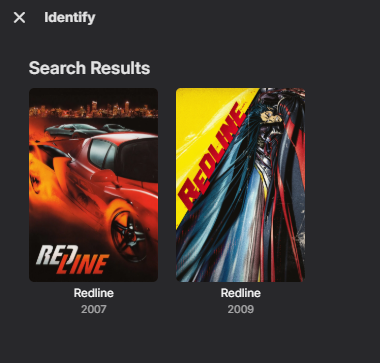
It works the the same way as I showed in web query above. So Emby will take the first result in the query returned from the api so the Redline (2010) example will always be wrong. The api query { "page": 1, "results": [ { "adult": false, "backdrop_path": "/5QV9uotDRFbeik7tkCcKo96yvWt.jpg", "genre_ids": [28, 53], "id": 16392, "original_language": "en", "original_title": "Redline", "overview": "A gorgeous young automobile fanatic--and front to the hottest unsigned band on the West coast--finds herself caught up in illegal drag-racing competitions organized by exotic car fanatics", "popularity": 1.4517, "poster_path": "/lE1XfidwJml7lNGi0D4KlB8uQFY.jpg", "release_date": "2007-04-13", "title": "Redline", "video": false, "vote_average": 5, "vote_count": 153 }, { "adult": false, "backdrop_path": "/cftD8o34P6N8zTwySfaaMnaNkTT.jpg", "genre_ids": [16, 28, 878], "id": 71883, "original_language": "ja", "original_title": "レッドライン", "overview": "A daredevil driver is determined to compete in Redline, the most popular race in the galaxy. The race only occurs every five years, but in order to participate he must overcome the mafia, the government and even love.", "popularity": 2.0215, "poster_path": "/yUkH0y9OsY7J08Dvfzi1P0di559.jpg", "release_date": "2009-08-14", "title": "Redline", "video": false, "vote_average": 7.52, "vote_count": 501 } ], "total_pages": 1, "total_results": 2 } Now querying Redline 2024 will provide the correct result. Along with Redline 2009. { "page": 1, "results": [ { "adult": false, "backdrop_path": "/cftD8o34P6N8zTwySfaaMnaNkTT.jpg", "genre_ids": [16, 28, 878], "id": 71883, "original_language": "ja", "original_title": "レッドライン", "overview": "A daredevil driver is determined to compete in Redline, the most popular race in the galaxy. The race only occurs every five years, but in order to participate he must overcome the mafia, the government and even love.", "popularity": 2.0215, "poster_path": "/yUkH0y9OsY7J08Dvfzi1P0di559.jpg", "release_date": "2009-08-14", "title": "Redline", "video": false, "vote_average": 7.52, "vote_count": 501 } ], "total_pages": 1, "total_results": 1 } But in the end it is best to use the year provide on the website for best results but there are many cases where IMDB/TMDB/TVDB can have different release years for any content. So there can never be one method that works for everything. I guess technically there can be it requires manual work of already knowing the provider id. Redline (2010) {tmdbid=71883}
 1 point
 -
Lately it has been working fairly well most of the time by simply exiting the Emby app entirely when finished/returning home however something like 30% of watched episodes do not have their watch state synced so I end up having to manually go through this process to clear them out on a regular basis (like every week there's something like 6 or more downloaded files stuck on my phone which I watched, but the server is unaware of that). For example, I sync a show (8 episodes), watch those in about 2 days, each day 1 (+/-) episode isn't cleared but the rest are (and it's random), so on day 3, episodes 1-3 are watched and deleted, but 4 is watched and stuck, 5-8 are watched, but 7 is stuck, rest are deleted. So then I have 4, 7 and 9-14 on the phone. This cycle generally repeats but different random episodes get stuck. Eventually the servers ability to automatically pull in new episodes is killed by retaining watched files the server thinks are unwatched and I have to manually mark as watched and re-save the series sync profile to get new episodes.1 point
-
I'm not sure if there are already requests for these features but I couldn't find any. I was just working on creating chronological playlists/collections for Stars / Marvel / DC etc when I noticed two things. Collections can only be sorted by default fields (Album, Artist, Date Added, Title, etc) and "Collection Order". I'm assuming the Collection Order means the order in which the item is added to the collection? When working on playlists, studios sometimes add prequels or sequels which in turn would end up somewhere in between a collection. Is there a way to influence the "Collection Order" of items within a Collection other than removing every sequential item and adding all items again in the correct order? Using Playlists we cán add a custom order but that can ONLY be done for 1 item a time. So for example the following scenario is inconvenient: Create Star Wars list Add Andor Add The Mandalorian Add The Acolyte Have to manually move each entry to the first position within the playlist There ís a bulk selection within playlists but that doesn't seem to do much besides being able to delete multiple items? Would it be an idea to be able to select multiple items and drag all of them to a certain position, causing all selected items to be placed áfter the drop target? Summary Can we add the option to sort Collections? The reason is that Collections also don't show ALL episodes within a season, making them perfect for building chronologies. Can there be an option to bulk-move/order items within a playlist? Moving entire series or albums is quite a chore and all the scrolling makes me dizzy.1 point
-
@ebryes I found that thread as well but then realised something pretty quickly, for example: Create Star Wars collection chronological: Movie 1, Movie 2, Movie 3, Movie 4, etc... Create Star Wars collection by release date: Uh-oh! This only works when creating a single sort order and this most likely is used in search as well, right? Creating a specific order for a specific item within a specific collection would be much more applicable to many more scenarios. Also the bulk-edit function for playlists would be a really, really nice-to-have because the current multi-select in the playlist doesn't really add any functionality at the time, other than removing items which someone will probably do barely.1 point
-
@Tank_Killer@mausfield that the issue. Not every setup is equal / similar, it would be impossible to make a guide to fit all. Some users don't know what network is or care, they have never logged into there router, and are still using the "factory default password" How would you ever make a guide that fits them ? Not even speaking of the different router interface, where some might change with each firmware iteration ? Then there are the different network setup behind the router, OS, Firewall, security software and reverse proxy setups. etc...... But you could start by making a guide to rule them all1 point
-
Hi. We would like to make this easier but also do not want to compromise our mission of keeping your server your server. Keeping this control in your hands instead of ours does come with some additional responsibilities, unfortunately.1 point
-
Muchas gracias Luke1 point
-
@ServerNoob005hi there! Renaming your folder causes Emby to not be able to "find" the original media so it's "poof gone". Also I can't seem to be able to find any media named "Redline" from 2010 in either themoviedb or thetvdb. Judging from your image, the Redline you wanted to find is the one from 2009: The movie db: https://www.themoviedb.org/movie/71883 The tv db: https://thetvdb.com/movies/redline Both sources say Redline is from 2009. So changing your folder name to "Redline (2009)" and going to Dashboard -> Emby Server -> Library and running "Scan Library Files", should result in the correct movie being matched. Using the wrong year for media causes most media servers (not just Emby) to not be able to match the correct media or sometimes match completely wrong media. Always adhere to the naming conventions to prevent mess ups like these: https://emby.media/support/articles/Movie-Naming.html https://emby.media/support/articles/TV-Naming.html Manually adjusting the ID is a bandaid in my opinion because moving the folder at any later time and not using .nfo files (local files) to store the data, will cause this exact same issue later.1 point
-
Thanks Luke. Let us know if you need any help reproducing / debugging (if it only happens on some hardware / configs maybe)1 point
-
Ideally you just create a script to create a custom subfolder within /system/dashboard-ui/Custom-images/ and copy images into that folder with every update. Or copy into existing theme folders. Like here where I copy/replace logo with a script and/or tool to replace existing default image with my colored image.1 point
-
@ISeeTWizardI use this plugin to make all my unified.1 point
-
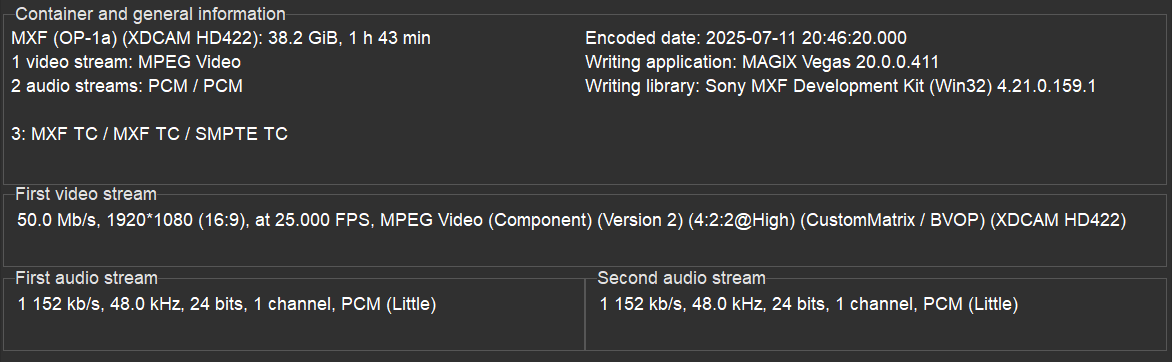
The video below (MXF, 1080p50 MPEG2 @ 50Mbps, 2 discreet PCM channels) plays fine on my TV (bought in 2023) with Android OS using direct play. The same is also true for my Android Phone (Samsung a54/ Android 15). There is no change in container necessary, the app plays MXF out of the box, no transcoding. On the browser there's a change of container and transcoding of both audio and video. On the Windows app it shows HLS for the container, plays the video stream without transcoding but transcodes the PCM audio.
 1 point
 -
Nice! I will be a little more careful next time i clean up. I removed the refresh icon button from the settings for now, it didn't work optimally so made it so people will have to restart the server instead when changing the icons in the folder. I'm planning on reintroducing the button again when i have a better solution. Getting the rating isn't a problem, it's having to be able to support all of them. If i add one then people will understandably want the rating for their country as well, so i will have to add all of them. Afaik. some countries use symbols for their ratings so it would have to be icon supported as well. It's ofc. not impossible, so i will look into it.1 point
-
Just to add to this topic if anyone else runs into this issue. I was having the exact error as Airbender when trying to authenticate trakt premium with a fresh Premiere install. It ended up working when turning off Tailscale as Luke mentioned in this thread above (turn off VPNs). Note though, that i did not get the usual "Wohoo! Your device is now successfully connected to trakt". It just stayed same page with the 'next step' button greyed out. I confirmed it via the 'Connected Apps' page on trakt and then the emby logs.1 point
-
Not sure why this suddenly worked now, but it appears it has. Is there any way to see a log of what I've watched in the last few weeks easily? I need to mark some things as watched in Trakt.....1 point
-
Hokey dokey, thanks.1 point
-
hi @fanhua1211have you taken a look at this?1 point
-
HI, a while ago we tried to include the screensaver feature into our Samsung app and Samsung rejected the app over this. I think they thought it would cause confusion with the device screen saver. Anyway we can try again to include it, but that is why it currently doesn't have it.1 point
-
But Extras have more options now depending on your structure but are all Season 0 unless placed within season or next to episode. https://emby.media/support/articles/TV-Naming.html#tv-extras1 point
-
No, not atm. at least. I guess with the new background option i can put it back to how it was originally. I cut the outline by half the in this one. EmbyIcons.dll1 point
-
As @Neminemhasn't found any breaking bugs i think i can let more people try the new version as well. I've been working on this for a while now along side the now old version. --- This is a big change to the plugin, most the code has been changed and even rewritten. This was done to make it less patchy after all the additions made to the plugin and remove some repeating logic plus squeeze the very last bit of performance out of it as possible. Added: 1) Setting to add a background, circle or square to the community score, what color and transparency it should be. Changed: 1. Most of the code has been rewritten to improve it and remove redundant code. 2. Changed the cache pruning to only prune the least used data so data used often will stay and improve performance. If it is set a bit to aggressive then please report back to me and i will change the timer on it slightly. 3. Removed the tag option from the settings as it was no longer needed. For using tags you just need to provide an icon with the right name and set a tag on a movie/series in Emby. 4. The refresh icons button has been removed, instead the plugin will now redraw all overlays on Emby server restart. This will ensure no stale icons and no memory leaks. The setting might return in the future when i have refined the setting to work better. 5. Changed to using Embys internal detection for resolutions instead of using a list in the plugin it self. This should improve performance how ever minute. 6. Tag names are no longer case sensitive. Bug fixes: 1) Tag icons should now correctly be added and removed when adding a tag and the right icon. Note: To be 100% sure it works correctly you should add the icon to the icons folder before adding the tag to the video. Bugs: 1. Because of several factors, some TV shows with many episodes (200+) might in rare cases not show for example the subtitle icons even though all episodes have them. This should be very rare though and a refreshing of the metadata with "replace existing images" enabled should fix it. For now it's not something that can be done much about, i will look into it later. 2. Because of the change to using Embys own resolution detection some videos that does not correctly state their resolution will not have it detected. This mostly happens for very old videos. I will look into using a mix of Embys and a reintroduced plugin detection later if this shows to be a problem. --- Todo list: Add support for photos and music. Make configurable hierarchy system for the icons so it can be configured what icons should be shown first. Note: These are not 100% sure to ever be added, they are just things i plan on looking in to. EmbyIcons.dll1 point
-
The IPTV plugin does not support lists. You can use it, but you have to enter single streams at a time. That means it will be a lot of work to setup. But yes it is possible if you are willing to do that.1 point
-
Hi, we'll take a look at it. Thanks for reporting.1 point
-
How are you getting on with thr comparisons. The new android app on shield tv consistently produces micro stutters / single frame skips a very 10 to 15 seconds. The original shield tv app also does the same but milder. I'm viewing dv or hdr files in particular.1 point
-
Version 13.2.0 Notes: Please remember to leave an updated textual review on the Play Store. Your feedback is essential for improving the app’s ranking and securing Symfonium’s future. Added: Added possible composer and track-artist rows to album detail pages. Expanded smart filters / playlists with additional track fields. Transition Maestro: number of inserted tracks is now configurable (global default or per queue). New option to force alphabetical splits in Android Auto for shorter lists. Genre page can now show only album artists. Home-screen “Settings” shortcut added (lets you hide the top-bar button). Playback history is now stored and can be backed up or restored. The detailed data will support future features. You can now add up to 3 icons to expanded now playing string lines. Added scale factor setting to now playing volume bar. Added support for long click actions to top bar texts in now playing. Added new option to copy smart playlists as normal playlists. Added disctitle and providername as possible custom string value. Changed: Smart-filters UI redesigned and filter choices are now grouped by category. Details pages no longer leave blank space when back/top buttons are absent. Tapping the bottom-bar search icon a second time now clears the search field. You can now also apply a scale factor to the now playing basic progress bar. Fixed: Renaming the active media queue now saves correctly. Subsonic playlists auto-update properly in all time zones. Clicks no longer pass through the expanded player when it’s collapsed. Fixed an issue where swiping the compact player worked only once. Playlists in Android Auto are now properly filtered as in the phone interface. Fixed Google drive provider no more allowing to select shared folders in some cases. https://support.symfonium.app/t/version-13-2-0-released/95131 point
-
They are developing and completing new big feature, new color theme.1 point
-
Emby for Apple TV 1.9.9 has been released. Here are the highlights: Support playback correction in the video player Support sleep timer in the audio player Support subtitle offset in the video player Support new youtube trailer playback (in the 4.9 server) Fix home top tabs not being translated View the full article1 point
-
What have you done? As there are a few topics on this as methods have changed a couple of times. But currently you are not required to edit the html page anymore. div.view-startup-manuallogin { background-image: url(https://imgur.com/eGfYBvk.jpg); } Also depends on which login screen you are talking about also.1 point
-
I have seen many people have been switching to using mkv over mp4 in recent times and others complaining about playback issues with mkv. Many know that remuxing can help but it's very time consuming to do so, but it works. The issue is that the cues of a mkv file are normally written to the end of the file. This is an issue that's been corrected with mp4 files with -movflags faststart option when encoding mp4 files, but with mkv it's a little different. The script I have put together makes use of a program to move the cues to the front of the mkv and optimize the file for faster playback and better skipping and resume support. So I have a rather large library and it's become a bit of a problem for me so I found a program called mkclean from matroska that is used to fix and move the cues to the start of the mkv file. With very little documentation on the issue I had to go through a lot of trial and error to get things to work properly, but I put together a python script to fix this. Attached is that python script for those of you who would like to try it out. As of right now this guide is only for Windows machines but I still believe those that are using linux are more than capable of adapting this info for their environment. Step 1: Download the MKClean file to a directory. https://www.matroska.org/downloads/mkclean.html My files are located in a separate drive lettered K: so I created a folder called K:\mkclean to house my mkclean.exe file. Step 2: Download and install Python on your machine if you don't already have it installed. You can see the link below for that. https://www.python.org/downloads/windows/ Step 3: Open a command prompt as administrator and update pip to the latest then download the watchdog feature to python to be able to monitor your folders for newly added files. Use the following command python -m pip install --upgrade pip when done then run python -m pip install watchdog Step 4: Once both of these commands are completed update your system environment PATH with an entry for mkclean. Settings -> System -> About -> Advanced System Settings -> Environment Variables... In the system variable section scroll down and select path and click on the edit button. Then click on New to add an entry for the folder containing the mkclean.exe file. (In my case it was K:\mkclean) Once done click ok and reboot your system. Step 5: Not it's time to create your python file. Attached is a .txt version of the python file I created for myself and have been running. You will need to edit it some, but I'm here to help with that. NOTE THAT WHEN ENTERING A PATH YOU MUST ENTER IT WITH \\ AS EXAMPLE BELOW K:\mkclean WILL FAIL BUT K:\\mkclean WILL WORK. (Below is the path were you want your database of the the files it's processed to be stored at, update it to the path you want your database created at, but please leave the files_processed.db name for ease of use of you will have to edit more lines.) LINE 9: DATABASE_FILE = 'K:\\mkclean\\files_processed.db' (Below is the path to make the connection to the database you created on line 9, be sure that the path matches what you have entered on line 9) LINE 65 conn = sqlite3.connect('K:\\mkclean\\files_processed.db') LINE 77: conn = sqlite3.connect('K:\\mkclean\\files_processed.db') (Below are lines identifying the folders to work it's way through looking for .mkv files and running this mkclean optimization script on. Change each line to identify your library folders. You will need 1 line per folder that you are looking to process and it will search recursively through them for any .mkv file) LINE 95 process_existing_files("K:\\TV_Shows") LINE 96: process_existing_files("K:\\Movies") (Below is a line to identify the folders to monitor after it has completed it's initial task of recursively working it's way through your files and checking for .mkv files to optimize. When new ones are added it will find them and run the optimization on them again making them perfect for streaming.) On this line all the folders to monitor should be comma seperated values inside of double quotes and AGAIN take note of using \\ when entering a path vs a single \. LINE 99: folders_to_watch = ["K:\\Movies", "K:\\TV_Shows"] Step 6: Now when you go to save this I recommend saving this in the same folder as your database and the mkclean.exe file so you can locate it easily, but save it once with a txt extension for ease of updating later, and then save it again with a .py extension. Step 7: Now you can run the file by opening a command prompt and entering this command. python "K:\mkclean\mkclean_optimization_script.py" NOTE: To stop the running program hit CTRL+C with the command window active. Step 8: Many of you would probably like to have this also start up when your system starts so it's easy enough to do by creating a .bat file and placing it in your startup folder. I'm not going to walk you though that in this tutorial, but the code is simple enough to add for you and for you to make your edits to so it's below. @echo off python "K:\mkclean\mkclean_optimization_script.py" PLEASE NOTE I AM NOT THE BEST PYTHON PROGRAMMER OUT THERE BY FAR AND THIS IS A PERSONAL PROJECT OF MINE THAT I'M MAKING AVAILABLE FOR YOU TO USE IF YOU LIKE, BUT I TAKE NO RESPONSIBILITY FOR IT IN ANY WAY. PLEASE TEST OUT ON SOME COPIES OF FILES FIRST AND USE AT YOUR OWN RISK. Other than that enjoy and let me know if this helped you out at all. mkclean_optimization_script.txt1 point