Leaderboard




Popular Content
Showing content with the highest reputation on 07/06/25 in all areas
-
@Luke @ebr @Abobader and any others that might be interested. I finally managed to get access to the email connected to my account and I can now use this board again. I hope I did not cause to much of a problem. The new accounts I created in an attempt to resolve this can now be deleted if you need the emails involved I can supply them via PM. Thanks for the efforts and I am developing a better backup system for my important info. It would probably help a good deal if I were not so stupid as to forget meaningful and important info. I blame it on age but anybody can pick whatever reason they want. I am thick skinned enough to take the abuse. Again, Thanks to everyone that helped me.3 points
-
A masonry view to reduce unnecessary waste of page space.

 1 point
 -
Hi emby community. Sadly my much loved Sony Android TV died last weekend. The emby Android TV OS did just about everything I wanted and was great. I've replaced my TV with a Hisense 65R8 - https://hisense.com.au/product/65-series-8-65r8/ Unfortunately this doesn't run Android TV, instead using Hisense's own 'VIDAA U3.0 AI' OS. It has an app store named 'AppsNOW' with a very small library that doesn't include emby, nor kodi. There's an inbuilt browser but it won't load the web client either. So, my questions are: 1. What is the likelihood that an emby client app might be developed for this OS in the future? 2. What are my best options for getting back to the Android TV experience without huge expense? I'm thinking along the lines of some sort of Android TV box. In the meantime I can use my Windows 8.1 HTPC, which is running WMC with emby classic. This gets the job done but lacks a lot of the features and love that I enjoyed with the Android TV emby client. I've tried using the emby theatre (desktop) app. This gets me close but doesn't work very well with my remote and I can't work out playback controls during playback (seeking, stats for nerds, view progress, time-shifting for live tv, mini guide, etc). It also seems to make the HTPC work pretty hard with the cooling fan spinning up to annoying levels. The Windows store app doesn't appear to be available on Windows 8.1 so I haven't tried that. Ember for emby looks like another option that might be worth exploring. (BTW, my HTPC is a gen 3 core-i3 NUC - https://ark.intel.com/content/www/us/en/ark/products/76978/intel-nuc-kit-d34010wyk.html) Thanks for your input. TT1 point
-
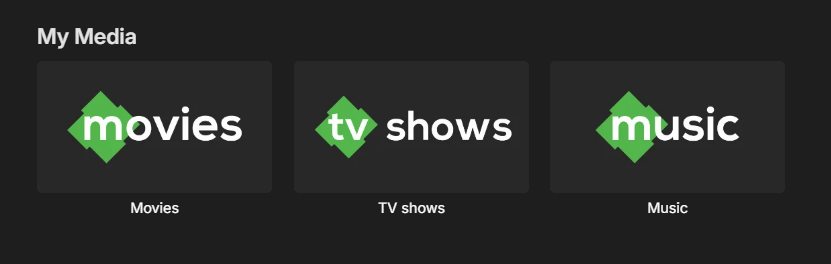
I made some simple icons for the "My Media" section inspired by the emby logo and figured I'd share. SimpleEmbyIcons.zip
 1 point
 -
Hey - sorry for not replying. Since my earlier message - "I turned off the scheduled daily scan/sync, and left it as Real Time Monitoring, it's been fine" - that's still been the case. So I think the problem is still there, but I am no longer running schedule/daily scans, I am not experiencing it1 point
-
Yes, I've noticed this also. @Lukewhen using Android app on mobile device, interacting with any of the sections on OSD, eg. Chapters, Cast & Crew disappears too quickly even when you are actively scrolling left to right.1 point
-
Ah, ok I found a bug in my code, and I figured out that I am able to add them using the tag service, so I might be set, thanks... For anyone reading this, I switched to the TagService, i.e. made my endpoint /Items/1348003/Tags/Add and I am able to add tags that way. Given that I had a bug, I'm going to go back to testing using the ItemUpdateService and see if I can get that working, but I have at least something that works. I'll have to do some more testing to see if the tag service will work better...I need to see what happens when I submit duplicates. I'm kind of hoping that the ItemUpdateService just replaces all the existing tags with what I submit, as that may present some advantages but regardless, I have a way that at least gets the basic thing going. Thanks!1 point
-
You need to set the specific gpu uuid in your NVIDIA_VISIBLE_DEVICES1 point
-
I just realized why I missed this earlier, I've been using the static Swagger linked from EmbyDev here; it must be and older version because TagItems isn't listed there. I'm just using the regular API documentation now/swagger from my local server instance.1 point
-
Thank you!1 point
-
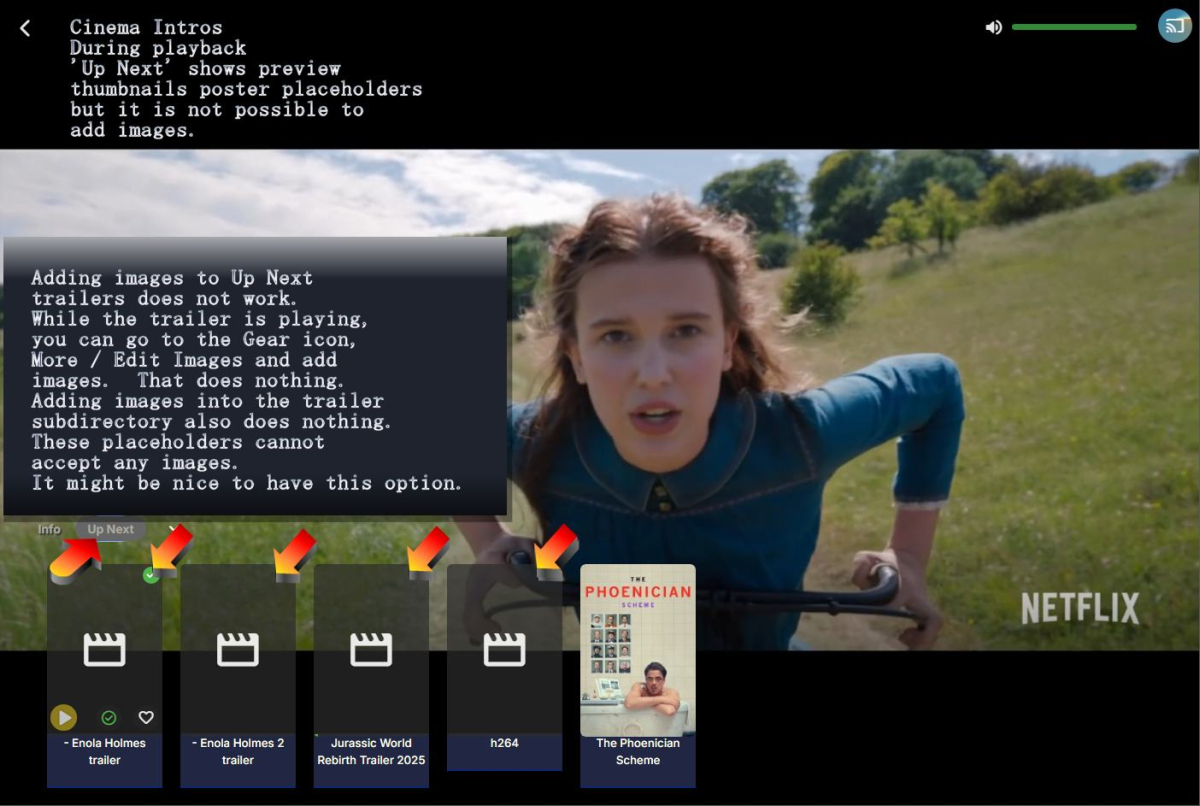
A different feature request for Cinema Intros. Be able to add thumbnail posters to the placeholders.
 1 point
 -
I suppose. Was hoping someone in this community had encountered this and could help though.1 point
-
If this works on android and android auto that would be a good idea as I do use another application for playback in my car, so maybe the same for ios and carplay ?1 point
-
At least, the plugin outcome looks awesome! I encourage everyone profiting from this to support such committed devs like @yockerand buy him a via his GH page. Or two! I just use it for HDR, Rating and IMAX as Tag. I just modified the image size to fit with the coverart plugin. In case someone finds the icons useful (I use MetroCase, EmbyIcons icon size: 8%):




 1 point
 -
Removing the embedded image fixed the false positive. All good for now.1 point
-
Finally fixed with some file juggling... I ran batch files and backed up and removed all the trailers media in /trailers/[some movie or tv trailer.mp4] files. Rescanned all libraries. The Cinema intros no longer had any media to find in all the /trailers subfolders. Then I renamed all the trailers, took cleared out all dashes and parentheticals and tried adding a dash and a space at the beginning of the file names. - some movie trailer.mp4 I let Cinema intros find the names on it's own without rescanning the libraries. Finally the media player, hover, lower left titles now show the full name starting with the dash space. The trailers had to be removed in order to reset the names. Just changing all the trailers subdirectories to a temp name T0 and then back again, did not help. The mp4 media were still in the directories and Emby just found them as additional extra media and no name reset happened. I had to actually remove all the mp4 files. Perhaps just turning then to .mp4.off might have worked. It would still be nice to have a rescan trailer names button. Probably no one else will ever run into this. But it is not very user friendly. Maybe the next update, have a look. Thanks.1 point
-
FWIW: I thank you for the idea but I programmed computers for many, many, many years and do not wish to get into that drudgery again. If you work at something long enough even the fun parts become less that pleasing. As an old guy (77 going on whatever) I think I will just stay as I am. Thanks1 point
-
The new version is up. Added: Ability to show audio and video codec overlays. Overlays for tags. Read the readme in the settings for how to use these. Changed: Changed the overlay sizing slightly so they scale based on height only. Download at EmbyIcons Github or here. EmbyIcons.zip1 point
-
Hi, we're looking into it. Thanks.1 point
-
The NFO does not actually reference the file directly, it's more that it gets associated to the video file based on the name. So if you replace the webm with an equivalently named mp4 it will just update the NFO.1 point
-
Yes reinstalling the beta should pick everything up again without any hassle of starting over.1 point
-
You can kinda make it look like the browser supports DTS-MA. Install the DTS program from the Microsoft store and enable it and that makes the PC support that format, this still requires HDMI. This does however not make the browser support it, so it will have DTS-MA converted to something compatible and then Windows will then output that in DTS-MA after. VLC will work because it supports passthrough with HDMI, this will simply pass on the audio to the actual speakers to be decoded there. Browsers do not support audio passthrough. DTS for headphones works without any HDMI but browsers still don't support it. Afaik the only way to get DTS to work is using a dedicated program, that goes for Jellyfin too. However.. Jellyfin might have an edge in transcoding DTS as the method in Emby (for me) just causes long stutters in the video no matter what device i use when transcoding.1 point
-
@visproduction @ebr Updated the app on the nVidia Shield. The app on the smartphone and tablet were both updated. No improvement at all. Attached the log. The movie is "terremoto del secolo" or "the quake" embyserver (2).txt1 point
-
The requested info was delivered to @TheNewElijah1 point
-
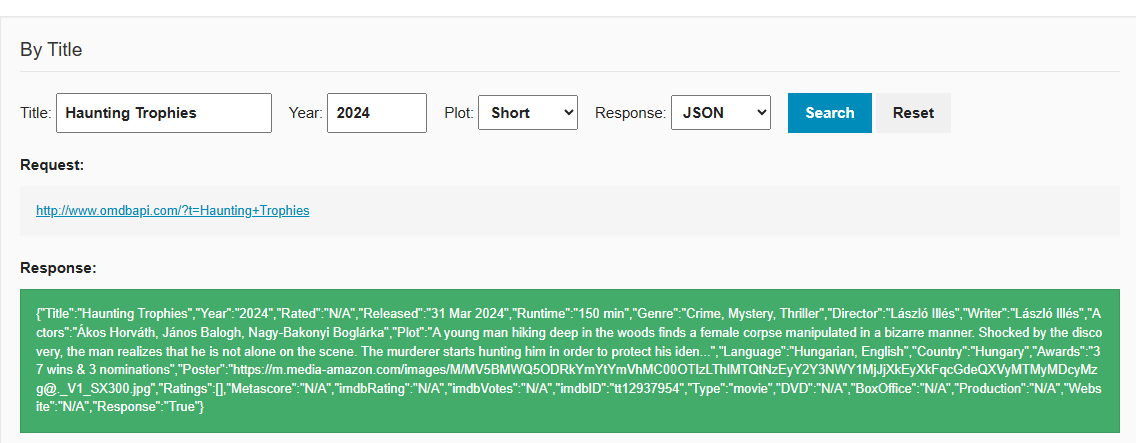
It does not exist on TMDB or TVDB so where should it come from? Haunting Trophies - TheTVDB.com Haunting Trophies — The Movie Database (TMDB) OMDB is English only and has that media. But does not always get listed image.
 1 point
 -
There is currently no browser that can direct play dts.1 point
-
As generiq said. Browsers do not support formats like DTS-MA, you will need a dedicated player for that.1 point
-
For the people wanting to test here's a quick beta. It should be bug free as i havn't touched any of the underlying stuff but always good with more people looking at it. Also some icons to test with, you can ofc. replace them with your own. The tag.png is needed for the preview, debating with my self if i should embed it in the code or leave it like this so people can customize. WARNING!! WARNING!! WARNING!! Beta, so there might be unforeseen problems!! Edit: Forgot the change list. Added: Overlays for audio and video formats. Overlays for custom tags. For example add a tag named "bob" to a video and the plugin will look for a "bob.png" (or jpg) in the icons folder to overlay. The readme in the settings page explains all the icon names. EmbyIcons.dll Icons.zip1 point
-
Just wanted to add that I am seeing the same symptoms as @Kcircuitwhere the TV will only display the Ready to Cast logo and play the audio of the live TV stream, but no video. Also I see no information about the current stream showing on the phone Dashboard. In my case, the server is on Windows 10 and the phone is an iPhone. It has been this way for a while, perhaps since the whole Chromecast expired certificates fiasco or shortly after. Chromecast on Plex for live TV has been toast ever since they redesigned their phone app, so I recently switched back to Emby. I have not tried playing any recordings or movies yet, but for debugging I ran: avahi-browse -rt _googlecast._tcp from an Ubuntu box on my network and it returned ve=05 which is Cast v5 (historically Chromecast Audio) according to this site. Perhaps to fix the issue they had to move the cast version forward, but this device is definitely not audio-only. I use ffmpeg to transcode my live TV before it reaches the server, so all the video is as follows: Output #0, mpegts, to 'pipe:1': encoder : Lavf61.1.100 Stream #0:0: Video: h264, yuv420p(tv, bt709, progressive), 1280x720 [SAR 1:1 DAR 16:9], q=2-31, 29.97 fps, 90k tbn encoder : Lavc61.3.100 libx264 Stream #0:1(und): Audio: aac (LC), 48000 Hz, stereo, fltp, 320 kb/s encoder : Lavc61.3.100 aac The H264 codec is set to high profile, level 4.1. Don't know if it makes a difference, but I can tweak any of these values if needed.1 point
-
We’re working on something special for the Emby Blog — a new series that showcases real users and their media server setups. From silent Raspberry Pi builds to powerhouse servers running multiple 4K streams, Emby users around the world are crafting some incredible configurations. In our upcoming feature, “Meet the Emby Community: Users Share Their Setups,” we’ll take a look at how different people are using Emby — and why they love it. Want to be featured? We’re inviting Emby users to share their setups over on the Emby Forums. Tell us about your hardware, streaming devices, and what makes your setup unique. You might just see your system featured in the next blog post — with full credit (if you want it). Visit the forum thread now and tell us your story. We can’t wait to highlight the amazing things the Emby community is building. View the full article1 point
-
To anyone finding this thread in the future, I created a repo that contains a Python script for bulk disabling unmapped live TV channels: https://github.com/coulterpeterson/emby-bulk-actions1 point