Leaderboard




Popular Content
Showing content with the highest reputation on 07/02/25 in all areas
-
Thank you for your help with the issue regarding S01E01.disc and the real S01E01 file not both showing in the API response. The problem is now resolved! It turns out that when I initially implemented the AlternativeMediaSources field, I had literally copied it with the "i" (Alternative). After changing the field name to the correct spelling: AlternateMediaSources (without the "i"), the API now properly returns both the .disc placeholder and the real .mkv file within the MediaSources array for the S01E01 episode. Thanks again!2 points
-
@grzes2411 Yes, my episode API call includes the following "fields" parameters: SpecialEpisodeNumbers,ParentId,Path,Genres,SortName,Studios,Writer,Taglines,LocalTrailerCount,Video3DFormat,OfficialRating,PremiereDate,ProductionYear,DateCreated,People,Overview,CommunityRating,CriticRating,ShortOverview,Tags,ProviderIds,RemoteTrailers,MediaSources,PresentationUniqueKey,OriginalTitle,AlternateMediaSources,PartCount,SpecialFeatureCount,Chapters,UserDataPlayCount,UserDataLastPlayedDate This should return all mediasources. Can you please post your actual server query and the response for review (mask the API key).2 points
-
So i tried it by removing the swedish subtitle icon beacause that icon was on 95% of my library by first deleting the Icon and refresh, and when all were gone i added it again and refreshed, i guess the size of the library is a factor in the case so it contains: Movies: 151 (in separate folders) Series: 134 (in separate folders, some with multiple seasons in each folder) Movie Collections: 32 (in separate folders, with 5-ish movies in each collection give or take) Documentary movies: 19 (each in separate folders) Documentary series: 14 (each in separate folders, some with multiple seasons) Total data library short of 5TB I would say that the refresh time for deleting and adding where cut by approximatly half! So good job maestro!2 points
-
Run the Audio MIDI Setup app. Select the Studio Display speakers. Set the format to 96,000 Hz. Click the Configure Speakers... button. Specify the configuration as stereo and click Done. Studio Display will now play stereo playback. emby mac app no longer crashes after this configuration. Please try it out.2 points
-
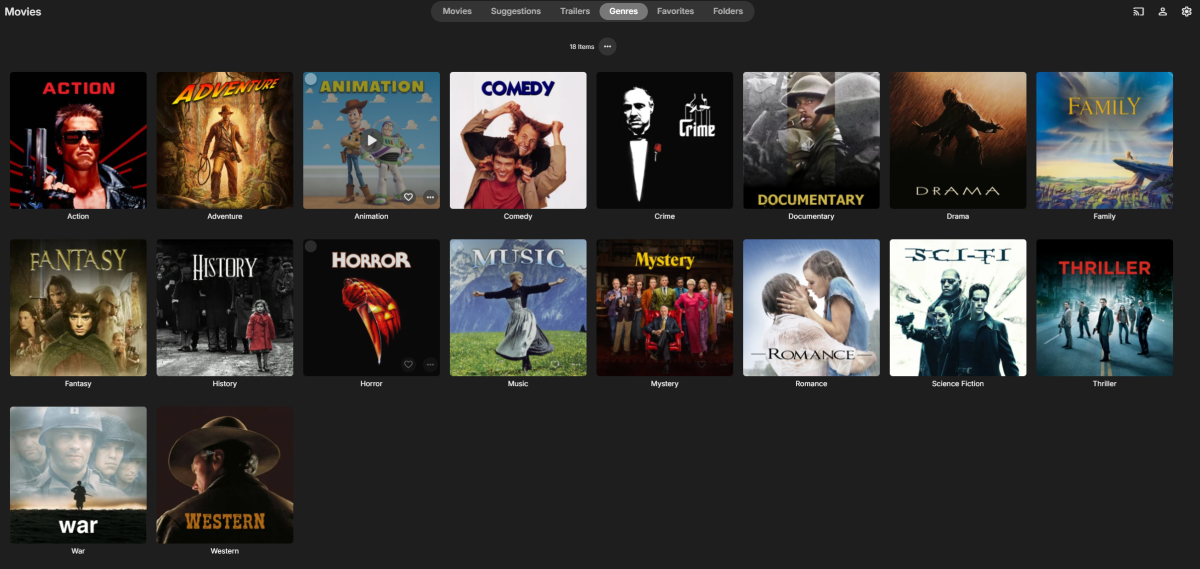
Hello everyone! I've been an Emby user for several years but am new to the community. This weekend, I had some free time and created custom movie-themed genre cover art. I thought others might find them useful, so wanted to share them with you all. Enjoy! Download: https://drive.google.com/drive/folders/1AVi_I9ACdHcSyiIbc1wcI7xdB3dNsGgN?usp=sharing Preview:
 1 point
 -
OK how did I not know about this? Instant purchase. Thanks @GrimReaper1 point
-
...or install TimeLordTV plugin from the catalogue and automate process, else you'll be forced to constantly mess with the db.1 point
-
Might have to move this thread to Linux forum. After thinking about assigning 100 of the same images to individual video files I decided to see if a "link" would work. It did. Yay!! So I set a "background" image to the parent folder which showed up as fanart.jpg in this case and them made a linux script to link to that image. All 100 videos now have the same image. My mini script below. It uses parameter expansion. for fln in *mp4;do ln -s ./fanart.jpg "${fln/mp4/}jpg";done This beat the #%$@ out of doing all 100 vids manually. Less than a second for me to run.1 point
-
3 months of waiting and we are almost there.... I have the same problem, the fonts load but the ASS subtitles lag a lot and at the beginning of the playback even do not display at all. It also looks like the subtitles start working after some time of playback, and I guess it also depends on the complexity of the subtitles. Edit: I checked and after starting a given video with ASS subtitles in my case emby loads them about 7s. I have a video that from 1s has subtitles that display only after 7s. Once they are displayed and I go back to 00:00 there is no problem anymore1 point
-
I switched to Navidrome. I put a lot of effort into tagging my music, Navdirome picks up on metadata changes almost instantly. I use Symfonium as a client and the rest is history. I'm not dissing Emby and still use it for video, and, its worth the money. But like mentioned, the corporate style one line answer to a feature request from 2017 is laughable at this stage. We not asking for nrw construction of pyramids or reinvention of the wheel. I will add one extra postive note to Symfonium, the dev actually listens to the community and has implemented tons of feature requests. Thats something I can truly support going forward.1 point
-
@thekingpin I would be curious what you choose as well? Like you I replaced emby music some time ago. For what it is worth, I am using Navidrome and find it an improvement.1 point
-
I did try to play the same file and there's a big improvement on subtitles overall. What I mean is often, subtitles would lag when skipping, now it seems to just go where it should properly. I also saw that I now have subtitles on the parts I identified so it's better. I'll report if I find something else. Thanks!1 point
-
I hear you. Out of curiosity, what did you switch for? I'd prefer not having to switch between apps and deal with tagging / coverart hell if exporting my lib to another platform for now. But yeah that's very poor communication overall. I mean, Emby is still kinda worth the price in my opinion, but giving us info on this topic doesn't cost anything to the team and yet, we have to sustain ourselves on regular corporate-style answers that only make the frustration worse. No alternatives, no deadline, no discussion, nothing. In the end, I guess that's the downside of closed-source software. It's so annoying that I'd have been willing to learn .NET just to implement this specific feature.1 point
-
I think we’ can just hardcode that one to ignore.1 point
-
How do I organize files for Plex? has a video tutorial to get you started. Since you're using Emby, you'll want to use {emby.id} as custom format instead of the {plex.id} format as shown in the video tutorial. Adding 720p / 1080p / etc is a matter of adding {vf} to your custom format. e.g. { emby.id % { ' - ' + vf } } That'll generate file paths like this: Movies/Avatar (2009) [tmdbid=19995]/Avatar (2009) - 1080p.mp41 point
-
Sure thing! Replaced the "old" one with this, get back to you shortly! Thanx!1 point
-
Show the "Next Up" for playlists and Collections as well. Handy for working your way through Arrowverse/MCU/Star Trek Universe/Etc1 point
-
Yes, please! I have lists with Holiday content, and this feature would be great when returning to keeo watching the list after a viewing.1 point
-
Oh that's good to know, so I don't need to even try and figure it out, it wouldn't even function that way anyway. Thanks Luke!1 point
-
@Luke@ebr I've found this issue can very temporarily be fixed by clearing the app cache, however the audio slowly goes out of sync with the video. This is using the app version available from the Amazon app store.1 point
-
Thanks Luke, sorry for the late response. My ISP is (was) using a CGNat, but I was able to subscribe to a Public IP for $5-ish a month. After that I was still having trouble setting up the Port Forwarding, but after some trial and errors here's how I did it in case it helps someone in the future. Remember, I'm using my ISP's router (NOT in bridge mode), and a TP Link Deco Mesh setup. I had to turn off uPNP, and open the 8096 port to my Deco's IP, not my server (Macbook).1 point
-
What you have added looks great. Thanks.1 point
-
@BaderBnplease review Quick Start guide to understand what Emby is and what it is not.1 point
-
Hi, there's already an open request for this or something functionally equivalent. Please join in and contribute to the existing discussion at:1 point
-
Did you check the metadata editor?1 point
-
Thanks for following up.1 point
-
We’re working on something special for the Emby Blog — a new series that showcases real users and their media server setups. From silent Raspberry Pi builds to powerhouse servers running multiple 4K streams, Emby users around the world are crafting some incredible configurations. In our upcoming feature, “Meet the Emby Community: Users Share Their Setups,” we’ll take a look at how different people are using Emby — and why they love it. Want to be featured? We’re inviting Emby users to share their setups over on the Emby Forums. Tell us about your hardware, streaming devices, and what makes your setup unique. You might just see your system featured in the next blog post — with full credit (if you want it). Visit the forum thread now and tell us your story. We can’t wait to highlight the amazing things the Emby community is building. View the full article1 point