
Leaderboard




Popular Content
Showing content with the highest reputation on 06/28/25 in all areas
-
مرحبًا، لا توجد خيار لتقييم المستخدم. يمكنك إضافة تقييم مخصص في بيانات الميديا، لكنه لا يظهر. الفكرة هي أن الآباء يمكنهم إنشاء تقييمات مقيدة R و MA و X لأي فيديو ومنع أطفالهم من الوصول إليها. هناك طلب ميزة لهذا في منتدى الميزات: يمكنك أيضًا إنشاء أي مجموعة من خلال البدء بوسيلة إعلام. أضف إلى مجموعة جديدة. يمكنك تسمية المجموعة. أفلام موصى بها أو أفلام مغامرة وإثارة نحبها... إذا قمت بتغيير ترتيب الفرز في هذه المجموعة الجديدة (3 نقاط... / تحرير البيانات الوصفية) إلى _Collection01، _Collection02... فستظهر هذه المجموعات الجديدة في أعلى قائمة المجموعات عندما يقوم المستخدم بفرزها حسب العنوان. Hi, there is no user rating option. You can add a custom rating in each media's metadata, but it does not show up. The idea is that parents can create restricted R, MA, X ratings to any video and block their children from access. There is a feature request for this in the feature forum: You could also create any collection group by starting with a media . Add to new collection. You could call the collection. Films recommended or Adventure and Action films we like... If you change the sort order on this new collection (3 dots... / Edit Metadata) to _Collection01, _Collection02... Then these new collections can appear at the top of the collection list when the user sorts by Title.2 points
-
Thank you! Here I confirm this workaround works on Intel N355 CPU as well.2 points
-
Had no idea I could run the native Android app on my TV. So thanks for the info. Much more configurable in settings which is great.2 points
-
Hi, Since I am using more and more TMDb, (since tvdb is more and more a mess), I am missing a very important feature. tvdb had the feature of grouping stuff into aired, DVD and absolute, which is supported by emby. TMDb had also this feature. See this example for "La casa de papel" (Money Heist, Haus des Geldes): The Original Order is allways the "aired order" of the original country. "La casa de papel" was originaly released by "Antena 3" and was taken over by Netflix, which results in different episodes ordering, which is a mess. They solved it in episode grouping. This feature is missing from emby, but it's integrated in their API and is allready supported in other apps, like kodi. At least, Banana a TMDb Mod claims it, that it's supported by Kodi: https://www.themoviedb.org/tv/71446-la-casa-de-papel/discuss/5e7032d84f9a99001152704f?page=1#5eb76872ca7ec6001f7c53cb Is it possible to add this feature into emby? It is the last scraping feature, I really really miss for TMDb on emby. It adds much flexibility and is overall a much better solution, than on tvdb with their aired, dvd and absolute order. Another great example is Dragonball Super: As you see, it adds much more flexibility for different regions over the world. It's in my own eyes a must have for emby!

 1 point
 -
You know, I didn't look in the logs too closely, is there more than one device playing that movie back? It should be on a LibreWolf web client(not sure if that IDs as Firefox). If that doesn't narrow it down enough, I might have to dig in the logs to narrow it down.... At least the last 2-3 efforts to play it back might be from the same device, but it won't be the same session obviously.1 point
-
I think I figured it out. I went into Windows as admin, and uninstalled Server/All Traces. I had reinstalled it yesterday but there must have been an out of sync fragment somewhere. Emby Windows shows my movies now and the db is rebuilding at 91%. In the past I've found my issues were almost always fixed by a clean reinstall. Maybe one of these days I'll remember that.1 point
-
I don't have an ETA, sorry, but it does make sense to add.1 point
-
It would be very helpful, because it so annoying to change the subtitle color every time you switch between SDR and HDR content.1 point
-
Not sure if it's been addressed. "auto-playing next episode" seams to be working so far.1 point
-
I cannot pull logs at the moment but I have a stream that according to the logs initiated a stream at 10:09am on June 27 (yesterday). The stream is still playing today, even after a server restart. AppleTV 1.9.9(6). what is interesting is that I can go to the home page then back to managing the server and the stream is always starting at 1:37:01. I can watch the stream count up. The stream seems to be in a loop after watching it a while. 1:37:01-1:37:09. hitting the stop button does not do anything. And the activity log doesn’t show a pause or stop for this stream.1 point
-
I know that playlists should have the full paths but I like that this works. I very rarely know what I want to listen to but I usually like to listen to full albums. So 95% of the time I will choose music via the album page sorted by random. But there is no option to sort by random in android auto. Since I accidentally discovered that these lists work I've set up a script that lists all my albums shuffled each hour. This means that in the car I get a random list of all my albums that I can click to play safely rather than always AC/DC and never ZZ Top. If it's not supposed to work then, at least, please don't "fix" it.1 point
-
What do you think, works again like it should... I had to enable debug logs for this to work so I did that, and played a movie. Right away it started to play with video. Played another movie, stops working (again?) ffmpeg-transcode-c06fc49f-3e25-4e9c-8d0e-f9c4e84d1c42_1.txt embyserver.txt1 point
-
It's something that we can look at improving. Thanks for the feedback.1 point
-
Great to hear! I'm afraid of saying what the fault was as it would make me feel extremely stupid, so i wont! What i will say is, many thanks again!1 point
-
@keitaro26 This should fix the bug. Plus while i was at it anyway i have added some more user friendly way of enabling/disabling the libraries i have made for a later time. Thank you for your wonderful debugging with this! EmbyIcons.dll1 point
-
We’re working on something special for the Emby Blog — a new series that showcases real users and their media server setups. From silent Raspberry Pi builds to powerhouse servers running multiple 4K streams, Emby users around the world are crafting some incredible configurations. In our upcoming feature, “Meet the Emby Community: Users Share Their Setups,” we’ll take a look at how different people are using Emby — and why they love it. Want to be featured? We’re inviting Emby users to share their setups over on the Emby Forums. Tell us about your hardware, streaming devices, and what makes your setup unique. You might just see your system featured in the next blog post — with full credit (if you want it). Visit the forum thread now and tell us your story. We can’t wait to highlight the amazing things the Emby community is building. View the full article1 point
-
i come before you humbly without trying to sound like a rude person, and remember i am not a programmer i have no idea if this requires some major rewrite or just some minor bug fix... but back in september 24, 2023 you said the same thing, maybe it something that required a major rewrite and you havent been able to get to it until 4.9 but im hoping itll be fixed for 4.9.. fingers crossed! If for whatever reason you think it may take a lot longer maybe its better i just rename the videos to numbers... is the problem that it starts with DJI_XXXX and i need to remove all the DJI_XXX or is it another problem with the naming that i can easily address for the time being?1 point
-
After many trial-and-error I've finally been able to get it working by rebuilding the `intel-media-driver` library with the latest version, the hard part was compiling this with dependencies having compatible ABI as the ones running on the Emby image (thanks closed source), which I found with image `ubuntu:18.04`. Sharing here to everyone who was stuck like me. To get this working you need to make your custom image of the emby image with the updated dependencies. The following steps took me 15 minutes to build on a 20 cores CPU, the build process will take longer with less cores (therefore, much longer on a N150 if you're compiling directly there). 1) Create an empty folder with a file `Dockerfile` file with the following content FROM ubuntu:18.04 AS builder WORKDIR /workspace RUN apt-get update && \ apt-get install -y \ build-essential \ git \ cmake \ automake \ autoconf \ libtool \ m4 \ pkg-config \ libdrm-dev RUN mkdir build build/usr build/lib # Libva RUN \ git clone https://github.com/intel/libva.git && \ cd libva && \ git checkout 2.22.0 && \ ./autogen.sh --prefix=/workspace/build/usr --libdir=/workspace/build/lib && \ make -j$(nproc) && \ make install && \ cd - # Gmmlib RUN \ git clone https://github.com/intel/gmmlib.git && \ cd gmmlib && \ git checkout intel-gmmlib-22.7.2 && \ mkdir build && \ cd build && \ cmake -DCMAKE_INSTALL_PREFIX=/workspace/build/usr -DCMAKE_POLICY_VERSION_MINIMUM=3.5 -DCMAKE_INSTALL_LIBDIR=/workspace/build/lib -DCMAKE_BUILD_TYPE=ReleaseInternal .. && \ make -j$(nproc) && \ make install && \ cd ../../ # Media Driver RUN \ git clone https://github.com/intel/media-driver.git && \ cd media-driver && \ mkdir build && \ cd build && \ export PKG_CONFIG_PATH=/workspace/build/lib/pkgconfig && \ cmake -DCMAKE_LIBRARY_PATH=/workspace/build/lib -DCMAKE_INSTALL_PREFIX=/workspace/build/usr -DCMAKE_INSTALL_LIBDIR=/workspace/build/lib .. && \ make -j$(nproc) && \ make install RUN find /workspace/build -name "*.so" -exec strip --strip-unneeded {} \; FROM emby/embyserver:4.9.1.0 AS emby COPY --from=builder /workspace/build/lib /lib 2) Build the image using `docker build -t emby-n150-fixed .` This will take a while, the more CPU cores you have the shorter (took me about 30 minutes with 20 cores) 3) Check that this is working by running `docker run --rm -it --device /dev/dri:/dev/dri --entrypoint vainfo emby-n150-fixed`, if this returns something as follows, then it worked: Trying display: drm libva info: VA-API version 1.22.0 libva info: Trying to open /lib/dri/iHD_drv_video.so libva info: Found init function __vaDriverInit_1_22 libva info: va_openDriver() returns 0 vainfo: VA-API version: 1.22 (libva 2.22.0) vainfo: Driver version: Intel iHD driver for Intel(R) Gen Graphics - 25.2.5 (4b3a078bd) vainfo: Supported profile and entrypoints VAProfileNone : VAEntrypointVideoProc VAProfileNone : VAEntrypointStats VAProfileMPEG2Simple : VAEntrypointVLD VAProfileMPEG2Simple : VAEntrypointEncSlice VAProfileMPEG2Main : VAEntrypointVLD VAProfileMPEG2Main : VAEntrypointEncSlice VAProfileH264Main : VAEntrypointVLD VAProfileH264Main : VAEntrypointEncSlice VAProfileH264Main : VAEntrypointFEI VAProfileH264Main : VAEntrypointEncSliceLP VAProfileH264High : VAEntrypointVLD VAProfileH264High : VAEntrypointEncSlice VAProfileH264High : VAEntrypointFEI VAProfileH264High : VAEntrypointEncSliceLP VAProfileVC1Simple : VAEntrypointVLD VAProfileVC1Main : VAEntrypointVLD VAProfileVC1Advanced : VAEntrypointVLD VAProfileJPEGBaseline : VAEntrypointVLD VAProfileJPEGBaseline : VAEntrypointEncPicture VAProfileH264ConstrainedBaseline: VAEntrypointVLD VAProfileH264ConstrainedBaseline: VAEntrypointEncSlice VAProfileH264ConstrainedBaseline: VAEntrypointFEI VAProfileH264ConstrainedBaseline: VAEntrypointEncSliceLP VAProfileVP8Version0_3 : VAEntrypointVLD VAProfileHEVCMain : VAEntrypointVLD VAProfileHEVCMain : VAEntrypointEncSlice VAProfileHEVCMain : VAEntrypointFEI VAProfileHEVCMain : VAEntrypointEncSliceLP VAProfileHEVCMain10 : VAEntrypointVLD VAProfileHEVCMain10 : VAEntrypointEncSlice VAProfileHEVCMain10 : VAEntrypointEncSliceLP VAProfileVP9Profile0 : VAEntrypointVLD VAProfileVP9Profile0 : VAEntrypointEncSliceLP VAProfileVP9Profile1 : VAEntrypointVLD VAProfileVP9Profile1 : VAEntrypointEncSliceLP VAProfileVP9Profile2 : VAEntrypointVLD VAProfileVP9Profile2 : VAEntrypointEncSliceLP VAProfileVP9Profile3 : VAEntrypointVLD VAProfileVP9Profile3 : VAEntrypointEncSliceLP VAProfileHEVCMain12 : VAEntrypointVLD VAProfileHEVCMain12 : VAEntrypointEncSlice VAProfileHEVCMain422_10 : VAEntrypointVLD VAProfileHEVCMain422_10 : VAEntrypointEncSlice VAProfileHEVCMain422_12 : VAEntrypointVLD VAProfileHEVCMain422_12 : VAEntrypointEncSlice VAProfileHEVCMain444 : VAEntrypointVLD VAProfileHEVCMain444 : VAEntrypointEncSliceLP VAProfileHEVCMain444_10 : VAEntrypointVLD VAProfileHEVCMain444_10 : VAEntrypointEncSliceLP VAProfileHEVCMain444_12 : VAEntrypointVLD VAProfileHEVCSccMain : VAEntrypointVLD VAProfileHEVCSccMain : VAEntrypointEncSliceLP VAProfileHEVCSccMain10 : VAEntrypointVLD VAProfileHEVCSccMain10 : VAEntrypointEncSliceLP VAProfileHEVCSccMain444 : VAEntrypointVLD VAProfileHEVCSccMain444 : VAEntrypointEncSliceLP VAProfileAV1Profile0 : VAEntrypointVLD VAProfileHEVCSccMain444_10 : VAEntrypointVLD VAProfileHEVCSccMain444_10 : VAEntrypointEncSliceLP You can compare and run the same command on the emby image, you should have a bunch of errors instead. 4) (OPTIONAL) For your convenience, I uploaded the image on DockerHub if you want an easy way to see if it works, use the image rajiska/emby-n150-fixed:4.9.1.0, though I'd recommend to build the image yourself1 point
-
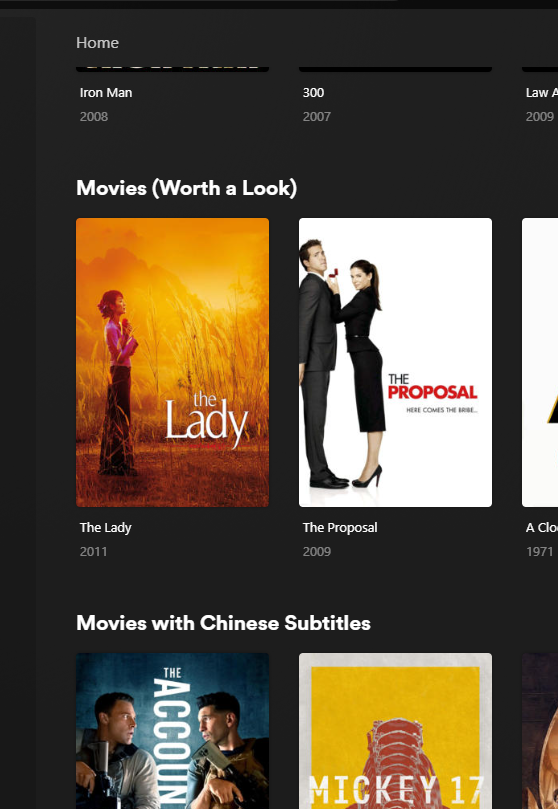
+1 For giving the ability to add custom playlists or collections to the home page as horizontal listing for all users (ie from the original post, similar to how netflix, plex can do etc) - not on the favourites page, which is not the same thing (favourites is a seperate page involving more clicks, and also is only relevant to the user logged in). Netflix or others would use the feature as seasonal lists which could be turned on or off (xmas movie list). ie, a typical use case in emby is generating a smart collection (example); 1) a recently added movie to the library within the last 14 days which 2) has not been watched, and 3) is highly rated (IMDB >7) 4) rated PG13 or below called "Must Watch collection", which could be displayed in the home page above the "Recently Released Movies" default section in Emby. Example below of a plex library with smart collections on the home page
 1 point
 -
You might want to post on the JellyFin forums, not here1 point
-
I found this a few years ago and like it https://www.tweaking4all.com/home-theatre/rename-my-tv-series-v2/ Tweaking4All.com - Rename My TV Series. For me it has seemed to be consistent with TVDB and IMDB.1 point









