Leaderboard



Popular Content
Showing content with the highest reputation on 06/16/25 in all areas
-
For host you only enter the IP address, host name or domain name, the second field is the port number.3 points
-
After many trial-and-error I've finally been able to get it working by rebuilding the `intel-media-driver` library with the latest version, the hard part was compiling this with dependencies having compatible ABI as the ones running on the Emby image (thanks closed source), which I found with image `ubuntu:18.04`. Sharing here to everyone who was stuck like me. To get this working you need to make your custom image of the emby image with the updated dependencies. The following steps took me 15 minutes to build on a 20 cores CPU, the build process will take longer with less cores (therefore, much longer on a N150 if you're compiling directly there). 1) Create an empty folder with a file `Dockerfile` file with the following content FROM ubuntu:18.04 AS builder WORKDIR /workspace RUN apt-get update && \ apt-get install -y \ build-essential \ git \ cmake \ automake \ autoconf \ libtool \ m4 \ pkg-config \ libdrm-dev RUN mkdir build build/usr build/lib # Libva RUN \ git clone https://github.com/intel/libva.git && \ cd libva && \ git checkout 2.22.0 && \ ./autogen.sh --prefix=/workspace/build/usr --libdir=/workspace/build/lib && \ make -j$(nproc) && \ make install && \ cd - # Gmmlib RUN \ git clone https://github.com/intel/gmmlib.git && \ cd gmmlib && \ git checkout intel-gmmlib-22.7.2 && \ mkdir build && \ cd build && \ cmake -DCMAKE_INSTALL_PREFIX=/workspace/build/usr -DCMAKE_POLICY_VERSION_MINIMUM=3.5 -DCMAKE_INSTALL_LIBDIR=/workspace/build/lib -DCMAKE_BUILD_TYPE=ReleaseInternal .. && \ make -j$(nproc) && \ make install && \ cd ../../ # Media Driver RUN \ git clone https://github.com/intel/media-driver.git && \ cd media-driver && \ mkdir build && \ cd build && \ export PKG_CONFIG_PATH=/workspace/build/lib/pkgconfig && \ cmake -DCMAKE_LIBRARY_PATH=/workspace/build/lib -DCMAKE_INSTALL_PREFIX=/workspace/build/usr -DCMAKE_INSTALL_LIBDIR=/workspace/build/lib .. && \ make -j$(nproc) && \ make install RUN find /workspace/build -name "*.so" -exec strip --strip-unneeded {} \; FROM emby/embyserver:4.9.1.0 AS emby COPY --from=builder /workspace/build/lib /lib 2) Build the image using `docker build -t emby-n150-fixed .` This will take a while, the more CPU cores you have the shorter (took me about 30 minutes with 20 cores) 3) Check that this is working by running `docker run --rm -it --device /dev/dri:/dev/dri --entrypoint vainfo emby-n150-fixed`, if this returns something as follows, then it worked: Trying display: drm libva info: VA-API version 1.22.0 libva info: Trying to open /lib/dri/iHD_drv_video.so libva info: Found init function __vaDriverInit_1_22 libva info: va_openDriver() returns 0 vainfo: VA-API version: 1.22 (libva 2.22.0) vainfo: Driver version: Intel iHD driver for Intel(R) Gen Graphics - 25.2.5 (4b3a078bd) vainfo: Supported profile and entrypoints VAProfileNone : VAEntrypointVideoProc VAProfileNone : VAEntrypointStats VAProfileMPEG2Simple : VAEntrypointVLD VAProfileMPEG2Simple : VAEntrypointEncSlice VAProfileMPEG2Main : VAEntrypointVLD VAProfileMPEG2Main : VAEntrypointEncSlice VAProfileH264Main : VAEntrypointVLD VAProfileH264Main : VAEntrypointEncSlice VAProfileH264Main : VAEntrypointFEI VAProfileH264Main : VAEntrypointEncSliceLP VAProfileH264High : VAEntrypointVLD VAProfileH264High : VAEntrypointEncSlice VAProfileH264High : VAEntrypointFEI VAProfileH264High : VAEntrypointEncSliceLP VAProfileVC1Simple : VAEntrypointVLD VAProfileVC1Main : VAEntrypointVLD VAProfileVC1Advanced : VAEntrypointVLD VAProfileJPEGBaseline : VAEntrypointVLD VAProfileJPEGBaseline : VAEntrypointEncPicture VAProfileH264ConstrainedBaseline: VAEntrypointVLD VAProfileH264ConstrainedBaseline: VAEntrypointEncSlice VAProfileH264ConstrainedBaseline: VAEntrypointFEI VAProfileH264ConstrainedBaseline: VAEntrypointEncSliceLP VAProfileVP8Version0_3 : VAEntrypointVLD VAProfileHEVCMain : VAEntrypointVLD VAProfileHEVCMain : VAEntrypointEncSlice VAProfileHEVCMain : VAEntrypointFEI VAProfileHEVCMain : VAEntrypointEncSliceLP VAProfileHEVCMain10 : VAEntrypointVLD VAProfileHEVCMain10 : VAEntrypointEncSlice VAProfileHEVCMain10 : VAEntrypointEncSliceLP VAProfileVP9Profile0 : VAEntrypointVLD VAProfileVP9Profile0 : VAEntrypointEncSliceLP VAProfileVP9Profile1 : VAEntrypointVLD VAProfileVP9Profile1 : VAEntrypointEncSliceLP VAProfileVP9Profile2 : VAEntrypointVLD VAProfileVP9Profile2 : VAEntrypointEncSliceLP VAProfileVP9Profile3 : VAEntrypointVLD VAProfileVP9Profile3 : VAEntrypointEncSliceLP VAProfileHEVCMain12 : VAEntrypointVLD VAProfileHEVCMain12 : VAEntrypointEncSlice VAProfileHEVCMain422_10 : VAEntrypointVLD VAProfileHEVCMain422_10 : VAEntrypointEncSlice VAProfileHEVCMain422_12 : VAEntrypointVLD VAProfileHEVCMain422_12 : VAEntrypointEncSlice VAProfileHEVCMain444 : VAEntrypointVLD VAProfileHEVCMain444 : VAEntrypointEncSliceLP VAProfileHEVCMain444_10 : VAEntrypointVLD VAProfileHEVCMain444_10 : VAEntrypointEncSliceLP VAProfileHEVCMain444_12 : VAEntrypointVLD VAProfileHEVCSccMain : VAEntrypointVLD VAProfileHEVCSccMain : VAEntrypointEncSliceLP VAProfileHEVCSccMain10 : VAEntrypointVLD VAProfileHEVCSccMain10 : VAEntrypointEncSliceLP VAProfileHEVCSccMain444 : VAEntrypointVLD VAProfileHEVCSccMain444 : VAEntrypointEncSliceLP VAProfileAV1Profile0 : VAEntrypointVLD VAProfileHEVCSccMain444_10 : VAEntrypointVLD VAProfileHEVCSccMain444_10 : VAEntrypointEncSliceLP You can compare and run the same command on the emby image, you should have a bunch of errors instead. 4) (OPTIONAL) For your convenience, I uploaded the image on DockerHub if you want an easy way to see if it works, use the image rajiska/emby-n150-fixed:4.9.1.0, though I'd recommend to build the image yourself3 points
-
Hi and welcome. Just like Plex, Emby consists of two main complements, the Server and the Client. It sounds like you've installed the 'client' software, but have yet to install the Server (Step 1) Please follow this guide which will hopefully explain the setup process from start to finish, adding your media library will soon become more obvious once you've installed the Server software. Guide: Quick Start Let us know if you get stuck.2 points
-
Hi Please, it would be great to be able to limit download speed (of offline playback) without affecting streaming speed. I found more than one topic talking on this feature from a long time ago but unfortunately not implemented yet ... so I post it here in " Feature Requests" section. It would be a very nice if you can add this feature as soon as possible as @FredMuppeteer said on other topic: Also in the same feature it needs to control/limit how many download the user can do on the same time. I hope the other users agree with me and make voting for the feature Many thanks --------- here some topic about these feature:1 point
-
Feature Request: Have User Groups and all settings applied at the Group Level That way you can just assign users to the appropriate Group and all settings will be inheritated.1 point
-
You mean for "Native Playback"? It all depends on the Emby devs.1 point
-
OK, that is a single stream, not a channel listing m3u. The m3u that you import needs to be a channel listing. For example, it would look like this: #EXTM3U #EXTINF:-1 channel-id="123" tvg-id="123" tvg-name="Example Channel" tvg-logo="https://example.com/logo.png", Example Channel http://example.com:8080/live/stream1.m3u8 #EXTINF:-1 channel-id="456" tvg-id="456" tvg-name="Another Channel" tvg-logo="https://example.com/another_logo.png", Another Channel http://example.com:8080/live/stream2.m3u8 If you just want to import a single video url, the iptv plugin can do that for you.1 point
-
I should prefix this with my goal of wanting to shift my emby server off a dedicated Windows machine into docker. I've been switching out SSDs one containing my original Windows installation and Emby installation with a SSD containing Linux and a docker container running emby/embyserver:latest (both Emby Windows and docker image is of writing this is v4.8.11.0). I should also say that its only happening with one of my TV series while nearly all other TV series encoding with H265 10bit (HVEC) work fine with the hardware acceleration in the docker container. My hardware is Intel i5-10500T (supports HEVC Main10 decoding) Host and container confirm support via vainfo /dev/dri devices are passed correctly After an exhaustive amount of troubleshooting with chatGPT it concluded that the Emby container does not fully support VAAPI HEVC 10-bit HW decoding with iHD driver despite system capability. The inbuilt ffmpeg version supplied with emby/docker container 4.8.11.0 isn't compatabile or is missing certain libraries and reverts to terrible software transcoding ending up with pixelated image. (See attached screenshot) Whereas the Windows counterpart works fine playing the same file. (See screenshot below) ChatGPT told me to install and run vainfo on the host and within the container to prove that its all supported. Both the host and container return the below. libva info: VA-API version 1.20.0 ibva info: Trying to open /usr/lib/x86_64-linux-gnu/dri/iHD_drv_video.so ibva info: Found init function __vaDriverInit_1_20 libva info: va_openDriver() returns 0 vainfo:VA-API version: 1.20 (libva 2.12.0) vainfo: Driver version: Intel iHD driver for Intel(R) Gen Graphics - 24.1.0 () vainfo: Supported profile and entrypoints VAProfileMPEG2Simple : VAEntrypointVLD VAProfileMPEG2Main : VAEntrypointVLD VAProfileH264Main : VAEntrypointVLD VAProfileH264Main : VAEntrypointEncSliceLP VAProfileH264High : VAEntrypointVLD VAProfileH264High : VAEntrypointEncSliceLP VAProfileJPEGBaseline : VAEntrypointVLD VAProfileJPEGBaseline : VAEntrypointEncPicture VAProfileH264ConstrainedBaseline: VAEntrypointVLD VAProfileH264ConstrainedBaseline: VAEntrypointEncSliceLP VAProfileVP8Version0_3 : VAEntrypointVLD VAProfileHEVCMain : VAEntrypointVLD VAProfileHEVCMain10 : VAEntrypointVLD VAProfileVP9Profile0 : VAEntrypointVLD VAProfileVP9Profile2 : VAEntrypointVLD ChatGPT told me to run /app/emby/bin/ffmpeg -hwaccel vaapi -hwaccel_device /dev/dri/renderD128 -i test.mkv -f null - and/or /app/emby/bin/ffmpeg -hwaccel vaapi -hwaccel_device /dev/dri/card0 -i your_hevc10bit.mkv -f null - and failed for both with ffmpeg: error while loading shared libraries: libavdevice.so.59: cannot open shared object file: No such file or directory After fixing this issue by installing a full copy of ffmpeg using the below apt update apt install -y software-properties-common add-apt-repository ppa:savoury1/ffmpeg5 apt update apt install -y ffmpeg and rerun /usr/bin/ffmpeg -hwaccel vaapi -hwaccel_device /dev/dri/renderD128 -i test.mkv -f null - and/or /usr/bin/ffmpeg -hwaccel vaapi -hwaccel_device /dev/dri/card0 -i your_hevc10bit.mkv -f null - both worked. ChatGPT suggested symlinking to see if it fixed the issue however all content became unplayable with the error below so I removed the symlink and put it back the original file. "No compatible streams are currently available. Please try again later or contact your system administrator for details." mv /app/emby/bin/ffmpeg /app/emby/bin/ffmpeg.backup /app/emby/bin/ffmpeg => /usr/bin/ffmpeg Attached are my clean log files from the the docker container. hardware_detection-63884159906.txtembyserver.txtffmpeg-remux-94fc0f56-edc1-4720-be0d-b5273907fcbf_1.txtffmpeg-transcode-7324b96d-838c-4d71-abc2-def9280d22ea_1.txtembyserver-63884160000.txt
 1 point
 -
Also, make sure windows network is set to private, check your firewall setting, are you running a VPN?1 point
-
Get everything working just using the web client first, you should be able to set up your libraries and test playback, have all your media and metadata imported and loaded and verify the server is all working just using the Web Client. Once the server is set up and working, and you can play back media using the Web Client Interface, then move on to the Emby Apps on all your devices.1 point
-
AND if you move files your watched status will not change. One thing I do if moving files is, -create the new directory where I plan to move the files. -add the new location to the appropriate library. -shut down Emby Server and move the files. -restart Emby and confirm everything is OK. -remove the old directory from the Emby library. DO NOT put the same files in two locations that are location for the same library. Bad things happen when you do. You CAN put them in a new library with a different name, remove the original files in the old location and after a restart of Emby rename the library. If you do that emby will rescan the library though. I have found if you do it as described above - Emby doesn't rescan or anything, it just carries on as if nothing changed.1 point
-
Theres a settings for it1 point
-
Try this. TranscodeNotifier.dll1 point
-
Hey mate, this one is no problems and it doesn't impact the speed of the scans! This is simply a notification that Emby Scripter-X will wait a maximum of 600000 milliseconds (600 seconds, or 10 minutes) to call the MediaItemAddedComplete event. This doesn't block the server at all, it simply is a timer that watches for the MediaItemAddedComplete event, if it doesn't complete within 10 minutes, it will call the event to ensure it actually occurs1 point
-
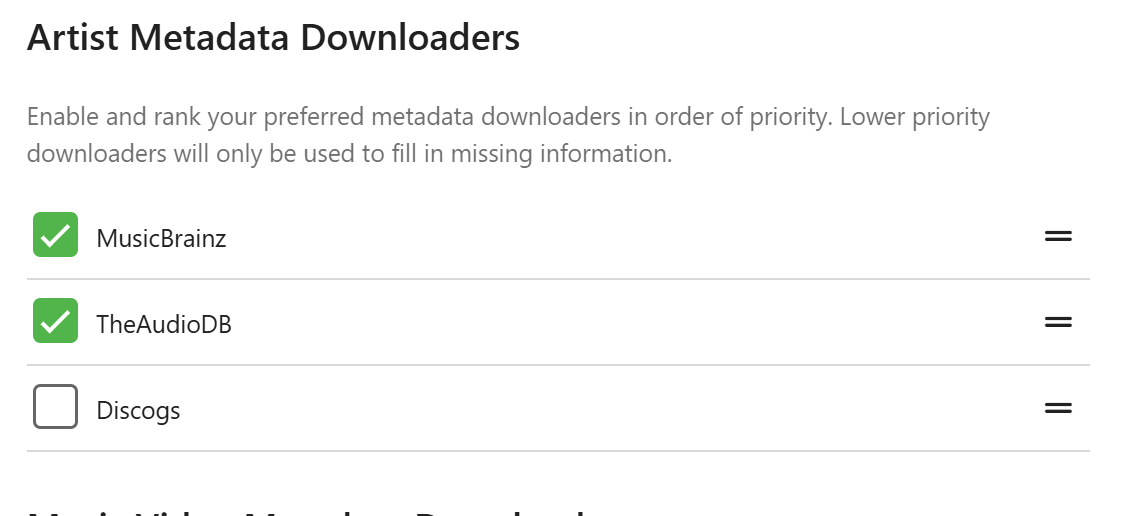
Hi, if you're using Mp3tag, then semi-colon ; will also work well to separate tags anywhere that Emby will import multi-field tags from (e.g. Artist, Album Artist, Genre). What I've found generally is that Emby usually prioritizes your music embedded metadata tags and will overwrite anything in your Emby database that conflicts, but not always. Do you use MusicBrainz IDs? These can sometimes cause issues if there are discrepancies. Do you have Discogs or MusicBrainz Artist Metadata Downloaders switched on? This could be what is messing up your Artists??? Beyond that, can you give a specific example of exactly what is happening? Is it just Artists missing from certain tracks? Otherwise it's a bit difficult to suggest anything else specific to try... Screenshots can also help!
 1 point
 -
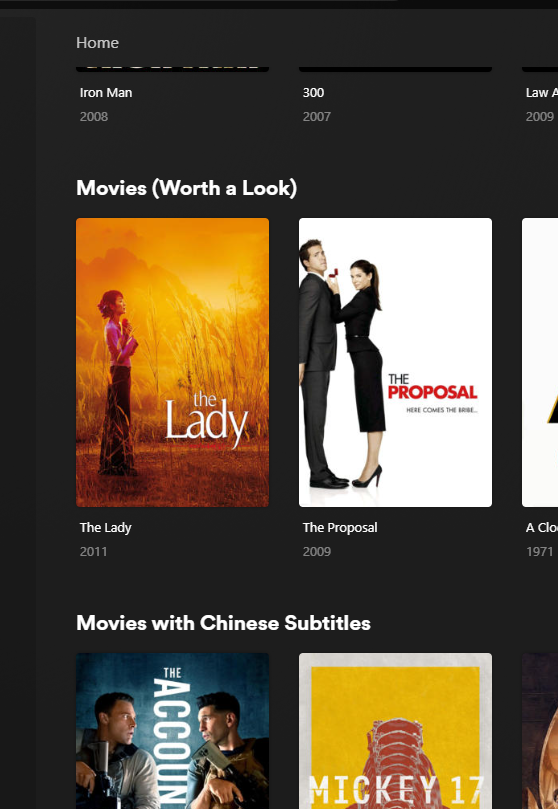
+1 For giving the ability to add custom playlists or collections to the home page as horizontal listing for all users (ie from the original post, similar to how netflix, plex can do etc) - not on the favourites page, which is not the same thing (favourites is a seperate page involving more clicks, and also is only relevant to the user logged in). Netflix or others would use the feature as seasonal lists which could be turned on or off (xmas movie list). ie, a typical use case in emby is generating a smart collection (example); 1) a recently added movie to the library within the last 14 days which 2) has not been watched, and 3) is highly rated (IMDB >7) 4) rated PG13 or below called "Must Watch collection", which could be displayed in the home page above the "Recently Released Movies" default section in Emby. Example below of a plex library with smart collections on the home page
 1 point
 -
+1 for improved library/collection options, ideally set at library or collection level for all users.1 point
-
Update: the crashing seems to only happen with the seamless variant of refresh rate switching. It's when the refresh rate is changed instantly on demand, without the usual few seconds in a black screen. Starting and stopping playback (stopping as in backing out of the player) repeatedly with this seamless mode also causes the app to crash. Disabling this seamless behavior on my Samsung TV requires setting game mode to off. On or auto allows VRR to be used, I guess, and that's what it seems to use to switch rates.1 point
-
Last I checked, it still didn't work. So for now I've opted to disable hardware decoding for VC-1, and instead rely on software decoding, which seems to be working alright However, I have since then also gone through the process of manually transcoding all my VC-1 files to H.264. It is therefore technically not a problem anymore, since I don't have anymore VC-1 files I've since then also upgraded to version 6.12.15 of Unraid, but haven't tried it with that version, since I had already transcoded all the VC-1 files at that time. Kernel version is 6.1.126 for this version of Unraid. Would love not to have to transcode these files manually, but seeing as it is such an inefficient codec anyway, and having to deal with the hassle of it, I will be transcoding any VC-1 files immediately when I'm done ripping.1 point
-
Have had some reboots of the Shield and Emby login has persisted. So I'm using the Emby for Android app now, no longer the Android TV app.1 point
-
FWIW: I use Drivepool and it would be overkill for just two drives. I have 13 external drives pooled into one huge volume. My total disk space available is about 86 TB. But i do not recommend using Drivepool for fewer than about 5 drives as it is easier to maintain separate drives than combined drives for Emby. But when I was initially setting things up the largest regularly available drive was 4 TB with some 6-8 TB drives beginning to show up. Recently I was rearranging things and I got clumsy as I was hooking things up and one of my external drives was knocked to the flour while running and that crashed it completely and I lost everything on it but I actually lost almost nothing as I have DrivePool configured so that all my movies and TV shows are "duplicated" and I just had to turn that function off and order a new drive. When the new drive arrived all I had to do was plug it in, add it to the pool, turn duplication back on and Drivepool moved everything around and balanced the pool and reduplicated everything. Note: Drivepool's duplication feature is NOT a backup it is simply redundant storage. That is if you are using duplication and you mistakenly delete a file it is not recoverable as "delete" deletes both copies. Really Drivepool is more for convivence for me than anything else but it does work very well. I would hate to have to manage each drive separately even though Emby would not care. If i was starting from scratch now I would probably just go with separate large drives but, since I am already set this way, I think I will just add new drives to the pool if needed.1 point
-
Same response as a few months ago. Luke's definition of near future is worrisome.1 point
-
I noticed this issue today. Turning off PIP for Emby works for me too, workng as expected now. Just posting an FYI that this is still an issue on Emby for Android 3.4.72, Server 4.8.11.0, Shield 2019 Pro. ETA: Before I disabled PIP, it would show the PIP in the lower right of the screen and also 2 dialouge popups in the middle of the screen that I had to click to make it all go away. The popups showed the live tv channel name and channel # with options to open or stop (on 1 popup) and options for details or dismiss (on the 2nd popup). Also, the 2 popups were flickering back & forth...one would be in focus then the second one would be in focus, back & forth until I clicked on one. Pretty weird, never saw that before!1 point
-
Oh I see - it's under Home Screen settings while I was looking in the Library settings.1 point
-
I would post it here.1 point
-
New PUBLIC TESTING version available 12.1.0: Delta changelog 11.2.1 -> 12.1.0 Kodi 21 and 22 support sort iconnodes fix node labels when label is a number improve incremental sync performance fix minor incremental sync issues add dynamic nodes option to disable local trailers (default off, cause it's slow) fix dynamic node multi-favorites update Chinese langague file, thanks wabisabi926 fix Kodi favorites when quotes used in names add transcoding options by resolution support davs native content support webdav protocol as internal webservice (which is now default) hide dummy sources from views fix minor server login issue fix minor watch together bug lower progress updates to 50 seconds (less server traffic) add multiversion selection option in context menu for episodes and musicvideos add time sync check < year 2000 add support musicvideo links for songs based on MusicBrainzId, Fallback -> Artists/Title (default on) fix c22 in database in movies table -> filepath re-download userimage when deleted from temp folder fix song remove sync issue (edge case) fix updates for downloaded content use xbmcvfs wherever possible (Kodi's virtual file system) fix folder views fix dynamic tag node for picture rewrite backup function, it's possible to restore between major releases fix cinema intros, skip youtube trailers fix cinema intros, playback progress issue improve tvtunes integration support livetv remote playback improve remote playback performance for dynamic content fix remote playback disconnects minor http server communication improvements for async requests set custom resume points Comment: Transencoding with newer ffmpeg only works when "http" is selected as webservice mode I created a pull request to fix the issue for webdav -> https://github.com/xbmc/xbmc/pull/26784 Kodi 22: This version changed something in the multiversion tagging. Maybe this change will be reverted in next versions as it seems to be done by accident. If so, it will break the movie content playback again. Kodi 22 is currently pre Alpha! This version requires a complete resync.1 point
-
I would love to weigh in on the emby app for music. A wish list as it were, I have used it for years, and love the fact that I can link into already casted music and control from anywhere. I love the artwork though think it ruins it a bit with album art over the top of artist images, would love it if it was at the bottom of the screen and smaller to benefit all of the artwork. Playlist resume and album resume is non existent and where symphonium excels. If swapping between networks this can become tedious and you have to start playlists/favourite songs over again rather than resume what is already started. Lack of equalisation is a big one, I have traditionally used emby app at home (chromecast audio) and synced a playlist to my phone for power amp to use. Creating this playlist is a chore, with symphonium I can create a smart playlist of favourite songs and cache it. It also has a rolling cache. I have seen the resume function requested quite a few times. Emby is the Swiss army knife here and is an excellent server. Symphonium is a good dedicated music app and finally a way to get the best out of emby music, highly customisable etc. I would love to see a native WiiM integration like it to handle multi room at home as chromecast audio is no longer supported and has limitations. Just some feedback from a loyal patron Oh better Home Assistant support would be great too.1 point
-
Hi, I wouldn't say that. User demand is just pulling us in other directions.1 point
-
Hi @Luke Any chance we'll see this very old request (filed way back in 2016) of adding country of origin to the movie details page as well as a filterable field in the movies overview?1 point
-
Thanks Anthony - webhooks are working great for what I want to use it for - using postjson to notify HA of live TV recording finished. Comskipper (from message above) looks interesting Cheers for all the work, hope you are getting some sleep!1 point