Leaderboard




Popular Content
Showing content with the highest reputation on 06/11/25 in all areas
-
hey emby team after some time looking for a good alternative to plex i finally found this and after trying it out i realized this is the best media server alternative to plex out there it just works and it works really well with cloudflare and tunneling plex doesn’t support that nearly as well and the transcoding here is way better and faster too i've had zero problems and i’m even using the beta versions to try out the newest stuff also emby feels way less bloated than plex no annoying ads no weird features i don’t care about just a clean setup that does what i need and does it well i like how i have more control over things in emby the settings are actually useful and it’s easier to manage users and libraries plus emby doesn’t try to lock everything behind a subscription like plex does with even basic features just wanted to say thanks this is exactly what i’ve been looking for2 points
-
The issue here is people are not being made aware that an advertised feature in Emby is simply not as secure/private as they would expect it to be. Admins can implement https, reverse proxies etc - doesn't matter, if you know or can guess the url, then you can get unauthenticated access to the images. Is an attacker likely to even know the base url, or spend time brute forcing - unlikely, but security by obscurity has no place in 2025. Randomising the id's/url would be a start, but implementing proper Auth for photo library images would be what I would want to see - if it costs performance, then so be it. For other general metadata images, then I see no reason to implement Auth for them.2 points
-
Not trying to protect Emby here, but always assume that everything you put on the internet is insecure and has more holes than a cheese. Never ever put anything on an internet connected device you do not want any one to see, have or control! With that said, if there are glaring security problems in Emby they should IMO ofc. have priority for a fix. Remember though that It is a private media server server not a data vault.2 points
-
In the near future we'll have an updated ffmpeg build on the server beta channel, just FYI.2 points
-
Ok so my request is to be able to search each library separate as it stands when you search it searches everything, and if like me you have 30k music tracks 10k books/comics 10k episodes and 10k+ movies, searching is slow so is it possible to have a search section for each library individually1 point
-
Technically they're optional and you don't need them, you should be able to create the PFX with just the CRT and the KEY. I'd recommend that first. But you can probably use MYDOMAIN-chain.pem for Chain Certificate File and leave File 2 blank if you have issues with just the CRT and KEY.1 point
-
i did it differently and more organized, not having issues now. thank you.1 point
-
Nice that's the point, but a commend ever blue moon, will not cut it. I aggravated you and you responded, and now the topic is flaming. Keep it up to get traction Then dev's might notice. Do it daily, do it often, do not forget to raise your point.1 point
-
Yes. I marked as a solution1 point
-
Saw the word "Plex"; and disengaged. If I wanted Plex, I'd use Plex. There were reasons I came to Emby and been here since the MediaBrowser days even.1 point
-
Awesome, @Neminem!! Yes, I've disabled "Import playlist files" (which I really don't need ) and my HD went to sleep immediately! Amazing, thank you so much!1 point
-
could this answer to be treated like - this feature would never happen, use workarounds based on reverse proxy? If yes, then better to give the final answer with arguments why not and just close the topic. Honestly, it would be better than keep people in suspension and being frustrated.1 point
-
Thanks Neminem, I didn't realise it was set on a by-library basis, thought it would be a global setting. All good now, thanks again.1 point
-
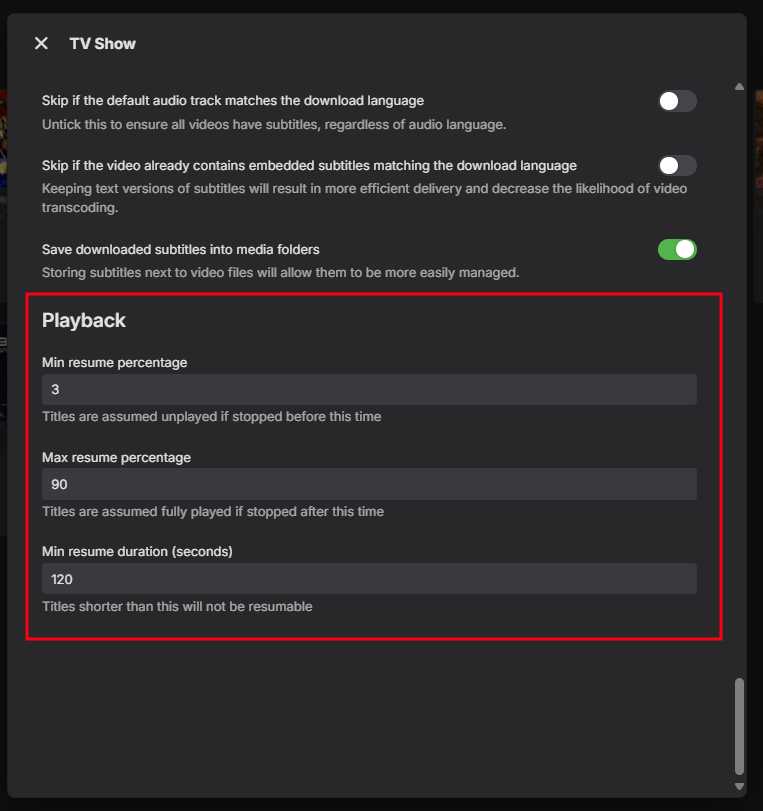
@SethBrundleit should be in your library settings, all the way down.
 1 point
 -
I did reverse test it as well mate, turning it off again put me right back to shitty small images lol no idea what's happening but wanted to let you know that's what was causing it.1 point
-
Please see attached. embyserver.txt1 point
-
No, it magically fixed itself.1 point
-
@Lukethe feature request is in this post which is ironic because the discussion of it lead me to this current thread/post about how Playback Reporting reports without the filtering in the notification section. Sigh...1 point
-
Hi, in the near future we'll have an updated ffmpeg build on the server beta channel, just FYI.1 point
-
Hello Luke, Could you build a HD function in this plugin? I get with all trailers only SD and no HD. And can you maybe add a function to change the language? For example, so that you can watch trailers in German! best regards1 point
-
Language selection is a must.1 point
-
Going back one worked, but was still having issues and ended up using AI. made a couple python scripts to convert movies and another for series to strm. Not 100% perfect but worked for me, you have rename the file to input in the same directory and run the script. they will output to a new directory, create a log of the conversion and another for errors. Movies_m3u_to_strm.py Series_m3u_to_strm.py1 point
-
The solution is really in the steps @TMCsw gave you to follow and the post that should be marked as such. Mine just cleared up some of the details.1 point
-
I used ffprobe from an ffmpeg build that is at least ac4 aware even if it still can't decode it. I think the main branch of ffmpeg at some point got the ability to remux it but not decode.1 point
-
Thanks for following up.1 point
-
Lol, yeah I have no clue what's going on! You're defintely not alone, I have no idea how decoders work either. I've tried researching to understand...but my eyes start glazing over, and I'm like, huh?! Now I understand the "deer in headlights" look my users used to give me when I worked in IT support. Where did you see this...in the Emby logs? Stream #0:1[0x32](eng): Audio: ac4 (AC-4 / 0x342D4341), 46034 Hz, 12 channels (FL+FR+FC+LFE+FLC+FRC+SL+SR+TFL+TFR+T BL+TBR), fltp1 point
-
Thanks Luke, I did have the backup plugin installed and working. I guess I was just looking for any other hints, tips, gotchas, etc that I might encounter, or any weirdnesses that might be unique to the QNAP. Over the weekend I went and reset the NAS, rebuilding the storage volumes etc. After installing emby again, entering my premiere key and installing the plugin backup, it did restore successfully. There were a few things I had to do manually, the other plugins that were installed didn't appear to be captured in the backup - note to others doing this, manually list the plugins installed. But the credentials for the plugins were saved. I also had to re-jig some of my libraries for music, movies, TV shows etc because the path names were slightly different. After the rebuild the RAIDed hard disks were in storage pool 2 as the add-on card with the NVMe SSDs were in a new storage pool 1. That's to be expected and was fixed by adding the new directories (e.g. /CACHEDEV2/MEDIA/Movies) to the appropriate libraries and removing their original ovations. Interestingly, I thought I might have been able to just edit the path name but it wouldn't let me so adding the new path and removing the old one was the way to solve that. All in all, the process went remarkably well, I've just been restoring all the media back onto the drives over the last couple of days from where it was backed up before resetting the NAS.1 point
-
Hi there, Emby will create Artists from the embedded metadata in your individual music (song) files. You can find out more basic information here: https://emby.media/support/articles/Music-Naming.html I'd recommend using Mp3tag (or similar) to check both Artist and Album Artist fields/tags, at a minimum. If you change the info just within Emby and then rescan you music library later on, then Emby may revert to the original embedded metadata in your files and import this back into your Emby database. Beyond just the Artist and Album Artist tags, you may want to research MusicBrainz IDs and how these are used by Emby...1 point
-
Interesting as I get the same results with it enabled or disabled as I got the same 1000x1486 image from fanart.tv. But glad it is working again.1 point
-
Hi, we'll look into whether this is possible or not. Thanks.1 point
-
I hope the two bugs get fixed soon1 point
-
Just a guess. Your daughter's account may have limited access to parental guide ratings. Maybe their user account limits R movies. There are a lot of ratings and if you are not specifically allow them access, then some odd rating for a music with strong lyrics and maybe cause the entire playlist to be off limits and not appear.1 point
-
"not auto-playing next episode" The subtitle issue is on another thread.1 point
-
You have critic ratings and tomato meter, it would be be nice to see a Common Sense Media age rating. Or an option to turn it on or a plugin to enable it. Thanks!1 point
-
+1 for Switch 2. YouTube and Crunchyroll are also making their app compatible.1 point
-
I would also love an option to disable this. It's one of those cute features players like to have, without considering that some people don't want a slideshow of all their media. Plex had the same issue, but recently removed it entirely from their player (it now just shows the Plex logo). Telling people to set up different users really isn't a fix.1 point
-
any update on getting Emby to work on the Switch or now Switch 2? iPad died and sWitch2 came out so seemed like a better option as similar pricing. But didn't realize my Emby wouldn't work which really sucks.1 point
-
Oui mais sans comprendre pourquoi1 point
-
Actually, nevermind, the 60 second clip I provided had the FLAC stripped out and it still has the issue. Something else is going on. Did the logs I provided not have any clues as to why it is choosing to use ffmpeg?1 point
-
I think you might be onto something, just player allows me to set it to ONLY use device decoders and when I do that, it won't play the truemax file at all, switch back to prefer device decoders and it works again. I then played a file with the same codecs (no FLAC audio track though) that works fine in the internal emby player and confirmed it has the same codecs as the truemax as reported in VLC. When that new file is played in just player with the ONLY device decoders setting, it plays fine however. So I wonder do you think it's a problem with the 8 channel FLAC audio track even though I am using the DTS-HD MA track and not the FLAC track?1 point
-
VLC Video codec: MPEG-H Part2/HEVC (H.265) Audio Codec 1: DTS Audio Audio Codec 2: FLAC1 point
-
Sorry for the false alarm. I was able to change the default website language to English and log in. Right after that I tried to download subtitles from the EMBY app and its been working ever since but they had stopped for 3 days prior with the following message in the server logs. Thanks for responding so quickly. OpenSubtitles.OpenSubtitleComDownloader.Search(SubtitleSearchRequest request, OpenSubtitleOptions options, CancellationToken cancellationToken) at Emby.Providers.Subtitles.SubtitleManager.<>c__DisplayClass17_0.<<SearchSubtitles>b__3>d.MoveNext() Source: OpenSubtitles TargetSite: Void MoveNext()1 point
-
Hi @Luke, I restarted the server and did the following: Start playing episode 1 of a certain show with the Spanish subtitle track selected. Seek to the end and let it autoplay episode 2. See that episode 2 is playing without subtitles. Closed playback and downloaded the verbose log embyserver.txt I tried to get it to remember the subtitle track in all kinds of ways to no avail. It fails with every show: remembers it for the episode I had played but never applies to other episodes. Doesn't matter which client.1 point
-
The test I did today was with .67, which I see has the latest "download fixes", so I guess I'll have to uninstall and reinstall the app (at some point, not in a hurry). Just as a heads up, Play Store isn't showing me any updates after .67 I just joined for "beta tester", to see if I get newer versions sooner, but nothing's coming up yet1 point
-
I will say cause well over 95% of the time when I'm in a particular library that is the only type of media I'm interested in. I do not want a list of various movies plus the TV shows I'm looking for and vice versa.1 point
-
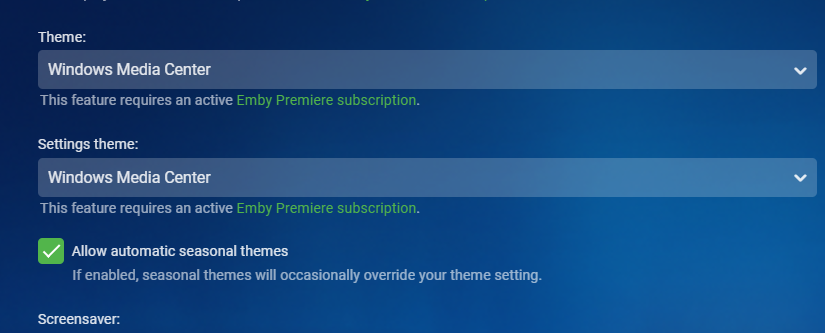
the theme name is "WMC" windows media center.... blue theme . I love the simplicy and clean UI. No different stuffs goin on just my media.
 1 point
 -
Looks amazing! Petition to replace the WMC theme with this one in Emby? Since WMC isn't used anymore. Or an more modern theme. @Luke@Happy2Play0 points








.thumb.png.95cc3d1db8647ae8b43445662d190f9d.png)