Leaderboard




Popular Content
Showing content with the highest reputation on 06/05/25 in all areas
-
Hi, This has been talked about a lot on the Apple TV forums, but there is no formal request for it. So I do it here, please add support for MKV HEVC HDR playback using Apple TV (without tone mapping). I don't care what technique you use. Either adding HLS fPM4 support to the server or improving the MPV player. I anticipate that I am not satisfied with you saying that Apple TV does not support that, since most players on the market support it. Thanks2 points
-
https://hlsbook.net/hls-fragmented-mp4/2 points
-
We are now 15 months into the 4.9 development cycle. The 4.8 development cycle lasted 22 months. When 4.8 was released the Emby team hinted at smaller more frequent releases but only time will tell. There are some key features promised as part of 4.9 that we have yet to see so I suspect it will be some time before a stable 4.9 is released.2 points
-
Indeed, "search features" could be great Possibility to choose category, quality, language, etc directly on the search page / search page result2 points
-
Request an option to autoplay single media items such as movies, Continue Watching items, etc from Home Page for all clients such as Kodi does. Items such as Latest TV Shows, My Media, etc would still open like it does now. The Play option in long press would then swap to bringing up the details page if option is set Reason: Reduces clicks if you already know what you want to watch Not all devices support long press **This would also require Resume to be default on any partially played video2 points
-
Erik, from an expectation management perspective, the most important thing you can do right now is to restore trust through radical transparency. The situation, as it stands, doesn’t inspire confidence and hasn't for years, but there are some practical steps you can take immediately to start turning that around: Clarify the Beta Timeline People are asking because they care. Avoiding the topic fuels speculation and often negativity no matter how many bugs you squash and how hard the team has worked. If the current beta cycle has a projected end date, share it, even if it's subject to change. What I've learned over the years about SDLC is that it's all about adapting (Agile), but to keep your community and users happy, it also requires to have to have some visibility. Communicate clearly: “The current beta cycle is expected to run until [date], with reviews at each sprint to validate readiness for release.” The Emby team took the first step towards this years ago with the open beta programme, maybe it's time for the next step. Share the Roadmap Does TV-Next have a delivery roadmap? If not, maybe it's time to draft one. It doesn't need to be a rigid Gantt chart, just a high-level view of milestones, sprint goals, and feature releases. If you do have one, make it public (or at least customer-facing). Transparency breeds confidence, and Agile lives, no, thrives on that openness. People understand delays, but they crave honesty and progress tracking, especially for a much anticipated add-on like this. If you're facing blockers or scope creep, say so. Turn the community into your allies by showing them the plan and how you’re adjusting as needed. This can be a limited audience, you do not have to announce this to the whole world. Also, this isn’t about promising perfection. It’s about continuous delivery, fast meaningful feedback, course correction, and keeping your community, which is already very dedicated as a lot have been around here for a decade or more, happy. TL;DR: Set a target end date for the beta phase Publish a delivery roadmap with major milestones Communicate often, adjust openly, and be transparent about what’s next That’s how you manage expectations and keep people engaged.2 points
-
I'm a plex life time member, but I have been using Emby for over six years continuously, but there is a feature which I have always thought is missing in Emby which I would like and encourage the developer to consider including especially in this dispensation where families can social or commingle due to COVID 19. Today, I received a notification from Plex about it new feature titled Watch together you can read about it here https://support.plex.tv/articles/watch-together/ The feature allows friends and families at distance to watch same movies together instantly, you simply invite all your buddy, once they signed to the system which can be seeing in the server then play and pause as needed, this I think is cool feature should be added to emby. Let's here your though if Emby developer should consider adding this feature to our beloved Emby Media https://www.bing.com/news/search?q=Plex+Watch+Together&qpvt=plex+watch+together&FORM=EWRE1 point
-
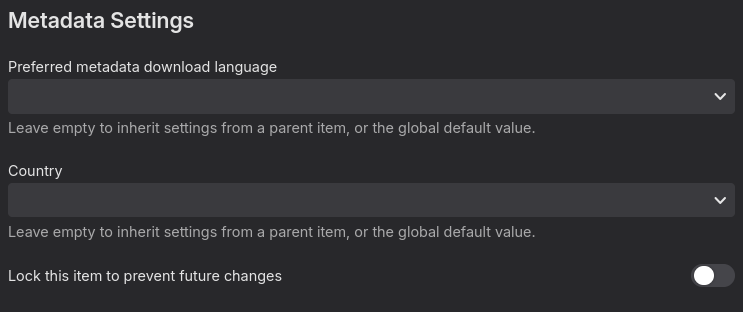
Yep. I've just logged back into TheMovieDB and guess what; they're having a hard time convincing the admins there their data is wrong. For now I've manually set all the season data so that won't be lost anyway. Maybe it's an idea to note that "lock this item for changes" switch because I've never noticed it before and is very useful in cases like these where the datasource is misleading for only a single season/episode or so. This issue is resolved because my question has been answered.1 point
-
Thanks, it's working now. I'm an idiot and completely missed that POST /Collections requires query parameters (and not a JSON request body).1 point
-
Hi, I just tested this and it changed immediately just fine, both adding and removing custom css. This is on localhost. Any change to custom css causes the web app to refresh immediately after clicking save.1 point
-
For HDHR the only logo source is your guide data, hence this option isn't necessary for it.1 point
-
@vdatanetThank you for educating me I was wondering1 point
-
Hi, have you tried using the browser debugger to compare your request to what the web app sends for the same action?1 point
-
Emphatic +1. fMP4 support is sorely missing.1 point
-
Your answer effectively amounts to, 'it will come when it comes'. the current beta updates are minor...there is zero visibility on when 4.9 is no longer beta. There is zero visibility on when TVNext features will be released. If you consider that to 'fully answer' the question, well then, we have different definitions of 'fully answered'.1 point
-
Yup, all the way at the bottom.
 1 point
 -
Old thread I know, but I though it would be useful for others to write that I too had this problem, after just setting up remote access to my home network via WireGuard on pfSense. Following Luke's instructions solved the problem and now Emby is playing audio and video flawlessly over any network.1 point
-
@Neminem I'm only using the NFO storage method and I've disabled thel loaders so I have a backup with each file without them interfering with updated meta. So yes but they're not being read.1 point
-
Format wars .. don't you just love them...1 point
-
Yes the install is not that complicated but preparing the usb stick every month is a hassle. If jumping through hoops was an option I would have gone with jellyfin instead of emby.1 point
-
Since the fallback "basic HDR10” is there, I think it should be possible to manually trigger the fallback HDR instead of it being locked to do something that result black screen1 point
-
I turned off the option "allow direct subtitle extraction" under "transcoding". Open subtitles are now found again!1 point
-
Yes, it's listed in the FAQ as being required. Without the plugin it can cause syncing issues, etc when deleting items from Emby.1 point
-
So...by default Starlink gives you a private IPv4 address but you can request a public internet routable IPv4 (it may just be limited to business customers). But this won't solve your issues as Starlink routers do not allow you to port forward. I imagine when you set up your VPN it was outbound from within your starlinked network but because they are using Carrier Grade NAT this will break every so often and there's not much you can do. What they do support is if you have your own router and bypass the Starlink one, your own router can request a pool of internet routable IPv6 IPs, these can be assigned to your emby server and you can control your own routers firewall to allow traffic in/out. The benefit of doing this with IPv6 over IPv4 is that they won't change. https://starlink-enterprise-guide.readme.io/docs/ip-addresses https://www.starlink.com/gb/support/article/1192f3ef-2a17-31d9-261a-a59d215629f4 These links have the info I was looking at, the key is setting up your own router to request IPv6 using SLAAC/DHCPv6-PD, once your router gets the network range for it's interface you can allocate devices with Ip's from that range. Hope that helps your googling1 point
-
Please fix this problem1 point
-
I learned that it's just in the browser cache when it was removed from the settings pages. Simply empty this one or CTRL + Shift + R normaly refreshes the page correctly But like written - this was it for my case - maybe also for you?1 point
-
Hi, Thanks for the answer, and I landed on this solution yesterday after some more testing. The issue I have with this, is that in the browser, if I just append /emby to my base url, I bypass the auth. I hoped there were a less "wildcard" approach.1 point
-
Before that, but we will be updating on the beta channel soon.1 point
-
Is Emby going to fix this? Just upgraded my AFS to a 4K Max Gen 2 and the problem is still there. VIMU player fixes the issue for me (AFS connected to old LG TV) with Emby set to use external player. VIMU lists its "engine" as "HLS/DASH over ExoPlayer2" And has the following "video" options set Dolby Vision Convert Dolby Vision Profile Remove HDR10+ (Remove HDR10+ metadata during playback) Surely it would be possible for Emby devs to add the same options?1 point
-
If/when it happens again I will1 point
-
OK I see the issue. thanks.1 point
-
Good Morning ...and @Luke, what do you think, is this possible in the short future ? That will be a great addon, for the great services from Emby..;)1 point
-
That's a cop-out/excuse. I can name any number of other Apple TV players that have no issues with this.1 point
-
Just use INFUSE with the Emby plugin. It's the only real option for Emby Apple TV users.1 point
-
Beta was supposed to be short this time around but it is turning same as the previous one very disappointing that we can start testing something that was said was ready for long time .1 point
-
As mentioned, half a decade of 'soon' really doesn't amount to anything much.1 point
-
This would be an awesome feature to have. A definite must have in my opinion. I hope the EMBY devs put this on priority status. I believe It would hugely benefit users as well as EMBY as a product. Also, and correct me if I am wrong, but a chat server isn't needed really since people watching remotely will be organizing via phone, text, zoom, google meet, facetime, signal, whatsapp, slack, messenger or whatever likely anyway. I know when we do remote movie parties with family and friends we all connect on an app or phone first and often keep a phone call going through the movie to communicate (shouting, talking, etc.). For me, anyway, just a simple way to gather up the people on EMBY and have the host hit play and have all the clients in the party pool play the movie at the same time would be a killer feature. Thank you.1 point
-
@Lukeis there a way we can fund the work for this as a community? I'm pretty sure that there is enough interest in this that the community would come together to help pay for this feature. I know I personally would be willing to pay a decent sum to contribute towards the development costs for this. Plex has torched the last thing tying me to their software, and Emby is my next home for my friends and family. I've actually referred another friend of mine here and he plans to get premiere as well. Is there anything that we can do as a community to aid you in bringing this functionality to Emby?1 point
-
Still would like to see this implemented natively in emby. Any news on this?1 point
-
Hi, we are working on getting it caught up !1 point
-
Soon. The most imprecise word in the English language. Every time there is an update I install the ARM version hoping the menu item is back. And it's not1 point
-
Sorry, this really looks like hidden advertisement or a scam. You are not willing to get hardware upgrades but okay with spending on some "professional media server performance optimization"? Professional optimization of a persons personal media server has to be the strangest thing i have heard yet this year.1 point
-
Hi, the nav bar hasn't been added to the Arm64 version yet, but it's on our to do list. If this is important to you, you can always use the x64 version in the meantime.1 point
-
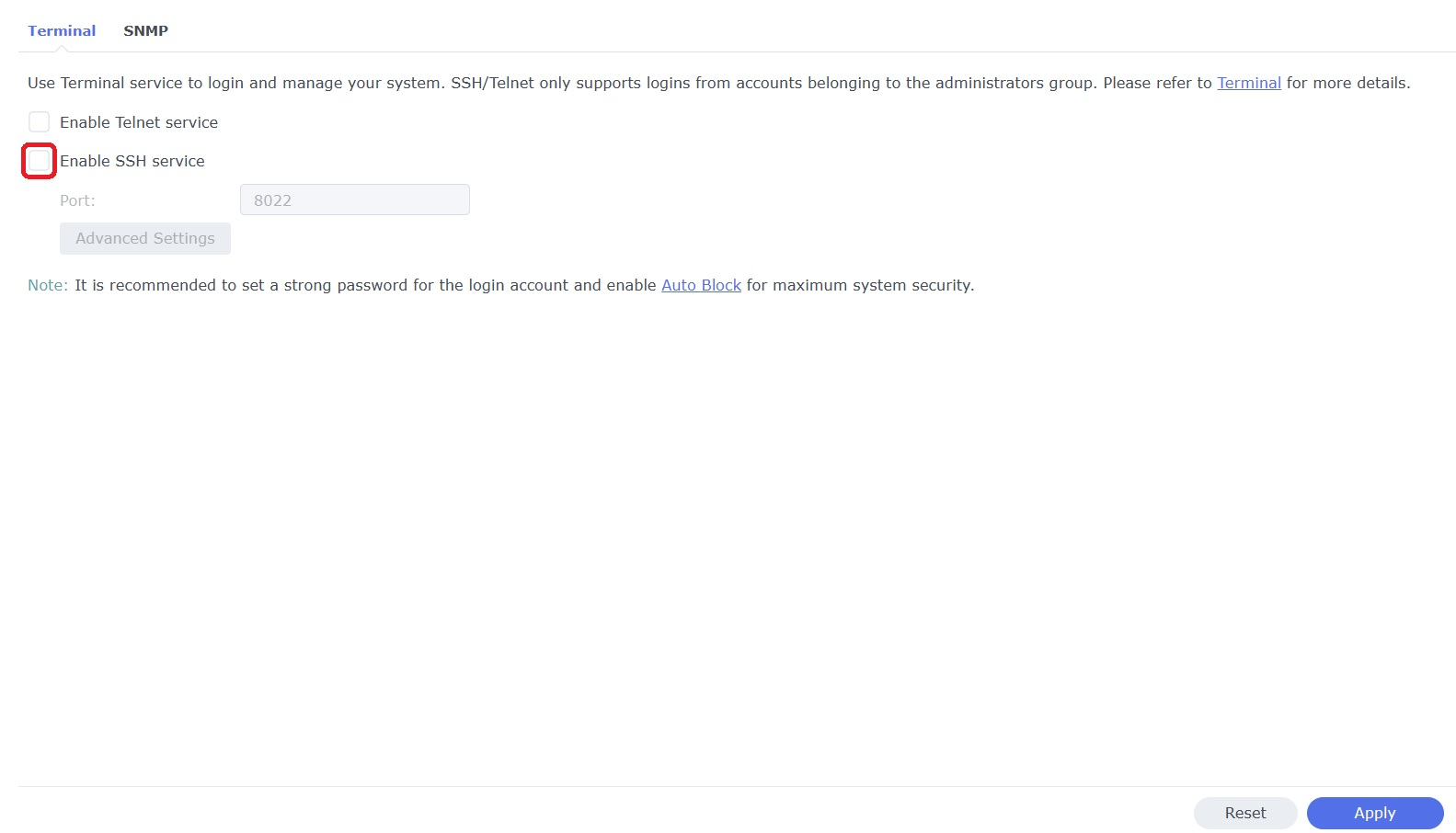
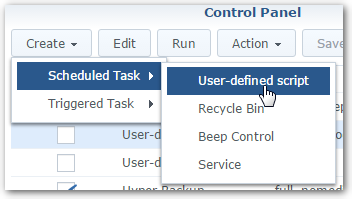
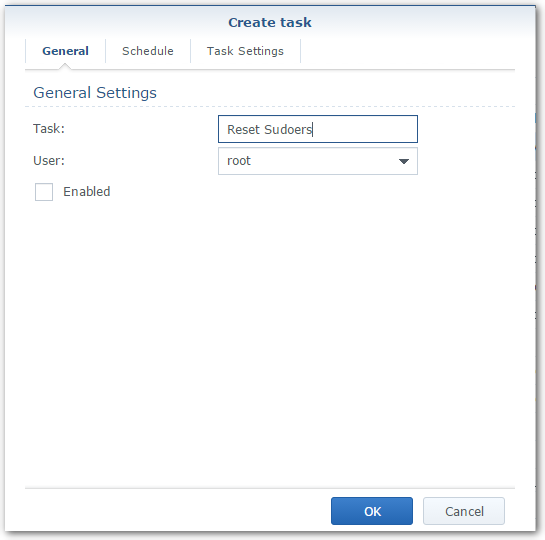
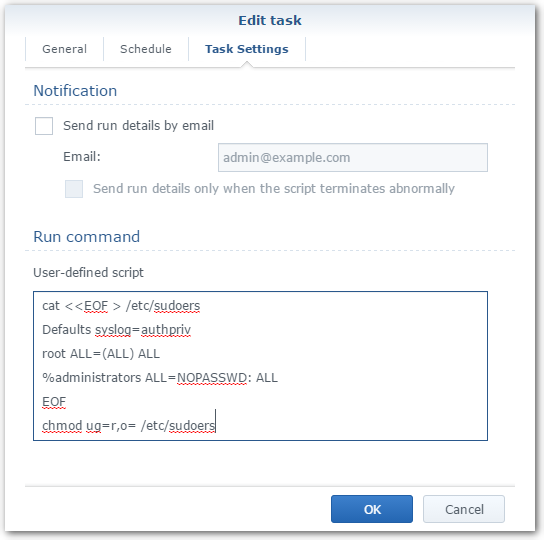
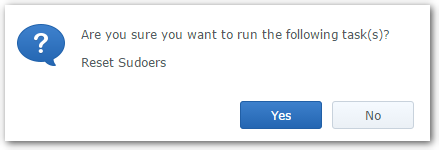
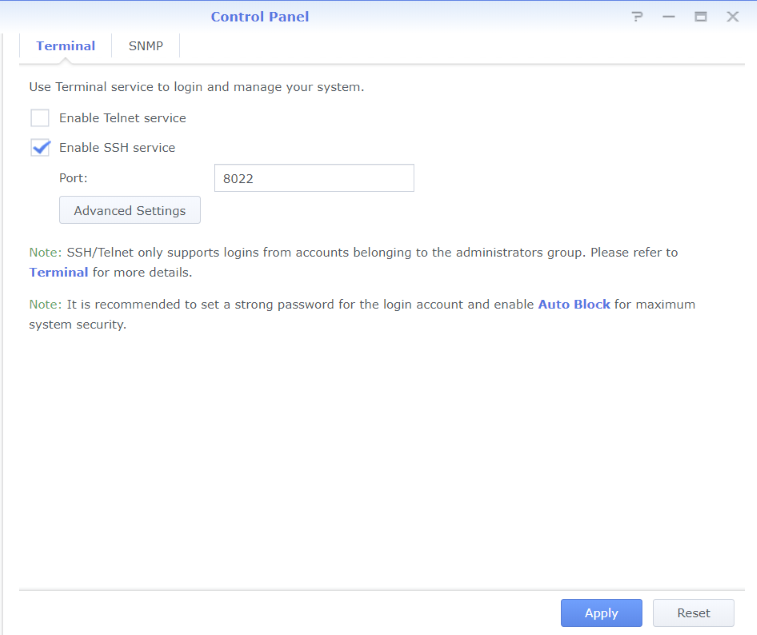
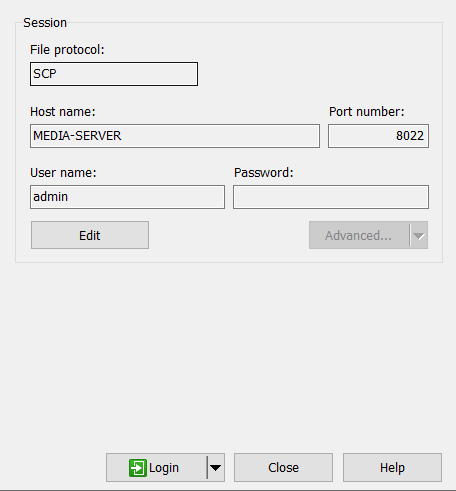
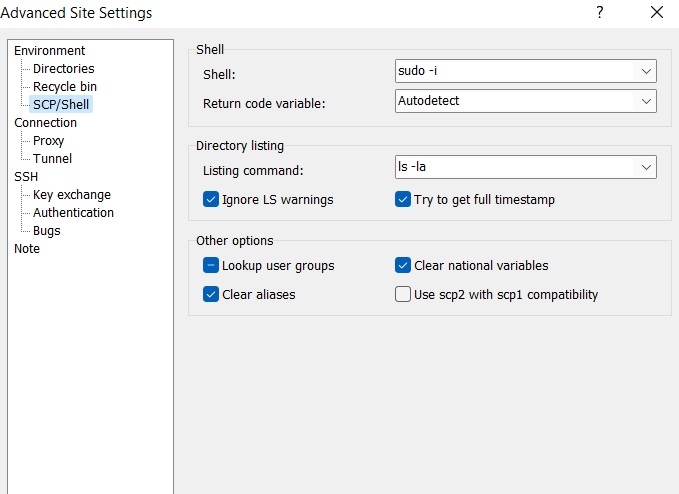
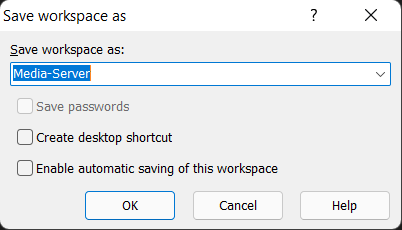
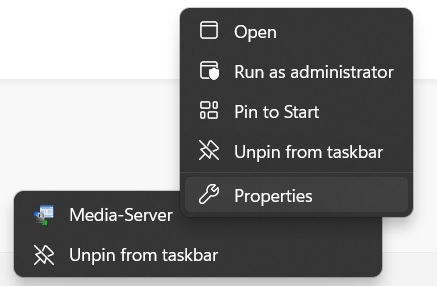
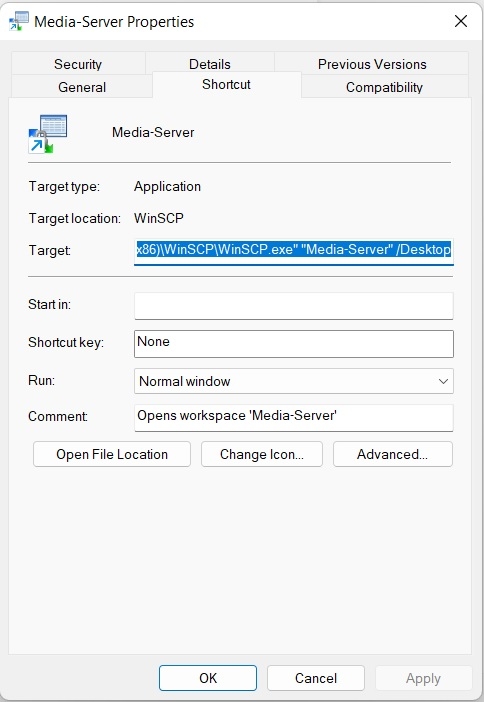
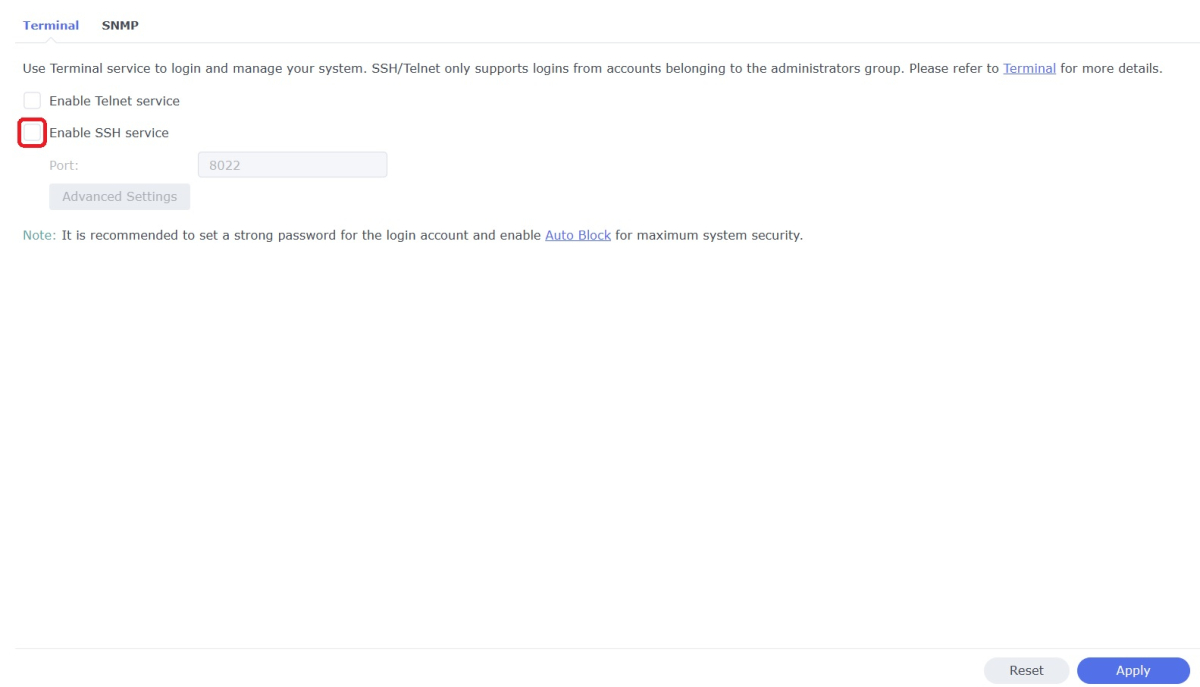
WinSCP is a popular SFTP client and FTP client for Microsoft Windows which can be used as a GUI alternative to Putty or Terminal. The procedures below will allow you to perform tasks as Superuser just like you can with Putty or Terminal. Superuser privileges may be needed for the following: full read/write/ execute privileges creating or installing files or software modifying files and settings deleting users and data If you do not need superuser access with WinSCP and just want to access your NAS using Admin then skip the steps (2, 3, and 6) in blue. 1. Enable SSH on Synology NAS Open DSM Control Panel Click Terminal & SNMP Click Terminal tab Check "Enable SSH service" Click "Apply" 2. Create script to modify sudoers config file on Synology NAS This script modifies the sudoers file which is needed to prevent DSM from prompting administrators only for the Admin password again when switching to superuser during the login process as WinSCP can't handle this prompt. This script is saved to rerun again later because DSM updates tend to overwrite any changes to the sudoers file. Open DSM Control Panel Click Task Scheduler Create a Scheduled Task - User-defined script Click General Tab Set task name "Reset Sudoers" Set user as "root" Uncheck "Enabled" box Click Task Setting tab Copy/paste the following into the Run command box cat <<EOF > /etc/sudoers Defaults syslog=authpriv root ALL=(ALL) ALL %administrators ALL=NOPASSWD: ALL EOF chmod ug=r,o= /etc/sudoers Click OK 3. Run the "Reset Sudoers" script on Synology NAS This step will need to be rerun whenever a DSM update puts your sudoers file back to default Highlight the new script you just created Click Run Click Yes 4. Install WinSCP Download and install WinSCP on Windows machine https://winscp.net/eng/download.php Allow WinSCP to start when done 5. Configure WinSCP to auto logon Create a new session/site: Change Login window using the following File protocol: SCP Host name: enter the NAS host name or IP address Port number: enter the port number you used from step 3 Enter User name: "admin" and password 6. Add switching to super user Click the Advanced... button In the the Advanced Site Settings window do the following: Select SCP/Shell under Environment Shell box: "sudo -i" Click OK to return to the Login window Click Save Click "Login" 7. Create a saved workspace for WinSCP (this step is optional) This will create a Windows shortcut to start WinSCP and automatically login to your session without any prompts Log into your new session you created in Step 5 Click Sessions Click Save Workspace... type a name for your new workspace Click OK 8. Create a shortcut for WinSCP on taskbar (this step is optional) While WinSCP is running Right Click the icon on the taskbar and choose "Pin to taskbar" Right Click on the WinSCP icon on the taskbar again Now Right Click on the WinSCP workspace you used in Step 7 and choose properties Your shortcut should look something like the one below with the exception of the workspace you used above Example Windows shortcut used on target line above "C:\Program Files (x86)\WinSCP\WinSCP.exe" "Media-Server" /Desktop Click OK Click WinSCP icon on taskbar start WinSCP and be logged into your NAS as Superuser without any prompts 9. Disable SSH in DSM (this step is optional) After you're all done using WinSCP it may be a good idea to close this port for security reasons. Additionally, you can also disable your Admin account now if you enabled it to do this. When you need to use WinSCP again just reenable SSH and you're ready. Open DSM Control Panel Click Terminal & SNMP Click Terminal tab Uncheck "Enable SSH service" Click "Apply"
 1 point
 -
HI, we are working on improving it. Thanks.1 point
-
If you ran the script and ever want to set DSM back so that it prompts administrators for the Admin password again when entering sudo commands then just use a text editor to modify the sudoers file and change the parameter from 'NOPASSWD' to 'PASSWD'.1 point
-
Modified so people know what steps they can skip if they just want to use WinSCP with Admin and don't need to switch to superuser when accessing their NAS.1 point
-
I also prefer the native player but that requires HLS fMP4 support and its implementation does not seem easy.1 point
-
+1 (x10000000000000.........) I do prefer the native Apple TV player over MPV - it seems to have better image quality (besides also allowing for frame rate matcing ).1 point
-
Hi, yes this is something we're very interested in. Thanks for the feedback.1 point










_svg.thumb.png.85e4ee6291ddd76347269c05175b5dda.png)










.thumb.jpg.c75790b7d9d27e0415687d7d6d1197cf.jpg)