Leaderboard




Popular Content
Showing content with the highest reputation on 05/31/25 in all areas
-
Erik, from an expectation management perspective, the most important thing you can do right now is to restore trust through radical transparency. The situation, as it stands, doesn’t inspire confidence and hasn't for years, but there are some practical steps you can take immediately to start turning that around: Clarify the Beta Timeline People are asking because they care. Avoiding the topic fuels speculation and often negativity no matter how many bugs you squash and how hard the team has worked. If the current beta cycle has a projected end date, share it, even if it's subject to change. What I've learned over the years about SDLC is that it's all about adapting (Agile), but to keep your community and users happy, it also requires to have to have some visibility. Communicate clearly: “The current beta cycle is expected to run until [date], with reviews at each sprint to validate readiness for release.” The Emby team took the first step towards this years ago with the open beta programme, maybe it's time for the next step. Share the Roadmap Does TV-Next have a delivery roadmap? If not, maybe it's time to draft one. It doesn't need to be a rigid Gantt chart, just a high-level view of milestones, sprint goals, and feature releases. If you do have one, make it public (or at least customer-facing). Transparency breeds confidence, and Agile lives, no, thrives on that openness. People understand delays, but they crave honesty and progress tracking, especially for a much anticipated add-on like this. If you're facing blockers or scope creep, say so. Turn the community into your allies by showing them the plan and how you’re adjusting as needed. This can be a limited audience, you do not have to announce this to the whole world. Also, this isn’t about promising perfection. It’s about continuous delivery, fast meaningful feedback, course correction, and keeping your community, which is already very dedicated as a lot have been around here for a decade or more, happy. TL;DR: Set a target end date for the beta phase Publish a delivery roadmap with major milestones Communicate often, adjust openly, and be transparent about what’s next That’s how you manage expectations and keep people engaged.4 points
-
Could we bring back that summary at the end of a episode with details on next episode instead of just" keep watching and next episode" Could display summary, rating, and cast maybe all custom infos Could be even full screen with backdrop and we reduce the current playback in a small square like somes tv compagnies does2 points
-
As mentioned, half a decade of 'soon' really doesn't amount to anything much.2 points
-
I didn't know it was time for our ~quarterly revolt. Let me go grab my pitchfork!2 points
-
When it comes to managing and streaming your personal media collection, Emby stands out as a favorite among home media enthusiasts. Whether you're a cord-cutter, a collector, or just someone who wants full control over your content, Emby delivers. But don’t just take our word for it — recently we took a look around the Emby Community Forums, Reddit, and other media server discussions to find out what users love most. Here are the features Emby users say they can’t live without: 1. Active Development and Plugin Ecosystem The Emby dev team has built a strong reputation for listening to users and delivering consistent improvements. Feature requests are often acknowledged in forums, and updates come regularly. The Emby Plugin Catalog includes tools for metadata management, intro skipping, trakt.tv syncing, theme music, and more — making it easy to expand your setup. 2. Emphasis on Privacy and Local Control Unlike some competitors, Emby doesn’t force users into cloud integration or tracking services. Features like Trakt and others are optional, and you’re never required to give up control of your data. This focus on local-first architecture makes Emby a great option for privacy-conscious users who want full control over their media experience. 3. Customization and Theming From custom libraries to visual themes, Emby offers a highly customizable user interface. Users can choose how metadata is displayed, organize content into rich collections, or apply unique visual themes and CSS tweaks. For families or multi-user households, Emby also supports user profiles with individual settings and parental controls. 4. Direct Play and Efficient Transcoding Emby is built to take full advantage of Direct Play, reducing the need for CPU-intensive transcoding. For devices that require conversion, transcoding is efficient and can be customized for quality and bitrate. If you’re running a hardware-accelerated setup with Intel Quick Sync, NVIDIA NVENC, or AMD VCE, Emby can offload transcoding for better performance. 5. Live TV & DVR Integration One of Emby's most appreciated features is its native support for Live TV and DVR. Whether you're using a TV tuner or loading an M3U playlist from an IPTV provider, Emby makes it easy to stream live television directly from your server. With season pass recording, time-based scheduling, and automatic commercial skipping (with optional plugins), Emby turns your home server into a powerful personal PVR. Bonus: Multi-Platform Support From Android TV, Apple TV, and Firestick, to iOS, macOS, Windows, and even Linux, Emby has apps for nearly every device. And with Emby Theater, you get a lean-back experience optimized for the big screen. Final Thoughts What makes Emby stand out isn't just its feature list — it's the freedom and flexibility it offers to its users. Whether you’re building a streaming server for your family, archiving physical media, or curating a collection for your home theater, Emby puts you in charge. Ready to try it yourself? Download Emby Server and see why so many users are making the switch. View the full article2 points
-
An updated version of the Emby Open Subtitles plugin is currently rolling out. We have switched from opensubtitles.org to the newer opensubtitles.com This means you will need to create an account on opensubtitles.com and configure that in Emby Server settings. Until you do that, you won't get any subtitle downloads. Stay tuned for more developments on subtitle downloading !1 point
-
Hi, Brand new user here... one of the first things I noticed immediately in the behavior of the playback progress bar: It eventually goes away of you watch long enough the same channel, is this know issue? Apple TV A2843 tvOS 18.5 Emby client v1.9.91 point
-
It would be nice if it were possibly to play audio only, especially on phones (and in the background). For example if I have a comedian standup movie, it would be great if I can just listen to it on my phone in the background.1 point
-
With the old trakt plugin we had the option of rating something after it was over, it would be nice to see that brought back. Something very simple and maybe as easy as selecting the rating by hitting the number on the remote.1 point
-
Please don't release before ready!1 point
-
Very much looking forward to seeing stable 4.9.1 release i see the change list is quite large hoping it also fixes some of the constant out of sync audio to video i get on my c855 tcl. love the work so far guys.keep it up especially looking forward to hevc.1 point
-
Thank you very much!1 point
-
HI, since we do that for subtitles, and since this uses almost identical detection, yes that would be feasible. Thanks for the feedback.1 point
-
interested in profiles similar like Netflix, some people share accounts with gf or kids and they not want to share some libraries, or tvshows progress.1 point
-
@pwhodges: But anyways: Even IF your point (that forced subtiltle tracks would be included in the default ones) were always true (which I acknowledge happens), that would still prove my point, that emby choosing primarily the forced subtitle over an existent default flagged subtitle track when starting the playback still results in the wrong subtitle display (when having "DEFAULT" as subtitle mode). Which then forces an imho unncessary user interaction. You cutting the forced flags out of files is just a workaround for programs that choose the wrong priority for subtitle tracks. So my actual wish for the different cases would be to have this implementation: Check if a file has a forced-flagged subtitle track If yes Check if the file has a default-flagged subtitle track If yes Set subtitle playback track to default subtitle track If no Set subtitle playback track to forced-flagged subtitle track If-End If no (regarding the forced flag track) Check if the file has a default-flagged subtitle track If yes Set subtitle playback track to default subtitle track If no Set subtitle playback track to "null" (no subtitles shown at all) If-End This implementation would regard the subtitle tracks in this order: default flagged track > forced flagged track > no subtitle shown This would create a better experience for everyone independently of forced flag tracks being included in default flagged tracks. And for you, @pwhodges, it would cut off the necessity to remove the forced-flag tracks of your files.1 point
-
Looks like we are starting over the count to 60 rather than having a release.1 point
-
Thanks @Luke, feel like a bit of an idiot now. That was the problem- it seems to have reset at some point to 1080 - 60 Mbps for home streaming. Bumped it back up to 4k - 200mbps and it instantly started working. Appreciate the help!1 point
-
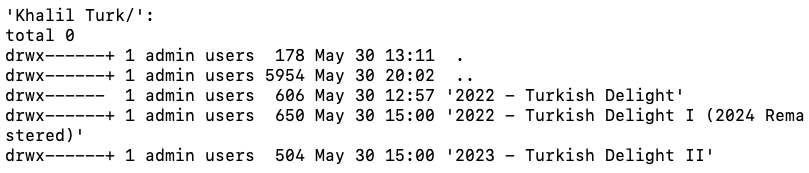
Hey @user24 Thanks a lot! I figured it out, based on what you told me to do... In fact I stumbled upon the solution First, I checked the folder structure and the albums were not there, which pointed again to permissions. But I had checked all the permissions on the FILES over and over... but never crossed my mind to check the permissions for the DIRECTORIES. Then I did (screenshot attached) I saw that "regular" directories had the "+", indicating extended ACLs but the directories I added didn't. So I tried the following: Rename the old directory, adding an appendix, say "-a". Create a new directory with the same name as the old one (minus the prefix of course). These new directories get created with the extended permissions. Moving the files from old to new directory and delete the old one. That fixed the problem. Just had to do it to the directory of every missing album. I went on, looking for the cause. Turns out that: when the Mac's zip program decompresses the file and there's a directory inside, the directory has permissions of its own, and when I move the directory to Synology (which I access via NFS from my mac and NFS keeps permissions on copy), it keeps the original permissions, not adding the extended permissions (indicated by the + sign). Without these permissions, Emby can't see the folders. I managed to reproduce this by re-tracing my steps and decompressing the zips, moving them, etc... Now I'm writing a script to traverse my whole directory tree, looking for directories without the proper permissions and fixing everything. I'll schedule the script to run once a day to find this sort of inconsistency. Thanks a lot @user24! Regards, _______________________ DiabboVerdde
 1 point
 -
Hi, yes these are great suggestions. We'll take a look at them. Thanks for the feedback.1 point
-
I have backups from another server. I built a new server and wanted to restore the backup from the old (existing server) onto that new server. Anyhow I discovered the issue. Emby backup will only show the restore button if you have a full backup in your restore directory (where you pointed it to). I am spelling this out for the next person who is riding the struggle bus in the future. If you configure Emby backup folder to (for example) "D:\Emby Backup". You must place your old backup (or any backup) into that EXACT directory. I made the mistake of placing my backup on my users desktop "C:\Users\Emby\Desktop". Thinking that I would be able to click the restore button -> navigate to the backup and restore it. Well you can't. As pictured above the restore button doesn't exist (literally hidden) until a backup is placed into that backup directory. Looking back at this I understand the concept. Backup must be in backup directory, otherwise the option to restore backup is hidden from end user. My personal expectation was restore backup option is not hidden -> I click "restore from backup" -> windows file explore pops up (or I click the magnifying glass) -> navigate to backup on my desktop -> restore -> success. So for anyone restoring from backup (fresh server installation) -> place a full backup in the same directory as "backup folder" path -> you should then see the restore button appear in the server settings. And you can restore your backup. ------------------------------------------------------------------------------- A few suggested enhancement to the dev team to improve user experience\confusion would be: During the server installation process. The first option should be "Do you want to restore from backup?" (even before creating an account and disabling UPNP etc). Other option is to add a little text box explaining why restore button is missing when you first build server "restore button will appear once first backup is created in XYZ hours. You can manually trigger your first backup by going to scheduled tasks -> server backup -> play button" Other option is to make the restore from backup button available at all times, and allow/direct the user to place their old backup in the same location as the new backup directory (or let us choose a backup file from any location with file explorer).1 point
-
It could be any number of things besides just incorrect login. For example, it looks like you're expecting local server credentials. Maybe they're confusing the difference with Emby Connect and entering Emby Connect credentials into your UI. Or maybe they restricted device access and forgot about it, or remote access. The server log will usually have the answer.1 point
-
I think for that kind of filter you would have to set it up at an earlier level than Emby Server, like in a reverse proxy so that the request never each reaches your Emby Server.1 point
-
That probably makes sense, yes.1 point
-
I had another thought: When I play long playlists, but start & stop, then restart, the SHUFFLE function often plays the same songs. You could have a "switch" (so this feature could be turned off or on) that would continue the original shuffle on serial playings, so that songs played before would not play again until the full song list had been run through, no matter how many days or sessions were used.1 point
-
Yes, the external disk via OTG is now accessible. Thanks, Luke.1 point
-
then how about provide an update of substance?1 point
-
Update. I just opened up the web browser and my music library loaded flawlessly. embyserver (4).txt1 point
-
Don't have a shield. On the Amazon Fire TV 4K Max (Gen1), I have not seen either issue using the STANDARD Android App, which is my primary Emby app. I also have the Android TV Emby app installed (just for checking it out) and not seen it on that. For the above test on the LG WebOS25 on a 2025 G5, I did use the "Memory Cleaner" before I ran Emby to make sure everything was freed up and clean. This is built into the TV menu settings by LG. Issue #3: When an episode plays its end credits, and the "Continue Watching" and "Next Episode" buttons show, and the countdown indicator of how much time is left on the credits playing till the end, when the episode stops, and you are just with one button, it takes TWO presses of the BACK button on the remote to get back to episode list. It should only be one press of the BACK button.1 point
-
It never really got used would be a more accurate statement.1 point
-
Emby for Apple TV 1.9.9 has been released. Here are the highlights: Support playback correction in the video player Support sleep timer in the audio player Support subtitle offset in the video player Support new youtube trailer playback (in the 4.9 server) Fix home top tabs not being translated View the full article1 point
-
This problem has not been resolved.1 point
-
Audacity would actually edit the FLAC files to boost or lower the volume. That's not really feasible on a large library. metaflac will actually analyze FLACs and apply ReplayGain tags to them, and it's a command-line tool so it could easily be done in bulk. Of course, this is all academic until this is implemented.1 point
-
I know there's a ton of dev work always going on for the Android side of Emby, but just wanted to say that I think if Emby could get some better Apple TV work done, they might be able to bring over a bunch of Plex users due to the garbage client update that they're forcing on everyone now. Main thing I'd like to see is auto-HDR (changing the Apple TV to HDR mode when playing an HDR video) - has been asked for a long time now. Also making sure that it can play all DV content. I know that Channels DVR just made changes to their Apple TV client to support DV and it didn't seem to be a very big lift. I know everyone will say to use Infuse, but that doesn't support multiple user profiles.1 point
-
I know @Luke, but you've been saying the exact same thing for a long time now...would be nice to see it on some sort of roadmap, along with an ETA.1 point
-
Looks like there's a ReplayGain implementation for MKV files: https://github.com/kevinlekiller/mkvrg. Whenever this gets implemented for audio, it'd be cool if the logic could also be used for videos.1 point
-
Having spent a couple of decades working in product development and product marketing, it makes a lot of sense to me that Emby doesn't (and won't) publicly discuss its future product roadmap (even just a little bit). I can't think of too many high-tech companies that do? Generally it comes down to: Company (Business priorities can and do change for many various reasons - financial hurdles, technical roadblocks...) Competitors (The golden rule - never ever let the other guys know what you are doing, but learn all you can about them!) Customers (Communicate well - but don't put the company in a compromising position by giving competitors any undue advantage.) Anyway, perhaps Emby could also answer these questions: What is Emby's history and product evolution? (newcomers may like to know) Who do you see as your main competitors and what are your product advantages over theirs? What do you see as future trends regarding (e.g.) industry consolidation, local media vs streaming, local storage vs cloud storage, emerging technical platforms and newer audio/video media formats...1 point
-
+1 to show support for this feature1 point