
Leaderboard




Popular Content
Showing content with the highest reputation on 05/23/25 in all areas
-
Hi. That is simply not how any player I'm aware of operates. You choose one and only one sub track and that is the one that is shown until you turn it off or change it. Now, the contents of the different tracks may make it appear like multiple are being shown, but that isn't what is happening.2 points
-
Looking at the .js code - I think it would be easy enough to simply add an extra condition into the for loop that builds the rows. But then you may want to include them, so it should probably just look at a config variable set in the config tab. Maybe I'll take a look this weekend if @TeamB is busy ..2 points
-
I had a similar question a few months back. Undefined users don't show up in the Ignored Users dropdown2 points
-
True, I see your point. Again, you made my day with such quick and helpful answers.2 points
-
Displaying the individual file isn't the issue. The issue is how do we display multiple files when the episodes are all out of order? And then how do we play them back in order (hint: we can't).2 points
-
Are you just trolling? Otherwise, you'd need to pay more attention and actually read the links that multiple members - including two Devs, a Moderator, two Top Contributors and few prominent Community members (personally, can't remembet when was the last time I've seen such a gathering, for you to still be as confused as you appear or act to be) - have been sharing with you and directing you to, in addition to their posts. You should inform yourself what Emby is and what it isn't - and streaming service is one of those things that it ain't. Your are already connected to an Emby Server - your own. It is up to you now to populate it with media, publicly available Netflix-style Emby Server where you can connect and stream content does not exist. Alternatively, someone from your family or your circle of friends might be willing to share their server with you - but that is again something that you yourself need to take care of and something that no member of this community has anything to do with. Hope that clarifies any doubts you might still be having.2 points
-
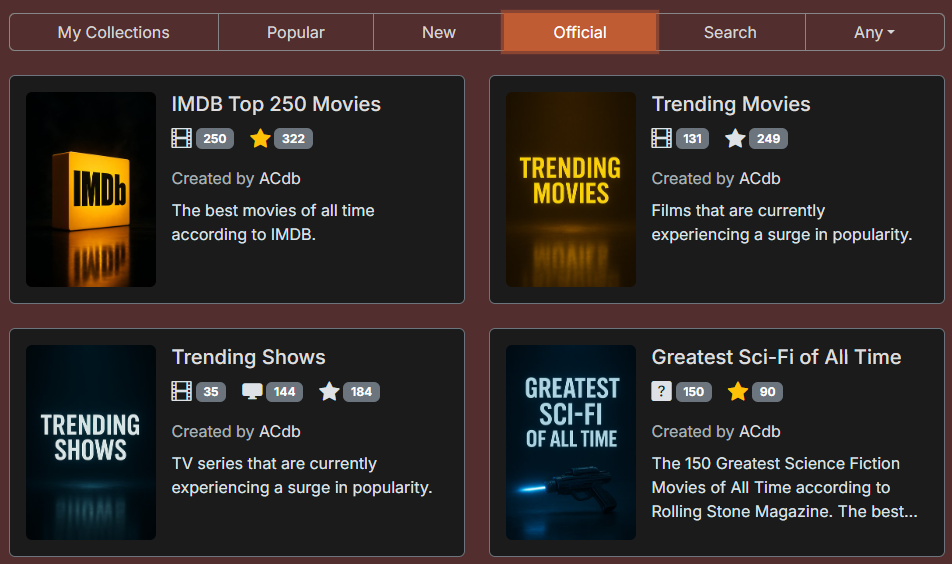
Hey guys, I've just added support for collection posters and created a gallery on acdb.tv. Right now, it features only AI-generated images I’ve "created", so please feel free to upload your own... I’ve added posters to most of the "Official" collections, though I’m still working on giving them a consistent style. If you’ve added any of those collections, posters will begin syncing to your Emby gradually, max 24 hours after updating plugin. You can assign different posters to any of your added collections, even if you didn’t create the collection yourself. Posters can be in a variety of aspect ratios on Emby, the official posters I've done to be in same ratio as default poster, in 2:3. I'll share my experience of using Chat GPT to create these posters since it was a bit hit and miss to begin with. If you like a particular style of a poster, you can attach it to a chat and ask Chat GPT to generate an image in the same style and mention the 2:3 aspect ratio every time. Some example chats (the posters I attached at the start of the convo don't show when sharing but you get the idea). https://chatgpt.com/share/682f9540-220c-800e-8b2d-5fe17e82866e https://chatgpt.com/share/682f95ad-f35c-800e-b542-5a625d3f2d28 Keep the chat thread short, once you have something you are happy with, start editing the last prompt to make something new instead of continuing on or AI gets confused in my experience.
 2 points
 -
Personally, I would have different SSID's for different WiFi bands for exactly this reason. With regards to Netflix, YouTube, they heavily optimise their media streams to support streaming, including file format, codec, delivery method, resolution and encoding. Emby is playing your media, your way, and isn't trying to do this optimization so it will be more sensitive to network issues.2 points
-
@ebrThank you very much. So you were correct, Ih ad deinterlacing on the server for the non-working TV., disabled and his fixed the transcoding. Then we had a power outage and when it came back it seems the Firmware Upgrade on the TV hadn't completed successfully despite a notification otherwise. Reinstalled - Everything is now working perfectly ! Really appreciate your time.2 points
-
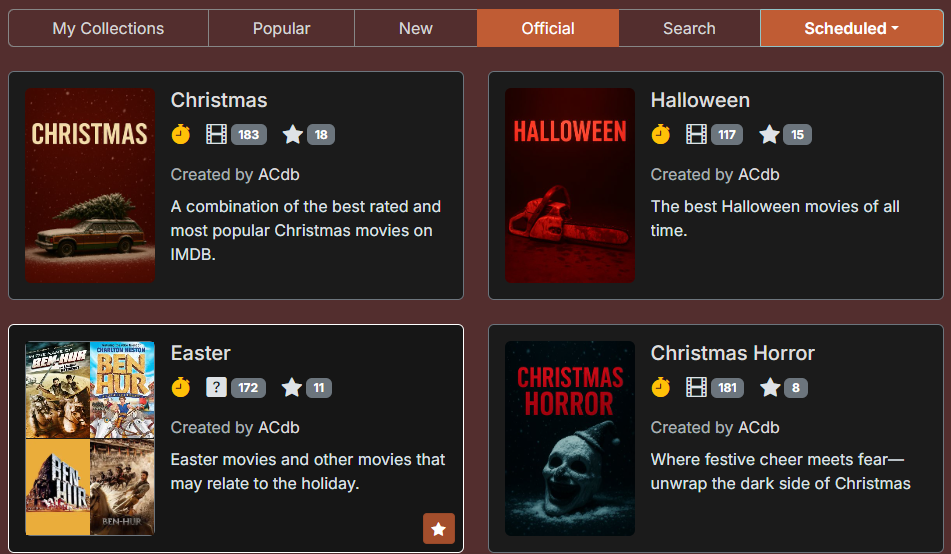
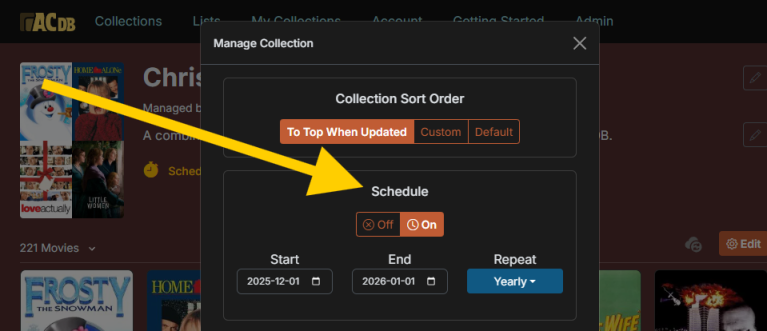
Hello everyone, I've released the ACdb.tv plugin (Automated Collections)! It allows you to sync lists from MDBList to create automated collections in Emby. I've previously created a Python script to do the same but wanted to make something that is easily accessible for everyone. Features Dynamic Movie and TV Emby collections synced periodically. Scheduled collections that are only shown during a particular season. Set up your own schedules. See missing items. Once a collection has synced you can check which items of the collections you are missing. Must be Patreon supporter to user this feature. https://acdb.tv/static/img/missing_items.jpg Custom collection ordering. Move newly updated collections to the top of other collections. https://acdb.tv/static/img/collection_sorting.jpg How To Install The plugin is available in the Emby plugin catalog. Check out Getting Started. Cost Free: 3 collections if you click "Join for Free" on the Patreon. $2/month: Add up to 20 collections, include any MDBList, and fully customize your collections. See more on the Patreon page. Work in Progress In beta, it's early days so I'm adding features these days and issues might happen. Please let me know about any issues/feature requests on this thread or the contact page which also has a Discord link. Coming up Next * Custom collection posters. How It Works Any user can add any Collections made by other users to Emby. Collections belong to their creator, so only the creator can edit the containing list, the title & description. Cloning: If you want to edit a collection you don’t own, simply clone it—now it’s yours. (Only Patreon supporters can edit collections.) The plugin checks for modified collections every 2 hours for now (might change). If a collection hasn’t been updated for 24 hours, it still syncs to ensure newly added items in your library are included.

 1 point
 -
Your Emby server is the heart of your home entertainment system, the engine that delivers your vast media library to all your devices. But what kind of hardware does it take to run a smooth and powerful Emby server? Let's dive into the essentials, from basic requirements to advanced setups. The Foundation: Operating Systems and Supported Platforms Emby is designed to be versatile, running on a wide range of operating systems, including: Windows: A popular choice for its ease of use and broad hardware compatibility. Linux: Offers flexibility and performance, favored by many power users. macOS: Seamless integration within the Apple ecosystem. Docker: For containerized deployments, providing portability and isolation. NAS Devices: Many NAS (Network Attached Storage) devices support Emby, simplifying setup and storage management. This platform flexibility allows you to choose the operating system that best suits your needs and existing hardware. The Core Components: CPU, RAM, and Storage The performance of your Emby server hinges on three key components: CPU (Central Processing Unit): The CPU is crucial for transcoding, the process of converting media files to a format compatible with your playback devices. For basic streaming of direct play content (where no transcoding is needed), a modest CPU is sufficient. However, if you plan to transcode multiple streams simultaneously, especially high-resolution content like 4K, a more powerful CPU (with built in iGPU or a dedicated graphics card) can be essential. RAM (Random Access Memory): Emby uses RAM for caching metadata, buffering streams, and other operational tasks. For most users, 8GB of RAM is a good starting point. If you have a large library or plan to transcode multiple streams, consider 16GB or more. Storage: The size of your storage needs depend on the size of your media library. Consider using dedicated hard drives or a NAS device for ample storage capacity. SSD storage for the Operating system and Emby metadata can drastically improve the responsiveness of the web interface. For optimal performance, use high-speed drives (e.g., 7200 RPM HDDs or SSDs). Hardware Acceleration: Dedicated Transcoding Performance Hardware acceleration offloads transcoding tasks from the CPU to dedicated hardware, significantly improving performance and reducing CPU usage. Intel Quick Sync Video: Integrated into many Intel CPUs, Quick Sync Video provides efficient hardware-accelerated transcoding. Quick Sync is also available on Intel's dedicated graphics cards. NVIDIA NVENC: Available on NVIDIA GPUs, NVENC offers high-quality hardware-accelerated transcoding. AMD VCE/VCN: AMD's hardware acceleration solutions on AMD GPUs. If you plan to transcode frequently, especially 4K content, taking the time to set up dedicated hardware transcoding can significantly improve performance. Choosing the Right Hardware for Your Needs The optimal hardware for your Emby server depends on your specific use case: Basic Streaming: A modest CPU, 8GB of RAM, and sufficient storage are adequate for streaming direct play content. Moderate Transcoding: A mid-range CPU with dedicated hardware acceleration (Intel QuickSync), 16GB of RAM, and high-speed storage will handle moderate transcoding loads. Heavy Transcoding: A powerful CPU with multiple cores and robust hardware acceleration or dedicated GPU as mentioned above, 32GB or more of RAM, and fast storage are essential for heavy transcoding of high-resolution content. NAS Devices: many modern NAS devices can run Emby. Research the specifications of your NAS to ensure it meets your performance requirements. Optimizing Your Server Beyond hardware, optimizing your Emby server involves: Network Connectivity: A stable and high-speed network connection is crucial for smooth streaming. Regular Updates: Keep your Emby server and operating system up-to-date for optimal performance and security. Server Location: Place your server in a well-ventilated area to prevent overheating. Conclusion Building a powerful Emby server is about understanding your needs and choosing the right hardware. By carefully considering CPU, RAM, storage, and hardware acceleration, you can create a seamless and enjoyable media streaming experience for your entire household. Also, always keep in mind the wonderful community of Emby users and admins that you can find always active on our forums that can help with any questions you may have about hardware and initial setup.1 point
-
While the application supports localization for the main interface, the language selection menu remains in English. This presents a usability issue for native speakers of other languages who may not recognize the English names of their own languages. Allowing the dropdown menu to be localized would ensure a more accessible and user-friendly experience. Thanks!1 point
-
I can confirm that the beta loads images much faster for me than the current version!1 point
-
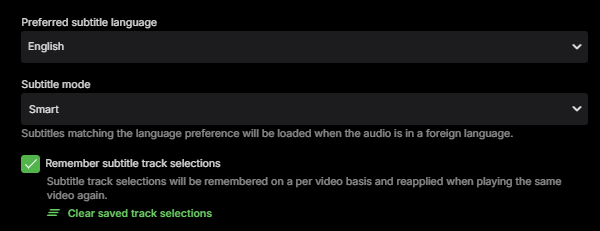
Seems to work as expected for audio tracks, but it's completely broken for subtitle tracks. I can't get the subtitles to stick for other episodes under any scenario. Even if I reach the end of one episode with the desired track selected and let it auto play the next episode, it starts with no subtitles selected (or whatever the default would dictate).
 1 point
 -
Hi Luke. I restarted the emby server to fetch the ffmpeg logs. Everything worked when I attempted to recreate the issue. Thanks anyway.1 point
-
We plan to in future updates, but we're not there yet.1 point
-
Hello all, after searching a wile under “Feature Request” and strangely finding nothing on the subject, here is my request: I am using Kubuntu 24.04 LTS with Plasma. Emby Theater was my choice because everything can be played directly without transcoding. Unfortunately, the font size at a resolution of 5120x1440 is so small that it is very difficult to read. Therefore, the ability to change the font size would be a great benefit for many. Thank you very much.1 point
-
Yeah I think it also gets picked up during a jellyseer media scan. I have radar and sonarr set to initiate a scan on media completion rather than leaving automatic scanning enabled in Emby. This results in API hits that are picked up by the reporting plugin. It's entirely a cosmetic thing that I try to ignore but my compulsive personality would love to hide it.1 point
-
I installed evermusic connected to my music folder via smb and then created a playlist manually in there, set it to offline mode so hopefully that will all work. A lot of work and a pain, plus another £30 for the app.1 point
-
Thanks. Will do. Yup, downloaded and exported the PKCS 12 again and it works. Thank you!1 point
-
Sorry Emby has no method to move/change already imported paths. It hasn't worked for everyone but the only method is manually editing the database when you do cross platform restores.1 point
-
You could adjust your method for obtaining movies to exclude the image files. Hopefully your soul can survive this ordeal.1 point
-
Does anyone know of a music player on iPad that could download my playlists from emby? I know playlists are "coming soon" but that seems to be the stock answer, along with "it's on our todo list", 5 years isn't really soon. Not sure I will still be alive in another 5 years so "soon" isn't really an option for me. It would be nice to be able to listen to my music offline while at the hospital, I don't mind getting another app but can't so far find anything that works. I don't really want to mess around with apple music, unless that is the only option, but anytime I get involved with the apple iTunes replacements I end up regretting it.1 point
-
This is a great idea!1 point
-
I got the issue solved, I am running a mesh server and my Verizon Fios router did not have wifi turned off so it was giving 2 IP addresses and wouldn't allow me to give Emby a static IP. I turned off FIOS WIFI and only using the mesh network and its working.1 point
-
That is why I was asking. I didn't know a way to do it. Not a big deal to me as I already have all the hi-rez corrected and original poster art. I just wanted to share is all.1 point
-
Hopefully will be resolve in the future release. I am in version 3.4.67 on Emby Android, but it is still reoccurring. I don't want to delete all of my downloads just to fix this.1 point
-
Thanks Luke that would be appreciated. I did end up testing with my phone and the same thing happens, it doesn't try to switch to the mobile network when the wifi network is dropped - maybe because the wifi reconnected so quickly and was not actually turned off - but either way it stopped sending POST requests with player progress. My friend did end up getting a network switch and wired the shield with ethernet and hasn't reported any issues since so I'm happy that there was a relatively inexpensive way to resolve their issue. Feel free to contact me if you have any test builds you'd like to get more data from if you're not able to reproduce this scenario with your own network equipment.1 point
-
1 point
-
Asustor users are getting it a little early.1 point
-
I figured it out. Sorry, I was used to the Plex setup where the tiles were always available and could only be hidden. I didn't realize you had to have one of your Home Screen options as My Media.1 point
-
We sort of have the same thing in Scandinavia where Denmark, Norway and Sweden have almost the same language. Maybe i can make a setting for the TV posters that something in the line of "If contains all these languages or all languages together then show this icon" I will look into it but i can't promise anything.1 point
-
Can't wait, don't hesitate if you want me to test some things.1 point
-
Updating to 18.5 solved the issue. I thought that the 16.3 might be LTS for my model, because of its age. It's been set to auto update since it was set up, so I didn't think to try a force check for OS updates. After updating it enumerates the content and plays it as well without issue.1 point
-
Installed, works, thank you!1 point
-
Beta is still at 4.9.0.59. The "fixed" Asus server version is 4.9.0.70 and installed right on top of 4.8.11.0.1 point
-
Hi. I'm not aware of "standard" as a subtitle flag. Do you mean Default? This is not correct. Only one subtitle track is displayed at any given time and a "forced" flag will usually take priority - meaning that is the one that will be selected depending on language settings. A subtitle marked "forced" is usually a track that shows subtitles only for portions of the video where the spoken language doesn't match the primary language of the film.1 point
-
4.9.0.70 - so we're basically running the beta version? Or is this the first official 4.9 release?1 point
-
OK. I think I understand the remux situation. I'm guessing the CPU pegging would only be as long as it takes to mux/queue up the length of whatever is playing. I just tested that, and that's what I see. So, I feel much better about that. I did perform a test streaming a 4K video to my laptop via Emby Web Player. It remuxed when I guess mentally I would have thought it would have transcoded. But, the player says it's getting 4K, so I'll accept that it makes sense. I also changed the quality in the web player to 1080p (from a 4K movie), and it's now using the GPU for transcoding. I guess silly me thought everything from a .mkv file would have flowed through the GPU, but it's a GPU, not an APU Thank you muchly for the education lesson.1 point
-
Emby for Apple TV 1.9.9 has been released. Here are the highlights: Support playback correction in the video player Support sleep timer in the audio player Support subtitle offset in the video player Support new youtube trailer playback (in the 4.9 server) Fix home top tabs not being translated View the full article1 point
-
well, I'm not sure why, but I uninstalled the server app and re-installed, and on this 3rd attempt, installation seemed to hang at 45% for ages, but when i refreshed the screen, the app was installed, and now it is working1 point
-
Thanks for all the tips. I have remote access now. I think the key thing was turning the firewall off (now back on with rule for Emby hopefully correctly set). I also set up a static IP from my ISP. Am I right in thinking that this will make things a bit more stable? That was the reason for doing it so hopefully this will help. I'm also going to assign IP'sto the key devices on my LAN . Fingers crossed that the past of multiple Emby drop outs is behind me. Thanks again1 point
-
My wording could be more precise in that regard, however the app log is only showing the LAN address as being attempted at that point and when the episode ends it fails to connect to it, and it does not continue from there on its own. In the log they sent me today it fell off wifi at 14:25:55, threw a couple no network errors, was back on by 14:25:58 and mentions onServerAddressChanged with the LAN address and when the episode ended at 14:46:12 it sat there until they backed out while talking to me asking how to get the log for me and at that point I see onServerAddressChanged with the remote address. There's no evidence of reattempting the remote address during the 20 minutes of playback that remained after the disconnect, and of course in my server log I stopped seeing the progress being reported again through that duration. Only the request for the video seems to be reattempted.1 point
-
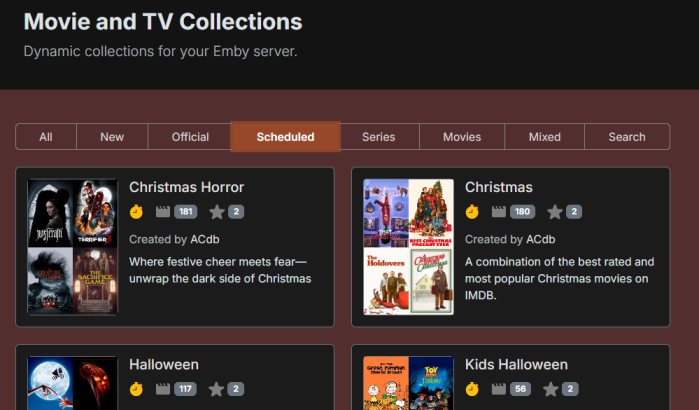
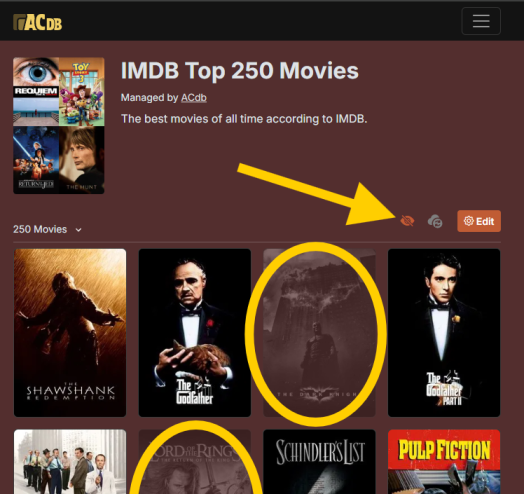
Hey, I've been adding some new things. Added scheduled/seasonal collections + a filter collections bar on the front page: Above you can also see the relatively new sorting option. Move collections to the top if new items from your library get added to them. Added a new button on your collections so that you can see which items you have missing from a collection. Shown once you have synced that collection. Must be Patreon supporter to use. If you don't see the option make sure you have the latest version of the plugin (and then you must wait for syncs). Plugin has had a bunch of minor improvements and also a number of fixes (thanks @eMoOakfor lots of testing).
 1 point
 -
Hi, yes you did and yes it will come.1 point
-
Sorry, I'm generally a noob with emby, I've used it off and on for the last couple of years, but just decided to make the complete switch from Plex, so forgive me if I'm using the wrong terminology. Just wondering if anyone is working on a project to get images from theposterdb. They have a lot of Collection artwork that can't be found anywhere else, and lots of themed artwork within those collections. Would be nice to have an agent that handles the downloading of those. For some reason, I don't seem to get all of the poster artwork from Emby that Plex seems to get, for instance, my Garden of Sinners posters all looked similar in Plex, but there's 2 of them that aren't getting the poster images that Plex seemed to be able to find. So having a single source repository for Poster art would be awesome. I am also having the same issue with my Hana to Hebi Live Action movies, both the ones from the late 70's and early 80's as well as the ones from the Early 2000's. The posters just aren't showing up despite them being matched appropriately.1 point
-
This looks super helpful. I've been struggling to find a solution to automate this and have been putting off scripting my own. Given the easy and popularity of LetsEncrypt, I with this was just natively supported or at least available as an addon.1 point
-
If you're running Emby Media Server to manage and stream your personal media collection, you probably have heard about hardware transcoding. But what exactly is hardware transcoding and why should you enable it on your Emby setup? In this blog post, we'll break down the benefits of hardware transcoding and explain why it’s a game changer for your media streaming experience. Please keep in mind that hardware transcoding is an Emby Premiere feature and can be purchased HERE. What is Transcoding? Transcoding is the process of converting media files from one format to another, optimizing the content to suit the device you're watching on. For example, if you have a high-bitrate 4K movie on your server, but you’re streaming it on a phone or a non 4k TV over a slow internet connection, Emby will transcode the file to a lower resolution or bitrate to ensure smooth playback. By default, this transcoding happens in software, meaning the CPU does all the heavy lifting. But that’s where hardware transcoding comes into play and can be incredibly helpful. What is Hardware Transcoding? Hardware transcoding uses a dedicated component in your computer, such as a GPU or integrated graphics, to handle the transcoding process instead of relying solely on your CPU. This results in faster, more efficient media conversions, and frees up your CPU for other tasks. Below, we will go into detail as to why hardware transcoding is so important for Emby Media Server. Top 5 Benefits of Hardware Transcoding in Emby 1. Faster Transcoding and Smoother Playback Hardware transcoding significantly speeds up the process of converting video files. Since dedicated hardware like GPUs are designed to handle parallel processing, they can manage transcoding tasks much faster than your CPU. This means no more waiting for videos to buffer when streaming to devices that require transcoding. For users streaming in 4K or on multiple devices at once, the speed boost from hardware transcoding can make a huge difference in ensuring uninterrupted, smooth playback across your media library. 2. Lower CPU Usage, More Efficiency When you use hardware transcoding, you’re offloading the intense workload of video conversion from your CPU to your GPU or dedicated hardware. This reduces the strain on your CPU, freeing it up to handle other tasks more effectively. For home servers running on lower-end hardware or even NAS devices, this can be a crucial benefit. With reduced CPU usage, your system can run more efficiently, leading to better performance for other applications and even energy savings in the long run. 3. Better Multi-Stream Performance If you have multiple family members or friends streaming from your Emby server at the same time, hardware transcoding is a must-have if not every file can be direct played on their client devices. Software transcoding is limited by the power of your CPU, which can quickly become overloaded when handling several streams at once. With hardware transcoding, your server can manage multiple transcoding tasks simultaneously without lagging or crashing. Whether you’re streaming on a tablet in one room and a TV in another, or your family is accessing your media library remotely, hardware transcoding ensures a seamless experience. 4. Support for High-Resolution Content (4K and HDR) Streaming 4K HDR content is demanding, and transcoding such high-quality files puts a significant load on your server. Without hardware acceleration, many servers struggle to downscale 4K videos, leading to stutters, buffering, or even failed streams. Hardware transcoding, especially with modern GPUs and iGPUs, is optimized for high-resolution content. It can handle 4K, HEVC, and other high-bitrate formats much more efficiently than software transcoding, providing smoother playback for high-res media. 5. Energy Efficiency and Longevity Since hardware transcoding is faster and more efficient than software transcoding, it uses less power overall. When your server doesn’t have to push its CPU to the limit, it consumes less electricity, which can be a big plus for those concerned about their energy bills. Additionally, since the hardware is doing the heavy lifting, your CPU experiences less wear and tear over time. This can prolong the life of your system, especially if you're running your Emby server 24/7. How to Enable Hardware Transcoding in Emby Enabling hardware transcoding in Emby is straightforward, but it requires compatible hardware. Many Intel CPUs with integrated graphics, as well as dedicated NVIDIA or AMD GPUs, support hardware transcoding. Check Your Hardware: Ensure your CPU or GPU supports hardware transcoding. Intel Quick Sync, NVIDIA NVENC, and AMD VCE are popular options. Install Necessary Drivers: Make sure the correct drivers for your GPU are installed and up to date. Enable Hardware Acceleration in Emby: - Go to Server Dashboard in Emby. - Navigate to Transcoding settings. - Check the option to Enable hardware acceleration when available. - Select your preferred hardware transcoding engine (e.g., Quick Sync, NVENC) under the advanced tab if preferable. Test Your Setup: Start streaming from a device that requires transcoding or force transcoding and monitor your server's CPU and GPU usage to confirm that hardware transcoding is active. If you’re serious about getting the most out of your Emby Media Server, hardware transcoding is a must. By leveraging the power of your GPU or integrated graphics, you can enjoy faster transcoding times, smoother playback, better multi-stream performance, and energy savings. Whether you’re streaming 4K movies or sharing your media library with family, hardware transcoding ensures that your server runs efficiently and delivers the best possible viewing experience.1 point
-
Folks, I just got back here for a short quick update, might help someone else with same HW. I put a Quadro P400 card (fits perfectly) into the server, and OMG! It really makes a difference! No words for it. Multi100 MBps 4K HEVC hugeFPS videos downconverting to few10MBps FHD consumable on portable devices and remote locations. All done in realtime, without lagging, pretty sweet. I just love it Thank you Emby Team!1 point
-
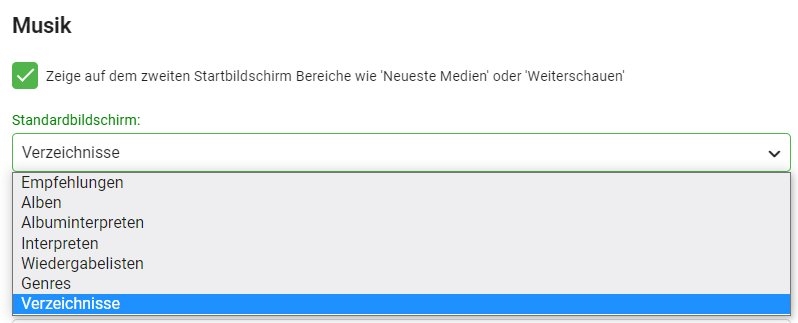
Hi, das kann sich jeder Benutzer in seinen Einstellungen (ich geh mal vom Web Client aus), Bereich Startseite, für jede der Bibliotheken auf die er Zugriff hat einstellen. Das hier wären dann die Einstellungsmöglichkeiten für eine Musik Bibliothek: Ciao, Alfred
 1 point



.thumb.png.f4cb0545e98b51fd9b00e427622ab761.png)













.thumb.jpg.2bf0b4249dd84787e726c0ce669037eb.jpg)



