
Leaderboard


.thumb.jpg.c75790b7d9d27e0415687d7d6d1197cf.jpg)

Popular Content
Showing content with the highest reputation on 05/15/25 in all areas
-
Personally - i think the fundamental issue is the type of information presented in the 'Quality' setting, 1080p - 60 Mbps 1080p - 50 Mbps 1080p - 40 Mbps 1080p - 30 Mbps 1080p - 25 Mbps 1080p - 20 Mbps 1080p - 15 Mbps 1080p - 10 Mbps 1080p - 8 Mbps 1080p - 6 Mbps 1080p - 5 Mbps 1080p - 4 Mbps 720p - 4 Mbps 720p - 3 Mbps 720p - 2 Mbps 720p - 1.5 Mbps 720p - 1 Mbps 480p - 1 Mbps 480p - 720 kbps 480p - 420 kbps 360p 240p 144p Auto What does this really mean to the average user ? The answer is absolutely NOTHING To add - the user is not going to know how much bandwidth they have on a given remote connection - so even if they did decide to change it - it would be a pure guess at best. It has been suggested before and to me makes it a much better UX if it simply said something like - Best (May use significant data allowance on a cellular connection) Better Good Lowest (Use for poor reception cellular connection) Best = Direct Play attempted Better = 1080p @ 10Mbps Good = 1080p @ 4Mbps Lowest = 720p @ 1 Mbps What's behind the settings can be changed by the Admin - so in a country where cell etc is strong, then they can be increased. Also as has been said before - setting a default server side for the device and/or user would be an obvious advantage.3 points
-
Only tested on windows 11 - no idea how it will behave on Linux or mac (or even if it will work) 1st alpha release. (local disks only at present, no mapped drives) StorageIOViewer.dll
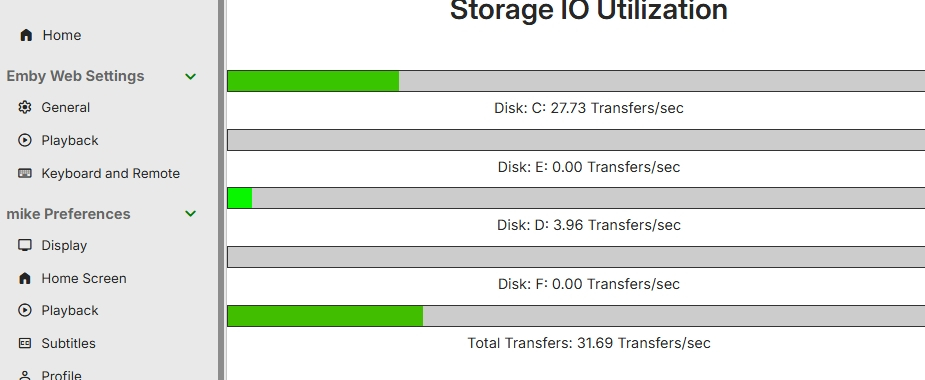 2 points
 -
Threw this together. Try it, if you like it then you can add more options and settings your self. As it is it just sends a message to users when they transcode, the message can be changed in the settings. Change it, release it, claim it as yours or what ever.. I don't care, just keep it open source please. Edit: Uploaded the wrong version, it kept spamming the message. This one will fix it. Transcodenotifier.zip2 points
-
Hi. You might want to think about supporting its development since its given you so much value.2 points
-
People tend to overlook this when chasing after those new cheap trinkets.2 points
-
Having the latest cpu/gpu combo in hardware means very little without certification and support. The Shield is still fully supported 10 years after it's release - infact it got a significant update only recently adding functionality, not just bug fixes. I'm hoping with the incoming Nintendo Switch 2 release - Nvidia use their own T239 SoC to release the Shield 2025 .. If they did - it would be the 'go to' hardware for anybody serious about AV - and given the legacy and popularity of the Shield 2015/2019 - the number of customers upgrading to get AV1, HDR10+ etc would be huge.2 points
-
I think good software design involves creating a UX that is easy to understand. The reality is the current way quality is managed can be done much better. I don't think "too lazy or too stupid" is fair. A lot of people around me know less than I do. I don't look down at them in such a way. Many of them know more than I do in other areas of life.2 points
-
? - This plugin continues to work just fine for me. What's the issue ?2 points
-
Sadly, I had the beta initially and it didnt work. Went back to stable version and didnt work. Posted and that is when i saw the other thread about ADM 5.0 and decided to re-install the beta and it is working now. Just need to set everything back up. Thanks.1 point
-
Meh, I hope this setting would be optional.1 point
-
Oh, wow. I didn't even realize that the standard Android app could be used on Android TV. It works and solves the problem. I've only poked around a little bit, but I assume the main difference is in UI presentation, and I'm not losing any interesting features.1 point
-
no, not since clearing out storage on the share (d: drive).1 point
-
Yes, the space at the top is the root of the issue. I could be talked into a universal idea of sliding up the information when no backdrop is present. The could also help with other items. Yes, it's technically possible that a Music Video could have a backdrop, but I don't know of a single metadata provider that would have one. What would it even be like, other than a screen capture from the actual video. That is already what the primary image consists of. If it needs to have a backdrop style layout (which I disagree with), then you could lean on the primary source of images and metadata that exists - the Artist. Most artists views for music have rich metadata with logos and backdrops. So you could have the item "inherit" an artist backdrop, but I would rather slide the information up (like it used to be on the Roku).1 point
-
The users i've had problems with didn't even know about the settings. Having them hidden behind a profile picture might not be the best place.1 point
-
FINALLY got the DLNA server to work in my environment. The key information which helped was in https://lookanotherblog.com/resolve-port-1900-conflict-between-plex-and-synology/. For whatever reason, the Synology Windows network discovery service (minissdpd) was utilizing port 1900. So while EVERY OTHER application like Jellyfin, Plex, and the like seemed to not care and still worked, Emby had trouble grabbing control of the port. Once I disabled that service, the DLNA server showed up in a few minutes on my Windows PC and my other client devices. The separate IP address made no difference in my case. I tried with a host network and a bridge network.1 point
-
This looks like what I'd need. Not a bad idea for a plugin tbh.1 point
-
Many, people can't or won't take the time to figure out how to use a cell phone (talk/SMS?) no matter how simple it is. (for these people the only thing that would work for them (with emby) is a 100% continuously adaptive connection between the server and client (which would be fine if done like the big streamers do Via CDN's) but for emby servers would lead to delays/interruptions (while switching transcode setting or selecting a different stream) not to mention the other problems that have been highlighted in this and other threads). So, how could emby make it easier? (I'd say !COMPLEATY! remove Auto and Just show the current (emby chosen for the device/connection type) bit rate or user adjusted rate)(also get rid of the 480/720/1080/4k stuff having multiple bit rates for each confuses many).1 point
-
I started programming when I was 14. I met 12 year olds that were exceptional programmers. I could make the same argument about software development, yet here we are with all of us using a web wrapper for ffmpeg. /s Your argument is weird. Better UX is better UX.1 point
-
lol not this again. - Yes, emby sucks at detecting internet speed - no, admins cannot set default qualities for users - yes, playback settings really are burried where non-tech users will never see them - yes, it really is that confusing when you realise that playback settings are per device not per user - no, i don't see it getting fixed anytime soon since its been complained about foe years we should honestly just create a public emby landing page at this point. One that the community helps maintain and it tells new users how “it is” with clear instructions and screenshots so you don't need to give “the talk” to all new users 132943-please-can-we-fix-internet-speed-detection-once-and-for-all/1 point
-
quicksync should show up, but it might not because of the lack of resizeable bar. It also might not be showing up as it usually requires you to have an active monitor plugged into your system. If you're going to leave it as headless I would recommend you get an HDMI dummy plug. Your system is seriously ancient. You would be best to upgrade to a system that does have resizeable bar, or move to an NVIDIA card like a Quadro P1/2000. https://www.intel.com/content/www/us/en/support/articles/000092416/graphics.html Intel themselves state that resizeable bar is required for optimal perfomance and that Arc cards can still work on a system without, but not guaranteed.1 point
-
Well, after several iterations of trial and error I finally got my BIOS/UEFI set up straight and successfully moved Windows 10 from my failing MBR ssd to a new GPT ssd I have updated to Windows 11 well before normal support ends in October. Hardest thing was getting the GPT boot drive which had to be done not via cloning but rather via creating an image on the other new ssd I had but didn't use for the boot drive and also going through steps to initiate the drive as GPT with the proper partitioning to restore the image to. Thanks to Macrium customer support on walking me through this. Microsoft made it especially difficult this time to jump to the next OS version. Going from 7 to 10 was a breeze but this was not. Next up.. Installing new drives in my case and getting my programs up and running again. What started as a new build thread ended up being how to upgrade from Windows 10 on an MBR disk to Windows 11 on a GPT disk thread..1 point
-
If you're happy, we're happy1 point
-
I can do all of those in windows! - not sure about linux or mac... but probably1 point
-
Very nice I'd be interested in what library you are using to get the info ? For me personally, live GPU (for transcoding), Storage I/O and Network info is of more interest than CPU..1 point
-
OK we'll look at improving this. Thanks for the feedback.1 point
-
Audiobookshelf for Docker was easy enough to implement that it convinced me to migrate my Emby install to Docker. That being said, ABS now has a Windows install. So even if Docker was a hurdle at one point, it no longer is.1 point
-
I have switched to ABS for audiobooks. Its so simple to setup, in docker on my unRaid server.1 point
-
Okay... occasionally, I do bother to confirm that the Play Queue still shows (horizontally scrolling) embedded chapters separately from (vertically scrolling) split tracks. And it still has not been fixed. Case in point. Occasionally, I check to see if Emby is progressing in usable audiobook functionality beyond the barest of barebones. They are not, and the evidence is heavily in favor that they will not. I will continue to keep checking, but only out of curiosity.1 point
-
I'm also going to voice my support for this since I also prefer to keep all supporting files in media folders as well. I also have several emby instances pointing at those folders (only one of which has write permissions to update metadata, images, etc.) I'm actually generating preview images after not having them for a while. I'm realizing the situation is still messy with any emby generated detection or chapter data and images. It's far from portable as it is right now. Ideally we should have a way to store all of this information next to the media considering how valuable it is. It should be easy to reimport in the event of a fresh server reinstall.1 point
-
In this case, the strange thing is Plex, since Apple TV only supports audio up to 48 kHz. I wonder what Plex has to do to get around this limitation.1 point
-
In my opinion, either a rebase of the latest ffmpeg with the Emby secret sauce, or a sticky option for this override so it doesn't randomly get lost during restarts, updates, etc.1 point
-
It would be really nice to be able to modify the Audio track title of a library item after it was touched by the plugin from inside Emby. Best example would be e.g. the D+ Star Wars Project where you have lots of Audio Tracks and all are simply names Dolby Digital 2.0. But one is the score, one is the 1978 track, one is the Silver screen track, one is the DVD track etc... Currently you need to process the file, then do an exclude inside the plugin and modify the title manually outside of Emby.1 point

















