Leaderboard




Popular Content
Showing content with the highest reputation on 05/01/25 in all areas
-
As the rest of our colleagues have already mentioned, the issues have been resolved in version 2.1.0. Thanks, @Luke, for the quick resolution.2 points
-
+1 Been waiting for this feature for ages. There's an audio delay when using Bluetooth speakers and like many before me have said, it would be very useful to be able to adjust the audio delay. Any chance we could get an update on this?2 points
-
Similar to this old post, I'm suggesting a tab that would be titled Watchlist and could be placed in between Suggestions and Favorites. The functionality would pretty much be a copy of Favorites, just with a + symbol added next to the heart and other symbols that let you favorite a movie etc. The previous post had mentioned extra functionality such as automatically removing a movie from Watchlist after it has been watched. This would be nice, but is unnecessary because after watching a movie you can simply click the + symbol a second time to remove it from Watchlist. I would imagine this would be very easy to implement as a rebranded copy of Favorites. Adding other features could come later. Edit: added link to old post1 point
-
Hi, I would like to have an option to choose H265 instead of H264 in the Transcode option. It will be smaller for all bad bandwidth (2~5Mbit ADSL), but will have a great quality. Mobile phone can benefit of it greatly too with the 4G and the limitation of download.1 point
-
Feature Request: Have User Groups and all settings applied at the Group Level That way you can just assign users to the appropriate Group and all settings will be inheritated.1 point
-
It is really cool that Emby has the ability to support multiple versions of the same movie. It would be nice to have a setting on the client side to allow the user to set which version should be selected by default. This could be as simple a user-entered string, or it could be a list of detected strings to choose from. It could allow multiple entries and it would choose them in the order entered. On the Kodi side, it would also be nice to get the "Choose the Best Version for Me" option that the Emby app has.1 point
-
More items in the Latest row(s) would be nice. I just added a bunch of new TV shows / series and 16 isn't enough. If I click on Latest TV, it goes to Suggestions, which is useless, I would like more Latest TV not Continue Watching or Latest Episodes. I can sort TV by date added but that doesn't show new series added to existing ones (series 5 of The Expanse) for example. Similar for Movies please.1 point
-
As I mention in a related post, I love the additional subfolders for Movie Extras (eg, Shorts, Scenes, Interviews, etc.)! It would be awesome to extend this functionality to TV Series as well. Specifically to add support for many/all of the same folders supported for Movie Extras, eg, extras specials shorts scenes featurettes behind the scenes deleted scenes interviews trailers As well as any additional folders that get added in the future (eg, hopefully Galleries). Support Placement of "Extras" Folders Within Each Season Folder, Plus A Naming Scheme to Link A Particular Extras Folder with a Specific Episode (eg, "\Season 1\E1 - Deleted Scenes\" for episode 1 deleted scenes): I want to clarify that it would be great if these various "extras" folder types could reside within each Season folder. So for example, within a Season 1 folder we could then have an "Extras" folder, a "Deleted Scenes" folder, a "Featurettes" folder, etc. And furthermore, that we could designate a particular folder to refer to a specific episode (eg, "\Season 1\E1 - Deleted Scenes\" for episode 1 deleted scenes). See more below, particularly why I think this would be so useful: https://emby.media/community/index.php?/topic/55915-emby-server-theater-additional-extrasspecial-folder-types-for-tv-series-similar-to-movies/&do=findComment&comment=587195 Thanks for your consideration! PS - If this is something you might like to see implemented, be sure to "Like" this top/first post (as well as any subsequent posts in this thread that highlight particular aspects of what you are interested in) -- "Liking" the top/first post helps the Devs to know how much interest there is in a given Feature Request.1 point
-
I have been using the Android app (Android TV app) on my Shield for a good while now and I like it quite a bit but there is one little thing that is lacking that I find I really miss. I use the "Legacy Next up" row as I find it better for me than the standard "Continue watching" but there is one feature that Roku has that seems totally missing from Android: That is on the Roku you see a counter on the far right just above the row showing what position you are in the list. That is missing from the Android app. I find it a real advantage as that way, at a glance, I know exactly how far I am into the list and knowing that makes navigation easier. Sometimes I am watching from my next up and a show ends and I want to quickly go to one end or the other and, just from looking on Android, I have no idea how far that is. I can work around the problem with long press on the arrows but that is a work around and, particularly since Android does not have the ability to wrap rows, it seems clumsy at best. All I want is a small number right above the next up row that shows what the currently highlighted position is. I also wonder why it was not there from the start. It seems an easy addition that would have no negative impacts so it also seems that it should have been available from the start.1 point
-
Just wanted to pitch in my support for the idea. I recently bought a car with Android Automotive, but no Android Auto or CarPlay. Having Emby on Android Automotive would be a killer feature for me, especially since Android Automotive lets you watch videos while parked. I imagine this will also be a more in-demand feature over time, as more vehicle manufacturers move towards Android Automotive (like Ford, General Motors, Polestar, Hyundai, to name a few). I don't expect a ton of progress to have been made on this in such a short time, but would love to know if there's any update.1 point
-
buen dia muchas gracias ya lo logre solucionar agradezco la informacion y ayuda1 point
-
1 point
-
@Kelwarinbeat me to it by seconds Great job as usual by @Luke1 point
-
@Luke That seems to have fixed it1 point
-
Hi, Looks like 2.1.0 fixed everything for me. Good and fast job from you guys. Thanks1 point
-
When you get the 4.9 update, the scanning will change to be like this however it will also have the new display option to jump through the layer.1 point
-
I encountered the same problem, this method can solve it!!!1 point
-
Luke thank u very much for this. i did it and it works fine. Perfect i appreciate your help. ... and im not crazy .. my mom got me tested...1 point
-
Tienes que añadir el punto después del nombre, ejemplos: Para forzados: La Tierra errante II (2023).spa.forced.srt No forzados: La Tierra errante II (2023).spa.srt No dejes un espacio ni guión bajo. Mira la documentación para más información https://emby.media/support/articles/Subtitles.html Saludos.1 point
-
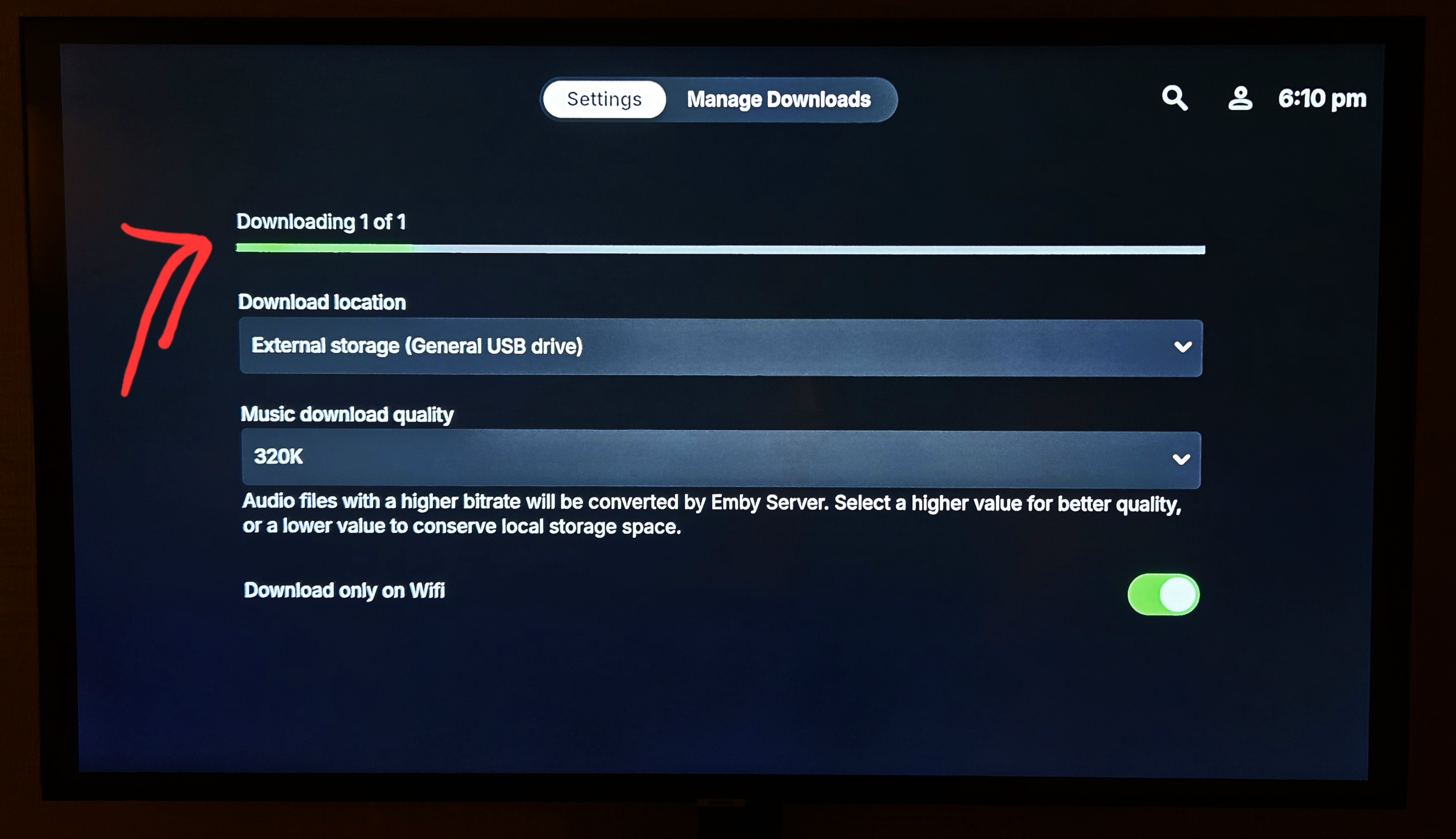
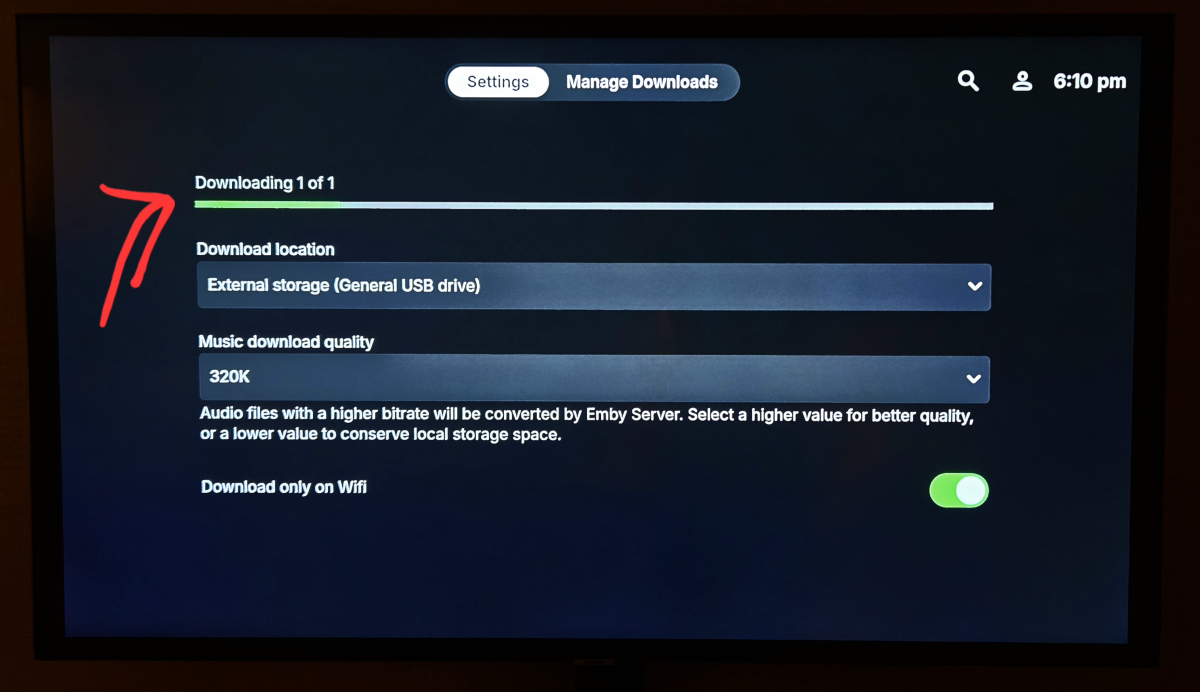
One more minor thing: I have removed the download (was too large file and wanted to interrupt). Download itself stopped, but the status bar remains here in settings (even after restarting Emby). I managed to remove it with force stop. But this might be because of the slow USB drive (Emby wanted to remove the interrupted download, and I believe it took a lot of time and during this operation the status bar remained on the setting screen)1 point
-
Hi, you're running an ancient version. You may want to try installing the latest via USB: https://emby.media/emby-for-samsung-smart-tv.html Hopefully we'll be able to get an update out to the store for your model, although Samsung stops accepting app updates for models older than 4 years so it's hard to guarantee that. We're trying to twist some arms and talk to the right person so that hopefully we can do that.1 point
-
Oh and you managed to add the status too! Amazing! I think this status would fit more into "Manage downloads" tab rather than here in "Settings", but that's just a minor feedback. One more idea to this: remaining time would be great addition i.e. nice to have You are absolutely the best NAS software creators in the world.
 1 point
 -
Great work guys! I'm testing it Seems pretty cool downloading to my USB stick! Thank you very much for your efforts!1 point
-
Agree it's probably a 'thing' that somebody thought was a good idea (a higher number is better right ? ) - a bit like h264 and h265 'profiles' that are far too high for the source material. All they do is cause trouble and unnecessary transcoding. 8.x is a streaming profile only - agree 100% - but it's the .6 part that is 100% wrong - as that says it's a physical BD disk - which clearly it is not.. Unfortunately, there are a lot of people out there who have the tools, but very little knowledge on what they are doing thus we get these odd combos ... A bit like the DV, HDR10+ (and thus HDR10) MKV's - totally against a defined 'standard' but 'it works' on 'some' equipment ... problem is, no hardware manufacturer wants to know about the issues, as DV or HDR10+ works - but not both as they have been 'hacked' to work ...1 point
-
Hi @Lukethat seems to have got the episodes displaying again but I've noticed something that looks a little odd. I'll look on my other TV and see if its my metadata or not.1 point
-
You are right, at least it's not on the official Dolby Vision list. A quick google search shows quite a bit of results about profile 8.6, earliest of them from about mid-late 2023. Some people claiming that it's a streaming only profile (Apple TV), though it to me looks like it originated (at least to the public) with some MakeMKV build or something. There have been non-public DV profiles before ,so it could exist, just being used for some streaming service.. Hard to tell though but there is enough talk about it and files floating around for me to not dismiss 8.6 as an actual thing. Anyway, i try to keep my Dolby Vision videos in profile 8.1.1 point
-
Having a manual option to simply convert a library to the new style would solve that problem and still avoid "some things not being scanned the exact same way" for those who wish to keep their library as-is. I still don't understand how files being scanned differently somehow would create issues, they shouldn't be scanned so differently that they get detected as something completely different but I guess you never know.1 point
-
It would be simple if there was an extra view type that simply displayed files as a file manager would, ignoring all specials associations like those. Everyone used to how things work now have what they want still and those of us who just want to browse our files could too.1 point
-
There is no such thing as Profile 8.6 - so yes AI is wrong. x.6 is used for UHD Disks - and a standard UHD Disk has a 7.6 profile - not an 8.6 profile. https://professionalsupport.dolby.com/s/article/What-is-Dolby-Vision-Profile?language=en_US A 'home brew' normal 8.x DV profile should be 8.1 or 8.4 the 8.1 meaning it has a HDR10 fallback layer (common) or 8.4 meaning it has a HLG fallback layer (rare). No HDR10 fallback layer is Profile 5. (the green/purple colours if you try and play it back on non DV equipment) If the file has been tagged as 8.6 - then it it outside the spec as defined by Dolby themselves - thus emby is likely to not recognise it. It should be easy enough to correct it using dovi_tools - but you may need to demux and then remux it using 8.1 etc as required. The fallback as suggested above, it to default to 8.1 if anything other than 8.1 or 8.4 is used1 point
-
Thanks for testing, I'll take a another look at it!1 point
-
Appreciate the update! Thanks Luke!1 point
-
So I was able to recover using Macrium Reflect and flashed my MoBo BIOS to the latest version which is dated March 11, 2025 on this 2019 GigaByte X570 Gaming X MoBo which brings it current and ready for Windows 11. My m.2 SSD will need an swap though as it has had too many read-write cycles over the last 5½ years. The MoBo supports dual m.2's so I'll be putting in both of the new ones I have, one mostly for Windows and the other for Emby's transcode and data libraries. I've never swapped a boot drive before having just built new whenever the time came so this should be interesting.. I'll use Macrium Reflect to clone the drive and then restore it to the new one. Hopefully I won't have much of an issue with moving he Emby Data over but any tips from @Lukeor others is welcomed! Wish me luck!1 point
-
Your guess would be correct, there is a trailer option under it and it does play that file.1 point
-
@Abobader1 point
-
Super excited for this as well can't wait!1 point
-
Yes seems to be good will update if I have further issues thanks so much.1 point
-
Still the same problem as described in original post with Emby for AppleTV 1.9.8 (2)1 point
-
Timeline update: Currently I'm working on 12.X version. Main focus is on Kodi 22 support and as usual performance. If there are any feature requests, now is a good time letting me know. I assume the next public testing version will be available in June with some core changes under the hood.1 point
-
Thank you guys for not giving up on this!1 point
-
Something like this div.view-item-item .artistSongsSection {display: none;}1 point
-
Hi, yes we have a new Linux app coming soon so stay tuned.1 point
-
This should be fixed in the new Xbox beta (https://emby.media/community/index.php?/topic/138418-new-windows-xbox-beta-222500-beta/) If all goes well, the stable will follow in a few days. Thanks1 point
-
How do you go about doing this with a Windows Store app? I figured it was like most App stores and there would be somewhere on the page to Opt-In to the better version. But I don't see it. I've been trying to force myself to use the Windows App version, but the Refresh rate switch is driving me insane since I am on a 4K240Hz monitor.1 point
-
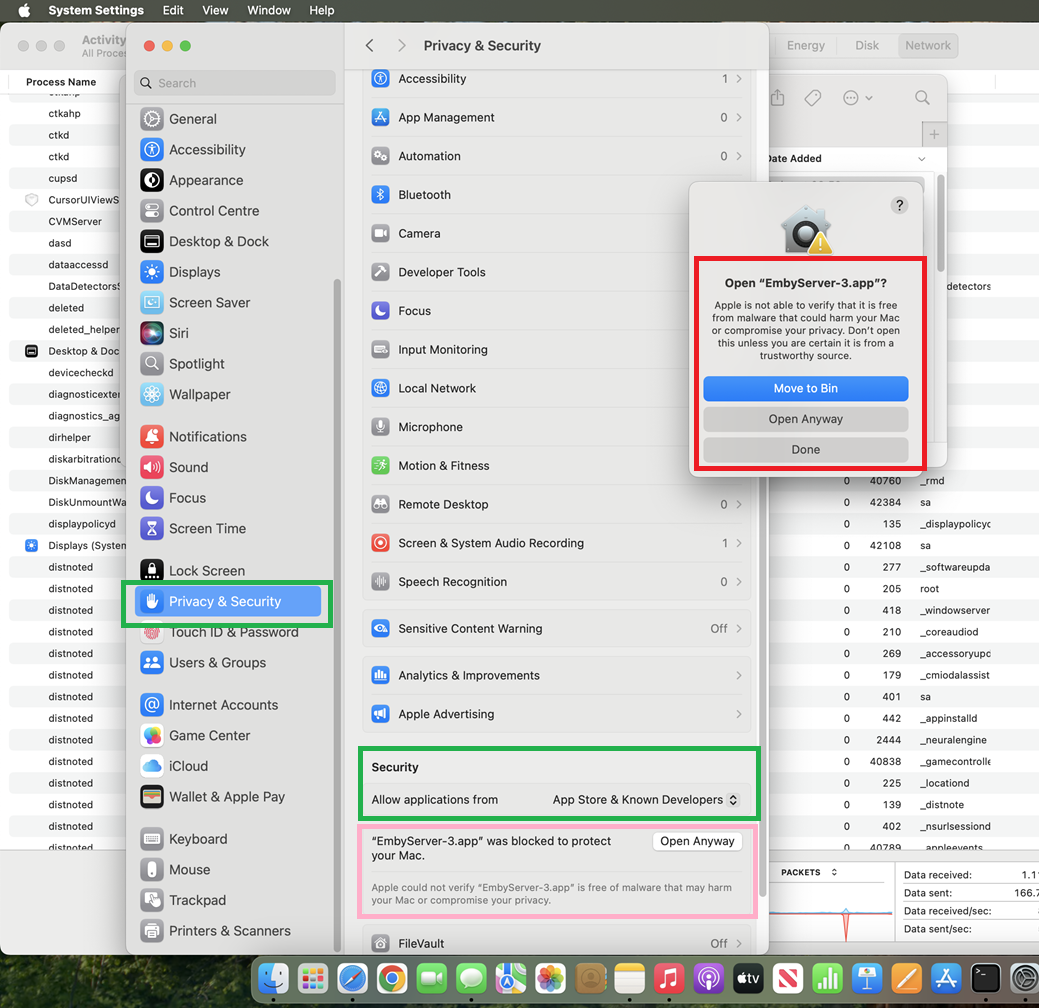
I think this is probably similar to the ownership/permissions issue I investigated here To check if it is the same issue, in terminal session, do the following: ls -ail /Users/rty/.config Copy the output from this Then ensure Emby Server is not already running as checked in Activity Monitor and try and launch it in terminal cd /Applications ./EmbyServer.app/Contents/MacOS/EmbyServer Save the output into a text file - It would show the permissions error if this is the same problem as the one I linked If it is the permissions / ownership issue, then try this command in terminal sudo chown rty /Users/rty/.config See if that resolves the problem Same : "Allow applications from - App Store & Known Developers" This in itself does not help and one would need then to select Open Anyway from the link that gets displayed below this security setting. And there was no option to Move it to the Applications folder. Only way was to drag and drop.
 1 point
 -
Over 7 and a half years... My 12700K can do this via the iGPU. There's cheap N100 machines now with the same iGPU. N305 machines that trade with my old 4th Gen i7 4771 that I ran Emby on for 9 years. The hardware to decode HEVC is everywhere. My old Note 9 phone for example. It's common. Look, I get it, and I used to be VERY curt about this stuff. However, I stopped because even though I can't program my way out of a paper bag (I have a stack of books to prove it) I've been involved in various software communities, from emulation, indie game development, so I always understood the difficulties developers face. But it's nearly 8 years since this thread started... Luke, I'd be ANGRY if Plex wasn't only just now getting this.1 point
-
The Emby team hopes you and yours are enjoying a Happy Holiday Season. We would like to announce a couple of changes that will hopefully increase the value of Emby in all of your households. First, to aid in the transition from our old TV-only Android TV app to the new Standard Android app on that platform, we will be eliminating the need for the app unlock by allowing free playback for up to five TV devices per Emby Server. Devices beyond that limit will require Emby Premiere. Previously purchased unlocks will still be honored. This should allow most households to move to the new app more easily. Second, recognizing that today's households have more and more devices, we are increasing our standard Emby Premiere License device limit from 25 to 30. We will then also increase the extended premiere plans from 45 to 50 and 75 to 80. Existing extended subscriptions will remain the same but new ones will be at these new levels. All standard licenses will be automatically updated to the new 30 device limit immediately. You should see all of these changes rolling out over the next week or so. Happy Holidays from the Emby Team! View the full article1 point
-
Courtesy of @Abobader Sort by Most Reactions at the FR forum:1 point
-
Please read this post first. I was wondering if it would be possible to add something that would allow you to skip the intro to shows automatically while binge watching. When watching Netflix it does this for some shows, and im not sure if thats a feature of Netflix itself or a Chrome extension i use called "Flix Assist" but it would be a nice feature to have within Emby as well. and possibly even create a custom timed skip for specific shows1 point
-
Hi Guys, I recently moved from Kodi with MySQL for lack of proper multi user management and server side support, I have to say I'm impressed with Emby. Together with the Kodi Plugin it really takes the solution to a whole new level, count me in among the supporters! One feature I would like to see is the ability to recommend movies or shows to other users: I share my Library with close friends and family but it is a big library so they are always calling me to recommend them a movie to watch. It would be really cool if after watching a movie I can click a Recommend button and choose the users I think would like the movie, then it is displayed on their suggested movies at the top with the name of the user who recommended it... Sorry if there is something like this is already there, I am new to the interface and don't fully know it but could not find such feature... Thanks!1 point
-
To gauge interest... What if you had the ability to "Forget" a series for the purposes of Next Up display. That is, it would no longer show in Next Up - unless you watched another episode. Sometimes you maybe watch a series for a while and, even though there is more of it or more is made later, maybe it isn't as good as the earlier seasons or maybe you just don't have time for it anymore. So you'd like it to quit showing up in your Next Up list so it is less cluttered and you can focus on the series you are actually watching now. If you start watching it again, the "forget" would be forgotten and it would start to show up in Next Up again.1 point