Leaderboard




Popular Content
Showing content with the highest reputation on 04/23/25 in all areas
-
yeaaah this works great! no more muxing everything manually!2 points
-
Hi, I completely uninstalled Emby from the TV, then unplugged the TV for a few minutes, then reinstalled Emby using the USB key (v2.0.3) and then tested again with the same issue. Most of my files are actually MKV files with either H264, HEVC or AV1 video codecs and most have AAC, AC3 or OPUS audio... which are pretty ?much all don't require transcoding since they direct play... but what's the difference from MP4 there? I've seen that issue on a MKV file as well when watching anime. Not sure how you want me to DM you the files as they're pretty big... I guess I could 7zip them in multiple parts and send links to you.2 points
-
It would be great if i could set the server to delete certain shows after a user has watched it. I happen to watch "The Daily Show with Jon Stewart" and "The Colbert Report", everyday, and with "News"ish type shows, there is no need to keep the episodes around. So i would like to set MB to auto delete those 2 shows, 3 days after one user has watched it.1 point
-
I think there is something not correct in the server reverse proxy. The Samsung Emby app users the TV's native player which works a little differently to some other apps that use a generic html video player, which is why you might be having issues on this TV. Can you install a local server, you can use the portable version (https://emby.media/windows-server.html) as a quick test?. Add a few of your files to a library and see whether they play correctly1 point
-
Made an account for this, it's 2025 and there is still no way to stop downloads on Android. The notification is of no help, I tried deleting in downloads which does nothing much like the download manager. So here I am downloading 80 episodes of star trek of which I wanted one on public wifi, biding my time before my phone runs out of storage and I can start deleting episodes to repeat the process.1 point
-
Already had cache size at 4GB, no change. CPU does not max out however. To me it seemed more like an index was not properly utilized, but I haven't had time to investigate. But I remember I had similar problems with a large database when running an (admittedly rather old) Emby version on a powerful Windows server. But it is only the search that is slow, browsing/accessing files is reasonably fast (unless done via Embycon, then the slowness increases drastically the more items a user has watched in the past, as reported in another post, hinting at another DB/index issue). For now I do not access new music files via Emby, I just leave them on my NAS and access them directly, that is easier, until I find a proper solution.1 point
-
Sweet, if that's all that's broke then you'll be set. And just to clarify, the plugins will fall in line with the emby release so they will work as and when emby is pushed from beta to release1 point
-
I don't support beta so you'd have to roll back to stable to use them. That'll just be your premier key so it'll already be tied up1 point
-
Thanks That seemed to work, I should have noticed that myself.1 point
-
I have lots of files in the DB and a simple search can take several minutes on the server, often reaching a timeout. Since the search operation starts already when typing the first letter, the problem cascades.1 point
-
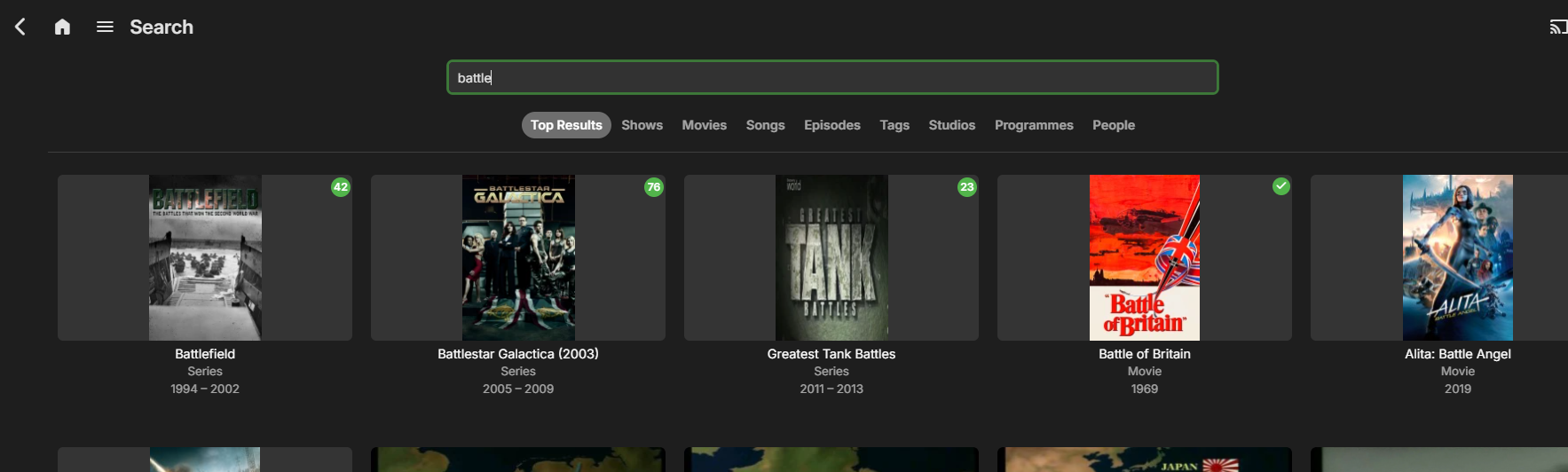
Can people give real life examples of how filtering the search BEFORE running it is any different to how it is now, when it filters the search results POST the request ? Granted I don't have 100's of thousands of items - but on a search of about 60K items - it finds items in ALL the libraries in less than half a second - and then displays the results as 'Top results' but also gives me the option to narrow it down (with a single click) if I know what library or media type it was more likely to be under. In this example - I search for 'battle' .. but what I'm actually after - is not the 'common' finds - but a Song from Tiesto called Battleship Grey .. so I click 'Songs' .. and there it is. It's taken no less 'clicks' then if I were to select 'Songs' first and then do a search ? Maybe on slow machines, it takes significantly longer to search everything first ? Does anybody have a practical example to show ?
 1 point
 -
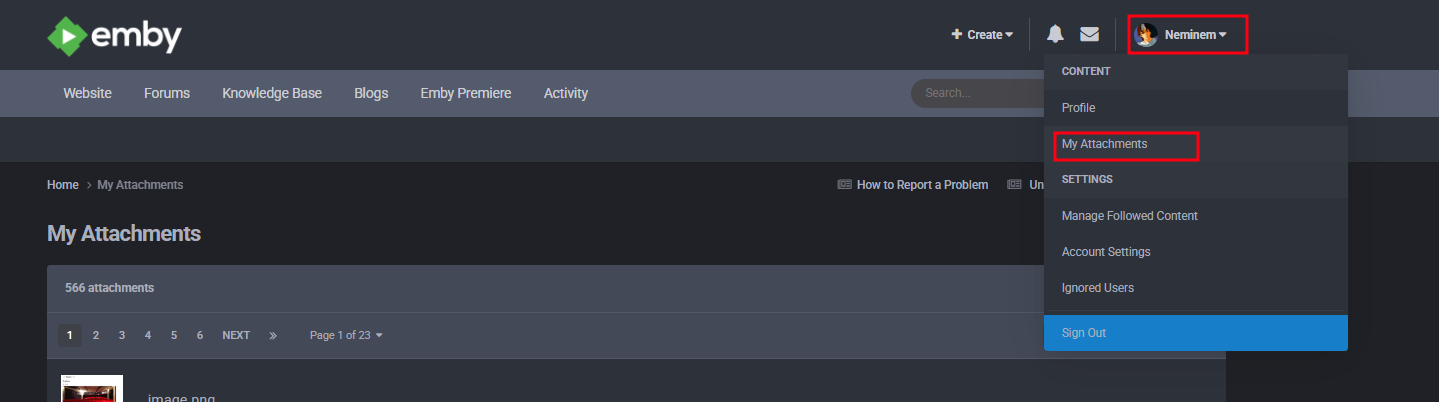
On you profile picture. From there you can delete the picture, if I remember right
 1 point
 -
Looks like I may have sorted this. The guide URL can also be specified as https://opop.pro/xxxxyyyyzzzz/?xml=1 which streams the raw XML data, rather than the default (without the param) which delivers the data in gzip-compressed format. Presumably Emby was having issues processing the gzipped content. The guide is properly populated now.1 point
-
Definitely no issues playing the one mkv file on my older Samsung TV, I will try and test on my other TV tomorrow, but I expect it will be fine. Are you using the original Samsung remote control or are you using a generic or programable remote?1 point
-
SamES may not need the whole file. Split your mkv using mkvtoolnix. If you can reproduce the problem with a small (maybe 5 min or less chunk) then that should be fine for testing.1 point
-
Besides all of that is that something that you consider doing @Luke& @ebr It would be super nice to have a second registry to pull from.1 point
-
This is a good test, but we really need to use something in mkv that won't require transcoding. Did you try to uninstall/poweroff/reinstall, just to be sure? Can you send me a PM with a link to download one of your files that you know you have a problem with, thanks.1 point
-
And I also know someone else who uses a similarly old LG TV remotely to my server and they never had a seeking issue... It really seem central to this Samsung TV or at least this model, idk...1 point
-
To me it seems very unlikely to be about the files... My LG TV at my other place is much much older and plays eveything I throw at it just fine and can seek forward and backward h264 or hevc on main or high profile and many different levels, with subtitles or not... VBR or CBR... My files are not especially weird, they direct play just fine. This Samsung TV is a much newer model and even natively supports AV1 playback... It's modern. I can't believe it could perform worse than my 2015 LG TV. I have literally not playback issue whatsoever with any platforms, including web browser, except for this specific TV... For the same videos and many other videos and this is the only device which can't seek without transcoding... I don't think we should assume all my files are encoded incorrectly since they work perfectly on any device except this one... What should I look for on a file to see if they are encoded "correctly"...? This sounds much more like a Samsung issue. A 720p/1080p H264 video file encoded at 2mbps should be easily played and seeked through by anything in the last 15 years or so... Regards, Pitchblack1 point
-
Hallo zusammen, ich habe @Teddyknuddelgeholfen, die Skins als Kodi Repository anzubieten. Habe die README des Git Repos aktualisiert => Teddyknuddel/embuary.omega Für Fragen und Anregungen stehe ich bereit! ----- Hey everyone, I helped @Teddyknuddeloffer the skins as a Kodi repository. I've updated the README of the git repo => Teddyknuddel/embuary.omega I'm available for questions and suggestions!1 point
-
Kinda surprises me that this feature that should of been implemented YEARS ago we still have to beg for.1 point
-
For info, was able to make it work again, here how : - Stop emby - Copy the library.db from the data folder in a working folder - Open the library.db with DB Browser for SQLLite - Search in the database for bad date : Select * from MediaItems where DateCreated not between -62135596800 and 253402300799 Got 3 corrupt line with bad information - Run this to delete all : delete from AncestorIds2 where AncestorIds2.AncestorId in (select mediaitems.Id from mediaitems where DateCreated not between -62135596800 and 253402300799); delete from AncestorIds2 where AncestorIds2.ItemId in (select mediaitems.Id from mediaitems where DateCreated not between -62135596800 and 253402300799); delete from Chapters3 where Chapters3.ItemId in (select mediaitems.Id from mediaitems where DateCreated not between -62135596800 and 253402300799); delete from ImportedCollections where ImportedCollections.ItemId in (select mediaitems.Id from mediaitems where DateCreated not between -62135596800 and 253402300799); delete from ItemExtradata where ItemExtradata.ItemId in (select mediaitems.Id from mediaitems where DateCreated not between -62135596800 and 253402300799); delete from ItemLinks2 where ItemLinks2.LinkedId in (select mediaitems.Id from mediaitems where DateCreated not between -62135596800 and 253402300799); delete from ItemLinks2 where ItemLinks2.ItemId in (select mediaitems.Id from mediaitems where DateCreated not between -62135596800 and 253402300799); delete from ItemPeople2 where ItemPeople2.PersonId in (select mediaitems.Id from mediaitems where DateCreated not between -62135596800 and 253402300799); delete from ItemPeople2 where ItemPeople2.ItemId in (select mediaitems.Id from mediaitems where DateCreated not between -62135596800 and 253402300799); delete from ListItems where ListItems.ListItemId in (select mediaitems.Id from mediaitems where DateCreated not between -62135596800 and 253402300799); delete from ListItems where ListItems.ListId in (select mediaitems.Id from mediaitems where DateCreated not between -62135596800 and 253402300799); delete from MediaStreams2 where MediaStreams2.ItemId in (select mediaitems.Id from mediaitems where DateCreated not between -62135596800 and 253402300799); delete from SyncJobItems2 where SyncJobItems2.ItemId in (select mediaitems.Id from mediaitems where DateCreated not between -62135596800 and 253402300799); delete from UserItemShares where UserItemShares.ItemId in (select mediaitems.Id from mediaitems where DateCreated not between -62135596800 and 253402300799); delete from MediaItems where DateCreated not between -62135596800 and 253402300799 - Save, close DB Browser, copy the library.db back in the data folder, in linux, check for permissions and owner and restart Emby - All Working!!!!!1 point
-
It looks like she typed this in http://xxx.xxx.xxx.xxx.8096:8096 Its should be http:/xxx.xxx.xxx.xxx:80961 point
-
Hi, i would like to request 2 options 1. sub-font mpv can't choose correct font for Chinese srt with default setting, so it has to be writen in the conf file related thread: 2. stretch-image-subs-to-screen Need set this option to yes to play cropped video with SUP subtitles correctly. I think this is discussed before in android tv app thread, its very important for many users.1 point
-
Emby for Apple TV 1.9.7 has been released. Here are the highlights: Fix play next episode automatically option not being honored in certain situations View the full article1 point
-
Hi, yes we’ll be adding an additional option. Thanks1 point
-
Certainly not official ones. As I said, the legal liability on the part of the software providers (both us and Google) is just too high. Unfortunately, there is no personal responsibility anymore. When someone does something stupid and gets hurt, someone else is made to pay.1 point
-
PW: byAllstar86 Custom-Overlays.zip
 1 point
 -
One information expansion resource idea would be Gay Erotic Video Index. Endless information of videos and often needed to be able to use MetaX to jack into it... as of now I have to embed all of the information by hand and curate the files by myself... one item at a time. Emby will occasionally pick up actor/model profiles online, but 0 backdrops and sometimes depending on the file type even the actor listings are spotty on showing up after embedding the metadata. I think what you're doing here is worthwhile. I value these models/actor/actresses as the case may be - just as much as regular cinema. Their lives, contributions and work as well as milestones, innovation, and progress within the industry is important to the timelines as well Credits where credit is due for sure. Recognition of their work and not to be forgotten. The industry has made many changes over the years. I feel people should acknowledge that professionalism as well.1 point