Leaderboard




Popular Content
Showing content with the highest reputation on 04/11/25 in all areas
-
So you want us to pay more for waiting 5 years? In terms of "strategic roll out plans, isn't 5 years long enough to have strategies, rolled out, debugged and mopped up? Krs Mark2 points
-
So...... Are EMBY developers considering this (basic) request???? All we want is a reply and a timeline for when it will be implemented!!!! Users.... if you want this option get on board and demand action!!!2 points
-
The lack of progress on this is definitely hurting Emby. 4.9 was announced as a short beta cycle but has again stretched out. I wish Emby could be a bit more transparent about milestones etc. JF is a bit rubbish in many ways but at least I can see what’s going on!!! The only thing that makes sense to me at the moment with Emby is the priority that was given to the new Windows app. Though I do understand there can be good reasons behind the scenes of course.2 points
-
No. FPS is easy to misunderstand. My 2 cents... Have you guys looked at almost any CPU/GPU hardware GAMING review? They typically go on for many pages siting various benchmarks and test. The results very a lot between different ones but they all have a common note: (Lower is Better or Higher is Better). So I don't think it really matters what units are used just that it's an apples to apples comparison and it's made clear to the reader. But I think the accrual point here is the plugin should be updated to upload the result to a database so people can easily access this information, over time this could become very useful...2 points
-
ability to be able to add a collection into another collection. ie: Spiderman Collection into a SuperHero Collection. like i could with mediabrowser with shortcuts. TIA1 point
-
Device Locations Plugin for Emby Purpose This plugin improves observability of users accessing your server remotely. All private ipv4 and ipv6 ip addresses are ignored. help understand if users are sharing their accounts with other people additional stats are added to help understand device behavior when are devices active? This can help tune servers during peak activity which areas have the most activity? This may inform content delivery strategies which users authenticate on devices? Installation Download the dll and move it to the plugin directory Restart your server Requirements Register for a free account at https://www.ip2location.io/ to obtain an API key used for enriching location data If you are using a paid account you can remove the attribution in the plugin settings, otherwise, you need to keep the attribution to remain compliant Update the plugin settings with the API key Enriching data There are 2 scheduled tasks that need to run before full results are available. Sync activity data - Runs hourly and syncs Emby activity events to the plugin Enrich location data - Runs daily and enriches geoIP data to the plugin data. You can update settings to configure the max number of requests to ip2location PER run. This is useful if you're testing and/or have a significant number of authentication events (large user base, etc). The ip2location API allows 30k requests / month. TODO: Add ipv4/ipv6 validation when sync'ing Emby data Add caching when enriching data EmbyDeviceLocations.dll1 point
-
Audio/subtitle selection needs to be done for every episode of a show - is there any we can select this for a whole series? Ie. Choose audio track 3 and subtitle track 7 for a series at the series level and have emby go with that? Obviously this can have some issues, but assuming all files in the series are of the same encoding/release group it might be okay? For reference, I'm about to start watching DBZ Kai in Japanese, from files that have Japanese as the default, great, but next year about I would like to watch it again in English with my young son and not have to select English as the language for every single episode as it starts.1 point
-
Oh fantastic! Great news and thank you so much for your help!! Great product by the way and I am paid user. Thanks again!!1 point
-
Any enthusiasm for this has long gone for me, though admittedly I'll probably get some of it back when it eventually turns up, hopefully before the children retire.1 point
-
@sa2000The issue is still reproducible on beta 4.9.0.43. I'll send you the logs in DM shortly.1 point
-
This I do agree on.1 point
-
There were some backwards compatibility issues with a couple queries. Thanks to @darkassassin07for helping test the plugin! Working version that accounts for schema changes and different activity log types. EmbyDeviceLocations.dll1 point
-
You star! and thanks for such a speedy response!1 point
-
Hi, from the server data folder, /config/mb.lic1 point
-
In Emby Server Beta 4.9.0.44 the throttling method was changed to be based on the playback position reported by the player. For anyone circumventing the issue through settings in the Diagnostics Plugin, this should not be necessary anymore Note that the current beta is 4.9.0.46 which would be the version to update to (or a later version)1 point
-
Hi, yes this question has come up before and some kind of solution is planned for future updates. Thanks.1 point
-
I think the major issue I now have is lack of response….. it shows a lack of respect to users. I created a new post and had it blocked and referred to this post…. So they have the time to read these posts just choose to not respond!1 point
-
Personally, never had an issue with this - as you just name the sub-collection (or the sort-order) with a prefix that puts it 'last' in a normal sorted order. When you open the main collection - you only see the sub-collections anyway - so that works just fine. Not hiding the sub-collections is not a good enough reason to disable this functionality imo. Hide would be nice, but not essential.1 point
-
I know this topic has been posted previously... however, the response from EMBY has been (IMO) below par. Please let your users know if this feature (extremely common in video playback programs) is being planned for / or not.... It's not OK to avoid these posts or/and not provide appropriate feedback. Is this feature on your list of TODO list!!?? Please advise when it is scheduled to be implemented...... I've been a lifetime Emby Premiere user for over 20 years...1 point
-
This is all covered in the first two sections here: https://github.com/MediaBrowser/Emby/wiki/How-to-build-a-Server-Plugin1 point
-
I will and I appreciate your concern Vic1 point
-
I tried to reproduce this tonight by recording three shows in sequence on the same channels I have issues with for The Amazing Race. Recordings completed fine...no ideas now. This was after updating to Beta .45 from .44. So maybe the issue was resolved by the "Fix SMB protocol regression in previous build" fix. I guess I'll find out next Wednesday when the next episode of the Amazing Race is scheduled to record.1 point
-
I can confirm that the app doesn't run in the background. My suspicioni is that this is due to the HEVC playback capability. This doesn't only unlock the codec but also grants more memory 2 instead of 1 or 3 instead of 2 GB to the app (and more CPU cores) than regular UWP apps. My suspicion is that apps which have that, cannot run in the background. The initial public release didn't have the Hevc capability and during that time, the beta didn't have it either, so that might cnfirm my suspicion if it would match the time frame when you tried it. There's a (complicated) method for background playback from which the docs say that it's no longer needed - there might be a chance that this way is still working in cases like our app. I've added it to the list for the next major update.1 point
-
Lessaj, I changed Emby's language to Spanish, updated the metadata again, and it's now available in Spanish. It seems Emby uses the GUI language in some way. Thank you very much for your help.
 1 point
 -
Anyway, it's not like there would be anything missing from our side to make that possible. The *.etrd files which are created by the plugin are valid JSON files, machine-readable and including all the information that is needed. We can talk about detail adjustments like adding something like a "Benchmark Suite" test plan, to make sure that everybody runs the same set of tests (per hw) or include certain additional fields in the output, that's no problem. But building a platform for this isn't something I'll have time for in the forseeable future.1 point
-
Also, there is very little reason to use json rather than a Caddyfile. Paul1 point
-
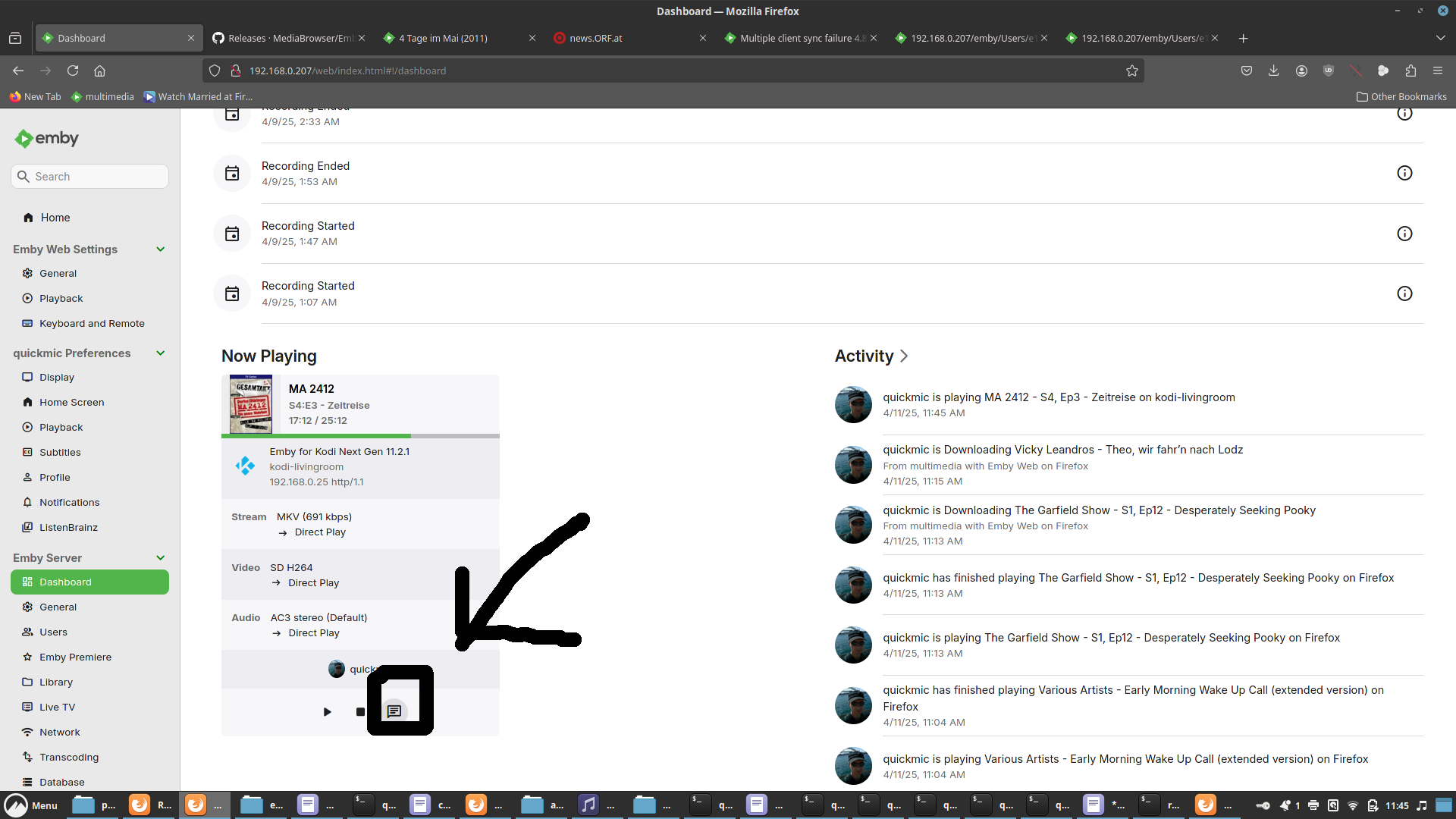
Thank you for teaching me a new trick. @Luke I am using the "Emby for Android" from Amazon, and I am using it on a Fire Quebe. I am sending commands to it using the Emby session manager. I looked in the Emby server log and the Emby for Android client was sent a SEEK message after the client sent two progress update messages back to Emby. The sent message did not affect the progress clicks from the client. I will use the Web Client to run further test. Vic1 point
-
@softworkzYou have to remember that a lot of users here are (I'm going to be blunt) not exactly the sharpest tool in the shed when it comes to hardware and encoding stuff. FPS is easier for these people to understand. As long as we are using standardized files like Tears of Steel or extreme case scenario Sol Levante (for 4k transcoding), it would let these users know what their hardware is capable of. The forums still get lots of posts from people who are clueless about transcoding and stuff and I'm sure you get pretty frustrated yourself with some of these questions from people. I've personally blocked several users who refused to understand things even after they were explained in plain english. Sometimes we need to dumb things down to the lowest common denominator so that everyone can understand, even if we don't want to. We have to remember that just because we understand these things, a lot of users will think it's Ancient Egyptian and be so confused they'll just give up. Some will reach out and want to learn, but many will refuse to. There is still too much voodoo in regards to transcoding, and we should make it so easy that someone grandmother could understand. ie, this device can do so many fps, which means so many concurrent trancodes of this resolution, which means this many concurrent users that need transcodes. Just some thoughts. I don't want to be stepping on any toes. If I have, please feel free to let me know.1 point
-
Hi, yes we’ll be adding an additional option. Thanks1 point
-
@rumzieeewe'll look at incorporating the full release date into the sorting. Thanks for reporting.1 point
-
Exactly that. I feel like Emby development, in terms of features, has really stalled...1 point
-
Just to clarify as I can no longer edit my post, I mean't to say most of the time it is NOT needed. It would be nice to have this option for the times when it is needed.1 point
-
Why has this been discussed for years with no action? There was a lot of deflecting by one team member in particular who kept pointing out the universal audio delay feature which is, obviously, not the feature being requested. This would seem an easy feature to an idiot like me given that mpv can easily support it. But I'm an idiot. If this IS hard let us loyal paying users know and we'll probably act less entitled. In my case I have no idea why 24p, in particular, suddenly invokes this issue when playing from Windows 11 with direct sound as a separate output from the HTPC. I can work around it, and do, and this doesn't affect all the configurations I use. Just one and only when the refresh rate is changed to 24. Currently, if using direct sound, I just don't let Emby change the refresh rate and I don't have any judder because of whatever algo's are running wherever (hard to know these days if it's the GPU or the TV or both). I'd really like to go to video source framerate refresh where possible and this feature would be the only thing I could use or add in universal delays for certain refresh rates - I think this used to be an option or, perhaps, it was Kodi back in the day.1 point
-
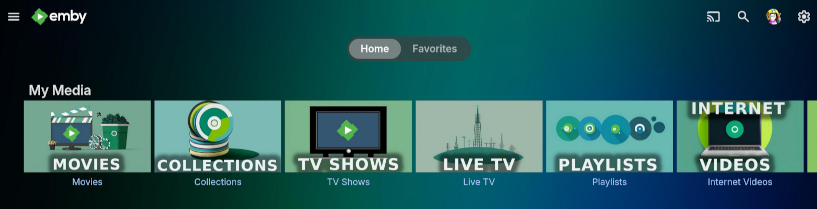
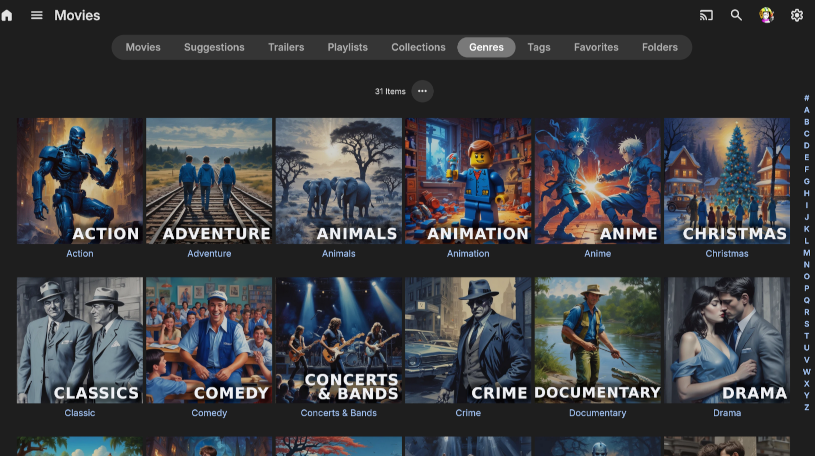
I thought I'd share with everyone the AI theme templates I use for my Emby server. I decided to make some media images that sorta match the Emby green color while throwing in a splash of blue mixed into the theme. Check out the Read_Me.txt file I created that shows what websites I used along with search terms & settings to get the same results to create your own artwork. If you want to create your own, follow my steps in the read_me to generate an image then open a .xcf in the zip files below to add your own text while making it all match the theme. Read_Me.txt Download My Media Library icons: MyMedia_Icons.zip Download Genre icons: Genres_Icons.zip Both of these zip files also contain the .png images I created along with .xcf files so you can easily edit them or create your own as well. Read_Me.txt _________________________ To change the background on my emby home screen to match the color theme of the My Media Library icons with that green/blue image I saved this image I found online as bg1.jpg to my emby images directory : on linux: /opt/emby-server/system/dashboard-ui/images/bg1.jpg (I have no clue where this file-path is on windows/mac, maybe someone else with that knowledge can post those details below)): Then to apply it, I added the following custom CSS code: div.view-home-home {background-image: url("/web/images/bg1.jpg");background-size: cover;}/ (Keep in mind, custom CSS only applies for the WEBSITE, and does NOT apply to the TV apps so users connecting from a smart TV will NOT see the custom CSS changes) That's about it. Feel free to add to this thread & share if you create some cool additions! I hope this helps someone looking to add a little more to your server. Read_Me.txt
 1 point
 -
Watching and recording cable TV in Emby has worked well for nearly everyone I chat with. Pretty much the same for OTA. It's just a matter of having the right hardware (e.g. Prime & QUATRO) and server with HW Transcoding and NVMe used for recording and transcoding temp storage. The NVMe storage is key to high IOPS o storage doesn't become a bottleneck if your recording multiple programs with users watching multiple channels and needing transcoding or remuxing. This assumes each client has a good connection to the server preferably using Ethernet vs Wifi. Carlo1 point
-
OMG. Would kill for this. Most of the time it’s needed. But sometimes it is sorely needed. Bad rip, bad file format, who knows what causes it. But a simple on screen control to increase or decrease audio delay would take care of it.1 point
-
Sorry but this may only hold true for non PC apps but for pc it is plain wrong. You are assuming that there is a convenient way to manage your audio device volume in your audio device. But for windows most of the time their isn't and the best we have is windows volume mixer. For example a HDMI monitor playing the audio with built in speakers. No one in their right mind is going to open a monitor OSD to adjust the output volume just for EMBY or any other Windows app. Different programs play at different volumes so it is an industry standard to have a persistent volume setting for 95% of the programs that may need any kind of volume adjustment. That is why windows has sound mixer and why a persistent audio settings in every app are common industry practice. Name a single game that does not have its own persistent software sound setting. Also to further complicate things Emby has more audio issues when combined with windows volume mixer. The audio set in volume mixer actually persists after restart while resetting the volume mixer slider back to 100 %. Meaning if you reduce EMBY app volume to 1% in volume mixer it will retain this 1% volume after app restart while resetting the volume slider back to 100% thus you cant hear anything but in-app sound is 100% and Volume mixer sound is also 100%. Moving the slider from 100% to 99% gives of an instant SPIKE in audio. So please stop calling bugs as features. I am also a software developer and I know that it is the default excuse when there actually is a scenario where it might remotely make sense. PS.: It is actually debatable even for non windows apps to keep anything at 100% in the audio source. 100% is the limit of what you device is capable of outputing and there is absolutely reason to have anything at 100% it does not effect digital audio in the slightest and analog audio will have much greater chance of getting distorted when close to any kind of audio devices limit. There is a possibility for a wave form losing details and flattening out if it can not reach its peak phase due to a hard limit of what the device is capable of outputting.1 point
-
I've had this last point happen to me. WAF is very low when it comes to tinkering while watching a movie, and when something happens (like yesterday when a video was stuttering every few seconds -not the issue at hand here, I know) falling back to Kodi is our much preferred solution.1 point
-
+1 from me. I have a modest media library (30+TB) and I'm not going to go through and manual fix every single small audio issues. A quickly accessible adjustment would be a killer feature. I see this has been mention for YEARS, and the lack of this feature vs other platforms is pretty frustrating. Additionally, sometimes I encounter this issue from my NAS (UnRaid) when there's a parity check running. A quick bandaid would be a great feature, rather than having to stop and fix it, especially from my wifes POV.1 point
-
+1 from me. There is an audio delay when using some Bluetooth audio speakers and it would be good to counter. kodi had great options to allow this1 point
-
+1 from me!1 point
-
I vote for this too1 point
-
I'd like to add my vote for this request as well. I have an entire season of a tv show with 150ms audio offset with no way to fix this problem in Emby other than to find a different source. The problem exists because it was incorrectly authored. I am on an older Roku Ultra.1 point
-
use case: I use an XGIMI projector which has Android built in, and when sending audio to my receiver using eARC, the audio gets delayed - probably in passthru processing, etc., etc. Running audio directly thru the built in XGIMI speaker results in good sync, so no problem with Emby. I solve this in Kodi by setting 250ms audio difference, and apply to all. I wish I could do the same with Emby (delay video vs audio, or advance audio from video). Therefore I too wish for this feature.1 point
-
+1. I would add, NOT the same way it's possible in Theater, which is very cumbersome to use, but an in-player option.1 point




















.thumb.png.1ddf135ad99a72646a26d671a28ffe35.png)