Leaderboard




Popular Content
Showing content with the highest reputation on 04/08/25 in all areas
-
I added a feature that will create a set of starter channels from your Emby Database under two conditions. You can do this when you add a new TV Source or when you select "TV Guide 1" and have no channels defined. In both cases a purple "Starter Channels" button appears. Click this button and the starter channels will appear. I have only tested this on my Emby DB. Let me know if it works on your system. Vic2 points
-
Thanks, updating to latest tizen version via USB helped. The issue is closed2 points
-
As one of the original testers of the most excellent tvnext created by @softworkzi can't tell you how bitterly disappointing it is that all the work that was done on it, what 4-5 years ago has STILL not been integrated in to emby yet!!! As I understood it it was possible to integrate it with a --tvnext command line switch so it could be optionally tested with minimal extra code required. Why have you let all that excellent work go to waste @Lukeyou should be ashamed. Krs Mark2 points
-
Hello, It will be great to have the possibility to exclude a library from the global search. For example the Adult content one. Or at least to be able to exclude a tag from the global search and by this I can tag the entire Adult library as Adult and Adult tag to be globally excluded on search. Imagine what happens when you want to search for "Coffee with Ana" movie and you start typing in the search field "Ana" with little kids near you Thanks!1 point
-
system\dashboard-ui\modules\common\usersettings1 point
-
Thanks @Happy2Play, I'll be attempting this after work today... about 4 hours from now...1 point
-
Truncating file names to at most 255 bytes helped. All file names, that needed to be truncated, contained russian or other characters, that take up 2 bytes Requesting for long paths feature in linux1 point
-
Look at the usersettingbuilder.js and change to this. I change theme to "black" and set settings to same as theme in this example so all users will start with black as it is by default null. UserSettings.prototype.settingsTheme = function (val) { return null != val ? this.set("settingsTheme", val, !0) : this.get("settingsTheme", !0) || "maintheme" }, UserSettings.prototype.theme = function (val) { return null != val ? this.set("appTheme", val, !0) : this.get("appTheme", !0) || "black"1 point
-
@Luke This did solve the issue on the TV by switching to the other app. It does solve the issue for her personally. But the bug does still exists on the Emby for Fire TV app. Thanks.1 point
-
Please let us know how this goes. Thanks.1 point
-
Yeah, i've searched it up a little bit, and seems like there's no solution for that. In windows i didn't have such issue, because it's possible to toggle long path in there, unlike in linux. So i think i'm going to shrink my filenames... Sorry and thanks1 point
-
Right now i don't see anything that Emby is doing incorrectly. It's an error coming from the dotnet runtime when trying to get directory contents. You could always try the beta channel as it has jumped from dotnet 6 to 8.1 point
-
[emphasis mine] Those might be a little under-stated . There would be a HUGE difference in ease of setup, maintenance and usage between a Linux HTPC and something like a Roku. All depends on how much time you want to spend tinkering and maintaining...1 point
-
@Happy2PlayPreferably the same way as it is with other apps on Android (not sure about ios), you long press to select the first item and then scroll with pressed finger until you reach the last item of your selection. This is not an issue with the method I mentioned above, as the items should be loaded as they are selected. If one dares to select thousands of items, then a performance hit is always possible of course. @LukeFor my use case, I am talking about selecting songs of an aritst to refresh metadata. Some artists might have a few hundred songs. Do you know how annoying it is to select each song manually1 point
-
You are going to need at a minimum a 7xx series Nvidia GPU but more realistically something from the 10xx series or above the that supports modern codecs. Intel iGPUs from 8-gen CPUs and above are also a good choice. https://developer.nvidia.com/video-encode-and-decode-gpu-support-matrix-new1 point
-
@Abobadermay have some insight.1 point
-
I do not think that is currently possible but it is a very interesting idea. In fact I wonder if it could be possible to set a different external player, or none, for each library. I do not currently have a need or desire for something like this but it does seem to have a fairly high potential value.1 point
-
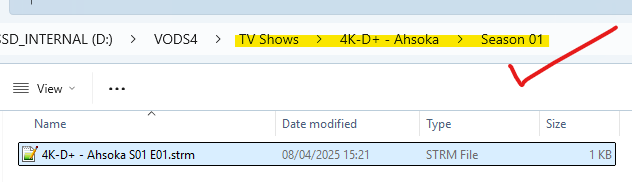
Thanks for supplying the two lines of your m3u, I can confirm a pattern match is causing the return of the whole string when trying to get the "Show Title" from the episode name. And the culprit is "4K-" I have altered the volume matching code very slightly, and this fixes this issue, my worry is that it might have an adverse effect on other titles that have volumes Attached for testing 08.Apr.2025 - 15:21:51 ====================== Item [1] =================================== 08.Apr.2025 - 15:21:51 Debugging: Sanitize InputString: 'DISNEY+ SERIES EU 4K 3840P' 08.Apr.2025 - 15:21:51 Debugging: Sanitize OutputString: 'DISNEY+ SERIES EU 4K 3840P' 08.Apr.2025 - 15:21:51 Debugging: Sanitize InputString: '4K-D+ - Ahsoka S01 E01' 08.Apr.2025 - 15:21:51 Debugging: Sanitize OutputString: '4K-D+ - Ahsoka S01 E01' 08.Apr.2025 - 15:21:51 tvgName: 4K-D+ - Ahsoka S01 E01 08.Apr.2025 - 15:21:51 groupTitle: DISNEY+ SERIES EU 4K 3840P 08.Apr.2025 - 15:21:51 channelName: 4K-D+ - Ahsoka S01 E01 08.Apr.2025 - 15:21:51 logoUrl: https://image.tmdb.org/t/p/w185/i29R3K7YgLQvBFtTkMAI7zQ9bHi.jpg 08.Apr.2025 - 15:21:51 Debugging: Pre-Include/Ignore metadata.ChannelName= 08.Apr.2025 - 15:21:51 Debugging: Pre-Include/Ignore metadata.MovieName=4K-D+ - Ahsoka S01 E01 08.Apr.2025 - 15:21:51 Checking [Include Config] Include: True because config is empty. Next check Ignore Config. 08.Apr.2025 - 15:21:51 Debugging: Keep=True. 08.Apr.2025 - 15:21:51 Checking [Ignore Config] Ignore: False because config is empty nothing will be ignored. 08.Apr.2025 - 15:21:51 Debugging: Ignore=False. 08.Apr.2025 - 15:21:51 Include / Ignore checking passed succesfully. 08.Apr.2025 - 15:21:51 Ingnore/Include Total execution time: 0 ms 08.Apr.2025 - 15:21:51 Debugging: [ProcessContentAsync] sanitizedMovieName=4K-D+ - Ahsoka S01 E01, unsantised Name=4K-D+ - Ahsoka S01 E01 08.Apr.2025 - 15:21:51 Debugging: Inside GetShowTitle, Before Season Removal, Input=4K-D+ - Ahsoka S01 E01 08.Apr.2025 - 15:21:51 Debugging: Inside GetShowTitle, IsitAnEdgeCaseTVShow?, Input=4K-D+ - Ahsoka S01 E01 08.Apr.2025 - 15:21:51 Debugging: Inside GetShowTitle, after moviePattern regex, Input=4K-D+ - Ahsoka S01 E01 08.Apr.2025 - 15:21:51 Debugging: Inside GetShowTitle, after volumePattern regex, Input=4K-D+ - Ahsoka S01 E01 08.Apr.2025 - 15:21:51 Debugging: Inside GetShowTitle, after seasonEpisodePattern regex, Input=4K-D+ - Ahsoka 08.Apr.2025 - 15:21:51 Debugging: Inside GetShowTitle, after parentheses with year ranges regex, Input=4K-D+ - Ahsoka 08.Apr.2025 - 15:21:51 Debugging: Inside GetShowTitle, after Season Removal, Input=4K-D+ - Ahsoka 08.Apr.2025 - 15:21:51 Debugging: [ProcessContentAsync] Pre build Path, ShowTitle=4K-D+ - Ahsoka 08.Apr.2025 - 15:21:51 Debugging: [ProcessContentAsync] Pre build Path, GroupTitle=DISNEY+ SERIES EU 4K 3840P 08.Apr.2025 - 15:21:51 Debugging - Checking for URL strings.. 08.Apr.2025 - 15:21:51 Detected TV Shows - URL contains the word '/Series/' 08.Apr.2025 - 15:21:51 Debugging: tvgType after AdjustContent=TV Shows. 08.Apr.2025 - 15:21:51 Debugging: filename1=4K-D+ - Ahsoka S01 E01.strm 08.Apr.2025 - 15:21:51 Debugging: GroupTitle1=DISNEY+ SERIES EU 4K 3840P 08.Apr.2025 - 15:21:51 Adding TV show: 4K-D+ - Ahsoka S01 E01 08.Apr.2025 - 15:21:51 Debugging: AddContentAsync Inputs: outputDirectory=D:\VODS4, tvgType=TV Shows, groupTitle=DISNEY+ SERIES EU 4K 3840P, showTitle=4K-D+ - Ahsoka, season=NULL, fileName=4K-D+ - Ahsoka S01 E01.strm, fileContents=http://xxx.xxx:80/series/xxxxxxxxxx/xxxxxxxxx/581085.mkv, imagePath=https://image.tmdb.org/t/p/w185/i29R3K7YgLQvBFtTkMAI7zQ9bHi.jpg, year=unknown_year, genres= 08.Apr.2025 - 15:21:51 groupTitle Folder omitted due to IgnoreGroupTitleFolder setting. 08.Apr.2025 - 15:21:51 Debugging: [IsitAnEdgeCaseMovie] Detection Result: (False),(4K-D+ - Ahsoka S01 E01) 08.Apr.2025 - 15:21:51 Debugging: Sanitize InputString: 'Season 01' 08.Apr.2025 - 15:21:51 Debugging: Sanitize OutputString: 'Season 01' 08.Apr.2025 - 15:21:51 sanitized season [AddContentAsync]: Season 01 08.Apr.2025 - 15:21:51 sanitized groupTitle [ Path.Combine() folderName]: 08.Apr.2025 - 15:21:51 Constructed Folder Name [2]: D:\VODS4\TV Shows\4K-D+ - Ahsoka\Season 01 08.Apr.2025 - 15:21:51 Constructed Folder Name [2]: groupTitle= 08.Apr.2025 - 15:21:51 Constructed Folder Name [2]: showTitle=4K-D+ - Ahsoka 08.Apr.2025 - 15:21:51 Debugging AddToContentListAsync: folderName=D:\VODS4\TV Shows\4K-D+ - Ahsoka\Season 01, fileName=4K-D+ - Ahsoka S01 E01.strm, fileContents=http://xxx.xxx:80/series/xxxxxxxxxx/xxxxxxxxx/581085.mkv 08.Apr.2025 - 15:21:51 Item [0] Adding to Folder: D:\VODS4\TV Shows\4K-D+ - Ahsoka\Season 01 VODtoSTRMscheduledTask.dll
 1 point
 -
I don't think there's anyway to do this currently: through my troubleshooting of my recent metadata issues, it occured to me that it would be VERY useful to be able to force just a single series to use only a single source for metadata. While you can do this inside a library, there doesn't seem a way to do it through a series. I've tried physically edit the series/season's NFO to "lock" fields from other databases with them remaining blank, but that doesnt seem to be a 'backend' fix. --- There are two major usecases for this feature: #1.) There are many series that have different counting methods for epsiodes/seasons depending on which database you use. Example 1: American Dad has COMPLETELY different season counts depending on which database server you use. TMDB counts Season 1 as just 7 episodes, while IMDB counts Season 1 and Season 2 (by TMDB's measure) as Season 1. Example 2: Burto by many database's is counted as one GIGANTIC season, but there is an official Viz season count that grounds the episodes by approximately every 25 episodes. In the case of Example 1, depending how I lay my series out, I may wish to tell the series to NEVER look at IMDB or TMDB.. In Example 2, I PERSONALLY would like the option to tell Emby to go fetch metadata by absolute episode#, but choose to group the episodes by the Viz US Official season grouping; which makes the series a lot more sane to try to digest. To the best of my knowledge there is no database that has adopted Viz US's official season groupings, but, of course there are a PLETHORA of sites that have the episode descriptions, and many that have use the "Absolute Episode #" field. --- If there isn't an implimentation of this already (which, part of this post is to 'beg the question', before dumping this into an official suggestion) is to add an "Absolute Episode # Field" into the metadata NFO for episodes AND to add the ability to 'refuse' data from metadata sources for on a series by series basis. I don't know if there is a STRONG usecase for the following, but I would almost suggest making this an option for episodes as well, that default inheritts from the Series/Season NFO. It seems pragmatic to add this feature (assuming it doesn't exist in some capacity already) while tweaking the above. ---- Finally, this next part probably should be its own post (and I'll likely break it up later depending on commentary here) --- I want to point out that on re-scans of a series, Emby doesnt appear to respect locked fields for "Season Title". Example: If I manually modify 'Avatar: The Last Airbender''s Season 1 to read 'Season 01 - The Book of Water' and then LOCK the field, Emby will revert it to 'Season 1' upon moving the series to another folder, removing/adding the series back into the collection or upon a request to either replace or find missing metadata request on a specific season.1 point
-
That's correct. That simple color boost was an interim solution. Meanwhile we use software tone mapping - including the parameters that are set under Transcoding >> Tone Mapping >> Software. The requirements are: The ffmpeg version being used, includes the 'supertonemap' filter In the Diganostics plugin, DisableTonemappedExtraction is not checked otherwise it would fall back to the contrast/gamma/saturation method.1 point
-
@fbrassin Added internal Error traps and Escapes for Emby Library Checking. Really the only part within this code that could possibly just silently fail is the year extraction. Although it should never fail, I have wrapped that in an error trap, so it "should" just continue after reporting a failure. I say "should" because its not Emby, its the c# netcore framework (Microsoft's code) that sometimes has this issue when parsing out numbers from strings. I have no idea if that is what is happening, but its in the "check with emby library" section code that you mentioned might be the problem, so I though, lets just make sure either way if its that or not. Anyway, that's all that's in this build, nothing else different from the last build. VODtoSTRMscheduledTask.dll1 point
-
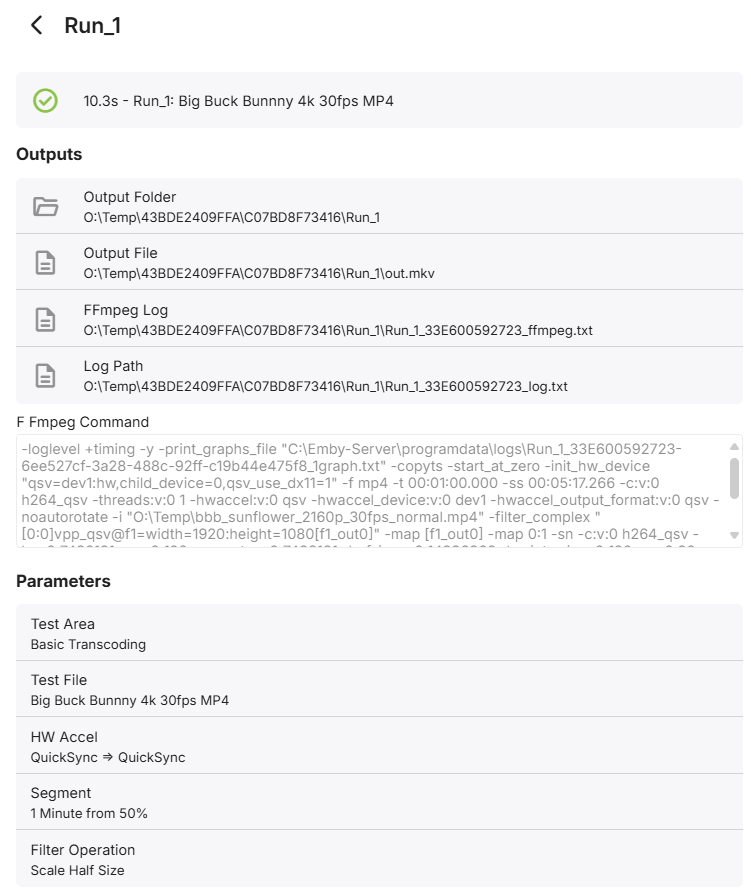
So the issue with benchmarks is every transcode will be different as different source and parameters will be used - thus while the numbers will give you a ballpark, they cannot be directly compared. This has come up before (a few times) and @softworkzdid some work to combat this by producing a plugin called 'Transcode Tests' (it's in the Catalog - under General) The output of this, once user approved and anonymised, could probably be uploaded and start to form some sort of Emby related database - accessable on the Emby wiki etc. To start with, maybe having a thread dedicated to people posting their output from the above may be a good start .. Run_1_33E600592723_ffmpeg.txt edit .. So I had a play, as this was early beta when I initally looked. It now looks like a pretty comprehensive set of tests, with auto download of the source. The only thing that appears to be missing - is a summary of the actual meaningful transcode results in fps. The ffmpeg log - which will be the same for everyone, assuming they use the same test run, contains all the info we need - attached, as it doesn't appear to contain any user specific data. It's a shame the plugin doesn't summarise this - in my case, 4K h264 >1080p h264 via QSV on a UHD 770 = fps=178 I think the fps is much more valuable that the time taken for the encode - as this 'should' roughly translate into parallel encodes. ie 178/24 = approx 7 encodes.

 1 point
 -
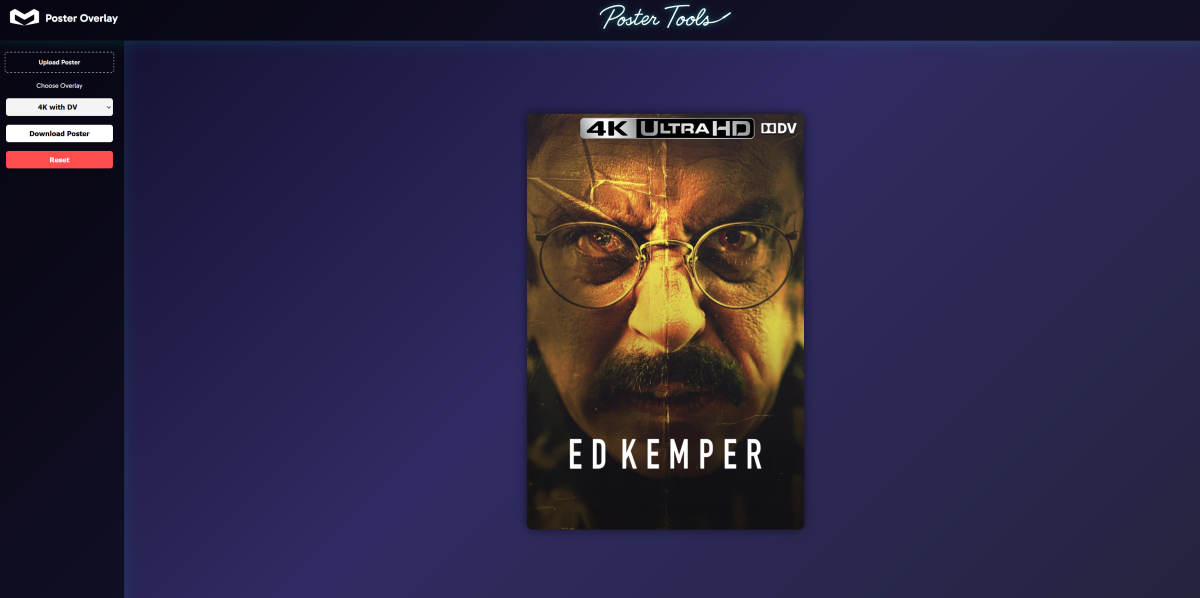
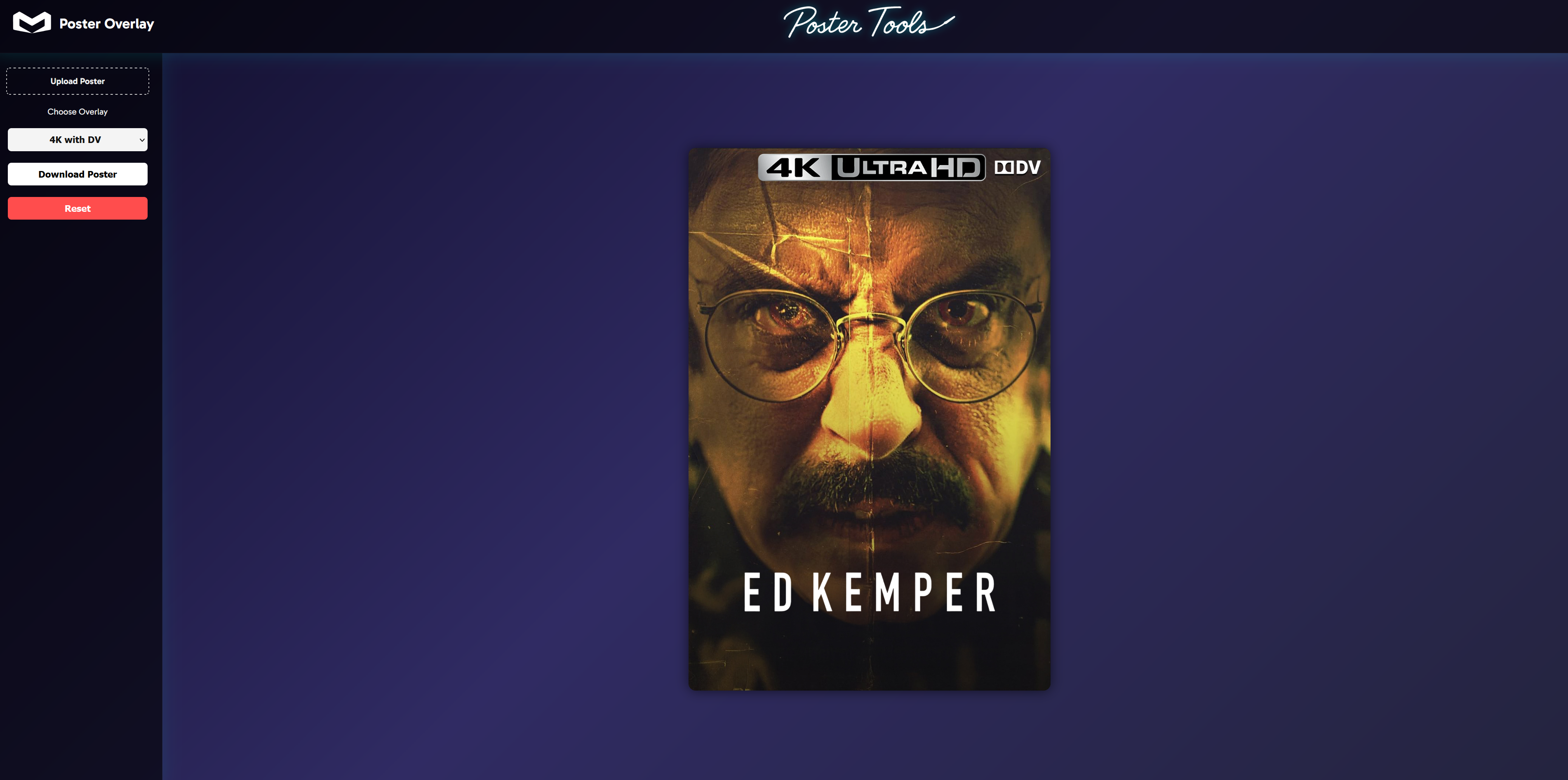
Been a while, nice to see others interested in this and taking the time to make changes. I've recently been working on a website with nicer visuals, other tools and functions etc. Bit of a teaser of the overlay tool.
 1 point
 -
Si, esto soluciono el problema. Ahora esperare hasta la proxima actualizacion a ver si no vuelve a ocurrir. Lo extraño es que nunca habia pasado esto. Saludos y gracias por la ayuda.1 point
-
Make sure you're using a nuget package that has a version number that is equal to or less than the version of the server you are running, not greater.1 point
-
I tested them a while back to see the difference. What they do is use the albumartist tag for one track in the directory and then assume that everything else in the same folder matches. Emby is a more direct representation of how your files are tagged.1 point
-
It is how emby works. Clients always stream from the server. Also emby is intelligent enough to reuse an existing stream. I.e. if two clients are watching the same iptv channel it only uses one incoming channel from the external source. Krs Mark1 point
-
Are you yelling or is something wrong with your keyboard? Please practice some patience, someone from the Dev team will respond to you in due course. There is no need for all the CAPS, thanks.1 point
-
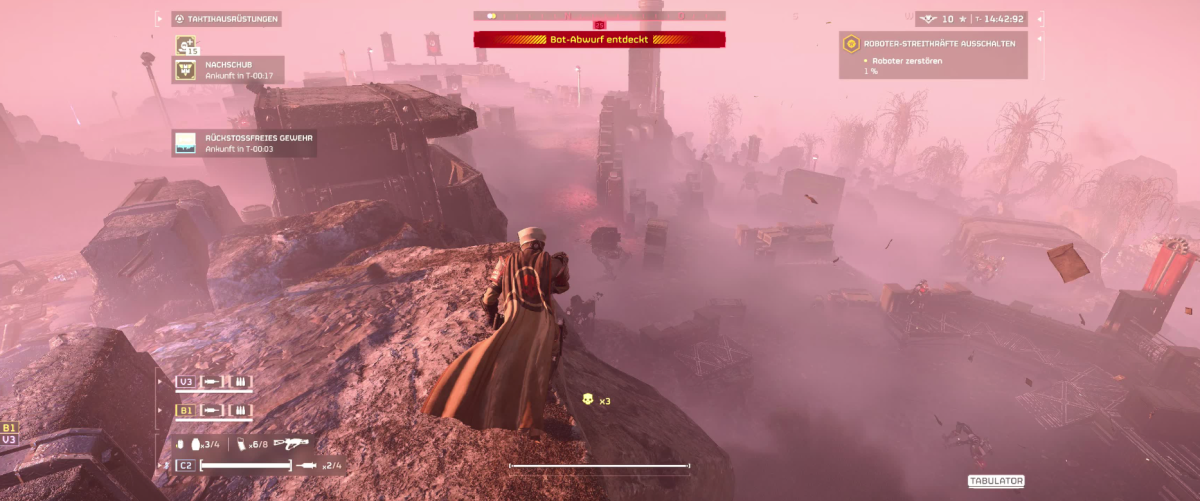
Alright, issue resolved. Turns out the problem was caused by the tone mapping algorithm selected in the transcoding settings I switched it from Hable to Mobius (both for software and CUDA), and just like that — problem gone From what I’ve read, Mobius is slightly slower than Hable, but with an RTX 3070, performance isn’t an issue at all (This is the new thumbnail)
 1 point
 -
Ended up using MP3Tag and set the following: Album Artist: "Various Artists" Artist: Actual Artist for each track and it only shows one Album now and looks fine. Thanks for the info, Interesting that Plex didn't have this issue but I guess Emby has different criteria.1 point
-
Yes, we have - but probably after 1.9.0 (actually 1.9.2 has this change)1 point
-
Hi Dev Team, this issue is resolved for me, I'm glad to be back on Emby Thanks!1 point
-
From memory, the preview images use a 'quick' version of tonemapping to speed up the process as it's very intensive when properly tonemapping every image. It used to use some type of gamma/colour correction that was even quicker (but looked poor), but tonemapping was added and tbh, I've been ok with the result. Prior to this, I added tonemapping to the bif creation myself via a script - to note, the MediaInfo plugin also has that same ffmpeg code/syntax under the BIF Generator tab. That does the full tonemapping which may produce better results - but test first as I haven't looked at that code in a long time since it got updated in the Core. Adding @softworkzwho added it - he may be able to provide further info. btw - it's also worth added the generated preview log file - as that will show the ffmpeg syntax used. It may simply be that the tonemapping algorithm default (hable) does not work well with the game graphics output, but others are available. (the plugin allowed you to change it)1 point
-
The Emby clients always get the stream from the Emby server, never directly from your provider.1 point
-
Porque si un video dura 30 minutos con esta opción la puedes reducir a 16 minutos y necesito ver cuanto tiempo real con base a los 30 minutos estuvo un usuario viendo contenido de video en tiempo normal1 point
-
This is easy to fix Go into display, change to TV mode and voila, kiosk mode, no more minimise maximise buttons It's that simple.1 point
-
What you want is in one of the js files as default settings are tied to Premiere and are sort of not changeable on none Premiere. But yes you can use custom css to override both theme/settings theme.1 point
-
Hi, please let me know if the Dlna plugin update that just went up resolves the issue. Thanks.1 point
-
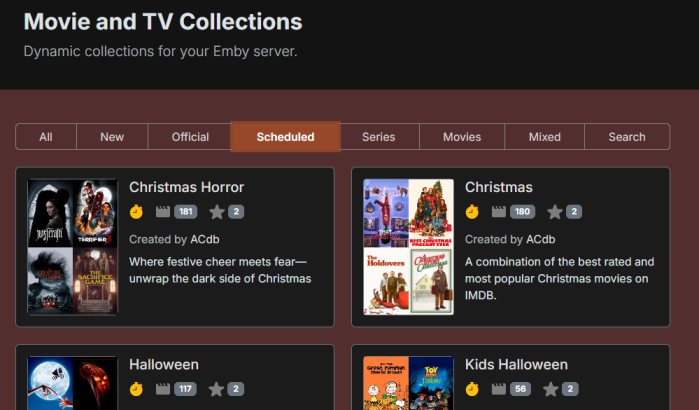
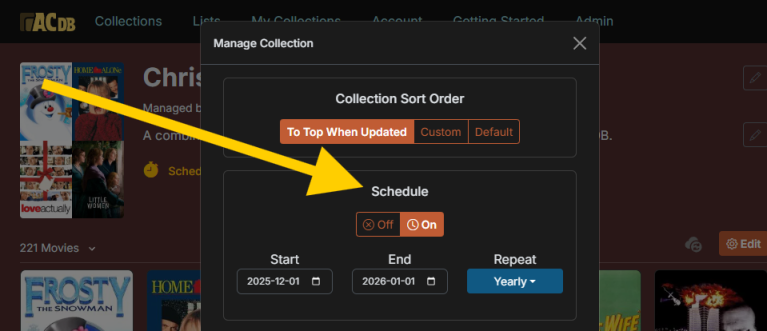
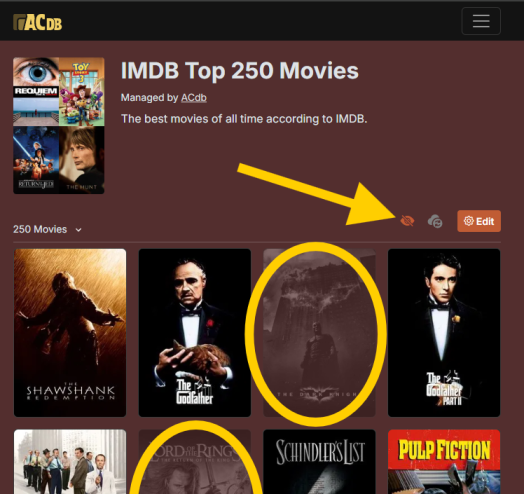
Hey, I've been adding some new things. Added scheduled/seasonal collections + a filter collections bar on the front page: Above you can also see the relatively new sorting option. Move collections to the top if new items from your library get added to them. Added a new button on your collections so that you can see which items you have missing from a collection. Shown once you have synced that collection. Must be Patreon supporter to use. If you don't see the option make sure you have the latest version of the plugin (and then you must wait for syncs). Plugin has had a bunch of minor improvements and also a number of fixes (thanks @eMoOakfor lots of testing).
 1 point
 -
What we really want is to know what happened, and how to prevent it from happening again, and so far you haven't answered any of that. Instead of trying to push this Windows Store App down our throats (when it's clear some of us prefer the Theater App instead) can you please address our concerns? Thank you!1 point
-
tldr: The ET apps are just web interfaces/browsers/tabs/however you want to call it packaged into an application. A lot of the runtime code is not built into the app, but instead downloaded from Emby servers every time you run the app. This can and does cause a wide range of issues, such as this issue. The problem is that the apps use Emby servers to download runtime code. I don't understand why they chose to do this. They should/could just load assets from our Emby servers? Or better yet - bundle them in with the app so the versions stay consistent and not a mix of downloaded code and live streamed runtime code. As a result without an online connection, or if the Emby server/service goes down, or they introduce a bug in their runtime code - you can't launch ET. This is why I brought up this post to ask for an AIO version that doesn't need to pull assets from their servers They could bundle in those runtime assets into the applications directly, or utilize our servers to serve those runtimes. https://github.com/MediaBrowser/emby-theater-electron/blob/master/main.js#L492 function getAppBaseUrl() { var url = 'https://tv.emby.media'; //url = 'http://localhost:8088'; return url; } Due to the bizarre decision of framerate switching without an option to opt out from that feature, the outage due to a bug or something in that streamed runtime code on Emby servers, and other weird decisions - I'm now just using the web interface on my PC. I'm unsure what has lead the Emby team down this path, but it doesn't inspire me with confidence. I want to lock down server and client versions as I fear similar updates will continue to roll out that are regressions and not actual feature updates.1 point
-
Yeah I've gone back to the Emby theatre on github. The app on Microsofts app store hangs straight after the splash screen sort it out. I've paid for a Premiere lifetime access I don't expect these problems. Post here when you've fixed it. Gutted really liked Mediabrowser1 point
-
@LukeWell, I have ruled not my theory, because other libary doesn't have this issue. The libary I reported in picture, is the most case sceanrio, for other libarys also got Symlink's notification, has no effect . So, I think it can be rule out. And, after 2 days, I found that, this rescanning can be over. Eventually, after 10--20 hours, it can be stopped , and scanning another libary. But, if I put new staff in this libary again ,it will rescanning over and over again, for a very long time. @CarloYes , this libary keep rescanning over and over again, in the mean time, no logs at all. The symlink case is..... like this example: 1. a folder, name /downloads/, and it contains both TV and Movie,qbittorrent downloads staffs in it. 2. Symlink , this container , monitoring this folder, when download is finished, it will decides if it's a Movie or TV, create softlink to /media/TV or /media/Movie,rename and sort by tmdbid, then notifies EMBY to scan /media When QB downloaded a folder like this: /downloads/Heroes.2006.Season01.HEVC.DDP5.1.NTB The Symlink create softlink like /media/TV/Heroes (2006) [tmdbid=1639]/Season01/S01E01.mkv /media/TV/Heroes (2006) [tmdbid=1639]/Season01/S01E02.mkv /media/TV/Heroes (2006) [tmdbid=1639]/Season01/S01E03.mkv 3.Now, I can be seeding and watching by EMBY at the same time, fully automatic....1 point
-
I'm on record recently as having said that a version of Theater without the ability to use an external player is of no use to me. I'm also on record, some time ago, giving the reasons for that. Emby responded by providing a version that was able to use an external player for both video files and live TV. for which I'm eternally grateful. I haven't used the Store version so don't know what else might be less desirable compared with this version, but looking at what people have posted from page one of this thread there are other reasons laid out.1 point
-
It doesn't really matter what drive it's on as long as the machine itself is dedicated to Emby. You're still going to be hardware limited in regards to access speeds, internet speeds and any transcoding. Just make sure the drive has a really large write life cycle, due to all the temp files that will be created.1 point
-
Yes, I found the version in the app, that's indeed the one.1 point
-
Hi, we should have an update in the store soon. Thanks,.1 point
-
Hi, we’re looking into improving this. Thanks guys.1 point
-
I've come across another reason it would be great to get higher bit files playing in the app. The workaround of using a web browser means high res audio gets transcoded down to AAC 384bps (according to Stats for Nerds and the Dashboard) because browsers don't support all the formats that Emby does, in particular AIFF regardless of the bit depth. I have to keep my DJ music library in AIFF for compatibility with CDJs/XDJs (in the future maybe move to FLAC; MP3 is meh). AAC 384 is not bad, but I really want to play the files with no transcoding at all. This is more of a general issue with accessing media libraries through a web browser, and shows why a dedicated client app would provide the best experience.1 point
-
Thanks for the prompt Luke. Made the time and details attached. I hope that helps. The symptom was happening on my old S21Ultra and happens on the S25Ultra which was a clean install. My client is 3.4.36 Android Auto is 13.7.650624-release ONE UI v 7.0 Android 15 patched to 1 Feb 25 Entirely separate comment - the original reason I was on the forums was to figure out how to make Emby Android connect once it connected to car Bluetooth as most of the time it would not; and I'd have to do it manually via phone HOWEVER on the new phone - it seems to connect perfectly every time saving me some precious hair. Love your work Luke. Sorry for the size of video. PXL_20250301_000410242.TS.mp4 emby_android_1740787391678_anon.txt1 point




.thumb.png.1ddf135ad99a72646a26d671a28ffe35.png)

















.thumb.png.f4cb0545e98b51fd9b00e427622ab761.png)