
Leaderboard




Popular Content
Showing content with the highest reputation on 04/05/25 in all areas
-
I mean I get everyone's frustration My monitor's range from 165hz to 240hz and the one reason I built a $20k Media Server is now pretty much ruined Sure I can live with HDR @120Hz but a lot of my movies have higher quality to offer and a full refresh rate would be nice to see But lord and behold every single time opening the Emby for Windows app I feel like I wasted like $4000 on monitors Why do this just because a few XBox customers complained? You made a separate version for them anyway right? So let Windows users enjoy full refresh rate Emby Theatre is buggy for other reasons but at least it did not mess with my monitor settings ALL THE TIME Don't make this the last month I use Emby, this would literally be the last straw leading me to Jellyfin4 points
-
Hi guys, sorry the fix got reverted somehow. It's on it's way up again. Apologies for the disruption. Thanks.3 points
-
Hello, Emby Theater 3.0.20 for Windows is suddenly stuck on the screen yesterday and two hours ago it was still running without any problems. The version from the Windows App Store runs but I personally find Theater better.
 2 points
 -
WOW. I didn't know you couldn't modify apps from the windows store... That's some horseshit that I will never tolerate. I've hated pretty much every change Microshaft has made since win 11+ and that's pushed me to purge windows from my systems and move to Debian. I tend to just use the web app on PC. If I was forced to use the windows store version, I'd move to Jellyfin first.2 points
-
Thank you to all who have provided their insight. I managed to narrow down the issue. The issue was actually on the subtitles stream (ASS format) and not the video stream as I was assuming. So it does seem that the TV is old/dieing as pointed out by @SamES. As a temporary solution, I created a script to extract the ASS subtitles into plain SRT format. For anyone interested, or who may come across this post: (replace fd with find) #!/bin/bash # shellcheck disable=SC2181 RED='\033[0;31m' GREEN='\033[0;32m' NC='\033[0m' fd -e mkv | while read -r file; do subs_stream=$(ffprobe -loglevel error -select_streams s -show_entries stream=index:stream_tags=language -of csv=p=0 "${file}" | rg eng) if (($? != 0)); then echo -e "${RED}${file}${NC}: Failed to detect subtitle stream." continue fi stream_no=$(cut -d',' -f1 <<<"${subs_stream}") ffmpeg -nostdin -loglevel 24 -y -i "${file}" -map "0:${stream_no}" -c:s text -f srt "${file%.mkv}.en.srt" if (($? != 0)); then echo -e "${RED}${file}: Something went wrong. Existing.${NC}" exit 1 fi echo -e "${GREEN}${file}${NC}: Subtitles extracted successfully." done2 points
-
This is example to do Plugin Please Try any youtube video Song link https://mattw.io/youtube-metadata/ you will get all info Search Via File name or identify youtube link. Please This will be a Great Options for all over world1 point
-
Whats the status on that issue ? using emby (server latest version) and client on iphone 16 pro max and cant play back any HEVC-Streams neither1 point
-
External player is not working for me. Keeps using internal player. Emby server restarted, theater restarted, same no external player launching, Path is correct. Deleted and readded. Now lauching but have to remember how to pass path to emby For anyone facing this issue. Close and restart emby theatre several times and its not syncing properly. Once done, add external player. Then COPY AND PASTE the (path) to the external player config box. Then it works.1 point
-
Dunno why it was not doing automatically, but multi-selected and refreshed metadata / images from within collections and they have come through. All back up and running now1 point
-
Ok, thanks. I looked for another post about it but I did not see it. Thanks for letting me know. Have a good one!1 point
-
Hello, Thanks for the fix . I had to clear the DNS cache of all my computers for it to work correctly on my arch : sudo systemctl restart systemd-resolved.service and on windows: ipconfig /flushdns1 point
-
Well. It wasn't my second launch. But it did eventually work. Launched it a few times and it didn't work. So I just waited a bit and it seems fine now.1 point
-
Why has this been discussed for years with no action? There was a lot of deflecting by one team member in particular who kept pointing out the universal audio delay feature which is, obviously, not the feature being requested. This would seem an easy feature to an idiot like me given that mpv can easily support it. But I'm an idiot. If this IS hard let us loyal paying users know and we'll probably act less entitled. In my case I have no idea why 24p, in particular, suddenly invokes this issue when playing from Windows 11 with direct sound as a separate output from the HTPC. I can work around it, and do, and this doesn't affect all the configurations I use. Just one and only when the refresh rate is changed to 24. Currently, if using direct sound, I just don't let Emby change the refresh rate and I don't have any judder because of whatever algo's are running wherever (hard to know these days if it's the GPU or the TV or both). I'd really like to go to video source framerate refresh where possible and this feature would be the only thing I could use or add in universal delays for certain refresh rates - I think this used to be an option or, perhaps, it was Kodi back in the day.1 point
-
Hi, right I believe on Synology the data folder does not get deleted on uninstall.1 point
-
Lyrics (Karaoke?) As you can see the Browser interface presents the option to show the lyrics for a song: But in the Apple TV interface this option has gone (If I remember correctly it was in tha past), as you can see in the below screenshot.... anyway can be this implemented on the Apple TV Client to match the web client? Additionally, will emby support karaoke subtitles if those are embedded into the file with timetags ? Plex supports those.

 1 point
 -
Sorry I can't but @GrimReaperwould be more than happy to split this into its own topic. But can say that is what I did on my main server.
 1 point
 -
In the current setup the answer would be no, because they way the directories are updated, but I can look at changing the code so that it could be an option.1 point
-
I thought I'd share with everyone the AI theme templates I use for my Emby server. I decided to make some media images that sorta match the Emby green color while throwing in a splash of blue mixed into the theme. Check out the Read_Me.txt file I created that shows what websites I used along with search terms & settings to get the same results to create your own artwork. If you want to create your own, follow my steps in the read_me to generate an image then open a .xcf in the zip files below to add your own text while making it all match the theme. Read_Me.txt Download My Media Library icons: MyMedia_Icons.zip Download Genre icons: Genres_Icons.zip Both of these zip files also contain the .png images I created along with .xcf files so you can easily edit them or create your own as well. Read_Me.txt _________________________ To change the background on my emby home screen to match the color theme of the My Media Library icons with that green/blue image I saved this image I found online as bg1.jpg to my emby images directory : on linux: /opt/emby-server/system/dashboard-ui/images/bg1.jpg (I have no clue where this file-path is on windows/mac, maybe someone else with that knowledge can post those details below)): Then to apply it, I added the following custom CSS code: div.view-home-home {background-image: url("/web/images/bg1.jpg");background-size: cover;}/ (Keep in mind, custom CSS only applies for the WEBSITE, and does NOT apply to the TV apps so users connecting from a smart TV will NOT see the custom CSS changes) That's about it. Feel free to add to this thread & share if you create some cool additions! I hope this helps someone looking to add a little more to your server. Read_Me.txt
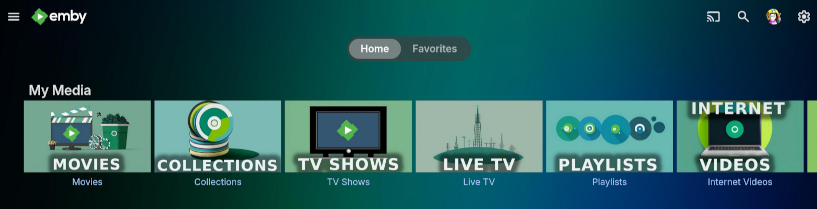
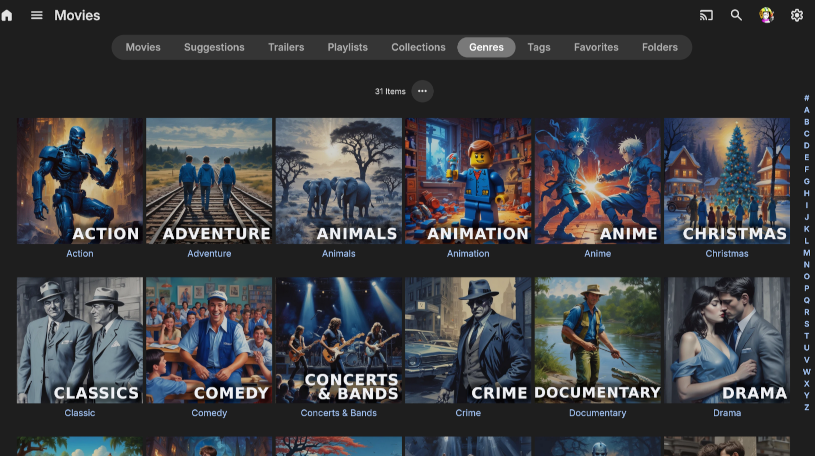
 1 point
 -
Hello, Make it a premium option, but do make it possible.1 point
-
I would try this if you haven't already1 point
-
OK, that shouldn't be an issue. Thanks for confirming1 point
-
1 point
-
Its been working so far. I will report if it does not work again.1 point
-
ProviderId tag syntax you're using ([ttxxxxxx]) is not utilized by Emby, it might as well not be there at all, consider renaming series folder to one of the supported naming conventions, i.e. Reacher (2022) [imdbid=tt9288030] in your example. Additionally, using IMDB Id tag is sorta hit-and-miss, as it has to be available on online providers' database (TVDB. TMDB, TV Maze, OMBDApi...), which is not always the case, it is advisable to use ID tag of your top-preferred meta-downloader, i.e. Reacher (2022) [tvdbid=366924] if it were TVDB.1 point
-
I was looking in User Preferences -> Display, it was hiding in Emby Web Settings -> General. Thanks for the screenshot and exact location. I'm not sure why or how that got turned off, but turning that back on fixed the issue.1 point
-
My advice would be that you should install the OS and emby on the primary NVME and use ether a second NVME or a SSD(SATA III) for emby transcoding-temp/cashe/etc.. (so they run independently) (SSD is fine for a few streams/ NVME for many streams/transcodes) So based on today’s market prices I would buy 2x1TB MVME(7000MB/s+) and this should be relatively `futureproof` Let's see what others have to say...1 point
-
It is launching for me now.1 point
-
I turned them back on few days ago and haven't had that issue since, so looks like it might have been a one-time thing. I do also a have a Jellyfin instance monitoring the same video files, not sure if my errors were because of emby and jellyfin getting on each other's way.1 point
-
Ugg, ok, then I'm going to have to find another solution. I was already planning to use a different program, but I figured if the feature was there and did what I needed, I'd just go with that. Thanks anyway. Not sure if this nomenclature is esoteric or useful enough to enough people to suggest it as an added feature. For what its worth, Sonarr and then other apps from Servarr have the option.1 point
-
Apologies for the disruption guys. A fix is on the way up.1 point
-
I wanted to provide an update. Maybe it will help someone else. Port forwarding with my ISP does not work unless you have a static IP. Apparently, traffic goes through more than one NAT. After getting a static IP ($10/month) port forwarding works as it should, and I can now stream to my phone/laptop wherever I am. As a bonus, it drastically reduced my ping times.1 point
-
Hello, I have the AS6704T and have updated to ADM 5.0 beta. I can no longer get into emby, whether via IP in the LAN or with DDNS. I would be very happy if you could offer a solution in a timely manner. Emby Server Version: 4.8.11.01 point
-
Here's a more detailed explanation: I have a mac share on VPN that hosts media I have saved and emby running on windows that uses the mac shared drives using smb. I think this is how I fixed it: Reconnect at Logon on Windows Client that runs Emby: When mapping a network drive, select the "Reconnect at logon" option to automatically reconnect the drive when the user logs in. Adjusting KeepConn: The KeepConn registry value in HKEY_LOCAL_MACHINE\SYSTEM\CurrentControlSet\Services\lanmanworkstation\parameters controls how long a client-side session remains active before disconnecting. You can increase this value to allow for longer idle times before disconnection. Locate the Key: Open the Registry Editor (regedit) and navigate to HKEY_LOCAL_MACHINE\SYSTEM\CurrentControlSet\Services\lanmanworkstation\parameters. Find or Create KeepConn: Look for the KeepConn value. If it doesn't exist, create a new REG_DWORD value named KeepConn. Modify Value: Double-click KeepConn and change the value data to a larger number (in seconds) to extend the idle time before disconnection. The default is 600 seconds (10 minutes). Alternative: Autodisconnect You can also modify the Autodisconnect value in HKEY_LOCAL_MACHINE\SYSTEM\CurrentControlSet\Services\lanmanserver\parameters to prevent automatic disconnection. Locate the Key: Open the Registry Editor (regedit) and navigate to HKEY_LOCAL_MACHINE\SYSTEM\CurrentControlSet\Services\lanmanserver\parameters. Find or Create Autodisconnect: Look for the Autodisconnect value. If it doesn't exist, create a new REG_DWORD value named Autodisconnect. Modify Value: Double-click Autodisconnect and change the value data to ffffffff to disable automatic disconnection. Followed with this on the mac that hosts: Open Terminal. In Terminal, use these commands to make packet signing optional for clients: sudo defaults write /Library/Preferences/SystemConfiguration/com.apple.smb.server SigningRequired -bool FALSE sudo /usr/libexec/smb-sync-preferences1 point
-
As far as I can tell, if you ever create a collection (regardless if you use ACdb or not), Collections show up in your library settings. The fact that you cannot delete is not related to ACdb.1 point
-
First of all thanks! 'Simultaneous Stream Limit' is correct.1 point
-
Hi Luke - I think I catched the main issue now ... When exporting my photos from Lightroom I typically use the ProPhoto RGB color space. Putting this through the resizer will lead not only to new borders it finally influences the color space, too. From what I saw in the meanwhile, the EMBY resizer is transforming the color space from ProPhoto RGB to sRGB which finally leads to the loss of color quality, depending on the algorithm which is used to reduce the colors. Typically the color numbers wont match in this case (two times reduced colors) and the result is a bad picture quality. To prevent from such questions (like from me) it would be great if you could push your colleagues to state in the documentation about the supported color space for photos. This is the same reason for the Windows 11 "Photo Viewer"-Effect: opening the picture is fine (the viewer can display the ProPhoto RGB) but editing results in a real bad result. Reason: "Photo Viewer" can only use sRGB for editing a picture. We talked about this problem before. Not sure if you really can do something here - except document what is possible. I did now two independent exports one for EMBY one for further use An export to JPEG or PNG with the extremely restricted sRGB leads to acceptable (not brillant :)) results. Having a bit more colors would be great ... best regards RUE1 point
-
So if I have this right, Emby's stance is that no one who installs their app should ever want their monitors to run at over 120hz, for games or any other reason, so they're automatically forcing all monitors down to 120hz every time anyone plays anything in the app, with no option to return to them to normal afterward? And this is intentional? I want to be clear that I'm not trying to be confrontational. I respect differing opinions. But I would strongly suggest you reconsider whatever train of thought led you to believe people would be okay with that. If you don't play games that's fine, if you don't see a difference in the way higher fps looks generally that's fine. But there's a whole world of things outside your (or any one) app, and doing something that affects the whole system in that way, with no alternative, is not ok. For me I noticed when some of my games became unplayably glitchy because of the framerate mismatch. And yes, I could change their internal target to 120 instead of 180, but VA panels (which are common) look significantly worse in their brightness, color, and motion when working below their maximum refresh rate. It's why I personally never use Freesync. You don't really need to parse any of that, but I assure you my usage is quite common. And no one should have to justify being allowed to use a high refresh rate monitor to its fullest. It's a neat solution you guys have come up with. It should absolutely not be a requirement for using Emby.1 point
-
Is there a way to downgrade to a previous version? The forced refresh rate switching regardless of settings is causing me more problems than what this app on Windows solves vs running just in browser.1 point
-
@Lukewhen?1 point
-
To give some specific details, the M1 Pro chip's MediaEngine can give you 20 streams of real time 4K H264 and H265 transcoded video with ZERO CPU or GPU involvement. The M1 Max can give 30 streams. Newer generation chips support even more streams, added 8K support, and additional codecs like AV1.1 point
-
how‘s it going1 point
-
Ok, hier meine Lösungskonfiguration um die Videostreamschnipsel dichter an den Client bereitzustellen und damit die Wege zum emby-server zu verkürzen. Bitte bedenkt bei meinen Ausführungen, dass ich kein gelernter IT-ler bin und hier nur meine eigenen Erfahrungen oder Beobachtungen darlegen kann. Hier basierend auf Nginx (nicht Nginx Proxy Manager): nginx.conf example.com Jetzt vielleicht noch einmal die Rahmenbedingen, welche mich dazu gedrängt haben, eine solche doch etwas umfangreichere Server-/ Verbindungskonfiguration wie in meinem o.g. Beitrag bereits erwähnt, zu wählen. Nach meinen Erfahrungen und Recherchen haben wir in Deutschland ein großes Problem mit den Telekom-basierten DSL Internetanschlüssen. Hier fängt meist die Problematik mit einem ordentlichen Routing und Internetstabilität zu anderen Servern und Ländern. Ein kleines Beispiel aus der Praxis: Selber Ort, ein User hat Telekom-DSL (250Mbit), ein User hat 1&1 DSL (250Mbit) und ein Weiterer hat die örtlichen Stadtwerke mit Glasfaser gebucht (100Mbit). Wenn man nun einen Speedtest auf z.B. speedtest.net macht, sucht sich der Test logischerweise immer den besten Server in der Nähe. Wählt man aber nun manuell einen Server im Land des emby-Servers aus, sehen die Ergebnisse anders aus. Alle Geschwindigkeiten sind logischerweise reduziert, aber die DSL Verbindungen sind zusätzlich während des Tests instabil und springen wie wild hoch und runter. Mit iperf (oder bestimmt auch anderen Tools) kann man deutlich sehen, dass einige Pakete der DSL Verbindungen zwischendurch hohe Latenzen haben. Teilweise führt das sogar zu Paketverlusten. In DSL-Stoßzeiten (wenn viele Kunden Zuhause sind und das Internet nutzen) reduziert sich die Verbindungsqualität weiter. In einigen Foren wurde auch bereits diskutiert, dass, und das scheint für mich logisch zu sein, Netflix/ Google/ etc. reservierte/ gekaufte Bandbreiten bei den Internetanbieter zu haben, damit deren Services problemlos funktioniert bzw. selbst Routingserver betreiben und die Nutzung sich teuer bezahlen lassen (Sind die ISPs teilweise nicht bereit auszugeben). Das alles fällt nicht sonderlich in´s Gewicht, wenn der Emby-Server direkt im selben Land oder sogar Bundesland wie der User steht/ erreichbar ist. Also einfach nen Server im heimischen Netzwerk mit Nginx Proxy Manager betreiben und diesen dann mit Port 443 und ner eigenen Domain im Internet freigeben, wird keine große Probleme bereiten. Wenn man aber nun, wie ich, User hat, welchen man nicht 100%ig vertraut, wäre es schon ziemlich fahrlässig denen seine öffentliche IP Adresse auf die Nase zu binden. Also musste eine anonymere Lösung her. Einen dedizierten Server mit Grafikeinheit zu mieten war zu teuer und den notwendigen Speicher für emby zu buchen außerdem unglaublich teuer. Stattdessen habe ich mich für einen günstigen VPS (2 Kerne/ 4GB RAM/ 30GB SSD) entschieden. Der alleine ist aber mit einer eigenen Emby-Instanz hoffnungslos überfordert. Mein Emby-Server selbst steht im heimischen Homelab, welcher über vier virtuelle Maschinen mit dem VPS in Frankreich verbunden ist. Die virtuellen Maschinen nutzen jeweils eine eigene VPN Verbindung eines VPN-Providers, welcher das Port Forwarding unterstützt. Diese Verbindungen laufen über unterschiedliche Länder. Der VPS kann nun über Load-Balancing, den öffentlichen IP Adressen des jeweiligen VPN-Provider Servers inkl. des freigegebenen Ports den emby-Server erreichen. Der Emby-User verbindet sich nun mit der Domain "meinembyserver.de" landet auf dem VPS in Frankreich und der verteilt dank Load-Balancing die Last zwischen den einzelnen VPN Verbindungen. Allerdings fängt der Stream bei den DSL-Usern häufig an zu ruckeln an. Emby reagiert offenbar allergisch in Kombination mit Paketverlusten und der längeren Paketwege. Nun hatte man in der Vergangenheit mit Cloudflare die Möglichkeit, diesen als CDN zu nutzen (Content Delivery Network). Sowohl für den statischen Inhalt der emby-Oberfläche, als auch für die Streamingpakete. Grundsätzlich gesagt, hat Cloudflare ein riesen Netzwerk an Servern. Ein Server steht bestimmt auch in Deiner Nähe. Somit werden die Wege zwischen den Usern und dem Server verkürzt. Damit dies aber funktioniert, musste man Cloudflare Zugriff auf die Bilddateien und auch Streaming-Pakete geben. Diese werden dann ganz grob gesagt zum jeweiligen, nahegelegen (zum User) CDN-Server übertragen und zwischengespeichert. Diese kostenlose Möglichkeit hat Cloudflare allerdings abgeschaltet. Es ist nun nur noch kostenlos möglich die kleinen Bild Dateien für die statische emby-Oberfläche auf die CDN-Server in Deiner Nähe zu übertragen. (Die Zwischenspeicherung der Video-Streaming-Pakete geht in die GB, wobei die Zwischenspeicherung der statischen Bild Dateien meistens weit unter 1GB verbrauchen) In meinem Fall fungiert der VPS nun als eigener CDN Server, welcher sowohl Bild als auch Streampakete zwischenspeichert. Damit muss der Emby-User nicht mehr jedes Mal den gesamten Weg für das Videostreamingpaket gehen (Emby-User -> VPS statt Emby-User -> VPS -> VPN-Server -> VM -> Emby). Auch das Springen während eines Streams auf der Zeitachse funktioniert viel schneller und sauberer.1 point
-
I digitized all my DVD and BD disks to ISO and threw out the plastic disks. I have 110TB of Data and all the Movies & TV Shows are now easy to find, and no more scratches on the plastic disks. I like all the junk on the Disks, all the Menus are great for the TV shows, the Extras are great!, as i paid for all the junk I am keeping it. Movies in various languages are great fun to watch, they are often edited different for the different countries to fit their society. I will be happy if I can find a Media Centre to play the ISOs as converting them to MP4 would take many years to do, as ripping them took 15 years to do. Kodi seems to be the only Media Centre that will play ISO.1 point









.thumb.png.1ddf135ad99a72646a26d671a28ffe35.png)











.thumb.png.f4cb0545e98b51fd9b00e427622ab761.png)


