Leaderboard




Popular Content
Showing content with the highest reputation on 03/30/25 in all areas
-
For me personally, I think this ventures far outside the scope of what Emby is intended for. You might have a better experience using something for which this use case is designed for like Mealie https://mealie.io/3 points
-
When using Emby for audiobooks, playback speed resets to 1x every time you reload the app, both web and android app have this issue. Even worse, accessing playback speed button requires 2 clicks more then ideally needed, making Emby a chore to use with audiobooks.1 point
-
@LukeI'm posting this in the Android forum as this is where I first noticed it in TV Mode, but it actually impacts other Theater apps, including the new Windows App. On the homescreen with detailed preview mode enabled, if you long-press to open the context menu on an item, the active backdrop disappears and then re-appears when you close that menu. This results in a poor user experience. backdrop_disappear.mp4 The same actually happens if you hit 'Back' in this view and the focus jumps up to the top "Home" -- probably has something to do with the current item losing focus. The expected behavior is that the current backdrop remains visible. Thanks.1 point
-
Hey guys, I just thought I'd give you an update on Scripter-X v6.0.0.5 on the catalog, with regard to JSON payload posting. I've added an internal processor WEB:POSTJSON You can send json payload based on any logic criteria, using any of the supported Scripter-X events using simple actions, and both the URL and the payload file is token supported. If you'd like more information, please check out the wiki page: https://wiki.emby-scripterx.au/en/processors/web test_payload_webpost.json: { "user": { "id": "%user.id%", "username": "%username%", "password": "%password%" }, "device": { "id": "%device.id%", "name": "%device.name%", "ip_addr": "%device.remote.ipaddress%" }, "server": { "name": "%server.name%", "version": "%server.version%" }, "scripterx": { "version": "%scripterx.version%" } } example testendpoint.php: <?php //test web:post endpoint $data = file_get_contents('php://input'); $new_log_entry = "\r\n ============================ \r\n"; $new_log_entry .= "Date/Time: ".date("Y-m-d h:i:sa")."\r\n"; $data_processed = json_decode($data, true); $new_log_entry .= "Processed Json: ".print_r($data_processed,true)."\r\n"; file_put_contents('/path/to/writeable/endpoint.log', $new_log_entry, FILE_APPEND | LOCK_EX); example yielded log (endpoint.log): ============================ Date/Time: 2025-03-30 09:36:45pm Processed Json: Array ( [user] => Array ( [id] => 0 [username] => asdfasdf [password] => sadfasdf ) [device] => Array ( [id] => e396607d-b63c-4326-a899-32088a3ef612 [name] => Microsoft Edge Windows [ip_addr] => ::1 ) [server] => Array ( [name] => DESKTOP-5GKNOAV [version] => 4.8.11.0 ) [scripterx] => Array ( [version] => 6.0.0.4 ) ) as always, the sky is the limit - your creativity is the canvas with ScripterX. If you have any questions or queries, please let me know. ScripterX also supports email and secure email, however I haven't revised and documented these functions for the wiki yet, that will come shortly. Kind regards, Anthony
 1 point
 -
Most of the time.1 point
-
1 point
-
hi, no ETA but we're working hard on it. Thanks.1 point
-
Hello merci beaucoup c’était cela j'avais pas vu cette fonction bonne journée1 point
-
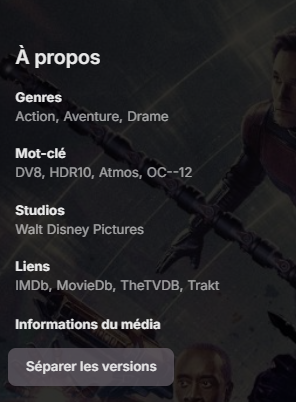
Descend plus bas,
 1 point
 -
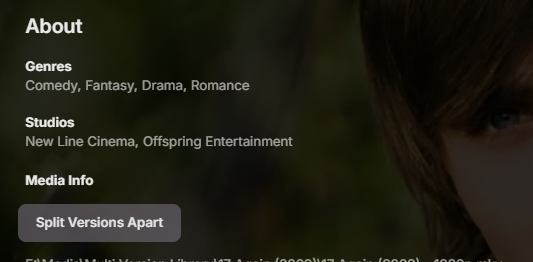
Faites défiler jusqu'à Informations sur le média, vous devriez voir le bouton Séparer. Scroll down to Media Info you should see the split apart button. Example
 1 point
 -
Emby is intended to share content with a group of users. Having E-books/PDFs as part of that offering would easily allow the sharing of recipes as well, using already existing features. For me, I would like to be able share all my content using a single user-friendly, cross-platform app like Emby. I can understand that the implementation of topic-specific features requires time, effort (and salary) for programmers to create & maintain, not to mention extra space on user's systems to store the coding and resource usage, etc. It certainly would not make sense to make these investments unless there were a broad interest among Emby subscribers for such features. This IS a public forum, and users should post their interest (if there is any). It may surprise all of us, though I suspect this is probably a "niche interest" and may not get as much support as I hope. It occurs to me that to allow selective implementation of recipe-specific features, Emby could offer a Recipe Plug-In for those users that are interested, though enough interest would need to be demonstrated before investing the time, effort & expense to make & maintain one. I begin to see your point: The Mealie Server offers comprehensive recipe & meal management services that DO go way beyond what anyone should expect from Emby. However, this requires some setup & configuration with Docker to get it up & running on my NAS. I will need to explore some more to see exactly what it entails. All my recipes are stored as PDFs, which could easily be presented using mostly features already available under Emby BOOKS. The "recipe-specific" features I was suggesting were simply a way to keep them separate from books when searching/browsing, a way to preview them before downloading and hopefully, a way to open & read them without having to download then import them into a reader. The advanced features offered by Mealie (like recipe re-sizing, grocery lists & meal planning) go WAY beyond what I was asking for in Emby. On that point, I agree with you. FOR USERS INTERESTED IN SHARING PDF RECIPES USING EMBY AS-IS, THESE ARE MY SUGGESTIONS: 1) Have a separate folder tree for recipes that can be searched separately from other books using the FOLDER option in the BOOK library, then add the main folder to the Emby Book Library. On a NAS, having a separate SHARED FOLDER might be easiest, though I see no reason having a RECIPE sub-folder under your main E-BOOK folder shouldn't work as well. 2) My original post in this thread has a screenshot showing how I chose to organize topics to allow for easy browsing by folder. Any intuitive organization you choose would be helpful. Use of TAGS for individual recipes will allow users to FILTER by additional topics you define (such as holiday, ingredient or cooking style/technique [e.g.sheet-pan, slow-cooker, nationality, etc]). 3) As more general E-book related features come online (intent stated by other forum moderators), hopefully a "quick-view" feature will be among them to allow "glancing" at an item before downloading it. An Emby dedicated book/PDF reader would make reading all items easier directly from the platform, without requiring the multi-step process of downloading a file, then importing to a reader.1 point
-
Hi, Thanks - I know I broke this when I rewrote the plugin to be multithreaded, I haven't fixed it yet. It is on my "to do" list, but other things are taking priority. I will get to it eventually. I am currently re-writing large sections of code due to some changes I have made in order to try and clip back the running time again. some minor changes have had a big effect and I am currently tracing where they are affected and correcting them. Current status is that I am making good progress but not quite ready to post the DLL1 point
-
Yep seems to have stopped working again1 point
-
New BETA version available 11.1.27: Delta changelog 11.1.26 -> 11.1.27 fix sync issue for multiversion content when width info is not available1 point
-
The answer to your second question can be found there, and it is still current. You don't need any build action.1 point
-
ISBN has been added to the metadata editor as part of the upcoming 4.9 server release. Thanks.1 point
-
Yes Sorry for the delays. Here's the answer on my post.1 point
-
I have to side with @Smitty018210and @darkassassin07on this one, IIRC focus could've been brought on header only when clicking UP, meaning DOWN vertical navigation was not affected - but even if it were, doubling the number of vertical clicks (which is very limited number to begin with) is more than fair trade compared to infinite horizontal clicks.1 point
-
So it's better to not be able to see the other pages EVER? 40+ clicks sideways in lists that refuses to remember your position to save 3 clicks down? Seriously? Who tf cares if you have to scroll past the headers, THEY'RE USEFUL and the only thing below them are external links. Move those up if reaching them immediately such a big deal. (it's not)1 point
-
Stay tuned.1 point
-
Apologies. Why did you repeat the exact same post?1 point
-
Hi, you could do that, but it would have to use the emby api.1 point
-
If an item already matches the desired output, it won't be added to that list. Items also get removed from the list, during the conversion process, when Embys library scan sees the converted files are missing (because emby deleted them to replace with the new conversions). I find the built in conversion feature good for small one-off jobs, but when it comes to maintaining a library in a desired format I use Tdarr. Embys convert just doesn't maintain history to prevent itself from pre-processing files and stumbling over itself constantly.1 point
-
Related to this, I think the TV mode option should be much more prominent. I did not know about TV mode until I saw it mentioned in the forum here. Initially the Display mode was set to Auto. However this did not put me in TV mode even though my computer is connected to a TV. The navigation using a keyboard is much better in TV mode than Desktop mode. My initial reaction to keyboard navigation in the new Emby Windows app was that it is very bad. In desktop mode, the mouse continues to keep focus even when I navigate using the keyboard. I already reported this here but it is not fixed: In TV mode, however the mouse cursor is visible but does not have focus. So TV mode is much better for keyboard navigation right now. In both Display modes, I think the mouse cursor should disappear, once the keyboard is used to navigate until I move the mouse again.1 point
-
Any one can replicate the plugin and make it better..? Emby bring this as a standard feature?1 point
-
Well, that problem was that I had the external drive disconnected. But I've now seen that it's not Emby, but my subtitles embedded in the mkv. Apparently, they don't support the format; it's VobSub (zlib). I've added some external SRT subtitles, and everything works fine. The problem will be finding good subtitles, or figuring out how to extract them to this format so I can have them externally. Thanks a lot, everyone. Anyway, I've finally figured out that it's not Emby's problem.1 point
-
@Lukenot sure if another log file is helpful but I noticed it happened again yesterday. If I wanted to send the log file from the TV how would I go about getting it off the TV? When I click the log in the app it just freezes everythingembyserver-63878029200.txt1 point
-
Bon ca y est j'ai trouvé. En fait mes videos de musique sont dans un sous répertoire de ma musique. Les vidéos n'apparaissent pas dans ma bibliothèque musique, j'ai donc créé une bibliothèque spécifique. Mais manifestement emby ne la scanne pas car il doit la considérer déjà utilisée. En déplaçant le répertoire c'est bon !! Merci à vous1 point
-
https://www.pcworld.com/article/2619590/plex-is-dropping-a-popular-feature-from-its-new-streaming-apps.html With Plex dropping this feature, this could be an opportunity for Emby to pick up the slack in the competition and win over customers that are looking for alternatives.1 point
-
So what's going on with the failing payment of the plugin now? @Luke@ebr@sross44@crawley@Carlo@sa2000 Multiple mentions of team members, but nothing.1 point
-
Disregard, I added a PIN to my account and it started working. Even once I deleted the PIN, it continued to work. I have absolutely no idea what the correlation/causation is there, or if there is one, or if it was totally unrelated, but at least for now it seems to be working again.1 point
-
Yes its possible. I dont know how you get your media. But this works for Windows : DDVT Tool Manual demux from MKV to MP4 And if you use apps like SABnzbd, Radarr, Sonarr : arr-scripts It will make a Mp4 from a MKV And then LG will play DolbyVision fine1 point
-
Since the SDH+Commentary flag feature request was closed after the addition of SDH and because I can't find another existing Commentary flag request, here's a request to add Emby support for MKV's commentary flag.1 point
-
A few years late, but I ran into this (still an issue with the official image not containing the tzselect package); There is a nice workaround (if you want the container to maintain the same TZ as the host, anyway) by adding these volume mappings: - /etc/timezone:/etc/timezone:ro - /etc/localtime:/etc/localtime:ro1 point
-
Numerous ways to accomplish this but rclone is a proven winner. Rclone can be setup to mount as a drive letter or joined to an existing folder on your computer. You just make sure Emby has permission to access the new "local drive" and setup the path in Emby Server as library. Scanning will be slow compared to having the files local because Emby needs to read the files the first time accessed to gather the meta-data. So initial scan time will depend on the size and media types of your current cloud library. There is an alternate way that skips the initial scan using STRM files. https://support.emby.media/support/solutions/articles/44001159147-strm-files In a nut shell you create a folder structure just like if the media were local except you use a text file with an strm extension instead of the media. The text file has one line inside it which is just a URL to the download location of the media. There are scripts available to generate these folders/files automatically for you. When Emby encounters an STRM file during scanning it will not pull down the file and will skip the steps to pull the meta-data from the file itself (like codecs, stream types, etc). On initial playback of the media the first time Emby reads this info adjusts on the fly and of course save this meta-data so it's available going forward. The major advantage to this method is that you can have a local folder holding the graphics, NFO file and optional thumbnails while keep the actual media in the cloud. That's a great compromise of storage space and functionality.1 point