Leaderboard




Popular Content
Showing content with the highest reputation on 03/27/25 in all areas
-
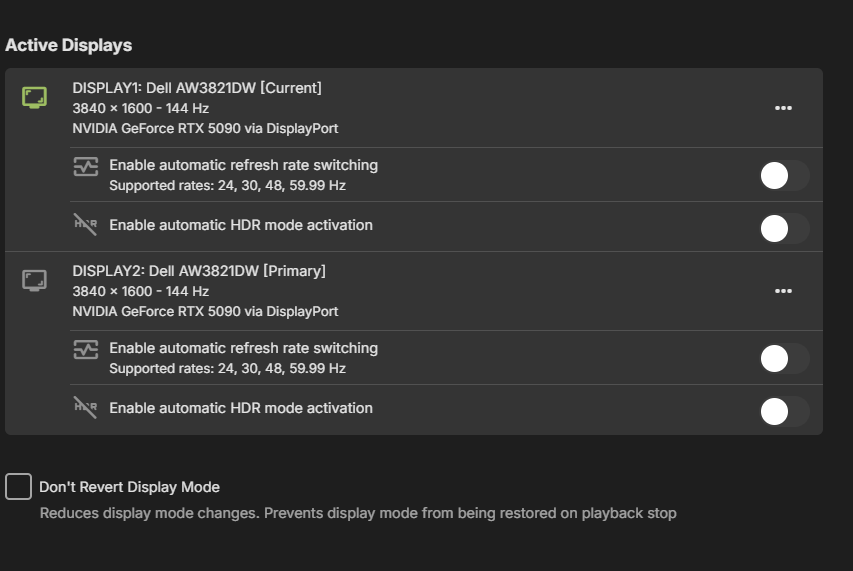
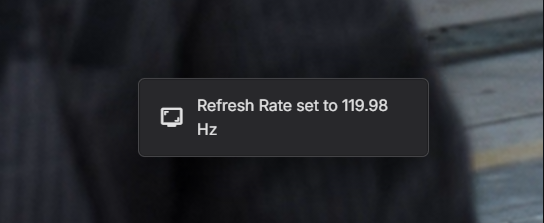
Opening a new thread because the previously one was locked even though there's still an issue. Even after the new update with the setting disable it still switches my screen's refresh rate to 120hz. This causes some issues for me because 1. I don't want my screen set to 120hz (actually 119.98hz) but rather at 144hz the native refresh rate. 2. The only way to prevent this issue is by enabling Windows Dynamic Refresh Rate (DRR), which must be done manually and cannot be scripted. This creates a problem because I use my desktop for streaming games with Sunshine/Moonlight and disable my screens while streaming. However, when I re-enable them, Windows DRR does not automatically turn back on. As a result, when I play a video with Emby, it automatically switches the refresh rate back to 120Hz, whereas I want to keep it at 144Hz. This causes an endless loop of adjustments—frustrating! Can we please fix the issue and let us disable the automatic frame rate switching? @softworkz
 2 points
 -
Can we pretty please get the setting option to turn off that terrible side menu? Also when pressing back a few times that side menu dumps you outside of Emby, is exits without warning on a fire TV stick. So annoying when navigating and youve pressed back button a few times. I like an old fashioned Do you want to exit dialogue as in the Android for TV legacy app....2 points
-
This is fixed with the new update for LG Webos emby app.2 points
-
Also, if you wanted to pull something from the MediaStreams nested array: { ... "Item": { ... "MediaStreams": [ { "Codec": "hevc", "ColorTransfer": "smpte2084", "ColorPrimaries": "bt2020", "ColorSpace": "bt2020nc", "TimeBase": "1/1000", "VideoRange": "HDR 10", "DisplayTitle": "4K HDR 10 HEVC", "IsInterlaced": false, "BitRate": 9317542, "BitDepth": 10, "RefFrames": 1, "IsDefault": true, "IsForced": false, "IsHearingImpaired": false, "Height": 2076, "Width": 3840, "AverageFrameRate": 23.976025, "RealFrameRate": 23.976025, "Profile": "Main 10", "Type": "Video", "AspectRatio": "320:173", "Index": 0, "IsExternal": false, "IsTextSubtitleStream": false, "SupportsExternalStream": false, "Protocol": "File", "PixelFormat": "yuv420p10le", "Level": 150, "IsAnamorphic": false, "ExtendedVideoType": "Hdr10", "ExtendedVideoSubType": "Hdr10", "ExtendedVideoSubTypeDescription": "HDR 10", "AttachmentSize": 0 }, { "Codec": "ac3", "Language": "eng", "TimeBase": "1/1000", "DisplayTitle": "English AC3 5.1 (Default)", "DisplayLanguage": "English", "IsInterlaced": false, "ChannelLayout": "5.1", "BitRate": 512000, "Channels": 6, "SampleRate": 48000, "IsDefault": true, "IsForced": false, "IsHearingImpaired": false, "Type": "Audio", "Index": 1, "IsExternal": false, "IsTextSubtitleStream": false, "SupportsExternalStream": false, "Protocol": "File", "ExtendedVideoType": "None", "ExtendedVideoSubType": "None", "ExtendedVideoSubTypeDescription": "None", "AttachmentSize": 0 }, { "Codec": "subrip", "Language": "eng", "TimeBase": "1/1000", "DisplayTitle": "English (SUBRIP)", "DisplayLanguage": "English", "IsInterlaced": false, "IsDefault": false, "IsForced": false, "IsHearingImpaired": false, "Type": "Subtitle", "Index": 2, "IsExternal": false, "IsTextSubtitleStream": true, "SupportsExternalStream": true, "Protocol": "File", "ExtendedVideoType": "None", "ExtendedVideoSubType": "None", "ExtendedVideoSubTypeDescription": "None", "AttachmentSize": 0, "SubtitleLocationType": "InternalStream" }, ] You would need to define the index list within the array (it's zero based index) So if you wanted to return the "Aspect Ratio" which is in the first list of the array, you would use: The aspect ratio is '{{ trigger.json.Item.MediaStreams[0].AspectRatio }}' However, if you wanted to return the "SubtitleLocationType" which is in the last list, you would use: The subtitle is an '{{ trigger.json.Item.MediaStreams[2].SubtitleLocationType }}'2 points
-
Emby Windows & Emby Xbox A new stable version 2.222.0.0 is available now. Please go to the Microsoft Store and check for updates. Changes 2.222.0 [Win] Don't wait for push channel creation on startup [Xbox] Enable HEVC Playback [Xbox] The EmbyPlus app is discontinued. EmbyPlus users will automatically transition to the regular app (2.222.0), which is now equal to the Plus app 2.221.0 [Win] Wintheme: Fix toggle button background [Win] Fix inconsistent refresh rate changes when hard-limiting [Win] AudioPlkayer: Fix exception when repeating a single song 2.219.0 [Win] MPV: Fix missing VO assignment1 point
-
Hi, the upcoming 4.9 release has a filter called duplicates.1 point
-
Sorry for the confusion and the late answer. I'm afraid I'll no longer get that issue since I wrote my cron job to mitigate that random mount loss. Thank you for your time @Luke1 point
-
Yes, thanks1 point
-
Please update me here when it is fixed. Thanks.1 point
-
I am sorry Luke, I shouldn’t have removed the default plugins so I’ve learned a valuable lesson. Leave well alone. So sorry again. I use Emby for is TV/Movies/Documentaries/Music and IPTV. I have the premuim sub to support you guys in the work you do.1 point
-
OK yes this question has come up before and it's possible for future updates. Thanks.1 point
-
I just released v1.0.3.1 of the Emby plugin to the plugins store: it fixes the backdrops, adds many new settings, the tier perks are also tweaked now to offer more features for all tiers (the website was not yet updated to reflect these tier changes), a "setup instructions" link was added to help new users and "preview poster" / "preview backdrop" links were also added to be able to see how the images will look before needing to refresh the metadata of items or libraries. The new plugin release has been tested with the latest version of Emby server and web UI. I took the time to look into some of the issues users had with images not downloading or downloading slowly and this seems to happen when the server has IPv6 enabled, disabling IPv6 seems to solve the issues. (i added this to the setup instructions also) I found a few other forum posts regarding IPv6 issues and slow image downloads from plugins (even image downloads timing out) dating back as far as 2018, it seems that those issues were never resolved. The "RPDB Folders" app that works with Emby too was also recently updated to support all new features.1 point
-
I'm not sure if I can help you, sorry. Don't know the inner workings of Mac and sharing from a mac.1 point
-
That's not currently supported, but I can add an option for it. For example,"don't create individual movies folders." There is already an option not to create group folders such as your "en box office" folder, but not for individual movies.1 point
-
Ha! beat me to it1 point
-
Thank you Luke for re-iterating. To be clear for anyone else that might experience this, essentially having just that one unrelated restriction by tag was the cause of this. I had [TVShow] tagged as "Filtered" - ie. wasn't appropriate for the kids, and didn't want it shown for the User account. Under Parental Controls settings for the User, I had then identified "Filtered" under Restrict Items with Tags. (Yes, I wasn't more creative with the tagging ID...). This effectively hid [TVShow] from the User account; but I didn't realize this was also causing the other issue identified here with Parts/Versions not appearing for a completely unrelated, and untagged show (Formula 1) I just removed the 'rule' from Restrict Items with Tags (ie. removed "Filtered" as a restricted item), and the Parts/Versions re-appeared for the User! Thank you for everyone's persistence in helping out with this, it was bothering me to no end!1 point
-
And there is your problem. Erring on the side of caution - without knowing what the language is, the system is turning on subtitles for you. If you tag the audio tracks properly, this will no longer happen.1 point
-
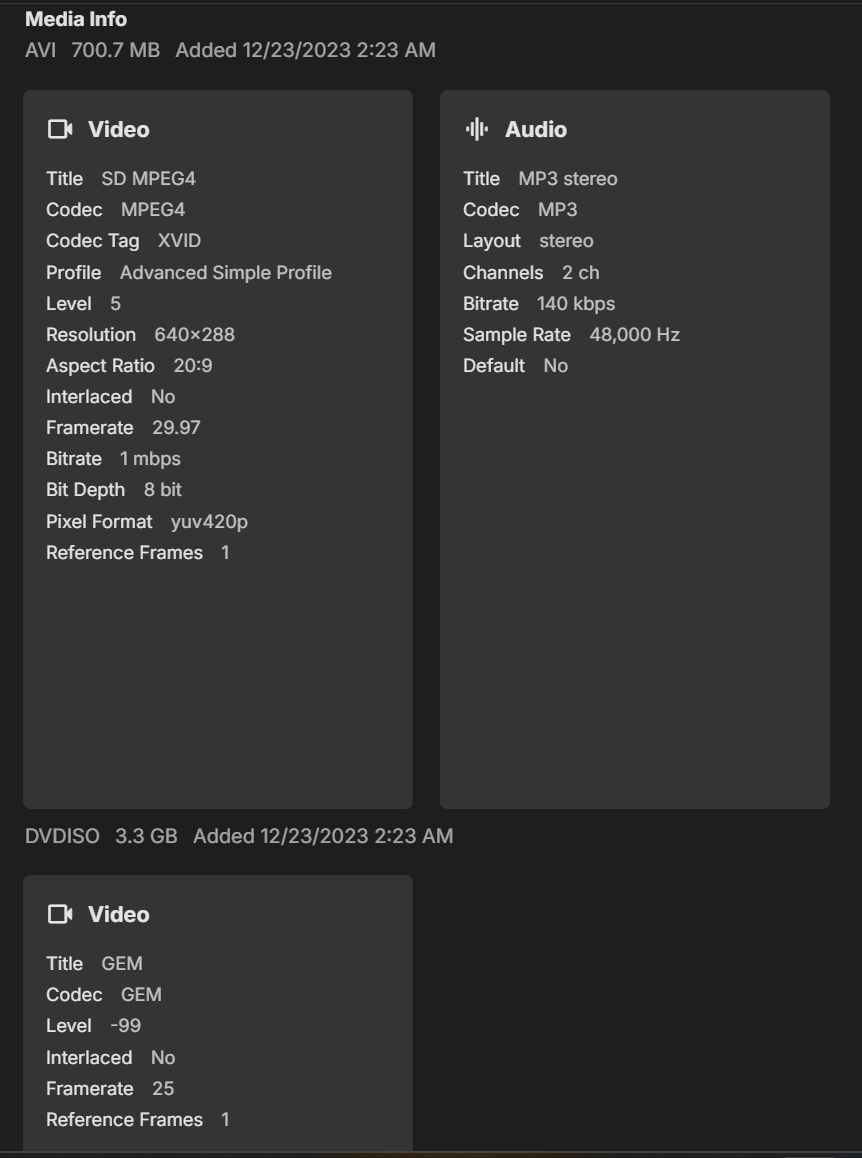
2 versions, 1 using GEM codec (never seen this before). The GEM version doesn't play - "No compatible streams are currently available."
 1 point
 -
@Luke Thanks for the pointer. Steps to fix: Login to opensubtitles.com Edit Profile Change username Log out and log back in Edit profile Change password. Log out and log back in In Emby: Change the opensubtitles entries Scheduled tasks > Download subtitles Logs > embyserver.txt > go to bottom See the login 2025-03-27 11:12:22.995 Info HttpClient: POST https://api.opensubtitles.com/api/v1/login 2025-03-27 11:12:23.526 Info OpenSubtitles: Login result: {"user":{"allowed_translations":10,"allowed_downloads":1000,"level":"VIP Member","user_id":156747,"ext_installed":true,"vip":true},"token":"eyJ0eXAiOiJKV1QiLCJhbGciOiJIUzI1NiJ9.eyJpc3MiOiJXcDBSS0xpTFZ5NnlGNVN2OU0yVHNTbGlOeUpyRFhEeCIsImV4cCI6MTc0MzE2MDA2OH0.wfGjdUKX2B7YYD5eYMHfEJaTF0SBN6Apcxfy-qRs4rc","status":200,"base_url":"vip-api.opensubtitles.com"}1 point
-
Thanks. When I enabled that option it told me that changing artwork would require a cache reset, and then proceeded to delete my artwork cache. I now have all my CoverArt treated artwork in Kodi as well. Thanks!1 point
-
As a follow up to this I ended up going the windows route. I just couldn't get sonarr/radarr working correctly on Linux and docker, just couldn't work out the permissions for copying stuff to the Nas. Much easier, for me, to mount the Nas over the network in Windows. The are suite works well natively in Windows, got cloudflared tunnels working, so far so good1 point
-
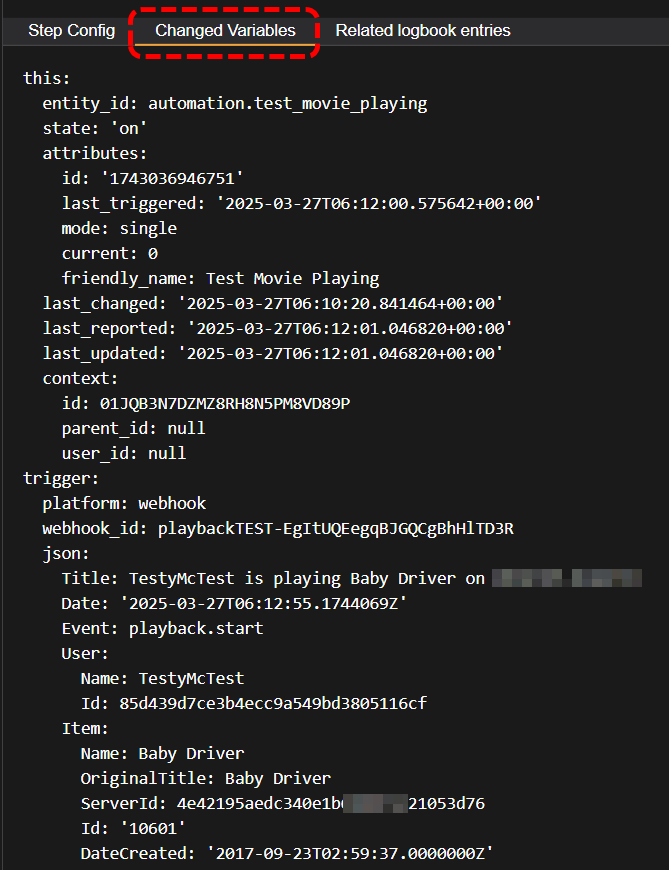
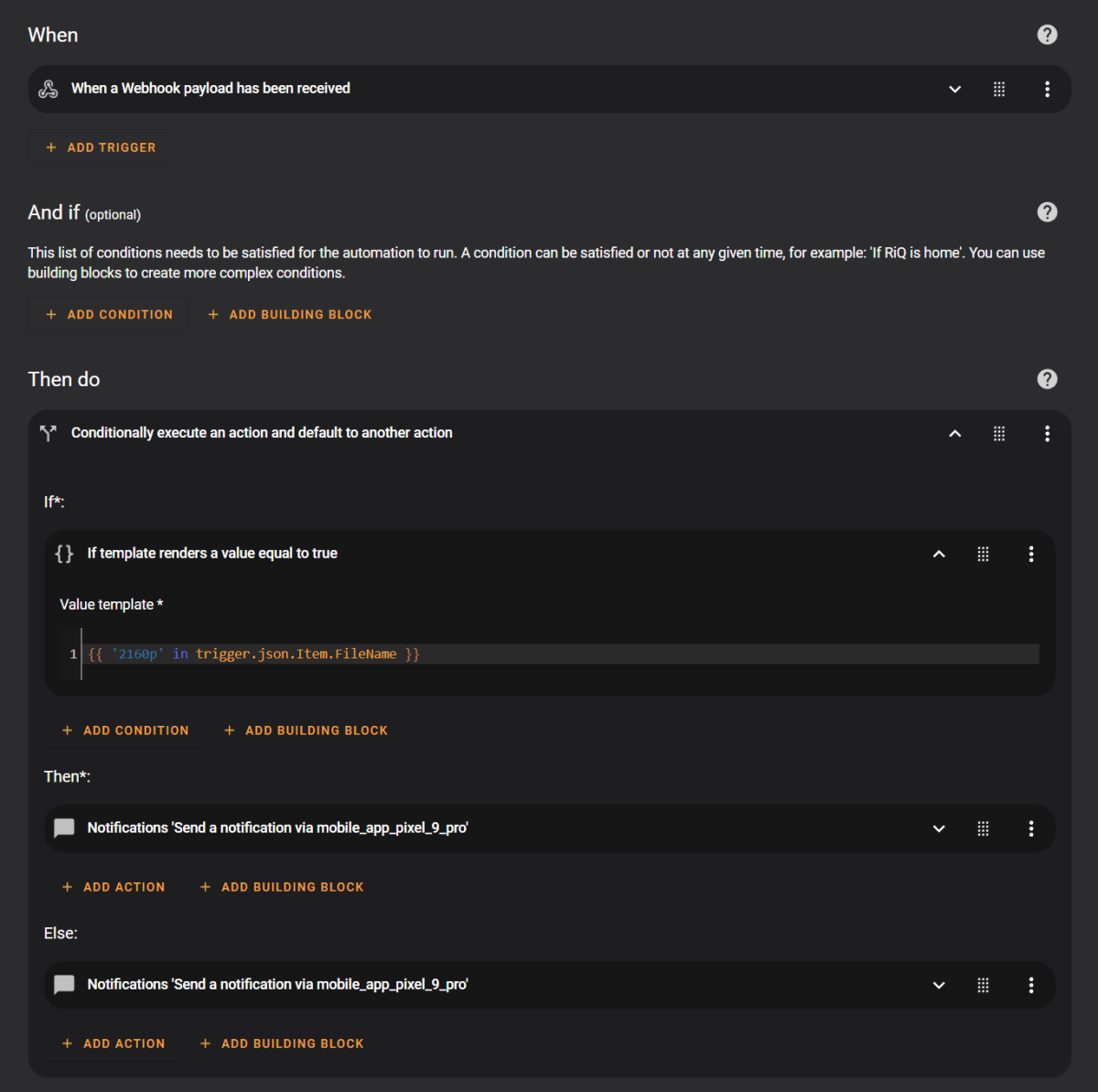
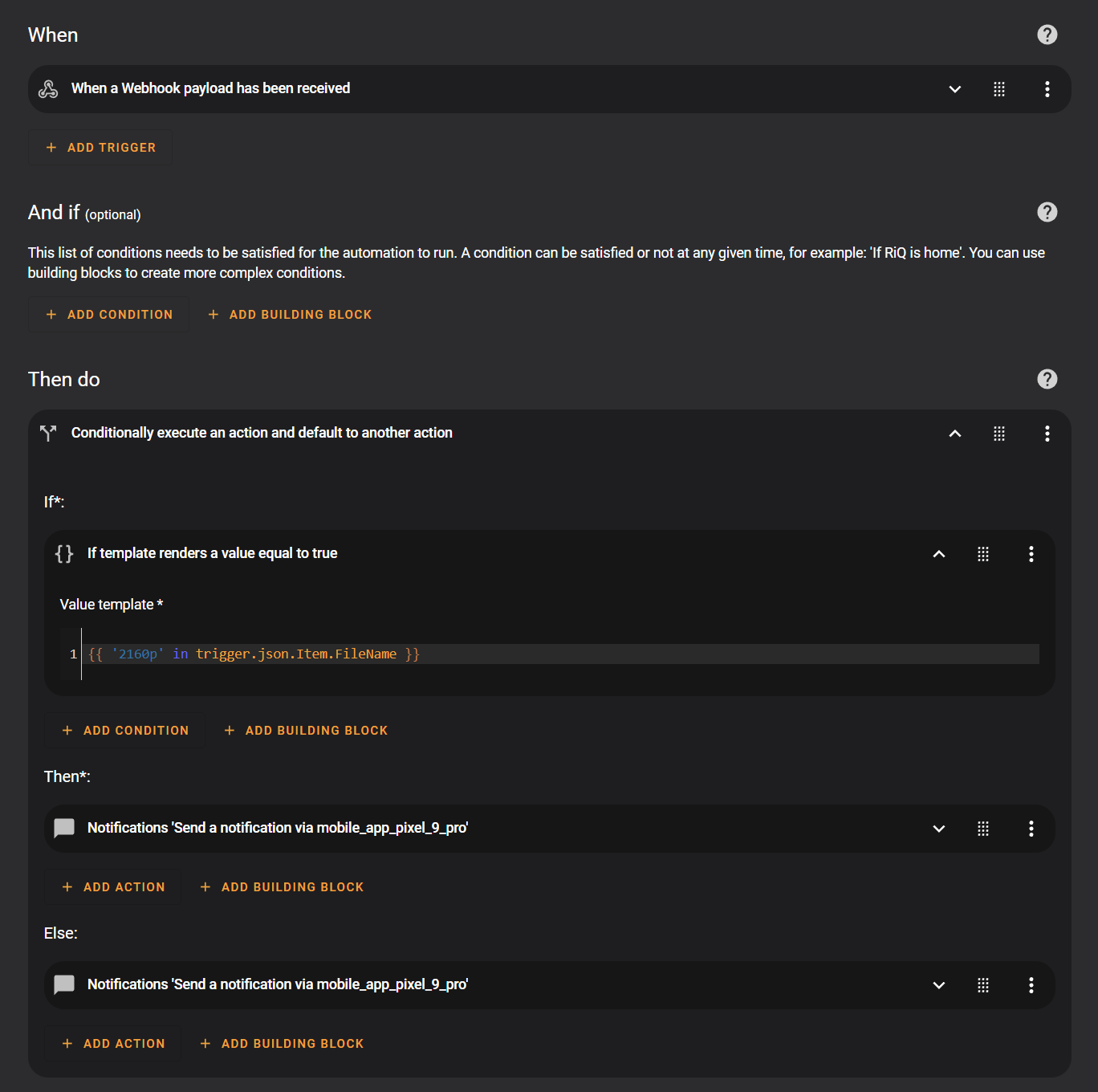
Does it have to be the filename specifically? Otherwise you can use anything that Emby sends in the JSON payload. Is this still for your projector adjustments based on aspect ratio? Anyway... To use your "filename" example. Let's say you wanted to know if the filename had the word '2160p' in it. BTW, you can look at the full JSON payload by checking out the 'Changed Variables' when you look at the 'Traces' of your HA automation You would create a simple Automation with the Webhook as the "When" trigger, and then you could add some "And If" conditions at that point if you wanted. Or alternatively, for the "Then do" action, select an "If-then" action by clicking "Add Building Block" For the "IF" condition, you would use a Template, and use something like this: {{ '2160p' in trigger.json.Item.FileName }} note the JSON nested structure to get to the FileName (it's also case-sensitive) Add the appropriate action in the "Then" field and optionally something else for the "Else" This is what my basic test automation looks like, it simply gets the Playback event from Emby and checks the filename for '2160p', if it detects it, it sends my phone a message saying "This movie is 4K", and if it doesn't match, then sends me a different message.
 1 point
 -
Thank you :)1 point
-
It's ok, I worked it out, I was being an idiot of course. Pointing the backup folder to the incorrect folder. So made the users on the new server, imported the backups and all looks good. Thank you1 point
-
Thank you for the kind words. In actuality in my main viewing area I have already switched things around so that my Shield is primary to get comfortable with it because of Roku not Emby. I also today made my Fire 4K Stick #1. I switched now rather than waiting simply because, if this change was to be made then I would switch but I am also upset with Roku to the point of not using it and that means switching. The only scenario where I would continue using my Rokus long term is if Emby does not implement the change AND Roku rolls back to the interface and TOS they used back in 2022. This change by Emby has not forced me to change but it did tell me that if I was going to change anyway it might as well do it now. It also is like, "I have to get over this sometime, why not now?" I still have the task of configuring my apps so that their behavior is near to what I had setup on my Roku. One actual positive is when using the Shield live TV is more stable. That is some of the little glitches I see when streaming live TV on my Rokus. I "think" the cause of that is that Roku requires transcoding and the Shield does not. Again I made the switch mainly because of Roku. In fact it was because of Emby that I have stayed with Roku for as long as I have. I just have to get used to the differences. Thanks! PS: I wonder if I can be as irritating in the Android forum as i have been in the Roku ones.1 point
-
This is the issue. It's right in your screenshot. Temporary workaround would be to remove that restriction.1 point
-
Yes. This helps a lot but not directly. The plugin use a dedicated database located in the same folder. Removing it can solve the problem.1 point
-
@King Pinreport back if you find any difference in picture quality of movies.1 point
-
Thanks, yes your fix will cover the issue. Maybe I modify it a bit... if MovieDefault[1] and MediaSource['KodiStreams']['Video'] and MediaSource['KodiStreams']['Video'][0]['width'] and MediaSource['KodiStreams']['Video'][0]['width'] > MovieDefault[1]: The issue appears only for multiversion content when highest resolution option is enabled and the content has no videostream width info available. Did you figure out which movie did not report the width? That's quite unusual. I'll also check if the same issue is probably in some other spots as well.1 point
-
AI suggested Manual Fix for Python Script: Edit the problematic code in emby_db.py: python # Original line 1359: if MediaSource['KodiStreams']['Video'] and MediaSource['KodiStreams']['Video'][0]['width'] and MediaSource['KodiStreams']['Video'][0]['width'] > MovieDefault[1]: # Modified line (add None check): if (MediaSource['KodiStreams']['Video'] and MediaSource['KodiStreams']['Video'][0]['width'] and MovieDefault[1] is not None and MediaSource['KodiStreams']['Video'][0]['width'] > MovieDefault[1]): I dont know if that's garbage or useful1 point
-
I found errors higher up. Sorry, I dont know how to quote code here :- 2025-03-26 20:31:59.612 T:134 warning <general>: EMBY.core.common: AspectRatio not detected: 5680547 / 19 Doors 2025-03-26 20:32:00.004 T:134 error <general>: Exception ignored in thread started by 2025-03-26 20:32:00.004 T:134 error <general>: : 2025-03-26 20:32:00.004 T:134 error <general>: <bound method Library.worker_library_add of <database.library.Library object at 0x74fd3c434770>> 2025-03-26 20:32:00.004 T:134 error <general>: 2025-03-26 20:32:00.004 T:134 error <general>: Traceback (most recent call last): 2025-03-26 20:32:00.004 T:134 error <general>: File "/home/paul/.var/app/tv.kodi.Kodi/data/addons/plugin.service.emby-next-gen/database/library.py", line 701, in worker_library_add 2025-03-26 20:32:00.006 T:134 error <general>: 2025-03-26 20:32:00.006 T:134 error <general>: Continue, _ = self.ItemOps(AddedLibraryProgress, ItemIndex, Item, SQLs, WorkerName, AddedLibrary[3], ProgressBar, False) 2025-03-26 20:32:00.006 T:134 error <general>: 2025-03-26 20:32:00.006 T:134 error <general>: 2025-03-26 20:32:00.006 T:134 info <general>: Skipped 17 duplicate messages.. 2025-03-26 20:32:00.006 T:134 error <general>: ^ 2025-03-26 20:32:00.007 T:134 info <general>: Skipped 105 duplicate messages.. 2025-03-26 20:32:00.007 T:134 error <general>: 2025-03-26 20:32:00.007 T:134 error <general>: File "/home/paul/.var/app/tv.kodi.Kodi/data/addons/plugin.service.emby-next-gen/database/library.py", line 763, in ItemOps 2025-03-26 20:32:00.009 T:134 error <general>: 2025-03-26 20:32:00.009 T:134 error <general>: Ret = self.ContentObject.change(Item, IncrementalSync) 2025-03-26 20:32:00.009 T:134 error <general>: 2025-03-26 20:32:00.009 T:134 error <general>: 2025-03-26 20:32:00.009 T:134 info <general>: Skipped 9 duplicate messages.. 2025-03-26 20:32:00.009 T:134 error <general>: ^ 2025-03-26 20:32:00.009 T:134 info <general>: Skipped 47 duplicate messages.. 2025-03-26 20:32:00.009 T:134 error <general>: 2025-03-26 20:32:00.009 T:134 error <general>: File "/home/paul/.var/app/tv.kodi.Kodi/data/addons/plugin.service.emby-next-gen/core/movies.py", line 88, in change 2025-03-26 20:32:00.010 T:134 error <general>: 2025-03-26 20:32:00.010 T:134 error <general>: self.SQLs["emby"].add_multiversion(Item, "Movie", self.EmbyServer.API, self.SQLs, self.EmbyServer.ServerData['ServerId']) 2025-03-26 20:32:00.010 T:134 error <general>: 2025-03-26 20:32:00.010 T:134 error <general>: File "/home/paul/.var/app/tv.kodi.Kodi/data/addons/plugin.service.emby-next-gen/database/emby_db.py", line 1359, in add_multiversion 2025-03-26 20:32:00.012 T:134 error <general>: 2025-03-26 20:32:00.012 T:134 error <general>: if MediaSource['KodiStreams']['Video'] and MediaSource['KodiStreams']['Video'][0]['width'] and MediaSource['KodiStreams']['Video'][0]['width'] > MovieDefault[1]: 2025-03-26 20:32:00.012 T:134 error <general>: 2025-03-26 20:32:00.012 T:134 error <general>: 2025-03-26 20:32:00.013 T:134 info <general>: Skipped 98 duplicate messages.. 2025-03-26 20:32:00.013 T:134 error <general>: ^ 2025-03-26 20:32:00.013 T:134 info <general>: Skipped 64 duplicate messages.. 2025-03-26 20:32:00.013 T:134 error <general>: 2025-03-26 20:32:00.013 T:134 error <general>: TypeError 2025-03-26 20:32:00.013 T:134 error <general>: : 2025-03-26 20:32:00.013 T:134 error <general>: '>' not supported between instances of 'int' and 'NoneType' 2025-03-26 20:32:00.013 T:134 error <general>: 2025-03-26 20:32:01.111 T:141 info <general>: EMBY.emby.api: Throttle queries 2500 / worker_library_add / 1801 2025-03-26 20:32:01.562 T:133 info <general>: EMBY.database.library: Unknown {'Id': '6242137'} 2025-03-26 20:32:01.562 T:133 info <general>: EMBY.database.library: Unknown {'Id': '6242213'} 2025-03-26 20:32:01.562 T:133 info <general>: EMBY.helper.utils: Refresh widgets initialized 2025-03-26 20:32:01.562 T:133 info <general>: EMBY.helper.utils: Refresh widgets video started 2025-03-26 20:32:01.595 T:133 info <general>: EMBY.helper.utils: Refresh widgets initialized 2025-03-26 20:32:01.595 T:133 info <general>: EMBY.helper.utils: Refresh widgets music started 2025-03-26 20:32:01.607 T:142 info <general>: VideoInfoScanner: Starting scan .. 2025-03-26 20:32:01.608 T:142 warning <general>: Process directory 'EMBY_widget_refresh_trigger' does not exist - skipping scan. 2025-03-26 20:32:01.613 T:93 info <general>: EMBY.hooks.monitor: -->[ kodi scan / video ] 2025-03-26 20:32:01.621 T:161 warning <general>: Process directory 'EMBY_widget_refresh_trigger' does not exist - skipping scan. 2025-03-26 20:32:01.621 T:161 info <general>: My Music: Scanning for music info using worker thread, operation took 0s 2025-03-26 20:32:01.713 T:93 info <general>: EMBY.hooks.monitor: -->[ kodi scan / music ] 2025-03-26 20:32:01.714 T:93 info <general>: EMBY.hooks.monitor: --<[ kodi scan / music ] 2025-03-26 20:32:03.112 T:141 info <general>: EMBY.emby.api: Throttle queries 2500 / worker_library_add / 1801 2025-03-26 20:32:13.119 T:141 info <general>: Skipped 4 duplicate messages..1 point
-
Never mind, my daughter had logged into her alt email account without noticing1 point
-
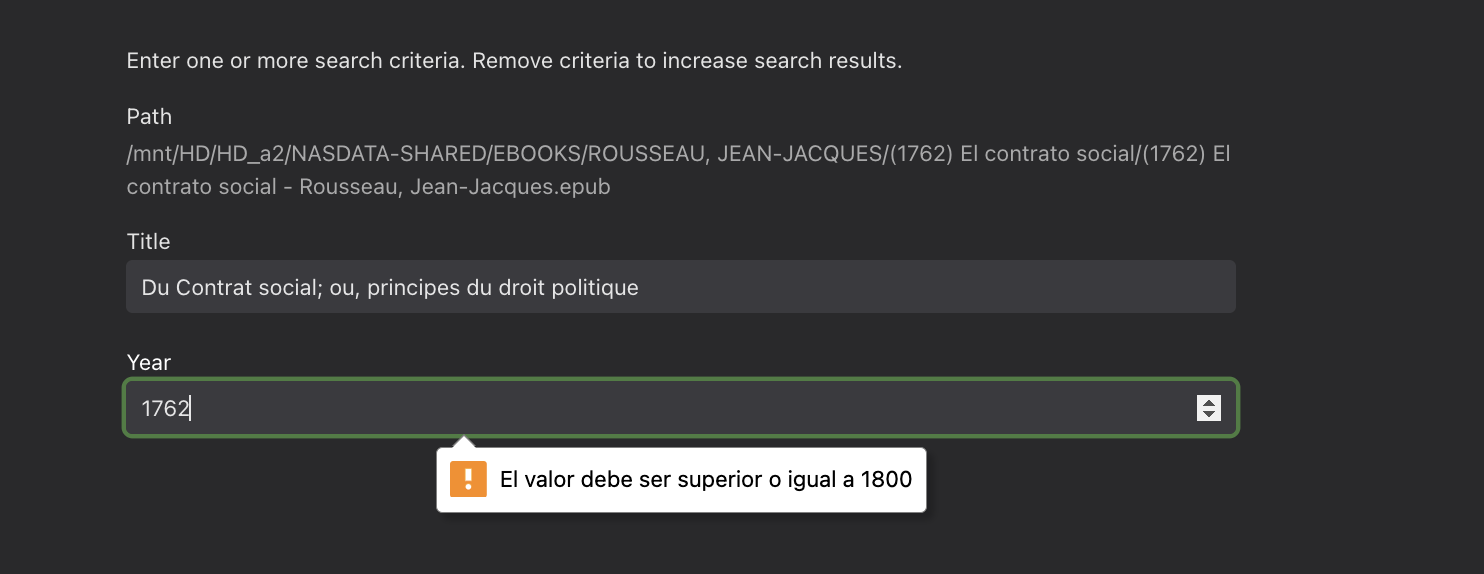
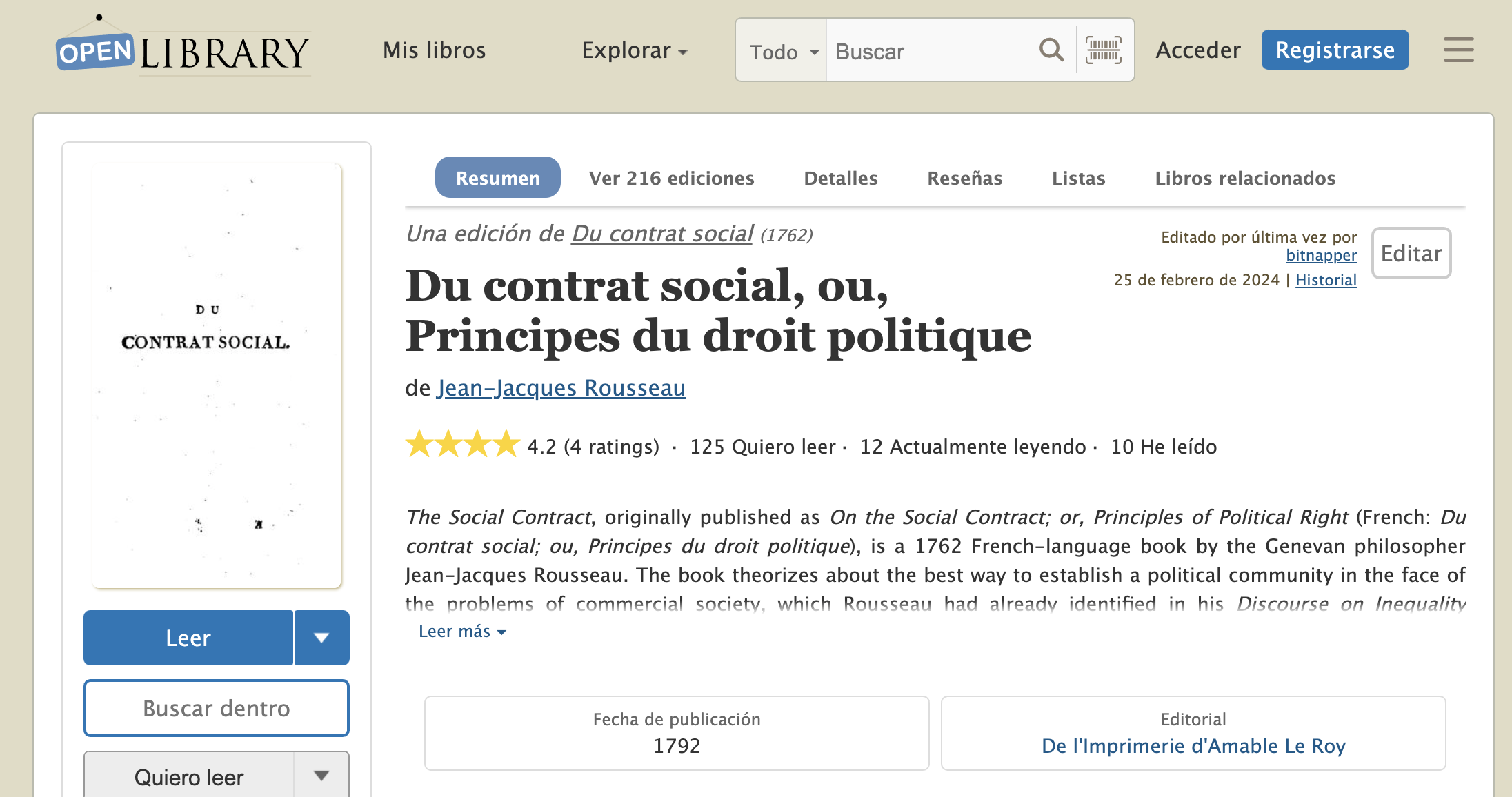
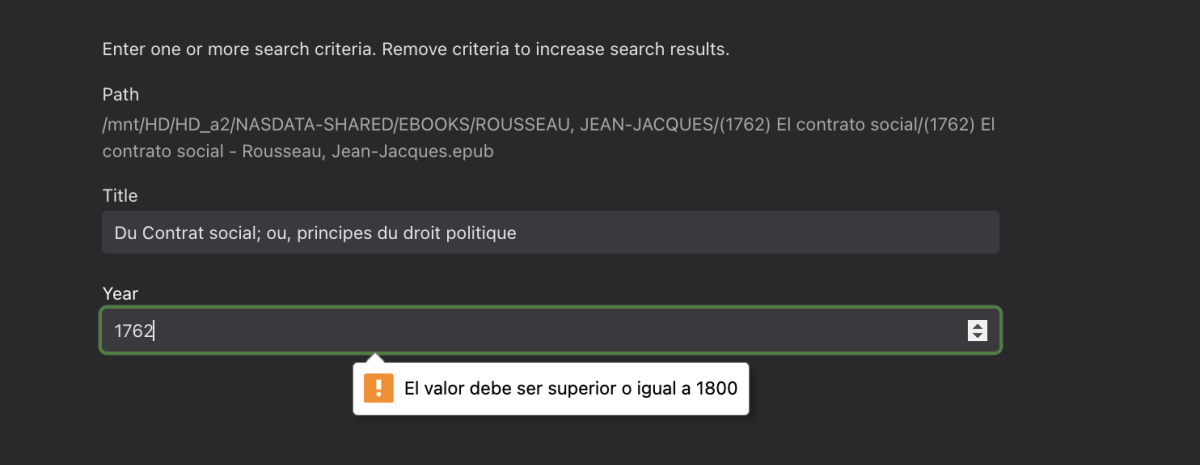
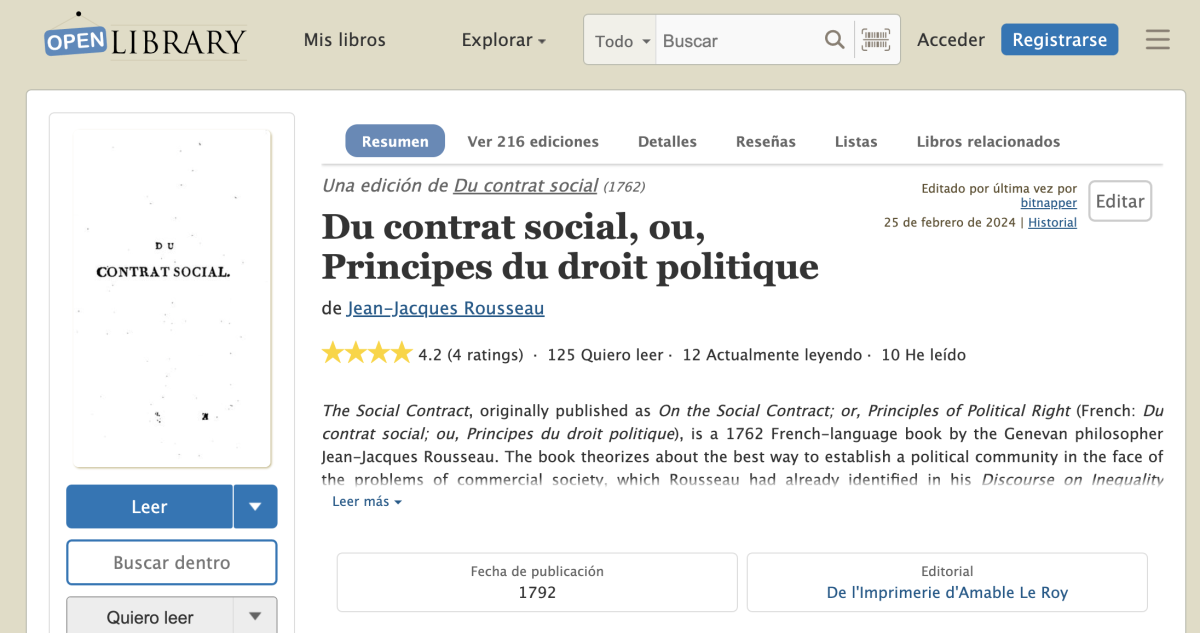
Very funny, release date must be bigger than 1800 to make a search: Poor JJ Rosseau, and classic authors, we cannot look for them in this plugin ... who had this brilliant idea ?? And don't tell me that there are no books in the open database prior to 1800:
 1 point
 -
That's because the approach is incorrect for iOS. When emby downloads something it's downloaded into the emby container application, if it's a video can be played because emby has a player to play videos, the same with music but with books and comics, even the file is downloaded is not presented on the downloads screen and as there's no "player" for this files then you are just wasting space on your iOS device, because once donwloaded cannot even be deleted ! Meanwhile emby has not a player for books or comics, the approach must be done by instead of dowload, implementing "Open with" for the target url file, it's explained here and seems quite simple to implement: https://developer.apple.com/documentation/uikit/uiapplicationdelegate/application(_:open:options:) And here: https://developer.apple.com/documentation/uikit/enabling-document-sharing With this iOS users will have the choice to instead donwloading the fille into emby's container and do nothing, select a 3rd party application to open the file and will be stored into this app container (exampler: ibooks, adobe acrobat, simple comic, etc)1 point
-
I turned off Kaspersy and it worked. Thank u for your help1 point
-
Major News for Xbox Users Versions 2.222.0 and later include the capability for HEVC playback - finally! What this means for current users of the Emby Plus app for Xbox is outlined here:1 point
-
If you don't want to upgrade to beta, if on Windows on your network interface card, you can try unticking the ipv6 protocol. For Linux, in /etc/sysctl.conf you can add the following lines then run sysctl -p net.ipv6.conf.all.disable_ipv6 = 1 net.ipv6.conf.default.disable_ipv6 = 1 Alternatively you could try adding the following env variable to your system or docker container, depending if you are running bare metal or in container: DOTNET_SYSTEM_NET_DISABLEIPV6=11 point
-
The plugin will pull in metadata for the books you have in your library. Then you can see the author, synopsis, some other details about the work. Rather than just the cover of the book you get the text too. That is what the plugin is for. As far as downloading it just requires the Emby server you are connected to has Emby Premiere. Then it should just work. The iphone is notoriously more difficult to share downloaded items among applications. If you were using Android it would just work. Apple is a different beast entirely. You probably need to make a post in the iOS/Apple section and ask specifically why downloads are not working on your device. I do not own anything Apple because of their gate keeping. Also.. when using applications tied to app stores some plugins will not be shown. Because those plugins might be against the policies of those app stores. But I believe downloading is not against the iOS terms. I could be wrong. That is why it is best to make a new post in the iOS/Apple section.1 point
-
There are several topics with this, targeting :root is easier the targeting elements. Original code for navdrawer .navMenuOption-selected { background-color: hsla(var(--theme-primary-color-hue),var(--theme-primary-color-saturation),var(--theme-primary-color-lightness),.2)!important; } and .emby-checkbox:checked+.checkboxLabel:before { border-color: hsl(var(--theme-primary-color-hue),var(--theme-primary-color-saturation),var(--theme-primary-color-lightness)); background-color: hsl(var(--theme-primary-color-hue),var(--theme-primary-color-saturation),var(--theme-primary-color-lightness)); } Targeting Theming is the best route. Use an online site to get HSL color values, here is a Blue. html.accent-emby:root { --theme-primary-color-hue: 222; --theme-primary-color-saturation: 100%; --theme-primary-color-lightness: 50%; --theme-accent-text-color-darkbg: #004cff; --theme-accent-text-color-lightbg: blue; } But if your accents have been changed in UI you may have to add "!important" to each line and change to html:root. html:root { --theme-primary-color-hue: 222!important; --theme-primary-color-saturation: 100%!important; --theme-primary-color-lightness: 50%!important; --theme-accent-text-color-darkbg: #004cff!important; --theme-accent-text-color-lightbg: blue!important; } But will assume none Premiere and not adjusting User Display Theme/Accent, first option should be fine.1 point
-
I want to create multiple backup libraries. but still don't want to show with all the members It will only open when the main library has a problem. What do I have to do in order to turn on/off once for all members? I would like the next version to be developed to be able to hide/show libraries for all members. Because I don't want to go into one member at a time because my list has many members. https://emby.media/community/index.php?/topic/99001-how-to-hide-and-show-some-libraries-for-all-members/&tab=comments#comment-10332751 point



















.thumb.jpg.1f54bc515e3b7bfe3d3c54b738b21407.jpg)