Leaderboard



Popular Content
Showing content with the highest reputation on 03/20/25 in all areas
-
A few amendments to core functions, support should titles like "22.11.63 S01 E01" - although I haven't tested it yet Add counters to the log, which indicates how many items are found in each category. This should show at the end of the run. Added Load/Save buttons for the startswith and contains filters I will do this for the force to category boxes as well eventually, and save and load the full config xml as well (this is not done yet) VODtoSTRMscheduledTask.dll
 2 points
 -
yes, headed out of town, won't be until Sunday or Monday, thanks2 points
-
There are a number of shows that I frequently "Shuffle" with... since I've seen all the episodes, don't intend to acquire more (or if I do I don't care about highlighting them beyond the latest added section), and episodes stand alone well enough to not want/need to watch it in order. Just want to watch a random episode during dinner or something. When I start doing this too much, the Next Up gets very cluttered. If shuffle randomly gives me S04 E05 for a show, I'm not terribly concerned about making sure I watch S04 E06 next. I've tried setting the entire series to Played, as I was hoping if all the "next episodes" were already Played it'd keep it off of Next Up, but no such luck. Would it be possible to disable Next Up for individual shows upfront so they stop showing altogether? By User possibly? Or maybe if I Shuffle specifically, it won't show but playing an episode normally does? Sorry if this is a duplicate, I searched a bit but the closest I could find was "forgetting" a series... which didn't really apply since I never want these shows to come back no matter how much I watch of it.1 point
-
Hi, Sorry for the delayed response. I've just tried to reproduce the issue and everything worked surprisingly well. I've switched to 4.9.0.42-beta since then though (client is still on the same version). But last time, when I wrote my previous message, it was a frustrating experience. I was preparing for travel and wanted to download several series and it did not want to start, after the conversion had been done. The same behavior was observed on my wife's phone (apple). After poking around, deleting caches, deleting download queues, (and probably that is when I also switched to beta) I was able to download most of what I needed. Several episodes were still missing, but that was good enough. I've just started several larger batches of downloads with conversions and will update here if it hangs.1 point
-
I found something. Needed to do "systemctl start emby-server". I will try and test1 point
-
1 point
-
What are you talking about? This would be a completely optional feature. What is the world makes you think anyone here is suggesting otherwise?1 point
-
Well there you go. Looks like the app is doing the right thing.1 point
-
HEVC level is not an issue because it shows direct play for video stream. I also tried the same HEVC encoder settings for other videos with ac3 audio tracks. Those can play without transcoding. It plays with no sound when audio transcoding is disabled.1 point
-
it's one of those things that even when the TV reports that it supports flac, it often doesn't play it very well. Similar to opus.1 point
-
I don't know what happened, but the issue has been happening for the past 2-3 weeks (didn't update to 4.8.11 until 2 days ago and had the same issue after that). Now when i went to shut down the Emby server to clear the logs (so that you don't have to read through a bunch of unrelated data), i tried to start playing an episode that was in half way through, and it started immediately. That has not happened for a long time. If this occurs again, i'll just send the logs as is without rebooting the server.1 point
-
A Movie library is what I ended up doing after reading around. It's interesting to see how many people also struggle with trying to twist their server into a place to collect everything. Interviews, videos, concerts, TV appearances, etc... At least I'm not the only nutcase. LOL1 point
-
Understood. I also see there are some pay services that will allow you to make changes to the M3U...and then the service keeps recreating the changes every time the new file is downloaded from the provider....and you download the M3U from the service. Something to think about. Thank you.1 point
-
@HappyGilmour This would mean you'd have to download the m3u to a local file, then point the server to that file rather than the m3u url. This also means it would become your responsibility to manually keep that file up to date with changes from the original url.1 point
-
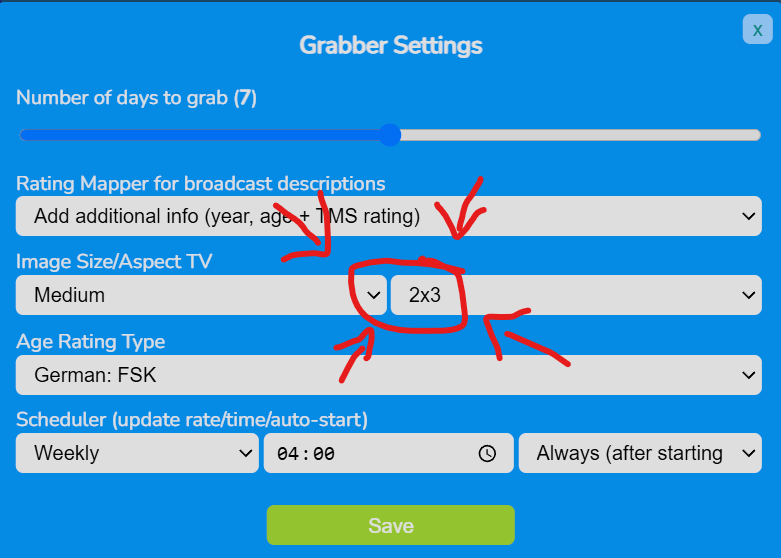
Ei Gude, habe erst jetzt den Beitrag gesehen. Das Problem ist, dass dein EPG 16/9-4/3-Bilder zieht und sie auf 2/3 anzeigt, also auch links und rechts beschneidet, eventuell vom Standard her nur in Medium oder Low Res. Sofern dein easyepg-new nur Emby versorgt, klicke mal auf das Zahnrad für die Einstellungen und wähle bei der Aspect Ratio 2x3 für das Posterformat.
 1 point
 -
You can install the new one from the store without uninstalling the old Desktop one; so it's no problem to check it out and see if it works for you. Paul1 point
-
Gotcha thanks.1 point
-
Whoever runs the show here seems to operate on God time where a 1000 years to us is one day to them except the real God has better customer service and prayers actually work. More like a whole box of salt and then that is being optimistic. They broke the current Live TV last year worse than it was before in February and it still hasn't been fixed.1 point
-
Should be fixed in the next update, thanks.1 point
-
that could explain it...sometimes if there are long credits, and i back out at the end, there is a resume marker, which i get rid of by marking unwatched and then rewatched....maybe that (marking watched) wouldnt set the last played date...i will look out for that.... Had another example last night so perhaps its more common than i realised.1 point
-
Hi, I think I fixed it by simply removing the old email address from the user account, saving it, which prompted a message that emby connect has been removed from that user. Then adding in the new correct email address. Looks fixed. Thanks for your prompt support though.1 point
-
Thank you so much.1 point
-
New BETA version available 11.1.26: Delta changelog 11.1.25 -> 11.1.26 fix dynamic node for musicvideo artists fix https EOF issues fix forced resyncs on Emby server updates1 point
-
I'm going to let her play with it tonight and will see if she experiences any issues I can deal with. Tomorrow I will reboot with the vpn enabled. I think that should isolate the issue to the vpn. I will keep you posted.1 point
-
Thnaks for your feedback - My ISP did change to CG-NET - geez - you have to be a computer scientist to keep up with everything - I got them to turn off - and it works fine1 point
-
It was done in the light of seeing Xboxes crashing on refresh rates above 60 Hz. We don't have telemetry in our stable app releases, but MS Partner center prrovides some very basic figures, one of them being app crashes. There has been quite a high rate of app crashes on Xbox in the context of video playback. There's also a number of crashes on Windows, but for that app model (WinAppSDK vs. UWP on Xbox) you get even less information and it's not clear where those are coming from. For the Xbox it was clear though, and that's why the 60 Hz limit was introduced. For Windows it was initially set to 100 but then increased to 120. I really know how annoying such behaviors can be for users, espcially for knowledgeable ones. But it's also true that this is always just a very small margin. The vast majority of of users (be it 95 or 99%) won't ever even notice when their rate is getting switched down once from 144 to 120, neither do they care. But what they do care about is when an app is crashing. Even I don't have a lot of patience in this regard: when I try an application and it is crashing, I drop it and I rarely ever give it second chance. On top of that, I'll tell everbody not to use it because I've seen it crashing. And like most others, I walk away silently, without notice. Only two users reports came in about the the Xbox crashes, but the figures from the store were in a totally different range. When you don't know what's going on exactly, you have not other chance than making a defensive decision for the moment, because - I'll say it like it is: annoying a small number of enthusiasts is a much smaller evil than dozens or hundreds of "silent walkaways" from users seeing the app crashing (especially when new they're new to Emby). This is in no way meant to disregard your feedback on the subject. But you also need to see that the app is still brand-new, released just 3.5 months ago. The immediate measure has been defensive to be on the safe side, while looking into it further. For the moment, the situation is that when you leave your Windows desktop at 120Hz or less, it's all fine. If you insist that it's gotta be 144, then I acknowledge that it's troublesome. In no way though does it mean that it has to stay like this for all times. I do not want to do that, because this is enforcing rate switching happening all the time and that's really too intrusive, totally different from a one-time switch to 120. But what we could do as a quick measure is to make sure that when you actually enable the rate switching feature, you will be safely switched back to 144 on stop. I'm running out of time, but I'll respond to the performance aspect in shortly. Thanks1 point
-
For transcoding, yes it would be used as normal. ffmpeg/ffprobe won't be used for stream acquisition, as it is currently used. TVNext, bypasses the use of ffmpeg for stream acquisition by handling this functionality directly. In rare cases, if some combination of protocol/codec/package wasn't directly supported, TVNext could fallback to using ffmpeg for compatibility (wouldn't be common). Carlo1 point
-
Hi, have you taken a look at this?1 point
-
Solved. I used the local admin in the nssm tool. thanks for helping me. RobB1 point
-
First off, thanks for taking the time to go through this and try and help. These are all from the same provider. I have the same set of recordings running today, so let me see if there’s any consistency to what’s working and what’s not. Thanks again for helping!1 point
-
Your Emby server is the heart of your home entertainment system, the engine that delivers your vast media library to all your devices. But what kind of hardware does it take to run a smooth and powerful Emby server? Let's dive into the essentials, from basic requirements to advanced setups. The Foundation: Operating Systems and Supported Platforms Emby is designed to be versatile, running on a wide range of operating systems, including: Windows: A popular choice for its ease of use and broad hardware compatibility. Linux: Offers flexibility and performance, favored by many power users. macOS: Seamless integration within the Apple ecosystem. Docker: For containerized deployments, providing portability and isolation. NAS Devices: Many NAS (Network Attached Storage) devices support Emby, simplifying setup and storage management. This platform flexibility allows you to choose the operating system that best suits your needs and existing hardware. The Core Components: CPU, RAM, and Storage The performance of your Emby server hinges on three key components: CPU (Central Processing Unit): The CPU is crucial for transcoding, the process of converting media files to a format compatible with your playback devices. For basic streaming of direct play content (where no transcoding is needed), a modest CPU is sufficient. However, if you plan to transcode multiple streams simultaneously, especially high-resolution content like 4K, a more powerful CPU (with built in iGPU or a dedicated graphics card) can be essential. RAM (Random Access Memory): Emby uses RAM for caching metadata, buffering streams, and other operational tasks. For most users, 8GB of RAM is a good starting point. If you have a large library or plan to transcode multiple streams, consider 16GB or more. Storage: The size of your storage needs depend on the size of your media library. Consider using dedicated hard drives or a NAS device for ample storage capacity. SSD storage for the Operating system and Emby metadata can drastically improve the responsiveness of the web interface. For optimal performance, use high-speed drives (e.g., 7200 RPM HDDs or SSDs). Hardware Acceleration: Dedicated Transcoding Performance Hardware acceleration offloads transcoding tasks from the CPU to dedicated hardware, significantly improving performance and reducing CPU usage. Intel Quick Sync Video: Integrated into many Intel CPUs, Quick Sync Video provides efficient hardware-accelerated transcoding. Quick Sync is also available on Intel's dedicated graphics cards. NVIDIA NVENC: Available on NVIDIA GPUs, NVENC offers high-quality hardware-accelerated transcoding. AMD VCE/VCN: AMD's hardware acceleration solutions on AMD GPUs. If you plan to transcode frequently, especially 4K content, taking the time to set up dedicated hardware transcoding can significantly improve performance. Choosing the Right Hardware for Your Needs The optimal hardware for your Emby server depends on your specific use case: Basic Streaming: A modest CPU, 8GB of RAM, and sufficient storage are adequate for streaming direct play content. Moderate Transcoding: A mid-range CPU with dedicated hardware acceleration (Intel QuickSync), 16GB of RAM, and high-speed storage will handle moderate transcoding loads. Heavy Transcoding: A powerful CPU with multiple cores and robust hardware acceleration or dedicated GPU as mentioned above, 32GB or more of RAM, and fast storage are essential for heavy transcoding of high-resolution content. NAS Devices: many modern NAS devices can run Emby. Research the specifications of your NAS to ensure it meets your performance requirements. Optimizing Your Server Beyond hardware, optimizing your Emby server involves: Network Connectivity: A stable and high-speed network connection is crucial for smooth streaming. Regular Updates: Keep your Emby server and operating system up-to-date for optimal performance and security. Server Location: Place your server in a well-ventilated area to prevent overheating. Conclusion Building a powerful Emby server is about understanding your needs and choosing the right hardware. By carefully considering CPU, RAM, storage, and hardware acceleration, you can create a seamless and enjoyable media streaming experience for your entire household. Also, always keep in mind the wonderful community of Emby users and admins that you can find always active on our forums that can help with any questions you may have about hardware and initial setup. View the full article1 point
-
Emulating Plex is the last thing Emby should be doing.1 point
-
Hi, In the TV Shows library there's is an option to merge from diferrents folders, thats works good. ¿It's possible to put the same option for the movies? I actually use different hard drives for different qualitys, so when I put a library I have a lot of movies that i have to group manually. I know there is a plugin doing something similar, but that plugin merge all libraries, and i want some library separated than others because I have for example a uniqe library with GDrive Movies, 3D movies separated... etc I think it would be nice have that option just like tv shows. Thanks1 point
-
Can you remove "Completed" from this thread, since the original request from 2018 is still unfulfilled: "I’d love that audio and subtitles choice would be saved per show, according to what you select on the last episode you watched."1 point
-
We already know that these consoles are garbage when it comes to media playback, stop requesting the devs to do things that will make your experience garbage. There is NOTHING the community can do to help. Use your game consoles for what they were intended for, gaming. As for money wise, Plex has over 100 paid employees and tens of millions if not hundreds of millions of dollars to play with. Emby will never be able to compete with that amount of financial backing. Face reality people and stop asking for the devs to move heaven and earth to appease your laziness.1 point
-
Hi Guys, I recently moved from Kodi with MySQL for lack of proper multi user management and server side support, I have to say I'm impressed with Emby. Together with the Kodi Plugin it really takes the solution to a whole new level, count me in among the supporters! One feature I would like to see is the ability to recommend movies or shows to other users: I share my Library with close friends and family but it is a big library so they are always calling me to recommend them a movie to watch. It would be really cool if after watching a movie I can click a Recommend button and choose the users I think would like the movie, then it is displayed on their suggested movies at the top with the name of the user who recommended it... Sorry if there is something like this is already there, I am new to the interface and don't fully know it but could not find such feature... Thanks!1 point