Leaderboard



Popular Content
Showing content with the highest reputation on 03/12/25 in all areas
-
The Roku app is crashing? Then when you sign back into the Roku app it just starts to work? If this is involving the Roku app crashing then we can officially help him resolve those crashes and work with him on this. @VicMooreI can work with you on fixing this crash on the Roku. Going to install the plugin and set this up. Then try to see if I can get some crashes on the Roku client and see where this occurs. The Roku app should never crash. Even with bad data it should error rather than crash. Will post back once I have this setup and can test.2 points
-
I have nothing new on this. Since it works having changed the path variable, I haven't given it too much thought. Maybe there's an option with the WinTv 10 setup to install for all users or just this user? I don't remember.2 points
-
I appreciate the work you’ve done with Emby, but I’d like to request an improvement to the search functionality. Currently, search applies to all libraries at once, with no option to limit it to a single library. This can be frustrating for users with large/diverse media collections, as it makes finding specific content more difficult, especially when multiple libraries contain similar items. Adding the ability to search within a specific library would greatly enhance usability, making it easier to manage and locate content efficiently. I hope you’ll consider this for a future update. Thank you for your time and for continuously improving Emby!2 points
-
Thanks for the info.1 point
-
Seems to be an API issue with no official reply so far: https://forums.trakt.tv/t/api-error-403/49857 https://forums.trakt.tv/t/embys-trakt-plugin-cannot-connect-to-the-trakt-account/49848 https://github.com/trakt/trakt-api/discussions/5071 point
-
I'd recommend taking a look at the 'playback reporting' plugin available in the plugin catalog. It has several tabs, graphs, and tables for viewing who played what, when, and how, that you can sort or filter by user and search through pretty easily. The summary tab in particular will let you view the info you asked for; a list of user activities that you can sort/filter by user.1 point
-
Yes that works. At least have the bare text notifications back for now. Thanks!1 point
-
Hi Luke, I did. I just posted that it did nothing for reference. The more notable thing is that the Thumbnail extraction does nothing until I actually play a few seconds of the new video. So for some reason, the Thumbnail extraction task isn't picking up my newly recorded TV shows until I actually play a little bit of those shows (something happens during the initial playback where the Thumbnail extraction suddenly sees they are "new" content and extracts the thumbnails. Another workaround that I found at this point is to run the API command every hour: curl -X 'POST' 'http://localhost:8096/emby/Items/3/Refresh?Recursive=true&ImageRefreshMode=FullRefresh&MetadataRefreshMode=FullRefresh&ReplaceAllImages=false&ReplaceAllMetadata=true&api_key=xxxxxxxxxxxxxxxxx' -H 'accept: */*' -d '' -v This fixes my issue as it does a metadata refresh on that library and also extracts the thumbnails.1 point
-
Thanks Luke, in the meantime I have disabled power saving during periods of likely recording. If you need anything else from me, let me know, David.1 point
-
Can confirm the same behavior. On emby start it always switches to 100%.1 point
-
Hi, please follow along here: Thanks.1 point
-
ok, so perhaps my kodi database keeps getting corrupt? Because I only use Emby stable and I didn't touch Emby For Kodi. I wish I knew what I keep doing to make this happen to me so often. The kodi.old.log was already gone. Either kodi crashed, or was closed by FireOS during the night. Then my wife opened kodi, nothing worked, and then I did a kodi restart without thinking to save a logfile - so the kodi.old was only from after the crash. Next time this happens I'll be sure to save logfiles and update this thread. I just did the full reset that was suggested (clicked 'yes'), and that appears to have resolved it. This is helpful knowing that the db file's are the actual root cause, and I can focus on those if/when this recurs, so I don't need to do a full restore from backup. Much appreciated!1 point
-
Thanks Luke.1 point
-
A lot of us have been begging for this for a very very very very very long time. This issue is twofold. The one you mentioned and when in settings and doing a search Emby searches the libraries instead of just what's in the settings. The current default behavior should of never been the default behavior.1 point
-
Hi Luke, Unfortunately the same thing happens. You see the Emby logo then it crashes. I deleted the app restarted the ipad and reinstalled it but same thing happened.1 point
-
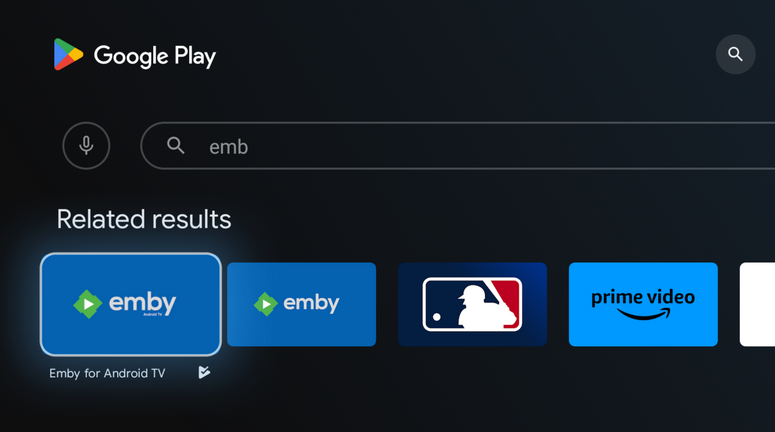
No need to side load. If you search for "Emb" in the Play Store, you will see two results come up. Install the second one that is named "Emby for Android" (without "TV" in the title) You don't need to uninstall the other, they will happily run side by side.
 1 point
 -
That would work, so long as clicking out doesnt pause. It would be nice to be able to disable thr click-anywhere pause. Why can it not be made available in any other layout? Losing controls in the UI to have a different layout on the home interface seems completely arbitrary. Theater lost the ability to type with the keyvoard in the search box a while ago, and now it lost an onscreen volume control.1 point
-
Hello @JatorI think with virtualTV you enter in the path of the logo image. He then loads the image from the server. I did this once with a plugin called channels. I didn't want to do this because Emby lets you add logo images so easily. Give this built in Emby feature a try. I hope you visit often @Jatorand if you come to gainesville lets have a face to face meeting. Vic1 point
-
Simple to not give it out for free….. there is some other guy selling a version for a few $ a month that’s semi comparable.1 point
-
If you use HDHomeRun tuners for this, there is a trick you need to do to "fix" the TTL setting of 3 used by these devices. Not understanding the TTL setting or the reason the tuner doesn't work if a trace route shows more than 3 hops (basically the Internet) between you and the device can be a frustrating time trying to diagnose as it's not very commonly changed. But knowing the default TTL is set to 3 easily explains why it doesn't work until you reset the TTL to 64 or similar. Don't let that scare you at all, I used to have a few remote HDHomeRuns located at friends and relatives' so I could record different sporting events. I had 2 in Florida & California and 1 each in NY City, Boston & Chicago & Pittsburg. I'm in southern New Jersey and got Phila via OTA (42 miles) & Cable as well as Baltimore/Washington sports OTA at 62 to 67 using a big tower mounted antenna. Besides the TTL thing, make sure the remote location has the needed upload speed with 50% margin to cover the number of tuners you'll be using. A home internet plan with only 10Mb upload for example wouldn't be idea to use. Once you've got the tuners working in Emby it's easy to setup for Guide data as Emby doesn't care where the tuners are location. Each guide lineup you create can be based on a different zipcode allowing each tuner guide data for its remote location. Carlo1 point
-
I just kept signing in until it worked and that's what drives me crazy I spent three hours at my parents home trying to get this to work. I do the love the excellent support1 point
-
Hi, the update is coming. Apologies for the delay.1 point
-
I am currently rewriting the "brain" of all this, and thus re-writing the subsidiary parts too - Its taking me a bit longer. There are a few issues in the original that I have noted. 1. If you log the output, when the log gets large, there can be a cross threaded file lock which "can" cause the process to just exit/miss files etc. *This was hard to detect* 2. Some ignore words didn't seem to be being captured. The core couldn't be multithreaded in its original form. Status: I have re-written the core, that is now multithreaded as well as everything else, so it processes the m3u file across all cores simultaneously (i.e. on my pc reads and interprets 16 m3u entries simultaneously, categorises them etc), as well a all the I/O operations and logging. I have re-written the logger altogether. Its complicated to explain, but it works. I have re-written the I/O file writer. So that now queues and writes across all cores simultaneously, also prevents thread locks, overloads, queue buffer overflow etc.. I have re-written the ignore handler, that is still being tested but appears to be corrected. There is still more to do as all of this is new and replacing the older code. Full Verbose Logging mode is only taking 19 mins now, compared to most of the day before! It might take me a few more days but I should be able to post a full working version soon.1 point
-
although i was sure it was working several weeks ago, apparently it was not….when i played around with it today i couldn’t connect to Emby Server on my home pc with a remote device without Tailscale installed….i need Tailscale running on the remote devices as well as on the home pc fwiw, using Subnet Router does allow me to use the home pc’s internal IP address to access the server from outside the LAN…although that doesn’t seem useful for anything but at least for me, installing Tailscale on the devices i want to access Emby Server remotely is not a big deal sorry for the false hope1 point
-
Ok perfetto vi ringrazio del aiuto1 point
-
Your explanation of converting imported Emby playlists to native playlists is detailed and useful. The step-by-step process ensures that users can seamlessly transfer their m3u files into Emby’s system while maintaining order and metadata. Using TracklistPro could further simplify the process, making it easier to manage and convert playlists across different platforms. The concern about losing tracks after deleting the original playlist is valid, but as you confirmed, Emby successfully retains the individual items in the new playlist.1 point
-
Best I can do: Nvidia passed through to Win10 VM and Emby set to CPU only = problems transcoding Nvidia NOT passed through to Win10 VM and Emby set to CPU only = no problems transcoding Nvidia NOT passed through to Win10 VM and Emby set to GPU only = no problems transcoding1 point
-
Hi, we'll add this to the list of detected extensions. Thanks.1 point
-
Hola nuevamente y gracias por las respuestas, al final elimine la biblioteca de películas y tuve que volver a crear la biblioteca volviendo a escanear todo, y ya están apareciendo nuevamente todas las películas como antes, gracias.1 point
-
hi, when it is direct playing and not rotated correctly, this is resolved for the next app update. Thanks.1 point
-
Reading all the comments, I see that the device limit is a very common issue. including myself having frustrating problems. I have 5 devices in my home and am still getting the premiere device limit exceeded. Why am I having this pop up on my screen when I have 5 devices, that is with in allowed amount of devices in my account?1 point
-
Hi all, So my MacBook only plays DV profile 5 (yay Thanks Apple, totally not a huge hassle). Which means that I have some profile 5 files, but (again thanks Apple) cannot stream them without it trigering transcoding. Not that big of an issue, i'll just open them locally. But now that I have the files anyway it would be cool if I could use them for my family. At the moment, when tonemapping begins for Profile 5, it will give the signature green and purple look. Jellyfin looks to have fixed that and I was hoping this could also come to Emby, especially snce your recent update mentioning Emby will now recognise and tag content as DV @Luke. No rush, it's not that big of a deal for me but maybe easy and nice to implement when you have the time! J1 point
-
This feature request will be 7 years old in less than 2 months —SEVEN!!! and with 13 pages of comments. What is the point of the feature request forum?1 point
-
Serious "I went to Pizza Hut but they wouldn't sell me a cheeseburger" energy here.1 point
-
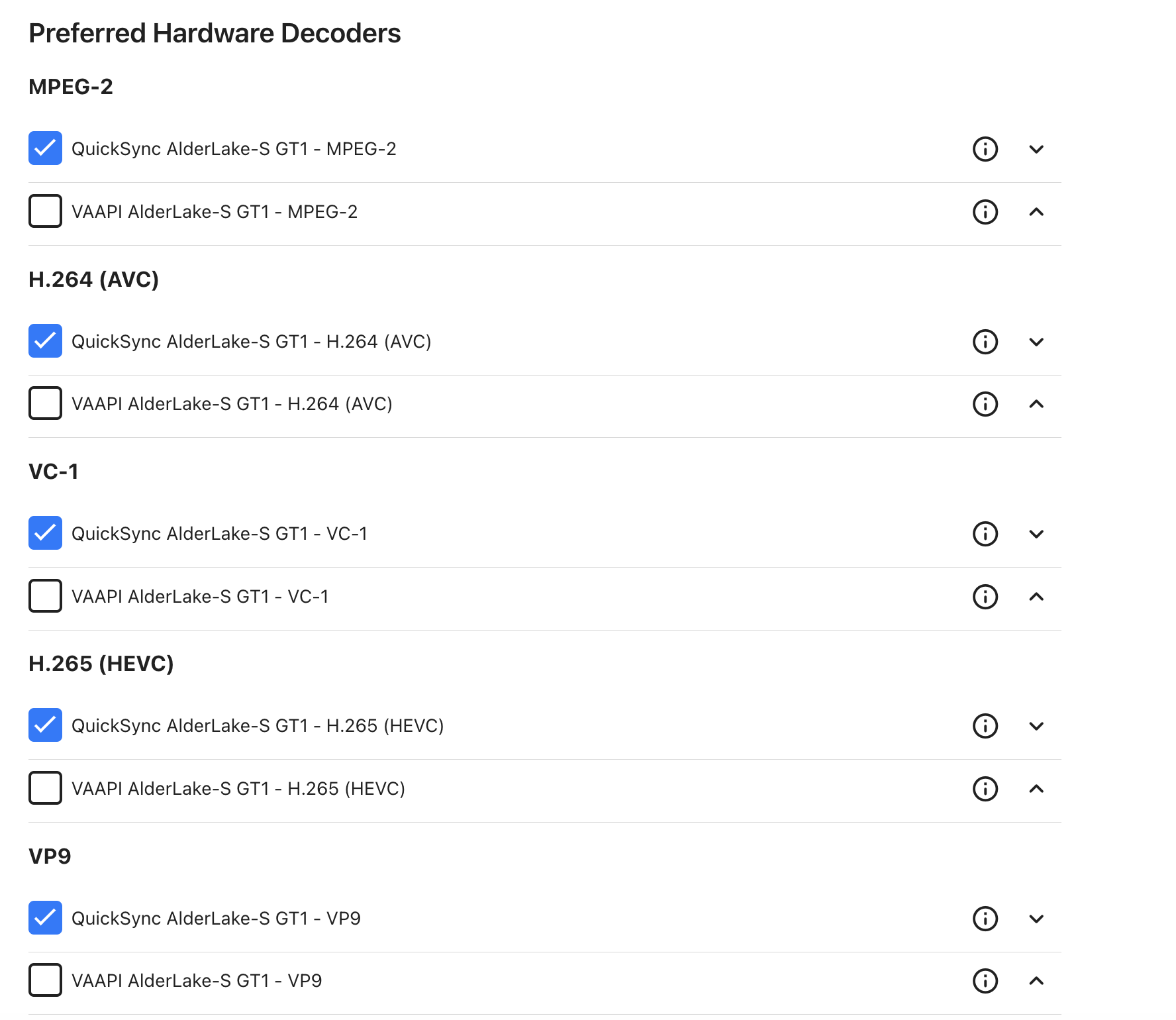
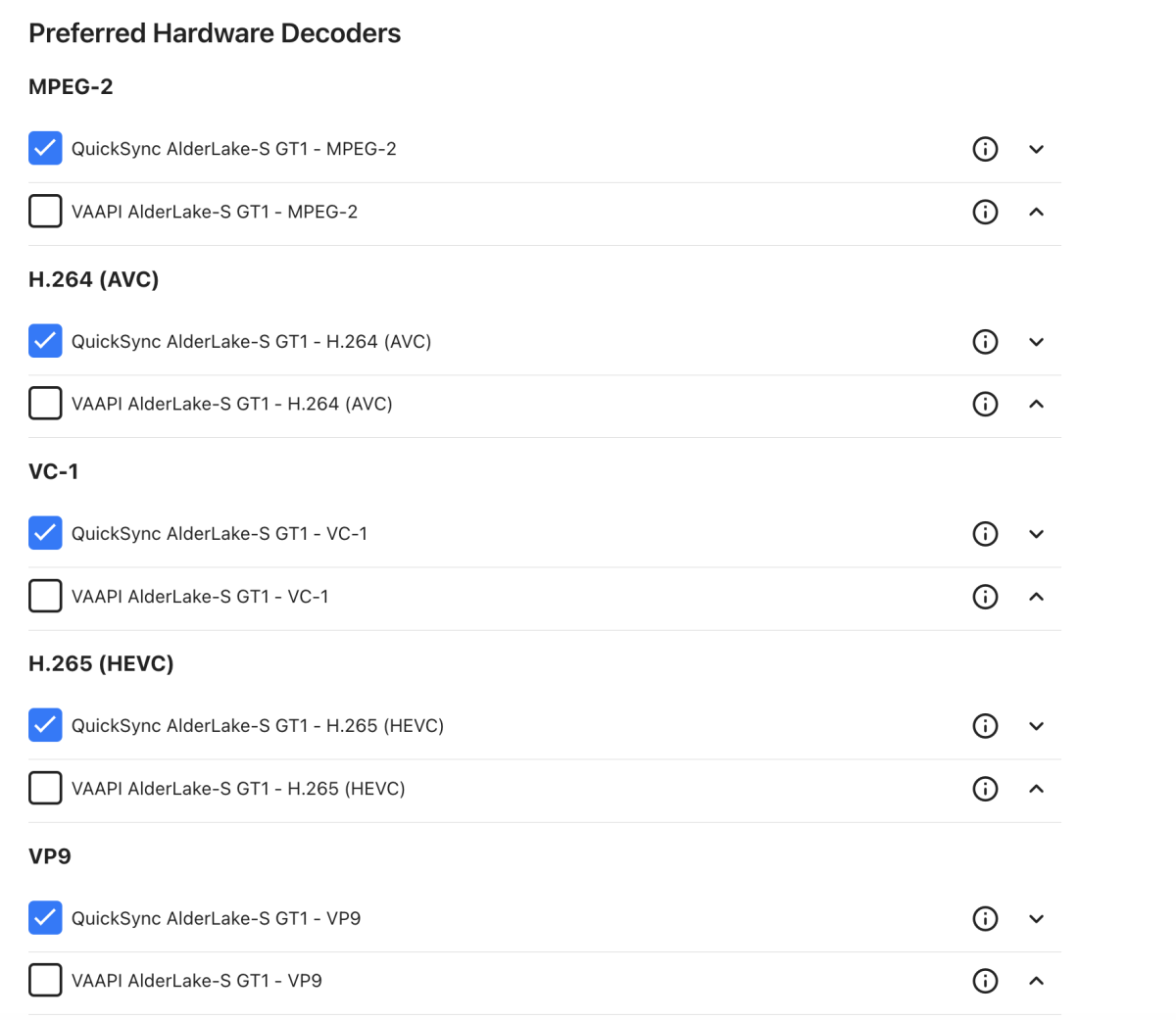
No, you don't need to disable anything here. Which one is used depends on the hw encoder (that's why others have mentioned the other tab for choosing encoders/decoders). There are cases where hardware tone mapping would be inefficient, like in case of transcoding operations which can only be done in software and the data would need to be copied back and forth between CPU and GPU mem. In that case, no tone mapping would happen when you disable software tone mapping. Also, hw tanscoding can always fail for many reasons, where Emby falls back to sw transcoding and then it's relevant which choice you made for sw tone mapping. You should try it out and see how it works out on your system. If it's too slow, you should better disable it, as without sw tone mapping you get better sw transcoding performance. If your system is capable, you can leave it enabled to be sure to have tone mapping even in cases with sw fallback. What this setting doesn't do, is having Emby perform sw tone mapping instead of hw tone mapping when hw tone mapping would be possible (and is enabled), so no need to worriy about that.1 point
-
It is correct that the fixed-function tone mapping was only added in more recent iGPU models, but we support hardware tone mapping via OpenCL, which works with both, QuickSync and VAAPI. QuickSync is generally preferable (faster + better encoding).1 point
-
I'm running on unRAID as well. I have my settings exactly the same. However on the first transcoding tab, I have all of the VAAPI options unchecked like below. Let me know if you have any issues with transcoding and tonemapping and I'll be more than happy to help.
 1 point
 -
I think I recall this request in the past, but I couldn't seem to find it... Today I installed new raided SSD drives, and had to fresh install Emby.. Saved user database... Long story short, I had to go into every emby user and give them access to the libraries they were allowed access, Music, Movies, and Music videos.. If we had a user groups option, where, had all of these accounts been set to the "Users" group, I could just edit permissions for the "Users" group and been done at once. Not sure how tough this is to make happen, but as emby servers gain more and more users, it would be nice to be able to change one group rather than 40 users.... Support for multiple groups of course..1 point
-
What exactly happened? How to Report a Problem0 points



.thumb.png.225edb9636a79b10cd220c27f59990f3.png)