Leaderboard

.thumb.png.f4cb0545e98b51fd9b00e427622ab761.png)


Popular Content
Showing content with the highest reputation on 03/05/25 in all areas
-
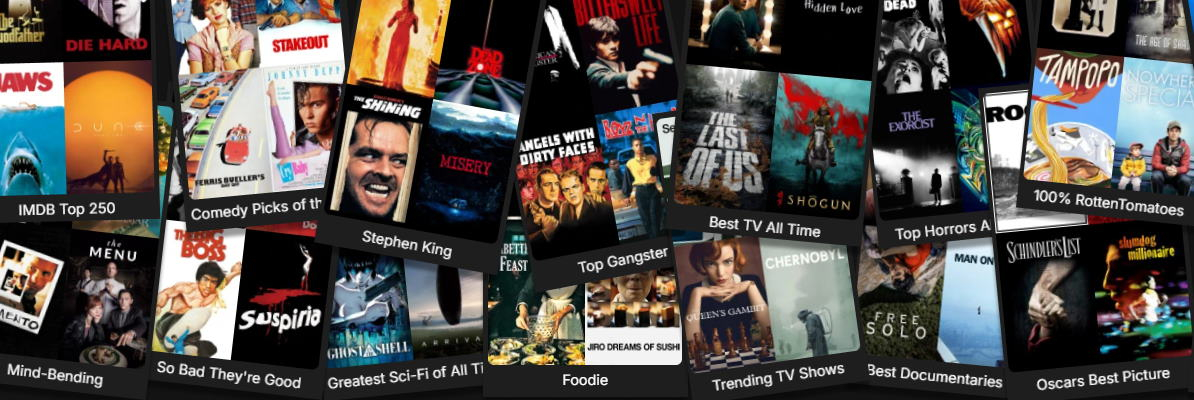
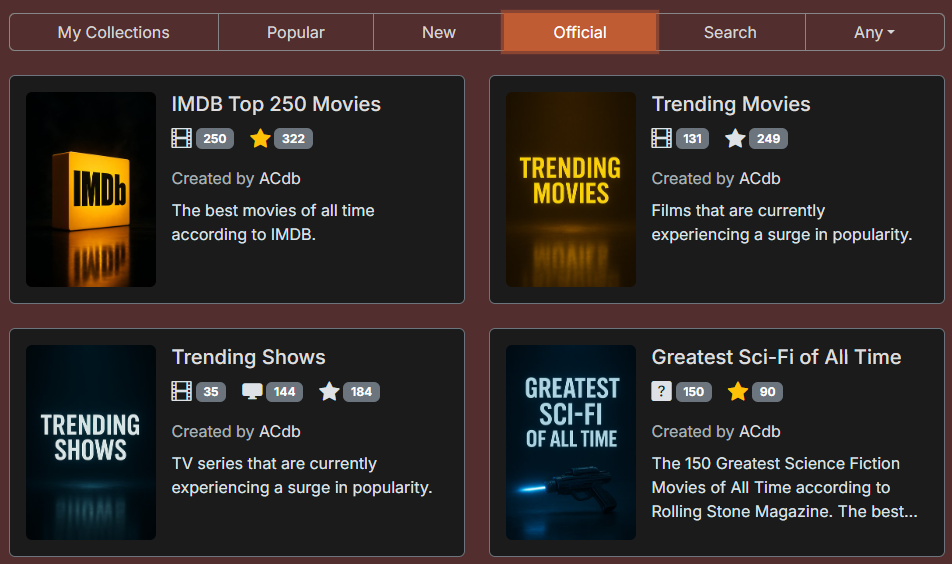
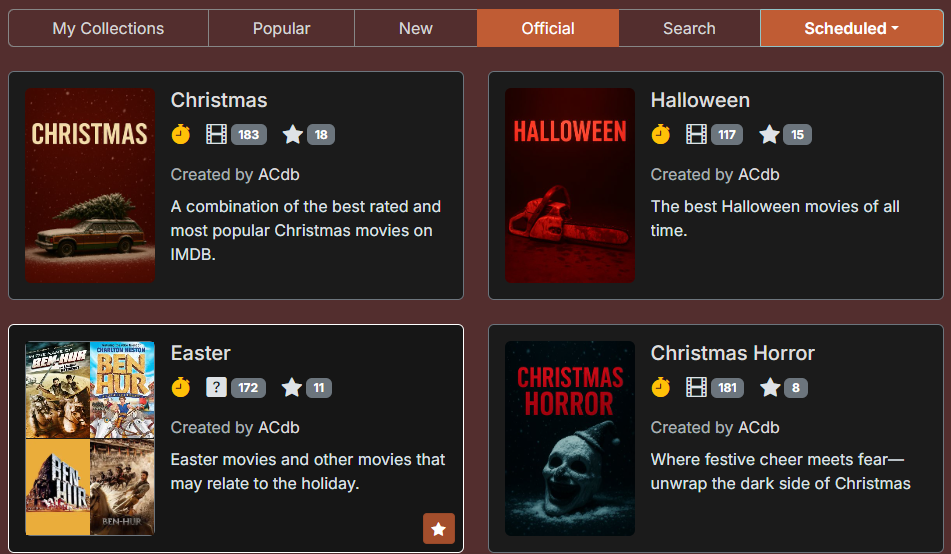
Hello everyone, I've released the ACdb.tv plugin (Automated Collections)! It allows you to sync lists from MDBList to create automated collections in Emby. I've previously created a Python script to do the same but wanted to make something that is easily accessible for everyone. Features Dynamic Movie and TV Emby collections synced periodically. Scheduled collections that are only shown during a particular season. Set up your own schedules. See missing items. Once a collection has synced you can check which items of the collections you are missing. Must be Patreon supporter to user this feature. https://acdb.tv/static/img/missing_items.jpg Custom collection ordering. Move newly updated collections to the top of other collections. https://acdb.tv/static/img/collection_sorting.jpg How To Install The plugin is available in the Emby plugin catalog. Check out Getting Started. Cost Free: 3 collections if you click "Join for Free" on the Patreon. $2/month: Add up to 20 collections, include any MDBList, and fully customize your collections. See more on the Patreon page. Work in Progress In beta, it's early days so I'm adding features these days and issues might happen. Please let me know about any issues/feature requests on this thread or the contact page which also has a Discord link. Coming up Next * Custom collection posters. How It Works Any user can add any Collections made by other users to Emby. Collections belong to their creator, so only the creator can edit the containing list, the title & description. Cloning: If you want to edit a collection you don’t own, simply clone it—now it’s yours. (Only Patreon supporters can edit collections.) The plugin checks for modified collections every 2 hours for now (might change). If a collection hasn’t been updated for 24 hours, it still syncs to ensure newly added items in your library are included.
 2 points
 -
Hey, I've released a plugin that makes the experience more user friendly and no fiddling with scripts It's missing a few features to catch up to the script but will be there soon! See:2 points
-
It would be great to have Emby as a music provider for Music Assistant: https://music-assistant.io/ I'm forced to use Jellyfin as a provider for now: https://github.com/orgs/music-assistant/discussions/583 It probably wouldn't take too much effort to adapt the existing Jellyfin provider to the Emby API: https://github.com/music-assistant/server/tree/dev/music_assistant/server/providers/jellyfin1 point
-
Pretty simple suggestion. I have multiple users for my Emby server. If I want to do continuous maintenance on the media, I have to tell everyone. some of them are harder to reach than others ( i.e. no Facebook or Skype chat etc. ) It would be great if say... on the admin panel, I could hit a check box that enables 'maintenance mode', where the server still runs does everything as normal, but instead of the login screen it displays a maintenance page saying the server is unavailable. Even better if I were able to directly put a reason in a text box that would then display on the login screen as well. Not really sure what others would think of this, but for me it would be quite helpful. mostly if I want to make sure no one is trying to access content I know won't work until I've done a full library scan again. Thanks for reading. -Kyle1 point
-
It has come to our attention that someone (we believe out of China) is spoofing our purchase page and reselling bogus Premiere keys. Please be aware that the only valid locations to purchase Premiere are our web site (https://emby.media/premiere) or inside one of our official apps. The scammers are using the domain "Emby.team" and are spoofing credit card receipts that look like they come from us and everything. If you happen to have fallen for one of these scams report it to your credit card company and please let us know at billingsupport@emby.media. I'm afraid we cannot do anything to help return your money but we can try to squash the perpetrators. Thanks.1 point
-
Woah. Good timing!!1 point
-
1 point
-
Hi, thanks for sharing.1 point
-
Hi, yes we'll be putting out a 4.8.11 maintenance release soon and I believe this was included in it.1 point
-
Thanks. He is on the case.1 point
-
Nothing stands out that I can see. Only other thought is sometimes you have to remove the album from Emby and do a scan to clear the db then read the album to see changes. Yes it should read the existing embedded metadata.1 point
-
Thanks so much for this! Just as a heads-up to others, I was trying to add a couple of solar (battery) powered Reolink cameras and came to find out that this type of camera does not support RTSP or any other type of streaming to third party apps/services. I was able to add my other POE cameras easily though which is fantastic, great plugin, truly appreciated!1 point
-
Ok so i understand the feature is not available yet in Emby Windows? But somehow it used to be available in earlier versions that the author of the post i linked used? I suppose "Emby Theatre" was a different app being replaced by the new Emby Windows? Just wanted to clarify. I'll be waiting for this feature soon. If PowerDVD is legal then i shall use that as my player. Just the fact im able to have a nice collection presentation and launch PowerDVD from there for me would be a great plus. Is there a way to sign up for notifications when that feature is released? Worst case ill keep checking once in a while. I appreciate your work BTW its really a nice media center software and i like it better than Plex because its offline and keeps things simple.1 point
-
Yes, IPTV can be played through transcoding.1 point
-
Actually our support articles say 2Gb ram min when transcoding and not 1Gb or 512 Mb @appas https://emby.media/support/articles/System-Requirements.html Windows, Mac, Linux, or FreeBSD computer Minimum Requirements — no transcoding Intel Core 2 Duo processor 1.6 GHz or better At least 1GB RAM for Windows/Mac OS X At least 512MB RAM for Linux Windows: Vista or later OS X: MacOS 10.13 or later Ubuntu, Debian, Fedora, CentOS or SuSE Linux Recommended Configuration — transcoding HD Content: Intel Core 2 Duo processor 2.4 GHz or better If transcoding for multiple devices, a faster CPU may be required At least 2GB RAM Windows: Vista or later OS X: MacOS 10.13 or later Ubuntu, Debian, Fedora, CentOS or SuSE Linux1 point
-
bare with me, still testing Changing from synchronous to asynchronous has thrown up some unexpected IO issues that don't occur in synchronous mode, I am now running emby and the plugin as an attached process in the VS IDE, to try and trace what the hell is going on, this might be related to @fbrassins issue, currently I am not sure. Before the code alteration, this one writes D:\VODS\TV Shows\A+ - Gutsy\A+ - Gutsy S01 E08.strm but this one throws the exception D:\VODS\TV Shows\A+ - Dear...\A+ - Dear... S01 E01.strm The difference seems to but the full stops. There should be no issue at all with the full stops. However instead of the error being handled by the error handler, in the async method the plugin just exists with no warnings... That's no good, that needs sorting out. So where I am is I am trying to trap the exact reason for this, then I can act accordingly such as maybe replacing the full stops with something else or removing them if required. I will keep you updated.1 point
-
I think for at least a few of the items in your list, the number of episodes to be collected is "0" because there are no official entries for them as a series in TVDB or episodes haven't actually aired yet. The Fear the Walking Dead episodes are on TVDB as specials under the parent series. Same with the Celestial Toymaker and Is It Cake. According to TVDB, episodes for A Cruel Love don't start airing until March 5 on ITV1. So there are no episodes to be collected until that date. Great Battles of the Great War has no episodes to be collected because there are no air dates identified for the three Season 1 episodes on TVDB. Money Heist and Captain Caveman and Son...I'm not sure why they have "0" episodes to be collected as they both have official entries as series at TVDB with air dates entered for each episode. I'll add them to my library when I get home tonight to see what Statistics shows for them.1 point
-
Emby does not restrict or manage the "upload" speed. It uses the full bandwidth available to stream the video and the limits are only for the bitrate of the stream itself, not the transfer rate. If you're seeing a transfer rate that is the same as the bitrate that is a limitation of the network itself at the server, the client or somewhere in between. It also means the stream bitrate should be reduced because a hiccup in the transfer will cause playback problems.1 point
-
Thank you Luke. Will await the update.1 point
-
Hi, are you able to update this device to a newer version of android?1 point
-
HI, yes we can take a look at that. Thanks.1 point
-
i just tried to reproduce it again, but i was not able to^^1 point
-
Bonus note to anyone else in my scenario: If you're making copies of your library.db file for purposes of rebuilding or backing up, be sure to move them out of your data directory, as they may get picked up by emby1 point
-
Hello @pmac myTV is similar to virtualTV in that both create an Emby EPG for use by Embys Live TV option. VirtualTV is a mature well debugged program that has excellent support. In contrast, myTV is open-source beta code aimed at building a simple point and click GUI that's easy for users to learn and use. It's not yet fully debugged or functionally complete. Users define what's needed to complete the code. The source code in part or whole is free for anyone to use anyway they like, including VirtualTV. The goal of this forum is to build new things, to learn new ideas, have fun and help others. Advanced new features include allowing as many EPG definitions as needed and a simple and easily way to determine how Channes are defined. The actual code is quite small. I hope this helped. Vic1 point
-
OK, I found the problem and I am fixing it. The problem was caused by not fully restoring the state of the DOM and my JS code when TV Guides other than 1 are defined. I will post new code tomorrow. Vic1 point
-
Thanks Luke! Some trial and error but this process appears to have healed my library.db: Shutdown emby docker container Fresh copy of my bulk-find-replaced db into the emby data folder Started emby container, checked 'vacuum on next reboot', restarted emby, then let it scan all libraries Shutdown emby container `sqlite3 library.db "PRAGMA integrity_check"` ran fine, however `sqlite3 library.db ".recover" | sqlite3 library-recovered.db` gave errors like other attempts, so I rebuilt the db this way: `sqlite3 library.db ".dump" > dump.sql` Confirmed dump.sql had actual SQL instructions in it and not errors `sudo sqlite3 new-library.db < dump.sql` No errors, so I copied new-library.db to library.db in the data folder Started up Emby docker container and all libraries were able to play fine now @Lukemaybe the ".dump" steps should be added to the Corrupt Database doc as a last resort before the "Steps to Reset Library Database & Load Fresh" step?1 point
-
I would just replace your server with a micro-pc that has a N100 or N150 processor, that is if your server is only used for transcoding and doesn't store all your content also. If it does store your content, leave the server as is and just add the micro-pc to your network and offload Emby to the mico-pc. With the loss of the graphics card you will be using LESS power with both machines as the N100-N150 will only use 15-20 watts max, and will typically idle at about 6. You'll gain the benefit of Quicksync and you can store the micro-pc almost anywhere due to its size.1 point
-
It should yes. Anyway when we submit our next update to amazon, we will take a shot at re-enabling this and see if they approve it.1 point
-
There are definitely fixes related to this in the 4.9 beta channel.1 point
-
Understood. Thanks for your help.1 point
-
This sounds very wrong...1 point
-
Yes, these are the settings you want, but now they will only apply for new content added going forward. To apply them to existing content, you will need to refresh the metadata on them, and check the box to replace existing images.1 point
-
Well… one year on… and I finally have a workable method of achieving this in Emby – while it didn’t actually take a whole year of time, it did take some experimenting to figure out… I first tried Tags, but the navigation/browsing experience was too disjointed… then, got distracted with trying to separate Artists and Composers… then, tried Collections, but didn’t really make much progress… then, got even more distracted with Country Flag emojis… then, with some community help (thanks @Happy2Play @Luke), I discovered that Collections, PLUS some CSS with the Web App, gave a feasible solution… While the result (to date) isn't quite as elegant as a dedicated “Related Artists” section, it is selectively configurable, unlike the auto generated “More Like This” section, that can sometimes be a bit ‘hit-and-miss’ with the results. The basic idea is: Manually set up “Related Artists” Collections (yes, it takes time) Ensure that the main Artist is included in the associated Collection (otherwise some necessary navigation links are missed out) Match corresponding Artist/Collection Primary Image, Background Image and Overview Text (so that the pages essentially become extensions of each other) Use CSS to exactly align the top sections of Artist and Collection pages Use CSS to move the Artist “Included In” section to underneath the Overview (otherwise scrolling down makes the navigation less streamlined) Use CSS to make the “Included In” images smaller and less dominating on the Artist pages The end-result is seamless navigation by “Related Artists” via alternating Artist and Collection pages (starting with either page type) with no need to scroll down the pages. (I guess it would also be possible to exactly match Page Titles text and Primary Images shape, if desired.) Here’s an example, showing just one possible navigation path, starting with The Beatles and ending with Electric Light Orchestra (Note: it’s the music exploring journey that’s meant to be fun, more so than just being a long way of getting to a specific Artist destination): The above example also shows Artist Country identification (and Country Collections) plus some Artist/Composer separation (both still a work-in-progress). So far, it’s working well, though I still have many more Collections to fully configure. There’s also the possibility to expand the Collections beyond just Artists, if I want to. While setting up the “Related Artists” Collections is a standard use of Emby, it’s really the custom CSS that makes this approach a viable navigation/browsing/exploring option. This does result in a doubling up on a lot of the same data, but it’s not noticeable, in use, when the Artist/Collection pages are exactly matched and aligned. In another year, I expect I’ll probably have modified things even further and HOPEFULLY, by then, the new Emby “Smart” Playlists/Collections/Views/etc… will allow for much more individual customization!
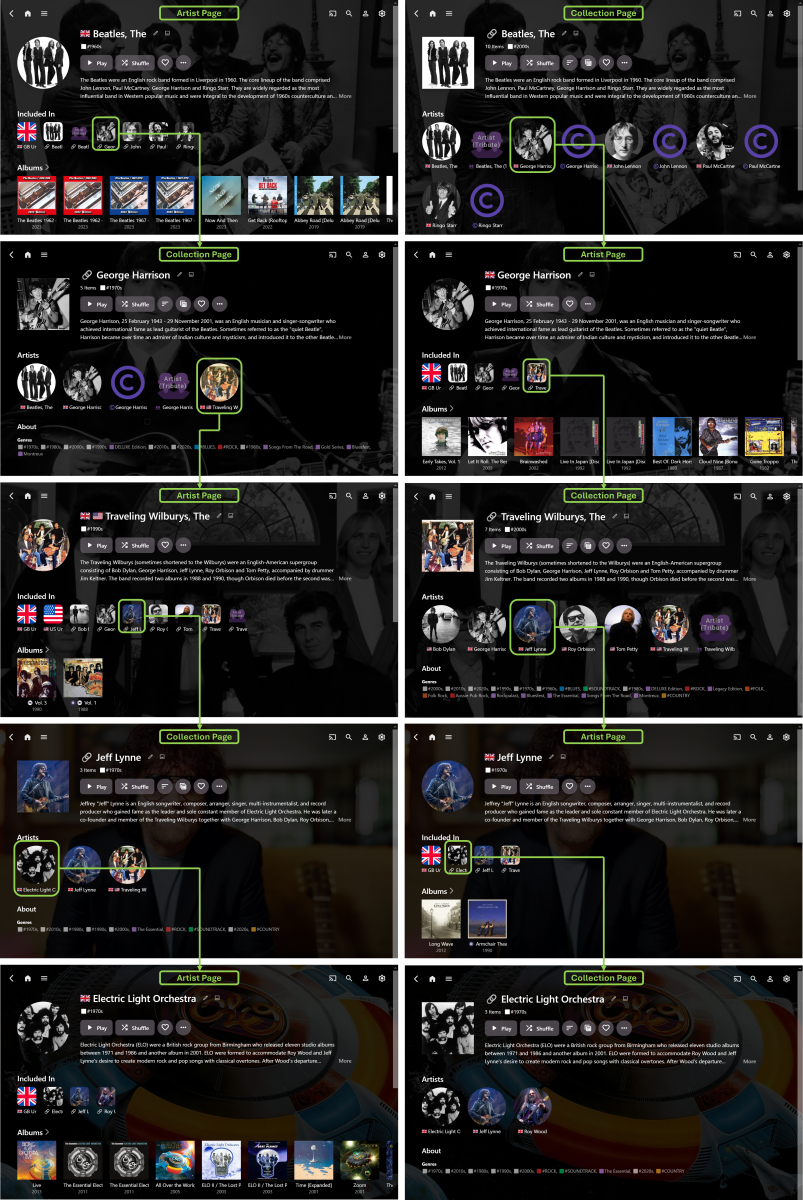 1 point
 -
Hi all, I was reading this post and it looks like a joke! While the OP is asking for more buffer others are saying about every kind of no sense things that is not the solution for the OP question. I have the same problem as the OP. In my case, both emby server and clients are at the same local network and everything is really fast. The problem only comes when watching IPTV, so the server uses internet to get the content, as we know, internet is not always perfect and stable, sometimes it has some seconds of lower rates, based on this, the buffer is usually only 10 seconds so the streaming can not survive some instability moments. Of course some jerk could say, get a better internet, your problem is not emby it is your internet and all the kind of no sense opinions. The true is, if Emby could keep a bigger buffer it would have much more chance to keep the streaming working fluent also when ups and downs happens. 10 seconds of buffer is really a small amount. I use another IPTV client and I have the option to set how many seconds of buffer I want to keep, it is the way to do it. @Lukecould you please take a gentle look at this thread? Thanks1 point
-
Thanks for providing another perspective @frankw. Unfortunately the Emby devs for whatever reason don't value or recognize this as an issue enough to expose the buffer time property to us. There should be no debate over the validity of the problem - Large amounts of latency alongside some occasional bandwidth spikes ruin the buffer time they've set. It's obvious and clear.1 point
-
I actually agree with @strichmoand think there is room for improvement here in terms of buffering. Not sure why certain people are throwing their toys out of the pram when we are simply discussing suggestions for improvements, but hey. My emby server is connected to a 1Gbps fibre connection and one family member accessing via Starlink using Android TV client (NVIDIA Shield) has continuous buffering issues. Media on all other services play without issue (Netflix, Prime, Apollo TV, YouTube). Other users on the server don’t have issues. Speed testing the Starlink connection gives results consistently in the 100Mbps+ upstream, and real-time video calls are made relatively uninterrupted on Zoom/Facetime. The problems are consistently with Emby being able to maintain a reliable stream at 15Mbps (max bitrate on the client) on a connection with speeds in excess of that figure, which would suggest a buffer which is simply too small for some connections or there are some other streaming parameters which need to be tweaked. Perhaps there could be two “modes” - one with HLS parameters as they are now, and one with a set of parameters tweaked for slower startup/seeking and with higher buffer? https://www.speedtest.net/result/i/6017479900 https://www.speedtest.net/result/i/60174964551 point
-
I was told by the emby team that it's a Linux issue and not an Emby issue. Somehow Plex works!0 points
-
You've already been told the reasons, but you don't want to accept it because it doesn't make sense to you. It's like explaining the fact the Earth is round to flat Earthers, who then do their own experiments to prove the Earth is flat, only to have those experiments prove the Earth is round, and then question the results of their experiments because they didn't get the results they wanted. You have it set in your mind that there is some conspiracy afoot, and you won't accept anything but the answers you want. The technical ignorance on the forums has been getting a little too strong lately with the ignorant touting their ignorance as a strength while telling those of us who are knowlegeable that we're wrong because they said so.0 points
-
If you think adaptive streaming is a quick fix - then best of luck. I'll leave it with you.0 points