Leaderboard




Popular Content
Showing content with the highest reputation on 03/02/25 in all areas
-
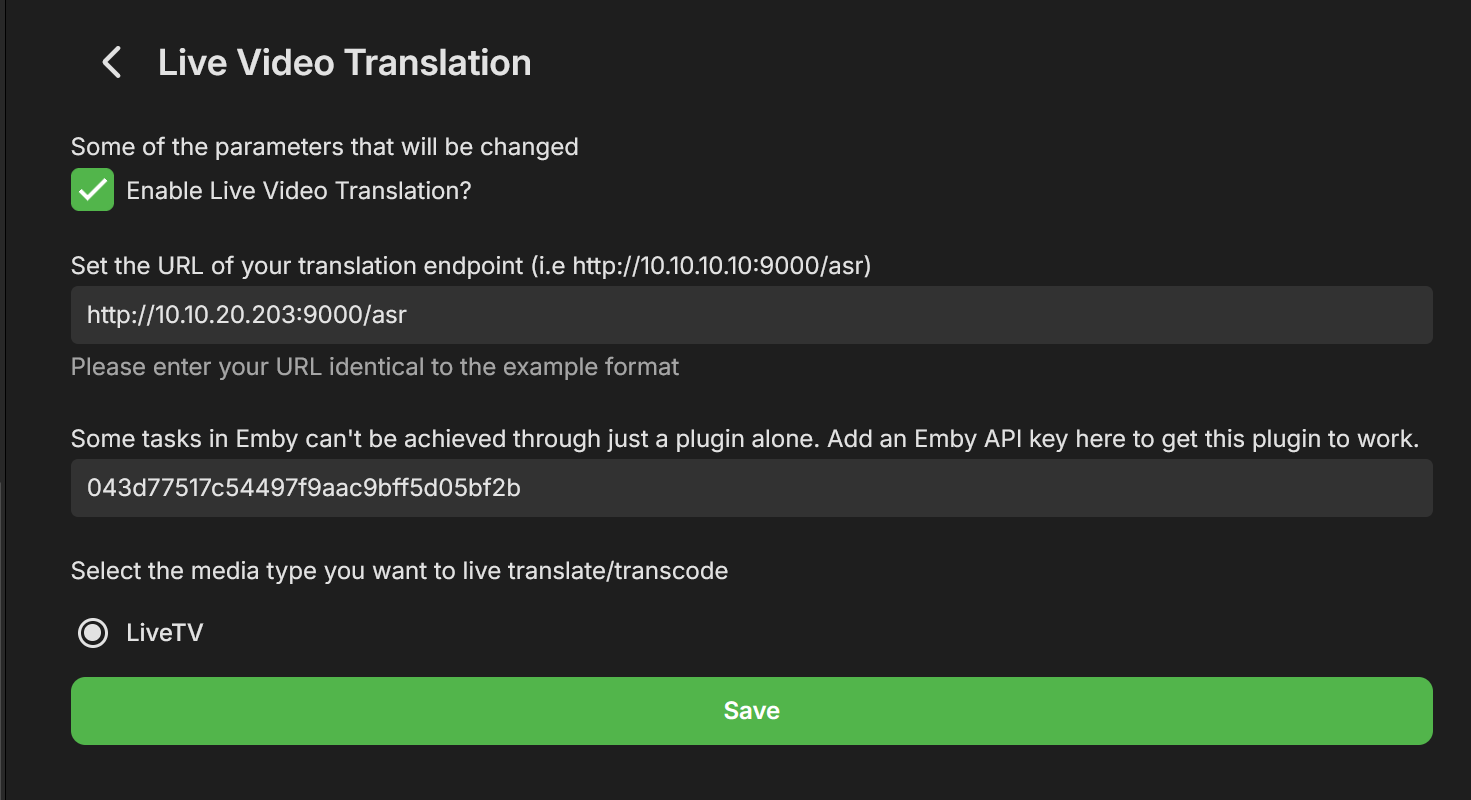
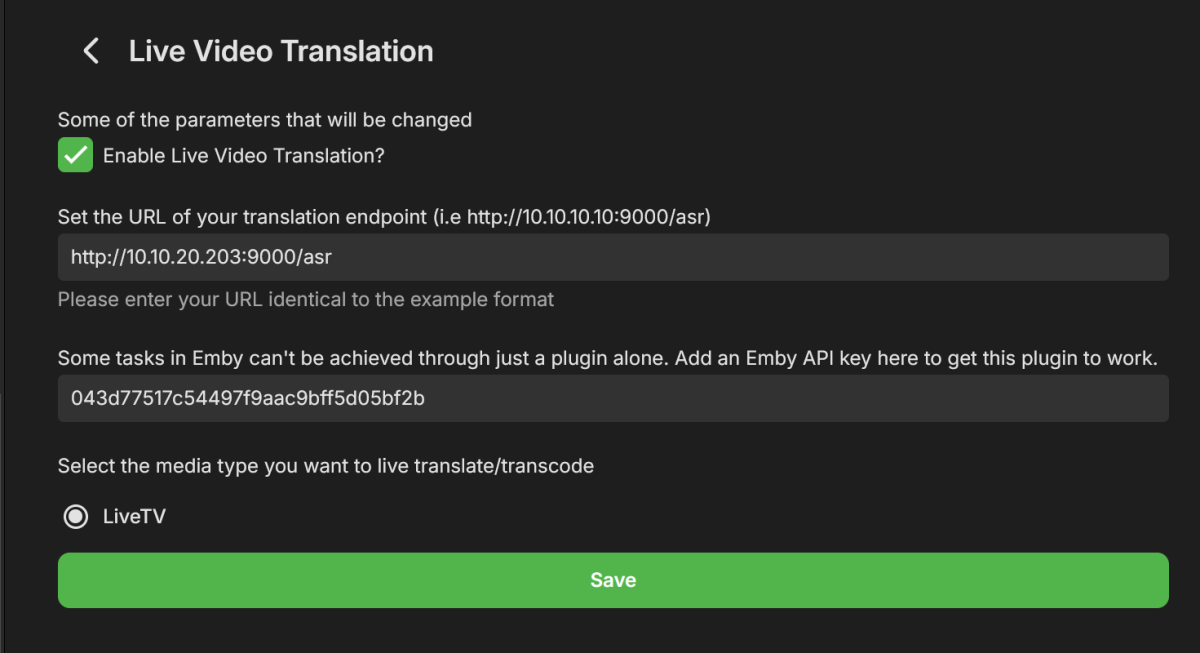
Hey All, After a few weeks of work I'm happy to present a new plugin Beta, called "Live Video Translation". The plugin uses Whisper, Open Ai's translation/transcription service (https://github.com/openai/whisper), to generate translated subtitles on the fly. This allows you to watch TV with live generated subtitles. If the original source is detected as English you'll get transcribed subtitles (English to English). If the original language is any of the supported languages, you'll get English subtitles. Languages supported are: https://github.com/openai/whisper?tab=readme-ov-file#available-models-and-languages How to Install 1. Run the following Whisper docker container somewhere that emby can access it. Make sure to run this docker container using the "GPU" flag. I have not tested CPU mode, but we do need good performance here which may not be available with just a CPU and LLMs. https://github.com/ahmetoner/whisper-asr-webservice 2. Run the docker container using either the "small" or "medium" models. In my testing at 1070 was good enough to keep up with near real time translation using small or medium models. The model download took about 10 minutes the first time. 3. Place the attached dll into the plugin directory. 4. Configure your plugin like so, with the full URI to the Whisper service, and with an EMBY API key. There was one thing that can't be accomplished with just a plugin. (a rapid way to add a library and scan just that library for new files). 5. Click on "Enable" at the top, and restart emby. How it works Currently the plugin only supports LiveTV. There are free LiveTV providers on the first few results of google that can allow you to test this for free. 1. User finds a Live TV Channel in Emby and Clicks "Play" 2. Plugin detects that the user wants to watch a Live TV Channel (and only live tv for now) 3. Emby starts playing the Channel, while in the background the plugin also starts consuming the same channel using ffmpeg. (For a short period of time there are 2 separate connections consuming the same channel) 4) The plugin adds a temporary library to emby that contains a single file. That file is a link to play the translated Channel Stream. It does not scan all the files that ffmpeg is creating, just a static stream file which points to our Plugin API, which serves files for that translation session. 5). The plugin starts creating chunks of the video and translating it, and generating a valid stream that emby can play. 6) Once a buffer of a few files has been created, the Plugin stops the initial stream, and starts the newly translated stream and immediately: - Pauses it - Displays a message to the user to wait for ~20 seconds until a bigger buffer is created - Restarts playback about 20-30 seconds passes These delays are very conservative to allow for any LiveTV ingestion hiccups. I have been able to watch near real time, with just in time delivery of the subtitiles, but have noticed certain IPTV providers hiccup and don't serve video in a timely manner, so this is a way of riding out those hiccups. 7)The new TV stream uses WEBVTT subtitles, which means emby properly parses them, and you can adjust the subtitle offsets, even though they should already be pretty accurate. 8 ) When the user stops playback (only on stopping playback, not closing an app, or closing a browser window), the ffmpeg consumer is killed, the folder deleted, and the newly added library is deleted. The library may still show up if you navigate home immediately, but if you refresh the page it'll be gone. Caveats/Future Improvements - The logs for this plugin, for this Beta, are very verbose in order to help troubleshooting. - Sometimes an IPTV provider is rocky and does not serve video files in a timely manner. Which means you'll be watching the translated stream and it'll overrun the buffer. This happens infrequently in my testing. - I have two test instances a) Windows with CUDA , I had to disable hardware transcoding to get this to work, unsure why. b) Linux with CUDA, works fine with hardware trans-coding enabled. - If there is interest in this I could add live translation to TV Shows/Movies. - I don't control the translation. Sometimes AI hallucinates, but overall it is very good. Sometimes if there is no audio, it seems like the docker container returns "Thanks for watching". - Sometimes the pausing/message on screen does not work. If it's been longer than 30 seconds feel free to click play in the translated stream. Questions for the devs - Sometime the plugin consuming FFMPEG receives corrupted packets from the provider and isn't able to handle it, and it stops. - Sometimes emby's consuming FFMPEG (the ones that consumes the plugin's translated stream) consumes a corrupted packet, and just stops consuming the stream. I'm unsure which one is the problem first here. Seeking guidance from the devs on how I can modify my translation ffmpeg command to account for this. You'll see what the translation ffmpeg command is in the logs shortly after a playbackstart. The translation ffmpeg command just "consumes" the stream to output video files, translation is done separately. - Sometimes sending a command like this, just does not work. Almost as if my code skips it, but it should be called each time. var pause_request = new PlaystateRequest { Command = PlaystateCommand.PlayPause }; _sessionManager.SendPlaystateCommand(null, sessionId, pause_request, CancellationToken.None); Troubleshooting If this isn't working for you, please provide: embyserver.txt - this will have a link to your IPTV in it, and maybe a username, you can obfuscate that if you'd like. The most recent ffmpeg logs which represent the emby's ffmpeg that is trying to play the translated stream. What OS are you using, is hardware trans-coding enabled? Occasionally monitor the buffer health (look at how much video is "left" in the stream). It should be growing as you watch) If it isn't that means either the translation or consuming ffmpeg has encountered an error and I'll need to see the logs as to why. If you watch that same TV channel, with the plugin disabled, does it fail in a similar way? Please provide an ffmpeg log of that. Thanks! LiveVideoTranslation.dll
 2 points
 -
I will add an ignore field eventually, so that those entries are not processed and files/folders are not created. Such that you could add for example "NL MOVIES" or "FR SHOWS" etc and entries in the m3u with that this wouldn't get processed at all. That would allow you for example to slim down your m3u to just what you want to have in it. This way it would increase speed dramatically with m3u files that are rather big in size. Output could then go for example from a 100+mb to a few 100kb That's the aim..2 points
-
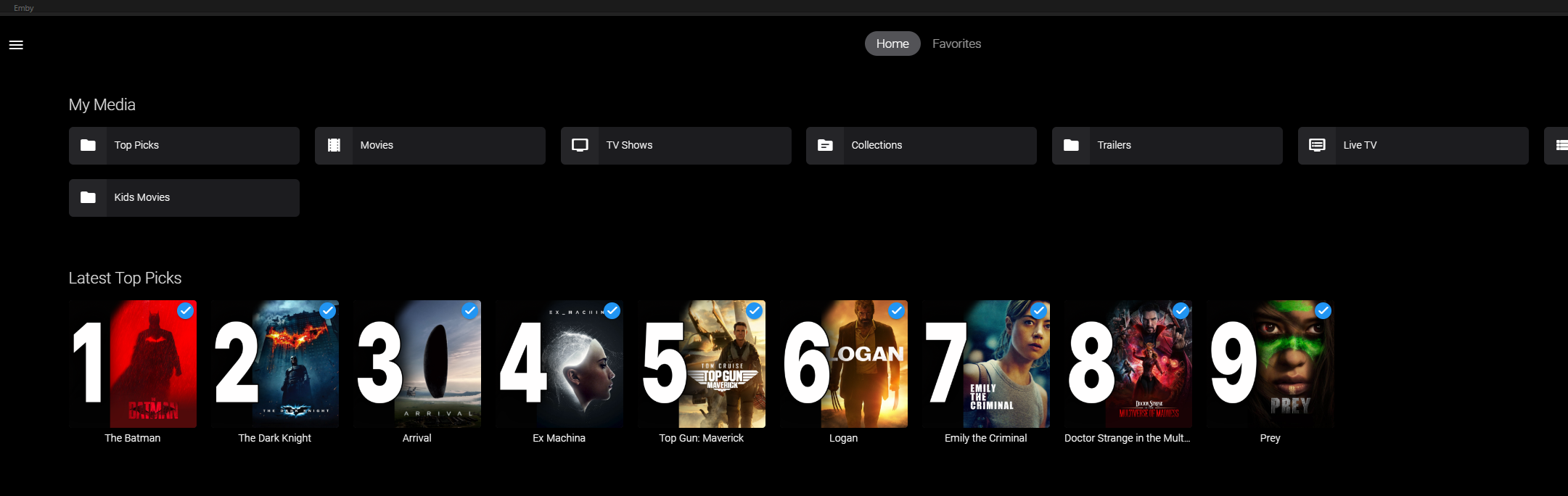
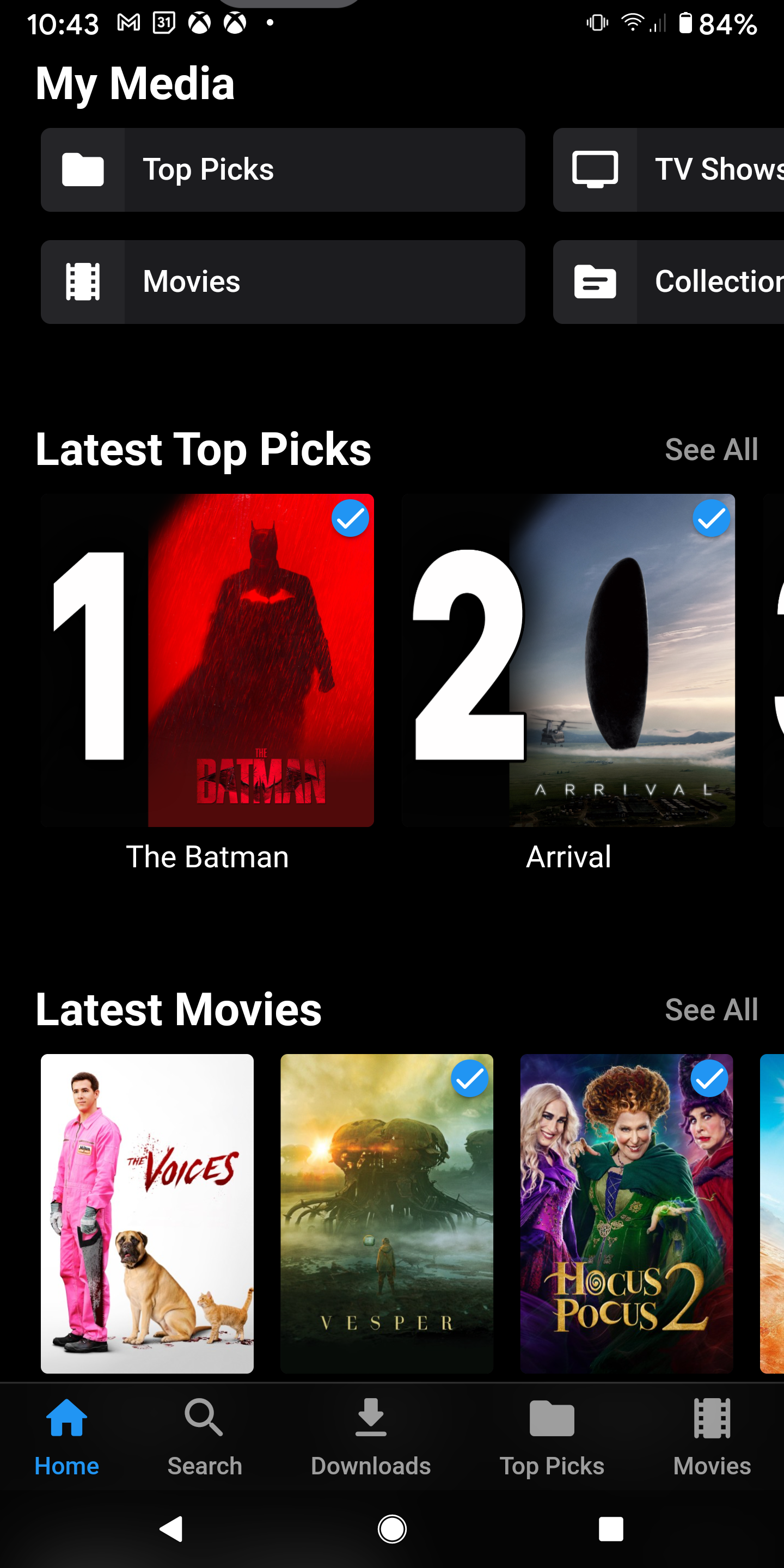
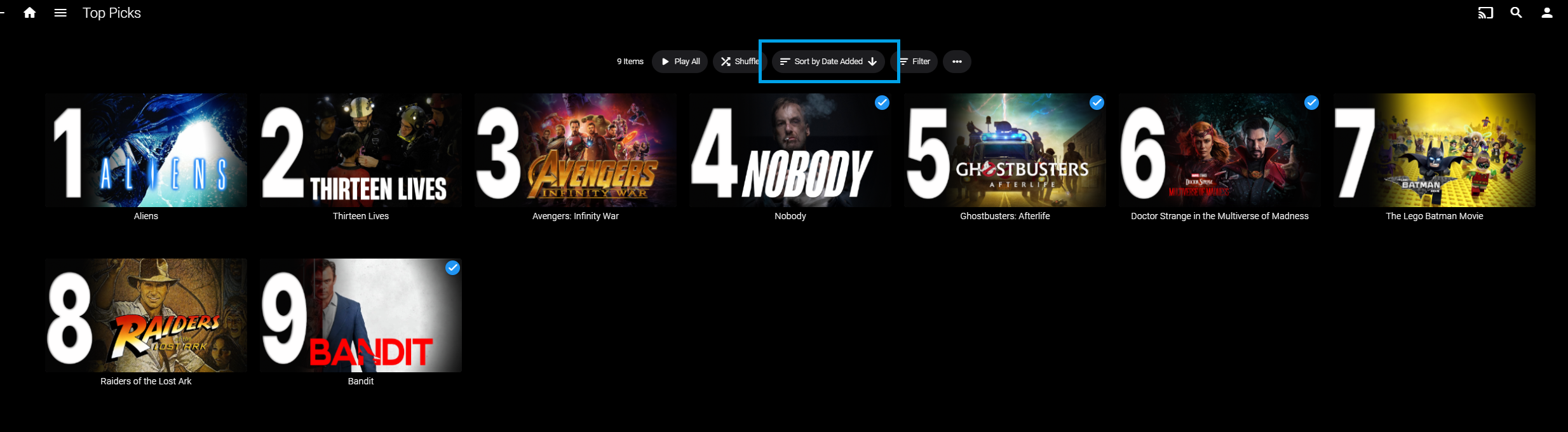
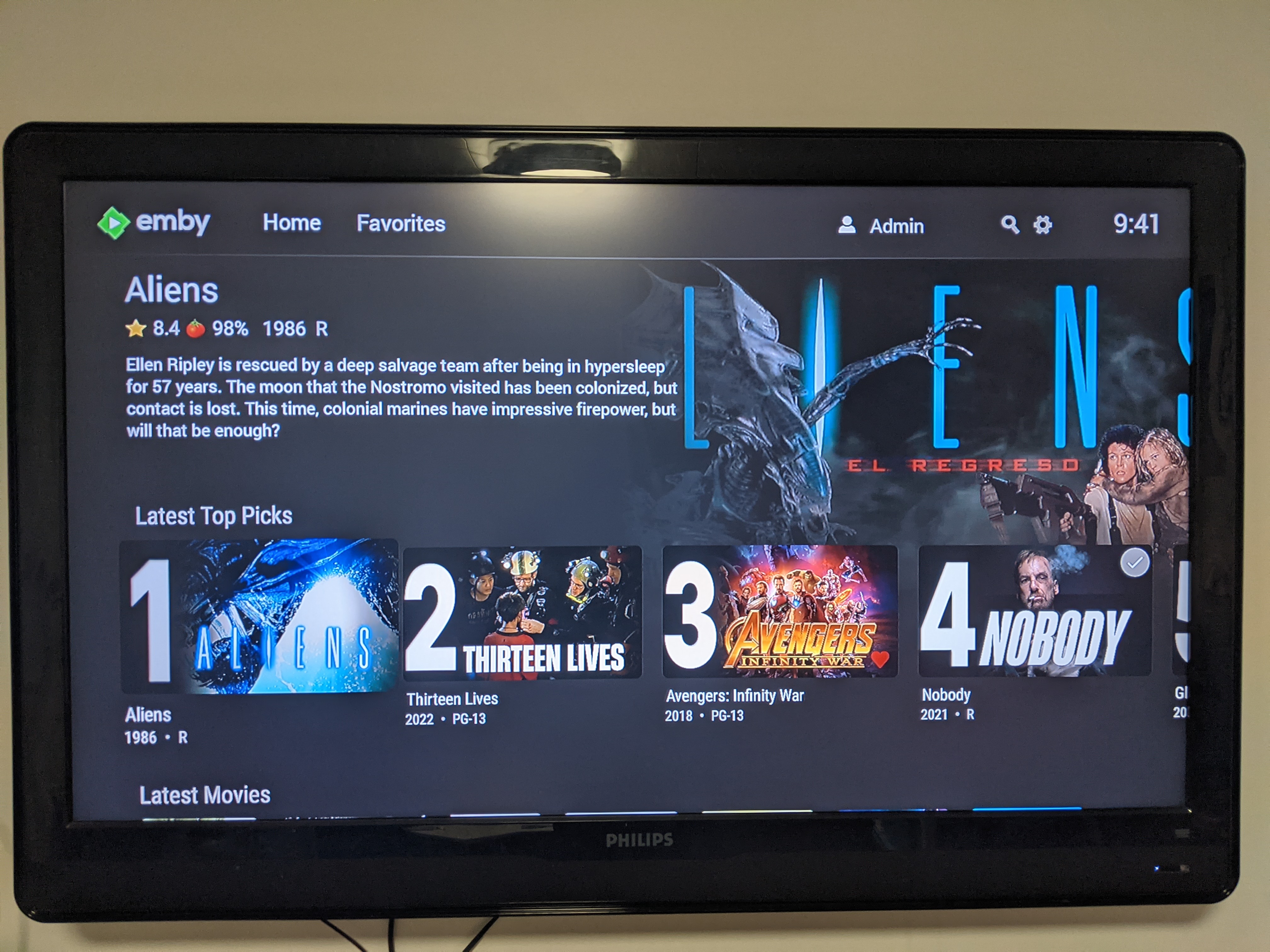
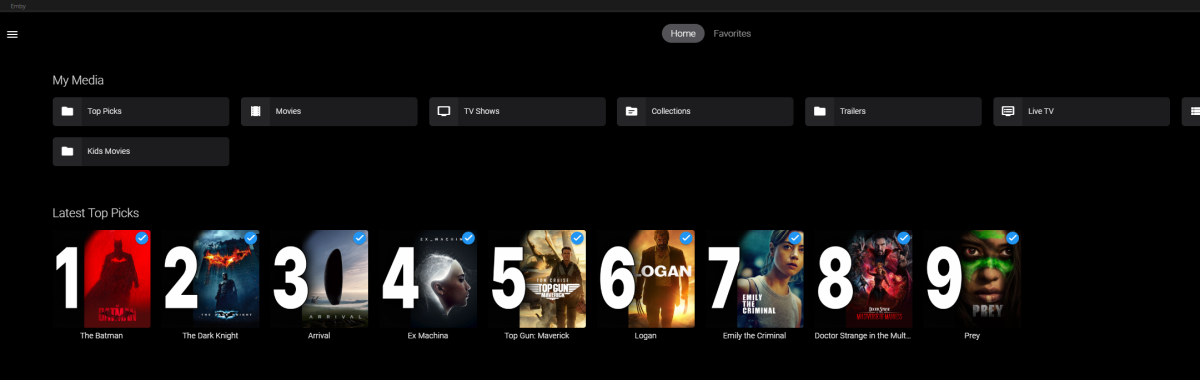
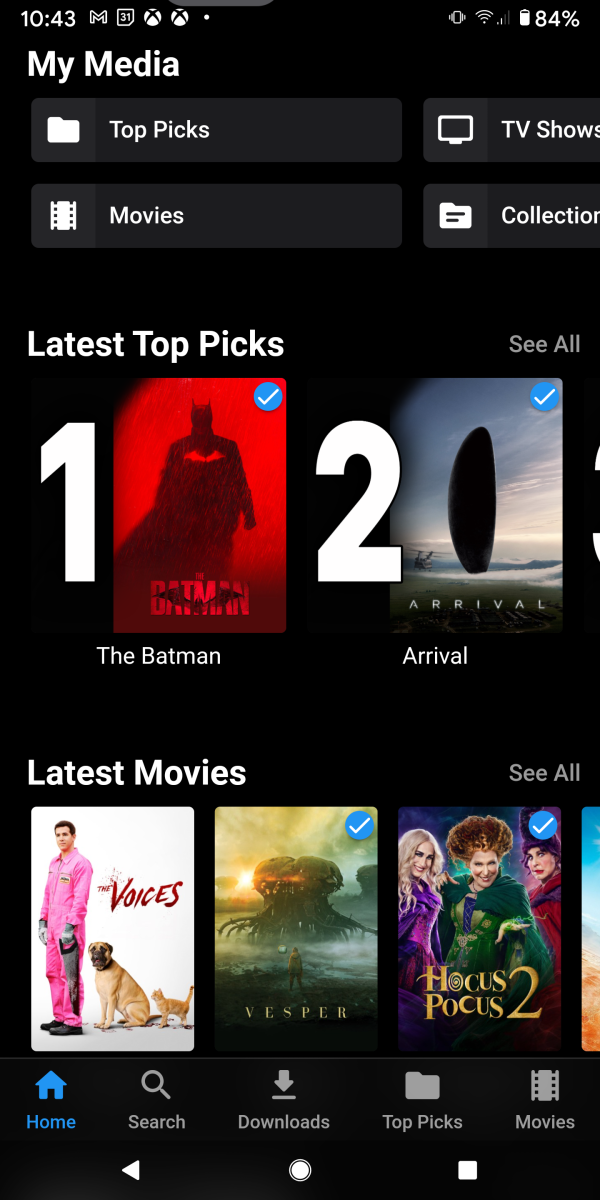
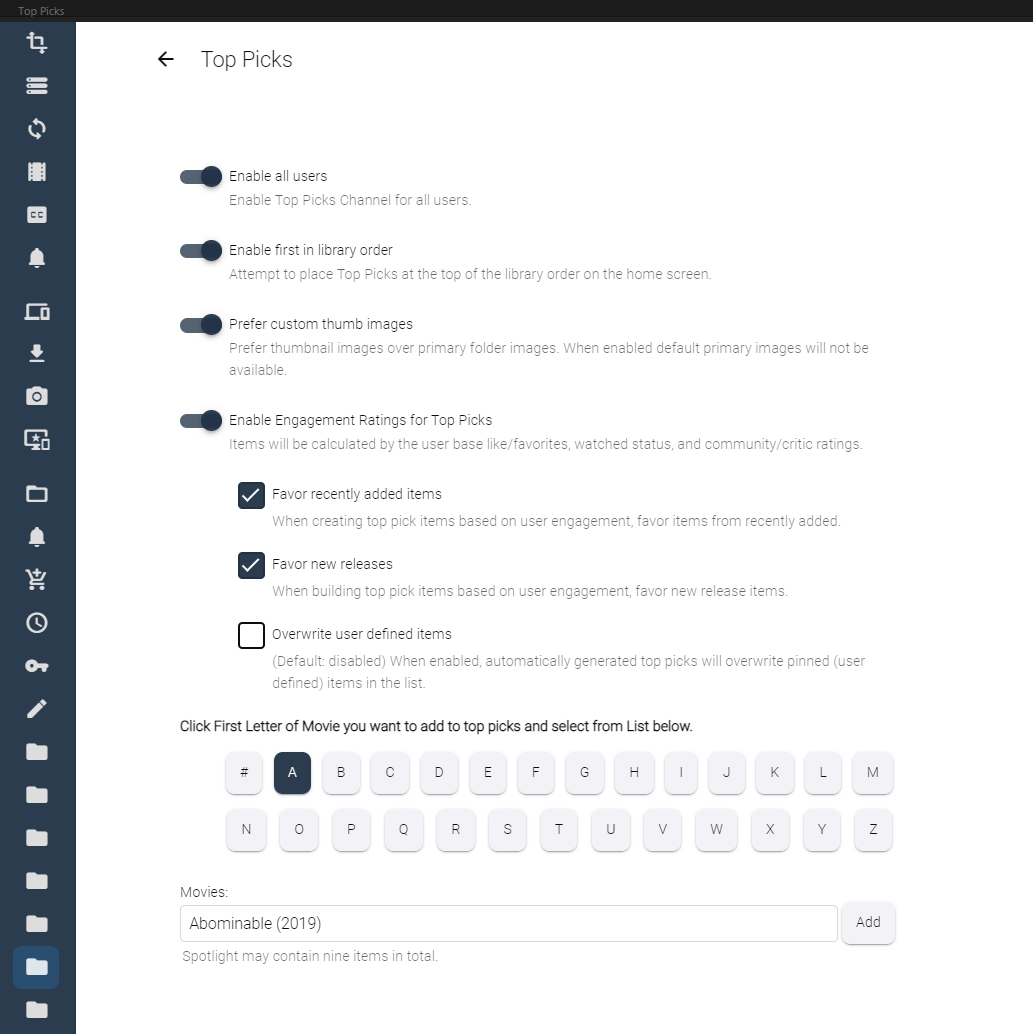
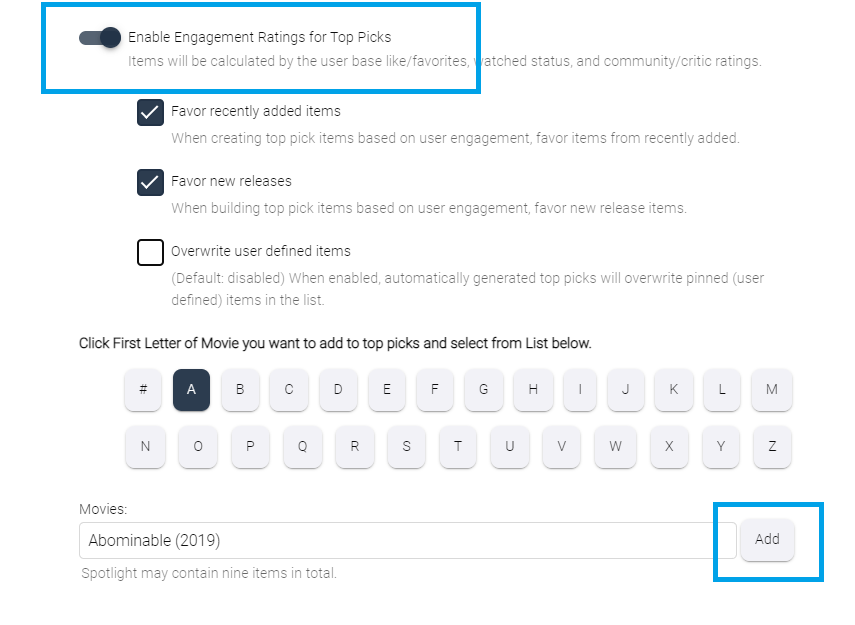
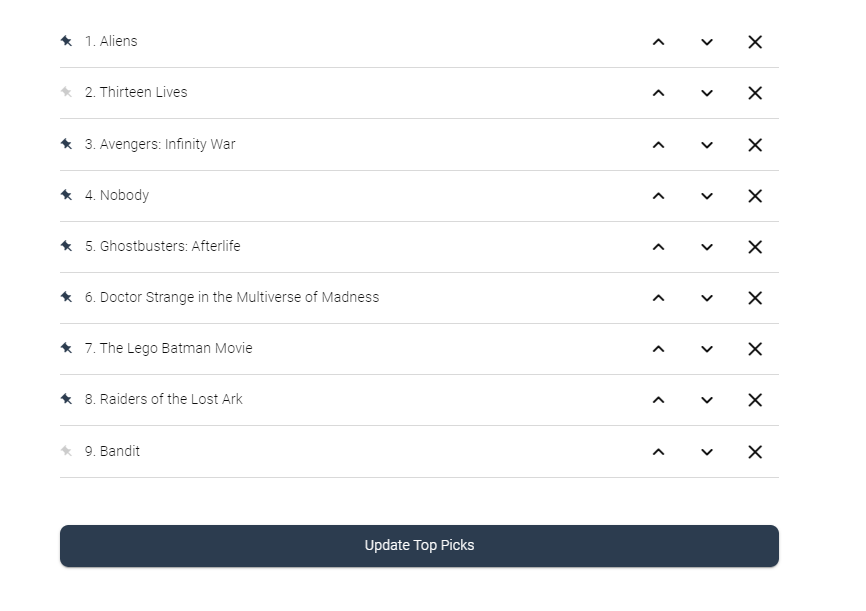
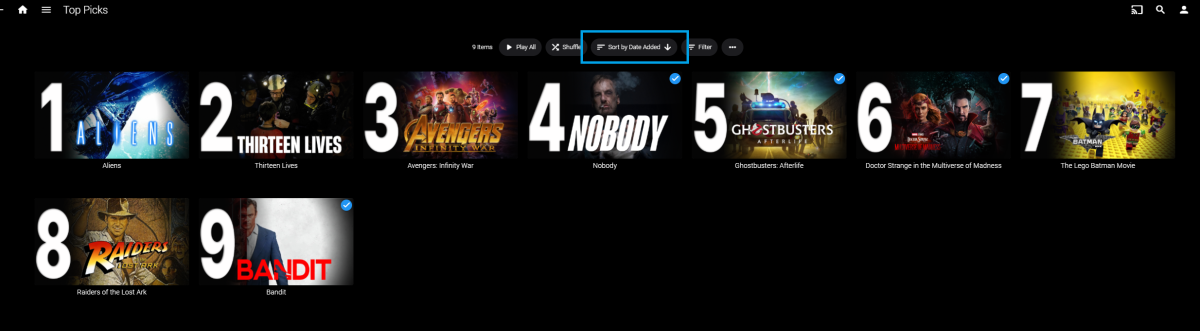
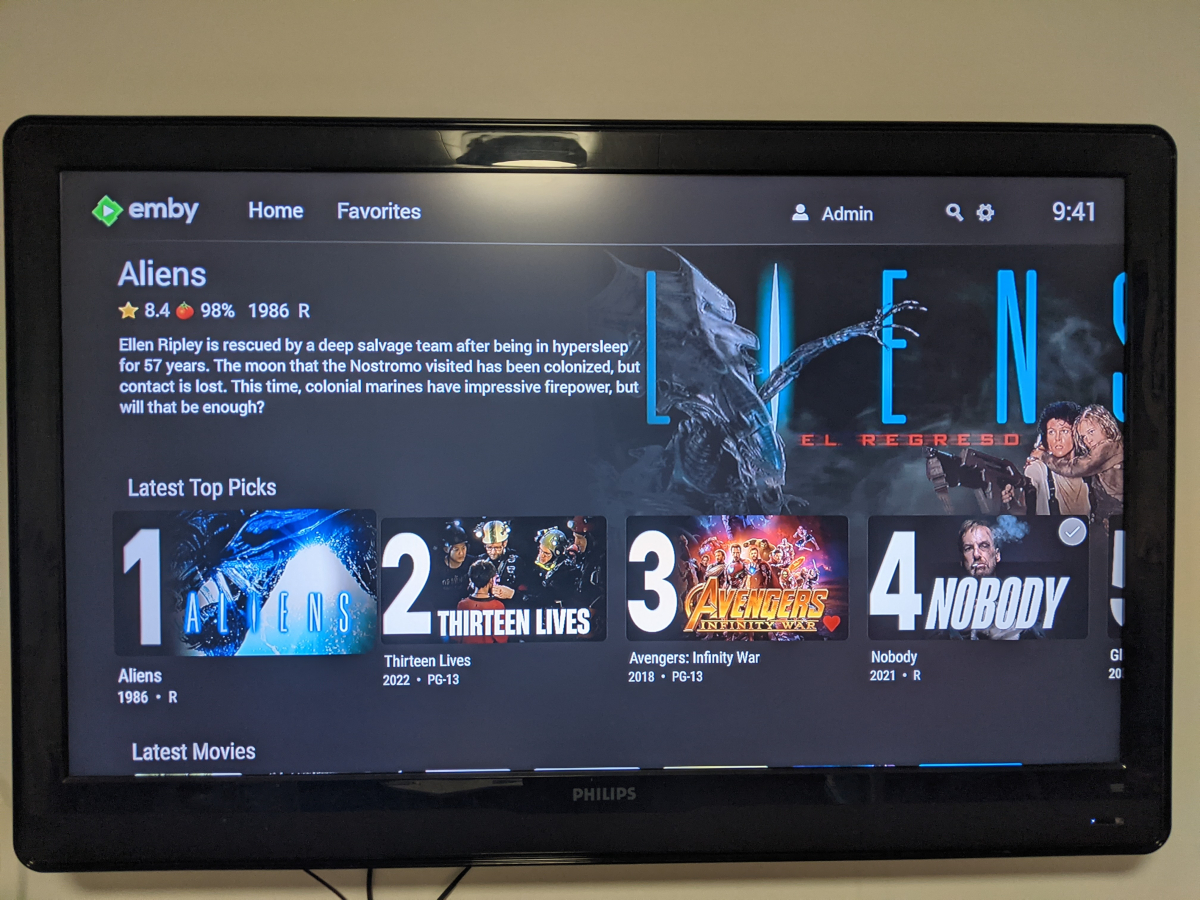
Welcome to Top Picks Top Picks will create a custom movie library with ranked items to share with your user base. Enabling settings in the top pick configuration will allow you to create a library based on your user engagement, and also customize what's being shown in the library. Note: Larger movie libraries will have the best chance at generating user engagement top pick items. Smaller libraries may only generate a couple top picks automatically. Critic rating, and community rating do play a part in choosing top pick items, along with User Likes/Favorited Items, and also Watched States. Creating, and editing the Top Picks List: After enabling, and running the scheduled task for user engagement (which will populate an initial list, but is also completely optional), you can also customize the library by adding movies of your choosing, and add-to/edit the top picks list to a maximum number of 9 items. It is important to note that users of the Top Picks library should not hide watched content from their home screen. This will ensure that all the content added to Top Picks is shown in the home screen layout. Pinning Items to the list: These items remain during the engagement rotation. This means that only auto generated items will be replaced weekly. Note: List item rotation will only happen when items are available in the library which meet the engagement criteria. This may lead to some manual up keep of the list. (In the image above, only the 2nd, and 9th item are allow to change, because they are not pinned to the list. However, the item changes will be based on the engagement results, and may not change based on the current state of the library and user engagement stats.) The more your users engage with the library, the more dynamic top picks will create lists. Favor custom thumb images over primary images: Favor custom primary images: Mobile: Android Enhanced Home Screen Layout Entering the Top Picks library you should choose to "Sort by Date Added" to have the images order themselves. There is a week long trial to test it out, after you install it from the catalog. If there are any questions please post them here in this thread. Please be kind, a lot of time, and work went into this. I'm open to further discussions regarding things that might make Top Picks better in the future as well. - chef Version 1.0.0.20 theme media is now added if it exists for a library item. Version 1.0.0.19 Current NFO files that exist in the library are now successfully used and properly altered for top pick items. This stops Emby from having to try and identify items which are already properly identified in the library. The ability to target a specific library for top pick creation. Version 1.0.0.18 Library items now have the option to show the top pick tag or not. Top picks drawing classes now attempt to draw custom thumb/primary images in memory without saving assets until complete. Version 1.0.0.17 Library is created with servers language for metadata retrieval. Top Picks will now search providers for missing resources to draw custom images for the library

 1 point
 -
I moved from Plex to Emby and even though I think Emby is superior in its flexibility there are some things I like better with Plex, especially in terms of its looks. This theme is trying to fix that by making it a bit more similar to Plex but with some, in my opinion, improvements. The CSS is attached to this post for anyone interested and below are some screens to show it off Good to know I only use Chrome so I can't guarantee this CSS works as expected in other browsers. If you want the sidebar menu to look like in the screens, make sure to pin the sidebar. Watched badge/banderoll is inverted which means that the badge will not be shown if media have been watched, like in Plex. For desired look, please use the "Dark" theme for both Theme & Settings theme in the display settings. Emby-Stable-style-v3.6.txt





 1 point
 -
... as I was tired of manually grouping all my movie versions into groups after each recreation of the db, I created a plugin to help with that. The use case is having movies, that belong together spread around and not being able to easily match the emby naming conventions, but still having the desire to present them as one item with multiple versions. The plugin works similar to the auto boxsets, but does the "movie versions grouping" - it will group all movies based on their TMDB id into one item, regardless of where they're placed and how they're named. I made that for myself - however, if anybody is interested, attached is a plugin that solves this issue. Attached version is for current 3.6.0.49 beta Server, do NOT use it with stable release! Plugin is alpha state, you should only use it, if you are willing to backup your db (there is no way to revert the changes otherwise!) and manually put the dll in the server plugin directory. Do not use it in your production environment before having tested in a test environment that you're fine with what it does - seriously! ;-). Note: There is a known bug in the web GUI presentation which is described here, which needs to be fixed on emby side. Edit: the mentioned display bug in BoxSets is fixed in Emby now, thanks Luke. AutoCollections-for3-6-0-49-betaServer.zip AutoCollections-for3-6-0-75-betaServer.zip AutoCollections-for-4.1.0.15-betaServer.zip AutoCollections-for-4.2.0.17-betaServer.zip (4.6.0.10 and before) 4.6.4.0 and above (does not require beta server as version number has been surpassed) AutoCollections-for-4.6.0.22-betaServer.zip Note: Original version will cause issue with other new plugins like Top Picks. Updates by community members: v.1.0.0.4 New update thanks to @Cheesegeezer Looks like we've managed to update the plugin, to be current Emby Server 4.7.7 (minimum). Some Changes to be aware of Automatic Library scan and updates are disabled, too many things are triggering library scans at the moment and entering into an endless loop which will crash the server. Moved to a Scheduled task now. Fully Locked item Metadata can be ignored in the Plugin Settings for grouping. (Partial field may have worked before but you need to Lock the item itself now) ".strm" files are ignored from any processing New plugin Graphics with a big nod to MikePlanet This is always Mikes plugin and the work he has done is fantastic. - We only did essential maintenance to keep this alive for you peeps. AutoCollections_1.0.0.4.zip v1.0.0.5 Removed Top Pick Items from the available item list re introduced the auto scanning... this will take place 1 min after an item event is detected re introduced auto run after a library scan tested against top pick plugin and there is no endless looping... but please test fixed the locked items bug. Good luck and let me know how the testing goes. AutoCollections.v1.0.0.5.zip v.1.0.0.9 New update thanks to @Hoptional Added option whether to Merge items across different libraries Compatible with nested folder structures, the "Top Picks", and the "New Releases" plugin Improved logging AutoCollections_1.0.0.9-libraryoption.dll1 point
-
I went to log into my sever this morning and was greeted with all sorts of unpleasantness. It turns out, my GTX 960 GPU has given up the ghost. While I am not thrilled with shelling out for a new GPU, the prices have at least started to come back down again. Also, the server is old enough that it only has a PCI-E 3.0 x16 slot, no 4.0 slots. That has me looking at some older cards, such as the RTX 2060. The entire reason for the GTX 960 being in the server originally was that it was the model of card I could afford that supported HW transcoding. I'm assuming the RTX 2060 will handle it as well. It's far enough along beyond the 960 in development that the ability should be baked in by time the 2060 came out. Anyway, looking at prices and such, it seems that the newer Intel ARC A750 is around the same price. What I cannot seem to find (I am sure because I do not know what to actually specifically look for) is any information on whether or not this card will support HW transcoding. Here are the server's modest specs: CPU: i7 6700K @4.2 GHz RAM: 16 GB DDR4 Motherboard: ASUS Z170-E GPU: Nvidia GTX 960* *Looking to remove or replace Lastly, as I regularly have up to 10 streams going at once, am I right in keeping a GPU in the server? Or is the 6700K actually doing the lion's share of the lifting and no longer really benefits from HW transcoding?1 point
-
The error is about this line: libraries_url = f'{emby_url}/Library/Sections' The url does not exist in the API. The correct and working one is: libraries_url = f'{emby_url}/Library/SelectableMediaFolders' by doing a get request you get a json with all info you need: [{'Name': 'xxxx', 'Id': '5', 'Guid': 'cxxxxxxxx4c21ecd', 'SubFolders': etc..1 point
-
I actually did something similar, but I didn't need a MS account. I was able to get the "Microsoft.HEVCVideoExtension_2.2.9.0_neutral_~_8wekyb3d8bbwe.AppxBundle" file and install it, and it even shows up in my Add/Remove programs now, and appears to be installed. However, this didn't make any change in my case. If all browser-based h.265 decoding is dependent on hardware acceleration, I may just be SOL. I'm starting to feel like this is probably the case. I've also tried the K-Lite codec pack. It installed everything, and it obviously can decode h.265 files, but it didn't provide the needed browser support. @yockerI appreciate your efforts to find solutions and share it here. If I find something that works for me, I will definitely be sharing it here. I can't help but think I'm not the only one out there with this issue.1 point
-
As soon as possible I will do some tests with version 4.91 point
-
Yeah, we're a difficult bunch to satisfy and our gratitude does not seem to last... no sooner have we been given something, or we ask for something different or an expansion of capabilities... grin1 point
-
So we need a OPF plugin now.1 point
-
and that was the reason I asked if it would import Calibre libraries in the other thread1 point
-
Looks neat. Certainly something to look into.1 point
-
Name,year, image, isbn. We'll have to see if we can get the description.1 point
-
Actually a server release will be required in order to identify by isbn.1 point
-
Sorry but all the Metadata in the world not make me go back to crossing my fingers hoping my place was saved whenever I start again.1 point
-
It would help if you put a description of what it is in the catalogue info page. I know its a metadata api from the internet archive, but many others will not.1 point
-
Don't mind, I finally solved it by disabling Volume 2 that contains the data, booting only with the M.2 Volume 1 and installing Emby on it. I reconnected the Volume2 Raid and the whole structure is now on the M.2 as I wanted.1 point
-
Hello Luke, thanks for the cooperation. I have in the post Problems with the sorting order added my entry. As I am more of an advocate of working with the built-in options rather than plugins or additional software, I will close this thread. Since everything was related to the problem with the sorting order Thank you1 point
-
In my tests yes. Unless @mikekokecan provide different test scenario?1 point
-
Ya, it's a known issue. I was hoping television tunes was going to sort their SSL but doesn't look they're going to so I'm planning to release an update this week which ignores the ssl cert1 point
-
Hi, fortunately, I was able to solve the problem myself. For all those who should also have the problem. You have to install the firmware for the intel-graphics: apt install firmware-intel-graphics Thx to all Toni1 point
-
Ohhh ! You're right ! I'm fuc***ng stupid ! ^^ I checked on TVDB you're right, it's why. It's write 41episode on aired episode. I don't know why TVDB say that. On TVDB Netflix order it's 48, that right. I don't know why TVDB find 41 episodes as if you check on wikipedia there is two possibility Netflix, or Antenna 3... 48 or 15 ^^ But I have also other strange issue, like : Battlestar Galactica 2005 0 / 0 (0 %) 0 / 73 (0%) I have all 74 episodes in my médiathèque ( not 73 ), but pluging say I have 0. Maybe a problem of name I don't know. So I come back to 3.2.2.1 version, scan again, and now it's better : La casa de papel 2017 48 / 48 (100 %) 48 / 48 (100%) Battlestar Galactica 2005 0 / 74 (0 %) +0/2 sp 74 / 74 (100%) +2 sp (Strange think that in TVDB there is 73 episodes...) If I remember well there is a way to say on a serie if we must catch information of aired version or dvd version. I didn't remember if it's an general setting for TVDB or if we can configure by serie, I will have a look when I will have time. Pretty sure we can do it by serie, it's logic. But one point important even if my mediatheque and setting didn't change, a diffenrent version of plugin will change this. Thanks all for your help1 point
-
He had to setup port forwarding on the router to allow inbound traffic through it.1 point
-
I've fixed some issues were the plugin was reporting incorrect numbers from TVDB. There might be some discrepancies between what you had before and now have. So I just checked TVDB for your show. It's showing only 41 aired episodes. So I would go thru your library and compare it to the TVDB entry.1 point
-
Problem solved. I reinstalled the OS on my Synology. Thank You!1 point
-
There's an OpenLibrary plugin in the catalog now. Enjoy.1 point
-
There is now an OpenLibrary plugin in the Emby Plugin catalog for books, and it supports ISBN lookup. Please try it out and report your experience. Thanks !1 point
-
There is now an OpenLibrary plugin in the Emby Plugin catalog for books, and it supports ISBN lookup. Please try it out and report your experience. Thanks !1 point
-
You need to add &e=1. This may have just been a safeguard to avoid this getting accidentally misinterpreted as something else. I don't recall the specifics, but here is an example that works in my testing: http://localhost:8096/web/index.html?userId=abc&accessToken=xxx&e=11 point
-
BDA issue and DirectShow graphs not stopping are always a possibility whether they are via NextPVR, the Hauppauge API, or TVNext I expect you will have problems from time to time. I personally agree that Kodi + NextPVR is a better PVR (currently) but by subscribing you are buying into the Emby infrastructure not just PVR and giving those up. You need to like Emby and I am sure you do or you wouldn't have subscribed in the first place Even with TVNext you need that love and commitment. Martin1 point
-
mickle026 just want to thank you for taking this on! I know we are sending you issues but I’m sure I speak on behalf of users this is going to be awesome! I’ve tried a Python script and either I have the wrong version or a variable is not set correctly. I have no way of contacting the author. Maybe put this in GitHub so we can help with testing/qa? Thanks again!1 point
-
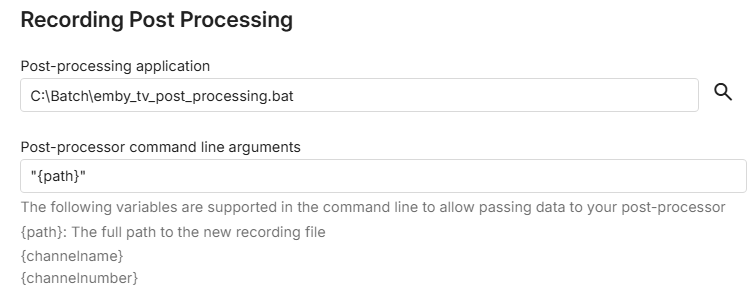
If using MKV the easiest and most flexible way is by using mkvmerge imo (part of the mkvtoolnix download) mkvmerge.exe -o "%~d1%~p1%~n1.mkv" "%~d1%~p1%~n1.ts" This puts the MKV alongside the TS - and copies all tracks available. Path is got via the path variable (#1) in the batch file containing the command above (and any other logging etc that you may want to add)
 1 point
 -
Hi, I would give it a try with WinTV and direct Emby support, and let us know how things go.1 point
-
This would be the simplest way I can think of: ffmpeg -hide_banner -nostdin -y -v info -i "<infile>.ts" -map "0:??" -c copy "<outfile>.mkv" edit: It will simply try to remux all streams in the original to the new container (no transcoding so it should be just/almost as fast as copying the file). Although you still need to put this command in an appropriate script wrapper (.bat/.sh…) for your OS (you didn’t specify) and use the post processing to suit. Also the mkv container may not retain some (any?) EIA-xxx text streams (if exists). You will also need to ensure emby picks up this new file (RTM/rescan?).1 point
-
1 point
-
I guessed these HDMI modulator wouldn't be perfect. There isn't a lot you can change on them in terms of settings. As you say they encode an AVC into an RF stream to the Dvb-t standard. However, they encoding would suggest that either they are not quite to Dvb-t spec, or FFMPEG isn't configured optimally? I've actually acquired another device (Edison HDMI modulator) and this seems to behave much better. Things trip up occassionally and require a reboot along the chain, but it appears to be much more stable to view. Recordings don't appear to produce truly compliant streams (what ever I mean by that), but there are a few workarounds I'm working on. For these, my use case is rather specific and only want to be able to record for time shifting so I can view something when I'm travelling.1 point
-
That's a good question. I'm familiar with DVBViewer from years ago as I used to have a DVB-S2 PCIe tuner for my PC. I've just actually ordered a SAT>IP DVB-S2 server, which will require a software solution to connect to Emby (I assume) so was testing DVBViewer with the HDHOMERUN. Also, I had been having some issues with using a HDMI modulator (on another thread) and wondered if going via DVBViewer would make any difference. One note to make - DVBViewer (notwithstanding that it doesn't seem to support parsing of Dvb subtitles to Emby) is incredibly simple to set up and requires no channel logos or EPG in Emby as these are carried over from DVBViewer directly.1 point
-
Thank You Luke.. that did the trick! I am not sure why but this time I could navigate to the path w/o problems. Currently, I am running a integrity check on a backup so might had some pull in it. /volume1/SynologyBackup/Packages/Emby now, with that being said, should I still give r/w access to emby to the shared folder? I plan on just using this only for backup and not utilizing this for media. letting hyper backup do the rest. please advise and again Thank You! tvos1 point
-
THANK YOU!!! That will solve it!1 point
-
I have to day thank you for all your work! and happy weekend! I have not one issue for at least 6 months your addon is so good!!1 point
-
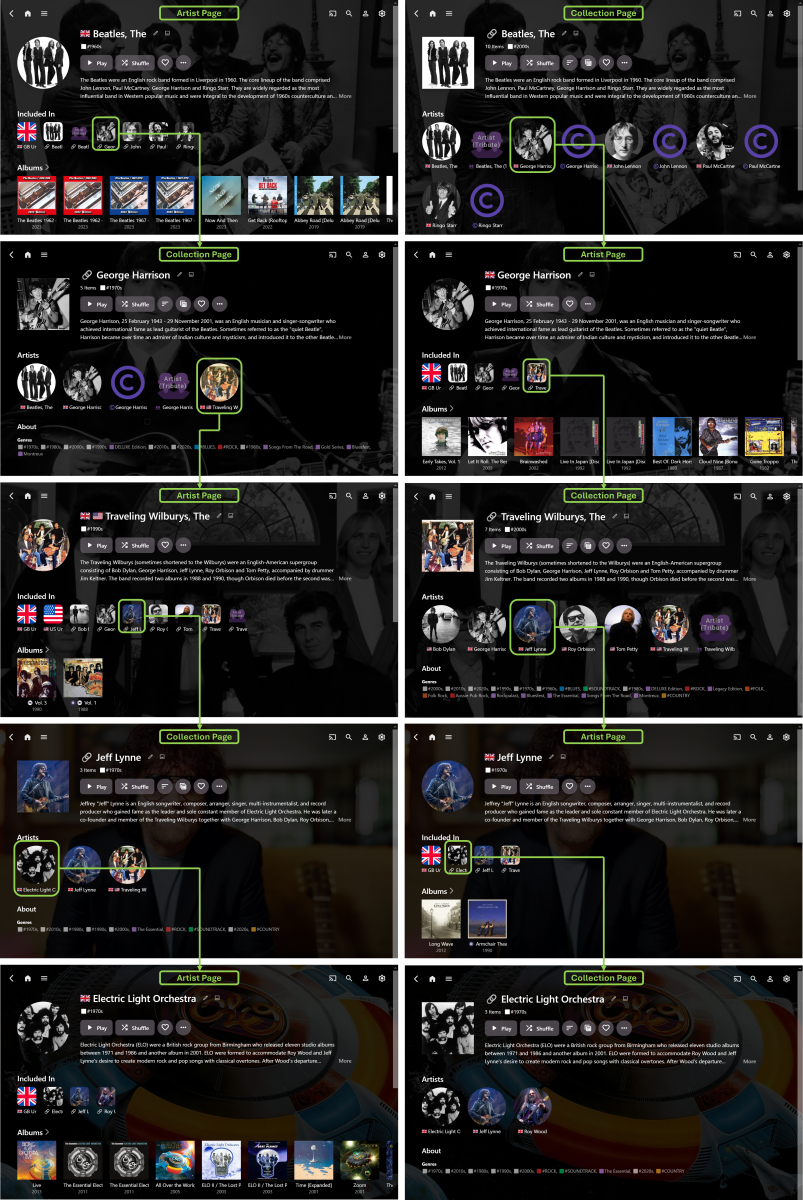
Well… one year on… and I finally have a workable method of achieving this in Emby – while it didn’t actually take a whole year of time, it did take some experimenting to figure out… I first tried Tags, but the navigation/browsing experience was too disjointed… then, got distracted with trying to separate Artists and Composers… then, tried Collections, but didn’t really make much progress… then, got even more distracted with Country Flag emojis… then, with some community help (thanks @Happy2Play @Luke), I discovered that Collections, PLUS some CSS with the Web App, gave a feasible solution… While the result (to date) isn't quite as elegant as a dedicated “Related Artists” section, it is selectively configurable, unlike the auto generated “More Like This” section, that can sometimes be a bit ‘hit-and-miss’ with the results. The basic idea is: Manually set up “Related Artists” Collections (yes, it takes time) Ensure that the main Artist is included in the associated Collection (otherwise some necessary navigation links are missed out) Match corresponding Artist/Collection Primary Image, Background Image and Overview Text (so that the pages essentially become extensions of each other) Use CSS to exactly align the top sections of Artist and Collection pages Use CSS to move the Artist “Included In” section to underneath the Overview (otherwise scrolling down makes the navigation less streamlined) Use CSS to make the “Included In” images smaller and less dominating on the Artist pages The end-result is seamless navigation by “Related Artists” via alternating Artist and Collection pages (starting with either page type) with no need to scroll down the pages. (I guess it would also be possible to exactly match Page Titles text and Primary Images shape, if desired.) Here’s an example, showing just one possible navigation path, starting with The Beatles and ending with Electric Light Orchestra (Note: it’s the music exploring journey that’s meant to be fun, more so than just being a long way of getting to a specific Artist destination): The above example also shows Artist Country identification (and Country Collections) plus some Artist/Composer separation (both still a work-in-progress). So far, it’s working well, though I still have many more Collections to fully configure. There’s also the possibility to expand the Collections beyond just Artists, if I want to. While setting up the “Related Artists” Collections is a standard use of Emby, it’s really the custom CSS that makes this approach a viable navigation/browsing/exploring option. This does result in a doubling up on a lot of the same data, but it’s not noticeable, in use, when the Artist/Collection pages are exactly matched and aligned. In another year, I expect I’ll probably have modified things even further and HOPEFULLY, by then, the new Emby “Smart” Playlists/Collections/Views/etc… will allow for much more individual customization!
 1 point
 -
Much appreciated. I did a search, but clearly used the wrong keywords or something. Anyway, given the age of my motherboard, it looks like Intel Arc is out of the question, which is a shame, given the current cost being so juicy. I'm down to looking at an RTX 3050 or NVIDIA Quadro P2000. The price difference between the 2060 and 3050 was around $15-20, so I'll just err on the side of newer tech since from what I understand the 3050 outperforms the 2060 in almost every way.1 point
-
Possible helpful discussion here:1 point
-
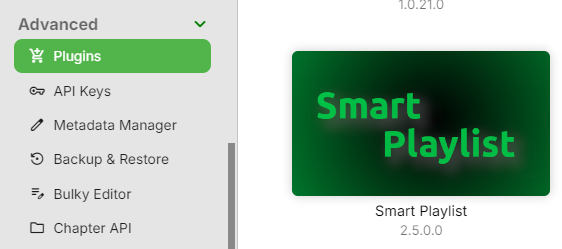
Yeah, that's the same post as linked above; it'll show as 2.5.0.0. in your Plugin list, tho.
 1 point
 -
@Boni340@GrimReaper@JBloom91 An update 2.5.0.4810 was posted here: https://emby.media/community/index.php?/topic/99885-new-plugin-smart-playlists-20/page/26/#comment-1339238 No idea what the difference might be but I've been using it daily for as long as I can remember.1 point
-
Many people have used first gen Arc. As Battlemage has only just been released, I doubt many people have experience with them. You really don't need it if you have a modern Intel CPU.1 point
-
The Emby team hopes you and yours are enjoying a Happy Holiday Season. We would like to announce a couple of changes that will hopefully increase the value of Emby in all of your households. First, to aid in the transition from our old TV-only Android TV app to the new Standard Android app on that platform, we will be eliminating the need for the app unlock by allowing free playback for up to five TV devices per Emby Server. Devices beyond that limit will require Emby Premiere. Previously purchased unlocks will still be honored. This should allow most households to move to the new app more easily. Second, recognizing that today's households have more and more devices, we are increasing our standard Emby Premiere License device limit from 25 to 30. We will then also increase the extended premiere plans from 45 to 50 and 75 to 80. Existing extended subscriptions will remain the same but new ones will be at these new levels. All standard licenses will be automatically updated to the new 30 device limit immediately. You should see all of these changes rolling out over the next week or so. Happy Holidays from the Emby Team! View the full article1 point
-
Could you possibly post a tutorial on how to do all that? I cant find inotify in my syno store and still can't figure out how to do it all with the dockers1 point
-
I went to the golf course and wondered why there were no bowling alleys... Like golf a hole then bowl a frame. Repeat 18 holes/frames.1 point