Leaderboard




Popular Content
Showing content with the highest reputation on 02/26/25 in all areas
-
https://www.pcworld.com/article/2619590/plex-is-dropping-a-popular-feature-from-its-new-streaming-apps.html With Plex dropping this feature, this could be an opportunity for Emby to pick up the slack in the competition and win over customers that are looking for alternatives.3 points
-
Or it means that can't monetize it since that's all that platform is concerned with the last few years2 points
-
It has come to our attention that someone (we believe out of China) is spoofing our purchase page and reselling bogus Premiere keys. Please be aware that the only valid locations to purchase Premiere are our web site (https://emby.media/premiere) or inside one of our official apps. The scammers are using the domain "Emby.team" and are spoofing credit card receipts that look like they come from us and everything. If you happen to have fallen for one of these scams report it to your credit card company and please let us know at billingsupport@emby.media. I'm afraid we cannot do anything to help return your money but we can try to squash the perpetrators. Thanks. View the full article2 points
-
You could also run an FTP server on your machine and use FTP or web browser to upload via the FTP server. This would be for "off net" access for the most part.2 points
-
Here is the latest list of versions for Emby software across the server and clients. Emby Server Stable: v4.9.5.0 (2026/05/18) Release Notes Beta: v4.10.0.14 (2026/06/04) Release Notes For other platforms, please refer to the download page. Emby for Android TV Google Devices Stable: v2.1.23 (2025/12/27) Beta: v2.1.46 (2026/04/15) Amazon Devices Stable: v2.1.23 (2025/12/27) Beta: v2.1.46 (2026/04/15) Stable Release Notes Beta Release Notes Universal Android app Stable: v3.5.16 (2026/01/26) Beta: v3.5.36 (2026/05/10) Release Notes Download the latest Beta here. Emby for Kodi See here for the latest information. Emby for Roku Stable: v4.1.63 (2026/05/04) Release Notes Beta: v4.1.64 (2026/05/13) Release Notes Emby for Windows (Windows Store for PC & Xbox One) Stable Release Notes Beta release notes Emby for Linux Beta Release Notes Emby for Samsung Smart TV (Orsay) E-series to H-series TVs only Release Notes Emby Theatre for Samsung Smart TV (Tizen) Release Notes Emby Theatre for LG Smart TV Stable: 1.0.50 (2026/01/19) Emby for iOS Stable: v2.2.53 (2026/05/16) Stable Release Notes Beta: v2.2.52 (2025/04/11) Beta Release Notes Emby for Apple TV Stable: v2.0.3 (2025/12/26) Announcement Beta: v2.0.6 (2026/04/11) Release Notes Emby for tvOS (Apple TV) Stable: 2.1.6 (2022/12/23) Release Notes - TBA Beta: 1.5.1 (10) (2021/03/02) Beta Release Notes Emby For MacOS Stable: 2.1.6 (2022/05/09) Details here. I will keep this post up-to-date as much as possible, but please send me a PM about anything I haven't updated, or is missing. Special thanks to @Borskfor supplying a lot of the updated information. Thanks.1 point
-
Hello everyone, I propose integrating a Tailscale-like functionality directly into Emby clients and servers to facilitate remote connections without the necessity of a non CGNAT connection or opening up home firewalls and the security concerns that entails. While starting a Tailscale client is relatively straightforward for most tech-savvy individuals, it becomes less intuitive on devices like TVs (where it can't be autorun), often causing confusion among users. To circumvent this, I typically set up a NanoPI as a proxy for remote users, directing their Emby client to it. However, if the open sourced Tailscale client were integrated into Emby, clients could transparently connect from any location with an internet connection. I understand that this integration would require significant effort, but I believe it would be a highly utilized and defining Premiere feature, attracting users from other Emby alternatives. Running the Emby server itself with the linuxserver.io docker mod is already straightforward, and the server can be easily referred to by a simple name rather than by an IP address or a lengthy FQDN. https://tailscale.dev/blog/docker-mod-tailscale Anyway, food for thought. Keep up the good work.1 point
-
Hello, I have been using Emby for a few years now and I must say that it works great ! Thanks to all the team. However, using it every day, I am regularly confronted with a problem of subtitles not being available on the OpenSubtitles or Addic7ed platforms with Emby, often I find them on small French sites (I think the problem must be present for other languages too ). I'm using Emby on a remote server and there are several of us accessing it, everything is done through the web browser (reverse nginx). I decided to set up a "web file browser" (github\filebrowser) to be able to manually copy the subtitle to the location of the video, rename it with the: 'name of the video.fr.srt' then in Emby on the desired video use the option "Update metadata" then F5 so that the subtitle is available but it's tedious. Would it be possible to have a button to upload a subtitle manually from a file available locally on the PC ? Sincerely, Romain.1 point
-
Since DockerHub changes it's rate limit with 1. April 2025 it would probably help many users to push the Docker container from Emby to ghcr.io to circumvent the really strict limit for 10 pulls per hour for unauthenticated users. Here is the link to the new rate limit: https://docs.docker.com/docker-hub/usage/ Please ignore my request if there is already a container on ghcr.io available but I didn't find one yet in the official repository which is this I assume: https://github.com/MediaBrowser Maybe it would be also viable to push it to the Release repo: https://github.com/MediaBrowser/Emby.Releases1 point
-
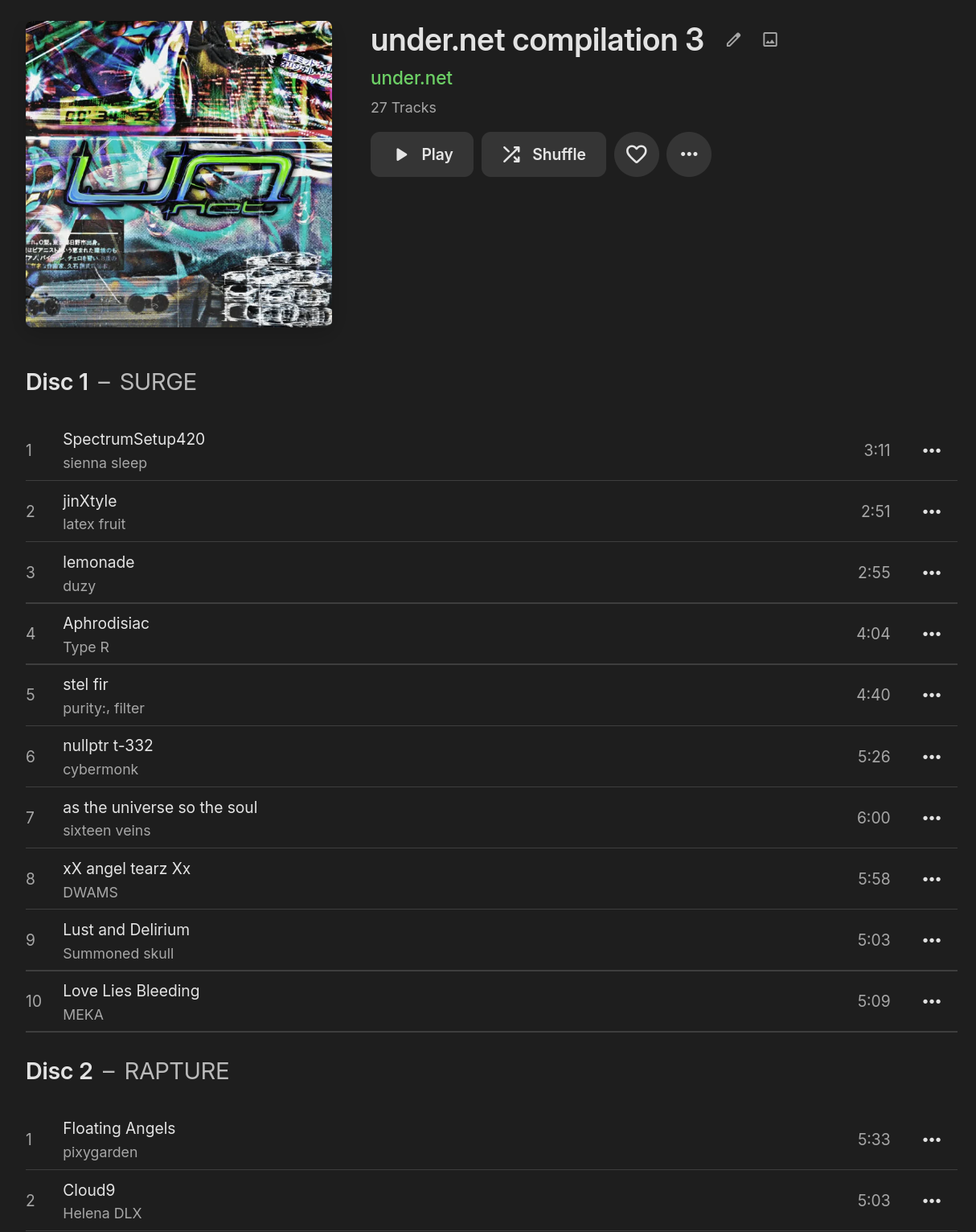
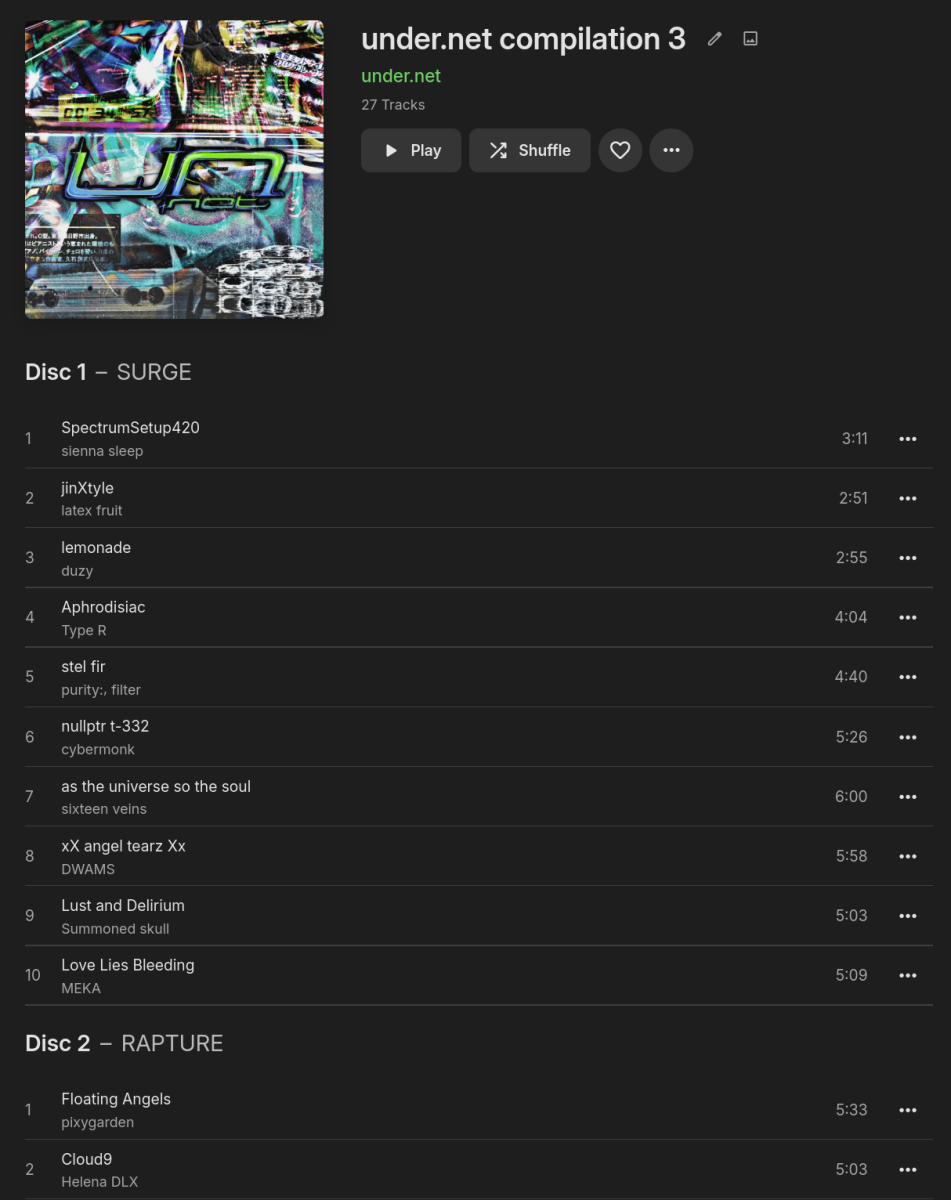
The ID3 specification includes a frame called TSST (Set subtitle), defined as TSST The 'Set subtitle' frame is intended for the subtitle of the part of a set this track belongs to. right below the frame used for disc number, TPOS (Part of a set): TPOS The 'Part of a set' frame is a numeric string that describes which part of a set the audio came from. This frame is used if the source described in the "TALB" frame is divided into several mediums, e.g. a double CD. The value MAY be extended with a "/" character and a numeric string containing the total number of parts in the set. E.g. "1/2". Other tag formats seem so have this kind of field to, quoting https://www.blisshq.com/music-library-management-blog/2018/03/27/lamentable-state-disc-title-support/ I'd propose displaying the disc (sub)titles (in this example: "SURGE", "RAPTURE" and "SHIMMER") something like this: My example is definitely not the most "real-world" one (I added the tags myself as the original album, as downloaded from Bandcamp, consists of multiple albums, each representing a disc), but there's definitely more use cases, as seen in this screenshot of the implementation in Navidrome: https://github.com/navidrome/navidrome/issues/272#issuecomment-627497195
 1 point
 -
To add movies to emby through local network address only.1 point
-
New or Upgraded Apps AURO-3D This update unlocks full support for playback of high-resolution immersive sound in AURO-3D over HDMI. Connect your NVIDIA SHIELD TV Pro to an AURO-3D compatible decoder and enjoy the most natural 3D sound experience from streaming apps such as Artist Connection. Enhancements Added support for Match audio content resolution feature when using a USB DAC Added ability to clear HDMI 1.4 flag via factory reset Added match Frame Rate (beta) enhancement Added French parental control Added security enhancement for 4K DRM playback Known Issues SHIELD TV will be removed from Google Home integration after SHIELD Experience 9.2 installation. Visit NVIDIA support to reconfigure. Resolved Bugs Fixed choppy video playback after FFWD/RWD operations Fixed remote stops responding for 60 seconds after wake from sleep Fixed SHIELD waking from lock screen without a button press Fixed issue with large file transfer to NAS (operation not permitted error) Fixed Google signing flow stuck in a loop Fixed stutters in Bose and Sony headsets while connected to 2.4Ghz Wi-Fi Fixed audio stutter in aptx supported headsets Fixed AV sync issues when Dolby Processing is enabled Fixed crash on volume change Fixed Apple Music corruption during casting Fixed Spotify empty playback when Match Audio Content resolution is enabled with Stereo Upmix Fixed Google Assistant not starting after Google GMS update Fixed full screen SHIELD Rewards notification issue Fixed Wi-Fi log filling up storage Fixed SHIELD drive filling up Fixed no audio heard when headset is connected to controller and DAP is on Fixed Geforce NOW crash after launch Fixed video distortion on "RGB 8-bit Rec.709" display mode Fixed USB HDD/Flash drive showing corrupted after hotplug Fixed NAS folder info shows 0 B and not the actual capacity Fixed mounted storages not listed after upgrade Fixed occasional crashes in DRM apps Fixed when Alexa SHIELD Skill cannot locate SHIELD TV device https://www.nvidia.com/en-us/geforce/forums/shield-tv/9/556907/shield-experience-upgrade-92-2525/ Released 5th February 2025.1 point
-
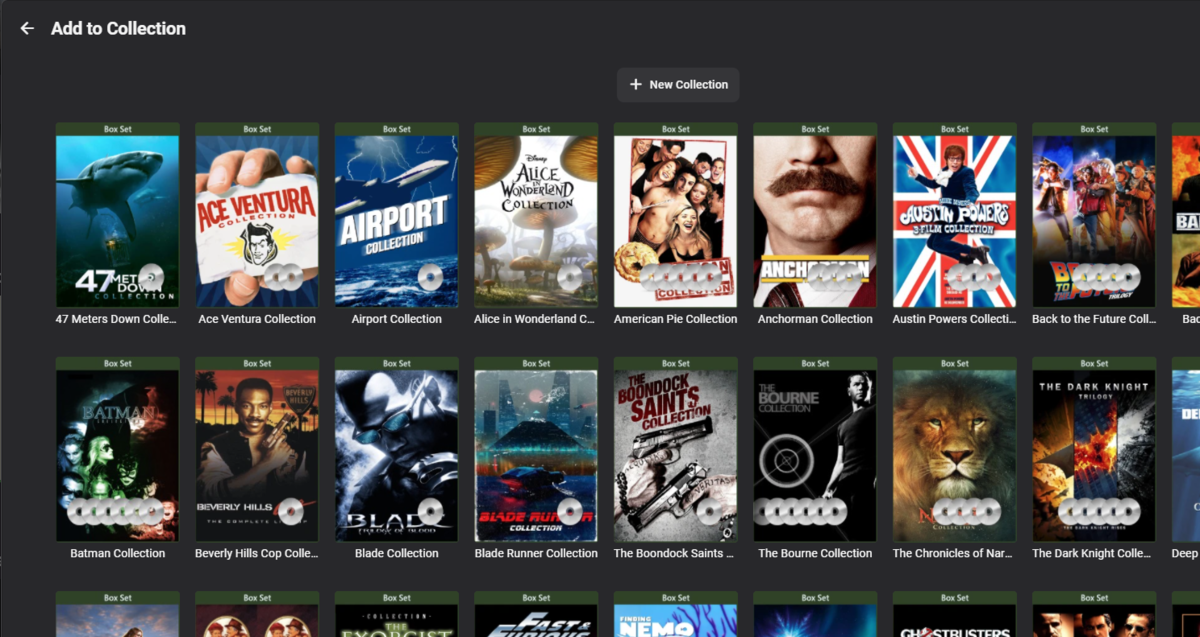
Add alpha picker to the "add to collection screen. The title pretty much says what I would like. It is slow to move through the collections to find the one to add to without it.1 point
-
I love the individual artists pages for bands but there is a number of things lacking that i believe would be a welcome to the artists pages and give it much more content if it could be done, that's if i ain't missing anything that i can already do or activate via settings or anything. We currently have Songs Albums Appears on Music videos More like this How about the following Members - Shows you individual photos of past & present members kind like the cast a crew section of movies but let's me know who the vocalist, drummer, bassist is and who is a past member Videos - I'm talking movies based upon an artist, promo video compilations, documentaries, live gigs and other types of dvd's, bluerays and videos, how about a section like Music Videos that shows any music dvd's you happen to have in your library that features the said artist. Photos - How about being able to show photos of artists if you have any, a number of bands i do have a few photos and whilst i do have a media library specifically for home video and photos it would be cool to visit a bands page and see a scroll able left and right gallery of photos depending on how many you have. Yes i can search for an artist and it brings up a few options like top results, albums, artists, people, photos, movies and so on but having it on the artist page would be good if it wouldn't be too cluttered and could work? Just a few ideas mind1 point
-
It IS an awesome feature. But it fails massively in awesomeness if you can create but NOT REMOVE collections as one see fit. Please developers, can u fix?? Imagine if you are using MS Word, but you can only create word documents but not delete them. Or you can only add stuff (tables, graphs and so on) to a document but you are not allowed to remove any of them... Apart from that, i can't think of anything else (at the moment) that I am dissatisfied with. Well, apart from Emby Connect which never worked for me. Apart from that, I will say Emby is awesome!!1 point
-
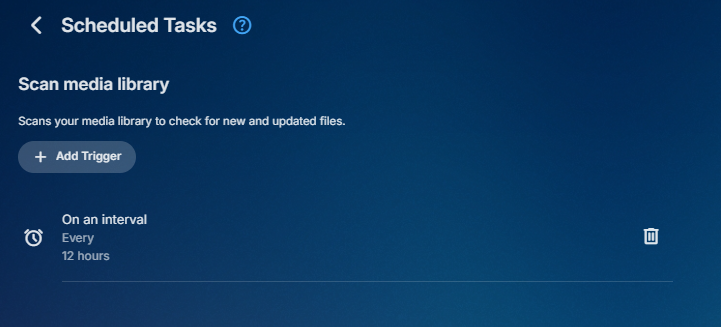
You can change the schedule task trigger to whatever you like. Go to scheduled task and click on the task delete or add additional triggers. Or you can run your own script with the api call

 1 point
 -
Thanks for always being there Luke. I just went and redid the playlists, With a plethora of music videos, it's a PITA. Heads up for others who may have the same issues: use the Emby back-end to create your playlists. This is the not the first time I've had issues with Bulky Editor. If you take a look-see at Bulky Editor's thread and the apparent long absence of its owner, it's safe to say it's abandon-ware.1 point
-
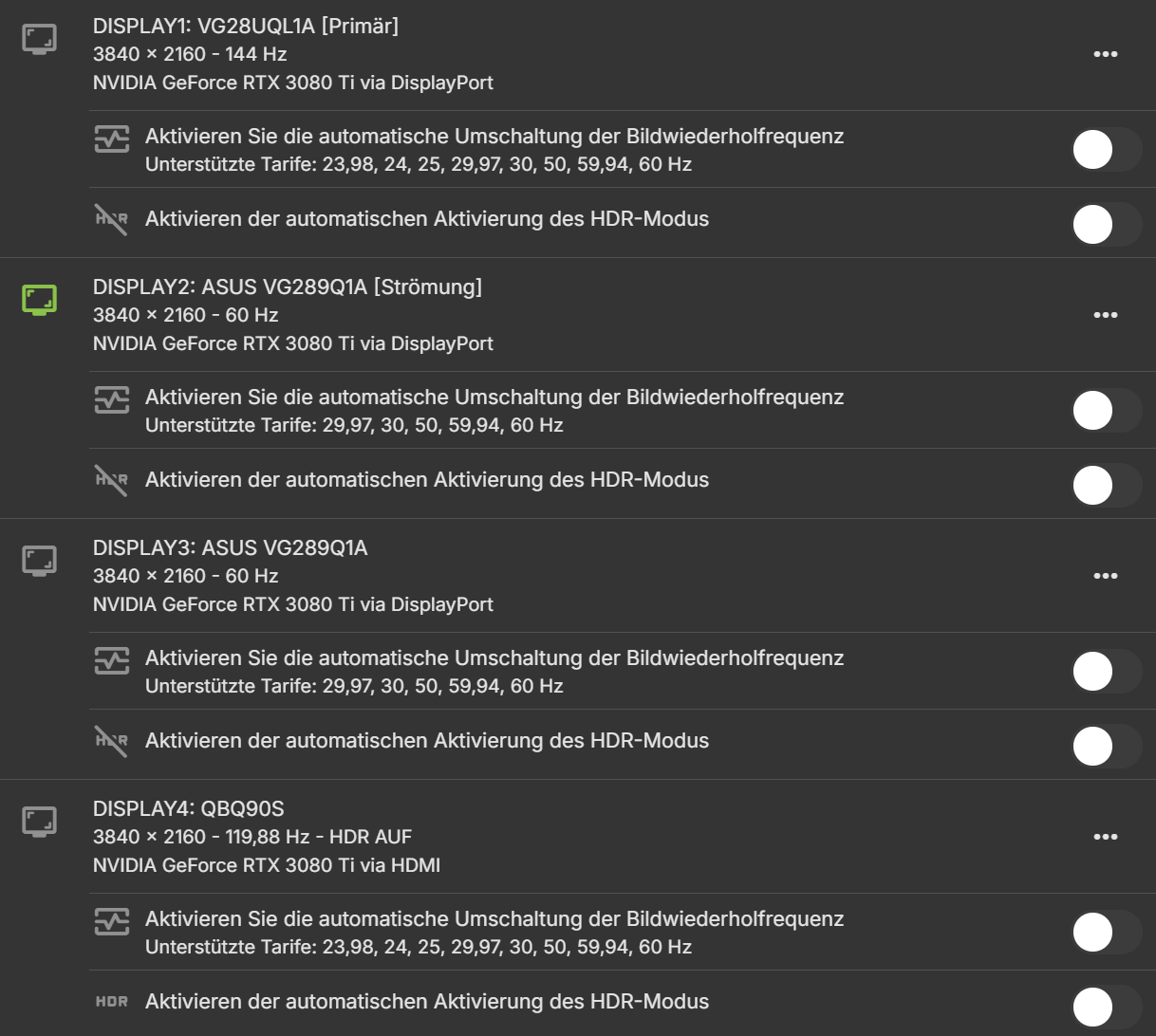
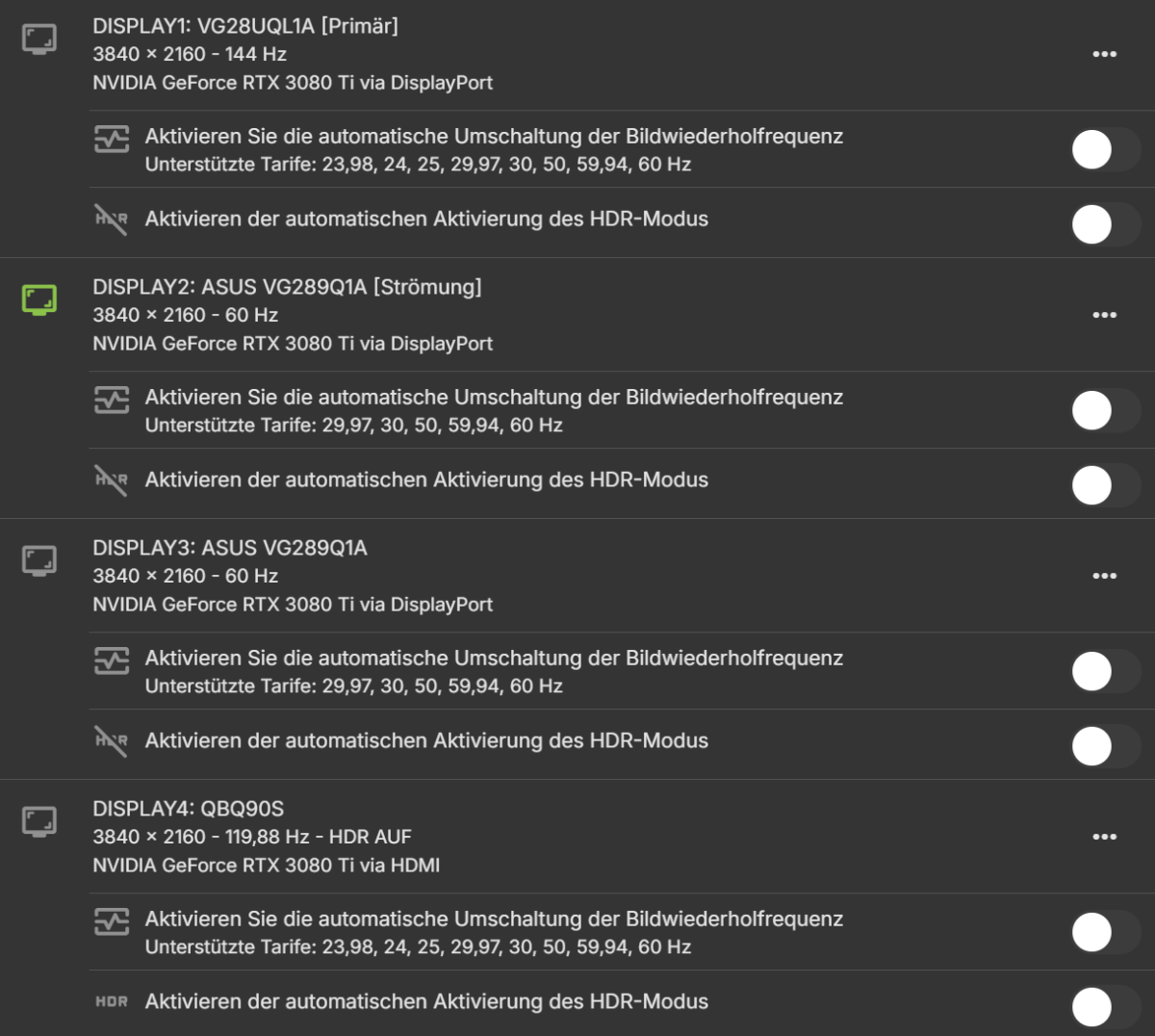
Same, none of the options are enabled still it changes the refresh rate. This makes it unusable for me. Anwendung Name: Emby Windows Version: 2.219.2.0 Gerätename: PC-GAMMA Geräte-ID: fd39089f-15e1-a930-a3b0-b64c10231e79 Paket: EmbyMedia.EmbyTheater_svmepx4c03f7m
 1 point
 -
actually looks like it will ARMv8
 1 point
 -
Thanks. I deleted the photo with the IP. I'll try the 64 bit one.1 point
-
HI Luke, no more crash since I remove all the plugins. Many thanks.1 point
-
@PMahboubiin the case of direct playing with Amazon Fire TV, this is resolved in Emby for Android 3.4.42+. Thanks.1 point
-
I am experiencing the same issues. Even picking up an artist takes ages and I need to touch the screen 5 times until it moves forward. CarPlay does not work with emby app. Emby app on its own works fine.1 point
-
No I'm using httpd, but I imagine you could modify it to fit Nginx syntax.1 point
-
Thanks, implemented CSP now.
 1 point
 -
Its from this test HTTP Header Security Test - HTTP Observatory | MDN1 point
-
Attached is the latest code Vic1 point
-
Thanks @Jatorthis helps me a lot. On the pseudoTV forum we have been experimenting with different types of GUIs to try and discover what works best for most users, especially those that are not technical. MyTv is a result of that study. The code is open source to encourage others to build even better solutions. For myself, I just enjoy learning new things. Your view is important. For a few weeks I am going to focus on clearing bugs from the foundation code. After that I will add new features. One is channel logos Vic1 point
-
Update: I think i've got it working. I'll be testing some more to see if this maybe have solved the issue.1 point
-
It'd be nice if there were a way to have a folder with trailers that weren't connected to a movie in your library. I have some trailers for movies that weren't produced, parody trailers, etc., and I'd like them to be shuffled along with the trailers included in folder directories.1 point
-
To complain about lacking TVnext progress https://docs.google.com/spreadsheets/d/e/2PACX-1vTtWQwRLBTPp5TNh8KmtSH3Rvz9Zm6ovUL__YL9Ax1ikzGLCzdfhryjMJ6-g5N1rJIf5LrDGjE5jqds/pubhtml?gid=1930489182&single=true1 point
-
TVnext Spreadsheet1 point
-
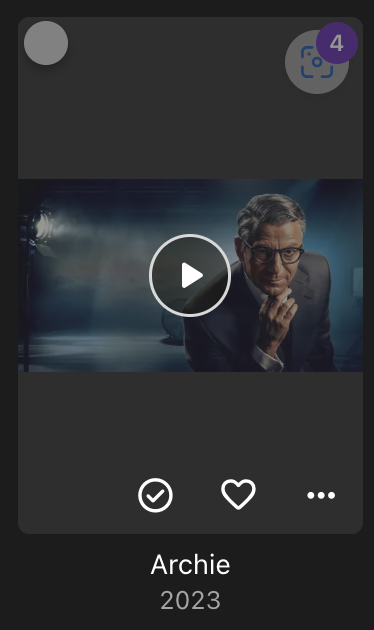
Hi gang! I'm often having to refresh/replace images and it would be amazing to get a "shortcut" button like the "played" and "fave" ones. Clicking it would just initiate a force refresh of the images in that series / object, rather than right-click, scroll down, replace metadata, check replace images.
 1 point
 -
Repeatedly. Nonverbal/autistic child goes wandering through the pressable buttons and hits "sign out." We can log back in pretty quickly, but it's a royal PITA when they're in the back seat and the adult is in the driver's seat.1 point
-
Yes we would need to see port forwarding rules and how you have configured Emby Network page. As by default Emby uses 8096 for http and 8920 for https. And a server log from startup.1 point
-
Can you post a screenshot of the port forwarding rules? Perhaps there's a simple misconfiguration there. I agree you shouldn't have anything blocked on a business line; so something else is up.1 point
-
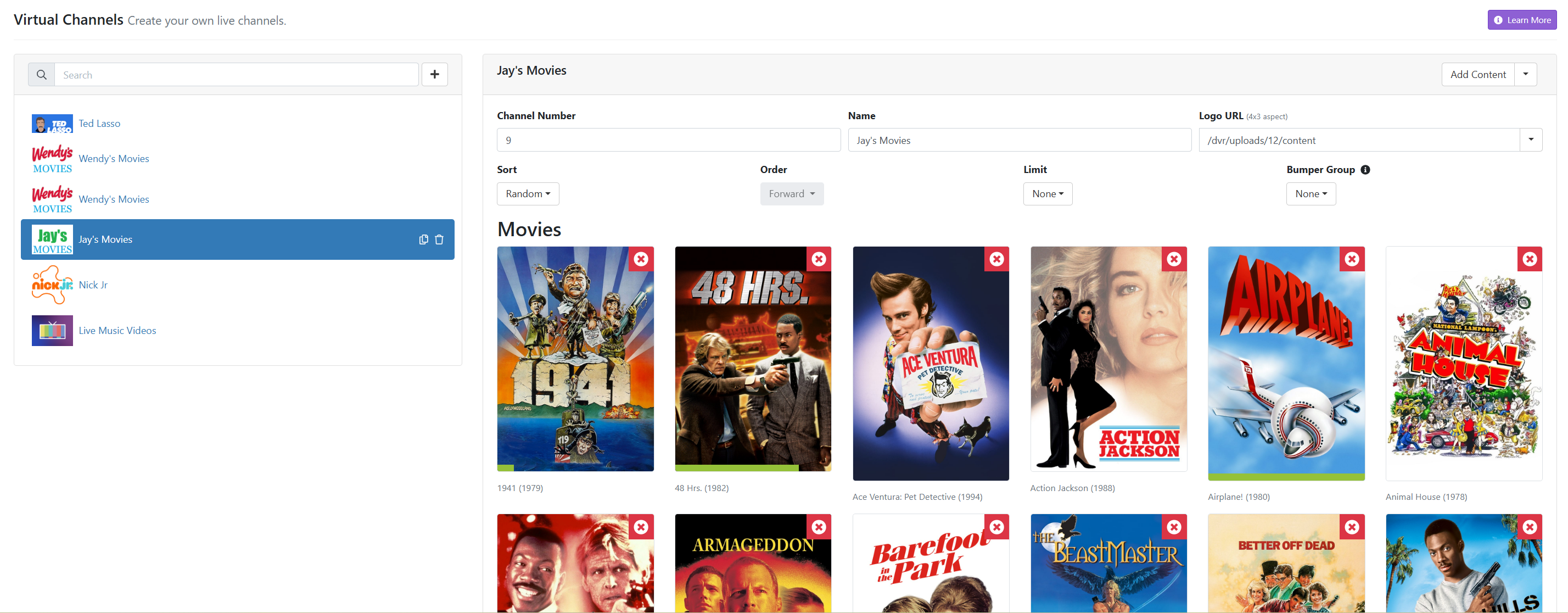
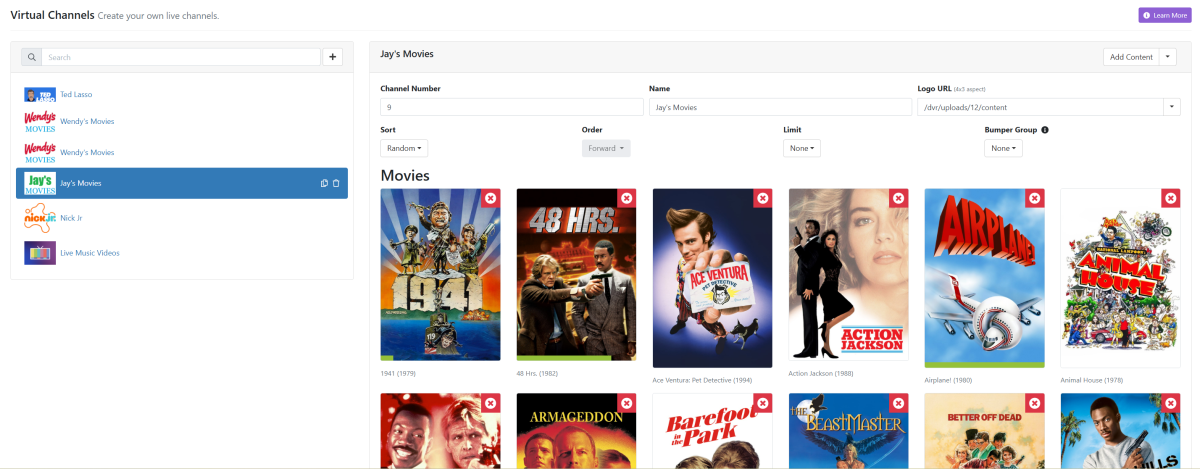
On VirtualTV, there's almost "too" many options. Also, not clear what some of the options mean. For example, playback options are "playlist live", "playlist archive", continuous playback (live)", "continuous playback (archive)" and "native (Archive)". I did some searching but don't have the time to read through a lot of the forum to see if someone posted a guide on those options actually mean. I get it that on one hand, you have a lot of control because you can set it up to include only Harrison Ford movies that don't include the word "Star" in it to exclude all Star Wars movies he was in (don't know why someone would do that, but using as an example). But I'd like to have a simple point and click environment where I can select which movies to use, and then have an advance feature if I wanted to use it. A good example of a simple approach to managing is the Virtual Channels option on Channels DVR. See below screenshot, very easy to setup in just a few minutes and it just works. VirtualTV takes more time to setup, again for those wanting a lot of customization options thats great, but for the simple set it up quickly and walk away, I like what your myTV seems to be offering something closer to Channels DVR.
 1 point
 -
I don't think that I misinterpreted that since I do unauthenticated Docker pulls, because I can't do authenticated pulls <- this is probably also true for other people and this means only 10 pulls per hour. I do update checks once a week from my Docker containers usually during Saturday night and then pull the updates. On my server are about 60 containers installed from which about 55 are always running and I need to pull about 30 to 40 containers in one go (probably in about 5 to 20 minutes). The new rate limit would ultimately break that and would leave probably half of my containers without the update. Even if you pull updates every day, granted if they are unauthenticated, you could run into issues with the 10 pulls per hour limit. The Emby image which is currently only available on DockerHub would be also really beneficial if it would be available through ghcr.io My assumption is that probably most HomeLab users have something in the neighborhood from 20 to 40 or even more containers running. I have almost switched over all my containers over to ghcr.io from maintainers who offer them on ghcr.io but I still have a few containers from DockerHub left where Emby is one of them, I also want to avoid using a third party Emby image and would prefer using the official image instead.1 point
-
100% need faster switching, TiviMate is extremely fast but missing the server features of emby. I'd totally pay more if the emby folks could get the channels to switch as fast as TiviMate.1 point
-
I know this feature is already a plugin -> https://github.com/bakes82/Emby_KillStreams However the dev hasn't done much in a long time and with EMS v4.8 coming up, the plugin's compatibility seems to be off now. Maybe the dev will update it, not sure, but it's a plugin that can't be accessed directly through the built-in plugin-in catalog. I've been using this plug-in for two purposes: Kill a stream that's been paused by myself or another user after "x" amount of time... for me it's 10 minutes right now. If a device that's not 4K, plays 4K content, a transcode happens, which then kills the stream. I was told by Luke that the first function should be an added feature in 4.8 -- coming soon, however, the 2nd, still needs to be addressed. If there's another plugin that does the same functions, that'd be great, and I'm open to using it. However, if these features can be baked into Emby, that'd be even better...1 point
-
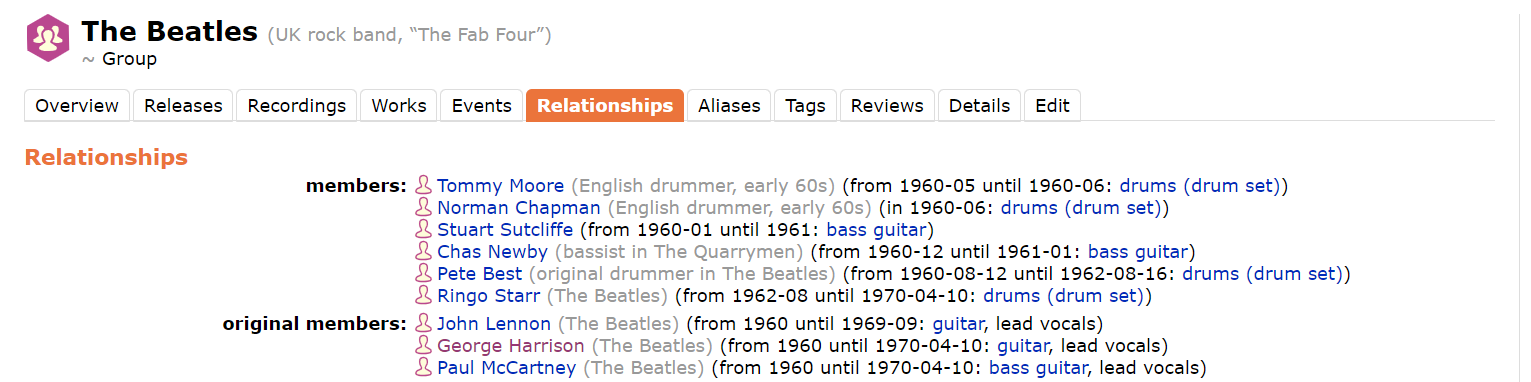
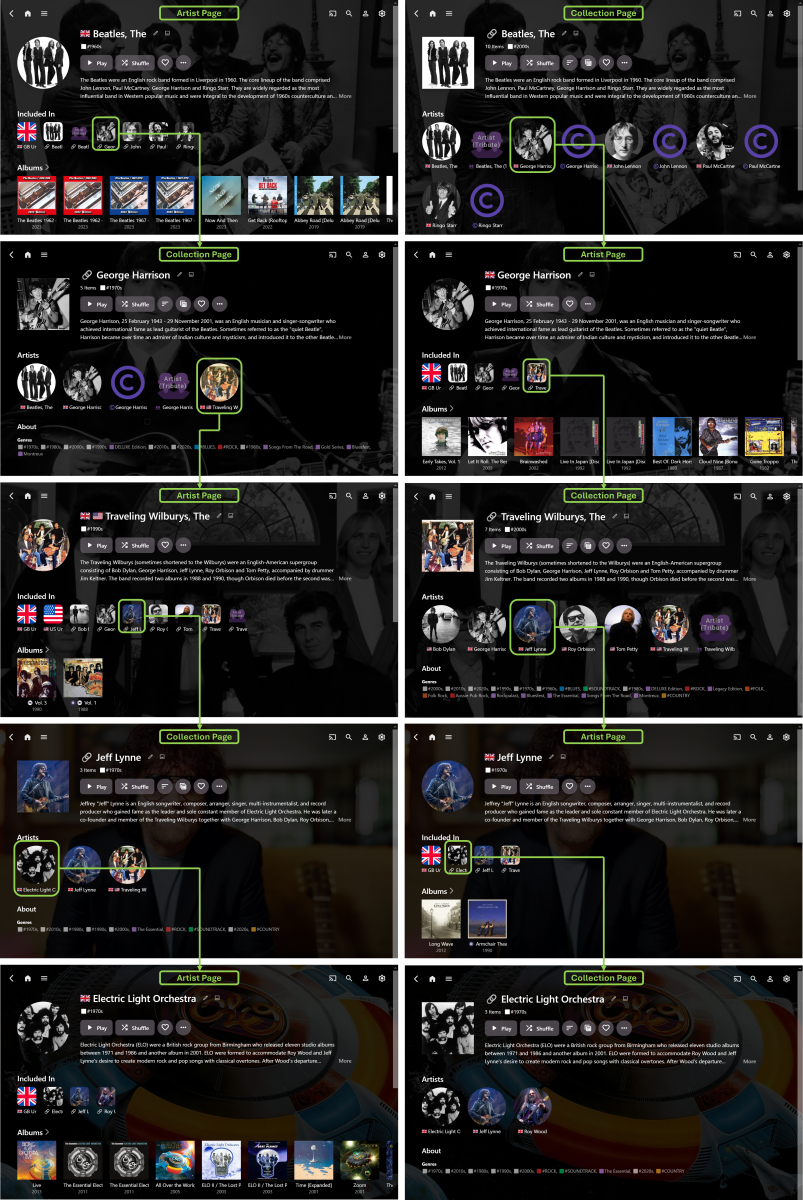
Well… one year on… and I finally have a workable method of achieving this in Emby – while it didn’t actually take a whole year of time, it did take some experimenting to figure out… I first tried Tags, but the navigation/browsing experience was too disjointed… then, got distracted with trying to separate Artists and Composers… then, tried Collections, but didn’t really make much progress… then, got even more distracted with Country Flag emojis… then, with some community help (thanks @Happy2Play @Luke), I discovered that Collections, PLUS some CSS with the Web App, gave a feasible solution… While the result (to date) isn't quite as elegant as a dedicated “Related Artists” section, it is selectively configurable, unlike the auto generated “More Like This” section, that can sometimes be a bit ‘hit-and-miss’ with the results. The basic idea is: Manually set up “Related Artists” Collections (yes, it takes time) Ensure that the main Artist is included in the associated Collection (otherwise some necessary navigation links are missed out) Match corresponding Artist/Collection Primary Image, Background Image and Overview Text (so that the pages essentially become extensions of each other) Use CSS to exactly align the top sections of Artist and Collection pages Use CSS to move the Artist “Included In” section to underneath the Overview (otherwise scrolling down makes the navigation less streamlined) Use CSS to make the “Included In” images smaller and less dominating on the Artist pages The end-result is seamless navigation by “Related Artists” via alternating Artist and Collection pages (starting with either page type) with no need to scroll down the pages. (I guess it would also be possible to exactly match Page Titles text and Primary Images shape, if desired.) Here’s an example, showing just one possible navigation path, starting with The Beatles and ending with Electric Light Orchestra (Note: it’s the music exploring journey that’s meant to be fun, more so than just being a long way of getting to a specific Artist destination): The above example also shows Artist Country identification (and Country Collections) plus some Artist/Composer separation (both still a work-in-progress). So far, it’s working well, though I still have many more Collections to fully configure. There’s also the possibility to expand the Collections beyond just Artists, if I want to. While setting up the “Related Artists” Collections is a standard use of Emby, it’s really the custom CSS that makes this approach a viable navigation/browsing/exploring option. This does result in a doubling up on a lot of the same data, but it’s not noticeable, in use, when the Artist/Collection pages are exactly matched and aligned. In another year, I expect I’ll probably have modified things even further and HOPEFULLY, by then, the new Emby “Smart” Playlists/Collections/Views/etc… will allow for much more individual customization!
 1 point
 -
There are so many layers of options in Family Tree software. I think it would be best to stick to a Proper family Tree software package. I have actually created an add-on / plug-in type of video player inside Family Historian website creator. This has been up and running for over 5 years and works for all browsers. You can see a demo in the forum for this software. If nothing else, the features listed will give you an idea of what kind of options would be useful. I would be happy to help anyone set this up. It is not an auto install type of plugin. Once it is set up, it is quite dependable. https://www.fhug.org.uk/forum-1/viewtopic.php?t=170141 point
-
Updated it, to also split a stream providers m3u file into LiveTV,TVshows and Movies (3 seperate m3u files) and save them.1 point
-
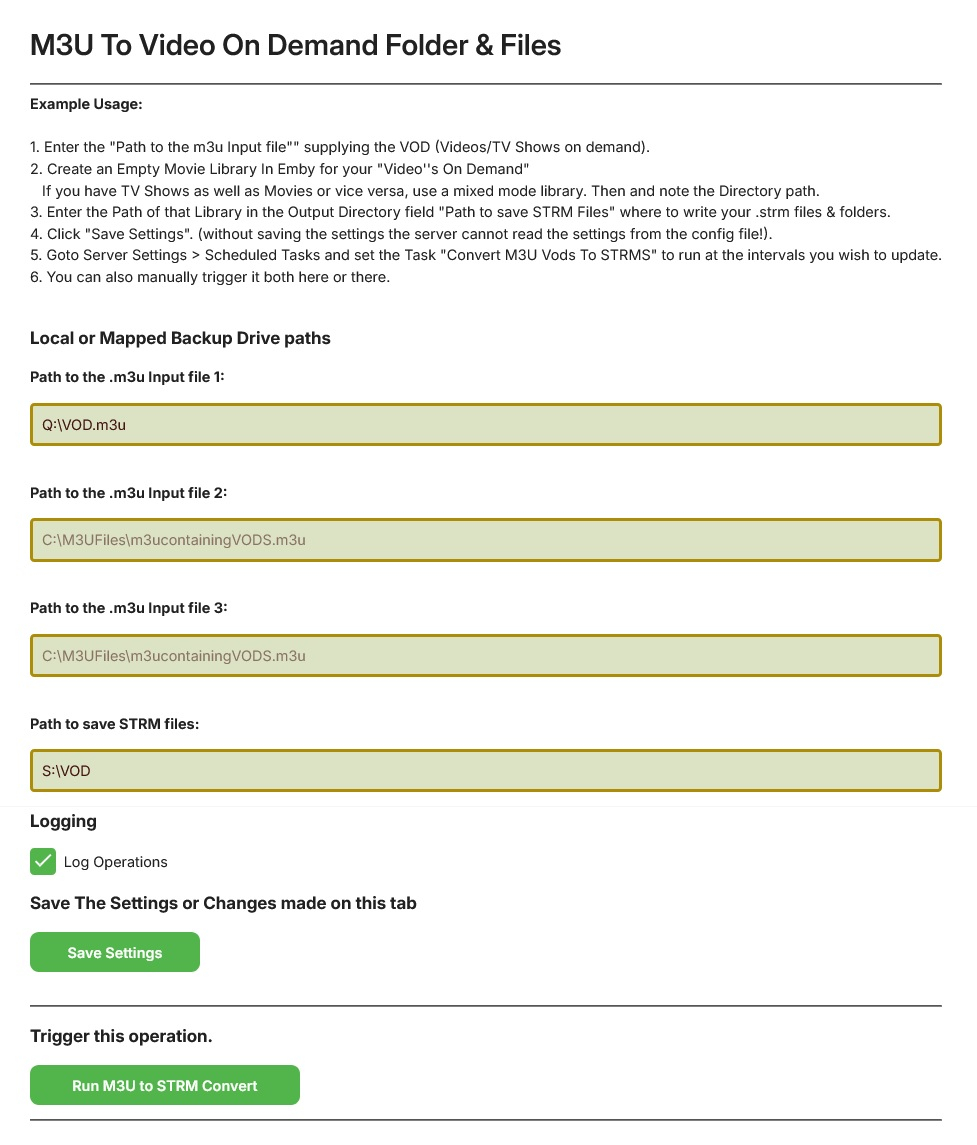
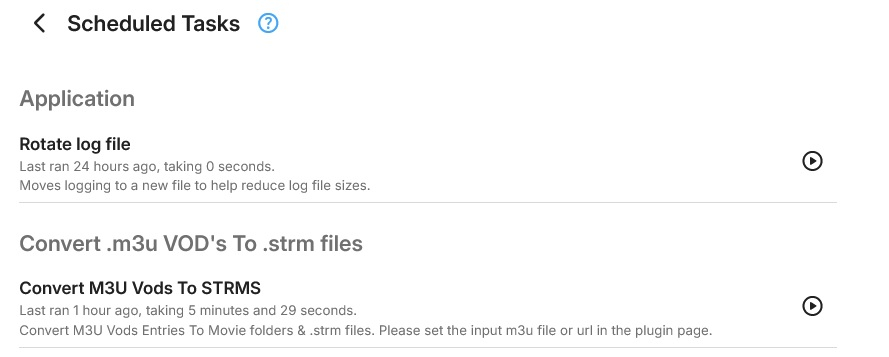
I have done the code, its all working. Currently the progress bar doesnt work in the scheduled task either, but i am not worried about that yet, the scheduled task does though. I am concentrating on getting the tv shows into season folders at the moment. I have enabled the plugin to take 3 m3u urls or paths, but it is designed so that it can do it all from one m3u. its here:
 1 point
 -
Do you have TV Everywhere setup in Channels? The number of channels available through TVE is much smaller than your typical sat or cable channel list. A few companies own probably 90% of the national channels. They are all building their own streaming services or already have them which isn't good for TVE long term. Instead of renewing broadcast rights to cable companies, including rights to stream some channels via TVE, I think these companies will push to drop rights to TVE as they will push to "upsell" a rights to stream live and VOD content from their streaming service. For example, if the cable company wanted rights for having streams of NBC, NBC News, NBC sports, Hallmark channels, WWE, True Crime, Today, Sky & a dozen other channels, they would push the cable company to a deal for Peacock content. ESPN, FX, A&E, Nat Geo, Freeform Disney channels, ABC are all Disney propertied with a lot of leverage. But for now, we still have TVE, and it mostly works well with a glitch here or there and losses of the big 4 (ABC, CBD, NBC, FOX) quite often. I don't think LMN is on Youtube TV but is on Philo, Hulu Live TV, Sling TV and DirecTV Stream might have it. https://thestreamable.com/channels#top-cable-channels they cover the most popular channels, but you want to check each directly. Then make sure you can use it with TVE so you can get it in Channels and Emby. You would be able to record in Channels or Emby (both actually). Depending on need, you may want to set Channels up to record and cut commercials with Emby having a library on top the Channels recording area. Channels have strong DVR functionality and the ability to bring in streams from lots of sources. Emby kills channels from a library management and client & streaming standpoint. Together they are a good partnership. Any streams in Channels can be used in Emby via M3U setup. So all the streams are viewable in Emby and you can record here as well.1 point
-
Hi, yes that’s an interesting idea. Thanks.1 point
-
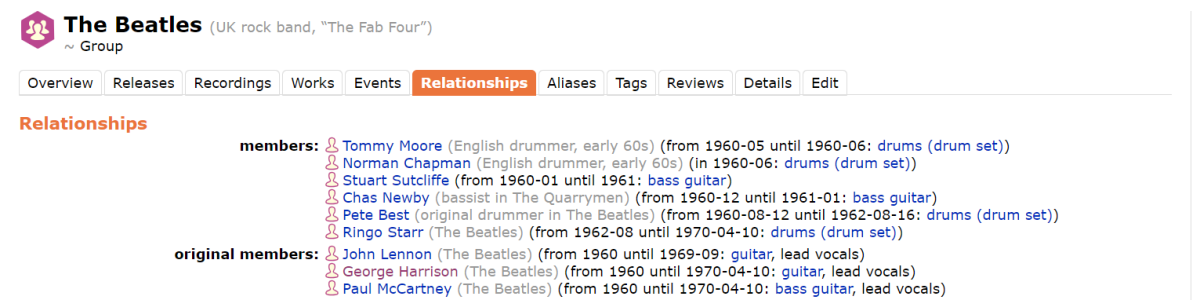
The Album Artist pages are also my favourite Emby Music pages and adding a "Members" section similar to "Cast & Crew" for Movies would potentially take Emby Music Libraries to another whole level of functionality. My thoughts are that a "Related Artists" section with direct internal cross-linking (where possible) to the relevant existing "Related Artist" pages would be a great way to browse across a large music library. Music bands could show the band members and individual artists could show the bands they have been in, e.g.: The Beatles Related Artists: George Harrison, John Lennon, Paul, McCartney, Ringo Starr. George Harrison Related Artists: Delaney & Bonnie, The Beatles, The Traveling Wilburys. This information is available in MusicBrainz directly under the Relationships tab so could potentially be auto-populated by Emby. If this was a step too far for Emby to implement, then at least having a "Related Artists" section that could have user manually entered info and internal links would be a very good step in the right direction. When browsing it would be a fun journey to go through (e.g.): The Beatles - George Harrison - The Traveling Wilburys - Jeff Lynne - ELO in just 4 clicks/taps. I am currently experimenting with setting this up with Tags by tagging an "Artist" with the "Related Artists" and it does work to some extent, though it means scrolling down the Artist page to the Tags section and then going through the immediate Tag page to get to the Related Artist page. For this method to work well it also requires tagging an Artist as themselves so they show up properly in all the relevant Related Artist Tag pages. Another downside is the tagged info is then used (I think) by Emby for the "More Like This" section - which is not always relevant to the relationship. I think this is a great way of browsing/exploring a large music collection and also discovering unknown artist relationships and potentially new music. It would be interesting to know what other music fans think.
 1 point
 -
Just curious - in what situation would there be a subtitle file on your phone that you would be uploading into the system?1 point
-
My understanding was this was about the add to collection screen, not the collection detail screen. i.e.
 1 point
 -
Hi It would be nice to implement the alphabet picker for all views, including music playlists, whatever the way files are sorted. For music playlist, it could be worth adding a filter for genre/style Thanks.1 point
-
Well, no, because I want them to play before movies just like regular trailers. Basically I want it to randomly pick a trailer from one of the "legit" trailers in a movie directory or a trailer from this special directory. Maybe the simplest way to implement this would be to include an additional line for a directory containing local trailers in the config for the trailers plugin. Does that make sense?1 point