Leaderboard




Popular Content
Showing content with the highest reputation on 02/25/25 in all areas
-
2 points
-
Just to add my $0.02... Synology disables the "admin" account by default partly to eliminate the low hanging fruit of having such a standard username available to would be hackers. I believe the recommendation is to enable the admin account, create a new account with a more obscure username and admin permissions, then disable the "admin" account. I have setup my Emby media file structure to be available to the internally networked Windows computers via Samba to facilitate uploading new media. I use the excellent parental controls built into the Emby server; however, as the kiddos have gotten older and more network savvy it is too easy for them to simply go directly to the network share and get whatever they want. Using the ownership permissions of the linux filesystem, I use the ssh interface to change the ownership and permissions of restricted media so that only the Emby server can see them. Uploaded files are owned by the samba user, but all of the "support" files created by the Emby server are owned by Emby. So, I first change the ownership of the folder and uploaded files to Emby, then I remove the read, write, and execute permissions for the group and others: sudo chown -c -R emby targetfolder sudo chmod -c -R go-rwx targetfolder (the -c outputs each change made, the -R makes it recursive through all subfolders) Once the group and other permissions are removed, you will also need to use sudo ls -l to see the folder contents. (And the tab auto-complete won't work.) From the Windows machines, the folder name is visible but cannot be opened. If you want to completely hide the media, just tuck it under a folder like "Restricted" (also without group and others permissions). Then the Windows machines will only see the folder "Restricted" but cannot see what is inside it. It is important to note that if the Emby server encounters any folder / file it can't read in any of its media libraries, it will abort the scan for file changes and you will notice that it no longer updates when media is changed / added / removed. So be sure that any folder / file with the group and other permissions removed is owned by the Emby user (including its parent folders).2 points
-
Can you post a screenshot of the port forwarding rules? Perhaps there's a simple misconfiguration there. I agree you shouldn't have anything blocked on a business line; so something else is up.2 points
-
He has much important features to code, like 5th color theme.....2 points
-
kind of! lol THAT plug in was left absent, @hackthis02then took over and revived it since then, he has been amazing on it. unfortunately a few issues have crept in that a few of us and him have been working on fixing. stay tuned, as he is traveling right now, but he has been in high gear trying to fix this!2 points
-
There's a new post for each new version. The latest version is always pinned in this forum, so it's very easy to spot: https://emby.media/community/index.php?/forum/54-windows-xbox/ What's really hard to follow is an endless thread with thousands of posts where you need to read every single message to see when a new version is available. If you don't want to subscribe to the whole forum, you can instead FOLLOW the Emby Release Agent. This also allows you to get notified only when there's a new release.2 points
-
Since DockerHub changes it's rate limit with 1. April 2025 it would probably help many users to push the Docker container from Emby to ghcr.io to circumvent the really strict limit for 10 pulls per hour for unauthenticated users. Here is the link to the new rate limit: https://docs.docker.com/docker-hub/usage/ Please ignore my request if there is already a container on ghcr.io available but I didn't find one yet in the official repository which is this I assume: https://github.com/MediaBrowser Maybe it would be also viable to push it to the Release repo: https://github.com/MediaBrowser/Emby.Releases1 point
-
Hi Anyone ever had the idea of making an emby app for virtual reality? Only a simple app with a virtual screen (maybe cinema environment). There isnt a good solution for enjoing media in VR yet, so that might bring many new users to emby. Plex tried sth similar about a year ago, because many people requested it but the app was in a very bad shape at release and failed. Btw have someone already tried sth in that direction?1 point
-
Hi, I have a Synology 920+ with 1x 256Gb SSD Cache (yes, read-only). I was wondering if the load of the entire movie can be "forced" in the SSD cache, thus avoiding or mitigating the lawnmower noise of the disks for the entire duration of a movie... P.S. When Movie station was deprecated, I tried Plex, Emby and the other one suggested by Synology. After two days of tests I bought the Premiere License right away as I was really impressed by the great job you've done! Thanks a lot!1 point
-
Emby devs ahead of the curve1 point
-
Hi everyone, Just for informe you that I have the same issue. I will wait for the update when it will be validate Thanks @hackthis02for your job1 point
-
The current development/beta is huge in terms of changes from the last release but is nearing the end. Once that is released, the next server development cycle will begin which is when TVNext will be introduced.1 point
-
Yeah, I'm good. And this is the version of the smoother Emby:
 1 point
 -
The latest version was failing for some, and since I'm traveling this week, I removed it. I currently have a new version out for testing. Will promote if/when it successfully passes.1 point
-
Ahh, I see how that works now... yes that is significantly faster.1 point
-
The original developer stopped supporting it a few years back. I took it over sometime after that. But we never made a new thread. There is still regular updates and enhancements. As such posting here in still vailed.1 point
-
Original dev abandoned it and a new dev picked it up. It is supported as new dev picked it up here. I guess in theory this original topic should have been deprecated and a new topic created but it is what it is. Personally, not seeing any issue with v3.3.2.21 point
-
Depends on how larger your library is as some system say they takes weeks for initial scans as reported elsewhere. I just takes time scaning and probing every item and querying every item from on provider site. But currently looks normal to me.1 point
-
Since unRaid's primary user is root, but nobody is your default permissions for files / folders, it's easier to use nobody as a user in your dockers. Then the docker has access to your files / folders you assign to that docker. And does not require you to edit permissions for Emby to access files, uploaded or created by other dockers. Emby docker by default runs with 2 - 2 - 2, don't remember what user that is. But anyways nice history lessen1 point
-
Not that I know of, AFAIR it was always a week. I could be wrong, tho, memory ain't what it used to be.1 point
-
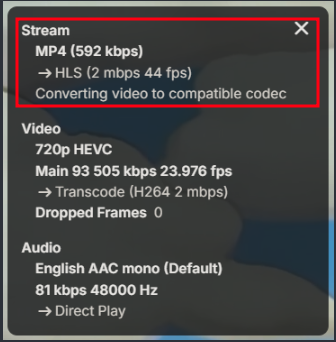
Devs would need to see logs and what client. This indicates the client cant handle hevc.
 1 point
 -
No. The devices list in your server does not track premier use. The ONLY way is to wait 2 weeks for devices to fall of the list internally tracked at emby.media YOU HAVE ABSOLUTELY ZERO CONTROL OR VIEW OF THIS. you can only wait.1 point
-
Oddly, Telus blocks 80 for me, but not 443... They also block port 25 outbound so I can't host email (can't send to external servers)1 point
-
The media isn't transcoded, it is a direct play. I sent Luke the logs of it happening (two LG TVs are affected).1 point
-
1 point
-
I don't think that I misinterpreted that since I do unauthenticated Docker pulls, because I can't do authenticated pulls <- this is probably also true for other people and this means only 10 pulls per hour. I do update checks once a week from my Docker containers usually during Saturday night and then pull the updates. On my server are about 60 containers installed from which about 55 are always running and I need to pull about 30 to 40 containers in one go (probably in about 5 to 20 minutes). The new rate limit would ultimately break that and would leave probably half of my containers without the update. Even if you pull updates every day, granted if they are unauthenticated, you could run into issues with the 10 pulls per hour limit. The Emby image which is currently only available on DockerHub would be also really beneficial if it would be available through ghcr.io My assumption is that probably most HomeLab users have something in the neighborhood from 20 to 40 or even more containers running. I have almost switched over all my containers over to ghcr.io from maintainers who offer them on ghcr.io but I still have a few containers from DockerHub left where Emby is one of them, I also want to avoid using a third party Emby image and would prefer using the official image instead.1 point
-
Why not just split the files into two? MKVToolNix will do the splits based on the timestamps you've already added. Paul1 point
-
Oh, damn, you are right. I totally missed that, thanks, I am sorry for not checking that first. Had that configured ages ago and totally forgot to check the options there. Had a typo in the rule (0 needs to be between % and s) wrong: S%s0E%0e-E%0ed - %en.%ext fixed: S%0sE%0e-E%0ed - %en.%ext1 point
-
What does Emby show for media info for this example and or the ffmpeg log? You will want to anonymize your logs also by enabling and downloading via the ui. https://emby.media/support/articles/Log-Files.html Might need to ask a MOD to remove that server log.1 point
-
I agree it should be added to the 'add to playlist' and 'add to collection' menus; however all of the other places you mentioned DO have the alpha picker, you just have to set the sort order to 'title'. It's not displayed for the other sort options.1 point
-
It is not a running version update post as there probably should be one Version Release post for this instead of a new one with current version. As it would make following easier.1 point
-
The way it is going don’t expect anything this year we are already end of February and barely any updates to beta. Its very disappointing with extremely slow progress but it is what it is1 point
-
Thanks. @sa2000can review this.1 point
-
TVnext will be added to the beta following the release of the 4.9 server release, and I have read that it greatly improves the channel start time.. Paul1 point
-
100% need faster switching, TiviMate is extremely fast but missing the server features of emby. I'd totally pay more if the emby folks could get the channels to switch as fast as TiviMate.1 point
-
The Comskipper plugin cant do this really. It gets the events from Emby as the recording is playing and skips ahead at the places indicated in the EDL file. The only preprocessing is done with the post-recording command that runs comskip now. Some other utility would probably need to be created to do this chapter addition if desired and run it as part of the post-recording processing after comskip. I would have no use for that so I won't be creating it, sorry. I did create this app that removes the commercials that comskip detects.1 point
-
Is that from this plugin, if it is post here1 point
-
Ok, today I logged it with the friend with the LG TV, we did the following: Emby Server 4.8.10.0 on Arch Linux, latest LG Emby App on the TV. restarted the emby server started an episode on the TV I get the loading symbol for a few seconds on the TV then the loading symbol disappears and it's only a black screen in the Emby Server admin overview the stream starts running from 0 to 20 seconds, then starts over at 0 and begins to run to second 20 again and again, but the TV stays black after 1-2 minutes the stream starts on the TV. In the admin overview it starts at 0 again and now shows the actual run in sync with the TV then I jumped a few minutes forward in the stream on TV I get a freeze frame in the admin panel after a few seconds it again runs a few seconds in a loop while the TV stays frozen after 1-2 minutes the video resumes playing we skipped a few minutes three times and it was the same everytime I sent you the server log via the PM you opened. If you need any additional info or stuff I should try, fire away. EDIT: Another friend with another LG TV reports the same problem, I could log that TV, too, if you need it.1 point
-
That fixed the problem. Thanks!1 point
-
Hi Luke I haven't done it yet. Hopefully by the weekend. The Microservers needed a certain technique (lost in my memory) to make them boot from a specific drive. Did a dry run with the non Emby server and got that up and running. Now to get the other one running before getting Emby reinstalled. One issue at a time is all I can manage these days I take it previous versions (Emby server 4.7 in this case) are found on github?1 point
-
Hi, Luke. I mean remembering the playback speed. It is best to keep that speed across the TV series. I tried to implement it with webhooks, but it seems that emby webhooks don't support playback speed in the contents it sends.1 point
-
Hi, please try removing these plugins: Disk Space 1.0.6.4 Episode Refresh 1.0.0.1 TV Maze 4.8.3.0 Xml Metadata 3.5.1.0 Then restart the server and see how things compare. Thanks.1 point
-
You can use community-made SmartPlaylists plugin.1 point
-
I'm traveling this week. So It's possible I won't be able to fix it in a timely manner. I've removed the newest version from the system. If you are having issues revert back and I'll push a fix soon.1 point
-
HOW TO CONVERT "IMPORTED" PLAYLISTS INTO "NATIVE" EMBY PLAYLISTS, THAT SHOW UP IN "ADD TO PLAYLIST" LISTING: When you try to add new items to the "imported" playlists, they do not show up in the "native" Emby playlists listing as options to add to. Apparently, only playlists actually created within Emby will allow you to add new material to them. "imported" playlists CAN be converted into "native" playlists by adding an "imported" playlist to a newly created playlist. Emby will add all the items from the "imported" playlist to the newly created "native" playlist, then the old "imported" playlist file can be deleted. The specific steps are outlined below: I navigated to HOME>MUSIC>PLAYLISTS, where all the "imported" & "native" playlists appear together (Master Listing). I selected one of the "imported" playlists, then clicked the ellipsis (...) to get to the "Add To Playlist" option. From the "Add to Playlist" screen, I created a new playlist. I had to repeat the navigation from home>music>playlists to get the new playlist to show up, but there it was! it had the same number of items & in the same order. The new PlayList also now shows up in the "Add To Playlist" listing! However, there are now 2 versions of the same playlist showing up in the Master Listing. I had added a custom description to the Metadata of the "imported" playlist. It was a simple matter to edit the "imported" playlist metadata, copy the description, edit the new "native" PlayList Metadata & paste the description, then Save. Since I couldn't delete the "imported" playlist from within Emby (separate question in another post), I went to File Station on my NAS & moved the PlayList.m3u file to a non-Emby-Indexed folder (effectively deleting it from Emby, while keeping a copy). I had to Re-Scan the music library to get Emby to recognize that it had been removed. When I went back to the Master Listing I saw that the "imported" version of the playlist was gone & the new "native" playlist remained, with the same content. I was concerned that deleting the original playlist would also remove the items from the new playlist, since the "source" was removed. However, apparently Emby imported the individual items from the original to the new playlist, so the new playlist remained intact when the original was deleted. Voila!1 point
-
It has come to our attention that someone (we believe out of China) is spoofing our purchase page and reselling bogus Premiere keys. Please be aware that the only valid locations to purchase Premiere are our web site (https://emby.media/premiere) or inside one of our official apps. The scammers are using the domain "Emby.team" and are spoofing credit card receipts that look like they come from us and everything. If you happen to have fallen for one of these scams report it to your credit card company and please let us know at billingsupport@emby.media. I'm afraid we cannot do anything to help return your money but we can try to squash the perpetrators. Thanks. View the full article1 point
-
Thank you @Carlofor a great explanation.1 point
-
I don’t have an eta but it is in our plans. Thanks.1 point
-
Emby does this for every image as they are not presented at full resolution and a client like the Roku chokes on high resolution images also. Just like go to a movie item details page and save the poster. The poster is 1000x1426 but itemdetails resizes poster and is 329x459. Dev would have to confirm but don't believe full resolution is used anywhere. But I believe mage resizing varies across all devices.1 point
-
This was requested over a year ago. It seems to me to be a quite basic request that would have nothing but positive effects on the user experience. I have a few hundred collections and it would be very god to have an alpha picker on the right side of the screen when adding to collections.1 point