Leaderboard




Popular Content
Showing content with the highest reputation on 02/24/25 in all areas
-
Moving the issue from this thread, here is a formal request to add to all Emby apps the ability to adjust / sync the audio playback / delay, in the same way it apparently is currently possible to do in Emby Theater.1 point
-
I mentioned it in another thread, but thought I'd put it here since this looks like a new section--just for posterity. Would like to have a bulk meta data editor function. For example, if I have 750 videos whose producing studio is the same, I want to select those videos and apply the name of the studio to those videos. Similarly, if there is a custom tag I want to apply to a subset of those movies, I want to be able to select them in bulk and apply the tag to those videos (instead of selecting them one by one).1 point
-
Now for the embarrassing part - I'm always falling asleep watching something - then have a complete mind blank what i was watching the next day until the next episode is out and i realise im missing something. Would it be possible to add a 'recently watched' section where you can see all items you've recently viewed in order? Probably more applicable to TV I guess,1 point
-
Viel Spaß damit Emby Install.pdf1 point
-
It has come to our attention that someone (we believe out of China) is spoofing our purchase page and reselling bogus Premiere keys. Please be aware that the only valid locations to purchase Premiere are our web site (https://emby.media/premiere) or inside one of our official apps. The scammers are using the domain "Emby.team" and are spoofing credit card receipts that look like they come from us and everything. If you happen to have fallen for one of these scams report it to your credit card company and please let us know at billingsupport@emby.media. I'm afraid we cannot do anything to help return your money but we can try to squash the perpetrators. Thanks.1 point
-
New or Upgraded Apps AURO-3D This update unlocks full support for playback of high-resolution immersive sound in AURO-3D over HDMI. Connect your NVIDIA SHIELD TV Pro to an AURO-3D compatible decoder and enjoy the most natural 3D sound experience from streaming apps such as Artist Connection. Enhancements Added support for Match audio content resolution feature when using a USB DAC Added ability to clear HDMI 1.4 flag via factory reset Added match Frame Rate (beta) enhancement Added French parental control Added security enhancement for 4K DRM playback Known Issues SHIELD TV will be removed from Google Home integration after SHIELD Experience 9.2 installation. Visit NVIDIA support to reconfigure. Resolved Bugs Fixed choppy video playback after FFWD/RWD operations Fixed remote stops responding for 60 seconds after wake from sleep Fixed SHIELD waking from lock screen without a button press Fixed issue with large file transfer to NAS (operation not permitted error) Fixed Google signing flow stuck in a loop Fixed stutters in Bose and Sony headsets while connected to 2.4Ghz Wi-Fi Fixed audio stutter in aptx supported headsets Fixed AV sync issues when Dolby Processing is enabled Fixed crash on volume change Fixed Apple Music corruption during casting Fixed Spotify empty playback when Match Audio Content resolution is enabled with Stereo Upmix Fixed Google Assistant not starting after Google GMS update Fixed full screen SHIELD Rewards notification issue Fixed Wi-Fi log filling up storage Fixed SHIELD drive filling up Fixed no audio heard when headset is connected to controller and DAP is on Fixed Geforce NOW crash after launch Fixed video distortion on "RGB 8-bit Rec.709" display mode Fixed USB HDD/Flash drive showing corrupted after hotplug Fixed NAS folder info shows 0 B and not the actual capacity Fixed mounted storages not listed after upgrade Fixed occasional crashes in DRM apps Fixed when Alexa SHIELD Skill cannot locate SHIELD TV device https://www.nvidia.com/en-us/geforce/forums/shield-tv/9/556907/shield-experience-upgrade-92-2525/ Released 5th February 2025.1 point
-
The documentation on naming music files contains incorrect information: https://emby.media/support/articles/Music-Naming.html This says that the "Artist" and "Album Artist" tags need to be the same. That's not correct. The album artist needs to be the same for all tracks in an album, but the artist tag can (accurately) reflect the individual track artist. This seems to have been true as far back as 3 years ago, with Luke providing correct information to someone in this forum... ...but you can find even newer threads where Luke is giving the incorrect answer: Speaking from experience, this is still causing confusion. Posting just to suggest that the documentation be updated to accurately reflect that Emby can handle albums with different Artists, as long as the Album Artist is identical (and not blank) for all tracks.1 point
-
Greetings, all: I've migrated off my ASUSTOR NAS to a UGREEN NAS (DXP8800 Plus) so I thought I'd share how I set up SSL for Emby using Let's Encrypt. I'm posting here because UGREEN does not have its own subthread in the Emby Community, but mods, feel free to move this where you see fit. DISCLAIMER: I tried my best to document this based on what worked for me, but YMMV. NOTE: UGOS does now also use ZeroSSL for certs but I wasn't sure how to leverage this with Emby. ASSUMPTIONS: you have a domain hosted somewhere (I've use Dreamhost for nearly twenty years, now, and they are swell) you have SSH/sudo access to your DXP you are comfortable on the command line, as there's no native Let's Encrypt support in UGOS (yet) STEPS: SSH into your DXP install certbot: sudo apt-get install certbot Once installed run certbot to get just the cert: sudo certbot certonly --manual --preferred-challenges dns -d yoursubdomain.yourdomain.com NOTE: if you are using a subdomain, just exclude the "yoursubdomain." part You are going to be asked by certbot to create a TXT record for your domain. How you do so will be dependent on your host. Here are Dreamhost's for a reference: https://help.dreamhost.com/hc/en-us/articles/360035516812-Adding-custom-DNS-records#toc-heading10 IMPORTANT: the host name will be different than your actual host name (mine was prefaced with "_acme-challenge" (ignore the period after your host name). Copy the text string into the TXT value. WAIT. KEEP WAITING. WAIT SOME MORE. SERIOUSLY, WAIT EVEN MORE. That TXT record needs to propagate through throughout the world. I tried to proceed after five minutes and it was not enough, so I had to start the whole process again. I ultimately waited an hour and it went through. Once you've downloaded the cert, you need to generate a PFX file for Emby. To do so, run this command: openssl pkcs12 -export -out /path/to/yourdomain.pfx -inkey /etc/letsencrypt/live/yoursubdomain.yourdomain.com/privkey.pem -in /etc/letsencrypt/live/yoursubdomain.yourdomain.com/fullchain.pem -password pass:yourpassword The "/path/to/yourdomain.pfx" should be in a place that Emby can access the file. You will also need to change ownership on it so Emby can read it (e.g., chown emby:emby domain.pfx). We'll come back to this in a minute. You need to point "/etc/letsencrypt/yoursubdomain.yourdomain.com" to the correct paths (the "/etc/letsencrypt/" part should be the same for everyone). NOTE: if you are using a subdomain, just exclude the "yoursubdomain." part Finally, change "yourpassword" to whatever you want. You'll need this later in the instructions when setting up SSL in Emby. So, this will only generate the PFX file once, and you'll need to renew the cert from time to time, so the next step is to add an entry to the cron to schedule this to run. First, let's create a script to run so you can more easily edit it if/when needed: sudo nano renewCert.sh -= OR, if you are like me and prefer to edit in VIM =- sudo vi renewCert.sh NOTE: I created this in the "/etc/letsencrypt" folder, just to keep everything cert related in the same spot Paste the following into whichever editor you are using: #!/bin/bash certbot renew --manual --preferred-challenges dns --post-hook "openssl pkcs12 -export -out /path/to/yourdomain.pfx -inkey /etc/letsencrypt/live/yoursubdomain.yourdomain.com/privkey.pem -in /etc/letsencrypt/live/yoursubdomain.yourdomain.com/fullchain.pem -password pass:yourpassword" NOTE: all the same comments in step 6 apply here, too (e.g., changing the appropriate paths, changing "yourpassword," etc.) Save the file. Now, make the file executable: sudo chmod +x renewCert.sh Now, let's add it to cron: sudo crontab -e NOTE: if you have not previously edited the cron before, you will be asked which editor you want to use; choose the same one from step 7 Paste the following into the cron and save it: 0 0 * * * /path/to/renewCert.sh NOTE: This will run the script each day at midnight. You can adjust this accordingly. Finally, let's set up Emby to work with the PFX. I'm not going to go through each of the network settings, here, but just the ones relevant to this guide. You can tweak this as you desire. Open your Emby server dashboard and click on Network. In the "External domain" box, enter whatever you used in steps 6 and 8 for "yoursubdomain.yourdomain.com" Under "Custom SSL path," enter the path you used in steps 6 and 8 above (/path/to/yourdomain.pfx). Under "Certificate password," enter whatever you changed "yourpassword" in steps 6 and 8 above. Save. Reboot Emby server. If all goes well, you should now be able to access your Emby instance via https. If anyone else has more experience with this and sees any problems with these instructions, please let me know and I'll update accordingly. Hope you find this useful!1 point
-
Emby Windows & Emby Xbox A new stable version 2.210.0.0 is available now. Please go to the Microsoft Store and check for updates. Changes 2.210.0 [Win] Adjust store listings [Xbox] Don't show full-screen button [Xbox] Update Holiday Bonanza 2.209.0 [Win] MPV: Fix passthrough for DTS-HD [Win] MPV: Add option to ignore volume input commands [Win] MPV: Fix audio device selection getting lost [Win] MPV: Show audio passthrough option for digital outputs [Win] MPV: Fix passthrough for DTS-HD [Win] Persist audio playback volumne1 point
-
@LukeThank you that was it! Not sure how I missed that id in there. Thanks again1 point
-
It has always been "album" and "album artist" as yes artist/s can be anything. Unless I am missing something somewhere?1 point
-
TVnext will be added to the beta following the release of the 4.9 server release, and I have read that it greatly improves the channel start time.. Paul1 point
-
Is that from this plugin, if it is post here1 point
-
hiya, lol, no that's the unix username/group-id for the underlying file system. Nice thought though, good to know, thanks. OK strictly speaking that wasn't a lol, more of a silent smile once I realised what you meant...but there isn't a shorthand for that!1 point
-
@Lukebuenas noticias, muchas gracias.1 point
-
@Robert87354this will be resolved in emby server 4.9. Thanks.1 point
-
Hi, Luke. I mean remembering the playback speed. It is best to keep that speed across the TV series. I tried to implement it with webhooks, but it seems that emby webhooks don't support playback speed in the contents it sends.1 point
-
Yeah the particular video I was watching was 4k but I was watching on my phone, so the resolution wasn't the same and that was causing transcoding. P.S: I updated the wording of my previous comment to align with what is actually going on. I also am someone who prefers proper terms when discussing technical matters. Thank you for pointing that out to me. I appreciate all the work that you do. Thank you so much for Emby.1 point
-
Thanks Luke. As far as I red, the improvement is mainly on home page rendering... I still think a good idea though: a 10-15 GB movie can be cached in few minutes and then "enjoy the silence". It would also benefit concurrent accesses... Cheers Paolo1 point
-
I would suggest comparing to this:; Even if you don't use nginx, most reverse proxies have a similar set of options.1 point
-
Right on the main screen during playback.1 point
-
@AngusArandawell are you seeing transcoding now? Did you check your server dashboard to learn what the transcoding reason was?1 point
-
Alright, all back up and running. Just need to spend some time redoing the meta data for most of the movies. The file name somehow got added to the sort name. Thanks a lot for the help.1 point
-
Still waiting for a full scan to complete. Removed all libraries and added only /volume1/Media/Movies and /volume1/Media/TV Shows. So far looks like it's finding the movies. Looks like it's using the file names instead of the Titles so far. I'll let it finish and let you know how it turns out. Thank you.1 point
-
ok, probably too many updates from me, but i removed the server from my phone app, then reconnected on wifi, and it brought over the new correct wan access as well. I think I'm all good for now. Thanks everyone!1 point
-
@Mr_Tea Hi there, let's look at an example. Please attach the information requested in how to report a media playback issue. Thanks!1 point
-
New release Brought up to NET8 Added support for other OS types.1 point
-
Another 3 weeks... Really? have you looked into it yet please? The Void i am screaming into is getting full up, i'll need to get another one soon. i am making jokes, but This is insane. why are you just openly ignoring us?1 point
-
Not sure what has happened. I deleted the app for a 4th time, this time I deleted it from the settings menu. When i reinstalled it all seems to be working correctly.1 point
-
hi, this will be in the next update to Emby for Android. Thanks.1 point
-
I'm traveling this week. So It's possible I won't be able to fix it in a timely manner. I've removed the newest version from the system. If you are having issues revert back and I'll push a fix soon.1 point
-
It has come to our attention that someone (we believe out of China) is spoofing our purchase page and reselling bogus Premiere keys. Please be aware that the only valid locations to purchase Premiere are our web site (https://emby.media/premiere) or inside one of our official apps. The scammers are using the domain "Emby.team" and are spoofing credit card receipts that look like they come from us and everything. If you happen to have fallen for one of these scams report it to your credit card company and please let us know at billingsupport@emby.media. I'm afraid we cannot do anything to help return your money but we can try to squash the perpetrators. Thanks. View the full article1 point
-
3.3.2.2 update failure: Value cannot be null. (Parameter 'key') at System.Collections.Generic.Dictionary`2.FindValue(TKey key) at System.Collections.Generic.Dictionary`2.TryGetValue(TKey key, TValue& value) at Statistics.Helpers.Calculator.CalculateMovieQualityList() at Statistics.ScheduledTasks.CalculateStatsTask.MediaBrowser.Model.Tasks.IScheduledTask.Execute(CancellationToken cancellationToken, IProgress`1 progress) at Emby.Server.Implementations.ScheduledTasks.ScheduledTaskWorker.ExecuteInternal(TaskOptions options)1 point
-
I'd be curious to know how this goes. You will likely see better results with this on the beta server.1 point
-
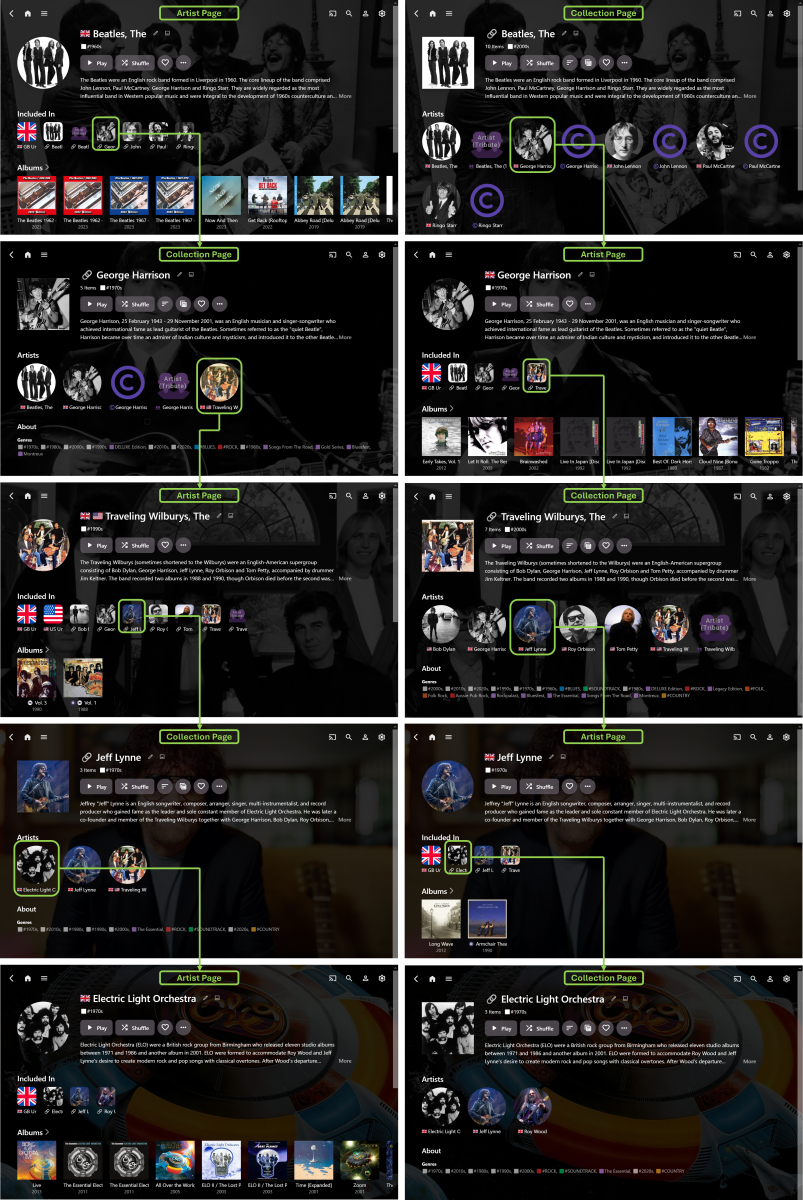
Well… one year on… and I finally have a workable method of achieving this in Emby – while it didn’t actually take a whole year of time, it did take some experimenting to figure out… I first tried Tags, but the navigation/browsing experience was too disjointed… then, got distracted with trying to separate Artists and Composers… then, tried Collections, but didn’t really make much progress… then, got even more distracted with Country Flag emojis… then, with some community help (thanks @Happy2Play @Luke), I discovered that Collections, PLUS some CSS with the Web App, gave a feasible solution… While the result (to date) isn't quite as elegant as a dedicated “Related Artists” section, it is selectively configurable, unlike the auto generated “More Like This” section, that can sometimes be a bit ‘hit-and-miss’ with the results. The basic idea is: Manually set up “Related Artists” Collections (yes, it takes time) Ensure that the main Artist is included in the associated Collection (otherwise some necessary navigation links are missed out) Match corresponding Artist/Collection Primary Image, Background Image and Overview Text (so that the pages essentially become extensions of each other) Use CSS to exactly align the top sections of Artist and Collection pages Use CSS to move the Artist “Included In” section to underneath the Overview (otherwise scrolling down makes the navigation less streamlined) Use CSS to make the “Included In” images smaller and less dominating on the Artist pages The end-result is seamless navigation by “Related Artists” via alternating Artist and Collection pages (starting with either page type) with no need to scroll down the pages. (I guess it would also be possible to exactly match Page Titles text and Primary Images shape, if desired.) Here’s an example, showing just one possible navigation path, starting with The Beatles and ending with Electric Light Orchestra (Note: it’s the music exploring journey that’s meant to be fun, more so than just being a long way of getting to a specific Artist destination): The above example also shows Artist Country identification (and Country Collections) plus some Artist/Composer separation (both still a work-in-progress). So far, it’s working well, though I still have many more Collections to fully configure. There’s also the possibility to expand the Collections beyond just Artists, if I want to. While setting up the “Related Artists” Collections is a standard use of Emby, it’s really the custom CSS that makes this approach a viable navigation/browsing/exploring option. This does result in a doubling up on a lot of the same data, but it’s not noticeable, in use, when the Artist/Collection pages are exactly matched and aligned. In another year, I expect I’ll probably have modified things even further and HOPEFULLY, by then, the new Emby “Smart” Playlists/Collections/Views/etc… will allow for much more individual customization!
 1 point
 -
Nope, support has not been removed nor is it broken (I have 100,000+ srt subs in my system and have to admit I've yet to encounter one of them failing to show). Exact example would be required, how are your files named and organized? How did you name your subtitle files? How to Report a Problem Q1 should cover that one once the issue is traced.1 point
-
Hi Tried that now. It seems to only display per season if I have more than 1 season. So if a show is on season 10 and I've watched 9 seasons and have season 10 only then it doesn't seem to be available to me. However even when available there are two major issues. Going season by season or even show by show is extremely time consuming This creates a manual overhead that nobody needs. I'd need to check every show every time to figure out if I'm missing something Is there a possibility of adding the old feature back (where you can see the missing episode alongside the other episodes). Or when you click play on a show and the next episode is missing, before playing the next available episode display a warning. Anything that takes out the manual aspect of checking for missing episodes1 point
-
Hello! The trailers doesn't seemed to be updating, all the current trailers stops at movies from 2024. How can I update it? I saw in an other post that triggering the "Refresh Internet Channels" task might help, but it doesn't. Thanks1 point
-
The Emby team hopes you and yours are enjoying a Happy Holiday Season. We would like to announce a couple of changes that will hopefully increase the value of Emby in all of your households. First, to aid in the transition from our old TV-only Android TV app to the new Standard Android app on that platform, we will be eliminating the need for the app unlock by allowing free playback for up to five TV devices per Emby Server. Devices beyond that limit will require Emby Premiere. Previously purchased unlocks will still be honored. This should allow most households to move to the new app more easily. Second, recognizing that today's households have more and more devices, we are increasing our standard Emby Premiere License device limit from 25 to 30. We will then also increase the extended premiere plans from 45 to 50 and 75 to 80. Existing extended subscriptions will remain the same but new ones will be at these new levels. All standard licenses will be automatically updated to the new 30 device limit immediately. You should see all of these changes rolling out over the next week or so. Happy Holidays from the Emby Team! View the full article1 point
-
+1 for fast channel switching1 point
-
There is some delay due to Synology's long review process. So for example, if we release a 4.8.6 release but we know we'll probably be doing a 4.8.7, then we'll probably just wait for 4.8.7.1 point
-
@marnef?1 point
-
use case: I use an XGIMI projector which has Android built in, and when sending audio to my receiver using eARC, the audio gets delayed - probably in passthru processing, etc., etc. Running audio directly thru the built in XGIMI speaker results in good sync, so no problem with Emby. I solve this in Kodi by setting 250ms audio difference, and apply to all. I wish I could do the same with Emby (delay video vs audio, or advance audio from video). Therefore I too wish for this feature.1 point
-
+1. I would add, NOT the same way it's possible in Theater, which is very cumbersome to use, but an in-player option.1 point
-
Hi. What forward and back buttons and exactly what would they do and where? Thanks.1 point
-
The stats for nerds feature inside the video player can tell you the transcoding reason, as can the server dashboard.1 point