Leaderboard




Popular Content
Showing content with the highest reputation on 02/22/25 in all areas
-
It has come to our attention that someone (we believe out of China) is spoofing our purchase page and reselling bogus Premiere keys. Please be aware that the only valid locations to purchase Premiere are our web site (https://emby.media/premiere) or inside one of our official apps. The scammers are using the domain "Emby.team" and are spoofing credit card receipts that look like they come from us and everything. If you happen to have fallen for one of these scams report it to your credit card company and please let us know at billingsupport@emby.media. I'm afraid we cannot do anything to help return your money but we can try to squash the perpetrators. Thanks.2 points
-
Version 12.0.0 Notes: Please remember to leave an updated textual review on the Play Store. Your feedback is essential for improving the app’s ranking and securing Symfonium’s future. Added: Complete rewrite of the Now Playing screens and their settings. You can now create the Now Playing screens of your dreams in both portrait and landscape modes, with a preview mode to ease tweaking the many new options. Configure what is visible, where and how it’s displayed. Support always visible lyrics and/or queue in landscape mode. Support advanced strings templates with conditions for all strings. And much more. Added an optional donation program, allowing users to support the app and contribute to its continued development. Introduce the concept of Application and Now Playing Styles. You can now export and import these styles to share with others. Application Styles embed nearly all interface settings (including current now playing style), allowing you to change the whole interface in two clicks and discover the full power of Symfonium customization without having to adjust every setting individually. Now Playing Styles embed the complete Now Playing settings, allowing you to completely change the Now Playing interface in two clicks. You can use the dedicated forum section to share your styles and discover those created by other users. Symfonium now includes multiple default Application Styles and new Now Playing Styles to ensure seamless adaptation for users. Added file deletion support for Local provider in SAF mode. You may need to remove and add again the source folders in the Local provider settings. Remember that you are responsible for your own actions! Added new navigation patterns and precise settings for portrait and landscape navigation types. Added new home shortcut styles (Compact and List). Added new library page button styles (Horizontal and List). Added Landscape and Landscape Background styles to home grids. Added Grid Landscape and Grid Landscape Background display modes for most lists. Added Fanart Grid display mode for Artists. (Not all providers support fanart.) Added Compact Header mode to album, artist, genre, and playlist pages. Added an option to show the Search button in the top app bar. Added an option to always show the filter bar on list pages. Added Favorite Date as a smart filter field and as a smart playlist sort order. Added a per-renderer option to prefer the offline cached version when casting, even if the server is available. Added a new advanced setting to disable the output switcher, preventing unwanted audio output device changes. Added “Is missing” and “Is present” filters for date fields in smart filters. Added “Favorite” and “Quick rate” as possible compact player button. Added new “Prefer year tag” setting to Symfonium custom tag parser. Added new API call to load and resume media queues. Backups can now properly include saved Smart filters. Normal playlists can now be exported to m3u8 files. Changed: Due to the complete rewrite of the Now Playing screens, your Now Playing settings have been reset, as it was not possible to migrate them. You can reconfigure them to be as before—or even better now. (All the previous styles can be downloaded from the forum) On some devices, the default navigation patterns may have changed. You can restore your preferred configuration in the settings. Moved the Now Playing settings to be sub-settings of the Interface settings. Removed support for pure Android Media Store library handling for new users, as it is too limited. On Android 15, keep foreground status on pause for a longer period to allow resuming in more cases when forced to target Android 15. Symfonium will now use a random entry in PLS Internet Radio on each attempts and not always the first one. Symfonium custom parser will now try to support both 0…5 and 0…100 values for ratings. Clicking an Internet Radio in the list now queues all available stations, allowing you to switch between them using skip previous, skip next, and the now playing queue. Fixed: Fixed the “Offload if gapless is supported” setting not always working as intended. Do not create media queues for non-media playback. Fixed pre-cache being limited to 10 tracks despite settings allowing larger values. Fixed cases where Replay Gain values of 0 were ignored when determining the proper Replay Gain to apply. Fixed Replay Gain sometimes not being applied to non-natively supported formats. Fixed Jellyfin artists tag handling when part of collection and having tags. Fixed playing composers sometimes saying no playable media. Fix smart playlists not playable from voice commands with Google assistant when filter only offline is enabled. https://support.symfonium.app/t/version-12-0-0-released/68782 points
-
TheTVDB now supports more alternative orders than just Aired/Absolute/DVD. Can Emby query these additional orders and add them as options? Two examples of shows I've seen this used are Re:Zero which has a "Director's Cut" display order and Money Heist which has a "Netflix" order. https://thetvdb.com/series/re-zero-starting-life-in-another-world https://thetvdb.com/series/la-casa-de-papel1 point
-
Hi all, As the title suggests It would be a nice addition if a Label tab can be added to music. We have studios and networks for movies and tv, Labels would help round out music functionality. This data is already captured and albums by record label is available currently from an individual album A top level view is the key easily access the info. The art is readily available. and could easily be incorporated with studio art as that is how labels are treated anyway. Better still the art is available through an api already used.... fanart.tv @@softworkz you seem to be a metadata guru maybe this is up you alley? As I understand emby would need to capture the musicbrainz record label id as that is the key for lookup on fanart. I am sure @@Kode can provide further details as needed. the fanart labels look really nice... so vote up this request and perhaps we can get Luke and softworkz to take a look. thanks -vicpa1 point
-
Be able to create playlist based on a certain criteria, like genre and or year, in order to create a dynamic playlist that it refreshes automatically when new content is added. This way you can for example, create a tv comedy playlist from the 90's, or a new sci-fi Movies playlist. Some other criteria for rules could be the rating, watched/unwantched, score, tags, language, audio codec, etc The possibilities could be endless1 point
-
Hi, Since I am using more and more TMDb, (since tvdb is more and more a mess), I am missing a very important feature. tvdb had the feature of grouping stuff into aired, DVD and absolute, which is supported by emby. TMDb had also this feature. See this example for "La casa de papel" (Money Heist, Haus des Geldes): The Original Order is allways the "aired order" of the original country. "La casa de papel" was originaly released by "Antena 3" and was taken over by Netflix, which results in different episodes ordering, which is a mess. They solved it in episode grouping. This feature is missing from emby, but it's integrated in their API and is allready supported in other apps, like kodi. At least, Banana a TMDb Mod claims it, that it's supported by Kodi: https://www.themoviedb.org/tv/71446-la-casa-de-papel/discuss/5e7032d84f9a99001152704f?page=1#5eb76872ca7ec6001f7c53cb Is it possible to add this feature into emby? It is the last scraping feature, I really really miss for TMDb on emby. It adds much flexibility and is overall a much better solution, than on tvdb with their aired, dvd and absolute order. Another great example is Dragonball Super: As you see, it adds much more flexibility for different regions over the world. It's in my own eyes a must have for emby!

 1 point
 -
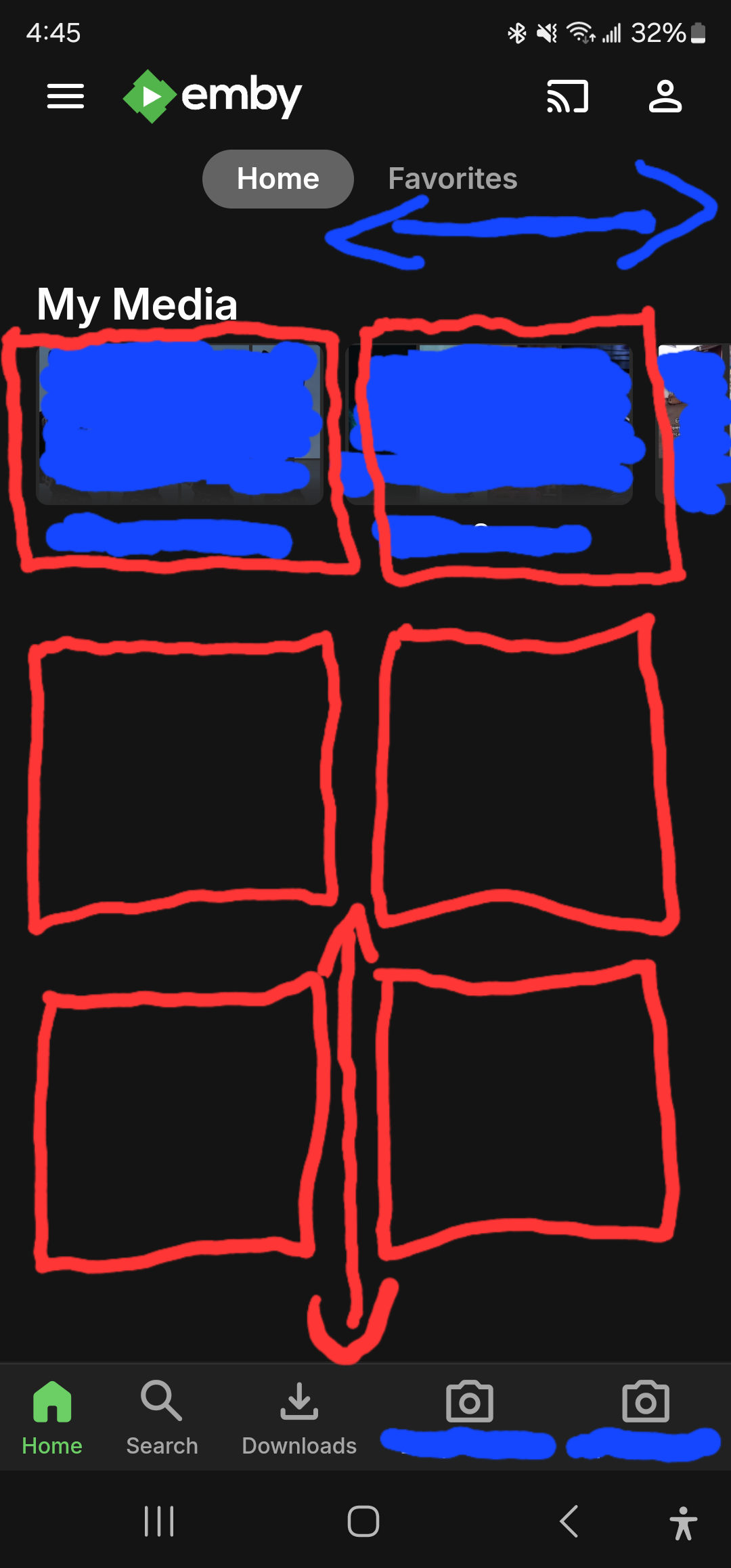
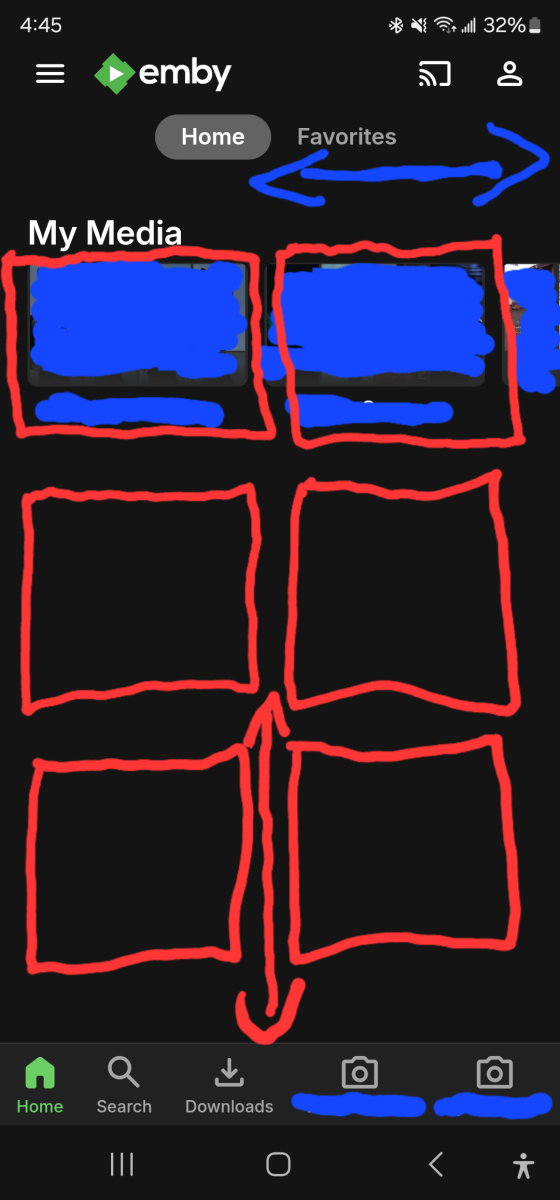
Current Issue: In the current version of the Emby mobile app, media libraries are displayed in a horizontal scroll format. With around 10 media libraries, this requires quite a bit of scrolling to navigate through all of them, which can be cumbersome. Proposed Solution: I propose a redesign of the media library display to a grid tile format. Specifically:Display media libraries in a grid with two tiles wide and three tiles tall.Users with more than six media libraries can scroll vertically to view the additional libraries.
 1 point
 -
When you try to add new items to playlists "imported" to Emby as m3u files, they do not show up in the "native" Emby playlists listing as options to add to. Apparently, only playlists actually created within Emby will allow you to add new material to them. "imported" playlists CAN be converted into "native" playlists by adding an "imported" playlist to a newly created playlist. Emby will add all the items from the "imported" playlist to the newly created "native" playlist, then the old "imported" playlist file can be deleted. The specific steps are outlined below: I navigated to HOME>MUSIC>PLAYLISTS, where all the "imported" & "native" playlists appear together (Master Listing). I selected one of the "imported" playlists, then clicked the ellipsis (...) to get to the "Add To Playlist" option. From the "Add to Playlist" screen, I created a new playlist. I had to repeat the navigation from home>music>playlists to get the new playlist to show up, but there it was! it had the same number of items & in the same order. The new PlayList also now shows up in the "Add To Playlist" listing! However, there are now 2 versions of the same playlist showing up in the Master Listing. I had added a custom description to the Metadata of the "imported" playlist. It was a simple matter to edit the "imported" playlist metadata, copy the description, edit the new "native" PlayList Metadata & paste the description, then Save. Since I couldn't delete the "imported" playlist from within Emby (separate question in another post), I went to File Station on my NAS & moved the PlayList.m3u file to a non-Emby-Indexed folder (effectively deleting it from Emby, while keeping a copy). I had to Re-Scan the music library to get Emby to recognize that it had been removed. When I went back to the Master Listing I saw that the "imported" version of the playlist was gone & the new "native" playlist remained, with the same content. I was concerned that deleting the original playlist would also remove the items from the new playlist, since the "source" was removed. However, apparently Emby imported the individual items from the original to the new playlist, so the new playlist remained intact when the original was deleted. Voila!1 point
-
weel it seems not. not now anymore in fact. At the very begining, I had this kind of problem with port opening, but it's solved. I also had the title of this loooong post "access token invalid" wich was the result of bad time issue on the server. also solved. anyway thanks1 point
-
Awesome job once again! Sent you donation via the new buttons for the continous greatness1 point
-
HOW TO CONVERT "IMPORTED" PLAYLISTS INTO "NATIVE" EMBY PLAYLISTS, THAT SHOW UP IN "ADD TO PLAYLIST" LISTING: When you try to add new items to the "imported" playlists, they do not show up in the "native" Emby playlists listing as options to add to. Apparently, only playlists actually created within Emby will allow you to add new material to them. "imported" playlists CAN be converted into "native" playlists by adding an "imported" playlist to a newly created playlist. Emby will add all the items from the "imported" playlist to the newly created "native" playlist, then the old "imported" playlist file can be deleted. The specific steps are outlined below: I navigated to HOME>MUSIC>PLAYLISTS, where all the "imported" & "native" playlists appear together (Master Listing). I selected one of the "imported" playlists, then clicked the ellipsis (...) to get to the "Add To Playlist" option. From the "Add to Playlist" screen, I created a new playlist. I had to repeat the navigation from home>music>playlists to get the new playlist to show up, but there it was! it had the same number of items & in the same order. The new PlayList also now shows up in the "Add To Playlist" listing! However, there are now 2 versions of the same playlist showing up in the Master Listing. I had added a custom description to the Metadata of the "imported" playlist. It was a simple matter to edit the "imported" playlist metadata, copy the description, edit the new "native" PlayList Metadata & paste the description, then Save. Since I couldn't delete the "imported" playlist from within Emby (separate question in another post), I went to File Station on my NAS & moved the PlayList.m3u file to a non-Emby-Indexed folder (effectively deleting it from Emby, while keeping a copy). I had to Re-Scan the music library to get Emby to recognize that it had been removed. When I went back to the Master Listing I saw that the "imported" version of the playlist was gone & the new "native" playlist remained, with the same content. I was concerned that deleting the original playlist would also remove the items from the new playlist, since the "source" was removed. However, apparently Emby imported the individual items from the original to the new playlist, so the new playlist remained intact when the original was deleted. Voila!1 point
-
Well, after some experimentation I answered the part of my own question: Can an "imported" PlayList be made into a "Native" Emby playlist (showing up in the "Add To Playlist" listing). The answer is YES! though it involves a few extra steps. I navigated to HOME>MUSIC>PLAYLISTS, where all the "imported" & "native" playlists appear together (Master Listing). I selected one of the "imported" playlists, then clicked the ellipsis (...) to get to the "Add To Playlist" option. From the "Add to Playlist" screen, I created a new playlist. I had to repeat the navigation from home>music>playlists to get the new playlist to show up, but there it was! it had the same number of items & in the same order. The new PlayList also now shows up in the "Add To Playlist" listing! However, there are now 2 versions of the same playlist showing up in the Master Listing. I had added a custom description to the Metadata of the "imported" playlist. It was a simple matter to edit the "imported" playlist metadata, copy the description, edit the new "native" PlayList Metadata & paste the description, then Save. Since I couldn't delete the "imported" playlist from within Emby (first question in original post), I went to File Station on my NAS & moved the PlayList.m3u file to a non-Emby-Indexed folder (effectively deleting it from Emby, while keeping a copy). I had to Re-Scan the music library to get Emby to recognize that it had been removed. When I went back to the Master Listing I saw that the "imported" version of the playlist was gone & the new "native" playlist remained, with the same content. I was concerned that deleting the original playlist would also remove the items from the new playlist, since the "source" was removed. However, apparently Emby imported the individual items from the original to the new playlist, so the new playlist remained intact when the original was deleted. Voila!1 point
-
@GrimReaperyou always know what I need before I know what I need. Thank you. Your friend, Vic1 point
-
As I said, I understand what you are requesting and it can be made to work in many circumstances but Vis was not "wrong" in his assessment as you had claimed. Some video players may not allow us to ignore what the inputs are telling them so we would have to work out a different way to force them.1 point
-
Ok, hier meine Lösungskonfiguration um die Videostreamschnipsel dichter an den Client bereitzustellen und damit die Wege zum emby-server zu verkürzen. Bitte bedenkt bei meinen Ausführungen, dass ich kein gelernter IT-ler bin und hier nur meine eigenen Erfahrungen oder Beobachtungen darlegen kann. Hier basierend auf Nginx (nicht Nginx Proxy Manager): nginx.conf example.com Jetzt vielleicht noch einmal die Rahmenbedingen, welche mich dazu gedrängt haben, eine solche doch etwas umfangreichere Server-/ Verbindungskonfiguration wie in meinem o.g. Beitrag bereits erwähnt, zu wählen. Nach meinen Erfahrungen und Recherchen haben wir in Deutschland ein großes Problem mit den Telekom-basierten DSL Internetanschlüssen. Hier fängt meist die Problematik mit einem ordentlichen Routing und Internetstabilität zu anderen Servern und Ländern. Ein kleines Beispiel aus der Praxis: Selber Ort, ein User hat Telekom-DSL (250Mbit), ein User hat 1&1 DSL (250Mbit) und ein Weiterer hat die örtlichen Stadtwerke mit Glasfaser gebucht (100Mbit). Wenn man nun einen Speedtest auf z.B. speedtest.net macht, sucht sich der Test logischerweise immer den besten Server in der Nähe. Wählt man aber nun manuell einen Server im Land des emby-Servers aus, sehen die Ergebnisse anders aus. Alle Geschwindigkeiten sind logischerweise reduziert, aber die DSL Verbindungen sind zusätzlich während des Tests instabil und springen wie wild hoch und runter. Mit iperf (oder bestimmt auch anderen Tools) kann man deutlich sehen, dass einige Pakete der DSL Verbindungen zwischendurch hohe Latenzen haben. Teilweise führt das sogar zu Paketverlusten. In DSL-Stoßzeiten (wenn viele Kunden Zuhause sind und das Internet nutzen) reduziert sich die Verbindungsqualität weiter. In einigen Foren wurde auch bereits diskutiert, dass, und das scheint für mich logisch zu sein, Netflix/ Google/ etc. reservierte/ gekaufte Bandbreiten bei den Internetanbieter zu haben, damit deren Services problemlos funktioniert bzw. selbst Routingserver betreiben und die Nutzung sich teuer bezahlen lassen (Sind die ISPs teilweise nicht bereit auszugeben). Das alles fällt nicht sonderlich in´s Gewicht, wenn der Emby-Server direkt im selben Land oder sogar Bundesland wie der User steht/ erreichbar ist. Also einfach nen Server im heimischen Netzwerk mit Nginx Proxy Manager betreiben und diesen dann mit Port 443 und ner eigenen Domain im Internet freigeben, wird keine große Probleme bereiten. Wenn man aber nun, wie ich, User hat, welchen man nicht 100%ig vertraut, wäre es schon ziemlich fahrlässig denen seine öffentliche IP Adresse auf die Nase zu binden. Also musste eine anonymere Lösung her. Einen dedizierten Server mit Grafikeinheit zu mieten war zu teuer und den notwendigen Speicher für emby zu buchen außerdem unglaublich teuer. Stattdessen habe ich mich für einen günstigen VPS (2 Kerne/ 4GB RAM/ 30GB SSD) entschieden. Der alleine ist aber mit einer eigenen Emby-Instanz hoffnungslos überfordert. Mein Emby-Server selbst steht im heimischen Homelab, welcher über vier virtuelle Maschinen mit dem VPS in Frankreich verbunden ist. Die virtuellen Maschinen nutzen jeweils eine eigene VPN Verbindung eines VPN-Providers, welcher das Port Forwarding unterstützt. Diese Verbindungen laufen über unterschiedliche Länder. Der VPS kann nun über Load-Balancing, den öffentlichen IP Adressen des jeweiligen VPN-Provider Servers inkl. des freigegebenen Ports den emby-Server erreichen. Der Emby-User verbindet sich nun mit der Domain "meinembyserver.de" landet auf dem VPS in Frankreich und der verteilt dank Load-Balancing die Last zwischen den einzelnen VPN Verbindungen. Allerdings fängt der Stream bei den DSL-Usern häufig an zu ruckeln an. Emby reagiert offenbar allergisch in Kombination mit Paketverlusten und der längeren Paketwege. Nun hatte man in der Vergangenheit mit Cloudflare die Möglichkeit, diesen als CDN zu nutzen (Content Delivery Network). Sowohl für den statischen Inhalt der emby-Oberfläche, als auch für die Streamingpakete. Grundsätzlich gesagt, hat Cloudflare ein riesen Netzwerk an Servern. Ein Server steht bestimmt auch in Deiner Nähe. Somit werden die Wege zwischen den Usern und dem Server verkürzt. Damit dies aber funktioniert, musste man Cloudflare Zugriff auf die Bilddateien und auch Streaming-Pakete geben. Diese werden dann ganz grob gesagt zum jeweiligen, nahegelegen (zum User) CDN-Server übertragen und zwischengespeichert. Diese kostenlose Möglichkeit hat Cloudflare allerdings abgeschaltet. Es ist nun nur noch kostenlos möglich die kleinen Bild Dateien für die statische emby-Oberfläche auf die CDN-Server in Deiner Nähe zu übertragen. (Die Zwischenspeicherung der Video-Streaming-Pakete geht in die GB, wobei die Zwischenspeicherung der statischen Bild Dateien meistens weit unter 1GB verbrauchen) In meinem Fall fungiert der VPS nun als eigener CDN Server, welcher sowohl Bild als auch Streampakete zwischenspeichert. Damit muss der Emby-User nicht mehr jedes Mal den gesamten Weg für das Videostreamingpaket gehen (Emby-User -> VPS statt Emby-User -> VPS -> VPN-Server -> VM -> Emby). Auch das Springen während eines Streams auf der Zeitachse funktioniert viel schneller und sauberer.1 point
-
ok got it. "ExtendedVideoType": "Hdr10" this should always be one of : None, Hdr10, Hdr10Plus, HyperLogGamma, DolbyVision correct1 point
-
Right what I'm saying is use the ExtendedVideoType property, not VideoRange.1 point
-
HI, did you update the file? Try refreshing the metadata on it.1 point
-
The iOS update is out. We are working hard on the others. Thanks.1 point
-
Hi, I realize that we're maybe not talking about the same thing with embedded subtitles, We may have misunderstood! I'm talking about embedded subtitles that can be turned off as well as on. Not really embedded, non-closable subtitles. I can confirm that no re-encoding is needed, and the proof is that when I don't use Emby/Plex/Jellyfin, but only MX Player, I can turn off embedded subtitles and turn on external subtitles as much as I want. no remux, no need to *force turn off internal subtitles* Screenbits 2025-02-22_103529.mp4 And then, You said *The issue is apparently more complex than you believe, based on your "willing to add an option" question.* , Now I get it, I'm naive, I don't know how to develop, it should be up to you to think about how to implement this feature. You are right. And last, Are things really that complicated? As demonstrated by MX Player, It's just a matter of which subtitle is selected by default! I'm discussing the issue of default options before playback. If Emby selects PGS, then I need to do an extra step to change the subtitles option; if Emby selects external subtitles, then I can just play it. I just hope you make a Feature where you can select external subtitles by default. This has nothing to do with playback at all Screenbits 2025-02-22_104830.mp4 Such as video, Jellyfin automatically select external subtitles the moment you click into the movie, no remux, no need to *force turn off internal subtitles*. You may have misunderstood me. It's not that complicated. Screenbits 2025-02-22_094754.mp41 point
-
oh , thanks , as quickly as possible1 point
-
thank you, thats great to hear!1 point
-
I made a few improvements to channel building. Soon I will add in bumpers. Vic1 point
-
I tried disabling both of them, and no change. I decided to wipe my library and install 10.0.47. Surprisingly, I'm seeing the same issue. So looks like you were right, and there is absolutely something else going on here. Something must have gotten corrupted somewhere. I'll have to restore from a known-working backup and cross my fingers. Thank you for your help in troubleshooting this.1 point
-
No, that param is not currently in the api.1 point
-
not sure, @Lukewill know if this is possible via a REST API call1 point
-
I have to day thank you for all your work! and happy weekend! I have not one issue for at least 6 months your addon is so good!!1 point
-
We've been having this issue with the Emby app on LG TV for the last few months as well. We used to be able to watch media via Emby at a TV volume level of 20-25 and it was perfectly fine. Now for any and all media we have to turn the TV up to at least 45 and often as much as 60+ to get reasonable volume. This affects all files, including ones we used to be able to watch quite happily at a TV volume level of 20 or so. Server log from yesterday attached. No transcoding is occurring (video or audio). Other media sources viewed on the TV (live TV, PVR input) have the same volume level as they always used to have. embyserver-63875692800.txt1 point
-
Nope. It’s been “coming soon” for a few years. The ability to pin collections would be the feature request you want.1 point
-
Hello, it seems mbedtls for FreeBSD has been deprecated and removed from pkg: When running pkg install mbedtls I get notification about missing package - I have pkg set to LATEST. According to this: https://www.freshports.org/security/mbedtls/ port for mbedtls has been removed and replaced by mbedtls2 and mbedtls3. Those packages can indeed be installed, but since Emby package looks specifically for "mbedtls" the installation fails with missing dependency error. It is there possibly any fix for this?1 point
-
If you look around the forums, you'll see I've written many tips and tricks for Synology NAS boxes and the Synology 920+ in particular which has a Celeron J4125 CPU. From firsthand experience, I'll tell you 6 to 9 1080p transcodes while doing a 4K transcode isn't something to expect as far as performance and would be more of a planned "made for video" situation where videos are carefully selected. On the flip side, I can give you a "made for video" situation where this CPU can't transcode a single HDR video. Depending on the setup of the machine a J4125 may not have enough muscle to handle 2 live TV transcodes due to the IO, The onboard QuickSync is going to be similar on an Celeron, i3, i5, i7 or i9 from the same generation but it's more than that. What instruction sets does each have, have many cores are available, how much cache, what's the core speed & bandwidth, etc. The cores are being used to run the OS and programs running on it. They are being used for any special disk access like mirroring's, RAID, BTRFS, ZFS, for queuing reading/writing to disk, including the optional use of NVMe drives as a disk cache. Same with managing bonded NICs, IP4 and/or IP6 and handling calculations for SSL of all packets sent/received over the NICs. Not to mention the work the cores do to move data from storage to memory, to and from the PCI bus, the GPU, the cache to Quicksync. Short of using hardware with the ability to offload functionality from the CPU, the CPU is involved multiple times for nearly every byte of data that moves through the system. The number of cores available as well as PCI bandwidth can make a huge impact in overall performance. If something needing transcoding can't be done entirely in the Quicksync hardware pipeline the bandwidth and core count of the CPU becomes a big factor. A typical example of this is often working with media using non-text subtitles. If the CPU is now a bottleneck because there isn't enough cores/threads available to do what's needed without adding latency the transcode job is going to fail. Going from 2 to 4 cores will make a HUGE difference. Going from 4 to 8 cores generally will make a big difference. Going past 8 cores will make less overall difference in general. There isn't a specific answer what's the best CPU as you want to factor in what UHD graphics it has, what speed the CPU runs at, what type of core and how many, the number of threads it handles and of course the cost (cpu, motherboard, RAM, etc). The Intel 11700K the Op mentioned could be a great choice, but depending on parts that needs to be purchased the i7-12700K or i9-12900K both with UHD 770 Graphics could be a better investment depending on purchase prices.1 point
-
If the devs would just say straight out what the issue is and what their timeline is to either fix it or admit its as good as its going to get I think you would see a lot less of these repeated requests. I personally have moved back to Plex but still tinker with Emby and visit here often as I fundamentally prefer this software and the business model but at the end of the day I need something that works for my family. "We are looking into it" is great and all and its nice to know the top guy is reading and aware of the issues (your not going to see that on the Plex side of things) but after years of the same response, it sort of starts falling on deaf ears.1 point
-
I like Emby, the devs seem to do their best, and I cannot blame them for giving priority to Windows, but the Apple platform are demonstrably a huge hassle for the developers. For e.g. the Emby theatre app still can't play audiobooks properly (it basically stops updating the timeline after a while) and Apple TV development is a joke: every update is "improvement to playback" apparently, with no indication of what's been done. I get the sense that Apple products are worked on as an afterthought: we'll write a tiny block of code and send that on its way and call it an update. We hope it works. Makes me sad.1 point
-
It would be very desirable if music albums could be marked as listened. Audio books and movies already have this option.1 point
-
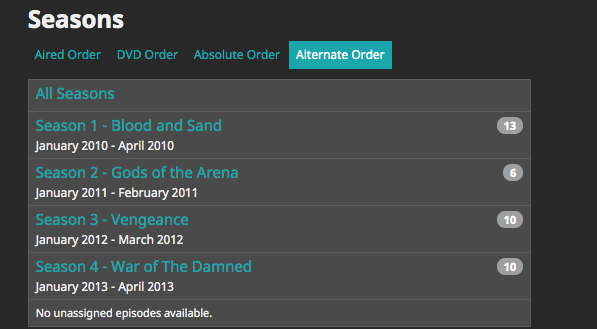
Could the alternate order option please be added? Right now, DVD order and absolute order can be selected, but Alternate is missing. Below is an example of a show on TVDB with an alternate order. Thanks!
 1 point
 -
It has come to our attention that someone (we believe out of China) is spoofing our purchase page and reselling bogus Premiere keys. Please be aware that the only valid locations to purchase Premiere are our web site (https://emby.media/premiere) or inside one of our official apps. The scammers are using the domain "Emby.team" and are spoofing credit card receipts that look like they come from us and everything. If you happen to have fallen for one of these scams report it to your credit card company and please let us know at billingsupport@emby.media. I'm afraid we cannot do anything to help return your money but we can try to squash the perpetrators. Thanks. View the full article0 points