Leaderboard




Popular Content
Showing content with the highest reputation on 02/21/25 in all areas
-
It would be great if emby can advance over the typical media servers by offering an animated hover thumbnail to videos. maybe in m3u8, webm, mp4 or gif format? There are several libraries on github that can do the task of generating the files needed for the thumbnails with a quick google search I found the following: https://github.com/grafov/m3u8 , https://github.com/tjenkinson/hls-live-thumbnails , https://github.com/video-dev/hls.js/, https://github.com/flowplayer/flowplayer-thumbnails I think it is up for the user to use these libraries to generate animated thumbnail on the video. What emby should do however is give support to animated video or gif on hover. I have not seen this feature implemented at another media server. I am aware that emby has the animated backdrop support to some extent. But this different. Netflix currently uses this feature on a tvshow/movie level and not on each single episode. I know the emby developers here are against animated thumbs.. Imagine browsing through your library with all thumbnails animated.. it will be distracting and messy! thats is why I think animatition on mouse over (or on selection in case of tv apps) would be the best idea to satisfy both sides.2 points
-
Version 12.0.0 Notes: Please remember to leave an updated textual review on the Play Store. Your feedback is essential for improving the app’s ranking and securing Symfonium’s future. Added: Complete rewrite of the Now Playing screens and their settings. You can now create the Now Playing screens of your dreams in both portrait and landscape modes, with a preview mode to ease tweaking the many new options. Configure what is visible, where and how it’s displayed. Support always visible lyrics and/or queue in landscape mode. Support advanced strings templates with conditions for all strings. And much more. Added an optional donation program, allowing users to support the app and contribute to its continued development. Introduce the concept of Application and Now Playing Styles. You can now export and import these styles to share with others. Application Styles embed nearly all interface settings (including current now playing style), allowing you to change the whole interface in two clicks and discover the full power of Symfonium customization without having to adjust every setting individually. Now Playing Styles embed the complete Now Playing settings, allowing you to completely change the Now Playing interface in two clicks. You can use the dedicated forum section to share your styles and discover those created by other users. Symfonium now includes multiple default Application Styles and new Now Playing Styles to ensure seamless adaptation for users. Added file deletion support for Local provider in SAF mode. You may need to remove and add again the source folders in the Local provider settings. Remember that you are responsible for your own actions! Added new navigation patterns and precise settings for portrait and landscape navigation types. Added new home shortcut styles (Compact and List). Added new library page button styles (Horizontal and List). Added Landscape and Landscape Background styles to home grids. Added Grid Landscape and Grid Landscape Background display modes for most lists. Added Fanart Grid display mode for Artists. (Not all providers support fanart.) Added Compact Header mode to album, artist, genre, and playlist pages. Added an option to show the Search button in the top app bar. Added an option to always show the filter bar on list pages. Added Favorite Date as a smart filter field and as a smart playlist sort order. Added a per-renderer option to prefer the offline cached version when casting, even if the server is available. Added a new advanced setting to disable the output switcher, preventing unwanted audio output device changes. Added “Is missing” and “Is present” filters for date fields in smart filters. Added “Favorite” and “Quick rate” as possible compact player button. Added new “Prefer year tag” setting to Symfonium custom tag parser. Added new API call to load and resume media queues. Backups can now properly include saved Smart filters. Normal playlists can now be exported to m3u8 files. Changed: Due to the complete rewrite of the Now Playing screens, your Now Playing settings have been reset, as it was not possible to migrate them. You can reconfigure them to be as before—or even better now. (All the previous styles can be downloaded from the forum) On some devices, the default navigation patterns may have changed. You can restore your preferred configuration in the settings. Moved the Now Playing settings to be sub-settings of the Interface settings. Removed support for pure Android Media Store library handling for new users, as it is too limited. On Android 15, keep foreground status on pause for a longer period to allow resuming in more cases when forced to target Android 15. Symfonium will now use a random entry in PLS Internet Radio on each attempts and not always the first one. Symfonium custom parser will now try to support both 0…5 and 0…100 values for ratings. Clicking an Internet Radio in the list now queues all available stations, allowing you to switch between them using skip previous, skip next, and the now playing queue. Fixed: Fixed the “Offload if gapless is supported” setting not always working as intended. Do not create media queues for non-media playback. Fixed pre-cache being limited to 10 tracks despite settings allowing larger values. Fixed cases where Replay Gain values of 0 were ignored when determining the proper Replay Gain to apply. Fixed Replay Gain sometimes not being applied to non-natively supported formats. Fixed Jellyfin artists tag handling when part of collection and having tags. Fixed playing composers sometimes saying no playable media. Fix smart playlists not playable from voice commands with Google assistant when filter only offline is enabled. https://support.symfonium.app/t/version-12-0-0-released/68782 points
-
That's the beauty of open source ... load the free Visual Studio Community 2022, get the source as stated a couple posts above this, and have fun2 points
-
Pretty simple suggestion. I have multiple users for my Emby server. If I want to do continuous maintenance on the media, I have to tell everyone. some of them are harder to reach than others ( i.e. no Facebook or Skype chat etc. ) It would be great if say... on the admin panel, I could hit a check box that enables 'maintenance mode', where the server still runs does everything as normal, but instead of the login screen it displays a maintenance page saying the server is unavailable. Even better if I were able to directly put a reason in a text box that would then display on the login screen as well. Not really sure what others would think of this, but for me it would be quite helpful. mostly if I want to make sure no one is trying to access content I know won't work until I've done a full library scan again. Thanks for reading. -Kyle1 point
-
It is really cool that Emby has the ability to support multiple versions of the same movie. It would be nice to have a setting on the client side to allow the user to set which version should be selected by default. This could be as simple a user-entered string, or it could be a list of detected strings to choose from. It could allow multiple entries and it would choose them in the order entered. On the Kodi side, it would also be nice to get the "Choose the Best Version for Me" option that the Emby app has.1 point
-
Why no one is looking into this issue it's really an annoying issues it happens as well with me i set downmixing to 3, not enough, yet the same file if direct play through other apps like vlc ... etc the volume level is like 3x higher not sure why this is happening i do have this issue for the app on LG TV WebOs1 point
-
I have added the DHR flag to the latest version (1.11.37)1 point
-
Thank you all so much. I'm going to have a look at this tomorrow, but for now I'm going to watch my emby, have a good evening1 point
-
Interesting. In that case the RTM is not strictly looking for file and directory changes but also capturing events like attribute and status changes. Attribute changes don't update the mtime of a file or dir since the contents haven't changed.1 point
-
Danke für die großartige und umfangreiche Hilfe. Habe den Fehler selber gefunden. Video - Caching funktioniert und die DSL-Anschluss-User können nun ruckelfrei den Stream genießen. Auch in Stoßzeiten.1 point
-
Brilliant, thank you1 point
-
I prefer to select films based on filename. So, for each folder I have to select the Table view, then manually de-select the default enabled Fields, which for some reason includes unnecessary fields such as Album Artist, Composer etc1 point
-
Neither chmod or chown alter the mod time attribute of files or directories. It shouldn't trigger RTM.1 point
-
rsync stuff here | tee -a /path/to/rsync/log Also I think running permission changes on all the files may trigger RTM to check them, even if the permissions don't actually change, not sure I'd recommend that approach here.1 point
-
Will try once i get home1 point
-
He isn't wrong in all instances. Some players do behave this way with a strict enforcement of the tags that are there (Roku most likely would be one). After all, that is what the data is telling the system to do. I understand your request and why you want it but, basically, you are asking the system to adjust to bad inputs and some players simply won't allow that. In those instances, we would probably have to force a transcode.1 point
-
Sorry for the delay, for some strange reason it started to display. I didn't do anything. It just started to display. I wish I could explain to help others but I don't know why. Very strange if it happens again I will note and give update. Thx all.1 point
-
I just bought a Philips 43pus8909 with TitanOS. Thank you for looking into this; Emby on this TV would be amazing!1 point
-
Have a look at this.1 point
-
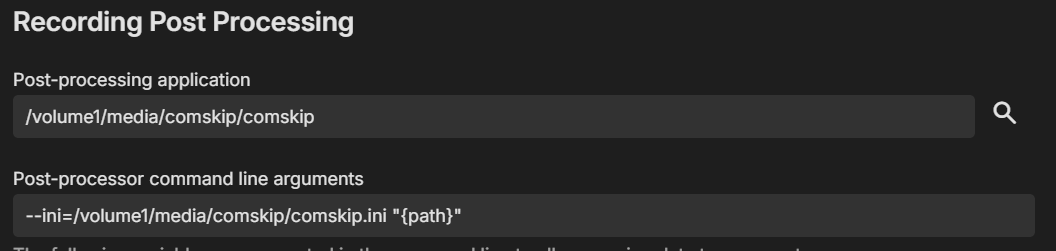
So finally found a workaround. I created a subfolder (/volume1/media/comskip) and placed both comskip and comskip.ini in there. The /volume1/media/ houses 3 other subfolders, /tv, /movies, /imports. I set the tv and movie subfolders as my default recording locations. I setup this folder as a "shared folder" and gave both emby and sc-comskip system user roles access to read and write. I then modified Emby post processing to the following: Now things are processing appropriately. Clearly I had a permission issue, I'm guessing it's the folder permissions within the /volume1/@appdata structure, but since I couldn't modify permission in shared folders, I wasn't going to try and tackle that via CLI, I'm not anywhere near knowledgeable to try and tackle that nor do I want to break anything inadvertently. Thanks again for the suggestions, it ultimately led me to finding a workable solution.
 1 point
 -
OK, so forced a refresh of metadata and that did nothing. Opened up the files in mp3tagger and guess what - EAC hasn't written the tags! Whether that's due to losing settings in latest upgrade or something, I don;t know. Forced library scan Now the two new albums show, but not all the tracks. Force metadata refresh followed by library scan - all tracks tere, the only thing missing is an artist image for one album, which may appear during future refreshes. Thanks Luke - problem solved. I shall now check the defaults set for EAC...1 point
-
ok will look into it1 point
-
I know setting quality to 100 will increase the time to display images. But some people like to see image in full quality irrespective of time. A simple option in settings can really help users.1 point
-
You could do keyword recordings though.1 point
-
The bug is fixed, and I changed much of the channel build code. The logic is simpler, and several improvements are included. Keep in mind that this code is beta code and further development is underway. Vic1 point
-
Ok great. Thankyou!1 point
-
Fix1 point
-
You should be able to copy the entire /var/lib/emby folder over, just make sure it's still owned by the emby user/group in case the UID/GID is different.1 point
-
Hi, not yet, sorry.1 point
-
Reproduce the issue. Provide some specifics: which client app you're using; does it happen on all items or only certain ones; which item was played; were embedded or external subtitles used; attach server log and ffmpeg log(s) if created for that session.1 point
-
Considering all the major players are moving to limit the maximum lifespan of a tls certificate to 90 days; you guys should seriously look at moving to automation through a free provider like letsencrypt. https://www.encryptionconsulting.com/from-398-days-to-90-days-googles-proposal-to-shorten-tls-certificate-validity-how-prepared-are-you/ Even if certificate providers choose to continue issuing longer certs, the browsers won't accept them soon enough. Stop unnecessarily paying for certificates; you're wasting your money on something that's provided for free, and will very soon get 0 benefit over free certificates. I've had mine automated using ACME.sh for like 7 years. Renews automatically with LE every 2.5 months using DNS-01 verification (the script logs into the DNS, adds a txt record, does the verification using that, then removes the record. No webserver config needed).1 point
-
Hello, it seems mbedtls for FreeBSD has been deprecated and removed from pkg: When running pkg install mbedtls I get notification about missing package - I have pkg set to LATEST. According to this: https://www.freshports.org/security/mbedtls/ port for mbedtls has been removed and replaced by mbedtls2 and mbedtls3. Those packages can indeed be installed, but since Emby package looks specifically for "mbedtls" the installation fails with missing dependency error. It is there possibly any fix for this?1 point
-
That makes sense, thanks @Carlo1 point
-
nvidia itself has said that the dolby processing feature is for one purpose: to convert dolby plus to dolby for devices that can't natively decode dolby plus and need it done for them. this is the best description of it that I've seen: I think you are getting confused by how nVidia (and others) phrase this. Dolby audio processing ENABLED means, let the Shield device handle it and decode the Dolby surround sound Dolby audio processing DISABLED means, ignore the audio format (basically) and let another device down the chain handle it (if you use a AVR, soundbar, etc) So the phrasing "enable Dolby processing to get surround sound" is kind of accurate. But i understand that it can be confusing. TL;DR If you use a AVR or other device behind the Shield which you want to handle the audio, disable it. If any device behind the Shield is not able to handle Dolby audio, then enable it. Maybe nVidia could change the phrasing to something like when its disabled "Enable to process Dolby audio by Shield" and when its enabled to "Disable to let Dolby audio be handled by another connected device" source: https://www.reddit.com/r/ShieldAndroidTV/comments/vjy6ls/comment/idmw0gl/ Here's another reply directly from nvidia: Over the years with passthrough (before Dolby processing in the 2019 SHIELDs), we've had a number of users complain when they are playing a 5.1+ title and they pause/play it, they lose the first second or two of sound. This is becasue with passthrough, the recevier is being switched between DD and stereo and that switch causes gaps in the audio. Netflix has apparently had a lot of users complain about this as well and as such they've designed the netflix app to require Dolbys MS12 stack if you want ATMOS. The main reason for this is in the netflix app with that stack, they keep the recevier in DD mode so there is never any lost audio. So, this is one othe major benefits of this stack. The stack can also possibly cause av sync to be better since there is finer control than with passthrough. One of the downsides with the stack in Netflix is Netflix requires us advertise stereo shows as 5.1 by stuffing the channels with empty data. This is to avoid the switching between modes which causes the gaps, but the downside is since yoru recevier see's it as DD, you can't enable Dolby pro logic or the other receiver converting features. We've been working with netflix to figure out how to address this but don't have a good solution yet. Disabling Dolby Processing works around this in the meantime in exchange for gaps in the audio as the modes switch. Our goal for the entire SHIELD was to run it in the MS12 stack. One big problem we ran into with the current version is the latency of the Dolby stack is high, hundreds of ms high, enought that when you navigate menus, the lag feels terrible if it's enabled. This is one of the reasons Netflix has no clicks as you navigate the UI and also for this reason when SHIELD goes back to the home screen, we bypass the MS12 codec which causes a blip in audio but avoids the latency issue. Becaue of the issues above, there are a few reasons to disable the MS12 stack but disabling it has it's tradeoffs as well, like gaps in the audio as you play/pause/start new shows. We're working with Dolby to someday get a low latency version of the stack that we can leave on everywhere to have a smooth experience across the entire device without any audio drops as transitioning and without noticable latency that makes clicks feel sluggish. source: https://www.nvidia.com/en-us/geforce/forums/shield-tv/9/380402/dolby-audio-processing-enable-or-disable/2736774/1 point
-
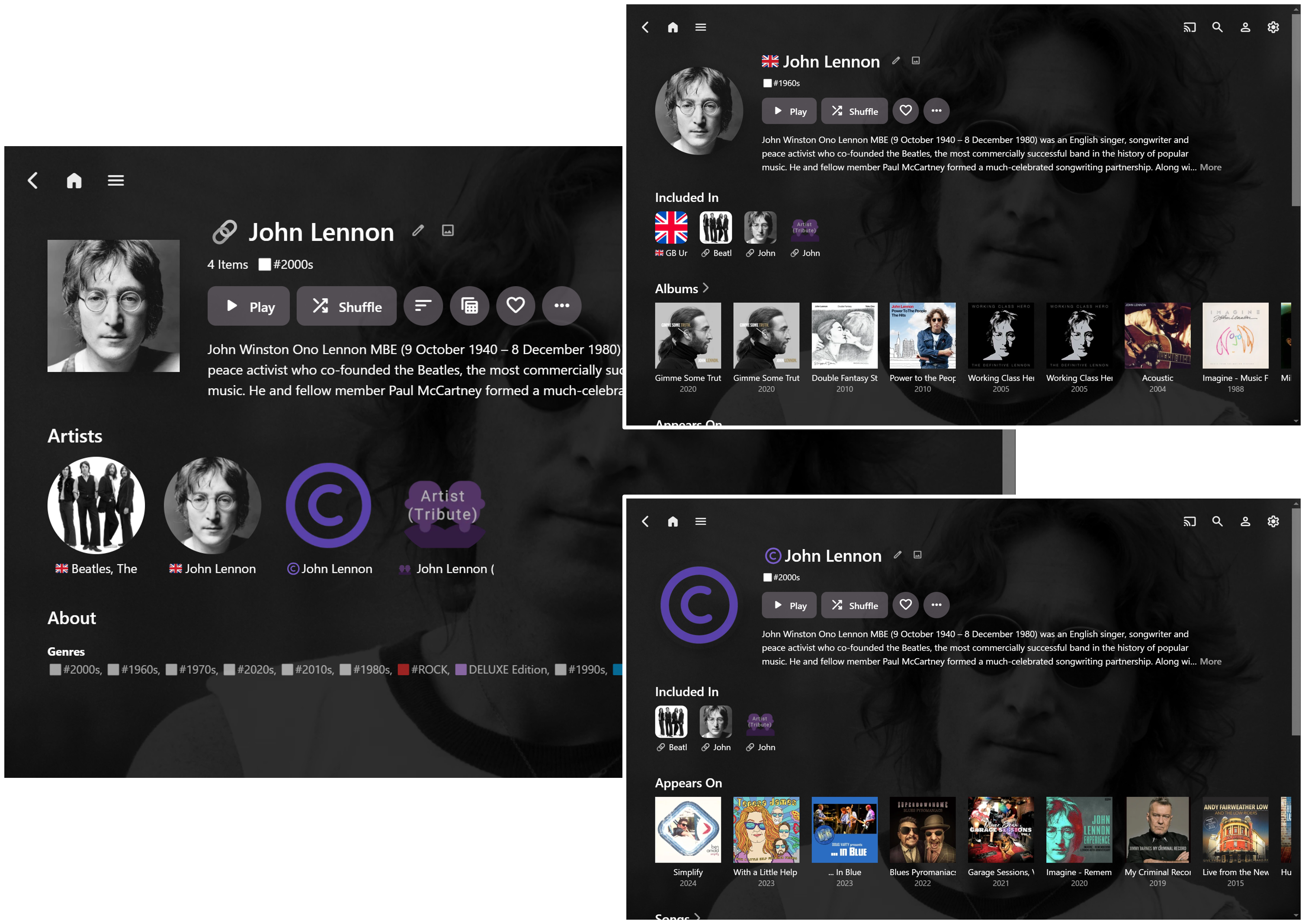
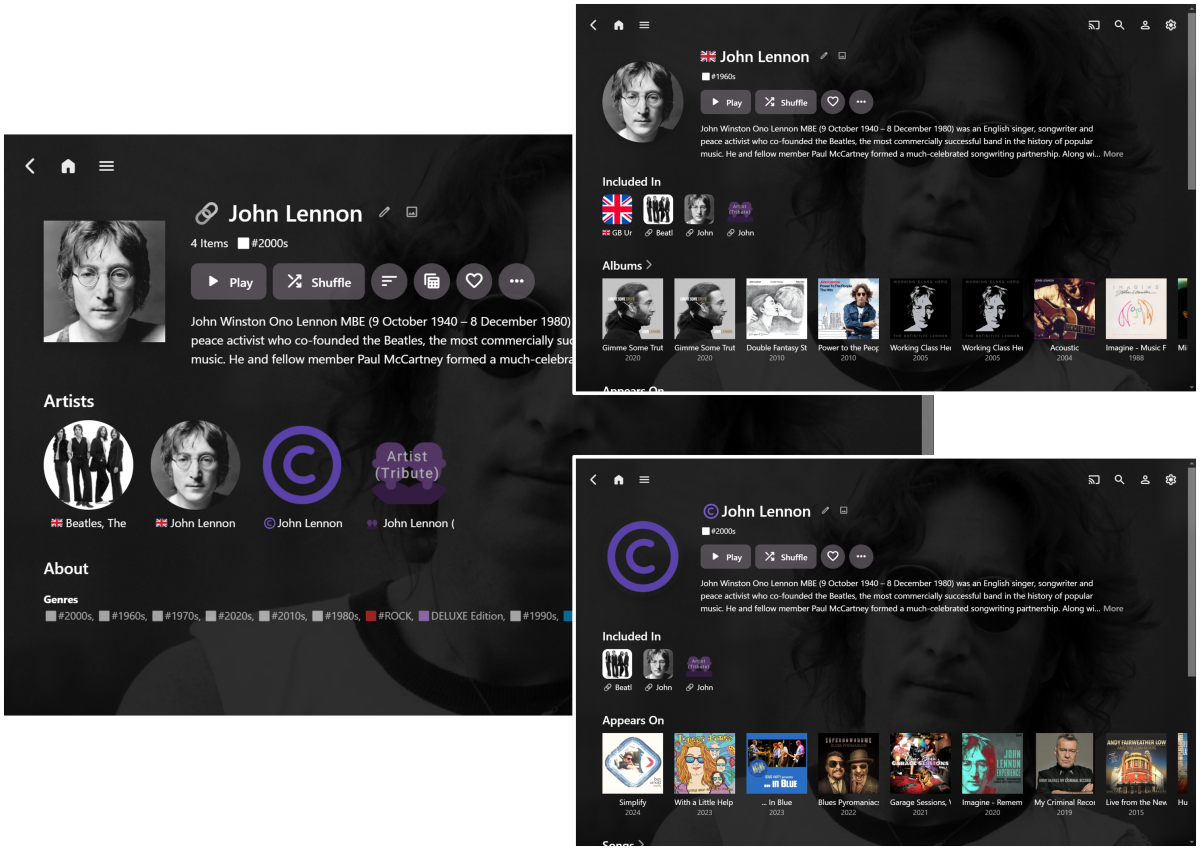
Here’s some updated info about my latest attempt to separate Artists and Composers, plus it combines a couple of other things I’m interested in: Separate Artists and Composers Show Album Artist Countries Navigate by “Related Artists” It's the same general principle as some of my other posts above, just a bit more refined and evolved. The main steps to set this up were: Add a “Copyright” emoji prefix to all Composers. This can be completely automated in Mp3tag. Any other emoji of preference could also be used instead. Doing this alone will give the required Artist / Composer separation being asked for. Add a “Country Flag” emoji prefix to all Album Artist + Artist entities (I haven’t worried about individual non-Album Artists just yet.) Bulk editing works in Mp3tag, but it’s more difficult to fully automate. Android and iOS support the flag symbols, but Windows doesn't, so the Country Flag Fixer Chrome Extension solves this for the Web App on a Windows PC. Create “Related Artist” Collections within Emby. This also allows for combining Artist and Composer back together. I have also used CSS to move (and shrink) Collections higher on the Artist detail pages and align the top overview section of the Artist pages to match the Collection pages. Here’s are some John Lennon example page views: With all Composer tags now starting with © , the John Lennon Album Artist + Artist page excludes Composer only Albums and Songs, along with giving a different group of music to the John Lennon Composer page. John Lennon (the Artist) and John Lennon (the Composer) are now grouped on the Collection page (along with The Beatles and a John Lennon Tribute entity). Therefore it’s still possible to easily select and play all John Lennon associated tracks, if required, via the Collection. Of course, Albums, Playlists, etc. could be added to the collections, but I’m mainly using them as a Related Artists navigation tool. (I did initially try Tags to do this, but they didn't work as well.) Separating Composers is actually the easiest bit. The Country Flags and Related Artist Collections are much more time-consuming to set up. It's still all evolving as I figure more things out, but already so much better (for me) than than no customization at all (or using Plex!!!). Perhaps these ideas could also be useful for others with organizing their own libraries?
 1 point
 -
I would like this, as the second server doesn't have any libraries viewable by the Android Auto app so there's literally no point in a menu to choose between it and the main server. The primary server has a music library and an audiobook library so it always makes it choose between them, but I'd be happy if I could just set a default and be able to open a menu to switch if needed.1 point
-
Emby for LG 1.0.45 has been released. This is largely a bug fix release. Here are the changes: Fix photos not showing in collections Fix top portion of home screen cut off when scrolling down (only on certain models) Increase allowed range of subtitle offset Fix parental rating multi-select filter Fix series status filter View the full article1 point
-
The Emby team hopes you and yours are enjoying a Happy Holiday Season. We would like to announce a couple of changes that will hopefully increase the value of Emby in all of your households. First, to aid in the transition from our old TV-only Android TV app to the new Standard Android app on that platform, we will be eliminating the need for the app unlock by allowing free playback for up to five TV devices per Emby Server. Devices beyond that limit will require Emby Premiere. Previously purchased unlocks will still be honored. This should allow most households to move to the new app more easily. Second, recognizing that today's households have more and more devices, we are increasing our standard Emby Premiere License device limit from 25 to 30. We will then also increase the extended premiere plans from 45 to 50 and 75 to 80. Existing extended subscriptions will remain the same but new ones will be at these new levels. All standard licenses will be automatically updated to the new 30 device limit immediately. You should see all of these changes rolling out over the next week or so. Happy Holidays from the Emby Team! View the full article1 point
-
Read here:1 point
-
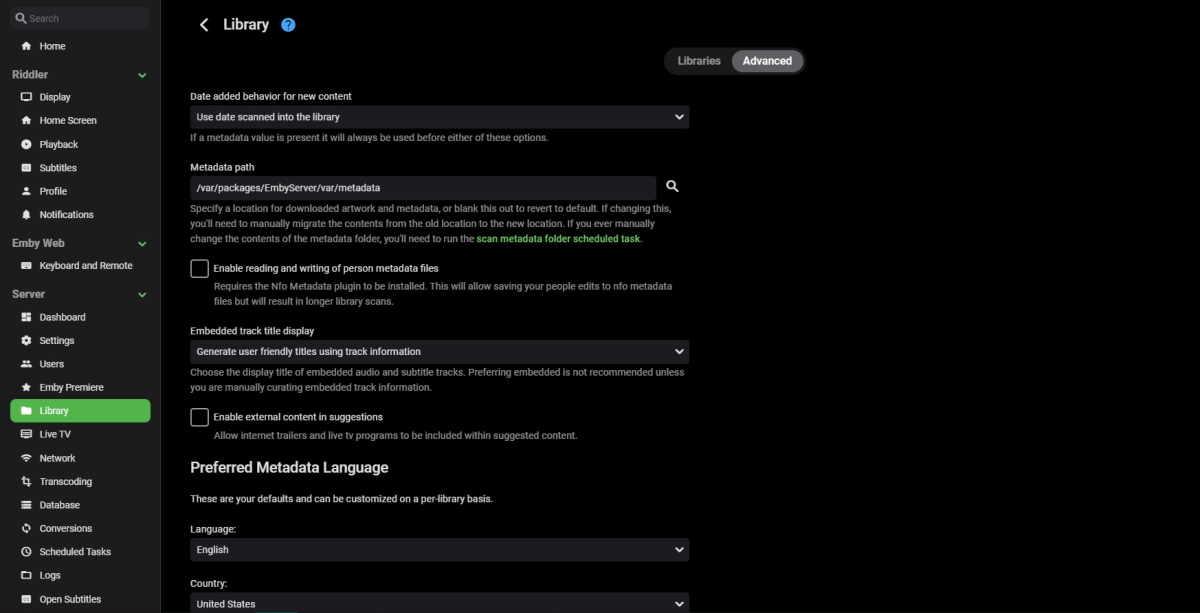
Sorry if I'm just being dumb but... 'Display specials within season they aired' is missing or am I searching in the wrong place?
 1 point
 -
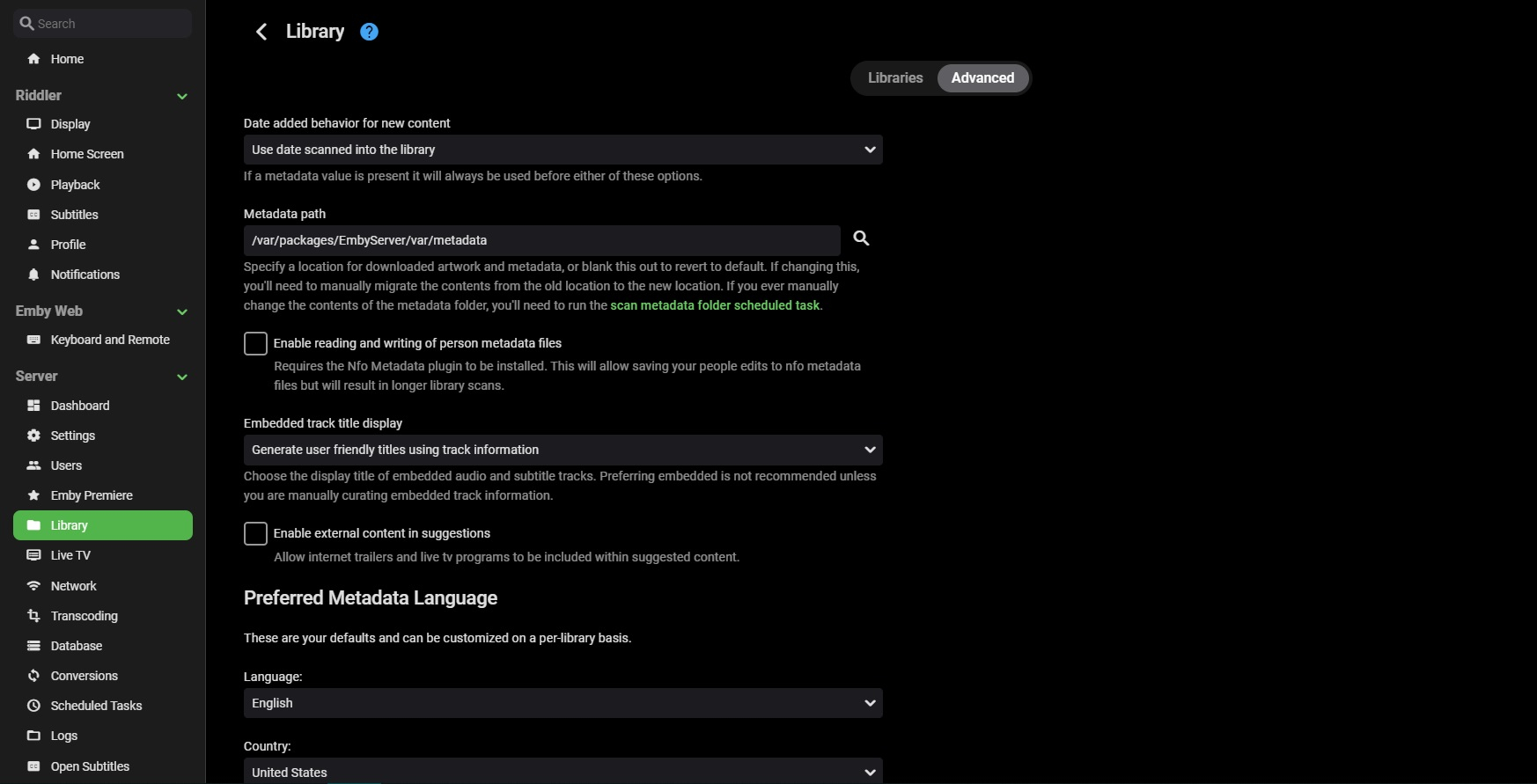
Courtesy of @Happy2Play: Here are the steps to creating a Collections library on a new install. On the server dashboard at the bottom of the page there is a link to the API. Note there are connections requirements of using localhost or a HTTPS connection. But there is a workaround with browser flags to allow your LAN connection from any address. In Chrome/Edge entered IP or Hostname depending how you connect. edge://flags / chrome://flags (but other browsers should have the same options) Once you have access to Swagger you will go to LibraryStructureService and expand Then you will expand /Library/VirtualFolders and click "Try it out" Then go to "AddVirtualFolder" box and clear it. Now you will copy this library config and paste into "AddVirtualFolder" field. { "Name": "Collections", "Locations": [], "CollectionType": "boxsets", "LibraryOptions": { "EnableArchiveMediaFiles": false, "EnablePhotos": true, "EnableRealtimeMonitor": true, "EnableMarkerDetection": false, "EnableMarkerDetectionDuringLibraryScan": false, "IntroDetectionFingerprintLength": 10, "EnableChapterImageExtraction": false, "ExtractChapterImagesDuringLibraryScan": false, "DownloadImagesInAdvance": true, "CacheImages": false, "PathInfos": [], "IgnoreHiddenFiles": false, "IgnoreFileExtensions": [], "SaveLocalMetadata": true, "SaveMetadataHidden": false, "SaveLocalThumbnailSets": false, "ImportPlaylists": true, "EnableAutomaticSeriesGrouping": true, "ShareEmbeddedMusicAlbumImages": true, "EnableEmbeddedTitles": false, "EnableAudioResume": false, "AutoGenerateChapters": true, "AutomaticRefreshIntervalDays": 0, "PlaceholderMetadataRefreshIntervalDays": 0, "PreferredMetadataLanguage": "", "PreferredImageLanguage": "", "ContentType": "boxsets", "MetadataCountryCode": "", "MetadataSavers": [ "Nfo" ], "DisabledLocalMetadataReaders": [], "LocalMetadataReaderOrder": [ "Nfo" ], "DisabledLyricsFetchers": [], "SaveLyricsWithMedia": true, "LyricsDownloadMaxAgeDays": 180, "LyricsFetcherOrder": [], "LyricsDownloadLanguages": [], "DisabledSubtitleFetchers": [], "SubtitleFetcherOrder": [], "SkipSubtitlesIfEmbeddedSubtitlesPresent": false, "SkipSubtitlesIfAudioTrackMatches": false, "SubtitleDownloadLanguages": [], "SubtitleDownloadMaxAgeDays": 180, "RequirePerfectSubtitleMatch": true, "SaveSubtitlesWithMedia": true, "ForcedSubtitlesOnly": false, "HearingImpairedSubtitlesOnly": false, "TypeOptions": [ { "Type": "BoxSet", "MetadataFetchers": [ "TheMovieDb" ], "MetadataFetcherOrder": [ "TheMovieDb" ], "ImageFetchers": [ "FanArt", "TheMovieDb", "Dynamic Image Provider" ], "ImageFetcherOrder": [ "FanArt", "TheMovieDb", "Dynamic Image Provider" ], "ImageOptions": [ { "Type": "Primary", "Limit": 1, "MinWidth": 0 }, { "Type": "Art", "Limit": 0, "MinWidth": 0 }, { "Type": "BoxRear", "Limit": 0, "MinWidth": 0 }, { "Type": "Banner", "Limit": 0, "MinWidth": 0 }, { "Type": "Box", "Limit": 0, "MinWidth": 0 }, { "Type": "Disc", "Limit": 0, "MinWidth": 0 }, { "Type": "Logo", "Limit": 1, "MinWidth": 0 }, { "Type": "Menu", "Limit": 0, "MinWidth": 0 }, { "Type": "Thumb", "Limit": 1, "MinWidth": 0 }, { "Type": "Backdrop", "Limit": 1, "MinWidth": 1280 } ] } ], "CollapseSingleItemFolders": true, "EnableAdultMetadata": false, "ImportCollections": false, "MinCollectionItems": 2, "MinResumePct": 5, "MaxResumePct": 90, "MinResumeDurationSeconds": 120, "ThumbnailImagesIntervalSeconds": -1, "SampleIgnoreSize": 314572800 } } Now hit "Execute" Now got to Library setup and verify setting are setup to your needs. Note if you click "Execute" more than one you will create multiple Collections libraries. Now for anyone wanting to remove this Virtual library or accidently recreated duplicate libraries here are the steps. Go to LibraryStructureService then /Library/VirtualFolders/Query and click Try it out and Execute to get a list of your libraries to see their id/itemid near the bottom of each library. Simplified to 1 library { "Items": [ { "Name": "Collections", "Locations": [], "CollectionType": "boxsets", "LibraryOptions": { "EnableArchiveMediaFiles": false, "EnablePhotos": true, "EnableRealtimeMonitor": false, "EnableMarkerDetection": false, "EnableMarkerDetectionDuringLibraryScan": false, "IntroDetectionFingerprintLength": 10, "EnableChapterImageExtraction": false, "ExtractChapterImagesDuringLibraryScan": false, "DownloadImagesInAdvance": true, "CacheImages": false, "PathInfos": [], "IgnoreHiddenFiles": false, "IgnoreFileExtensions": [], "SaveLocalMetadata": true, "SaveMetadataHidden": false, "SaveLocalThumbnailSets": false, "ImportPlaylists": true, "EnableAutomaticSeriesGrouping": true, "ShareEmbeddedMusicAlbumImages": true, "EnableEmbeddedTitles": false, "EnableAudioResume": false, "AutoGenerateChapters": true, "AutomaticRefreshIntervalDays": 0, "PlaceholderMetadataRefreshIntervalDays": 0, "PreferredMetadataLanguage": "", "PreferredImageLanguage": "", "ContentType": "boxsets", "MetadataCountryCode": "", "MetadataSavers": [ "Nfo" ], "DisabledLocalMetadataReaders": [], "LocalMetadataReaderOrder": [ "Nfo" ], "DisabledLyricsFetchers": [], "SaveLyricsWithMedia": true, "LyricsDownloadMaxAgeDays": 180, "LyricsFetcherOrder": [], "LyricsDownloadLanguages": [], "DisabledSubtitleFetchers": [], "SubtitleFetcherOrder": [], "SkipSubtitlesIfEmbeddedSubtitlesPresent": false, "SkipSubtitlesIfAudioTrackMatches": false, "SubtitleDownloadLanguages": [], "SubtitleDownloadMaxAgeDays": 180, "RequirePerfectSubtitleMatch": true, "SaveSubtitlesWithMedia": true, "ForcedSubtitlesOnly": false, "HearingImpairedSubtitlesOnly": false, "TypeOptions": [ { "Type": "BoxSet", "MetadataFetchers": [ "TheMovieDb" ], "MetadataFetcherOrder": [ "TheMovieDb" ], "ImageFetchers": [ "TheMovieDb", "Dynamic Image Provider", "FanArt" ], "ImageFetcherOrder": [ "TheMovieDb", "Dynamic Image Provider", "FanArt" ], "ImageOptions": [] } ], "CollapseSingleItemFolders": false, "EnableAdultMetadata": false, "ImportCollections": false, "MinCollectionItems": 2, "MinResumePct": 3, "MaxResumePct": 90, "MinResumeDurationSeconds": 120, "ThumbnailImagesIntervalSeconds": -1, "SampleIgnoreSize": 314572800 }, "ItemId": "126485", "Id": "126485", "Guid": "2faa6a99f9d24feabfeab2f97e3764d7", "PrimaryImageItemId": "126485" }, "TotalRecordCount": 1 } Note you can go to the browser and open each library to see each parentid in the URL as it is the same as id/itemid. Then you would go to /Library/VirtualFolders/Delete and replace "string" with the library id you want to remove.1 point
-
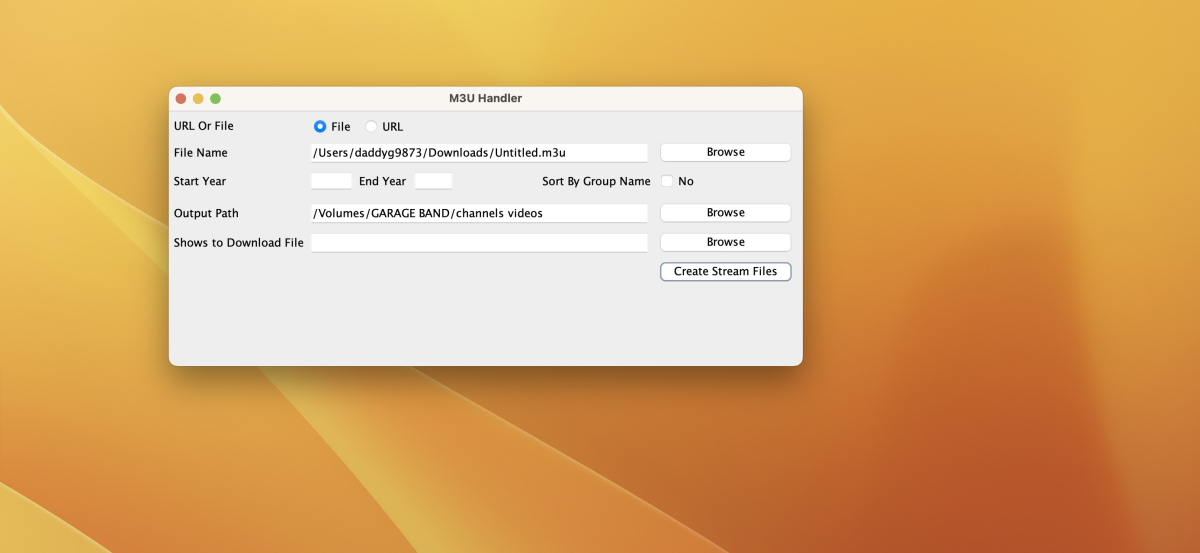
CreateStreams-1.0.zip1 point
-
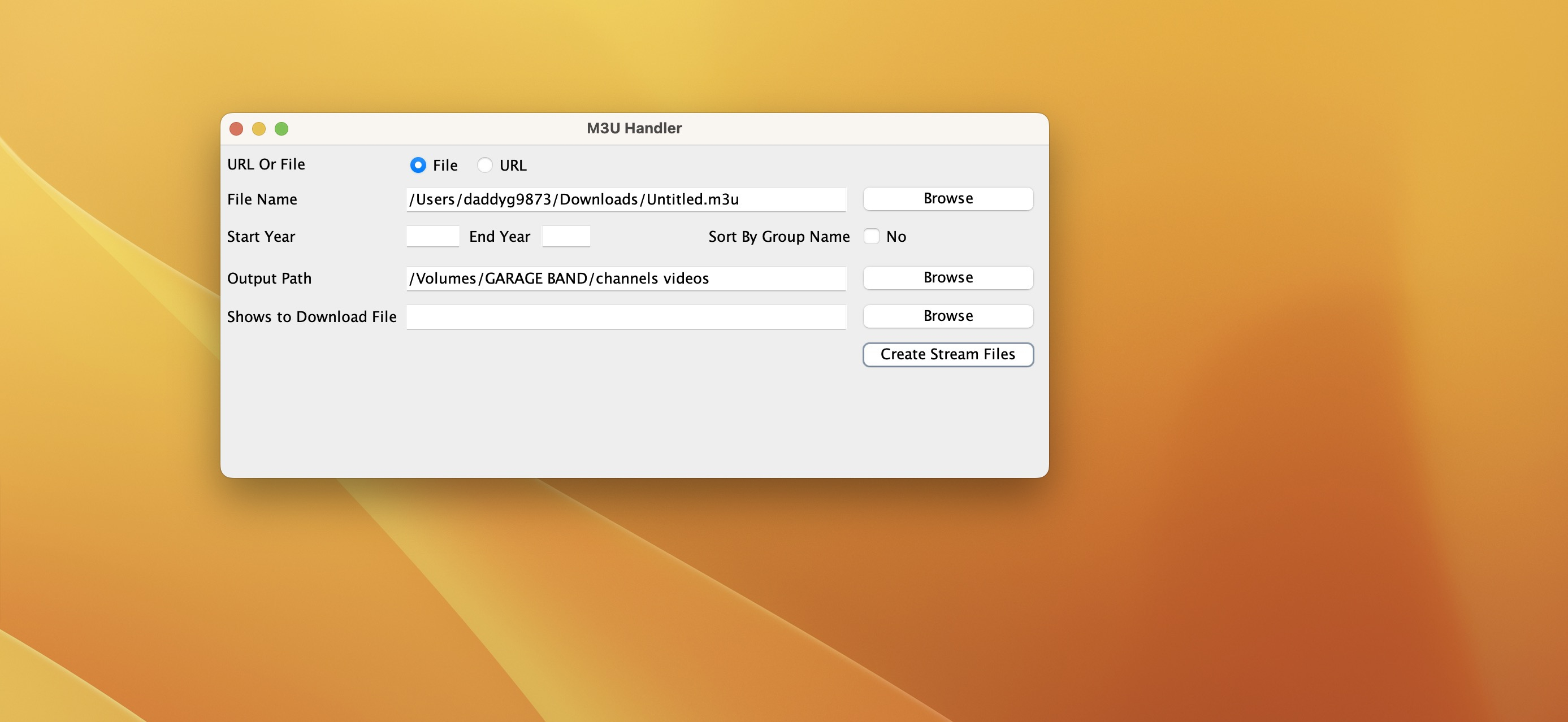
Hi Guys, I just came across this and thought I had won the lottery when I found the attached. However I can't get it to work for me on either mac or windows. I haven't a clue about coding or python so I thought this was the answer to my problems. I load the m3u as per the photo but nothing happens. What I am doing wrong? Any help would be much appreciated. CreateStreams-1.0.zip
 1 point
 -
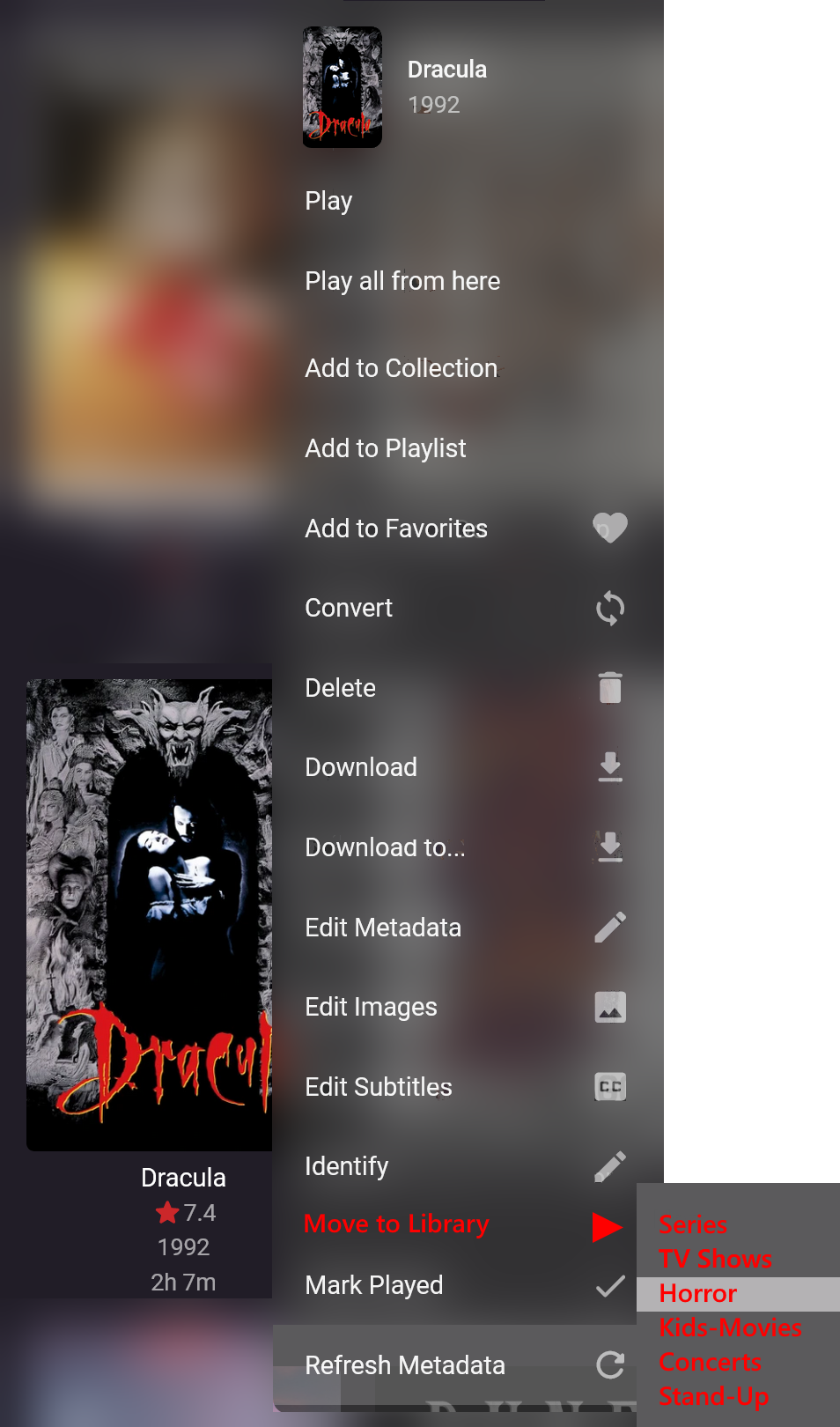
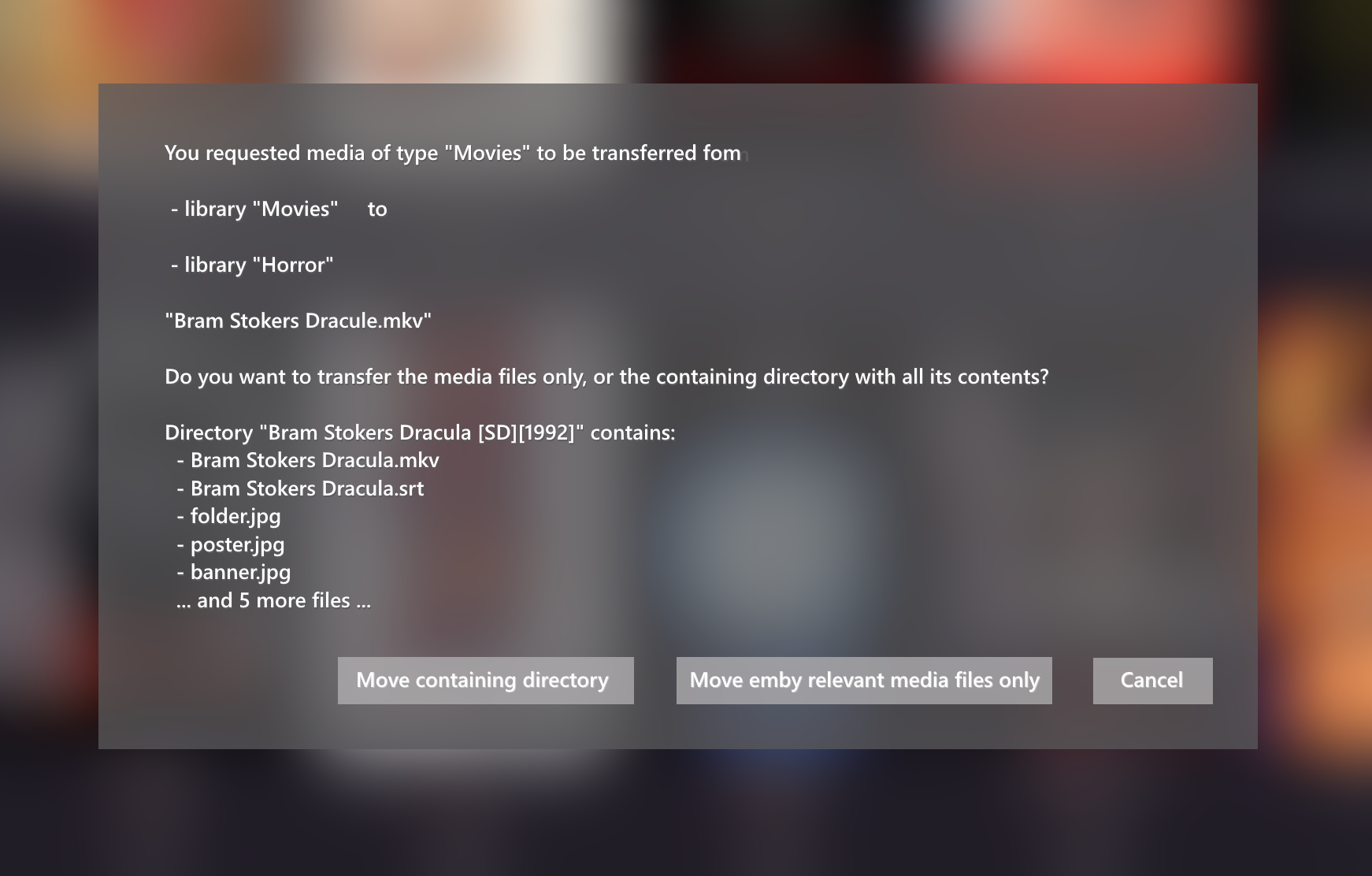
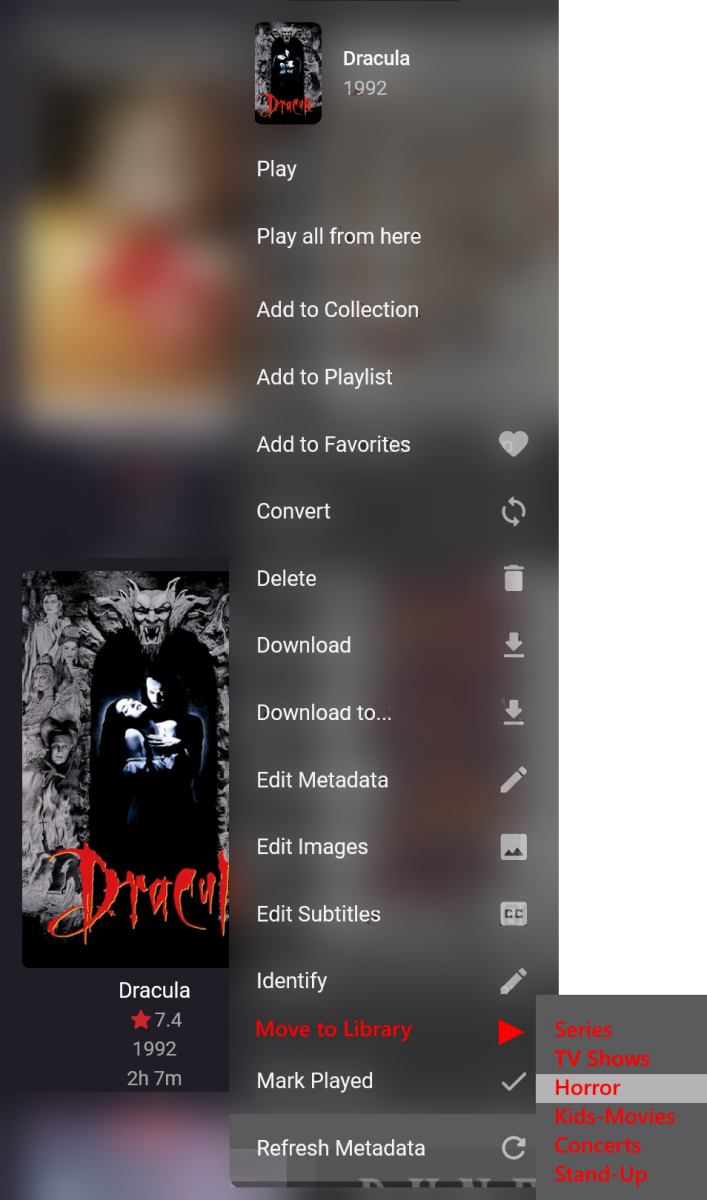
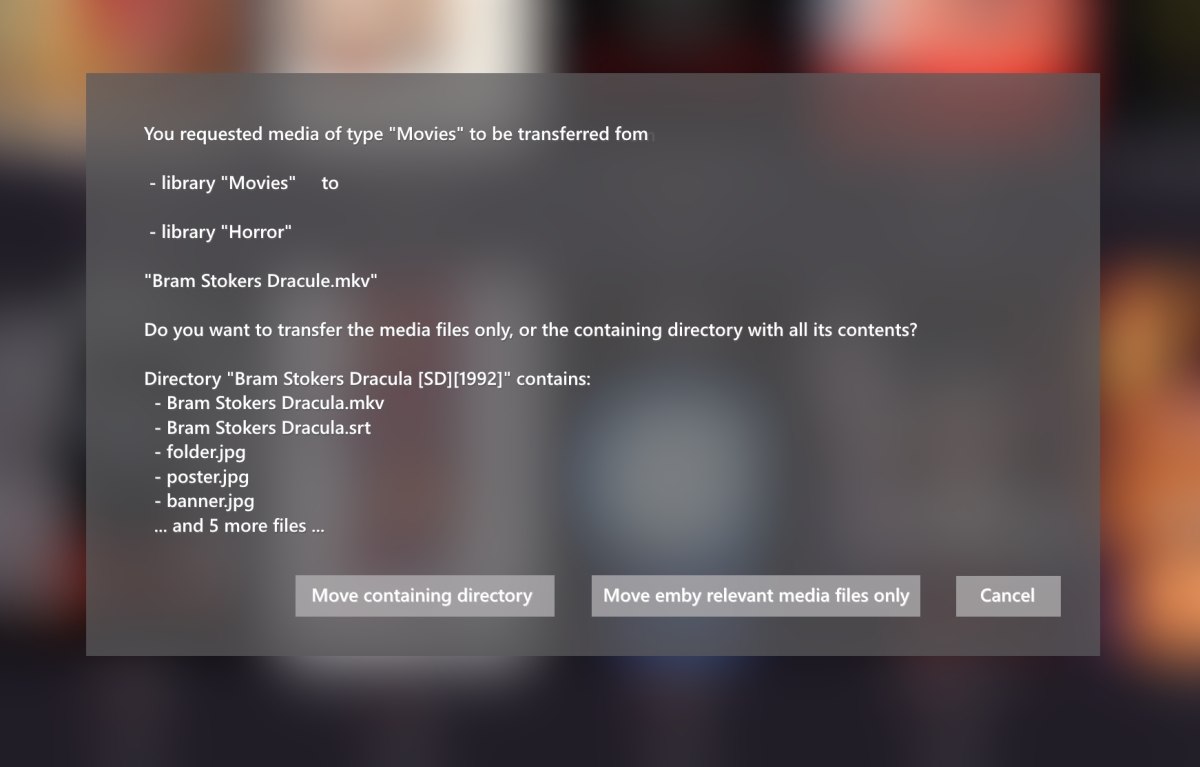
Hi all, since I spent some time to illustrate my version of the same request, let me repost it the images along with my description: I would like to have a function in the user-interface (UI) to move media from one library to another library. I have tried to illustrate an example here (in red): Currently, I have to do that on a filesystem level, and only I can do that. Adding that to the UI would enable other users to do that as well (with sufficient privileges). Once the destination is picked, a new dialog should pop up, what the transfer-request should move on the file-system basis: I hope that my idea is not totally absurd and finds many supporters! Thank you all! RooDee Original Post:
 1 point
 -
The Emby team hopes you and yours are enjoying a Happy Holiday Season. We would like to announce a couple of changes that will hopefully increase the value of Emby in all of your households. First, to aid in the transition from our old TV-only Android TV app to the new Standard Android app on that platform, we will be eliminating the need for the app unlock by allowing free playback for up to five TV devices per Emby Server. Devices beyond that limit will require Emby Premiere. Previously purchased unlocks will still be honored. This should allow most households to move to the new app more easily. Second, recognizing that today's households have more and more devices, we are increasing our standard Emby Premiere License device limit from 25 to 30. We will then also increase the extended premiere plans from 45 to 50 and 75 to 80. Existing extended subscriptions will remain the same but new ones will be at these new levels. All standard licenses will be automatically updated to the new 30 device limit immediately. You should see all of these changes rolling out over the next week or so. Happy Holidays from the Emby Team!0 points
-
Kenzytech0 points