Leaderboard




Popular Content
Showing content with the highest reputation on 02/12/25 in all areas
-
I'm guessing, but I don't think the device used to skip matters much here. It seems to just be the function in the app that's broken.2 points
-
Thank you! the problem arose immediately after installation. But, it seems, the solution to the problem is port forwarding on the router.2 points
-
Sorry. Marked it as solution now.2 points
-
Installed v3.4.38 and this is fixed. Thank you.2 points
-
Hello, I tried the Xbox app today to see if I can finally use it for UHD. Overall, despite being somewhat buggy, the app itself seems to be in decent shape. However, for HDR playback it still has issues. 1. Attempting to play HDR (tested with both 1080p and 2160p) at 120 hz will result in a stuck spinning blue circle with no playback and no error message. The same files play fine on 24 hz or 60 hz. I reported this in the past. If playback at 120 hz cannot be fixed, consider making the automatic display mode switcher prioritize 60 hz over 120 hz for HDR content. 24 > 60 > 120. 2. Higher bitrate HDR files (threshold seems to be around 30 mbps) are forced to transcode with "VideoBitrateNotSupported" when they play perfectly fine if transcoding is disallowed. I reported this in the past and even uploaded a sample file. 3. Dolby Vision profile 7 files (aka DV with EL) don't seem to trigger automatic HDR enabling and look washed out. Once HDR is enabled they play and look fine. 4. Minor issue: Notification popups include escape sequences. For example: "HDR Mode Enabled.\r\n" (the \r\n is shown on screen). EmbyPlus Xbox 2.213.70.1 on Xbox Series X. Hope these can be addressed. I also encountered other issues with transcoding, like active ffmpeg processes sticking around after playback, but these need more testing before I can give you any useful details. Thanks.1 point
-
Pour ceux qui ont un certificat Let's Encrypt sur leur Synology, voici un script pour le transformer automatique en fichier P12 pour être utilisé par EMBY #!/bin/sh # CONFIGURATION #script_folder=/volume2/Emby backup/Certificats à conserver script_folder=/volume2/video # p12 file p12_file_path=$script_folder/certificate_auto.pfx # Synology's Default Let's encrypt folder letsencrypt_cert_folder=/usr/syno/etc/certificate/system/default # renew timestamp renew_timestamp=renew_emby_timestamp.txt # p12 password p12cert_password=EMBY # DO NOT CHANGE BELOW UNLESS YOU'RE A WIZARD generate_p12=false current_date=`date +"%s"` current_certificate_date=`openssl x509 -enddate -noout -in $letsencrypt_cert_folder/RSA-cert.pem | cut -d'=' -f2` current_certificate_timestamp=`date -d "$current_certificate_date" +"%s"` # check if the renew_timestamp file exists if [ ! -f $script_folder/$renew_timestamp ]; then echo "Generate timestamp for the current renew date... " echo $current_certificate_timestamp > $script_folder/$renew_timestamp chmod +rw $script_folder/$renew_timestamp chown admin:users $script_folder/$renew_timestamp # generate the first p12 file generate_p12=true else renew_date=`cat $script_folder/$renew_timestamp` # check if it is necessary to renew the certificate or not if expr "$current_date" ">" "$renew_date" > /dev/null; then # generate a new p12 file echo "Renewing certificate..." generate_p12=true # update timestamp in the file echo $current_certificate_timestamp > $script_folder/$renew_timestamp else echo "It is not necessary to renew the certificate, abort." exit 0 fi fi # generate a new certificate file if necessary, and restart EMBY Server if expr "$generate_p12" "=" "true" > /dev/null; then echo "Generating the p12 certificate file..." openssl pkcs12 -export -in $letsencrypt_cert_folder/RSA-fullchain.pem -inkey $letsencrypt_cert_folder/RSA-privkey.pem -out $p12_file_path -password pass:$p12cert_password chmod +r $p12_file_path chown admin:users $p12_file_path echo "Restarting EMBY Server..." synopkg restart EmbyServer echo "Done." fi A lancer en "Root" quotidiennement1 point
-
Hello everyone, when I play a video in MKV/HEVC format on an iOS device, it shows a playback error: There is currently no compatible stream available. Only H264 videos can be played. The embyServer version is 4.9.0.35-beta, and the iOS client version is 2.2.33. My other devices, PC, WEB, and Android can play it without any problems. It seems to be a transcoding problem? Other devices play directly, only iOS devices seem to need transcoding. hardware_detection-63872396425.txt embyserver.txt1 point
-
Hi I've downloaded test files from Trinnov, for good sound and picture quality. Looks good, but not in Emby as is. I really think I've tried every setting there is, but can't get it to work.. nVidia Shield TV 2019, latest Android main app. (not tv app) I will mention that the network handels the video nice with VLC as player. MediaInfo from the one file: General Unique ID : 327957619299405152657311156189275384758 (0xF6BA5706F45A9AE5C59A45C207106BB6) Complete name : E:\Testfiler\Trinnov Trailers Dolby Atmos\Experience 16-9 Dolby Atmos.mkv Format : Matroska Format version : Version 4 File size : 282 MiB Duration : 44 s 458 ms Overall bit rate mode : Variable Overall bit rate : 53.2 Mb/s Frame rate : 23.976 FPS Encoded date : 2024-02-18 11:08:11 UTC Writing application : mkvmerge v79.0 ('Funeral Pyres') 64-bit Writing library : libebml v1.4.4 + libmatroska v1.7.1 Video ID : 1 Format : HEVC Format/Info : High Efficiency Video Coding Format profile : Main 10@L6.1@Main Codec ID : V_MPEGH/ISO/HEVC Duration : 44 s 458 ms Bit rate : 48.2 Mb/s Width : 3 840 pixels Height : 2 160 pixels Display aspect ratio : 16:9 Frame rate mode : Constant Frame rate : 23.976 (23976/1000) FPS Color space : YUV Chroma subsampling : 4:2:0 Bit depth : 10 bits Bits/(Pixel*Frame) : 0.242 Stream size : 256 MiB (91%) Language : English Default : Yes Forced : No Color range : Limited Color primaries : BT.709 Transfer characteristics : BT.709 Matrix coefficients : BT.709 Audio ID : 2 Format : MLP FBA 16-ch Format/Info : Meridian Lossless Packing FBA with 16-channel presentation Commercial name : Dolby TrueHD with Dolby Atmos Codec ID : A_TRUEHD Duration : 44 s 375 ms Bit rate mode : Variable Bit rate : 4 879 kb/s Maximum bit rate : 8 130 kb/s Channel(s) : 8 channels Channel layout : L R C LFE Ls Rs Lb Rb Sampling rate : 48.0 kHz Frame rate : 1 200.000 FPS (40 SPF) Compression mode : Lossless Stream size : 25.8 MiB (9%) Default : Yes Forced : No Number of dynamic objects : 15 Bed channel count : 1 channel Bed channel configuration : LFE If more info is needed, tell me embyserver.txt embyserver-63874709117.txt ffmpeg-transcode-3b28d963-d710-4acd-9b5c-f6f7c8e09a2a_1.txt ffmpeg-transcode-73e4384a-2fc9-46cc-9cdc-6f6e85231ac6_1.txt1 point
-
Sure. I am connecting to the HTTPS port for connecting the proxy to Emby but you could use plain HTTP as well, just make sure you change the port to accomodate. My requests log could use some cleaning up of the format but I like what I set for access logs since I mostly look at those anyway. EDIT: However I am fairly certain the problem you're having is what I described, it's transcoding when remote, thus is not seekable using an external player. ServerTokens Prod ServerSignature Off <VirtualHost <YOURIPHERE>:<YOURPORTHERE>> ServerName <YOURDOMAINHERE> ServerAlias <YOURDOMAINHERE> ErrorLog "|/usr/sbin/rotatelogs -l /etc/httpd/logs/ssl_emby_error_log.%Y%m%d%H%M 86400" LogFormat "%a - - [%{%Y-%m-%d %T}t.%{msec_frac}t] \"%r\" %>s Size=%S Duration=%{ms}T TransferLog "|/usr/sbin/rotatelogs -l /etc/httpd/logs/ssl_emby_access_log.%Y%m%d%H%M 86400" LogLevel warn SSLEngine on SSLProxyEngine On SSLProxyVerify none SSLProxyCheckPeerCN off SSLProxyCheckPeerName off SSLProxyCheckPeerExpire off <proxy *> AddDefaultCharset off Order Allow,Deny Allow from all </proxy> Header set Connection "Upgrade" Header set Upgrade "websocket" Header always set Strict-Transport-Security "max-age=63072000; includeSubdomains;" Header always append X-Frame-Options SAMEORIGIN Header always set X-Content-Type-Options nosniff Header always unset Server Header always unset X-Powered-By Header always unset X-AspNet-Version KeepAlive On Timeout 6000 SetEnv proxy-initial-not-pooled 1 AddOutputFilterByType DEFLATE image/webp application/x-javascript text/html application/json font/woff2 image/jpeg image/png text/css text/vtt text/javascript ProxyRequests Off ProxyPreserveHost On RewriteEngine On RewriteCond %{HTTP:Connection} Upgrade [NC] RewriteCond %{HTTP:Upgrade} websocket [NC] RewriteRule /(.*) wss://<YOUREMBYSERVERHERE>:8920/$1 [P,L] ProxyPass "/embywebsocket" "wss://<YOUREMBYSERVERHERE>:8920/embywebsocket" connectiontimeout=10 keepalive=on ProxyPassReverse "/embywebsocket" "wss://<YOUREMBYSERVERHERE>:8920/embywebsocket" ProxyPass "/" "https://<YOUREMBYSERVERHERE>:8920/" connectiontimeout=10 keepalive=on ProxyPassReverse "/" "https://<YOUREMBYSERVERHERE>:8920/" SSLProtocol TLSv1.2 +TLSv1.3 SSLCipherSuite HIGH:!MEDIUM:!SSLv3:!kRSA:!SHA1:!SHA256:!SHA384:!DSS:!aNULL SSLHonorCipherOrder on SSLCertificateFile /etc/httpd/ssl/server.cer SSLCertificateKeyFile /etc/httpd/ssl/server.key SSLCertificateChainFile /etc/httpd/ssl/fullchain.cer BrowserMatch "MSIE [2-5]" \ nokeepalive ssl-unclean-shutdown \ downgrade-1.0 force-response-1.0 CustomLog "|/usr/sbin/rotatelogs -l /etc/httpd/logs/ssl_emby_request_log.%Y%m%d%H%M 86400" \ "%t %h %{SSL_PROTOCOL}x %{SSL_CIPHER}x \"%r\" %b" </VirtualHost>1 point
-
@Carloyes can be done via symlinks, but it is abit unclear to me what would happen during update. Would it attempt to replace symlink with folder, fail or what would actually happen. @Lukethat part I know, question was more related to internally created playlists via Emby UI/Apps1 point
-
You can still use either, though installing/running Standard Android app comes up more and more as a solution for troubleshooting issues and is generally regarded as a way forward.1 point
-
See post title: "Suggestion: support Trash Guides "plex" naming formats" — I imagine a lot of new Emby users are coming over from Plex, supporting the Plex naming standard used in trash guides would allow people to try out Emby without having to rename their whole library to do so.1 point
-
That has been going on for few years now, with more focus being put on it lately/recently and AndroidTV client app being basically in maintenance-mode only for some time now.1 point
-
Can you try entering the server address again? Based on this screenshot it looks like you entered the wrong address. Thanks.1 point
-
Emby looks amazing, great software as well as stable with stunning results ! https://youtu.be/Sg1GKeR1gY81 point
-
I've noticed this over the last couple days as well; jist hadn't got around to detailing it. Pressing ff/rr (whether that's the directional buttons or the dedicated fast forward/rewind buttons) will work one single time per app launch, skipping 10sec then refusing to move any further. @CallieCatThat second issue you mentioned in the above comment is known. If you press the xbox home button to bring up the side menu, then close it; the app regains focus and you can start using it. @softworkz is working on that one already I believe.1 point
-
1 point
-
Hey @LukeIt already been removed by our mod's team @GrimReaper1 point
-
Here you go https://www.dropbox.com/scl/fi/t7ya7ibui03cxfzv72b60/Pointless-S33E06.ts?rlkey=lc6v9uowvz6csfcbv3if6xddi&st=yxloerzn&dl=01 point
-
If you want all that, I would using this for home videos and pictures. immich-app/immich: High performance self-hosted photo and video management solution. Emby is years away from what you want.1 point
-
Hello. Yes, indeed, your thoughtful explanation does help and I can appreciate the difference between the three rating systems. My media content is mostly home video and photos, which I am anticipating streaming to TV using the more fully fleshed out Roku UI currently under development. For me, grouping and organizing similar themed content is driven almost entirely by TAGS which annotate people, places, events, subjects, etc. A major characteristic of a photo album is CAPTIONS, which I intend to create using Emby's strategically edited OVERVIEW text (strategic because of the vertical 5-line limit and the horizontal text character limit that varies depending upon media item image size). Metadata such as ratings, studios, suggestions, genres, and other information specific to movies seems to have taken precedent in development, naturally, since the great bulk of Emby users must be streaming library content filled with movies. It is so surprising and delightful that Emby devs are committed to bringing greater utility to the Roku UI, when one considers their audience for TV streaming. Ta.1 point
-
Hi, this comes from backdrop images in your library. More options to control it are planned for future updates. Thanks.1 point
-
Ok. I uninstalled and redownloaded it. I'm running 3.4.36. All is fine now. Pressing the home button does not activate the PIP. Thanks guys.1 point
-
I have a Wiim Pro Plus player and it works great with Emby, I even get gapless playback of audio. It's using DLNA. You need to install DLNA plugin and enable Play to feature. Even Wiim's software detects Emby's DLNA server and creates an enhanced library in the app. I can cast from Emby or play content directly from the Wiim app.1 point
-
Hi. That isn't really what you want. Then there would be some other situation that caused the internal subs to be selected. What you want is for the system to prioritize an external sub over an internal one of the same language - regardless of any other attributes. At first blush, this does make sense as why do the external subs even exist if they aren't what you wish to use...1 point
-
Tx Quickmic, emby server Addon working is good. out of curiosity, this might be a kodi limitation or emby kodi add on limitation, my chapters are working fine but I noticed there is no “video timeline scrubber” I assume not a option?1 point
-
Hi Luke. The customized/built-in emby apk on the latest Zidoo boxes seem to sync up fine. I know they use their own player but maybe it could help trouble-shoot the issue? If I can do anything to help, please let me know.1 point
-
Apologies -- I have not confirmed they exist. I had to fix this problem with a metadata refresh, which I assume wiped out any old files. If you'd like a copy of one my backups from before all this, and the current backup, I can attach them.1 point
-
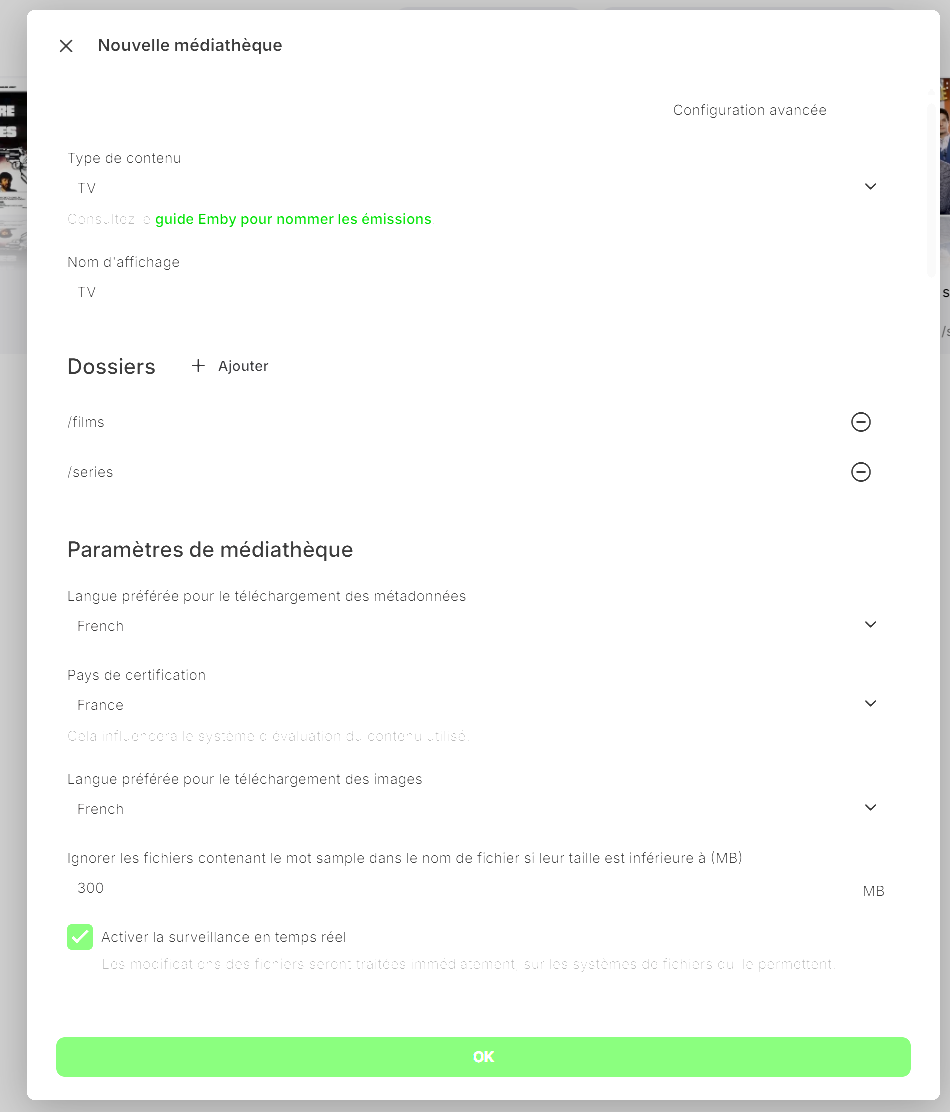
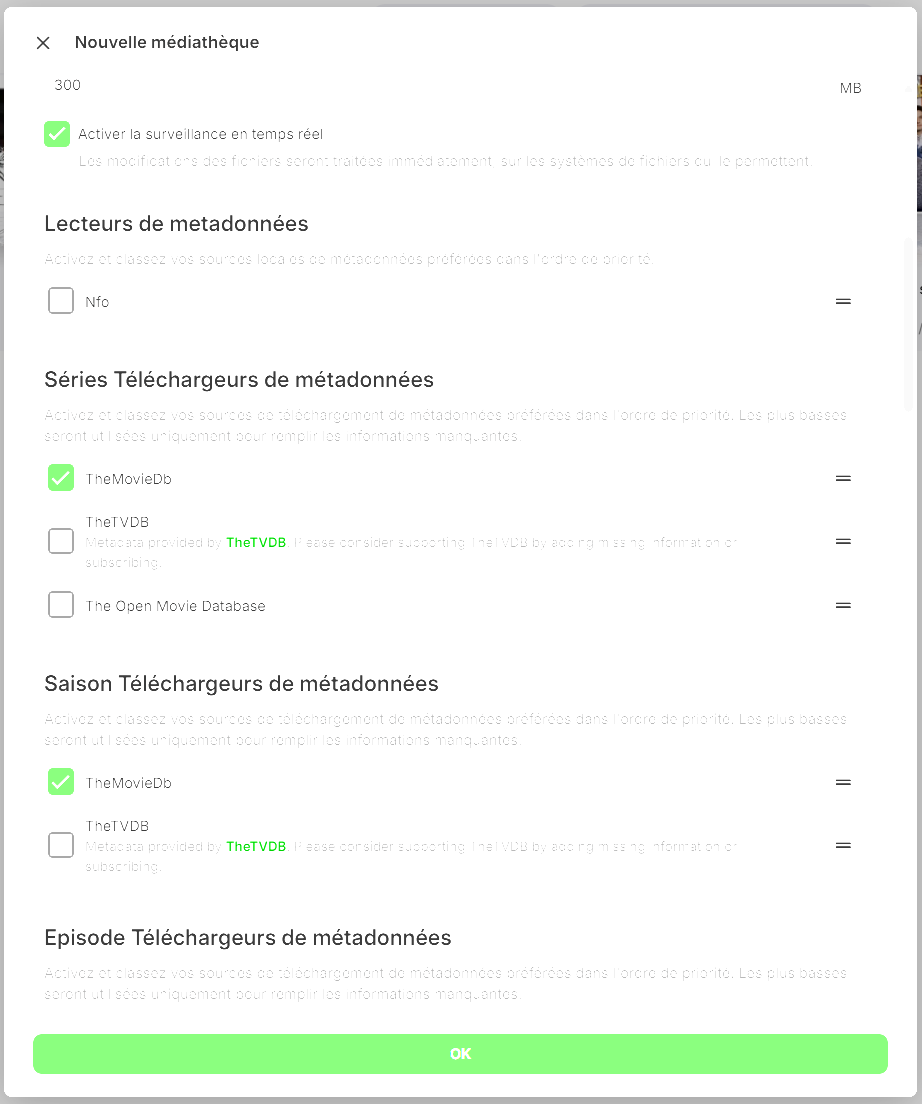
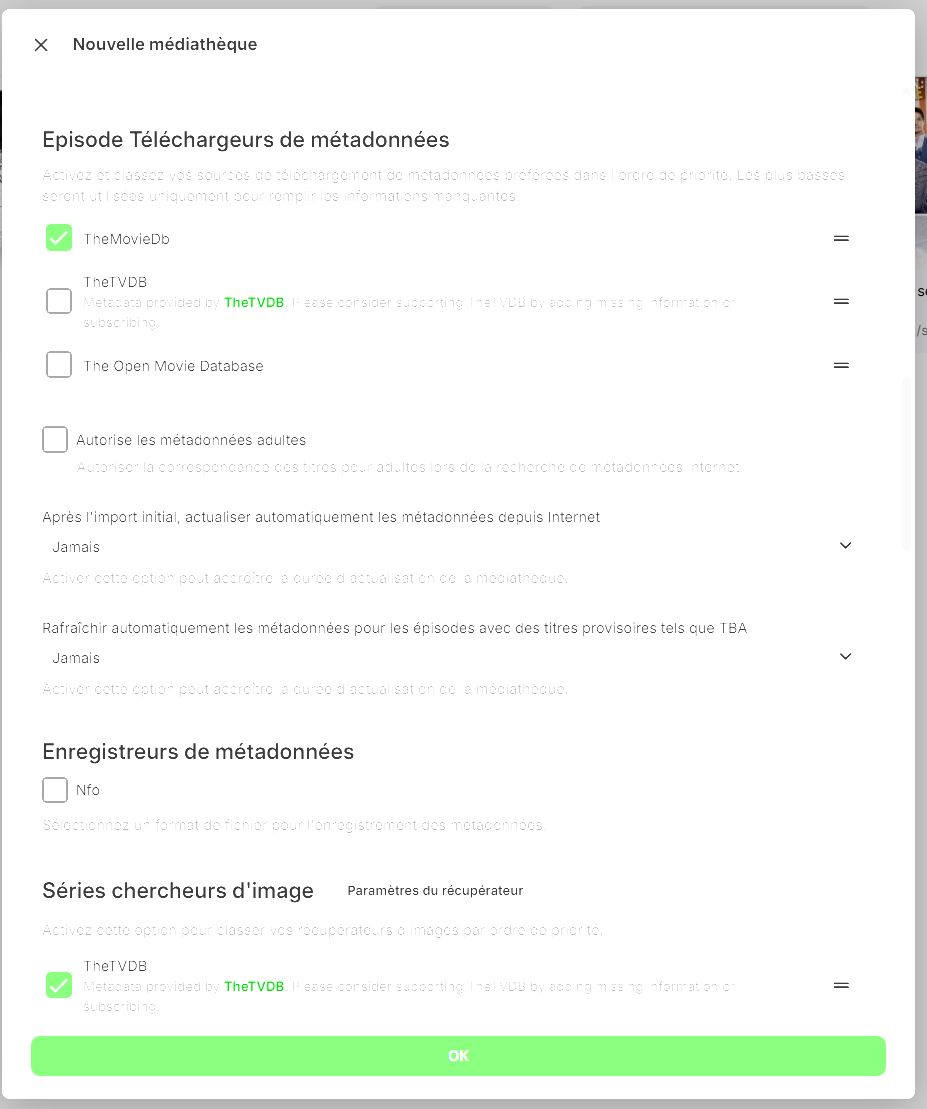
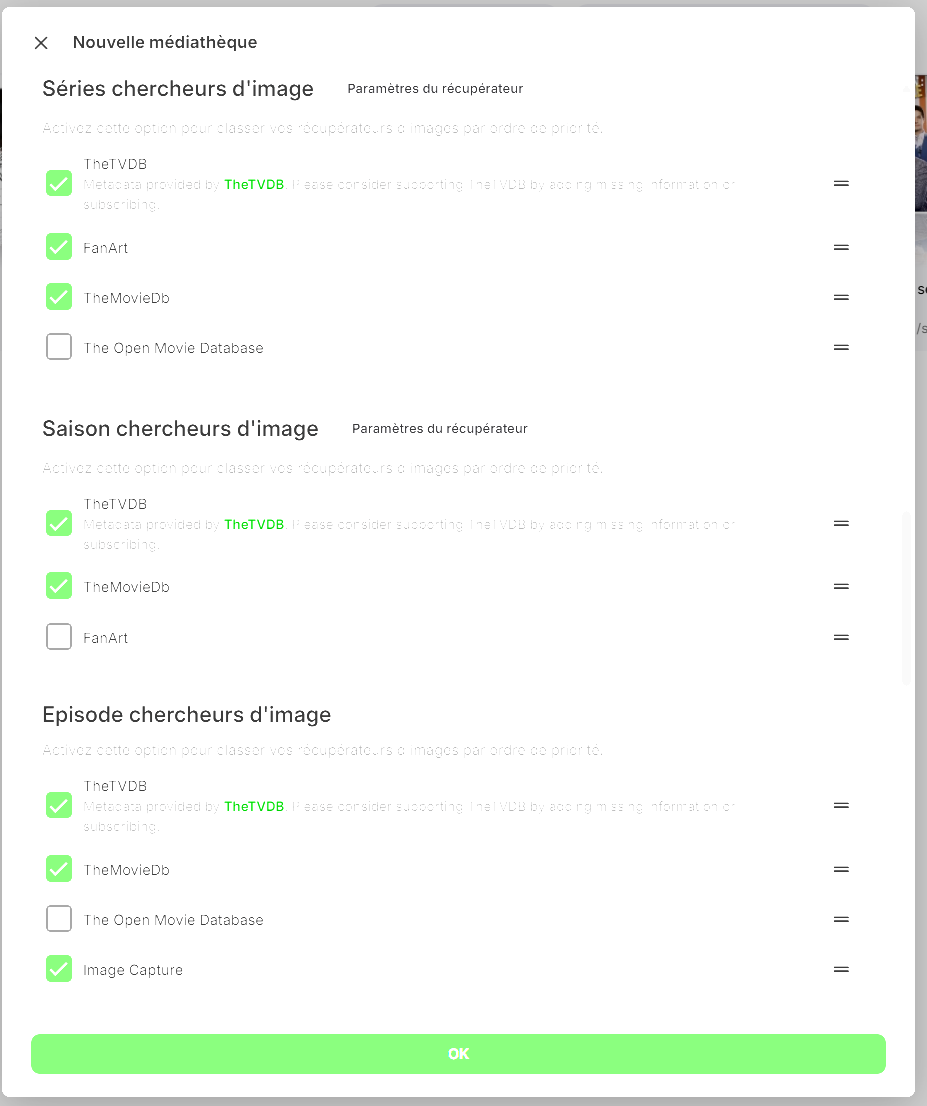
Bonjour Luke je l'avais fait aussi mais tant que Thetvdvd était active sa ne le remettaient pas en Français je passe toutes mes videos par emby sur mon synology que je regarde ensuite sur ma TV LG smart tv avec l'appli emby j'ais donc été oblige de décoché cette recherche voir ma recherche corrigée sur mes copies jointe merci de l'aide apportee
 1 point
 -
thanks, I get.1 point
-
Thanks @Lukefor your answer. As my goal is to change the name of library which are on network from IP to hostname ( for example instead have \\192.168.1.1\FIlms modify by \\EmbyServer\Films ) I will make a copy on my complete virtual computer. In this way when I restart if it's not good, I will be able to come back to originial situation. I will try the procedure, and I will come back to you to say want I do, or must do to complete succefuly the operation.1 point
-
Thanks for the reply. It looks like you operate more than just a license server on this IP connect.emby.media [173.230.139.54] mb3admin.com [173.230.139.54] www.emby.media [173.230.139.54] emby.media [173.230.139.54] ... and many more which unfortunately means for anyone that is following this a simple IP ACL will not be enough. To limit access to just the license server a HTTP proxy will be required. Team Emby please consider splitting the license server off so that it and only it can be allowed as minimum viable access.1 point
-
thank you. @Carlocould you have someone remove pic? @Abobader1 point
-
Hi Guys, Thanks for the new Emby app, media that didn't play in the older version now plays in the updated 2.201.1.0 version, but i would like to request that F11 gets mapped to the full screen toggle. It's how it works in the web player and also on all other media players I have installed (VLC, MPC-BE, Plex for Windows). Anyway, would appreciate it. Cheers!1 point
-
This is implemented in the latest Windows app now (2.213.0)1 point
-
yes thank you! i over looked that :)1 point
-
February 8th. Mission completed! I have all three channels now. Kudos to Carlo! Cannot say too much good about your vendor's slow response. Channels at times do change, get added, deleted or renamed. Hopefully this vendor isn't always this unresponsive. 39 days. But thank your Carlo for sticking with it. You made it happen for sure.1 point
-
OK yes more options to control this are certainly possible. Thanks.1 point
-
they did take the same time. but now i realize that doing the refresh from folder and unchecking replace images. will replace missing meta files like png jpg nfo. which is the main thing i wanted. i would occasionally have the initial scan be interrupted because of the time to scan all the strms. i dont want anything fancy, just the default images and basic info on movies and shows. so i tested each provider. and found that tvdb is the most if not fully complete library for both movies and shows. the quality compared to the fanart. the tvmaze did seem allot faster, mostly because it downloads all the info for that title at once, from want i understand. but for simplify am just going to use tvdb. so if run the scan from ether scheduled or folder view. and its complete. then go to folder view and do a refresh with images unchecked. then it will find missing meta files. thank you for your help @Luke1 point
-
feel this is the same issue. @Lukeis on top of it.1 point
-
Just following up here - I think this may have been a ram issue - I was having this issue a couple of times per day and restarting the server temporarily solved it. I added an additional 8GB ram today (16GB total) and have not had the issue yet today which is much better than the last few days so I suspect the issue may be fixed. I'll continue to monitor and update if this changes but for now if anyone else comes across this - consider adding RAM.1 point
-
Solution for me: My username was the only one with password (adminuser). Now, no more Password on my username, but I checked no more remote connection for adminuser. Im allways connected to my Homerouter via VPN. So i can still change and watch from anywhere1 point
-
Hi Luke, Thanks for your reply. Yes, I checked that post, but I couldn't get it to work with the plugin. However, the method of copying the folders worked perfectly! I’d like to take this opportunity to ask for your opinion. I switched from an old Quadro M2000 graphics card on a desktop to an HD 620 card with an 8th-gen i5 processor. I must admit that I overestimated this card. I have a second laptop that I could use, which has a Ryzen 7 5700U with a Vega 8 GPU. Which one would be more efficient for decoding? (I try to limit it as much as possible, but when users are on the move, they don’t always have enough bandwidth). Thanks in advance for your feedback! Obviously, the best option would be a 12th or 13th-gen processor, but I’d rather not buy a third laptop.1 point
-
Thank you! We have updated our code to use this endpoint instead. @cremoniesCan you please confirm you are now having the expected behavior?1 point
-
When you do al the steps and you keep getting errors from Alexa Issue is solved: Sold my aAlexa speaker and bought an Apple Homepod Works like a charm1 point
-
Been a long time Emby user/fan, and recommend to all my friends and family. Until the new 2.0 update. (In my comments below when I refer to the "Old Version" I mean the latest update before the 2.0 version that was pushed out before Xmas) I still have 2 consoles that fortunately have NOT taken the new update that work just fine (dispite being asked to update every time I launch). This allows me to compare against the new version which has serious issues. 1. Obviously the start animation takes a long time. I've read the posts on how to disable, but say that it won't start any faster. My question is: Why is it so much slower? The 2.0 version takes 2-4 times longer to start than the old version. If it isn't from the animation, then what is it from? 2. Captions are completely random. Sometimes tiny. Sometimes huge. Sometimes in random locations. Still works great in the version I have prior to 2.0. What changed? I have VOBSUB, SRT, MOVE_TXT, and ASS. All still work fine in the old version. Lately on the new version the captions start out tiny, but if you stop and restart they are fine. If that isn't just a straight up bug, I'm not sure what is. 3. Starting a movie/show or moving to the next show after finishing the current one, takes 2-3 times longer in the new version. Why? Still works great in the old version. 4. Pretty much the only remote buttons that work in the 2.0 version are navigation, Up/down/left/right/OK, and back. All buttons still work fine in the old version including skip forward/back, and prev/next episode. Why do these not work in the new 2.0 version? I see posts on what IR codes/devices you support, but at the end of the day it works in the old version and not the new. Why? 5. In the new 2.0 version, it is now much more difficult to tell where focus is. Was this change based on lots of feedback from users, or just random? 6. Why decide to push the 2.0 version out, just before the holidays when many are home with their loved ones and will ultimately be watching content more than usual? So many were faced with lackluster performance, green screens when trying to play videos, and all the other issues above that are still present today. Seems like more validation would have been a better idea rather than trying to get out before the holidays. I have a hard time believing that these items are because of changes in the OS or restrictions by Microsoft in the cert process (which is now almost entirely controlled by the publisher). Rather it seems that the testing/validation process has been compromised, or perhaps abandoned all together. I only use Xbox for Emby. Perhaps there is less desire to spend resources supporting this platform? If so, that is fine. Just let us know. Opening Emby in the browser is tedious at best, and really not a viable alternative. Not trying to be a Karen here, I just want the reliability/functionality that was present before this update back. I've since had to move to Plex which has it's pros and cons, but it does allow me to use it free on any number of devices, whereas with Emby I have to have a subscription to use more than one console at a time. If you do nothing, perhaps publish the old version for 24 hours so those of us that want the functionality back can update our consoles and turn automatic updates off, and/or create a copy on a usb key that we can fall back to. Sadly I cannot take the version that works on my Series X and install it on my old Xbox One.1 point
-
Transcoding still happens when your videos are of high bandwidth - specifically above 30 Mbps. Unfortunately this is an Xbox limitation, as it doesn't play such videos very well. It seems that they've only ever tested 4k HEVC videos like from online streaming providers where bandwidths never get that high.. Regarding the Emby Theater app I'm afraid, but it will be phased out as described in the FAQ: Even though I thin kthat Win 7 has been the best Windows ever made (in relation to its time of release), it is a dead end - even without playing the "security card": There's no development reaching down to that platform anymore: Many of the techniques we are using are not available on Windows 7 and so the new Emby app cannot run on this platform. Once ET Desktop is no longer working, your only option on Windows 7 will be to use the web app.1 point
-
Hi, yes it makes sense. Thanks for the feedback.1 point
-
I'd agree, it would be nice to have but probably not as easy as you would think. It would likely need to be a bit flexible as people take 'duplicate" to mean different things. For example, one person wants to make sure there isn't two of the same exact file, another person wants to make sure they don't have multiple versions of an episode or movie. Another person may have 4K, 1080 & 720 versions of media but wants to make sure there isn't two or more of any specific resolution. The above might only be concerned with local physical files. Some people mount file systems to cloud provider storage. Then there is also Emby's media placeholder support using stub and strm files. People using remote mounted file systems and strm files likely have even different views of what a "dupe" is.1 point