Leaderboard




Popular Content
Showing content with the highest reputation on 01/20/25 in all areas
-
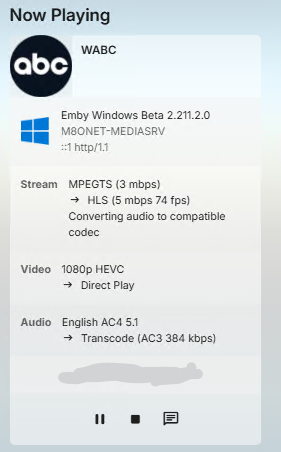
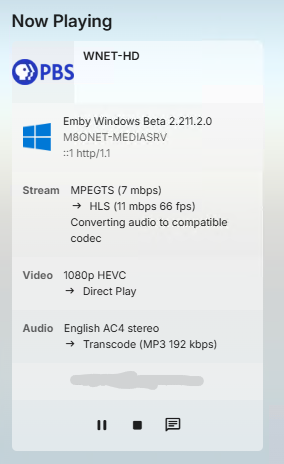
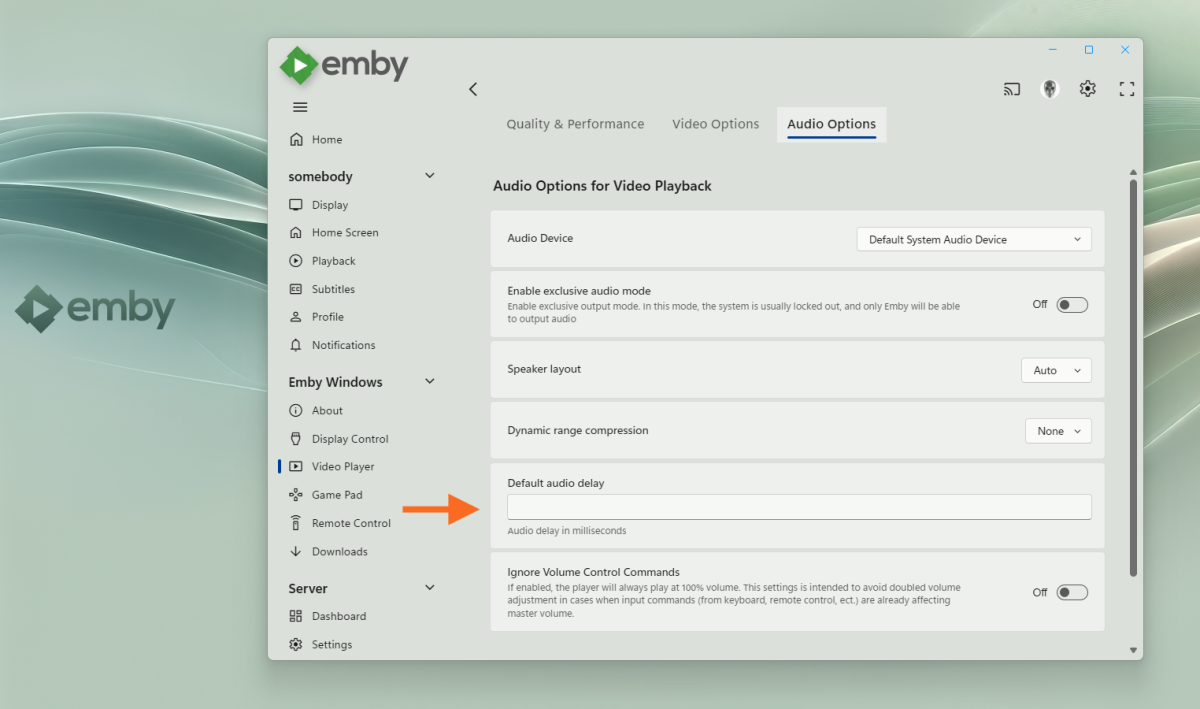
Yeah! Whoo Hoo. Normally this would be a thing to mention in the Test section but as it's discussed here I'll confirm here. It's working, from detection to transcoding of just the audio stream part and the output to 2-ch computer audio. Thank you, thank you, thank you. Again, I'm very grateful. But, it does also make apparent the next thing called for in the Emby UI app is a means of dynamically applying a lip-sync offset right there in the UI while watching to bring the video and audio into alignment. Hoping that is already on the backlog but if not it can be put on it and worked on in future sprint (if you follow that methodology) and released. Thank you again! AC4 Stereo Audio: AC4 5.1 Audio
 3 points
 -
Just installed it, it's exactly what I'm after, thank you2 points
-
Hi. We don't persist these by design because people will forget about them and wonder where all their media went. I think the upcoming smart views may provide what you want.2 points
-
As a dead simple and lightweight solution I would also throw in Beszel henrygd/beszel: Lightweight server monitoring hub with historical data, docker stats, and alerts.2 points
-
Update The latest beta of the Emby Windows app (2.211.0) should fix AC-4 playback (by having the server transcode it). You need to be in the beta group to try it. If all goes well, it will be in the next update for the Windows app.2 points
-
Hello all! This form post is more to take the temperature of an Emby-related open source project that I haven't been updating very much due to just life getting in the way and an upcoming move, but I've been doing a lot more freelance coding lately, and I'd like to try another push to complete an MVP if there might be even a hint of interest. In short, my project aims to extend Emby's API with Subsonic-compatible endpoints to allow for various Subsonic-compatible clients to leverage it, thus diversifying the clients that one can use to interface with Emby for audio. However, for all intents and purposes, Subsonic seems like a dead project. It appears that the last version of the Subsonic server came out over four years ago, and although arguably the Subsonic API has become a de facto standard, it isn't being updated at all either. Still, even though Subsonic may be "dead", it doesn't mean that the API isn't stable, even it has been neglected :) I currently use Navidrome for local audio although I'd rather just use Emby for everything. That said, I've been quite pleased using Symfonium (Android platform) with Navidrome - Symfonium even supports Emby native APIs. But of course that is just me. This post is an attempt to gauge if there may even be a smidge of some interest in having a stable Subsonic extension to Emby's API. So if you have any opinion on the matter, I'd love to hear it. Many thanks!1 point
-
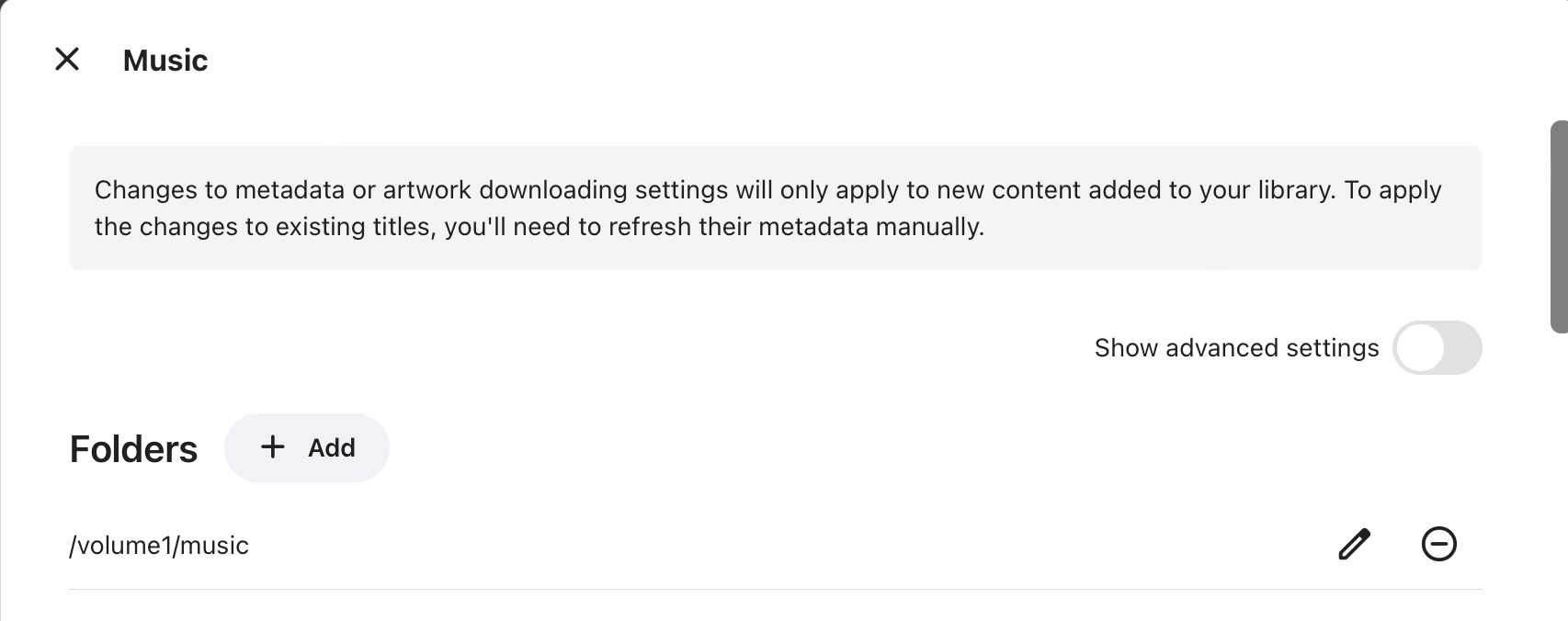
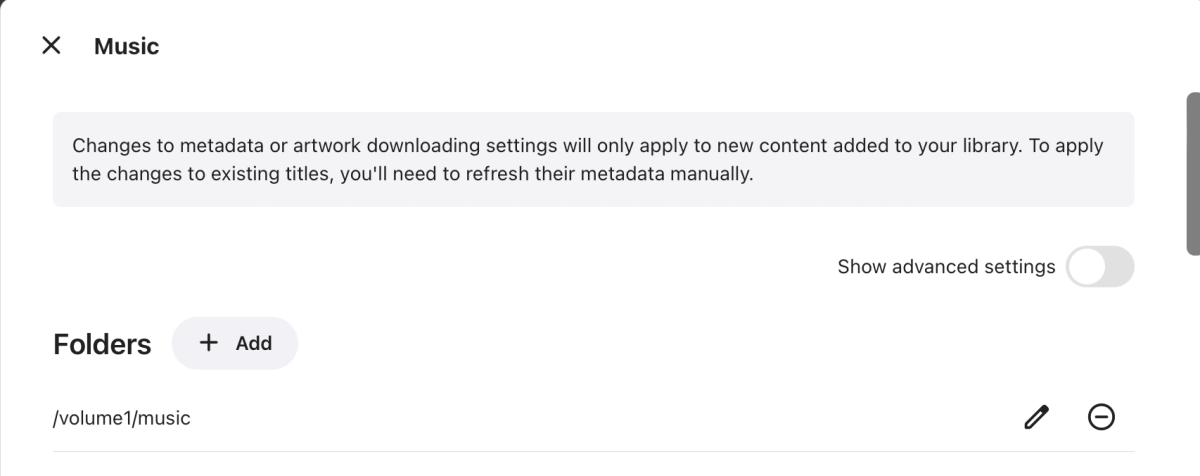
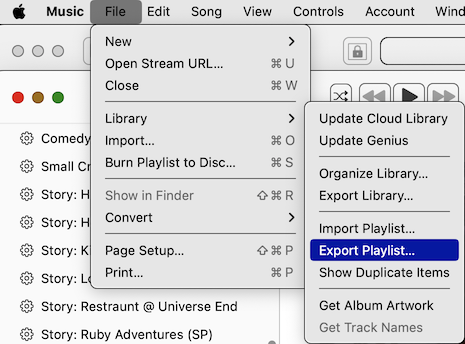
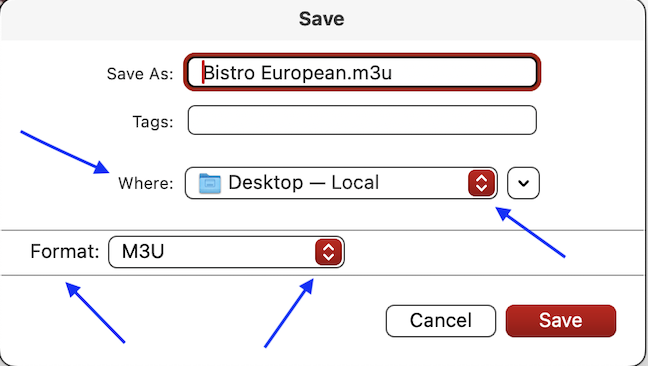
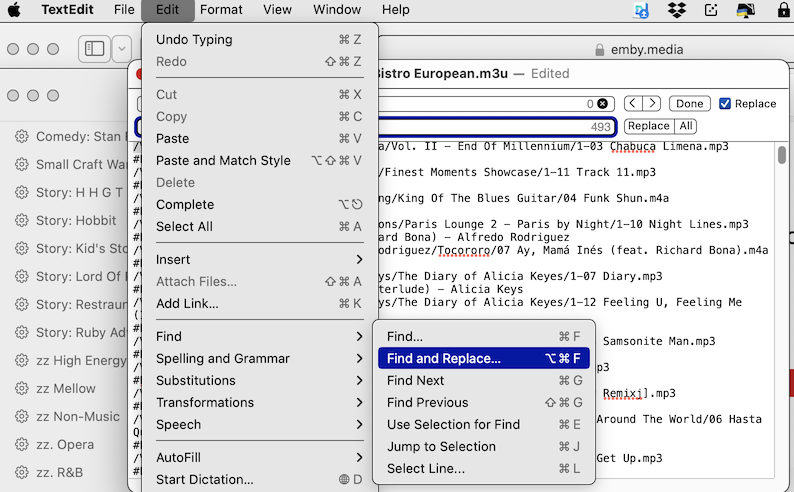
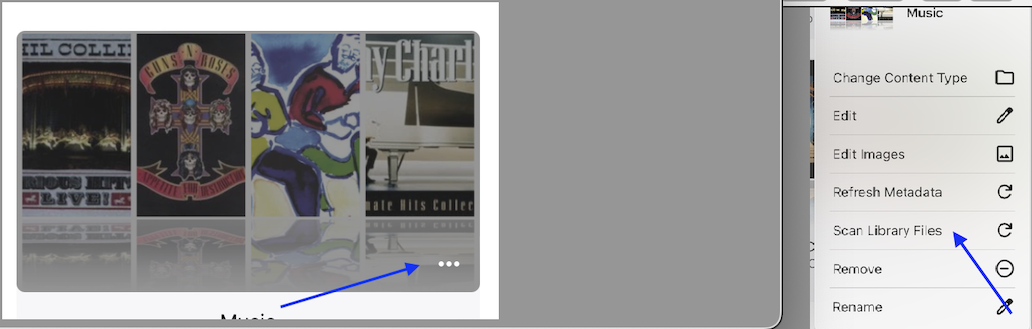
I was struggling to get my playlists from Apple Music to play in Emby. After some forum suggestions & a bit of experimentation I finally got them to work. I wanted to share the benefit of my experience. Apple Music allows PlayLists to be exported in M3U format (which is recognized by Emby). However, Apple Music will, of course, refer to the file path on the computer where they are originally stored. Since I use the Apple Music organization (Artist/Album/Songs), and I sync the entire music folder on my laptop with a sub-folder under the Shared Folder "/Music" on my Synology NAS, it was a simple matter to edit the ROOT part of the file path(s) in the M3U file to match the proper path on my NAS, which I obtained from EMBY>SETTINGS>LIBRARY>MUSIC (see SS 1). To export the playlist from Apple Music, I first selected the playlist I wanted to export, so all the songs are showing. I went to FILE>LIBRARY>EXPORT PLAYLIST (SS 2). On the next window, I selected M3U format & the destination where I wanted the file to go on my computer (SS 3). I opened the PlayList.M3U file using TextEdit, went to EDIT>FIND>FIND & REPLACE (SS 4), then did a search & replace, exchanging my laptop version of the root directory (/Users/Shared/) for the NAS version (/Volume1/Music/), then clicked ALL (SS 5), then FILE>SAVE. I used File Station on my NAS to create a new sub-folder: /Music/Playlists, then uploaded the newly edited playlist there. I seem to have issues getting newly added content automatically recognized by Emby (discussed a separate forum thread), but re-scanning the music files got the playlist recognized - EMBY>SETTINGS>LIBRARY, lower right corner ellipsis on the MUSIC section>SCAN LIBRARY FILES (SS 6). I apologize to the more technically minded out there if my instructions seem too pedantic. I sometimes find it helpful to have steps clearly laid out & wanted to be helpful to those less experienced (like myself). Everyone has to start somewhere... I imagine that since the steps are repeatable, there might even be a way to use Apple Automation to create a "script" to do all this automatically. However, that is beyond my skill set. Final note: Naturally, this will only work for music you actually have on your computer & not songs in playlists from the Apple Music streaming library because there needs to be a "physical" file path to a stored music file. I am not sure what will happen to the streaming songs in a mixed playlist. I assume they would be ignored, but you know what happens when you assume... I will let you know what happens when I get to a playlist that has a few songs from the streaming service in it.

 1 point
 -
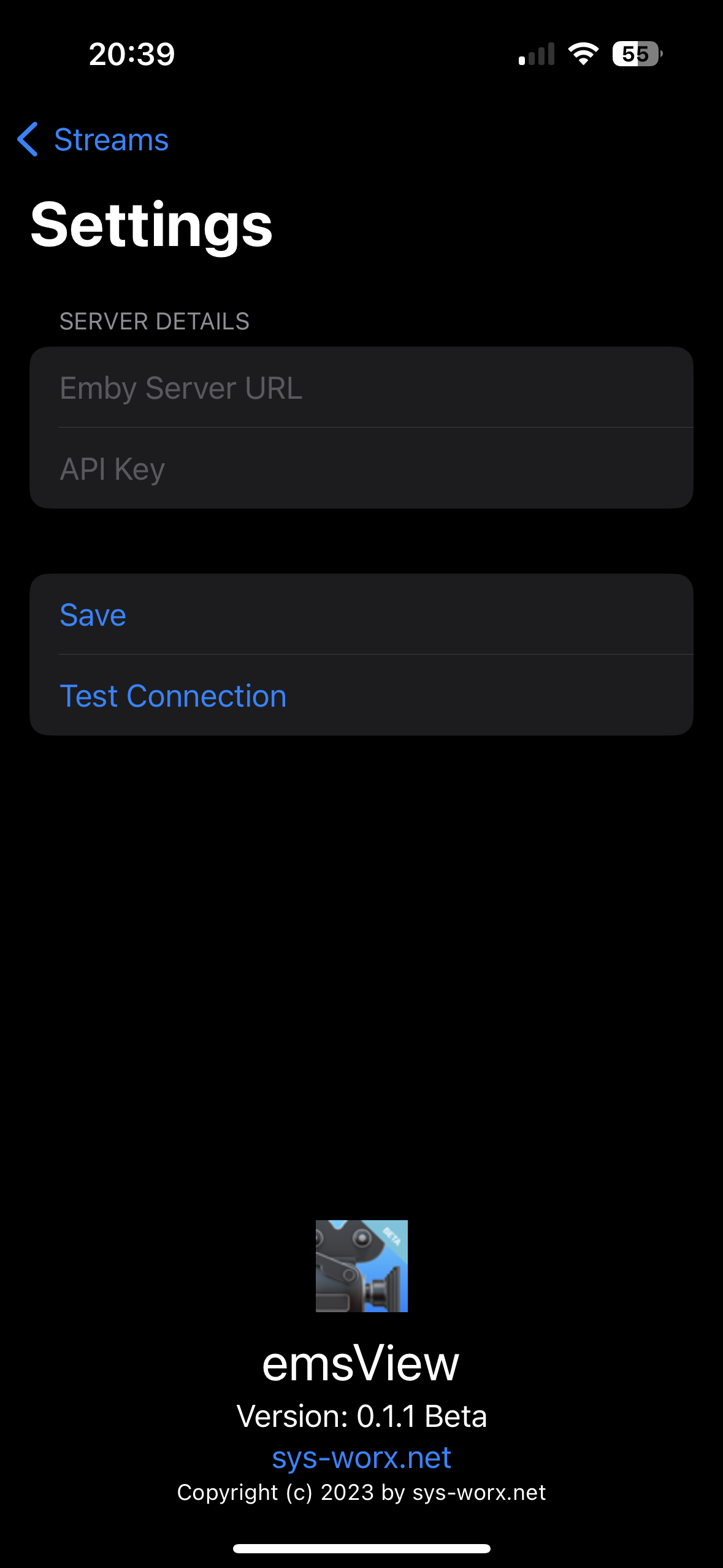
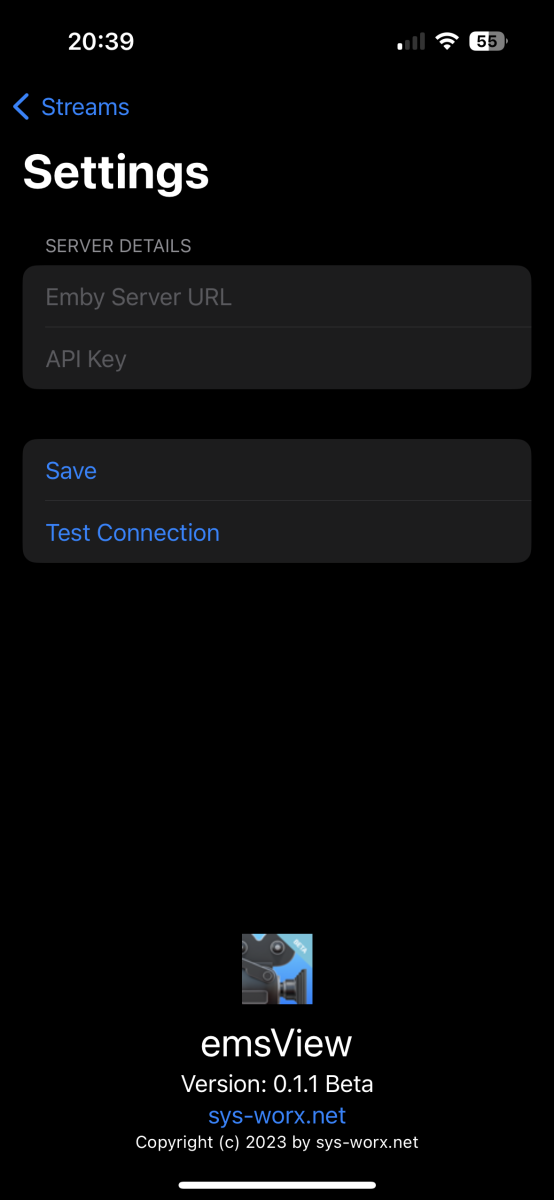
I'm playing around with Swift for the first time, and I came up with the idea of programming a small app. Since I haven't seen an app yet that shows you the current streams from your own Emby server, I started coding something along these lines. Here are two screenshots of what it currently looks like. You can give feedback on whether you need it

 1 point
 -
It seems to all be scanning just fine now. I removed a few plugins (Top Picks, Statistics, Email Notifications, Anime). Also removed then readded the entire library and swapped the metadata provider order and all seems fine now...(It could have been the long scan time issue afterwards) Thank you for all the help.1 point
-
I'm really looking forward to this feature being added.1 point
-
Your issues is your folder paths as you can not have a child path of any other library that already exists. So Movies you have E:\Media Backup and you have TV with E:\Media Backup\TV Shows. So the Movies library kills the TV library do to overlapping paths. You need to reorganize Movies path to say something like E:\Media Backup\Movies. But you should remove both libraries to possible correct the database issues that are being created now.1 point
-
no doubt, probably has happened to me at some point too. I'm not excluding myself from being the occasional moron1 point
-
You should be using the in-home IP to connect to the server within your local network.1 point
-
Yes, having a way to lock a particular episode to a particular metadata source would be very helpful.1 point
-
Gonna plus this one. I imagine just having to write the user email in the emby connect field when I create the user, and that that will create an emby connect account if missing, and if it isn't missing, add an available server to their account. In the case the account doesn't exist, an email would be sent. Possibly anyway, so that evil actors can't flood an account with bogus servers. I imagine OIDC could be used for this. I see that there has been a discussion about this. Emby connect would act as an "OIDC Authorization Server". The Emby server as a resource server and client. And Emby connect could federate users from external providers, like Google. I've implemented federated OIDC flows, and there are some quirks, for sure, but it's quite beautiful when it works. And as I understand it all required tooling is already in the .NET framework (and thus Mono), which I do believe is you poison? I think I would be willing to write a plugin for the server that can turn it into an OIDC client/resource server. If it is possible to write plugins for authentication (but not necessarily for authorization). Just having that would enable login with for example Google but it would require the server maintainer to register an app in the iDP. But that code could be very easily adapted to use Emby Connect as an iDP (which in turn would either authenticate users itself, or federate further up). And if Emby connect acts as an app, that would offload the server admin and make it all pretty darn seamless.1 point
-
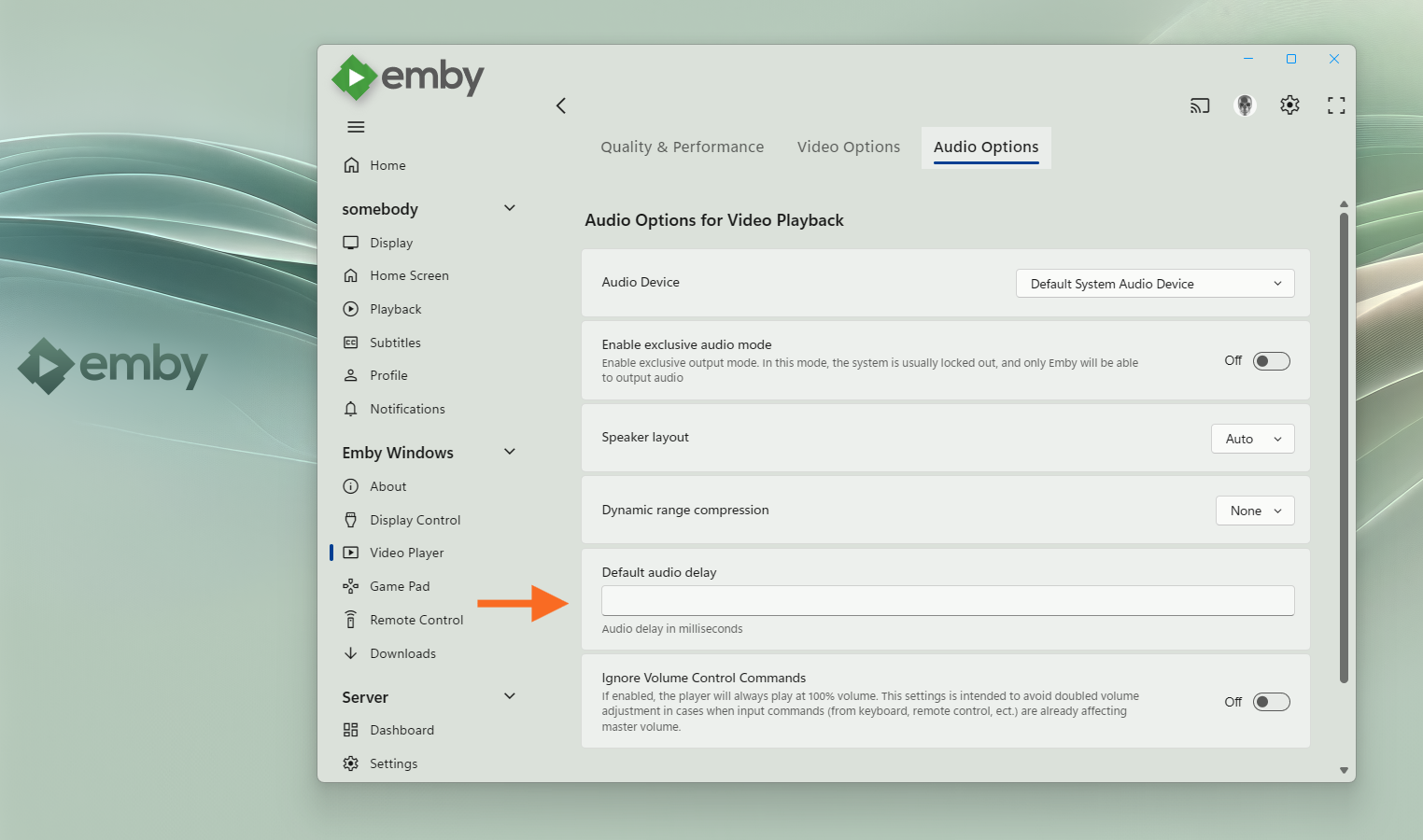
Thanks a lot for comfirming! You mean like this: But I rather wonder why you would need this at all - where does it happen that A/V is getting out-of-sync? What's your setup?
 1 point
 -
If you don't have a performance bottleneck now then you're not solving anything by throwing hardware at it. In real usage you won't notice the sub-millisecond differences between SATA SSD and PCI NVME. Not at the low IOPS and throughput of a media server.1 point
-
Thank you for your response @sa2000 These are both in the same TV library yes and the library has three different base folders. The 3rd is a DV folder. Yes, there is a choice to select a version. Correct, as mentioned in the original post, in order to move past this error, I simply selected a separate episode, and then back to the original episode and am able to play. I did that in order to show but it looks like it just caused confusion. If a new log file is needed, please let me know. Absolutely. 1. Obviously first you must have a library scanned in with the option "Automatically merge series that are spread across multiple folders." with 2 or more ( I have 3 folders) folders with the same series, but different versions. 2. Mark an episode as played so that the next episode shows in "Continue Watching". 3. Select the episode from "Continue Watching", enter the episode screen, and then press play. This is where the error occurs. Also, clicking the play button or playing from the Continue Watching screen will cause the first episode of the first season to play. If I didn't answer all of your questions please let me know, and again if needed please let me know if additional logs are required.1 point
-
Ah! Interesting, fairly easy fix. I'm just away at the min, gimmi some time and I'll push the fix.1 point
-
All, seems to work with 'Emby for Android'. Tested it now for about a week and the error did not show up again since then. Thanks ebr and Luke! Lukas1 point
-
Progress on releasing 4.9 is the measure; we have been assured that the following beta cycle will include TVNext. Paul1 point
-
NordVPN is not in any way related to your problem; it is never necessary, and only of possible interest when you have remote connections. Installing it without knowing what it can do for you will only cause confusion. You've been told that the problem is likely down to your going back a version. Either reinstall the current beta and take it from there, or wipe the installation and reinstall the stable version. If you then still have a problem accessing Emby on localhost, then we have a better chance of fixing it. Paul1 point
-
For context, this is the physical remote: https://a.co/d/cQPIOI0 (Couldn't find a link on the Samsung site.)1 point
-
The remote doesn't have a dedicated info button. To get to it on the virtual remote is the button sequence I listed above. A long press of the select button would be a lot simpler if it was supported by the app.1 point
-
Hi, that's really odd. @sa2000are you able to reproduce?1 point
-
for reference https://thehftguy.com/tag/malloc_arena_max/ https://sourceware.org/glibc/wiki/Development_Todo/Enhancing_malloc1 point
-
Hello, it's possibl Hi @Lukethanks for answer. Meybe in the future there will be possible to make global template for every device?1 point
-
Unfortunately, I can't quite quantify what's going on because the issue isn't as bad on a local server. I'll try to create a video showcasing the issue when/if I get a better handle on it.1 point
-
https://forums.plex.tv/t/hevc-encoding-forum-preview/888127/7311 point
-
I don't know that installer zip file, but most likely these are MediaFoundation decoders and work with Windows Media Player. I'm not sure whether it also included DirectShow decoders (or wrappers), then it would also work in WMP Classic, and the various MPC-*** players. MPV doesn't use these, neither does VLC. General Rule No codec installations exist which have an influence on video playback in the Emby app. Neither through the MS Store, nor any "codec packs", nor any other "codec installers".1 point
-
Hi @Lukemost definitely! I haven't found the root cause yet but both @ebr and @rbjtech have helped identify that it's not an Emby issue and pointed me in the right direction with my network. I can't put the time in to find the cause for a couple of weeks, but when I get to the bottom of it, I'll post it up. Chris1 point
-
I have no tuners setup. But the issue others facing now, I had a year back then.1 point
-
People want an option to delete/purge all TV data If tv was used before and now it won't. There is the "Live TV" menu entry which you can't get rid of it in the GUI. You have to Todo some SQL delete to get rid of it. A feature in the GUI to force remove the TV data and Live TV entry would be nice!1 point
-
Lastest available using docker. But I think I have an idea what happened. The user had full access before and even though the access was removed and only a couple folders remained the suggestion were still showing from before the access was removed. I made a dummy change to the user by disabling all access and then re-enabling the same access and it reset the suggestions back to only what user has access. I did notice this with library access changes, if user has access to library A consisting of folders a,b,c. Then folder d gets added into library A, the user will not see the folder even if they have the whole root folder unless the root folder is unchecked and rechecked. I think this is a bug but most users don't make changes to folder in libraries often. Thanks for the help Luke.1 point
-
1 point
-
has this been fixed yet? i cannot get rid of mine either.1 point
-
希望这个问题可以得到改善1 point
-
This was absolutely awesome. Just moved broadband provider and now cannot forward ports. This tutorial quickly got me back online outside the house in no time. Excellent share and very easy to follow!1 point
-
This is being tested with one of the other major media servers (not jelly) and its pretty sick. They are doing 10 bit h.265 so it retains HDR. I really hope this gets added to emby at some point. I have transcoded full bit rate UHD files down to 8 mbits (on the fly) and it looks pretty darn good. I guess it depends on what your server has for hardware.... I have family with rural internet so anything along these lines is helpful. AV1 would be even better.1 point
-
Another +1 for native ebook/PDF integration.1 point
-
would really love for emby to have this as well1 point
-
Yes the 4790 is more than up to the task - BUT ... personally, save your $75 for something much more modern (the 4790 is 10 years old ..). 10th Gen is probably the lowest I would go - a 10100 for example. You don't need memory for emby - so if you need to compromise on funds - go with something that you can later upgrade if you wish.1 point
-
WELCOME TO THE HISTORY OF EMBY! A lot of our users are new to Emby and we thought it would be a good idea to share some of the backstory of how Emby came to be, where we started and where we are headed. We have grown significantly since our inception. Once a humble open-source project, Emby has evolved into a sophisticated platform that allows users to organize, stream, and enjoy their media libraries with ease. In this post, we'll take a look back at the history of Emby, explore its development journey, and highlight the key milestones that have made it what it is today. The Early Days: An Open-Source Beginning Emby started its life as Media Browser, an open-source project focused on creating a simple, user-friendly interface for accessing digital media collections. Originally, Media Browser was a plugin for Windows Media Center, and its primary goal was to offer users a better way to manage and play their media files. Back then, it was a community-driven project, with developers and enthusiasts contributing code, features, and plugins to expand its capabilities. Media Browser gained a loyal following among tech-savvy users who appreciated its customizable nature and flexibility. The Shift to Emby and the Rise of the Media Server In 2014, Media Browser underwent a major rebranding and evolved into what we now know as Emby. This change wasn’t just about a new name—it marked a shift in focus from a media center add-on to a full-fledged media server solution. Emby’s developers wanted to create a standalone server capable of managing large media libraries, transcoding content, and streaming to multiple devices. The introduction of the Emby Server brought a range of new features: Library Management: Users could organize and manage their media files with a sleek web interface. Metadata Scraping: Automatic fetching of metadata like cover art, descriptions, and ratings. Transcoding: On-the-fly transcoding for seamless streaming to any device, regardless of format. Multi-Device Support: Streaming became possible on a variety of devices, including smartphones, smart TVs, web browsers, and gaming consoles. This new direction attracted more users who were looking for a flexible media server that could handle diverse formats and provide a unified experience across different platforms. Open Source to Closed Source: In 2018, Emby made a significant decision: it moved from being an open-source project to a proprietary, closed-source model. The change allowed the development team to maintain greater control over the codebase, improve security, and introduce features more rapidly. Key Milestones in Emby’s Development As Emby transitioned to a proprietary model, the development team pushed forward with a series of updates and improvements: Emby Premier: The introduction of a paid subscription model called Emby Premier brought exclusive features like DVR support, cloud sync, offline media, and hardware-accelerated transcoding. Emby Premier gave the development team a sustainable revenue stream to fund further development. Improved Mobile and TV Apps: Over time, Emby released a series of polished apps for mobile platforms (Android, iOS) and TV devices (Roku, Apple TV, Amazon Fire). These apps received regular updates to improve stability, user experience, and customization options. Live TV and DVR Integration: Emby expanded its offerings to include Live TV and DVR functionality, allowing users to integrate live broadcast channels, schedule recordings, and manage live content alongside their media libraries. Enhanced Transcoding and Streaming: Emby has continuously improved its transcoding capabilities to support modern formats like 4K, HDR, and Dolby Atmos. These improvements allow for a high-quality viewing experience regardless of the device being used. Security and User Management: Emby introduced advanced user management features, including user profiles, parental controls, and access restrictions. This makes it easier for families to share media without compromising on privacy or security. Emby Today: A Comprehensive Media Experience Today, Emby is a mature and feature-rich media server solution that caters to a wide range of users—from casual media consumers to serious home theater enthusiasts. It supports a broad spectrum of devices, offers robust customization options, and remains focused on providing a powerful yet easy-to-use interface. Some of Emby’s standout features today include: Unified User Interface: A sleek, modern interface that makes browsing and streaming media a joy. Customizable Libraries: Tailor your media collections with custom artwork, genres, and metadata. Cross-Platform Syncing: Keep your media in sync across multiple devices and platforms. Comprehensive Live TV Support: Access live TV, manage recordings, and watch DVR content effortlessly. Community Engagement: Emby continues to value its user base, with an active community forum, feature requests, and beta testing for new updates. The Impact of the Community and the Road Ahead Despite its shift to a closed-source model, the Emby community remains strong. Many long-time users contribute by creating plugins, themes, and offering technical support. The Emby team regularly interacts with the community, implementing feedback and adjusting features based on user needs. Looking forward, Emby is set to continue expanding its feature set while focusing on performance enhancements and cross-platform support. Emby’s development is driven by innovation and user feedback, ensuring that it remains a competitive choice in the world of media servers. Conclusion Emby’s journey from a simple open-source plugin to a leading media server solution is a testament to its adaptability and the passion of its developers. While the shift from open-source to closed-source was a turning point, Emby has continued to evolve, delivering a reliable and customizable media experience for millions of users worldwide. The history of Emby is one of growth, change, and a dedication to providing users with a comprehensive and enjoyable way to manage their digital media. View the full article1 point
-
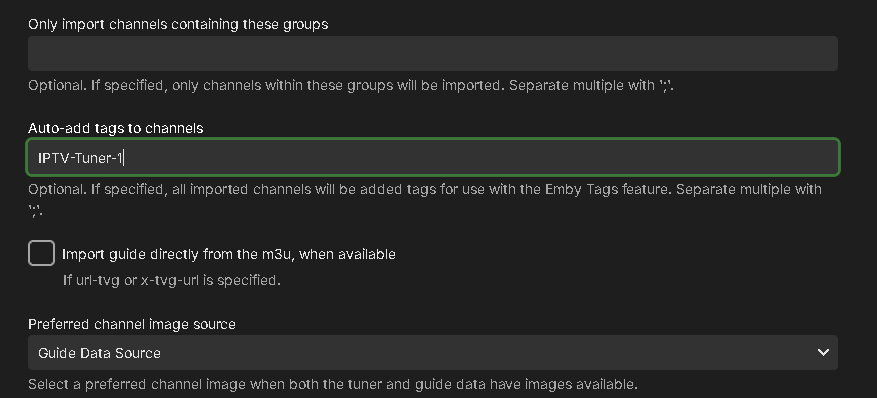
YES, YES and a tag/parental control is the way currently to do this. If you can hold off a bit, you'll be able to use this: Hi, You will be able to have all channels loaded from an m3u tuner tagged automatically. Just use a different tag for each m3u file, and the hard part will be done for you. You can then blacklist one tag or the other for each user. That will help you split the tuners among your users much easier. I With the blacklist of one tag, there won't be any double channels to see. Carlo
 1 point
 -
Yep definitely a feature request as there are so many TV shows that are all over the place in these different databases, just amazing... This feature should not be that difficult to do btw....1 point
-
Hi, not yet but this is planned for future updates. Thanks.1 point
-
HI, yes more development with books is planned for future updates. Thanks.1 point
-
External audio only with direct play seems like a good solution. I know it's possible to use other client in some way, but it's not an elegant process and not well supported in different platforms. Is it possible to add this functionality to Emby Theatre? This is very meaningful for many use cases. Personally I have many external audio files similar in size to its paired video files which make merging them not a good option. As I know Jellyfin has external audio file support now, though I'm not clear it's achieved by its server or client.1 point
-
This plugin does not replace TvMaze itself, it is a *helper only* Where TvMaze does not find the information, this plugin searches on bing and finds the ID (if it is available on TvMaze), sets the ID in Emby and allows the TvMaze plugin by Emby Dev to download the info using the ID rather than the name. Technically you shouldn't need this but in Tests I have found it will *help* identify people that TvMaze is obviously not telling the Emby Dev's TvMaze plugin it has in its database. How to use: Needs TvMaze Plugin from the Catalogue to work properly. Click on an Empty person image to trigger it. If it finds a link with a valid id (TvMaze id), then data and or image should load shortly. *A Caveat - it is possible that the wrong actor with the same name can be identified as correct* Nothing to configure or enable and it is seemless. It should work on all builds, place the dll in the /programdata/plugins directory and restart Emby. I accept no responsibilty for anything if you choose to use it, its all on you to check legallity in your country! What this does: 1. It looks on bing (not google this time) search engine for tvmaze links that contain the actor you are looking at or refreshing metadata on. 2. It collects links of possibles. 3. It only visits the links that might be valid and checks if the persons name is found in the actor page in order to verify it is valid. 4. It updates the provider Id (if found) 5. It writes a log file. Why does this help? Other metadata plugins if installed will use this id to get data such as tvmaze, themoviedb etc. This plugin might introduce a delay on person loading if *any* metadata is missing for that person. What it doesn't do: 1. It does not fetch any data on people, it only fetches the id code , fills in the field so TvMaze plugin can do the rest. It is technically a webscraper, athough intrusion is minimal - so it probably will not be allowed in the catalogue. 15.Jan.2023 - 03.18.25 Person = John Cleese 15.Jan.2023 - 03.18.25 Url = https://www.bing.com/search?q=john+cleese+tvmaze.com 15.Jan.2023 - 03.18.25 Found link = https://www.tvmaze.com/people/43636/john-cleese 15.Jan.2023 - 03.18.25 Testing Link = https://www.tvmaze.com/people/43636/john-cleese 15.Jan.2023 - 03.18.25 Id Verified, Using Id = 43636 15.Jan.2023 - 03.19.39 Person = Gillian Kearney 15.Jan.2023 - 03.19.39 Url = https://www.bing.com/search?q=gillian+kearney+tvmaze.com 15.Jan.2023 - 03.19.39 Found link = https://www.tvmaze.com/people/50102/gillian-kearney 15.Jan.2023 - 03.19.39 Testing Link = https://www.tvmaze.com/people/50102/gillian-kearney 15.Jan.2023 - 03.19.39 Id Verified, Using Id = 50102 TVMAZE ID Helper.zip Similar plugin for Imdb can be found here:
 1 point



.thumb.jpg.21d888786f2104b4f688825203ce7598.jpg)