Leaderboard




Popular Content
Showing content with the highest reputation on 01/19/25 in all areas
-
Thanks. We have now changed the default User-Agent HTTP header - so the problems that affected users were two separate causes - one the User-Agent and the other related to the Referrer spelling change where some providers needed to see Referrer rather than Referer - we now send both.2 points
-
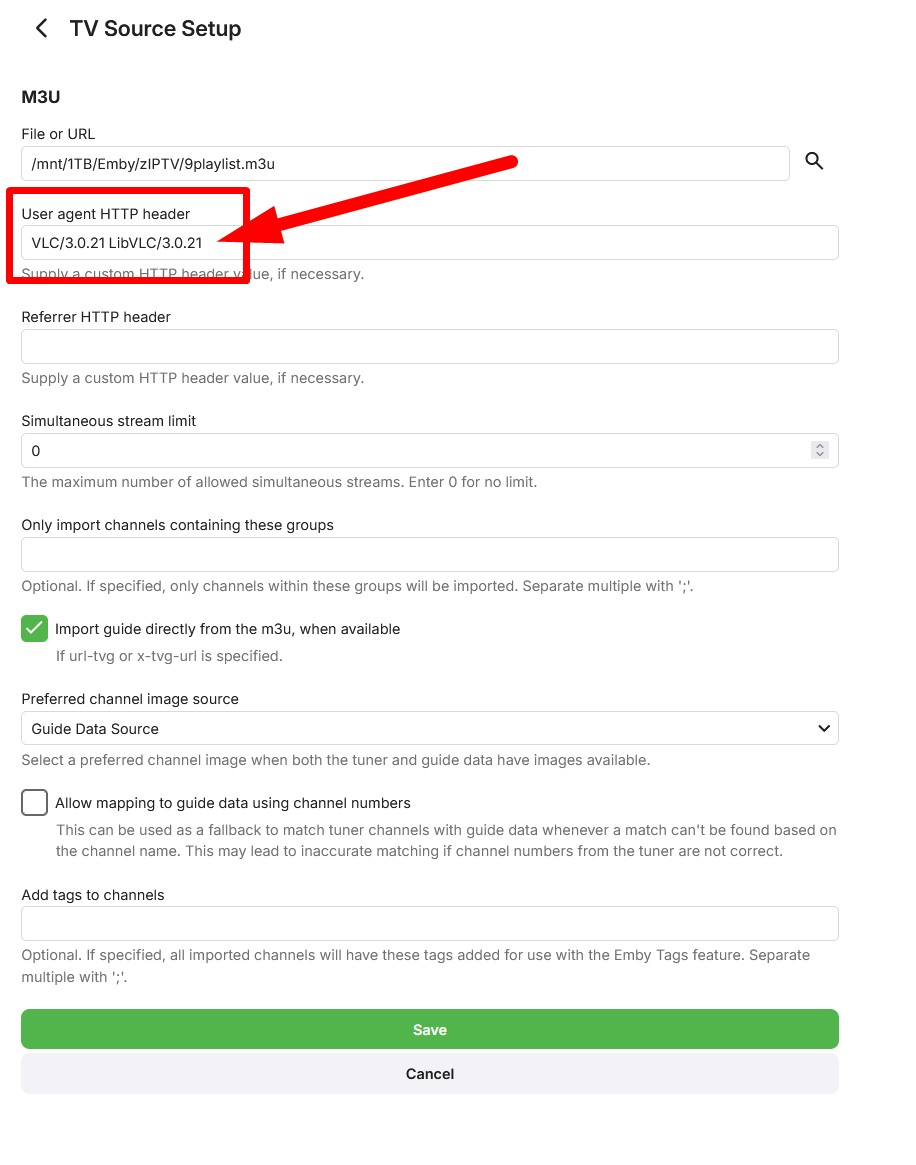
Following sa2000 advice I have just made the following tests with and without the following User agent HTTP header: VLC/3.0.21 LibVLC/3.0.21 1.0.31 with No headers → Does NOT work 1.0.31 with headers → DOES work 1.0.35 with No headers → Does NOT work 1.0.35 with headers → DOES work 1.0.38 with No headers → DOES work 1.0.38 with headers → DOES work If you are still having problems 1.0.38, try this user agent HTTP header: VLC/3.0.21 LibVLC/3.0.21
 2 points
 -
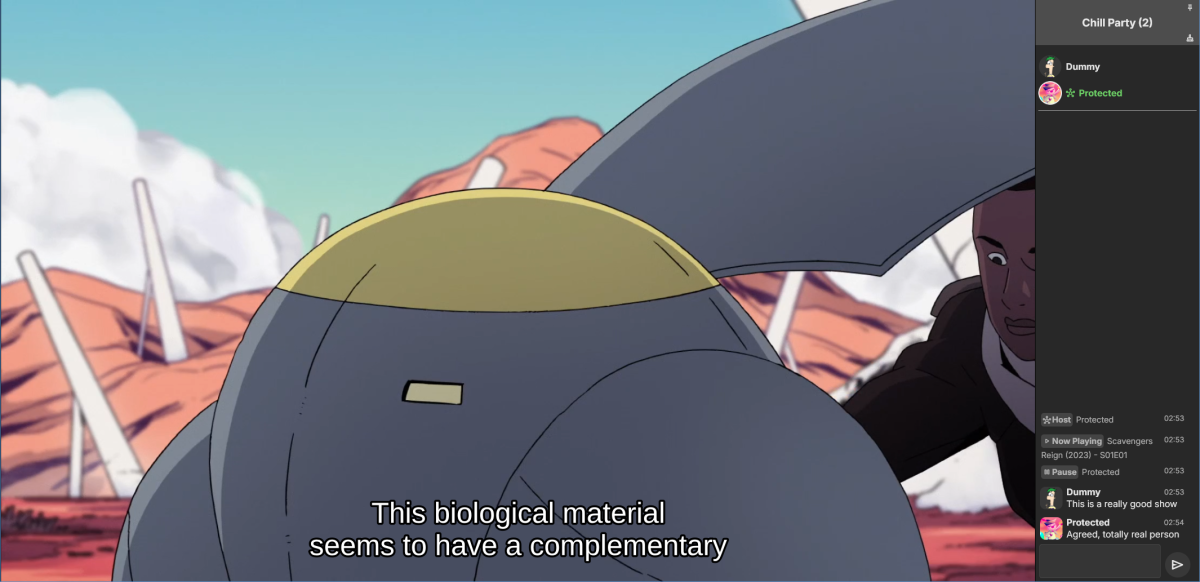
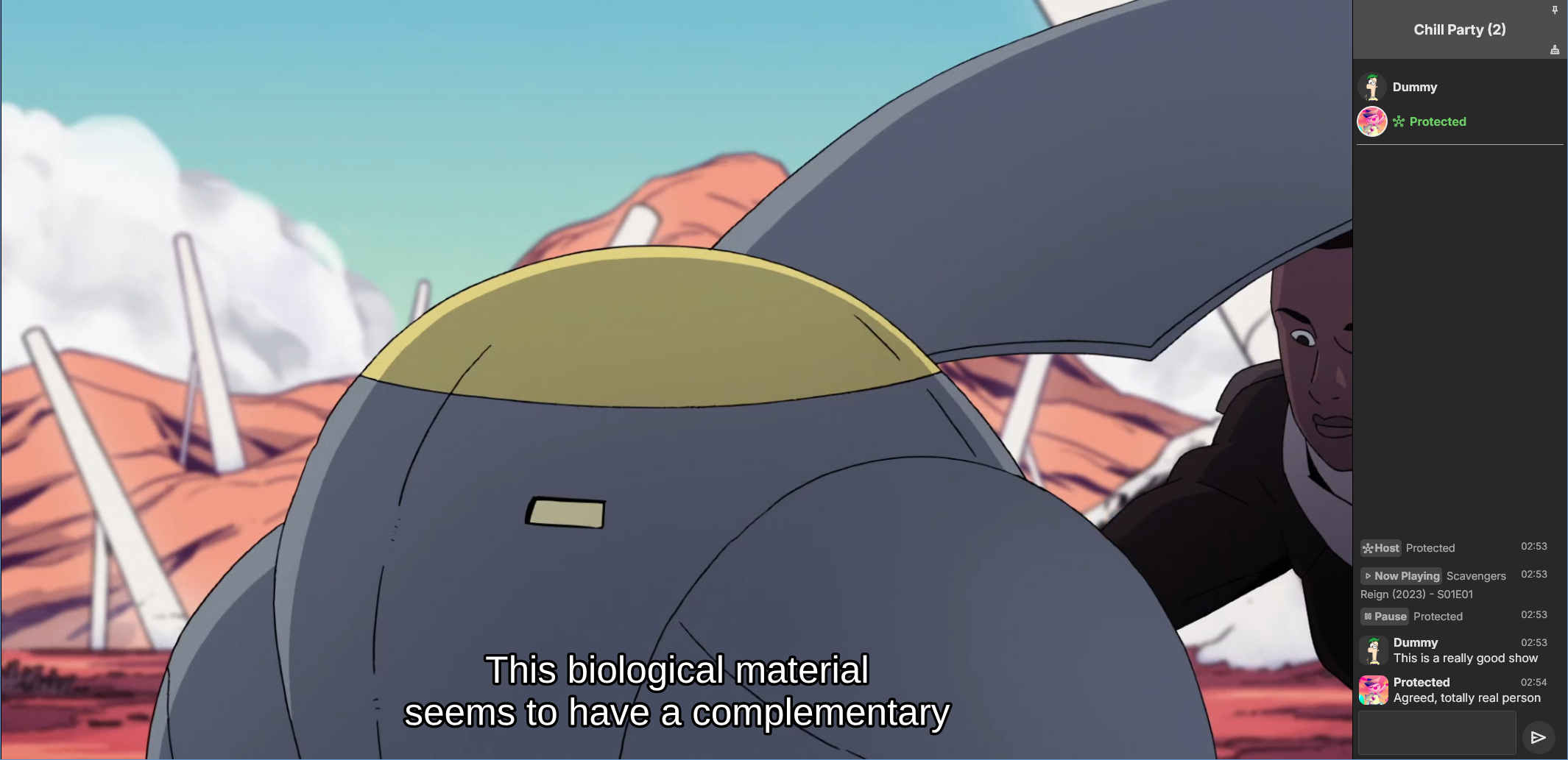
Emby Party is a solution for watching videos with multiple friends through your Emby web client. It requires no additional dependencies - only a device running Emby (presumably with good enough hardware for serving all the attendees, especially if you're transcoding) and at least one web browser. It consists in two halves: A server plugin and a web client module. They must be used together! Each half expects the other to be present. This is an experimental open source project. Feel free to fork and contribute pull requests and issues (my availability for fixing issues on my own may vary wildly and may be low in the near future). The source code and all known issues can be found in the github repository. Any information there should be considered the most up to date. Currently testing in Emby 4.8.10, Windows and Debian Bookworm (Linux), Firefox, Chrome and Edge. Features Hassle-free hosting: Doesn't matter who creates the party. Whoever initiates playback while in a party transparently becomes the party host, and host is reassigned if they leave. No need to recreate the party for someone else to host something later. The hosts controls the party video and video position. Video access permission check: Will only play a video if all party members have access to it, and will prevent new party members who don't have access to the current video (if any). Accurate synchronization of video player positions when the host seeks or changes videos using a multi-part protocol that leverages remote control commands under the hood. Accurate catch-up seek commands issued for guests when they fall behind or are otherwise offset from the host. Efficient transition between videos in a playback queue that accounts for slightly offset attendee positions and allows each attendee to start loading the next video while others finish the previous one. Late joiner support: Brings late joiners immediately into the video at the correct position. Joiners already watching a video will automatically start hosting that video if the party was idle. Host can change audio and subtitle streams for all attendees (guests can change it back for themselves if they want). Distributed pause/unpause requests - all users can pause and unpause. Return to video button for guests to return to the video being watched by the host if they closed it for some reason. Guests are automatically returned to the correct video if they open the wrong one or under certain other circumstances. Keep alive: Plugin keeps party member sessions and websockets open as needed and disconnects party members who time out. Support for multiple sessions/devices per user account. Just don't duplicate browser tabs! Support for remote control: Party members can control other Emby clients and those clients will benefit from party synchronization. (Caveats: Working, but not thoroughly tested yet. Due to the lack of client-side support, remote controlled clients are capable of issuing pause/unpause commands that break synchronization. I recommend being careful about pausing/unpausing in a device being remote controlled by a party member.) Cool resizable sidebar with list of party attendees and log of chat and events. The sidebar has docked (squeezes the video aside) and undocked (overlaps the video) modes and uses your Emby profile picture. Dark and light mode supported. Visual indicators for synchronization states of party members when synchronizing with host (icons). Visual indicator when receiving seek commands from the server (your name flashes orange). Host remedies for synchronization issues: Guests who are not responding can be sent another playback command by the host or kicked from the party after 20 seconds have passed. Emoji support in chat using :shortnames: or emoticons. Markdown styles support in chat, including spoilers and preformatted text. Preserves chat focus and selectively blocks keyboard shortcuts or UI interactables when chatting or syncing in order to prevent control mistakes/command spam. Chat bridge endpoint: External applications can connect to `ws://localhost:8196/bridge` to exchange chat (and some events) with the party sidebar. I threw together a module for my self-hosted Discord bot that shows how to use it. Remote control chain resilience for party attendees only: Prevents you from creating a loop of remote control targets. If you do this in vanilla Emby your clients will nuke the server with requests. Automatic skip to next video for videos stalled at the end because the last segment isn't decoding. This is also for party attendees only. Installation To install the server plugin, download it or build it in Visual Studio, then copy it normally to your Emby server's plugins folder and restart the server. Currently the plugin doesn't modify any Emby files (yet?), so you'll have to manually edit one of the web client's existing modules and import the Emby Party module there. Head on over to system/dashboard-ui/modules/appheader/appheader.js and locate the end of the render function, which in Emby 4.8.10 is in position 21877. Insert this code there: , Emby.importModule("./modules/embyparty/partyheader.js").then(function(PartyHeader) { return (new PartyHeader()).show(skinHeaderElement.querySelector(".headerRight")); }); Save, clear your browser cache and refresh. If the party button appears in the top right corner, you're good to go! I'm sure someone will tell me a better way to do this soon enough. I don't know if there's a commonly accepted way and haven't really put any thought into it yet. Whole bunch of disclaimers Use at your own risk! If something breaks that you don't want broken, revert the steps above to remove the plugin from your server installation. Emby Party was iteratively developed and tested with several friends over several weeks, but it was developed to suit our own needs. It was not (yet) tested alongside features we don't use, including, but not limited to, Emby Connect, Emby Premiere, Live TV, the audio player, conversions, cinema previews, most other plugins, etc. Currently no mobile styles. Not tested on mobile. We've been in active development until now. There are vaguely known issues that are hard to reproduce and instability can be caused by video decoding failures, networking issues, browser crashes, browser extensions, lack of hardware resources, forgetting your browser won't play until you click the window unless you've given Emby autoplay permissions.. New and exciting bugs should also appear as we get more people using it. Thanks in advance for helping test, report or fix this stuff! Otherwise, check back for updates, I guess? Please keep comments and suggestions in this thread. Issues should be reported only on github so they're all in the same place. You may notice a whole lot of things in the source code that make you think, wow, it sure would be nice if this was in the Emby settings. I agree! If you would like to implement a plugin settings page, please submit it as a pull request on github! I'm so horribly far behind schedule with this project, and my free time is far in the negative right now. There may be better ways to do some of the things Emby Party does that I am simply not aware of at this time (one of the reasons I'm keeping these instructions outside the repository for the moment) or were simply not considered because the feature grew organically. Pull requests please! Also recommended If you're feeling adventurous, consider improving your watch party's subtitle experience with these (much harder to apply) client-side fixes we worked out in tandem: Temporary workaround for subtitles coming in too early when resuming a video with transcoding (Important for this whole thing if you watch videos with subtitles) Web client ignoring AudioStreamIndex and SubtitleStreamIndex (Required for party host to guest stream index sync if you use that) Fixing mismatch between subtitle canvas and video aspect ratio breaking ass subtitles Fixed in vanilla as of 4.9.*! Playing plaintext subtitles through Subtitles Octopus by faking subtitle type Support mkvs with embedded fonts (requires the associated plugin) Fixed in vanilla as of 4.9.*! These may become obsolete over time if things are fixed or integrated into the main software. Don't forget to clear your cache and refresh after making changes to the client.
 1 point
 -
Hello all! This form post is more to take the temperature of an Emby-related open source project that I haven't been updating very much due to just life getting in the way and an upcoming move, but I've been doing a lot more freelance coding lately, and I'd like to try another push to complete an MVP if there might be even a hint of interest. In short, my project aims to extend Emby's API with Subsonic-compatible endpoints to allow for various Subsonic-compatible clients to leverage it, thus diversifying the clients that one can use to interface with Emby for audio. However, for all intents and purposes, Subsonic seems like a dead project. It appears that the last version of the Subsonic server came out over four years ago, and although arguably the Subsonic API has become a de facto standard, it isn't being updated at all either. Still, even though Subsonic may be "dead", it doesn't mean that the API isn't stable, even it has been neglected :) I currently use Navidrome for local audio although I'd rather just use Emby for everything. That said, I've been quite pleased using Symfonium (Android platform) with Navidrome - Symfonium even supports Emby native APIs. But of course that is just me. This post is an attempt to gauge if there may even be a smidge of some interest in having a stable Subsonic extension to Emby's API. So if you have any opinion on the matter, I'd love to hear it. Many thanks!1 point
-
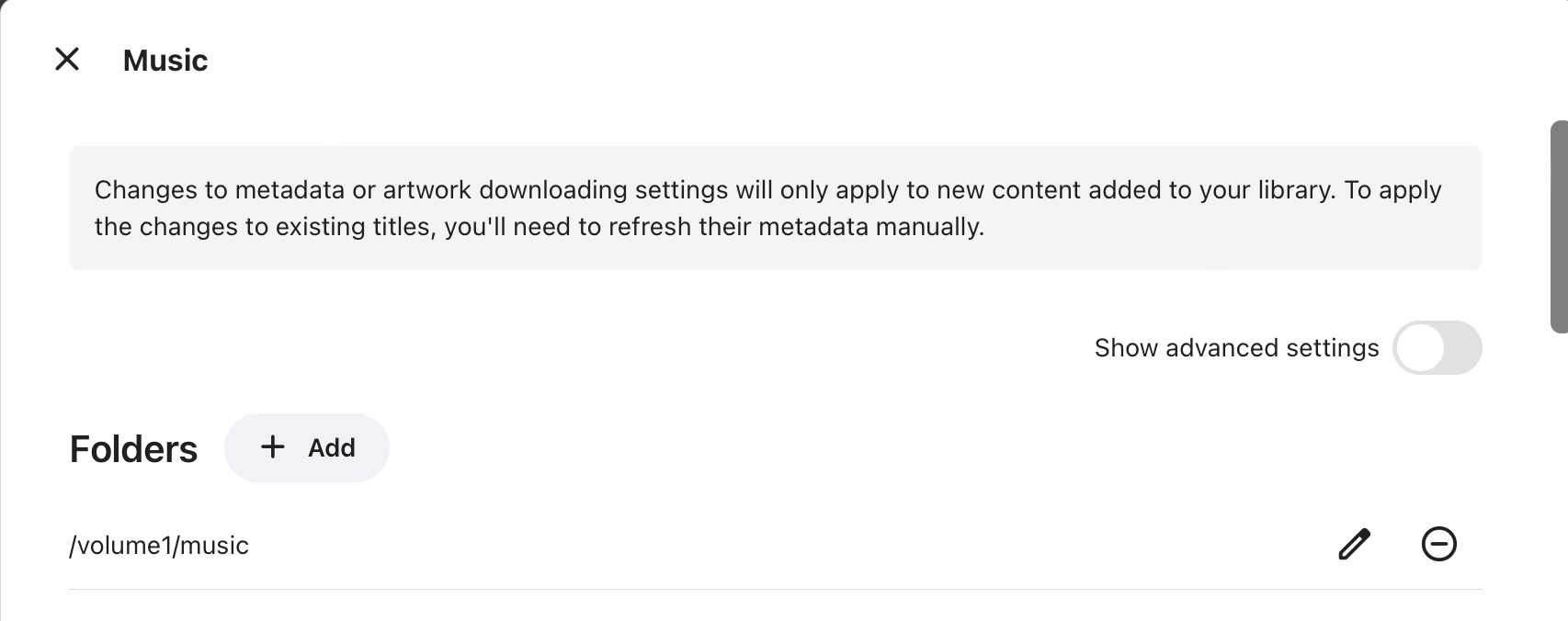
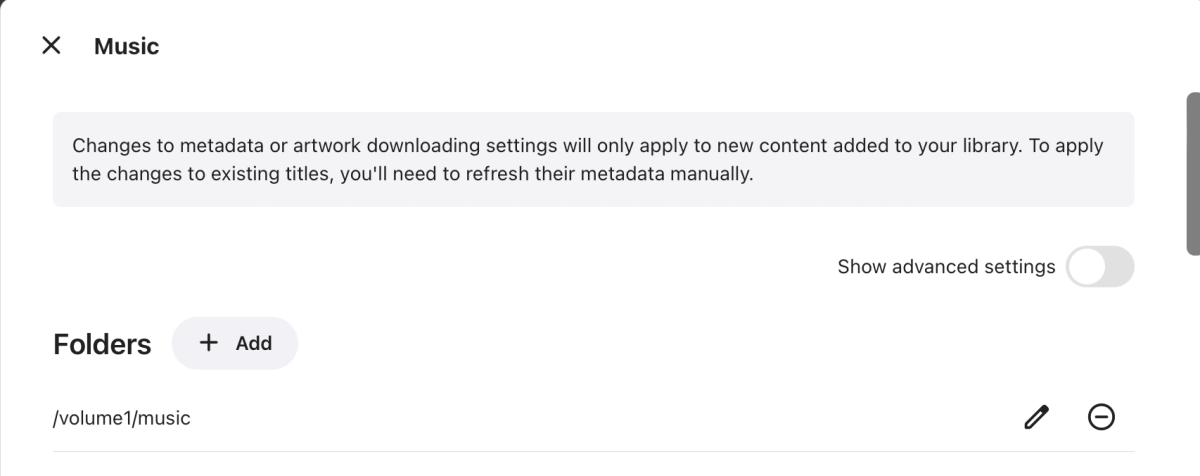
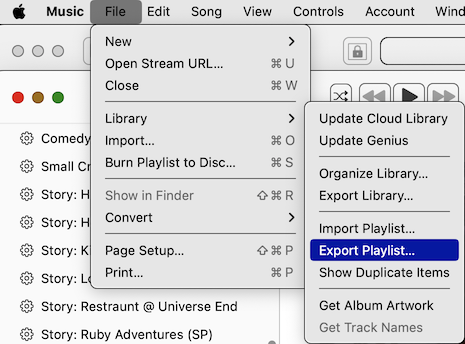
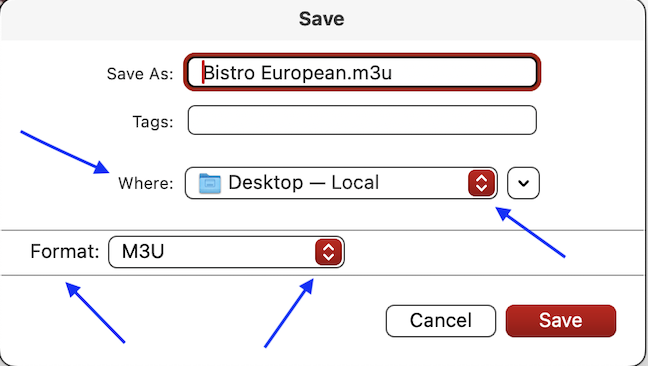
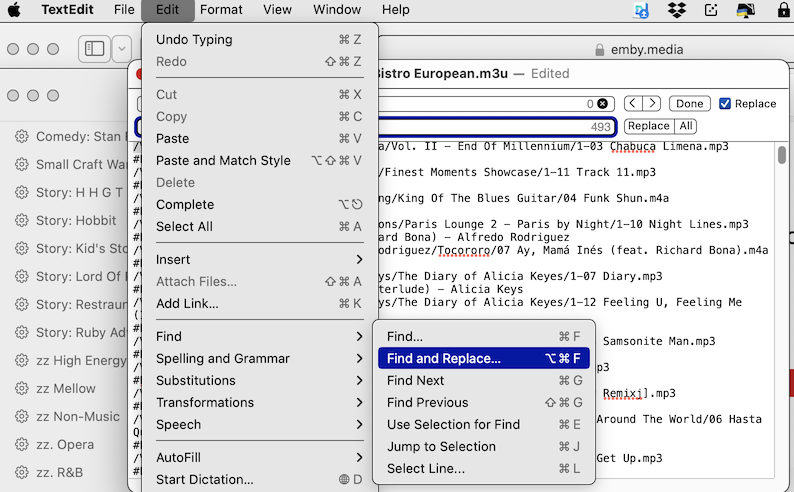
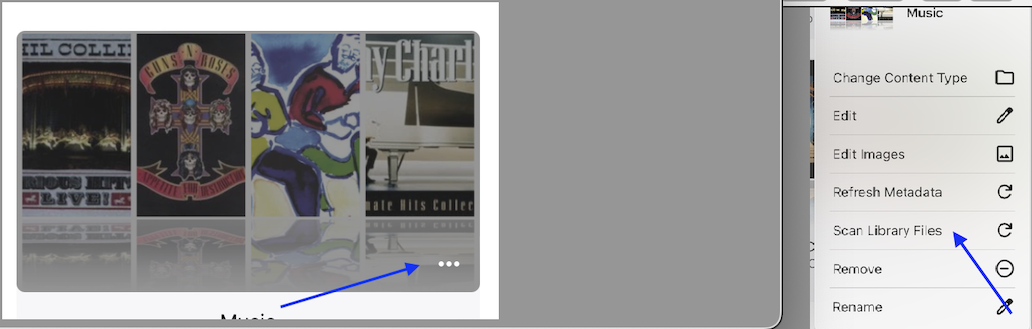
I was struggling to get my playlists from Apple Music to play in Emby. After some forum suggestions & a bit of experimentation I finally got them to work. I wanted to share the benefit of my experience. Apple Music allows PlayLists to be exported in M3U format (which is recognized by Emby). However, Apple Music will, of course, refer to the file path on the computer where they are originally stored. Since I use the Apple Music organization (Artist/Album/Songs), and I sync the entire music folder on my laptop with a sub-folder under the Shared Folder "/Music" on my Synology NAS, it was a simple matter to edit the ROOT part of the file path(s) in the M3U file to match the proper path on my NAS, which I obtained from EMBY>SETTINGS>LIBRARY>MUSIC (see SS 1). To export the playlist from Apple Music, I first selected the playlist I wanted to export, so all the songs are showing. I went to FILE>LIBRARY>EXPORT PLAYLIST (SS 2). On the next window, I selected M3U format & the destination where I wanted the file to go on my computer (SS 3). I opened the PlayList.M3U file using TextEdit, went to EDIT>FIND>FIND & REPLACE (SS 4), then did a search & replace, exchanging my laptop version of the root directory (/Users/Shared/) for the NAS version (/Volume1/Music/), then clicked ALL (SS 5), then FILE>SAVE. I used File Station on my NAS to create a new sub-folder: /Music/Playlists, then uploaded the newly edited playlist there. I seem to have issues getting newly added content automatically recognized by Emby (discussed a separate forum thread), but re-scanning the music files got the playlist recognized - EMBY>SETTINGS>LIBRARY, lower right corner ellipsis on the MUSIC section>SCAN LIBRARY FILES (SS 6). I apologize to the more technically minded out there if my instructions seem too pedantic. I sometimes find it helpful to have steps clearly laid out & wanted to be helpful to those less experienced (like myself). Everyone has to start somewhere... I imagine that since the steps are repeatable, there might even be a way to use Apple Automation to create a "script" to do all this automatically. However, that is beyond my skill set. Final note: Naturally, this will only work for music you actually have on your computer & not songs in playlists from the Apple Music streaming library because there needs to be a "physical" file path to a stored music file. I am not sure what will happen to the streaming songs in a mixed playlist. I assume they would be ignored, but you know what happens when you assume... I will let you know what happens when I get to a playlist that has a few songs from the streaming service in it.

 1 point
 -
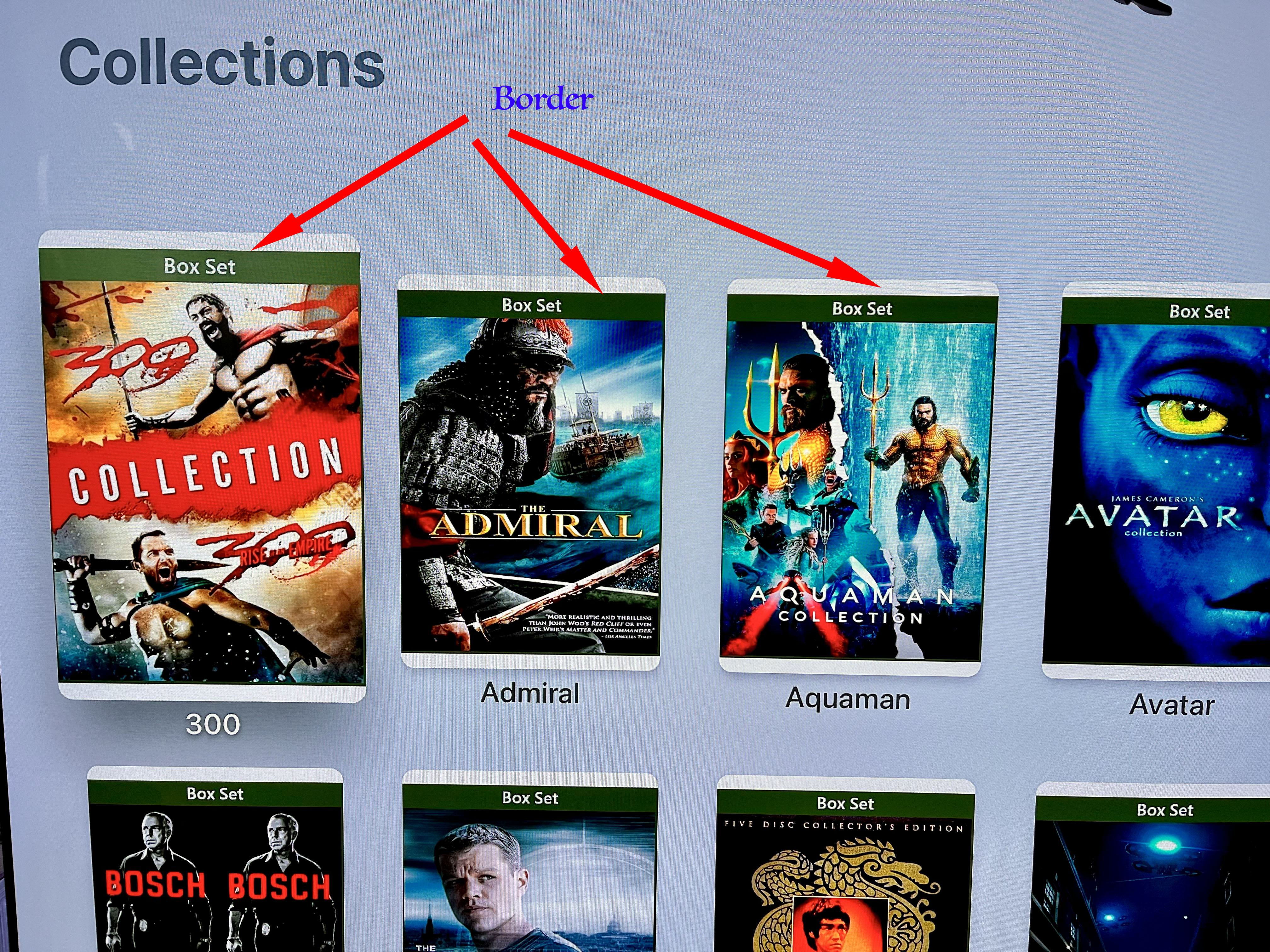
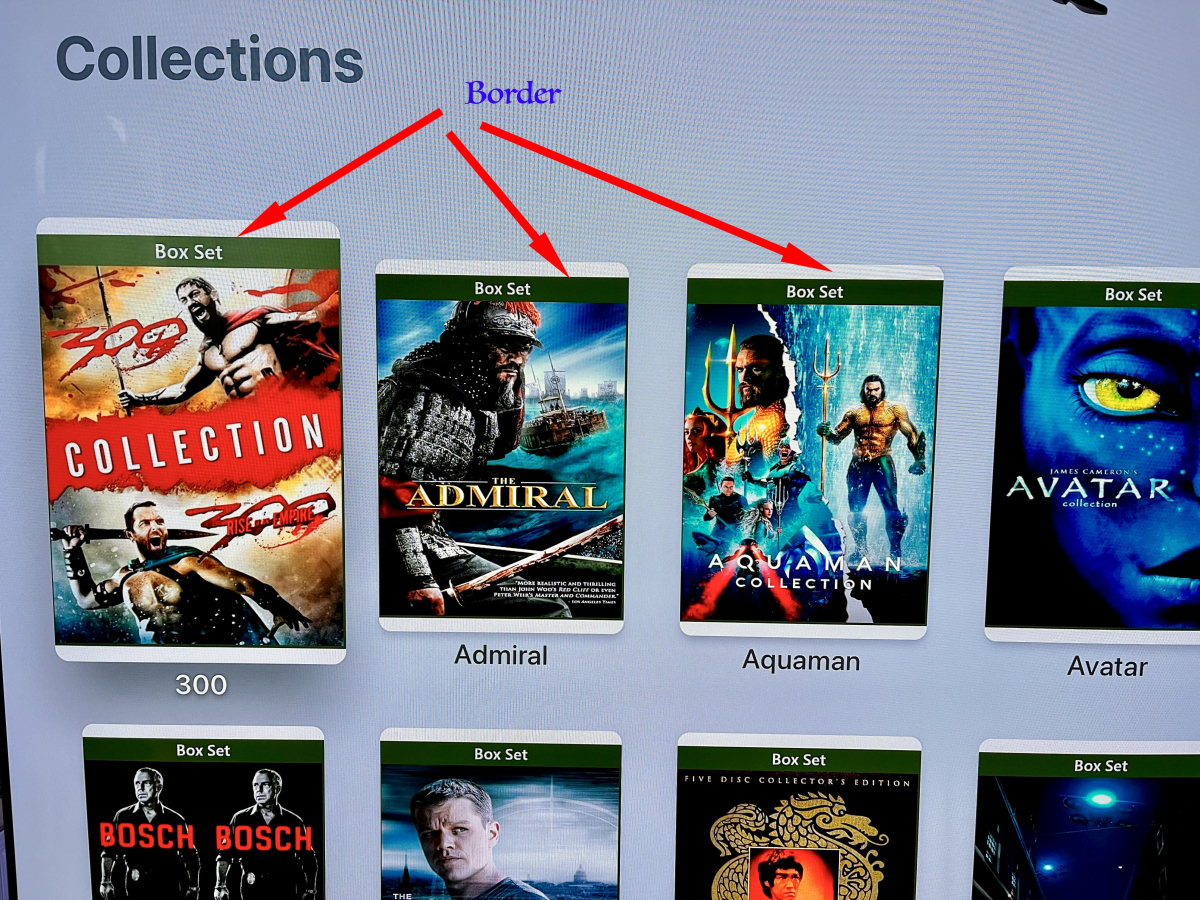
Hello Developers, Since updating my Apple TV 4K’s Emby app to 1.9.3 (3), I’ve noticed that my Collections now have top and bottom borders, the color determined by my Apple TV’s appearance settings. On my case, the background is white due to my Light appearance setting. Please look at the attachment. Thanks for taking the time to check and fix.
 1 point
 -
Reading all the comments, I see that the device limit is a very common issue. including myself having frustrating problems. I have 5 devices in my home and am still getting the premiere device limit exceeded. Why am I having this pop up on my screen when I have 5 devices, that is with in allowed amount of devices in my account?1 point
-
Absolutely & hello there! I am the OP/developer working on this. And it is funny you mention this! I just got notified about activity on this thread, and if you check my GitHub repo for this project, I've started working on it again after a family move to Alaska in May of last year (with all of the headache, time, money & preparation of selling our old house before that). Things have settled a bit for us going into the new year, so I am having more time to work on it, and you'll notice some new pushes recently. I am really, really wanting to push this over the line to get an MVP. My first target is the Subsonic 1.16.0 API spec, with OpenSubsonic after that in short order. Android has some great apps that support both Emby's API & Subsonic directly, but with iOS, since Emby doesn't natively have a Subsonic API layer, you're left with apps that only support Emby's API which aren't all that many. I'm hoping to open the door to more iOS Subsonic apps with this project so iOS users will have more app choice with Subsonic clients, at least when it comes to their music hosted on Emby. And that would include Subsonic clients running on desktop or wherever :)1 point
-
Support for Net6 is over and the latest update of Visual Studio they claim no longer supports it either as well. It should be easy to update to Net8. I submitted a PR for that.1 point
-
Just guessing - Probably a permissions issue. Emby on Linux runs under an account named emby. That account needs permissions to the media folders. If that doesn't help, I suggest posting your emby logs active at the time the scan was performed.1 point
-
You need to be a little careful here - is the m.2 nvme ? or m.2 sata ? nvme is significantly faster than any SATA based SSD. So while I agree any parallel I/O processsing you can do (on multiple controllers) is a good thing, moving your main 'cache' from m.2/nvme to SATA SSD is imo a bad decision and performance will degrade, not improve.1 point
-
I gave up on this. Due to whatever combination of circumstances, I could not get Hardware Transcoding working. Eventually swapped out the N150 for an intel i5 with an otherwise identical setup and everything worked near out of the box. Oh well. Thanks for all the support.1 point
-
I'm glad it worked out for you And that you server is no longer locking up. So to sum up, permissions issues all along.1 point
-
it works thanks to everyone! emby is the best for its community without a doubt, thanks to everyone!1 point
-
You could try something like 1) Netdata - Open Source | Netdata 2) Prometheus and Grafana - Get started with Grafana and Prometheus | Grafana documentation 3) CheckMK - https://checkmk.com/product/latest-version 4) Zabbix - Zabbix :: The Enterprise-Class Open Source Network Monitoring Solution There are so many ways to do this I use Prometheus and Grafana all installed in docker on my unRaid server.1 point
-
Thanks for the response. My server is on 24/7. When I set up some scheduled tasks to trigger earlier in the day (so I could make sure it was functioning properly) it did not initiate at those times, so I just set it all back to default and woke up to a fresh back up this morning, not sure why my other timers did not work- but it's working fine now. Thanks!1 point
-
That's what she said. thanks you guys for the help. Tomorrow's new thread will be how to get Emby to recognize my HD Homerun, which is probably a Synology issue with permissions, but we'll see.1 point
-
I'm sorry, this works now. I was in the hospital so I was unable to reply, my apologies.1 point
-
Yep, I tried rebooting the server. I will give it an hour and repost the txt.1 point
-
https://forums.plex.tv/t/hevc-encoding-forum-preview/888127/7311 point
-
As an FYI, my app could filter based on premier date as well. So adding start and end premier dates is important to the API1 point
-
I’ve tested hable, gamma, linear, 2446a, 2094-40 with Avengers and Allied both Dolby Vision. All exhibit noticeable brightness changes on my test scenes. BT.2390 is by far the best setting, brightness changes are subtle and the average viewer wouldn’t notice. Tone-mapping looks excellent to my untrained eyes for both hdr & dv. Not all media is affected, both test movies are dv profile 8.1 but other similar profile movies are fine. I’m going to leave tonemapping set to 2390 and consider the issue resolved in my case.1 point
-
Just checked again and brightness still changes but it’s not as bad as before. Will test some other tonemapping modes.1 point
-
Apologies Softworkz it was bt.2446a I tried last night. Just tried bt.2390 and the issue is fixed! Returning the tone mapping mode to auto and the problem is back. Should I leave the setting on bt.2390 for all media or does the auto setting behaviour need modifying to fix this in the next release? Thanks for your help, good guess1 point
-
Ok sorry, I haven't read any of those 1.9k posts and it wasn't clear to me that you are generally dissatisfied with Emby audio features.1 point
-
He has been closely involved, we have a private conversation going over many pages. All of his suggestions have been implemented with the exception of two and those two have only been postponed to better understand the use cases and to get an idea how to expose them as easy-to-use and easy-to-understand options. There's a difference between providing an app which is working reliably and satisfactory - and most importantly: right out of the box - for x-thousands of users and - on the other side - trying out the latest patches to a 3rd party component, that haven't even yet been included in that component or aren't yet included in the latest stable release of that component. The latest stable release of MPV player is 0.39 and that's exactly the version we have in the Emby app. You need to understand that it can only happen during beta phases where users call out for a feature and we add that for testing in a subsequent beta version. This cannot happen during non-beta periods. And circling back to @generiq- he has been of great help and we are very thankful for his input. I hope we'll be able to repeat the same kind of collaboration during the next beta phase. At the end of the last beta phase I had asked him two times whether there's anything important that we should add but he was good with the state we had. Also consider that this is the first version with an entirely new implementation and player integration and I think we have gone way beyond of what such kind of "1.0" implementations would typically offer. We are determined to improve the app in the future, but not in a way that people call out for a change and it will be implemented the next week, putting functionality for all other users at risk. Thanks for your understanding.1 point
-
Hallo zusammen. Ich habe den Scan nochmals durchlaufen lassen, nachdem ich Neminem Tipp zu Herzen genommen habe. Nach 4 Stunden war alles so, wie ich gern haben möchte. Vielen Dank nochmal an alle, die mir geholfen haben. Ich werde diesen einen Link zu diesen Thread eventuell in das Synology-Forum stellen, damit andere Unwissende anschlagen können. VG Peer
 1 point
 -
screen goes black after Picture in Picture on iPad and iPhone.1 point
-
Thanks for your input. Formuler is quite good at fulfilling its primary purpose and although it's a bummer it doesn't play nicely with Emby I now have a backup solution at least. But yeah, I might ask Santa for a Shield one day. Nice as your reply was @rbjtech I'd rather not mark it as solution. These boxes are getting fairly popular so it would be nice if someone could dig a little deeper.1 point
-
The concept on shortlisting/virtual library of items is not new, be it via strm files (links to existing items) or os level symlinks - they both have the duplicate problem (in the same library/search) and are ultimately a 'hack' on functionality. Many (including myself) are waiting for the smart playlist feature to create these virtual libraries - this has been marked for release in this beta cycle (4.9) Unless it's very urgent, I would personally wait for this to see what it can deliver, but there is no ETA unfortunately.1 point
-
Emby passes through all the HD Audio codecs just fine - on hardware that supports them. I find it very strange that the formuler.tv specs page for this hardware doesn't even mention the basic audio codecs such as Dolby Digital, yet alone HD Audio codecs, leading me to believe it a cheap clone and 'support' for them is unofficial at best. Emby is reading the capabilities via the Android OS - and it is likely reporting they are not supported (true). Kodi has it's own lower level drivers, which is likely why that 'works' .. but on any software using the Android API .. it is unlikely to work. btw - multi-channel PCM simply means it's decoded on the client, rather than the soundbar - but you'll lose all Atmos and DTS:X data as a consequence. (and again - this is because the client is not being told or doesn't support the codecs) After many years, the only mainstream box that officially supports all the HD Audio Codecs is the Nvidia Shield Pro - it's remains expensive for a reason, licenses from Dolby (for both audio and video) and DTS are official ..1 point
-
It's something we can look at adding.1 point
-
I'm unsure what you mean by DTS FLAC - there is no such codec. They are either FLAC or DTS, they cannot be both. Either way, you simply need to have an end device that natively supports the codec in question - be it DTS (or DTS-HD, DTS-X etc) or FLAC (but be careful here, as there are many formats within the FLAC container). Don't try and use ARC or EARC - ie go 'through' a TV - as you may then be limited to what that TV supports (passes through). Go direct from the Emby device to the decoder/receiver - and then pass the Video into the TV. I've never had issues with the Shield Pro, except a few edge case audio codecs - Everything from DD Mono to DTS-X/THD 7.1 Atmos passes through to my Denon Receiver just fine.1 point
-
This is 100% correct.1 point
-
If i remember correctly, LG does not support Dolby Vision if the video is encoded with a MKV container. Only videos with a MP4 container will work with Dolby Vision on LG TVs. Maybe this is the problem?1 point
-
External audio only with direct play seems like a good solution. I know it's possible to use other client in some way, but it's not an elegant process and not well supported in different platforms. Is it possible to add this functionality to Emby Theatre? This is very meaningful for many use cases. Personally I have many external audio files similar in size to its paired video files which make merging them not a good option. As I know Jellyfin has external audio file support now, though I'm not clear it's achieved by its server or client.1 point
-
Yea, it's not something that can be "sold" as a feature. You are "the one guy" who says: But all others will say: "Hey the feature isn't working, audio and video are out of sync!"1 point
-
Thanks for your detailed explanation. I haven't encountered any issues with the Rifftrax media, but I understand what you're driving at as this being an impractical general solution.1 point
-
There are features where you know all about it - how it can work, how it needs to be implemented and where you are sure that it will work out successfully. Other features require a certain amount of research to evaluate and determine whether it's doable, which effort it would take and whether the results would be reasonably useful. Another category of features exists, where you know up-front that there's nothing to win, which means that you know that you can't deliver it in a way that it would satisfy users' expectations, and you even know that this feature would eventually cause much more dissatisfaction than not providing the feature at all. Unfortunately, this feature falls into the latter category - even though it seems to be so simple and even though some local players support it (somewhat), but this feature would suck in too many cases, even with high effort put into it. To be a bit more specific: There will be offsets between audio and video. And not only offsets but also drifts. And these two things cannot be automatically fixed by the server as it requires a human to assess and adjust. This means in turn that we would need to have controls for adjusting these two parameters - in all clients. But besides adjustment controls, many clients can't handle such things locally in terms of playback, and the server would need to do those adjustments - but the server, which is transcoding and/or muxing audio and video together, is often way ahead of time in processing, so adjustments made at the client, won't happen instantly. But only with instant changes can adjustments be made properly. Also, when changing offsets of audio/video in a live-transcoding/live-streaming scenario, HLS clients may fail and stop playback, as players usually sync by audio not by video. For players that support offsets, the range of these is quite limited because it happens at a point where video frames are already decompressed, and raw video frames take a huge amount of memory per frame. Then there's transcoding itself at the server. We support a gigantic amount of different transcoding setups and we know from subtitles that the behavior regarding data flow in ffmpeg is fundamentally different when there's a stream involved that is coming from a separate external file. For subtitles it doesn't matter that much, because all subtitle frames can be loaded into memory at once, but for audio, it can be different. As always, we don't have a single case to consider, but ALL cases and there's no room for an additional factor and potential point of error. It's also important to understand that you cannot compare a local player to what Emby Server is doing. Emby server is an intermediate instance in the chain of media delivery to clients. It doesn't work by outputting AV to local hardware (display/sound) directly, but instead it re-encodes/remuxes media which will finally be demuxed and decoded and presented by clients/hw/sw which is usually a lot less capable (than VLC for example). The deeper you look into this, the more difficult it gets and what I've mentioned so far is just scratching the surface. While everything is always possible for the future, I think we shouldn't make any false promises. It's too unlikely that this could ever be part of our playback procedures, not just because these are quite complex already, but also because this wouldn't work as a feature that would match our own standards in terms of quality and reliability and cause an endless amount of user reports instead. A more realistic feature might be some kind of "interactive remuxing", which allows you to set offset and drift values interactively through some UI in the server administration area (or maybe through a plugin) and mux the external audio track into the video file so that eventual playback will use the prepared file..1 point
-
Looking at the first post it has only received 8 votes so far. Maybe supplying more information would be of help. Where can these external sound tracks be downloaded from for free like we can with subtitles? I took a quick look at https://www.rifftrax.com/ which was mentioned but didn't see anything about this type of thing on there. I didn't look hard however. Why can't these external sound tracks be remuxed back into the main movie outside of Emby so that they would be available to all video programs? This way you could also adjust offset that will likely need adjusting as well on many videos.1 point
-
Remuxing it may take a while if the input files are big, but not as long as you might think, besides Remuxing doesn't affect at all the quality of the original file, it just changes the container its comparable to the time that it takes to copy the files from a folder to another. May be you are thinking of encoding the file that would take a lot of time and might degrade the original video quality. Enviado desde mi Inco Aurora II mediante Tapatalk1 point
-
No, you would be surprised by the number of people running reverse proxies. A lot of people use CDNs as well but most use Cloudflare. Some people are behind a CG-NAT with a way for people to get to their media server so instead of using a relay or VPC or VPN they get a domain name, change the authorized DNS servers to point to Cloudflares. Then using a Cloudflare Zero Trust tunnel they get the benefit of people hitting the Cloudflare CDN directly which solves the CG-NAT problem. The also don't need to open any point so nothings gets into the network except Cloudflare through the tunnel. No one on the internet knows your IP address as they only see the CDN IP address. They get all the caching, special CDN features, optimized delivery (images are fast), etc as well as get protection against DOS attacks, bot attacks or scans since the CDN blocks that none-sense. Most due that on a free Cloudflare account as well! We make a change in the Cloudflare dashboard using a rule to specify not to cache anything starting with a couple of specific URLs. Theses are the URLs used by Emby for music and video media. This is to stop them from caching the media content and copying it to different regions or to edge servers. We try not to abuse their service. A portion of people using Cloudflare also use a reverse proxy as well to direct traffic to other services they have. The caching does make a big difference, I just want to make sure that a patch/solution for the issue doesn't break caching as it doesn't need to.0 points


.thumb.jpg.21d888786f2104b4f688825203ce7598.jpg)