
Leaderboard




Popular Content
Showing content with the highest reputation on 01/12/25 in all areas
-
Browser features are constantly evolving and development of the old MS Edge Engine has ceased several years ago. There's almost no more way of using it. The last Visual Studio version supporting the project type "UWP with WinJS" is Visual Studio 2017 and the only reason why it was still even working is thanks to Microsoft's compatibility policies. If it was Google or Apple, it would have stopped working long ago. Emby core app is aiming to use the latest web features and keeping compatibility with an abandoned browser engine is not feasible, going forward. It is in no way slow, only the startup takes some time. We started development about 1.5 years ago, WebView2 was just introduced on the Xbox. The slow startup is the same on Windows (unless you use the shared engine), we hope they'll be able to improve this over time. Thanks, I've seen it. Will try to reproduce during the next few days. This hasn't been reported yet, even after the release, we'll try to reporduce. After fixing the playback issues and HEVC playback (via the lottery), all other users appear to be quite satisfied besides a number of detail issues. Reverting isn't reasonably possible anyway, I'm afraid. Thanks a lot for your feedback!3 points
-
Good thing we complained about the lack of progress 2 years ago. It really sped them up...2 points
-
Is resistance futile?2 points
-
Is your server actually running? Do you see Emby icon in the tray? In Task Manager, do you have embyserver.exe (or multiple instances) running?2 points
-
The images that you get come from the movie and series metadata that the people belong to. Sometimes this information won't have the image for some people, but when you click on them, we'll do a broader search to try and get one. So that's why you see this behavior.2 points
-
Hello, Is it possible that in a version of emby a "ping pong" is performed in websocket to maintain a connection via a reverse proxy? Let me explain. Apart from reverse proxies such as caddy or traefik (for those I know) there is no real timeout for websockets. For reverse proxies like haproxy or nginx, the timeout is defined either by default or by the user. In the case of haproxy or nginx, if someone pauses a video that lasts more than an hour (a movie, for example), the websocket timeout will occur before the end of the movie. Or if, when playing an episode of a series lasting 40 minutes, the viewer pauses the video for 20 minutes, the connection will be closed before the end of the episode. Having the client send a message and the server reply every X seconds/minutes would eliminate the problem and prevent the connection from staying open for 1 hour for no reason, as in the nginx configuration. Also, I saw a message saying that if a connection was closed unexpectedly, for resource reasons, there was no attempt to reconnect. Why not set up a number of reconnection attempts? For example, the client tries to reconnect 3 times, and if none of the attempts work, the connection is aborted. This would, I think, allow better websockets management and avoid connections being open for hours. Or even when changing networks (LTE->wifi or wifi->LTE), this would make it easier to re-establish the connection than quitting the application and reopening it. To avoid sending just a "ping" and a "pong", useful information can be sent through websockets when the client supports them, such as the position of the video playback (which is currently sent via http), because a request via websocket is faster than an http request and sends, with the same information in the body, less data than an http request.1 point
-
Hey Everyone, My journey from Plex to Emby has been pretty smooth with the exception of setting up SSL encryption. There are lots of great posts on this forum and elsewhere on how to do this, and I consider myself pretty computer literate. But I'll be honest, this was a bit overwhelming for me as I have no experience at all in hosting web servers, DNS, or encryption certificates. After many hours, I've got it all working, so I thought I'd share what I've learned. I'm going to try to write this for the newbie, so don't be offended if it seems like I'm explaining lots of simple stuff. That's really what I needed a week ago, so maybe it'll help someone else in my shoes. Also, this is for Windows, although most of it applies to any OS. There's lots of text, but it's really very easy. Let me also say, I understand that a reverse proxy gives you lots of benefits and flexibility for securing your server. But that was a step too far for me. If you want a reverse proxy this post is not for you, but there are many posts in this forum to help you. If you want to access your Emby server from outside your home network you will want to require secure connection mode for all remote connections (see "Network" tab in Emby server configuration). To do this you need an SSL certificate. To get an SSL certificate you must have your own registered domain name. Here's a step-by-step. Domain Name Registration A domain name is the readable text part of a web address. So emby.media, or google.com, or media.yourdomain.net. Most home users don't have one, but you need one to get an encryption certificate. While (Edit:)There are many options for purchasing a domain (godaddy.com being very popular), I chose to buy my domain from domains.google. It cost me $12/year, and this is the only cost to getting your Emby server working with encryption. Go to https://domains.google, pick a domain, pay your money, and you're ready to go. For the rest of this discussion let's say you registered the domain name yourdomain.net. Now you need to associate your new domain with your home IP address. Most home users get their IP address assigned to them by their internet provider and it is "dynamic," meaning it can change. So you need to be able to tell your domain provider what your address is and update it when it changes. This can be done automatically, and is called dynamic DNS (DDNS). (Edit:) Before obtaining a domain, ensure the provider supports Dynamic DNS. Google domains supports this easily, here is the help page explaining how to set it up. Fortunately, my ASUS router has this capability built in so it was easy, but it's easy even if your router doesn't (follow google's directions). (Edit:) In case you have a static IP (obtained from your ISP), DDNS support is not mandatory. That's it for domain name registration. Now yourdomain.net points to your home network IP address. SSL Certificate Now you need to get an SSL certificate. This has the encryption keys you need, and must be issued by a recognized certificate authority or it gets blocked by your browser. Lets Encrypt will give you a free SSL certificate but it has to be renewed every 90 days. This was the part I was most confused by, but it's actually really easy. The part to understand is that Lets Encrypt must have some way of proving you own your domain name before they can issue you a certificate. There are two options, 1) they give you a little text file to place on your web server in a certain location. I don't have a web server so this is a no-go. 2) They give you a text string to add to your DNS registration in what is called a "TXT Record." You do this with google domains, it's very easy. To get a certificate you need an ACME client program that knows how to talk to the lets encrypt server. They recommend certbot, but it doesn't work in windows. Dig enough and you'll find ZeroSSL, they have a nice downloadable program that does it all and is really easy. Download here. Make a directory on your computer (I used c:\ZeroSSL). Put the le64 (or 32) exe in this directory. A single command will create your certificate. I think the easiest way to do this is create a text file in the same folder as the program, call it "get_cert.bat" and put the following three lines of text in the file. Edit the second line to have your actual domain name (instead of "yourdomain.net"), and to have your actual password for your PFX file (whatever you want it to be, just replace "yourpasswordhere" in the code below. @[member="Echo"] off le64 --key account.key --csr domain.csr --csr-key domain.key --crt certificate.csr --domains "yourdomain.net" --generate-missing --handle-as dns --export-pfx “yourpasswordhere” --live pause Save the text file as get_cert.BAT and then double click it to run. This runs the le64 program, creates the public/private key pair, asks lets encrypt to generate a certificate, saves that certificate, and converts it to a PFX file format that Emby requires. All in one command! When you run this, a command window will appear and you can see what it's doing. After a few seconds it'll pause and ask you to place the TXT record in your domain. It gives you a name and value, the name will be something like _acme-challenge.yourdomain.net, and the value will be a bunch of random letters and numbers. The program pauses here for you to put this into your domain. So now you just log in to your google domain again, go to "DNS" on the left menu, scroll all the way down and enter a "Custom Resource Record." The type is TXT, the name and value are what le64 gave you. Put them in, wait a few minutes for the change to take effect (took just a couple of minutes for me). Then go back to the command window where le64 is running and press enter to continue. It'll then verify your TXT record is there and issue your certificate. You'll find a file certificate.pfx in the le64 directory, that's it! Emby Setup Now log in to your Emby server setup. Go to "Network," in the field "External Domain" you put your domain name, so yourdomain.net or whatever you chose. For "Custom SSL certificate path," browse to the .pfx file that was created by the le64 program. In the "Certificate Password" field put whatever password you used in the .BAT file above when you created your certificate. Then for "Secure Connection Mode" I recommend you choose "Required for all remote connections." You also have to log in to your home router and forward port 8920 to the computer running your Emby server. I'm not going to give directions on how to do this, it depends on your router, but it's super easy. That's it. You need to restart your Emby Server, and then you're done! You can now access your server remotely and securely at https://yourdomain.net:8920. Certificate Renewal Now, I mentioned before that the Lets Encrypt certificates are only good for 90 days. So every 90 days you have to renew the certificate. Take that "get_cert.bat" file you made earlier and make a copy of it called renew_cert.bat. At the end of the second line, just add the text "--renew 20" (without the double quotes). When you are within 20 days of your expiration date run this file, it'll renew your certificate. I believe it'll ask you to place a new TXT record in your domain, so certificate renewal cannot be made fully automatic. You'll have to run it manually and add this TXT record into your google domain just like when you created the certificate in the first place. But it takes just a few minutes and then your certificate is renewed. You'll have to restart your Emby server for it to take. The file locations all stay the same, so you don't have to update anything in the Emby setup, just restart Emby. That's it! Well, I hope this helps someone. Sorry for the long post. I would have benefited from this level of detail a week ago, so maybe it'll be good for someone. If anyone sees something wrong here, feel free to correct me.1 point
-
More items in the Latest row(s) would be nice. I just added a bunch of new TV shows / series and 16 isn't enough. If I click on Latest TV, it goes to Suggestions, which is useless, I would like more Latest TV not Continue Watching or Latest Episodes. I can sort TV by date added but that doesn't show new series added to existing ones (series 5 of The Expanse) for example. Similar for Movies please.1 point
-
Hi. I have one tv show (one piece) where the skip intro feature is not working well, while other tv shows work really good. So, it would be great if I could disable this feature for specific tv shows1 point
-
So I am reevaluating EMBY again for my needs and something that I just noticed is lacking support for ignore file with patterns. With a rather large anime library, some of the older best encodes for certain sources make use segment linking, so when I would usually split the OP/ED into an extra folder, in the cases of files using segments, I must keep them all together. This causes emby to display them under the season. Can we please get support for ignoring filenames using patterns (either via a file or field within the library section. See Plex's for an example: https://support.plex.tv/articles/201381883-special-keyword-file-folder-exclusion/ This is one of the few things holding me back from migrating to emby full time. The above is a good example, but I also use it heavily in my photos library as-well.1 point
-
Would like to see the following changes for handling of tv show extras: 1.) For episode-specific extras (deleted scenes, commentaries). When you name the file Seinfeld 1x1-Pilot-Audio Commentary-Featurette, I wish it would do the following: Only list the words "Audio Commentary" instead of the whole file name "Seinfeld......" Plex handles it like that and it looks more cleaner. 2.) For season-specific extras that are housed in an "extras" folder under the season, the extras appear at the end of the season's episodes. My wish is for the following: have an "extras" button that you can click to show these titles. This is how Jellyfin handles them and Plex puts them on the Roku under "season extras." I am not a fan of how Emby does it currently and counts them as extra episodes.1 point
-
Hi, The metadata lookup for audio books is not that great.. I did a little googling and found that someone has written one for plex: https://github.com/macr0dev/Audiobooks.bundle Was just wondering if someone who knew what they were doing could port this or write something similar for audiobooks? Thanks in advance Shenn1 point
-
Hi All, Have been using Emby for quite a while as fallback for my Kodi installation. Am currently considering to replace Kodi altogether with Emby. Before I do, there is one thing that I would prefer to have worked out though: Currently, whenever I have a "Extras" folder anywhere in a TV show, the files in that folder show up as "Specials". This is kind of annoying since it clutters the actual "specials / season 0" folder contents. But also often gives wrong naming. In my case the "Extras" folder always contains things like "making of" videos. Is there any configuration I can set, or plugin I can install, to make those "Extras" appear separately under a TV show? Actually the way "Extras" are being handled as part of a movie would be perfect.1 point
-
Thanks. That worked.1 point
-
Why can this option not be built into the devices section, then you could specify an aspect ratio based on the device that is registered within Emby depending on if it is needed or not.1 point
-
You should use it mainly in wired mode, it's always more reliable all the more for stream1 point
-
The MP4 container adds global tags as header data. The MKV container adds them as streams. Those tags might not be fully supported inside an MP4 container but are supported within an MKV container. Some players can work-around bad data, other plays will choke and stumble over it. If this is something using DolbyVision you must keep them inside an MP4 container for the DolbyVision to trigger correctly. If the file is not DolbyVision you are safe to keep it as an MKV and get rid of the MP4.1 point
-
Wait it out1 point
-
Hi Did you adapt the rules in your Internet router ? for the wired IP address that is different of the one in wireless of your computer hosting the Emby server Vincèn1 point
-
Yes, it is enabled, and the server was reinstalled from scratch just 1 week ago so there is no error in it. Tomorrow I will upload the logs after playing them in the LG app.1 point
-
The majority of my people photos work fine. However, very often I find that someone, usually a minor actor, has the default empty thumbnail. But when I click to go to the person page, a photo is there. From that point forward, their photo shows on all pages. I don’t have to retrieve a new image, just seeing it on the person page seems to populate the thumbnail that shows on cast & crew view. Any idea what might cause this, or a way to force populate all those photos?1 point
-
@speechles Thank you for taking the time to explain. I will try your solutions and report back later today!1 point
-
Thanks the two in your above post worked like a charm. Thanks1 point
-
Thanks for the quick update! I’ve tested it, and it works perfectly now. However, the second issue seems to be a different one. Here are my testing steps: I tested with the movie Joker 2 (in the log, it shows as 小丑2). I created a copy of the movie’s .mkv file in the same directory and renamed it. Emby recognized both files as two versions, and they were synced correctly to Kodi. I then deleted the copied .mkv file and synced again. After this, both versions of the movie disappeared from Kodi. For context, I have two movies, Joker and Joker 2, and they are grouped in a boxset. The boxset was deleted from Kodi too. kodi.multi_version_movie_delete.log1 point
-
Correct. One reason is for the device limits.1 point
-
New BETA version available 11.1.18: Delta changelog 11.1.17 -> 11.1.18 Fix movie update issue1 point
-
OK I think I can reproduce the issue. I'll try to fix.1 point
-
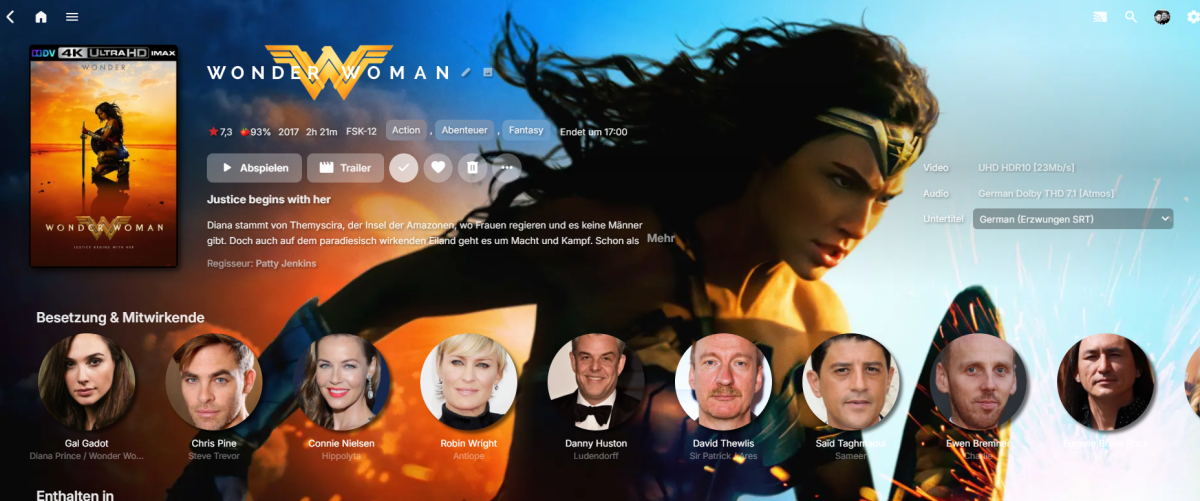
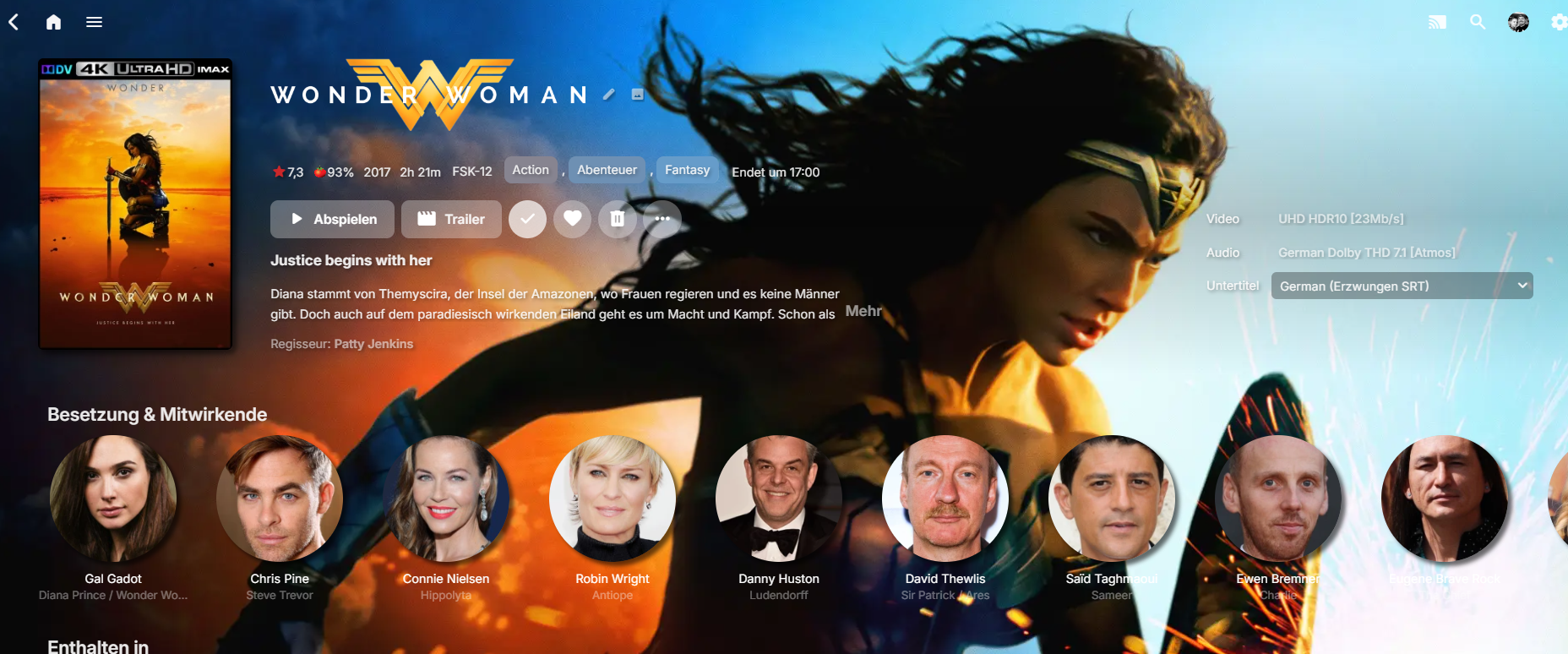
Did you try it successfully for yourself with the tips I sent you via PM on Friday? Should it look like this? Still not totally sure what you try to accomplish, but if you want them totally unfiltered like in the image above in the Details Screen, you can set the background options I sent you via PM to transparent or better delete them altogether. Will look uaf imo, but tastes are different... For the above result, delete: .backgroundContainer.itemBackgroundContainer.withBackdrop, .backgroundContainer.withBackdrop { -webkit-backdrop-filter: saturate(1.5) blur(0.5em); backdrop-filter: saturate(1.5) blur(0.5em); } @media (min-width: 50em) { .itemBackgroundContainer.withBackdrop:not(.backgroundContainer-transparent), .backgroundContainer.withBackdrop:not(.backgroundContainer-transparent) { background: linear-gradient(77deg, rgb(22, 19, 56) 0, rgba(36, 31, 92, 0.9) 70%, rgba(65, 0, 65, 0.7) 100%), url(https://grainy-gradients.vercel.app/noise.svg); } } Note: Other visuals can break since a lot of stuff is tied together in the html classes.
 1 point
 -
Per server. As per above linked blog entry: Only devices/apps that utilize Premiere features count towards device limit; if all 5 of your AndroidTV devices do, then no, your friend won't be able to play on AndroidTV app unless you have active Premiere subscription or they use another client app (some apps/platforms allow for free Full playback). Emby Premiere Feature Matrix Is there a limit to Emby Premiere?1 point
-
I ended up with MinisForum Elitemini TH80 ( https://minisforumpc.eu/en/products/elitemini-th80?_pos=1&_psq=th80&_ss=e&_v=1.0 ). I installed Ubuntu there as a dual boot, but as I am very new to unix/linux based OS I removed that partition within a few months and just keep rocking modified Windows, with all bloatware removed. I also had a side affair with Jellyfin, but that ended badly and now I have lifetime Emby premium . It just works fantastic with my current setup. The only downside is the Jet engine that the elite mini has. It does not come very often, but when it does, you have no doubt it has a lift off. Second downside (Ok, there was another, but this one is on me) is, that I have all my arrs on my main PC, so I need to transfer all the data to the external HDD that is connected to the Mini Elite. But as I have 2.5GB home LAN, even the biggest files sails very fast. I had to do this because my current ISP provides only 50mb upload and I do not want to connect Emby from internet when I am at home. If I would have VPN on Emby PC, then I just would have to do that, (right?)1 point
-
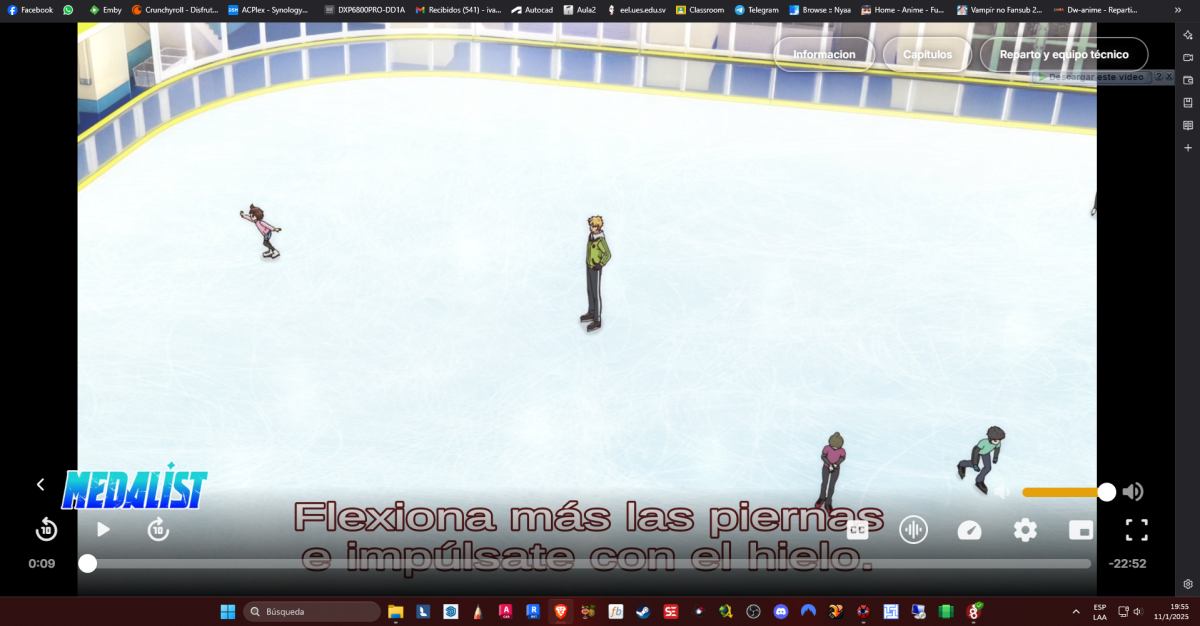
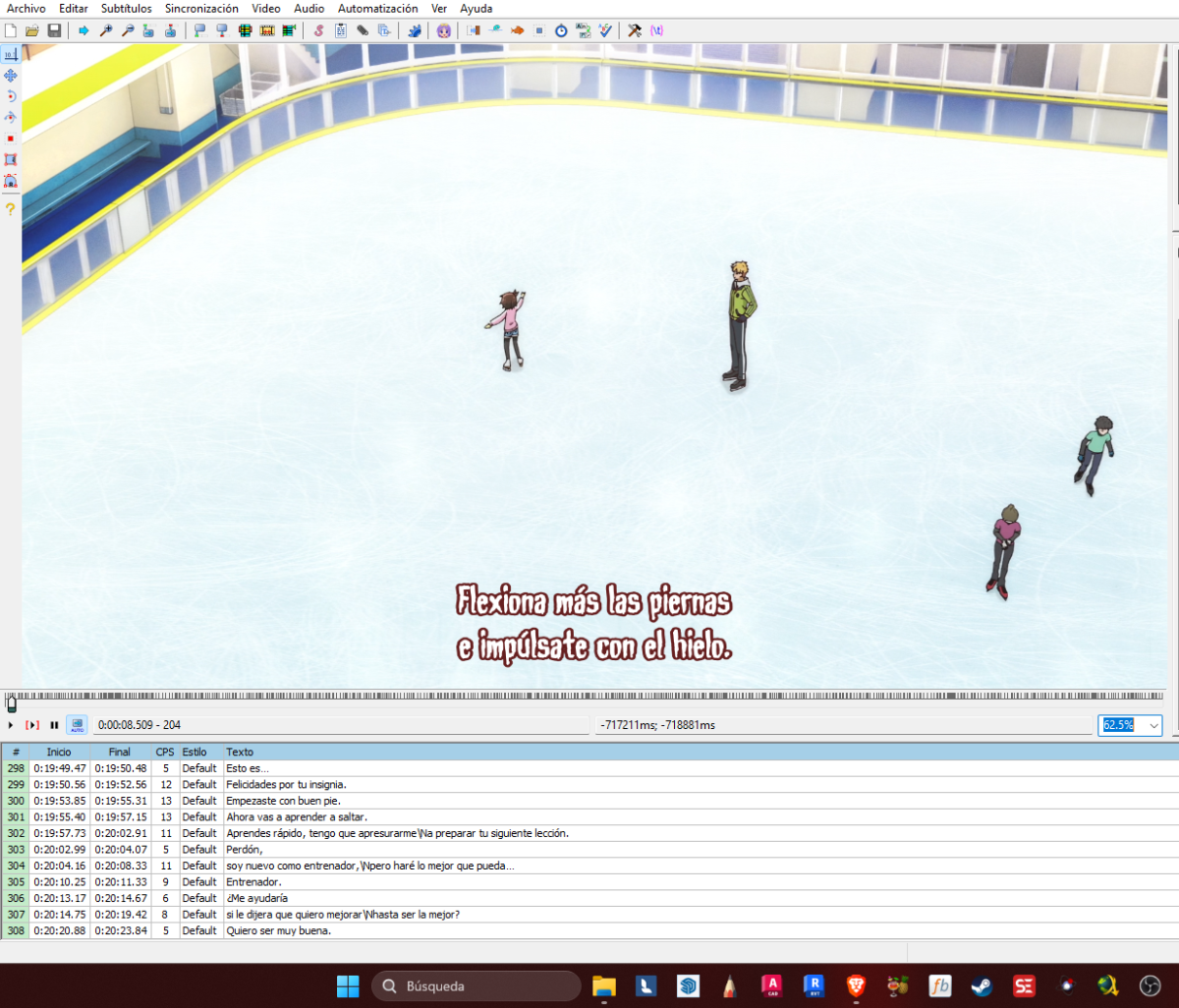
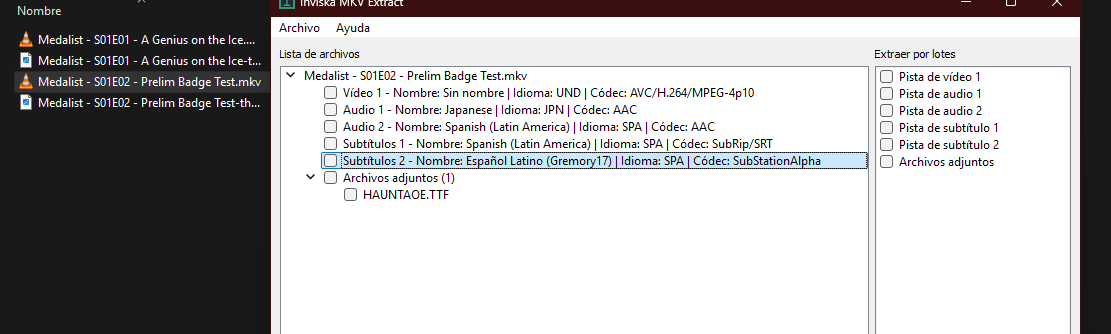
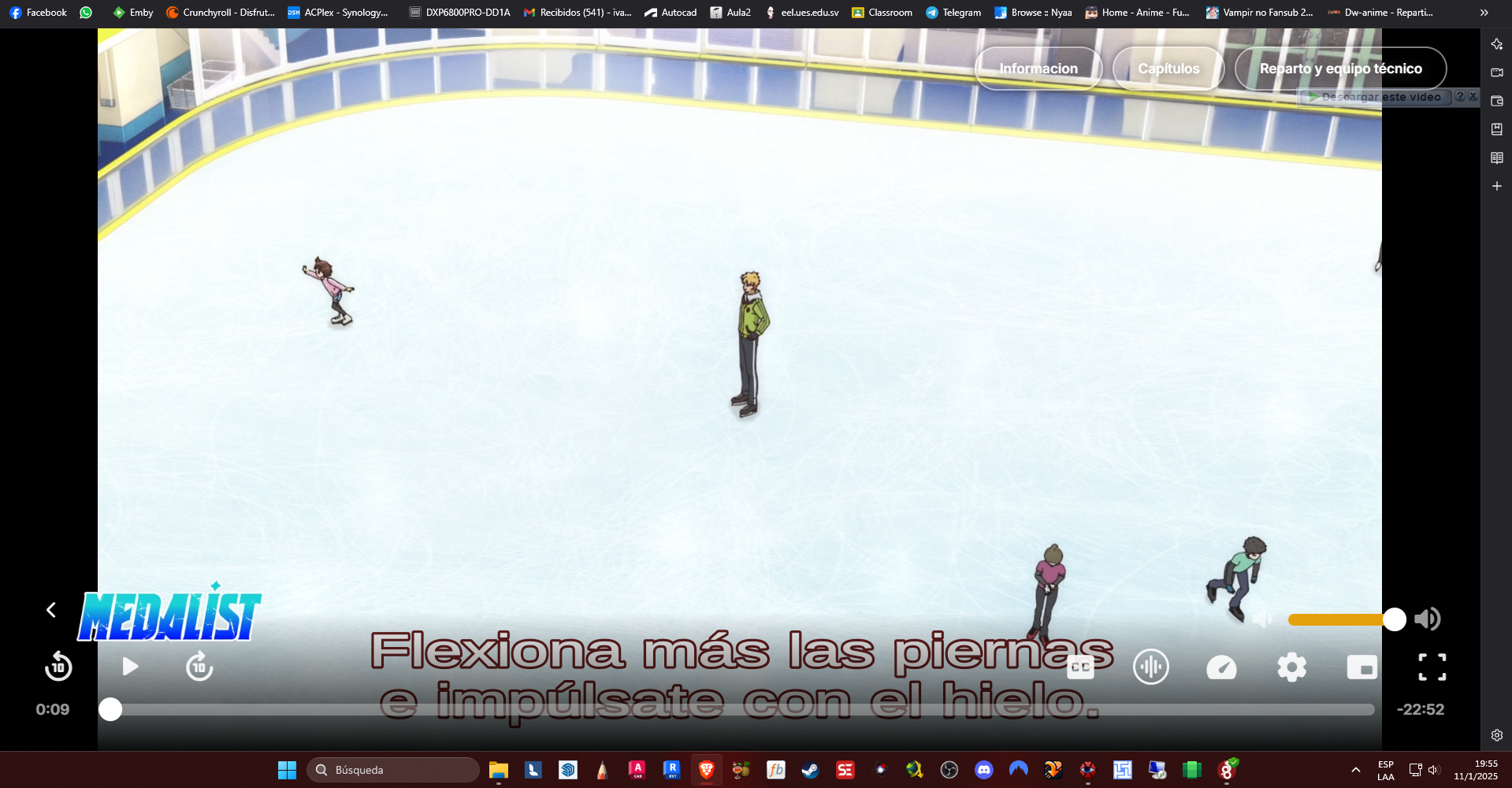
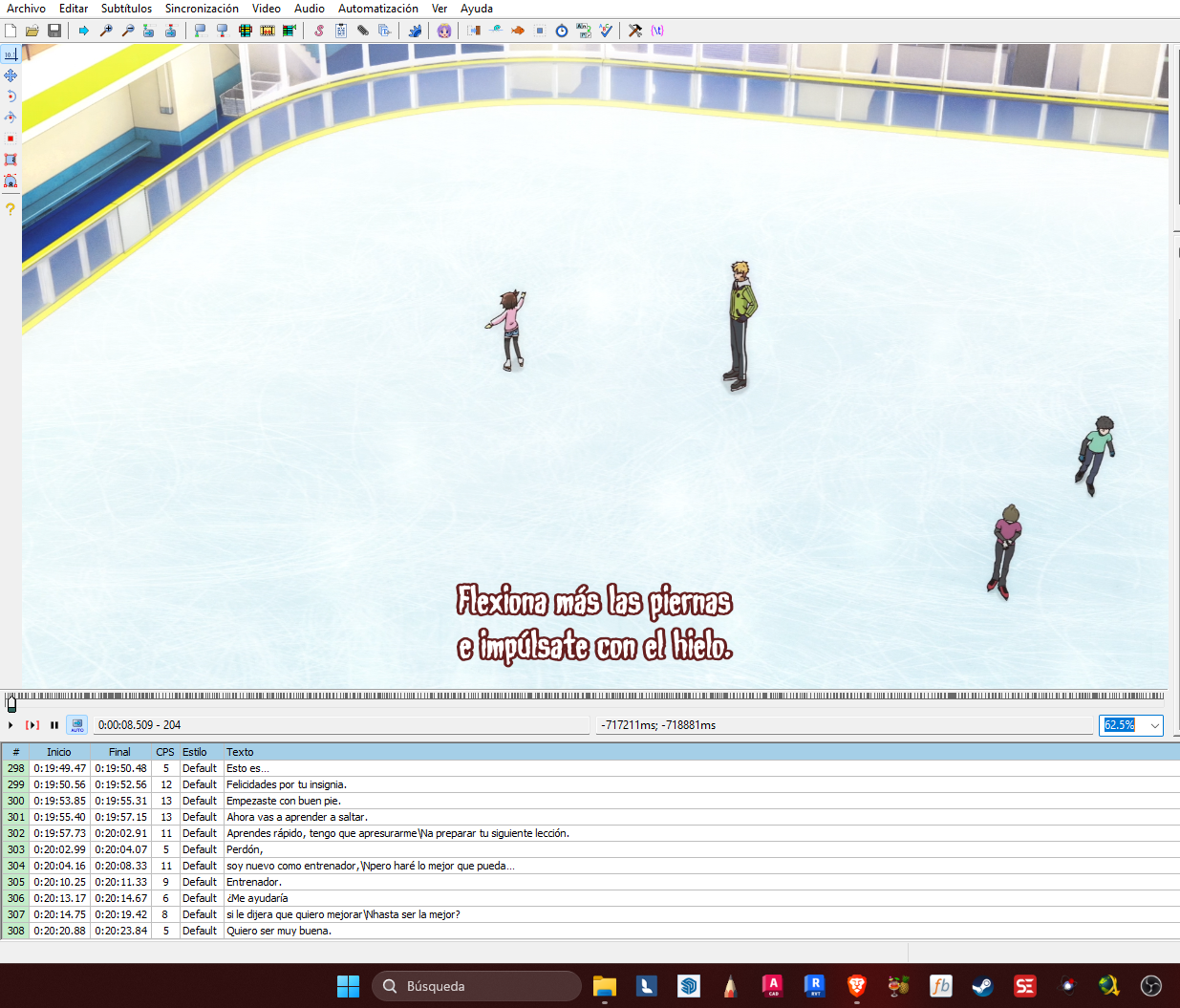
Estoy teniendo el mismo problema con emby porque no es capaz de reproducir mi fuente personalizada en el video mkv únicamente en el navegador ocurre esta falla, en la aplicación del teléfono si lo detecta correctamente la fuente ".ttf"
 1 point
 -
Yes this is correct.1 point
-
Function Suggestion: Add a switch for using the current device's H265 decoder to the Emby APP Dear Emby team, I have a function proposal. I'm using an old Android TV. The TV supports hardware decoding of HEVC H265 videos. However, when using its decoder to play videos directly, the frame rate is very low and the playback is quite choppy. The Emby APP will directly use the decoder to decode H265 videos regardless of the user's wishes when the device supports the H265 decoder. As a result, the videos look extremely choppy and not smooth at all. If you want the server to transcode the videos into AVC H264 for playback, you can only reduce the bit rate/resolution. For a 1080p H265 video with an original bit rate of 2Mbps, reducing the bit rate further will only make it extremely blurry, which seriously affects the viewing experience. I suggest adding a switch to the Emby APP to disable the use of the device's own H265 decoder and let the server transcode the videos into AVC H264 for playback. Original (Chinese): 功能建议: 为Emby APP添加使用当前设备h265解码器开关 尊敬的emby团队,你们好。 我有个功能提议。我的设备是一台安卓系统的旧电视,电视是支持硬件解密hevc h265视频的,但是使用它的解码器直接播放视频,帧率会很低很卡顿。emby APP在设备支持h265解码器的情况下会无视用户意愿,直接使用解码器解码h265视频。使视频看起来极为卡顿不流畅,想要让服务器转码成avc h264进行播放只能降低码率/分辨率,原本2mbps的1080p h265视频再降低码率只会变的特别模糊,十分影响体验。建议为Emby APP添加一个开关以关闭使用设备自身的h265解码器,让服务器转码成avc h264播放视频。1 point
-
I think the general consensus is that the amount of compressible data sent by Emby is a tiny fraction of the total so the overall gain is miniscule.1 point
-
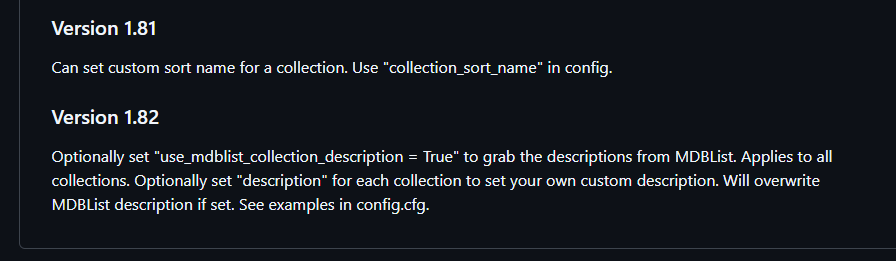
Glad you like it. I meant to post about it but added these 2 features a couple of days ago:
 1 point
 -
@AmythingThe Collection Description feature is a really nice idea! Thanks!1 point
-
Thanks for the responses. With regards to the new "MS Edge Chrromium browser engine", what was the benefit of moving to this? From my perpective it was a downgrade, but perhaps there are benefits I'm not aware of. Perhaps it was the usual "Support for this old engine is going away so move to the new one". Any chance you've reached out to Microsoft to get insights as to why it is so slow? Surely other developers have noticed the decrease in speed. Via the upload link you provided, I've uploaded a file that reproduces one of the CC issues (font too small). It seems to happen when I finish watching one show, and it auto plays the next show, then the font is super small. The screen shots I've attached show it small, and the correct size. When this happens (too small), stopping the video and restarting fixes it, until the next show in the series auto plays. Additionally I've also included a .SRT file that when selected is left justified for some reason. This also seems like a regression from the old version. I use the original Xbox One Media Remote. Included a picture of it in my uploads. For what it's worth, the controller buttons work for skip fwd/back and next/prev video. So the functionality is there, just not via the remote. There is also another odd issue I've encountered with the new version that I forgot to mention which is that it seems to get double button presses sometimes. For example, when choosing a video from the continue watching list, the video details are then shown. When you select the Resume button, you hear 2 button press sounds, and the UI even does a quick refresh between the two sounds, as if the command is processed twice. It's pretty strange and a little jarring at times. To reproduce, make sure you have sounds on as it may not be as noticeable with them off. If it is possible, I think it would be good to re-publish the last Xbox version before 2.0 (I have 1.1.436.70 which works great), and keep the new 2.0 version in Beta a little longer until things can get sorted. I don't usually participate in beta's but I'd be happy to flight the new 2.0 version in the hopes of making it better and getting things closer to where they were in the 1.1 version. Thanks1 point
-
I would assume that refers to Polish Parental ratings (PG ratings), not score.1 point
-
You can define a snippet for logging then reuse it by referencing from each site. I haven't found a way to include the global Caddy log, it still needs its own settings in the global block. Define it: (logging) { log { output file /config/log/{args[0]}.log { roll_uncompressed roll_local_time roll_keep_for 7d roll_size 10MiB } format console { time_format wall_milli duration_format string level_format upper } } } Using it: #emby emby.mysite.net { reverse_proxy 192.xx.xx.xx:8096 header { blah blah blah } import logging emby }1 point
-
That's exactly how I'm configured. I had mentioned at the end "... As my Emby Theater is set to Stereo so why isn't transcoding being activated, anyway?" But I know my tendency to overly describe things may get lost. haha BTW what platform and version of the UI is that screencap from? I remember seeing the "Audio" option within the left menu from a while ago, or that only on Theater for Linux; which I don't have running presently to check. Presently the route to audio options for me is "App Settings > Emby Windows > Video Player > Audio Options". Is it possible transcoding will be triggered for the version of Emby Theater you're using, manually installed I presume, but not the Release or Beta (I run both) version of Theater one gets from the Microsoft Store? Tho until recently I used to use a manually installed Emby Theater on Windows and everything I described above was the exact same. Welcome to other ideas.1 point
-
Might be to do with the VirtualTV plugin. Could you remove that plugin and see if it goes away Seems to coincide with 2025-01-08 11:50:15.748 Info SecurityManager: Registered for livetv-virtual If it is not that, then would need to see more examples - perhaps taking copy of /var/packages/EmbyServer/var/config/users each day and zip and send me by PM the daily zipped copies and the logs from one or more times when it arises1 point
-
@Bigmack3000I thought I was going to have to do the same, as I wanted Emby to be a one-stop shop for all my media and not being able to play mp3 and m4as in TV Shows seemed like a deal breaker. However, I've found a solution (at least for me).1 point
-
Hi, yes we will be updating our ffmpeg build in the near future, so stay tuned for that. Thanks.1 point
-
Can we PLEASE see some kind of option to increase the number of "Latest Media" we are able to have in lineup? Most days I add 30+ new films to my server and my kids end up missing alot of them when they're looking for new stuff to watch. At their age, if it's not on the main screen, they're not going to dig into 3000+ movies to find them. Thanks!1 point
-
Once we get past 4.9, we'll start testing a new Live TV infrastructure that should have improvements in this (and many other areas).1 point
-
In addition to this topic, is there any possibility / feature that the imdb score is synchronised periodically? Now the rating that is shown is often very different with the actual current score it seems.1 point
-
I managed to get it working. I'm not sure why though. Switched to Desktop mode I uninstalled the version that I installed via Discover. Downloaded https://github.com/MediaBrowser/emby-theater-electron/releases/download/3.0.19/emby-theater-flatpak_3.0.19_x86_64.flatpak via Chrome Started Konsole (terminal) cd Downloads flatpak install emby-theater-flatpak_3.0.19_x86_64.flatpak Started Emby and it worked fine. No idea why there would be a difference though.1 point
-
I would love to be able to do the following. For example, say you have a TV Show episode called "The Robbery" from Seinfeld. Any extras for that episode like Commentary, Deleted Scenes, etc.. could be listed with that episode or tied to that episode on a screen for access. Would any of that be possible?1 point
-
Your folder name doesn't contain "the" in "The Lord of Rings", movies must have exact folder name followed by space-dash-space to be multi-versioned.1 point
-
Yes, because the first task is to go see what channels you need to get guide data for. So it is a package deal.1 point



















.thumb.png.f4cb0545e98b51fd9b00e427622ab761.png)


