Leaderboard




Popular Content
Showing content with the highest reputation on 01/09/25 in all areas
-
Here is another thread that discusses how things actually work. As mentioned above, there is nothing auto about the auto setting in most cases. It should really be called "Default (4 Mbps)" soon to be "Default (12 Mbps)". If people understood what auto actually was they would be more inclined to adjust it, the way most users interpret auto is "best quality for their connection" and that is not what is happening.3 points
-
POSTERS "Posters" is in an Alpha stage of development. (was excited to share with the community, but there will be some fun things to fix) It is an application written in Javascript which will connect to Emby and display the a poster for the media item currently playing on a device. This app is hosted in the web browser. It can be run on Raspberry Pi, stuck to the back of an old computer monitor, mounted on the Wall. It can be opened in Chrome using 'Kiosk' mode, and the display set to portrait. More Raspi integration terminal commands to come. (Anyone with Raspi knowledge? It's time to shine!) It uses https://animate.style/ animations, so there is, literally, an bunch of possibilities in layout, and animations to make the posters app unique to each users tastes... More to come. How to use: Unzip the folder to the desktop (anywhere) Right click "index.html" Open in your favorite browser Discover your server Login Start to play a movie on one of your emby ready devices Watch the posters come alive TODO: A Landscape view Configuration options Terminal Commands for Raspberry Pi (kiosk browser, start in portrait, load html on start) Fix multiple streams cause images to reload. Maybe this is a good thing, we just have to slow it down. Take advantage of all the different animations available in animatecss libraries November 3 1. Added full screen capabilities, 2. landscape mode, 3. hidden fly-out nav for future options. November 2 1. First Upload DOWNLOAD: PosterApp_v0.22.zip2 points
-
I'd imagine this one will probably be a little to tricky to implement any-time soon Heck I'm not even sure if there's a suitable codec available that's opensource/free to use But it would be a really awesome extension to sync if you could transcode into multiple bitrates and then use adaptive streaming between the emby client and the server to pick the highest quality possible at any given moment. I would think this would be especially useful for mobile clients where the network performance can be all over the shop. I thought i'd suggest it on the off chance it was feasible.2 points
-
Thanks to all for your answers. The clue was « the movie Naming » !!! Writing « Rambo 2 » is ok, but « Rambo-2 » is not !!! and create a total mess So thanks again, and for me this topic may be closed Eric2 points
-
@Luke That worked @xandro Thanks for that comment!2 points
-
Hi Me and my family just went on vacation and wanted to download movies and series to our phones for offline usage. But we experienced that some of the requsted downloads never arrived to the phone. Hence it would ne a good improvement to have better control and overview of the downloads, like: - Where it says "Ready to tranfer", then capability to "force" download, because I experienced several items saying that, and never downloading - Improved overview og status. Like if it's saying "Ready to tranfer", then I would like to see why doesn't it download, what is it waiting for. - Ability to see in a movie or a series, IF I already requested it to download once. Because I would forget IF I set a specific movie to download or not, and it would great it what was illustrated on the movie. - And if I already requested a movie to download once, and I do it again, then that Emby pop up and say I already requested that, if I want to cancel the first request. I for example tried downloading whole season 1 -3 of a show, and then it turned out, it hadn't downloaded ep 1+2 in first season., and where also missing ep 8+9+10 in 2nd season, and I could tell why or force it to download. I hope it makes sence and hope an improvement for the Downloads1 point
-
UPDATE Hello everybody! The release of our new Window & Xbox apps in December 2024 was overshadowed by the unexpected rejection of the HEVC Playback capability by the MS Store for Xbox (only - the Windows app was unaffected). As a temporary remedy for Xbox users, we had established the Emby Xbox Holiday Bonanza. which allowed to register for a private version of the app with HEVC playback enabled: The "Emby Plus" app. Today (March 25, 2025) we are glad to announce the following changes: The Emby Xbox Holiday Bonanza program is closed The Emby Plus app is discontinued Starting from version 2.222.0, HEVC playback is included and enabled in the regular app releases What does this mean for current users of the Emby Plus app? There is no action required Emby Plus users will automatically be updated to 2.222.0 (or later) There is no drawback in any direction Version from 2.222.0 on provide the exact same capabilities like the Emby Plus app had offered before already We apologize for all the inconvenience, questions, support interactions and uncertainties this has caused for our users. The Emby Team This topic is locked now. Please create new topics in case of any questions. --------------------------------------------------------------------- Original Message Xbox Users! Santa Softworkz has worked relentlessly to bring you a happy holiday with Emby and the Xbox. There are rules, though: Don't talk about it Don't speculate Don't ask questions about it If you don't follow, then there's no happy ending for you. Watch out for the "Santa Softworkz Holiday Lottery"1 point
-
Hello again, I am trying to customize the EMBY page as much as possible. My question is if I can use a personal image as a background, both as the general background and as the background for each library. We have seen that you can change the themes, but this is at the user level. It would be preferable to do so so that each user of our platform can see the customization we have carried out. If it is necessary to do the process every time there is an update, then fine. Thank's.1 point
-
Hi guys. First of all, thanks for the great work you are doing. Emby is a great media swerver and it's worth the money I spent for the premiere license. Now the issue. Performing a search while typing is a great feature wth nice user experience but it may be problematic when you have a huge database. I have more than 100,000 titles (plus actors, performers and all the other types of related entities) and the search is just too slow and very annoying as, for every letter you type in the search box, it starts to search my huge database. Is there any way to set the "type speed" or, better, simply disable the feature "search as you type" and let the server start the search only after you press 'ENTER'? It shouldn't too complex to implement. If not, would you consider to add it in one of the next releases? As you may understand, the search feature is very important on a database of ten thousands of titles... Thanks, Gerry1 point
-
Hello, I must first admit I am on the edge of TV transmission here. There are a lot of errors from my HDHomeRun Device. On VLC streaming I get a usable video stream, with minor glitching. For the most part I get the same on Emby. However after a few glitches the stream fails and does not recover. Just sits there frozen. What can I do to fix this issue? ffmpeg-transcode-a36e09b0-8d28-4af8-9864-5e89a3f9d08e_1.txt1 point
-
Hello @feerlessleadrI will look at the console data tonight. Vic1 point
-
It can do 4096, but the client is limiting it to 3840 in some cases. It should be fixed in the next release1 point
-
Please add this simple feature. I have a DVD and a Bonus Disc and simply want to merge them together into one object. Emby decides to put the Bonus DVD as the top priority version, which is just stupid. I can't use merged version that way if there is no simple way to decide, which version should be default. Can't believe this topic is from 2018 and we're still asking for this Other than that, thanks for this great program!1 point
-
Na, just the one entry per xbox live account.1 point
-
Thanks for the quick reply much appreciated. My bad actually. I missed seeing the subtitle dialog just above the progressbar in the tv app. I switch it from of to I think it said subrip and I have them now. Thanks again.1 point
-
Hi, if you edited the file after importing then try refreshing the metadata on it.1 point
-
That's right, the solution is simple: use a dedicated Emby client, not simply a DLNA client.1 point
-
I have LG TV, so for me this is a solution to the problem. I wanted it to work on webOS and Android systems, and here is a supported client and it works great. VLC doesn't have to work in this case since I have a Emby client. I just didn't know that Emby has not only a server but also its own client software. Thank you all for your help.1 point
-
Thx for the fix!1 point
-
Sorry for late but I must watch some video this evening and I'll copy the log after some errors. Thanks again1 point
-
It does seem silly but the devs really love this feature. Search the forums and you'll see for yourself. Getting them to consider an actual fix or to give admins centralized control is like pulling teeth. So until then get used to the bandaid fixes and telling your users to override with their playback settings.1 point
-
+1, your second example is a pure DV file (profile 5) while the first is most likely an HDR DV hybrid (which can be either profile 7.6 or 8.1). I've played around a little with converting 7.6 to 8.1, some devices are more compatible with 8.1. You can better see the HDR information with mediainfo. But at the end of the day if you're transcoding this content on your playback device you're losing out on the HDR anyway, so you'll want to figure out why it's transcoding in the first place.1 point
-
Hey, welcome to Emby! Unfortunately this behavior is due to some rather silly software licensing/review with Microsoft. You can however Join the holiday bonanza! (there's an option for it in the settings of the xbox app). It'll fix the problem for you until things can get back on their usual path.1 point
-
Hi all, in the meantime I decided to move away from a Raspberry and Dietp PI. I tested a lot. I now have a mini PC with proxmox. Here Adguard Home is running as LXC and Home Assistant is running as VM. on the HA VM I run emby as an add on? Why? Network handling on Linux based system is still a nightmare for me. On HA are I am using also a samba share/ nas add on. In combination with HA automations I have the full flexibility to mount and unmount drives in combination with switching hem on and off via a wlan power connector. This also works on a raspberry 4b with native HA os installed. With Proxmox I have even more flexibility for testing. For now this is the perfect solution. Beside that emby migration is still a nightmare!!! it is strongly recommended to set the media pathes with a fixed IP. When you then switch emby installation, assign the existing emby IP fix to new installation on your router and all should work. A switch from Windows to Linux based systems or the other way round is impossible. Otherwise you start from scratch reading all your media. This can take ages ..... Greetings JuRo1 point
-
I never even saw the OK down there. The weird thing is, though, that I turned off "Enable new content" and when I went back in to check on it, I'd swear that it was still turned off!1 point
-
Some profiles have HDR fallback while others don't.. I can't remember what profiles have the fallback but looking at your pictures the profile 5 video does not. Emby does not support Dolby Vision tone mapping and there for needs the HDR for that, that's the reason you get strange colors when transcoding. Reason Emby does not support Dolby Vision tone mapping is because Dolby Vision is a licensed product and Emby does not have a license to be able to legally tone map it.1 point
-
Maybe this will help someone. I got the permission error after moving my setup to a new computer. I tried updating the dockerfile using the instructions here https://hub.docker.com/r/emby/embyserver but it didn't fix anything util I also upgraded docker-compose to 2.x1 point
-
sorry for the double post, but its still running the metadata refresh, and it seems like that worked! thanks for the help Luke, im starting to get results that are ignoring the periods within the titles!1 point
-
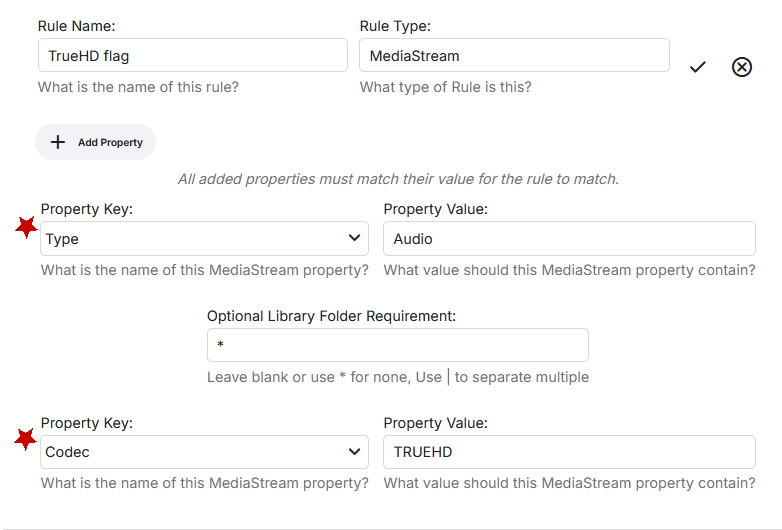
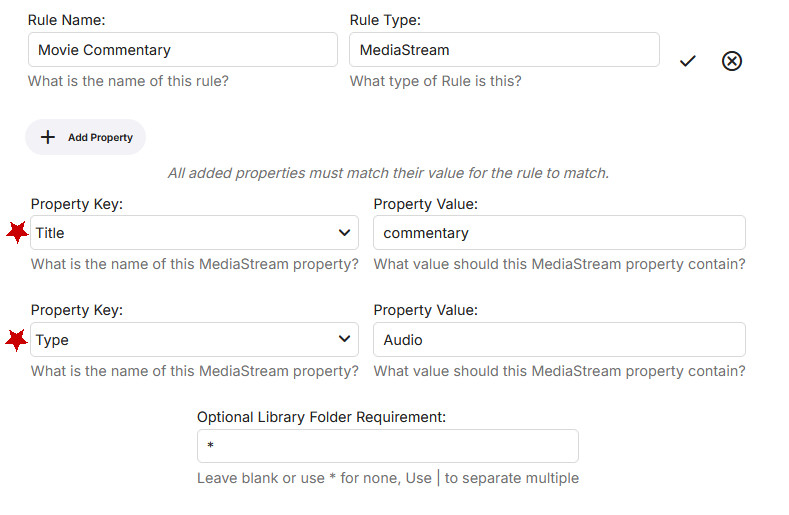
I think the MediaStream rule should cover what you need. Here's an example using the track's Codec property to detect TrueHD: Here's an example of using the Title property of an audio track to identify it as a commentary: Iconic will check every track until it finds a match for the rule. So, for example, if any of your video's audio tracks are TrueHD, it will add a badge.
 1 point
 -
lemme try that, at this point I dont mind or care about disruptive, if I have to go through every single video when so few come up in searches that may be the better option in the long term1 point
-
You could just refresh the metadata from a parent folder level. That is probably the least disruptive method.1 point
-
It still doesn't work, I gave up, most of them can be transcoded normally. This problem doesn't affect me very much1 point
-
I tried it , it works for now. I will let you know if it cannot connect again or not. Thank you for your help.1 point
-
Apologize for the interruption, I just discovered that this problem might be due to the third-party remote control, which apparently doesn't use standard protocols. After switching back to the original remote that came with the TV box, the problem was resolved.1 point
-
You can still find them on Ebay For example, here's 2 I found in 30 seconds on Ebay, both with receivers. https://www.ebay.com.au/itm/305507424793?mkcid=16&mkevt=1&mkrid=705-154756-20017-0&ssspo=KnoC8s00SHG&sssrc=2047675&ssuid=uXOEsjaYTXa&widget_ver=artemis&media=COPY https://www.ebay.com.au/itm/261913475420?mkcid=16&mkevt=1&mkrid=705-154756-20017-0&ssspo=OgLHCfPCRYK&sssrc=2047675&ssuid=uXOEsjaYTXa&widget_ver=artemis&media=COPY RC6 is the IR protocol that's used. The IR receivers seem to be harder to get, but once you have one you can pretty much use any RC6 remote with it.1 point
-
Thanks again for all the help I just had to mess play with the settings a little and we are up and running.1 point
-
Seriously.1 point
-
Hi, same problem1 point
-
Please help delete this post,the problem has been solved after updating to the new version. Bravo! Thanks!!!1 point
-
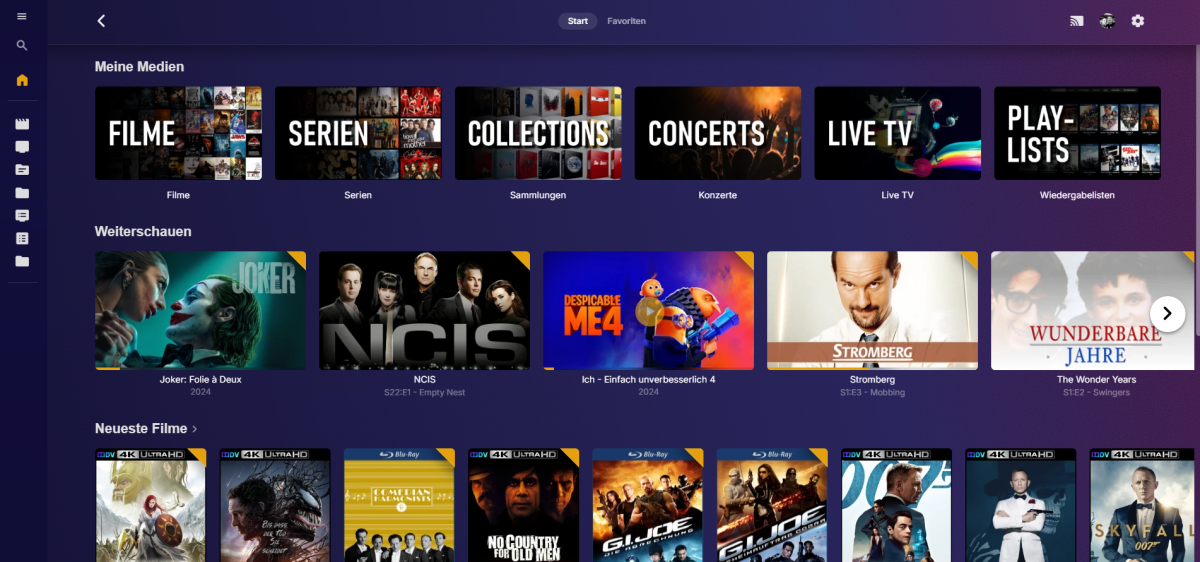
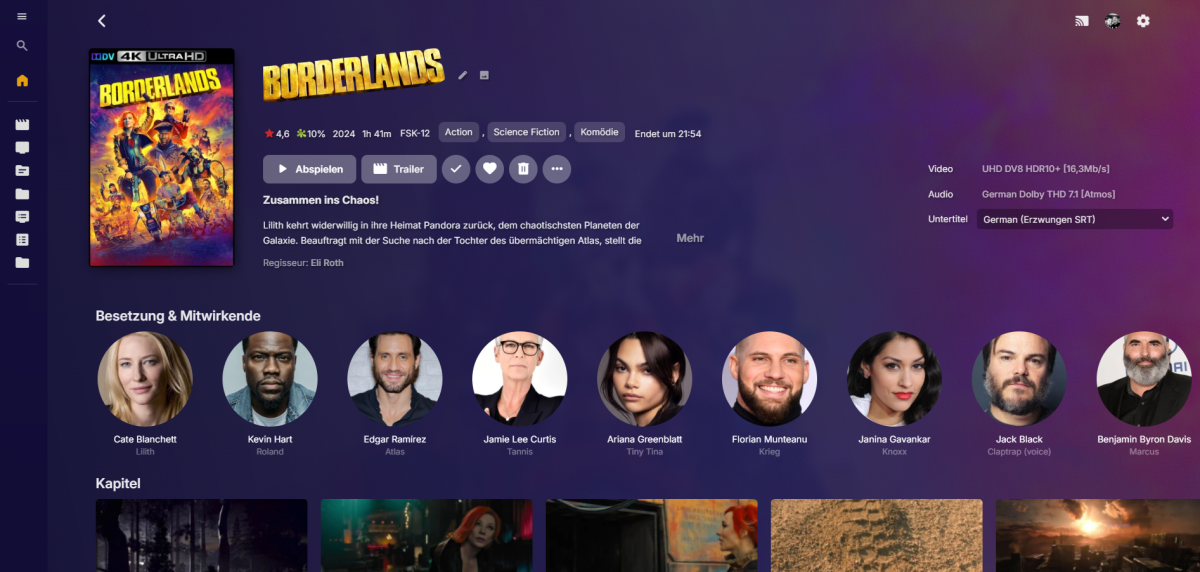
I made a little more colorful version based on @fillidillv3.5 from 3 posts earlier, but leaning towards UltrachromicMod in terms of colors. So all credit belongs to fillidill! Just a few corrections here and there (Top bar when scrolling, color scheme etc.). Primarily it's just for my delight, perhaps someone else finds it useful. Emby-Stable-style-3.5_colorful.txt
 1 point
 -
Testing it myself I'm not getting a black screen, although I'm not getting auto-logged in either. I'll have to try and recall what the purpose of those params were for, if it was for this after all.1 point
-
Okay, it's on the list. I'll link a build here when I'm sure it still works.1 point
-
I'd actually just like to hear the videos without carry a stage-full of mixers and amps. Like kodi.1 point
-
Regardless of the source file , Emby for android has an issue with output and volume. The difference with players for Emby and let's say kodi are huge. And adding an amplifier option would help many end users. Asking an end-user to purchase an additional hardware kit is ridiculous, fix the issue or add a feature in software. Kodi plays and maintains the volume very well however, the odd movie where the dialogue is low I just increase a few decibels. Simple.1 point
-
Just adding a few more things from the other post i made here: Also. it would be great with the option to start or stop downloading. i'm sometimes on a metered wifi connection and i do not want downloading to happen then. Users should also be able to move items to the top of the queue if there are something we want to download first. if i'm on a metered connection and want to download 1 item. i should be able to mark it for download, move it to the top if the queue. and then stop downloading after the item that i want is finished. when i get on a better network i can resume downloading the other items. this way the server can prep the items for transfer in the meantime.1 point
-
Hello Emby Team! Would it be possible to add a signal strength icon to live tv channels? I know it's small but it would be cool to see signal strength when tuning live tv channels like Plex does. Otherwise emby has come a long way and I'm a happy customer!1 point
-
Hi, I got the same problem for a while now, the "Now Playing" stuck when close any different way than pressing, clicking back button. Closing with X button, return to home, or tunning of the TV, Laptop are all result being stuck at Now Playing1 point
-
The problem has not been completely resolved, and the automatic catcher is still invalid, so the metadata can only be manually captured or refreshed1 point
-
Thanks for the reply! Could the menu commands be mapped to a keyboard?1 point
-
When watching ATSC 3.0 on my Nvidia shield I have audio. That's because the server will transcode the AC4 audio to AC3 automatically because the Shield does not support AC4 audio directly. When watching ATSC 3.0 on my Apple TV there is no audio. The server direct plays the AC4 audio to my Apple TV for some reason, even when the Apple TV does not support AC4 audio. Could there be a feature added to always make the server transcode the AC4 audio to AC3? I would think that would be a great marketing move for Emby, since the only way currently the HD Homerun can decode AC4 audio is by over the cloud.1 point