Leaderboard




Popular Content
Showing content with the highest reputation on 01/08/25 in all areas
-
Thank you, I was able to create a folder in the root file system (/Videos). I had to apply the settings I detail in my first post, and I can only manipulate wit the folder if I run a file manager (pcmanfm or mc) as root.2 points
-
Pretty simple suggestion. I have multiple users for my Emby server. If I want to do continuous maintenance on the media, I have to tell everyone. some of them are harder to reach than others ( i.e. no Facebook or Skype chat etc. ) It would be great if say... on the admin panel, I could hit a check box that enables 'maintenance mode', where the server still runs does everything as normal, but instead of the login screen it displays a maintenance page saying the server is unavailable. Even better if I were able to directly put a reason in a text box that would then display on the login screen as well. Not really sure what others would think of this, but for me it would be quite helpful. mostly if I want to make sure no one is trying to access content I know won't work until I've done a full library scan again. Thanks for reading. -Kyle1 point
-
Hi, The new Emby app is adding startup and closing animations. It is fun, but after a wile it is becoming painful to have to wait (or click close) at each startup or closing. Is there any option somewhere to disable theses animations?1 point
-
Hey, Just a quick question of VVC Codec (H.266) to see if this will be support by emby once they have released it fully to the public. VVC was released at the end of 2020 for testing on OTT companies etc and hopefully should be releasing it to the public domain fairly soon. of course there soon may be 2 years but would just like to ask if its something that is possible. EDIT : If you would also like to have this improvement/feature please give a like on this post so that the devs can see how much/little demand it currently has Thanks guys1 point
-
MKVs are capable of having multiple video streams inside of it. Some BluRays make use of multiple video streams, like animated films where some content like signs is translated to different languages. Or some films do have several video streams with additional content like a "before-CGI" version of the movie. Or you can choose of 2D video vs. 3D video. Kodi will support this in "Krypton" (version 17). http://forum.kodi.tv/showthread.php?tid=216672 So this works, when using "Direct Play". But not in other Emby-Apps or when transcoding. You can choose audio, you can choose subtitles, but not video. So it would be nice to have a "picker" for the video stream in Emby apps1 point
-
The Emby team hopes you and yours are enjoying a Happy Holiday Season. We would like to announce a couple of changes that will hopefully increase the value of Emby in all of your households. First, to aid in the transition from our old TV-only Android TV app to the new Standard Android app on that platform, we will be eliminating the need for the app unlock by allowing free playback for up to five TV devices per Emby Server. Devices beyond that limit will require Emby Premiere. Previously purchased unlocks will still be honored. This should allow most households to move to the new app more easily. Second, recognizing that today's households have more and more devices, we are increasing our standard Emby Premiere License device limit from 25 to 30. We will then also increase the extended premiere plans from 45 to 50 and 75 to 80. Existing extended subscriptions will remain the same but new ones will be at these new levels. All standard licenses will be automatically updated to the new 30 device limit immediately. You should see all of these changes rolling out over the next week or so. Happy Holidays from the Emby Team!1 point
-
Hi guys. First of all, thanks for the great work you are doing. Emby is a great media swerver and it's worth the money I spent for the premiere license. Now the issue. Performing a search while typing is a great feature wth nice user experience but it may be problematic when you have a huge database. I have more than 100,000 titles (plus actors, performers and all the other types of related entities) and the search is just too slow and very annoying as, for every letter you type in the search box, it starts to search my huge database. Is there any way to set the "type speed" or, better, simply disable the feature "search as you type" and let the server start the search only after you press 'ENTER'? It shouldn't too complex to implement. If not, would you consider to add it in one of the next releases? As you may understand, the search feature is very important on a database of ten thousands of titles... Thanks, Gerry1 point
-
Emby uses a client-server architecture, so anything you do in the server code will happen on the server. In you example using Process.Start, it will open a browser on the server only - you just "accidentally" see it when Emby Server runs in the same session as the client app from which you are accessing the server. It doesn't even work when you're on the same machine, but somebody configured the server to run as a service - the browser would open in the session of the service and you can't see it. Same on other operating systems - e.g. Linux: Emby Server runs on a different session and under a different account and nobody would see anything. What comes on top of it, is that not all clients support opening links. For example, on Android TV devices there is no browser installed and we cannot open windows in the context of the engine within which the Emby client is running for security reasons. Finally, following links means to leave the context of the Emby app. In many cases (e.g. TV mode, operated via a remote), following links means to leave the context of the Emby app and in most cases, there's no chance to navigate back to the Emby app (like with a remote only). For those reasons it is important that we have a clear distinction between a HyperLink (from which you might not be able to return without changing your input method) and a Button (which is always built-in functionality and doesn't cause you to leave the Emby app)1 point
-
Apparently my tv couldn't connect to the Internet had to factory reset the TV to fix.1 point
-
I built a new media server and used the backup/restore method for my Emby server. But a lot of the images for people were missing from the browser even though if you clicked on the blank image it took you to their profile page where their image was there. Refreshing the Metadata did nothing to change that. Browing directly to the metadata folder in question I could see the image there as well. Now, if I edited the identity or changed the image and then did a refresh - it showed up. So somehow it just was not being triggered with a refresh to think anything had changed. I'm only guessing, but it is as if the Emby database thinks that nothing changed so it leaves it as is. So - being an IT person and an engineer but I approached it differently and it worked great and fixed the issue for everything I was experiencing. Step one - go to your metadata folder (default is %appdata%\Roaming\Emby-Server\programdata\metadata) and move all the sub folders to another location on your drive (I just made a new folder on my desktop for this) then I ran the schedule task on Emby to Scan the Metadata which broke ALL the images of course. Step two - copy all the metadata subfolders back into the metadata directory and then run the Scan Metadata scheduled task again. (I didn't try moving but thought maybe file creation dates could come into play) Step three - enjoy having all your images display like they should. Understand this is simply SCANNING the metadata and not REFRESHING it so this is instant for any metadata that is actually already on your server. Anyway - worked for me.1 point
-
Hi, yes we need to get this added to Emby for Apple TV. Thanks for the feedback.1 point
-
Hello Great community and support on top of great product I love using Emby !! I saw this thread and I also want to vote for Hisense TV app Until that I'll continue to use it on web browser Thank you !1 point
-
OK we're looking into this. Thanks.1 point
-
Android TV is showing the lyrics now (with normal Andtoid app, not TV-Android app) I have no clue, why the Android phone cannot display the lyrics..... Thanks for the help!1 point
-
This is fixed in v4.9.0.35 on docker1 point
-
l'll try that.1 point
-
Thx mate, I'll take my problem elsewhere as it's not plugin issue. I might be better off just moving the whole coreELEC install to the usb drive... I'm not great with android and how to get mounted prior to kodi is beyond me.1 point
-
Resolved in 2.2.34 in my tests.1 point
-
Resolved in 2.2.34 in my tests.1 point
-
Resolved in 2.2.34 in my tests.1 point
-
it's work great. with folders and " - " in names. thanks1 point
-
Hi. Not if you use proper multi-version naming. Movie Naming TV Naming1 point
-
I got it sorted, thanks!1 point
-
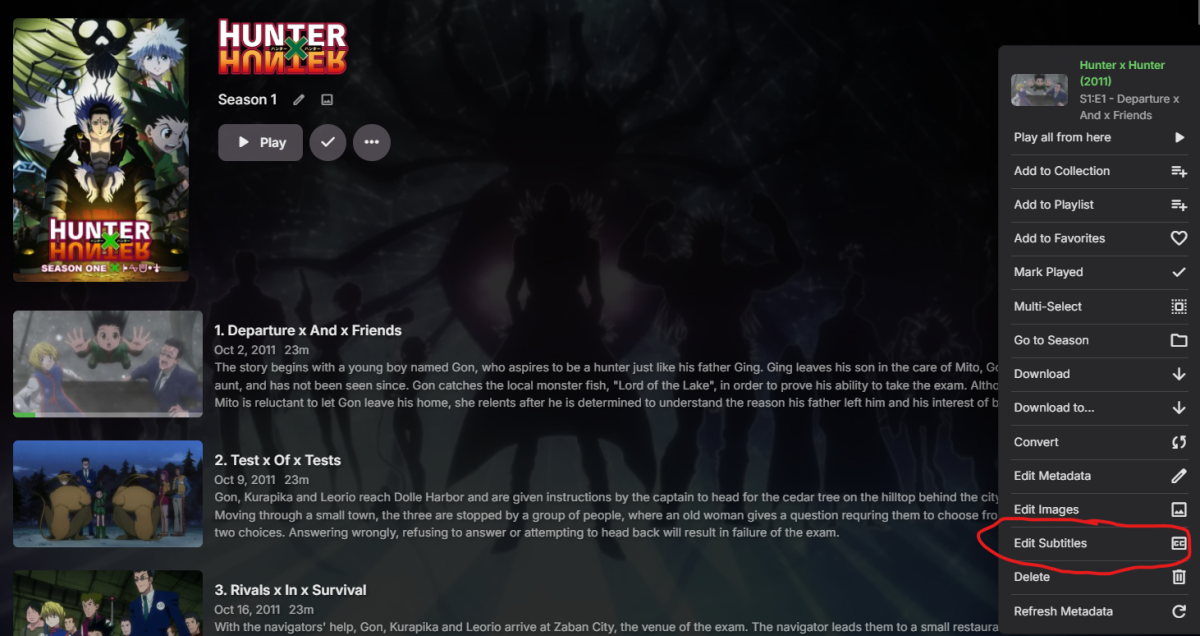
It worked! for anyone wondering where to download: Also as a heads up do not download the "horriblesubs" option unless you want to get some weird subs.
 1 point
 -
You're playing that item in a browser: that doesn't support that particular subtitle codec your English subs are in - resulting in transcoding (and likely subtitle burn-in): Since no active Premiere subscription - no HWA: meaning transcoding is done in software only, taxing your CPU (likely maximizing usage) and kicking your fans in high gear, resulting in: You can provide ffmpeg log written for that session for more details.1 point
-
Yes, 11 is nice - love the little animations. Thanks again for going through all this.1 point
-
@Lukeyou sir are a legend, i look forward to seeing it return to 'continue watching' in the tv library1 point
-
My app uses whisper, and it can go from many audio languages to English, but nothing other than English the last I checked. I will have a look and post here if I find anything.1 point
-
You've got open ports - they're just somewhere else ("outsourced", if you like). Paul1 point
-
@podonnellactually the compiled update will be posted in this thread. @simonmasonyes I have it on the list of $#!+ I will do.1 point
-
Shorty, is that jellyfin thing just available in the browser? If it is, then we can make that very easily for emby.1 point
-
Pm me your email that you purchased emby premium with. Many thanks1 point
-
Hi guys! I'm here. Had some life get in the way of coding last year, but I can answer questions, and also see about some keeping up with compatibility updates for the future. To answer the duplicate question, unfortunately no, there is no way (that I am aware of) of stopping the duplicate items from appearing in the library. This is because top picks creates a db entry in order to view it in emby. I won't be able to back track to far in this thread, so if there is something pressing, please post again. I believe I have been in contact with sone of you through PM's. If I have missed you, I will be in touch shortly Thanks again!1 point
-
Win 11 is my second favorite so far, way ahead of Win 10, but it takes time and effort to get rid of the many things they try to force upon users. Not yet. It will be months at least, so you got enough time We haven't gotten fully behind, there weren't that many Xbox users in the beta. Maybe it limits memory transfer for non-games in some way. Sometimes 50 Mbps videos seemed to play well, but this might also depend on which part of the video you're watching. We just determined that with 30 Mbps, we're on the safe side. It doesn't seem to make sense to use a higher limit and then see users reporting stuttering playback where we could only say "sorry, there's nothing we can do about it". So, that's the story so far. Once we'll go for another beta round for a major update (at some time, not immediately), we can continue exploring this, but for the time being the 30 Mbps limit was the only solution. Windows App (with mpv player) is the nonplusultra of what you can get. Regarding Shield, I'm pretty sure there will be a successor soon, but the current models are stil a great choice. I would keep away from Roku indeed as the hardware is pretty limited, even more than FireTV devices, which are far behind Shield, but at least good value for money.1 point
-
That was it thank you! @Lukeanother example of a setting being missed with the backup plugin, I checked my old server and that setting is disabled, however on the new server even though I used the config backup/restore plugin it was enabled. I would also recommend that this setting be turned off by default! Emby is supposed to be local media focused, not including links to some media site from South America1 point
-
Browsers are not included. Also, removing devices from the 'Devices' page makes no difference to the calculation, devices are tracked internally only.1 point
-
New version 2.1.5.0 in the plugin catalogue: Channels: Added option to (auto)enable channels on a specific date range Fixed some issues around the recently introduced option to enable channels for selected users Export API: Fixed a rare exception when exporting real live tv with the option "Try to match program entries to library items for catchup streams" enabled Improved playback start of "catch up streams" with Kodi addons The plugin should auto update, no manual download from the catalog is required. As usual, you should clear your browser cache before opening the plugin config page. Because of the changes some of your channel settings will get lost!1 point
-
One suggestion (or maybe I've missed an existing feature )... Is it possible to have a icon to reduce the Window to keep the application opened and avoid closing/opening too often on PC... ?1 point
-
I remember now why i didn't use Chrome. Seems that theres still problems with the video jumping back and then jumping forward (https://emby.media/community/index.php?/topic/128718-after-upgrade-to-485-shows-will-skip-back-1-sec-or-so-and-replay/), as well as problems with subs loading. Not optimal...1 point
-
It won't help hardware accelerated transcoding errors in Emby or for live TV, but it might help me with workaround to the problem between Emby and TNAS 6 and allow me to convert my recorded files using hardware acceleration. Note the error from my test above using the Emby formatted command [h264_qsv @ 0x803780] Selected ratecontrol mode is unsupported1 point
-
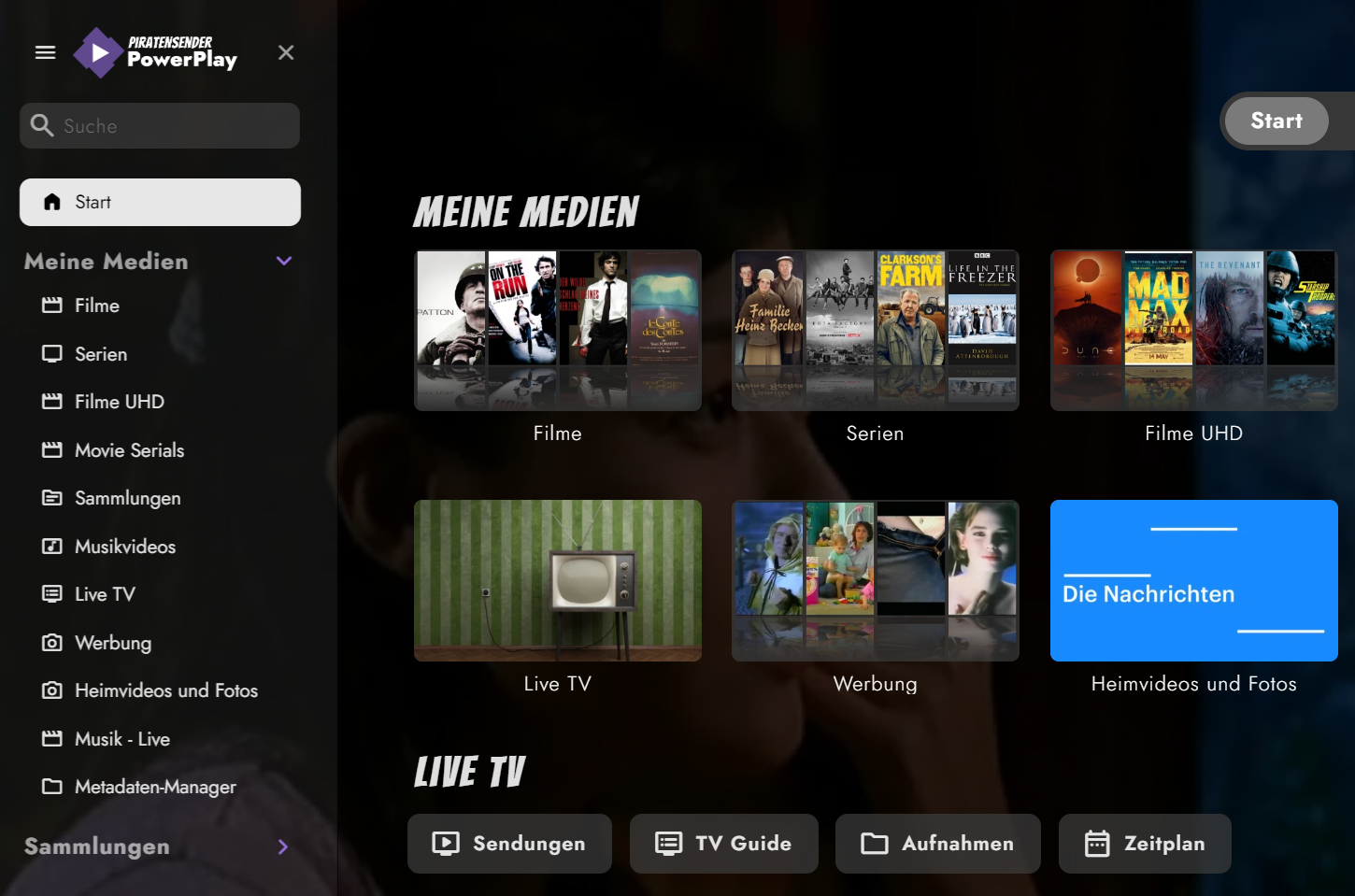
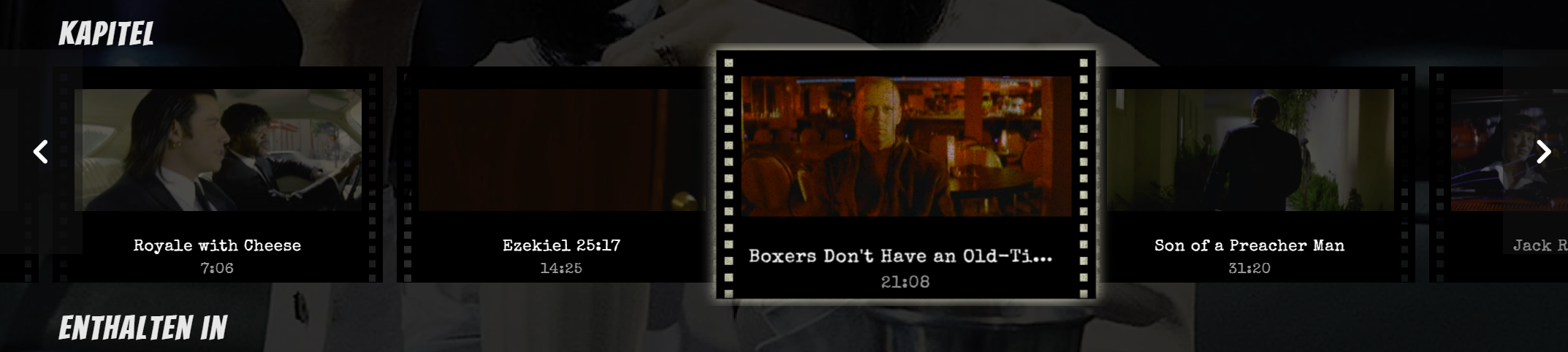
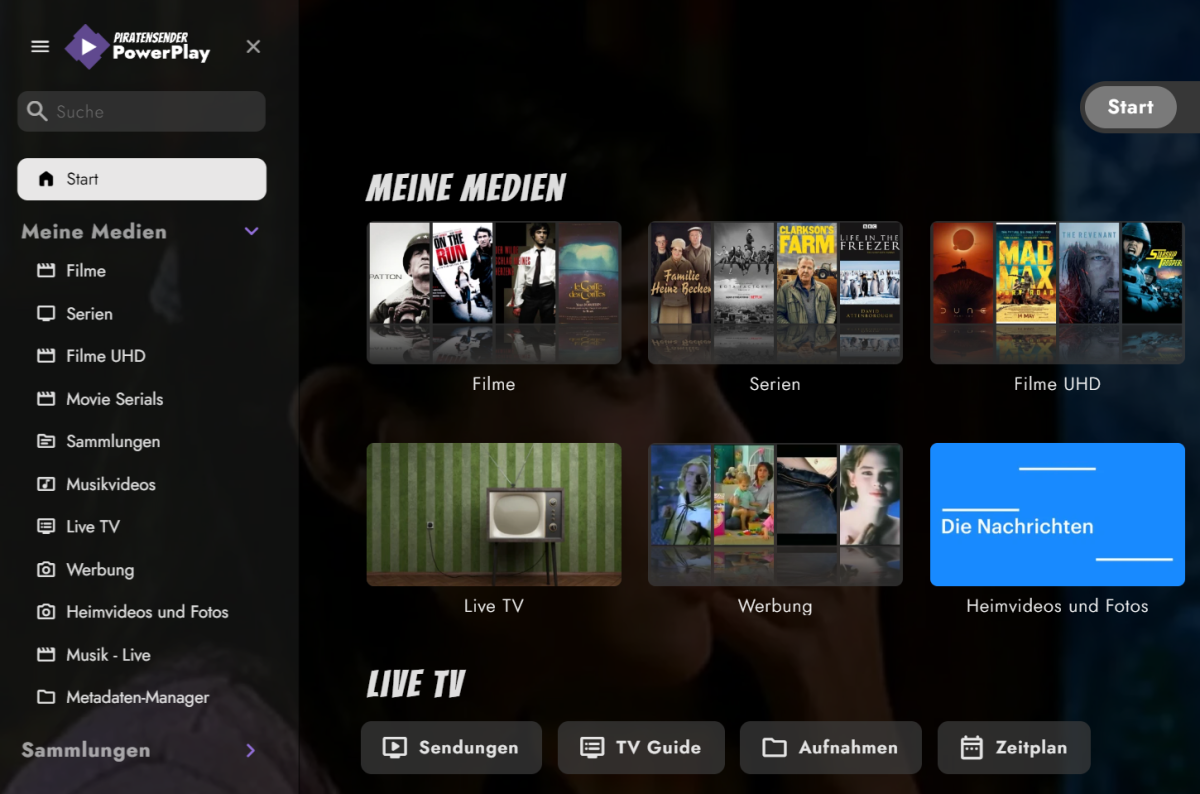
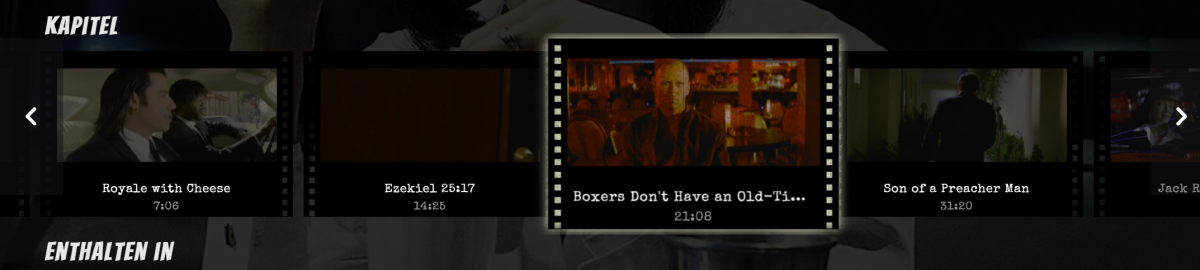
I've created some CSS for the Web App, originally made for Jellyfin and ported over to Emby. Not everything survived, but here's the scavenged stuff. 1. Home Screen I've started working on the fonts to give it a more classic and timeless look, while using fonts which look good and provide my glyph needs. I love cinema, thus these fonts hopefully capture the spirit of classic cinema (designer talk Fonts used in this screenshot: Bangers and Limelight for the headlines, Jost for the rest. Also Special Elite as monotype and Satisfy for handwritings. Custom logo, some paragraphs shortened to 70 characters per line for better readability. 2. Cast & Crew WIP. I wanted it to look like autograph cards. Also works with multi-lines, see Red Mist. 3. Chapter Section Most work was done here. Adds a film strip view with animation. Includes scaling on hover, with flickering and scratches. Known issues: 'Continue watching' also scales and glows Haven't looked at the home video section yet Put both CSS files in the same folder and adjust your paths. Look for YOUR_SERVER_ADDRESS_HERE and adapt it to your likings. The fonts used can be downloaded or imported from Google, see links above. Feedback and new code welcome. embyThemeFonts.css embyTheme.css

 1 point
 -
Thanks, but you have been, looking into it, for 8 Months... you must have seen it by now. can we have a timeline please?1 point
-
Hi, it's possible for future updates. Thanks for the feedback.1 point
-
Hi, we'll look at improving this. Thanks for the feedback.1 point
-
I just put everything in the advanced tab and point it to location. I have since switched to caddy because it works way easier1 point
-
@TolkienBardI am familiar with that list lol. I’m about 1/3rd of the way done building all the pieces of the script. The big lift is getting the prompts all put together to allow for customization of how it assembles everything. The idea is run the script, it will give you a menu to chose from and let you do the entire setup as a one stop shop.1 point
-
For "multiple versions", it would be great to have both the 4K / 1080p versions of the same film in a single MKV so that the audio tracks / subs can be shared and not wasted space.1 point
-
I'd like to be able to put an http path in for libraries and have the contents scanned just like a folder. This is kind of a re-hash of the (Optional) Shared Network Folder, but I'd like that to be HTTP and the first class location of the files. The idea is that the would be more agnostic to more clients (iOS can always hit http, probably can't hit the UNC \\path).1 point
-
Hi, we are looking into this. Thanks.0 points